Kaizen #193: Creating different fields in Zoho CRM through API
🎊 Nearing 200th Kaizen Post – We want to hear from you!
Do you have any questions, suggestions, or topics you would like us to cover in future posts? Your insights and suggestions help us shape future content and make this series better for everyone.
Hello all, welcome back to another exciting Kaizen post!
In Zoho CRM, you have the option to tailor modules according to your organization's unique needs using custom fields. These can be created manually in the module builder or via API.
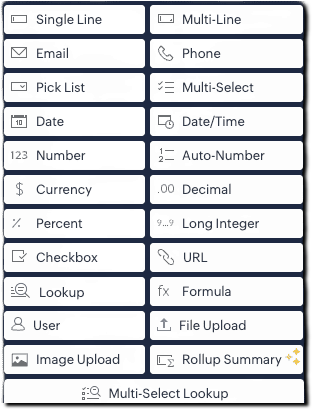
From Zoho CRM API version 6, you can add custom fields via API using the below endpoint:
|
POST
{api-domain}/crm/{version}/settings/fields?module={module_API_name}
|
From Zoho CRM API version 8, additional field types like multi-select lookups, multi-user lookup additions are also supported.
This article is intended to be a guide on how to create fields through the API.
|
Field Type (UI)
|
Field Data Type
|
|
Single Line
|
text
|
|
Multi-Line
|
textarea
|
|
Email
|
|
|
Phone
|
phone
|
|
Pick List
|
picklist
|
|
Multi Select
|
multiselectpicklist
|
|
Date
|
date
|
|
Date/Time
|
datetime
|
|
Number
|
integer
|
|
Auto-Number
|
autonumber
|
|
Currency
|
currency
|
|
Decimal
|
double
|
|
Percent
|
percent (only in POST)
|
|
Long Integer
|
bigint
|
|
Checkbox
|
Boolean
|
|
URL
|
website
|
|
Lookup
|
lookup
|
|
Formula
|
formula
|
|
User (Type- Single User)
|
userlookup |
|
User (Type- Multiple Users)
|
multiuserlookup
|
|
File Upload
|
fileupload
|
|
Image Upload
|
imageupload
|
|
Rollup Summary
|
rollup_summary
|
|
Multi-Select Lookup
|
multiselectlookup
|
The fields in below JSON are common for all fields. Field types such as single line text, phone, email, date, datetime, integer, and url fields consists of the below common fields alone and there are no dependent fields for them.
|
{
"fields": [
{
"field_label": "Your Field Label",
"data_type": "<field_type>",
"length": "<length>",
"tooltip": {
"name": "static_text",
"value": "Tooltip message"
},
"profiles": [
{
"id": "<profile_id_1>",
"permission_type": "read_write"
},
{
"id": "<profile_id_2>",
"permission_type": "read_only"
}
],
"external": {
"type": "user",
"show": false
},
"crypt": {
"mode": "decryption"
}
}
]
}
|
|
Key
|
Mandatory
|
Description
|
|
field_label
|
Yes
|
Display name of the field
|
|
date_type
|
Yes
|
Field type
|
|
length
|
No
|
Max number of characters allowed for a field |
|
filterable
|
No
|
Whether field can be used in filters. When set to true, the field will be available for use in Criteria Pattern Editors. Note that it is not applicable for imageupload, fileupload, textarea, and formula fields |
|
tooltip
|
No |
Field help text; name can be static_text or info_icon
|
|
profiles
|
No
|
Access control per profile (read_write, read_only, hidden)
|
| crypt |
No
|
Whether to encrypt the field (encryption or decryption)
|
|
unique
|
No
|
Enforce uniqueness across records
|
|
hipaa_compliance_enabled
|
No
|
Enable HIPAA protection
|
|
private
|
No
|
Enable GDPR-level handling (Low or High)
|
Single line Field
The single line field is a string field that can store 255 characters, and alphanumeric and special characters. It can be used to store fields like name, company, account name, etc. To create a single line field, give data_type as text.
A single line field can be marked as an external field. An external field is used to hold a record's unique ID available in an external system.
|
{
"fields": [
{
"data_type": "text",
"field_label": "External ID",
"external": {
"type": "org",
"show": true
}
}
]
}
|
Multiline Fields
The multi line field is a string field that can be used when you need a larger string field. It accepts alphanumeric and special characters. Multiline fields are of three types: plain text small, plain text large, and rich text field.
|
Multi-line field type
|
Character limit
|
Can be marked Mandatory?
|
Can be Encrypted?
|
|
Plain text small
|
Up to 2000
|
Yes
|
Yes
|
|
Plain text large
|
Up to 32000
|
Yes
|
No
|
|
Rich text (RTF)
|
Up to 50000
|
No
|
No
|
1) Plain Text Small Field
This type of multi-line field is ideal for concise entries up to 2000 character size. To create a plain text small multi line field, give data_type as textarea and type key in text area JSON object as "small".
|
{
"fields": [
{
"field_label": "Apartment_details",
"data_type": "textarea",
"length" : 2000,
"textarea": {
"type": "small"
}
}
]
}
|
2) Plain Text Large Field
This type of multi line field is ideal for more extensive entries of up to 32000 character size. To create a plain text large multi line field, give data_type as textarea and type key in text area JSON object as "large".
|
{
"fields": [
{
"field_label": "Apartment_details",
"data_type": "textarea",
"length" : 32000,
"textarea": {
"type": "large"
}
}
]
}
|
3) Rich text Field
Rich text field is ideal when formatted text needs to be entered. The length of the entry can be up to 50000 characters. To create a plain text large multi line field, give data_type as textarea and type key in text area JSON object as "rich_text"
|
{
"fields": [
{
"field_label": "Apartment_details",
"data_type": "textarea",
"length" : 50000,
"textarea": {
"type": "rich_text"
}
}
]
}
|
Picklist Field
Picklist is a field that lets you choose a value from a set of predefined values. The pick list value accepts all alphanumeric and special characters.
To create a picklist field, give data_type as picklist .Picklist fields have dependent JSON array - pick_list_values.
- pick_list_values: This JSON array comprises the options for the picklist field. Inside the array, display_value and actual_values stores the label shown for the picklist value in the CRM UI and the actual internal value of the picklist option respectively. The colour_code field consists of the color code of the picklist option in hex format, if color code is enabled.
- enable_colour_code - Boolean value that represents whether color code is enabled for the script
- history_tracking_enabled - This key when set as true audit/history tracking for the picklist field is enabled. Users with Module Customization permission can enable picklist history tracking. You can enable tracking for one picklist field per module, and this will be applicable across all layouts.
|
{
"fields": [
{
"field_label": "Your picklist's field label",
"data_type": "picklist",
"enable_colour_code": true,
"history_tracking_enabled": true,
"pick_list_values": [
{
"display_value": "Option 1",
"colour_code": "#af38fa",
"actual_value": "Option 1"
},
{
"display_value": "Option 2",
"colour_code": "#ffd6bc",
"actual_value": "Option 2"
},
{
"display_value": "Option 3",
"colour_code": "#cfddbc",
"actual_value": "Option 3"
}
]
}
]
}
|
Global picklist Field
Global sets in Zoho CRM is a type of picklist that helps you easily manage picklist values that recur across modules. To create a global picklist, use the Create Global Picklist API. The global picklist can then be associated to a module in the below format using the Create Custom Field API.
|
{
"fields": [
{
"field_label": "Source",
"data_type": "picklist",
"global_picklist": {
"id": "72223455366"//Id of the global picklist
}
}
]
}
|
Multi-Select Picklist Field
Multi-select picklist allows you to select multiple values while creating or editing record. The pick list value accepts all alphanumeric and special characters. To create a multi select picklist, give data type as multiselectpicklist.
Note that Picklist tracking is not supported for multi-select picklists
|
{
"fields": [
{
"field_label": "Preferred working days",
"data_type": "multiselectpicklist", // Specify the data type as multiselectpicklist*
"pick_list_values": [
{
"display_value": "Monday",
"actual_value": "1"
},
{
"display_value": "Tuesday",
"actual_value": "2"
},
{
"display_value": "Wednesday",
"actual_value": "3"
},
{
"display_value": "Thursday",
"actual_value": "4"
},
{
"display_value": "Friday",
"actual_value": "5"
}
],
"pick_list_values_sorted_lexically": true,
"enable_colour_code": true
}
]
}
|
Auto Number Field
Auto Number fields are used for assigning a unique incremental number automatically to each record, making identification easy. To create an auto number field, set "data_type" as "autonumber" and include an auto_number object with the following keys:
- start_number (mandatory) – Starting value for the auto-number sequence.
- prefix (optional) – (String) to prepend to the number.
- suffix (optional) – (String) to append to the number.
- _update_existing_records (optional) – (Boolean). If set to true, updates existing records with new auto-numbers based on the current format. Default value is false.
|
{
"fields": [
{
"field_label": "Order ID",
"data_type": "autonumber",
"auto_number": {
"start_number": 1000,
"prefix": "ORD-",
"suffix": "-2025",
"_update_existing_records": true
}
}
]
}
|
Currency Field
Currency field is used to store amount values. To create a currency field, set "data_type" as "currency" and define the currency JSON object with the following keys:
- rounding_option(mandatory) – Specifies how values should be rounded:
- "normal" – No rounding.
- "round_off" – Rounds to nearest based on precision.
- "round_up" – Always rounds up based on precision.
- "round_down" – Always rounds down based on precision.
- precision(optional) – Number of decimal places displayed in the UI (e.g., 123.466 with precision 2 becomes 123.47).
- decimal_place(optional) – Maximum number of decimal places stored. Values beyond this are truncated. Max allowed decimal places: 9.
|
{
"fields": [
{
"field_label": "Deal Amount",
"data_type": "currency",
"currency": {
"rounding_option": "round_up",
"precision": 2,
"decimal_place": 3
}
}
]
}
|
Decimal Field
Decimal field is used to store decimal numbers. To add a decimal (floating point) number field, use "data_type": "double".
- length(optional) – Total number of digits allowed, including both sides of the decimal point.
- decimal_place(optional) – Number of digits to allow after the decimal point (e.g., 2 means values like 123.45).
|
{
"fields": [
{
"field_label": "Discount Rate",
"data_type": "double",
"length": 16,
"decimal_place": 2
}
]
}
|
Percent Field
This field type is used to capture percentage values, such as scores or growth rates. To create a percentage field, use "data_type": "percent".
|
{
"fields": [
{
"field_label": "Enrollment number",
"data_type": "bigint",
"length": 18,
"separator": true
}
]
}
|
Long Integer Field
Long Integer Fields are number fields that accept up to 18 digits. To create a long integer field, use "data_type": "bigint".
|
{
"fields": [
{
"field_label": "Enrollment number",
"data_type": "bigint",
"length": 18,
"separator": true
}
]
}
|
Separator: a Boolean key that indicates whether the number is formatted for better readability. It is applicable for data types integer, double, bigint. Refer to this article on changing locale information for information on how to change it.
Checkbox Field
Checkbox value allows you to select or unselect a value indicating true or false. To create a checkbox field, use "data_type": "boolean".
|
{
"fields": [
{
"field_label": "Previously Employed?",
"data_type": "boolean"
}
]
}
|
Lookup Field
Use "data_type": "lookup" to associate records from another module. The lookup JSON object defines the target module, display label, and optional filter criteria.
-
module.api_name(mandatory) – API name of the target module (get via Modules API).
-
display_label(mandatory) – Label shown in the related list.
-
query_details(optional) – Used to define lookup filters. Inside query_details JSON Object following keys are present:
-
criteria(mandatory if query_details is used) – Filter logic.
-
group_operator – "AND"/"OR" (required for multiple conditions).
-
group – Array of filter conditions. Each condition includes:
-
field.api_name: Field in the target module
-
comparator: Operator like contains, equal
-
value: Value to match
-
revalidate_filter_during_edit(optional) – If true, validates filter conditions on record edit.
|
{
"fields": [
{
"field_label": "Your lookup",
"data_type": "lookup",
"lookup": {
"module": {
"api_name": "Contacts"
},
"display_label": "Contact Lookup",
"revalidate_filter_during_edit": true,
"query_details": {
"criteria": {
"group_operator": "AND",
"group": [
{
"field": {
"api_name": "Phone"
},
"comparator": "contains",
"value": "91"
},
{
"field": {
"api_name": "Lead_Source"
},
"comparator": "equal",
"value": [
"Cold Call"
]
}
]
}
}
}
}
]
}
|
Formula Field
Formula fields are used to calculate different types of values, including numeric values, text values, date values, etc. Use "data_type": "formula" to calculate dynamic values based on other fields.
For more details on all the available usages in the formula field, refer to this help doc on formula field. The formula object defines the logic and output type.
- formula.return_type (mandatory for formula field) – Output type of the formula. Possible values: double, currency, text, date, datetime, boolean
- formula.expression(mandatory) – The actual formula logic (e.g., "Sqrt(Len(${Email}))").
- decimal_place(optional) – Number of decimal places (only for double or currency).
- number_separator(optional) – If true, formats the number using separators (default is true).
|
{
"fields": [
{
"field_label": "Total amount",
"data_type": "formula",
"formula": {
"return_type": "double",
"expression": "${Amount} + 150"
},
"decimal_place": 0,
"number_separator": false
}
]
}
|
Auto refresh formula field
These type of formula fields are used when you need an accurate time measurement whenever you view the record. The key "dynamic" set as true indicates that the field is an auto refresh formula field.
For example, the age of a deal can be calculated by comparing the created time of the deal with the current time. A condition can be given to stop computing the value of the auto refresh field.
- dynamic: When set as true, indicates that the formula field is an auto refresh field.
- stop_compute_conditionally: When set as true, indicates that the computation of field stops when the condition given in stop_compute_expression key
-
stop_compute_expression: Mandatory when stop_compute_conditionally is true. Consists of the condition for stopping computation of the auto refresh formula field.
|
{
"fields": [
{
"field_label": "Deal Age",
"data_type": "formula",
"formula": {
"expression": "Datecomp(${Created_Time},Now())",
"return_type": "double",
"dynamic": true,
"stop_compute_conditionally": true,
"stop_compute_expression": "${Probability}==100"//When the deal probability is 100, the calculation gets stopped.
}
}
]
}
|
User lookup Field
User lookup field is used to associate a specific user to a record of the module. Use "data_type": "userlookup" to add a user lookup field.
The lookup JSON object defines the key properties of the user lookup
- query_details (JSON object): Defines filters to restrict which users are selectable.
- criteria: Uses a group of field conditions (field, comparator, value) with a group_operator (AND, OR) to filter users.
- revalidate_filter_during_edit (Boolean): If true, the criteria is reevaluated on record edit for the value selected on the record creation. This option is useful when associated values or fields have changed due to updates. It allows users to re-check and confirm that the correct records are still linked when editing the record.
- sharing_properties (JSON object): Contains details of access given to users
- share_preference_enabled (Boolean): If true, enables access to the records for the users.
- share_permission (String): Defines what level of access the associated user has (e.g., "read-only", "full-access", "read-write").
|
{
"fields": [
{
"field_label": "Assigned Sales Rep",
"data_type": "userlookup",
"tooltip": {
"name": "info_icon",
"value": "Sales user responsible for this lead"
},
"lookup": {
"revalidate_filter_during_edit": true,
//associate only users from countries India, and email containing "zylker.com".
"query_details": {
"criteria": {
"group_operator": "AND",
"group": [
{
"field": {
"api_name": "country"
},
"comparator": "equal",
"value": "India"
},
{
"field": {
"api_name": "email"
},
"comparator": "contains",
"value": "@zylker.com"
}
]
}
}
},
"sharing_properties": {
"share_preference_enabled": true,
"share_permission": "read-only"
}
}
]
}
|
Multiuser lookup Field
Multi-user look up is a lookup field that lets you add multiple users to a module record. It allows you to establish many-to-many relationships between modules and users in CRM.
Multi user lookup can be added by using the data_type "multiuserlookup".
- record_access: This Boolean key when marked as true indicates that the added user has access to the record. The users selected in the multi-user lookup field will be able to 'Edit', 'Delete', 'Change the owner' of that respective record
|
{
"fields": [
{
"field_label": "Associated_Agents",
"data_type": "multiuserlookup",
"multiuserlookup": {
"record_access": true
}
}
]
}
|
File Upload Field
User data type "fileupload" to add a file upload field
|
{
"fields": [
{
"field_label": "Resume Upload",
"data_type": "fileupload",
"length": 1,// Allow only 1 file, Maximum length : 5
"tooltip": {
"name": "info_icon",
"value": "Upload the applicant's resume in PDF or DOC format"
}
}
]
}
|
Image Upload Field
User data type "imageupload" to add an image upload field
|
{
"fields": [
{
"field_label": "Profile Photo",
"data_type": "imageupload",
"length": 1, // Only 1 profile photo allowed, Maximum length 10
"tooltip": {
"name": "info_icon",
"value": "Upload a professional head shot for the employee record"
}
}
]
}
|
Rollup Summary Field
Rollup Summary is a field that aggregates or summarizes a desired related list field. Rollup Summary Fields are of two types - Custom Rollups and Predefined Rollups. You can create only custom rollups using APIs. Supported related modules for APIs are Calls, Meetings, and Tasks
- function - Indicates the mathematical function applied to calculate the rollup summary.
- field_label - Represents the label of the field as it appears in the UI.
- data_type - This must be set to "rollup_summary" for rollup summary field.
- rollup_summary - This object contains all the configuration details for the rollup field.
- return_type - Specifies the type of value returned.
- expression - Defines the calculation logic for the rollup.
- function_parameters An array containing parameters needed by the function, typically including:
- api_name: The field being summarized.
- criteria Defines the filters to apply to the related records. Each condition includes:
- group_operator: If there are multiple conditions, you should also include AND or OR as the group operator for the conditions. It consists of an array of conditions.
- group: Array element of a condition
- field
- api_name: The API name of the field.
- comparator: The comparison operator (e.g., equal, greater_than, contains).
- value: The value used in the comparison.
- function - The function to be applied to the filtered records. Allowed functions : COUNT, MAXIMUM, MINIMUM, AVERAGE, RECENT, UPCOMING, EARLIEST.
- based_on_module - Specifies the module from which to summarize related records.
- related_list - Indicates the related list within the module (e.g., "Deals", "Contacts") to summarize from.
|
{
"fields": [
{
"field_label": "Total Invoice Amount",
"data_type": "rollup_summary",
"rollup_summary": {
"return_type": "currency",
"expression": {
"function_parameters": [
{
"api_name": "Grand_Total"
}
],
"criteria": {
"group_operator": "AND",
"group": [
{
"comparator": "equal",
"field": {
"api_name": "Billing_Country"
},
"value": "United States"
},
{
"comparator": "greater_than",
"field": {
"api_name": "Invoice_Date"
},
"value": "2024-01-01"
}
]
},
"function": "SUM"
},
"based_on_module": {
"api_name": "Invoices"
},
"related_list": {
"api_name": "Invoices"
}
}
}
]
}
|
Multi-Select Lookup Field
Multi-Select Lookup Field enables you to establish a many-to-many relationship between two modules in CRM.
- multiselectlookup : The mulitselectlookup JSON object specify the linking details between the module in which the field is present and another module
- connected_details: This JSON object contains details about the module you want to connect the current module with.
- module.api_name: Specify the module API name you want to link the current module with.
- field.field_label: When connecting a module, the system creates a new lookup field in the connected module for the current module. Use this key to specify a field label in the connected module.
- linking_details: When creating a multi-select lookup field, the system creates a separate module connecting these two modules, which contains their common details. This module is called the linking module
- module: Consists of the details of the linking module.
- plural_label: Specify a plural label for the linking module.
|
{
"fields": [
{
"field_label": "Skills",
"data_type": "multiselectlookup",
"multiselectlookup": {
"connected_details": {
"module": {
"api_name": "Skills"
},
"field": {
"field_label": "SkillName"
}
},
"linking_details": {
"module": {
"plural_label": "EmpXSkill"
}
}
}
}
]
}
|
Previous Kaizen Post : Kaizen #192 - Implementing Custom Token Persistence|Kaizen Directory
New to Zoho Recruit?
Zoho Campaigns Resources





Topic Participants
Mable Mary M P
Juan
Maria Antony Betson M
Jeganprabhu S
Sticky Posts
Kaizen #198: Using Client Script for Custom Validation in Blueprint
Nearing 200th Kaizen Post – 1 More to the Big Two-Oh-Oh! Do you have any questions, suggestions, or topics you would like us to cover in future posts? Your insights and suggestions help us shape future content and make this series better for everyone.Kaizen #226: Using ZRC in Client Script
Hello everyone! Welcome to another week of Kaizen. In today's post, lets see what is ZRC (Zoho Request Client) and how we can use ZRC methods in Client Script to get inputs from a Salesperson and update the Lead status with a single button click. In thisKaizen #222 - Client Script Support for Notes Related List
Hello everyone! Welcome to another week of Kaizen. The final Kaizen post of the year 2025 is here! With the new Client Script support for the Notes Related List, you can validate, enrich, and manage notes across modules. In this post, we’ll explore howKaizen #217 - Actions APIs : Tasks
Welcome to another week of Kaizen! In last week's post we discussed Email Notifications APIs which act as the link between your Workflow automations and you. We have discussed how Zylker Cloud Services uses Email Notifications API in their custom dashboard.Kaizen #216 - Actions APIs : Email Notifications
Welcome to another week of Kaizen! For the last three weeks, we have been discussing Zylker's workflows. We successfully updated a dormant workflow, built a new one from the ground up and more. But our work is not finished—these automated processes are
Zoho CRM Plus Resources
Zoho Books Resources
Zoho Subscriptions Resources
Zoho Projects Resources
Zoho Sprints Resources
Zoho Orchestly Resources
Zoho Creator Resources
Zoho WorkDrive Resources


Zoho CRM Resources
Get Started. Write Away!
Writer is a powerful online word processor, designed for collaborative work.
Zoho CRM コンテンツ
-
オンラインヘルプ
-
Webセミナー
-
機能活用動画
-
よくある質問
-
Ebook
-
-
Zoho Campaigns
- Zoho サービスのWebセミナー
その他のサービス コンテンツ
ご検討中の方
Recent Topics
I'd like to Import Contacts for an SMS Campaign, but they don't have email addresses.
I've got a contact list of about 4000 contacts. Some only have mobile phone and not email. Can I still import the contacts?How to sync overtime from zoho people to zoho payroll
Hi everyone, I’m currently setting up Zoho People with Zoho Payroll. While configuring the sync, I noticed I can only fetch Employee Profiles, LOP (Loss of Pay), and enable the Employee Portal. I can’t seem to find a way to automatically pull OvertimeBulk Associate Tasks/Task Lists to Milestones (Similar to Issues)
Hello Zoho Projects Team, We hope you are doing well. We would like to request an enhancement regarding Milestone management for Tasks in Zoho Projects. Current Behavior: In the Issues module, it is possible to select multiple issues and easily associateIs Zoho Sites still actively being developed?
Hello, Is Zoho Sites still actively being developed as part of the Zoho ecosystem? I noticed that the What's New page (https://www.zoho.com/sites/whats-new.html) does not show any updates since Q1 2025. We were considering migrating our website from SquarespaceAdding new data to the sheet with most recent data being added to top row.
I am using a form that I built from within sheets. When the form is submitted, is it possible to have the data entered in (for example) row 2 (since row 1 is the heading) instead of being added into the next available row which should be hundreds ofneed a packing list feature
In our business, goods listed on an invoice are packed in separate boxes and shipped off. for e.g. an invoice may have 10 items. each item could then be packed in different boxes depending on qty of each item. this packing list is as important as the invoice for purposes of shipping documents. Request you to add this feature asap.Editing Item Group to add Image
I did not have the image of the product when the Item Group was created. Now I have the product image, and would like to associate/add to the Item Group. However the Item Group Edit functionality does not show/allow adding/changing image. Please helZoho CRM Queries Now Support Databases and Cloud Data Sources
Hello everyone! We're thrilled to announce a major enhancement to the Queries feature in Zoho CRM! Queries now support a broader range of external data sources, allowing you to fetch live data and combine it with CRM records, all using a unified queryRe: Application Architecture in Zoho Creator — A Platform-Specific Deep Dive
A recent community post on application architecture made some excellent points about planning architecture early in Zoho Creator projects. The core message is right — Creator applications have a habit of growing organically into maintenance nightmares,Introducing a smarter, faster, and more flexible charting experience
Hello Zoho Sheet users, We're delighted to share the latest news about a major update to charts in Zoho Sheet! The new version supports dynamic data ranges, granular styling options, faster loading, and other interesting enhancements that allow you toZoho Bookings - Feature Request - Services Which Include A Resource and Consultant
Hi Bookings Team, My feature request is to have the ability to add Consultants and Resources to Services. Use case: Your business provides first aid training and there are certain equpment you require to provide the half day training. There are only specificAssign Meeting in records
It would be nice to be able to "call and assing" meetings from a record, for example from a Deal. Right now - calendar is synced with CRM - meetings show in calendar - you can go in each meeting and assign it to a record It would be nice to be able toSincronizar eventos de Bigin en Zoho Calendar (Zoho Mail)
Hola Me gustaría poder sincronizar mi Calendario de Zoho (Mail) con los eventos de Bigin. No veo la opción disponible.Sales Receipts in UK Free tier
Is Sales Receipts available in UK Books, specifically at the Free tier? None of the options from the help pages are available to me.My client requires me to have custom pdf file names to except payment for invoices, how can I customize this before emailing.
Hello! I love the program so far but there are a few things that are standing in the way. I hope you guys can code them in so I can keep the program for years to come. My client requires I customize the pdf file names I send in for billing. Can you pleaseWhen I schedule calendar appointments in zoho and invite external emails, they do not receive invites
Hello, We have recently transitioned to zoho and are having a problem with the calendar feature. When we schedule new calendar appointments in zoho the invite emails aren't being sent to the external users that we list in participants. However, this worksMigrate different zoho subscription to zoho one
Dear We have different zoho subscription we need to migrate it to zoho one. Currently we are paying for zoho email, zoho expense, zoho payroll etc under different admin We need to move it too zoho one flexlible plan for all my employeesBigin use in hospital- Human Med or Veterinary
I am looking for users who are in either human or veterinary medicine and use the CRM specifically for referral management tasks. Are you using the basic version? How many users update the CRM and is it effective? Did you pay for additional customizations?Standardize email communication with Signature Template
Maintaining a consistent and professional signature across all outgoing emails is essential for any organization. However, when users manage their signatures individually, it often leads to inconsistencies like varying formats, missing designations, orZoho Books: tax is not automatically pulled from product-data anymore - why?
Hi, until a short time ago, you could set a default taxrate for each product/item. This taxrate automatically appeared each time the item was chosen in an invoice or quote. Why does this not work anymore? The field is still there at the product record,Setting up property management in Zoho Books
Hi, I run a property management business that manages property complexes. There are multiple owners, some owning more than one property on the same complex. My role is to manage the fees they pay for maintenance of common areas, such as the swimming poolZoho Creator to GMAIL API Setup - Where Do I Begin?
Does anyone know how to connect Zoho Creator to Google Workspace (Specifically GMAIL?) We have FLOW setup and working fine to send emails via GMAIL, but Flow doesn't accept file attachments which is a major problem. So, we need to be able to send an emailKiosk Page Refresh
We have a Kiosk running from a button in contacts to update values and also add related lists, which works great, but when the kiosk is finished the page does not refresh to show the changes. Is there a way to force the contact to refresh/update whenSetting GC session variable programatically in a website
Hi! Is there a way now to programatically set session variables from a website for a Guided Conversations? The current available methods are dependent on react-native.Ticket Merge Error
Refresh frequency
Dear Zoho Team, I really, truly appreciate that Zoho Books gets frequent updates. As a matter of fact this is how a good SaaS company should stay on top. However, I feel that I have to hit refresh almost every day. This was exciting at the beginning butUpdate application by uploading an updated DS file
Is it possible? I have been working with AI on my desktop improving my application, and I have to keep copy pasting stuff... Would it be possible to import the DS file on top of an existing application to update the app accordingly?Two-factor authentication (2FA) Log-in Problems
The Two-factor authentication (2FA) Login on my passwords doesn't match , so it wont accept login I'm down to my last backup code.Remove my video
Hi, How can I remove my video so that I don't have to see myself. It's weird so I always remove my own video from what I see but cannot find this feature here. Thanks!Client Script: Any plans to add support for multi-select field with onChange
Client Script is fantastic and the documentation lists multiselect form fields as unsupported. Just wondering if there are any plans to make this a supported field. https://www.zoho.com/crm/developer/docs/client-script/client-script-events.html 2. FieldFeature Reqeust - Include MPN In Selectable FIelds
I have noticed that the MPN is not available to show in the list view of Items. Please consider adding it as EAN, UPC and ISBN are all available, so it doesn't make much sense to exclude this similar option. Thanks for considering my feedback.Experience effortless record management in CRM For Everyone with the all-new Grid View!
Hello Everyone, Hope you are well! As part of our ongoing series of feature announcements for Zoho CRM For Everyone, we’re excited to bring you another type of module view : Grid View. In addition to Kanban view, List view, Canvas view, Chart view andWindows Desktop Application for Bigin
I'm finding the need for a standalone Bigin desktop app for Windows users. Most of my daily work is done through a browser, so I often have several open tabs while working with customers and checking product information, etc. With Bigin currently onlySet another Layout as Standard
We created a few layouts and we want to set another one to standard:Salesforceに添付ファイルを格納したい
お世話になっております。 Salesforceに添付ファイルを格納したく、カスタムオブジェクトに連携し、 「ファイルのアップロード」項目を設けました。 実際、エラーもなく送信出来たのですが、実際生成されたカスタムオブジェクトのレコードを見ると、どこにも添付ファイルがありません。仕様として、この添付ファイルはSalesforceのどこに格納されるのでしょうか? 今回作りたいフォームは、複数の書類を添付するため、Zohoformのファイルアップロード項目「本人確認書類」「源泉徴収票」などの項目を、Salesforce側にも設けた「本人確認書類」「源泉徴収票」という各項目にURLリンクとして紐づけたいと思っておりました。Knowledge Base article lists
Is it possible to adjust the number of articles that are visible under a category of the Knowledge Base portal? Currently it looks like by default it populates about 5 articles before it puts the "more" option at the bottom. Looking to see if I can extendDiscrepancy in Contracts with Fields list/Layout
The Support Plan field on the layout isn't in the fields list. What am I missing?Migrating all workflows to another Zoho account
We are going to transfer into another company, and we are going to get new emails and new Zoho accounts. Is there a way to migrate (or save in some sort of external file) all presets and settings that we have on this account? That includes primarily workflows,Edit The Newsletter
There doesn't seem to be the ability add a title and a caption below the button. Can this be done?Unable to Delete Items – No Visible Transactions but Error “Items which are a part of other transactions cannot be deleted…”
Hello Community, We are using Zoho Inventory for our business and encountered a persistent issue that is preventing us from deleting certain items. The message shown is: “Items which are a part of other transactions cannot be deleted. Instead, mark themNext Page