Actions API - Webhooks APIs - Part 1

Webhooks in Zoho CRM
Use case
Configuring Webhooks for Zylker’s Use Case - UI Method
- Go to Setup
- Navigate to Automation
- Choose Actions -> Webhooks
- Click Configure Webhook
 Webhook - UI view
- Basic fields to configure Webhook.
- Configuring Headers
- Configuring Body
Filling the basic Webhook details via UI
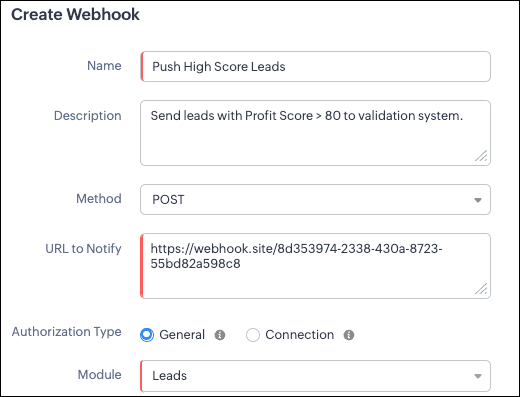
Filling the basic Webhook details via Create Webhook API
{ "webhooks": [ { "name": "Push High Score Leads", "description": "Send leads with Profit Score > 80 to validation system.", "module": { "api_name": "Leads", "id": "5725767000000002175" }, "authentication": { "type": "general" }, "http_method": "POST" } ] } |
Keys explanation
- name (mandatory): Name of your webhook.
- description: Add a short note about what this webhook does.
- module (mandatory): Select the module from where the external application listens the changes. In our case, select Leads module to push high-score leads.
- url (mandatory): Specify the external endpoint where CRM will send the data. This lets the external application see what CRM sends.
- Note: In this post, we have used an endpoint from Webhook.site
- authentication (mandatory): Specify authentication type for the webhook endpoint.
- Possible types:
- general: The receiving system does not require OAuth. You can pass OAuth tokens manually in headers.
- connections:
- OAuth-based integrations: Systems that use Zoho’s Connections.
- For our Zylker use case, we select General.
- http_method (mandatory): Select a HTTP method that allows you to send structured data.
HTTP Method | Headers | Body | URL Parameters |
POST |
| Type: form-data | Not Supported |
PUT |
| Type: form-data | Not Supported |
GET | Not Supported | Not Supported |
|
DELETE | Not Supported | Not Supported |
|
Creating a Webhook with Headers, Body, and URL Parameters
- Headers
- Body (Form-Data or Raw)
- URL Parameters
Configuring Headers
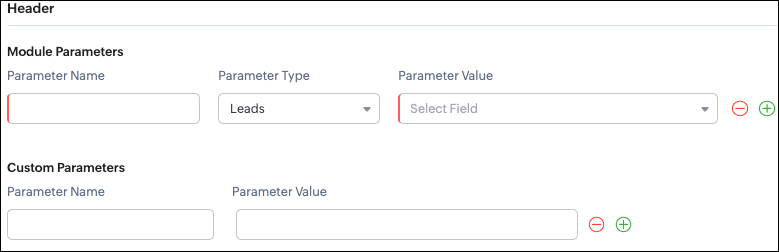
Headers allow you to send extra information along with your webhook request. These help when the external app needs extra data like auth tokens or CRM field values.
- Module Parameters - Dynamic values from CRM fields
- Custom Parameters - Static values you define
- Parameter Name - A unique header key that you define. It does not have to match the CRM field API name.
- Parameter Type - Defines the source of the data you are mapping. It can come from the selected CRM module such as Leads and Contacts, lookup fields, User fields such as Lead Owner, or Organization fields.
- Parameter Value - The merge field value. Example, ${!Leads.Created_By.id}
Parameter Name | Parameter Type | Parameter Value |
Lead_Email | Leads | |
Annual_Revenue | Leads | Annual Revenue |
Profit_Score | Leads | Profit Score |
Created_By | Created By | User Id |
- API version
- Tags like “zylker-crm”
Name | Value |
source | zylker-crm |
version | v1
|
Configuring Headers via Create Webhook API
{ "webhooks": [ { . . . "http_method": "POST", "headers": { "module_parameters": [ { "name": "Lead_Email", "value": "${!Leads.Email}" }, { "name": "Annual_Revenue", "value": "${!Leads.Annual_Revenue}" }, { "name": "Profit_Score", "value": "${!Leads.Profit_Score}" }, { "name": "Created_By", "value": "${!Leads.Created_By.id}" } ], "custom_parameters": [ { "name": "source", "value": "zylker-crm" }, { "name": "version", "value": "v1" } ] } } ] } |
Configuring the Body of a Webhook - form-data & raw formats
- Form-Data:
- Module parameter
- Custom parameter
- User-defined format.
- Raw:
- Text - plain messages
- JSON - structured API payload
- HTML - formatted messages
- XML - traditional enterprise systems
Form-Data Body: key-value
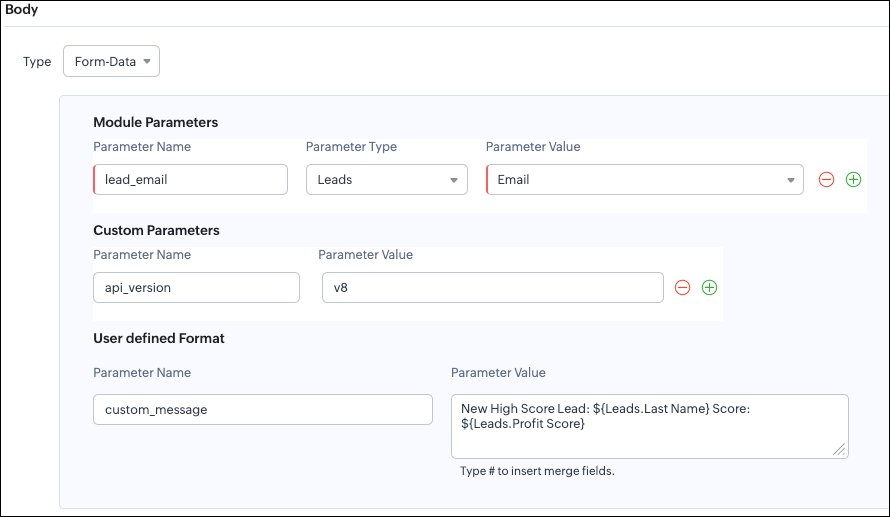
- Module Parameters
- Custom Parameters
- User Defined Parameters
- Headers are for sending supporting information that helps the external system understand the request - this can include auth details, source identifiers, or key CRM fields like email or score that help with quick categorization or filtering.
- Headers - Provide supporting details such as identifiers or quick-check values. For example, Lead ID, or source tags that help the external system check and route the request.
- Body - Contains the complete lead information that the external validation system needs to process.
Where parameters are used | Purpose | Example |
Headers | Metadata - OAuth,tags, and context | source: zylker-crm |
Form-Data (Body) | Main record data - actual lead details sent to the app.
| lead_email=patricia@zylker.com |
Parameter Name | Parameter Value |
custom_message | New high-score lead: ${Leads.First Name}${Leads.Last Name} (Score: ${Leads.Profit Score}) |
Configuring the Body of a Webhook - form-data via Create Webhook API
{ "webhooks": [ { . . . "body": { "form_data_content": { "module_parameters": [ { "name": "Lead_Email", "value": "${!Leads.Email}" }, { "name": "Annual_Revenue", "value": "${!Leads.Annual_Revenue}" }, { "name": "Profit_Score", "value": "${!Leads.Profit_Score}" }, { "name": "Created_By", "value": "${!Leads.Created_By.id}" } ], "custom_parameters": [ { "name": "source", "value": "zylker-crm" }, { "name": "version", "value": "v1" } ], "user_defined_parameters": { "name": "custom_message", "value": "New high-score lead: ${!Leads.First_Name}${!Leads.Last_Name} (Score: ${!Leads.Profit_Score})" } }, "type": "form_data" }, . . . } ] } |
Raw Body - JSON / XML / HTML / Text
- Raw + Text
- Raw + JSON
- Raw + HTML
- Raw + XML
Raw + Text:

- When sending a simple message.
- When the external app only expects plain text.
Configuring the Body of a Webhook - Raw - "Text" via Create Webhook API
{ "webhooks": [ { . . . "body": { "raw_data_content": "New high score lead: ${!Leads.First_Name} ${!Leads.Last_Name}, ${!Leads.Email}, ${!Leads.Annual_Revenue}, ${!Leads.Phone}, ${!Leads.Industry}, ${!Leads.Owner}", "format": "Text", "type": "raw" }, . . . } ] } |
Raw + JSON:
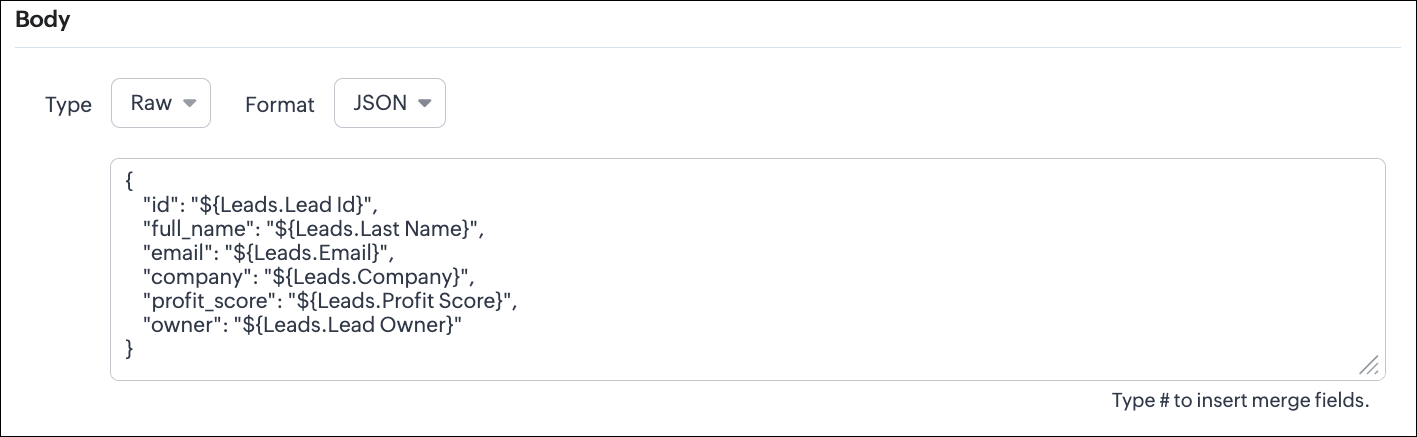
Configuring the Body of a Webhook - Raw - "JSON" via Create Webhook API
{ "webhooks": [ { . . . "body": { "raw_data_content": "{\n \"id\": \"${!Leads.id}\",\n \"full_name\": \"${!Leads.Last_Name}\",\n \"email\": \"${!Leads.Email}\",\n \"company\": \"${!Leads.Company}\",\n \"profit_score\": \"${!Leads.Profit_Score}\",\n \"owner\": \"${!Leads.Owner}\"\n}", "format": "JSON", "type": "raw" }, . . . } ] } |
- When the external system expects structured data
- Easier validation
Raw + HTML:
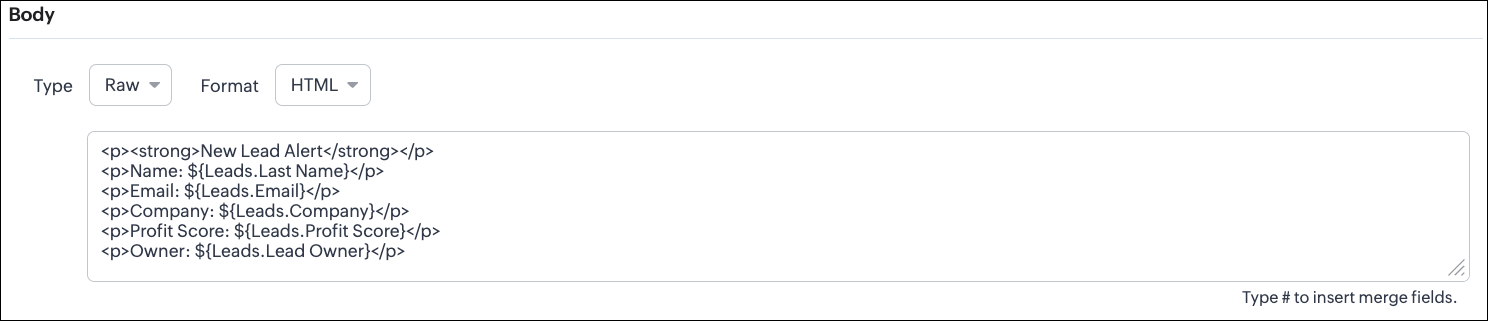
Configuring the Body of a Webhook - Raw - "HTML" via Create Webhook API
{ "webhooks": [ { . . . "body": { "raw_data_content": "<p><strong>New Lead Alert</strong></p>\n<p>Name: ${!Leads.Last_Name}</p>\n<p>Email: ${!Leads.Email}</p>\n<p>Company: ${!Leads.Company}</p>\n<p>Profit Score: ${!Leads.Profit_Score}</p>\n<p>Owner: ${!Leads.Owner}</p>", "format": "HTML", "type": "raw" }, . . . } ] } |
- If the external system displays formatted output
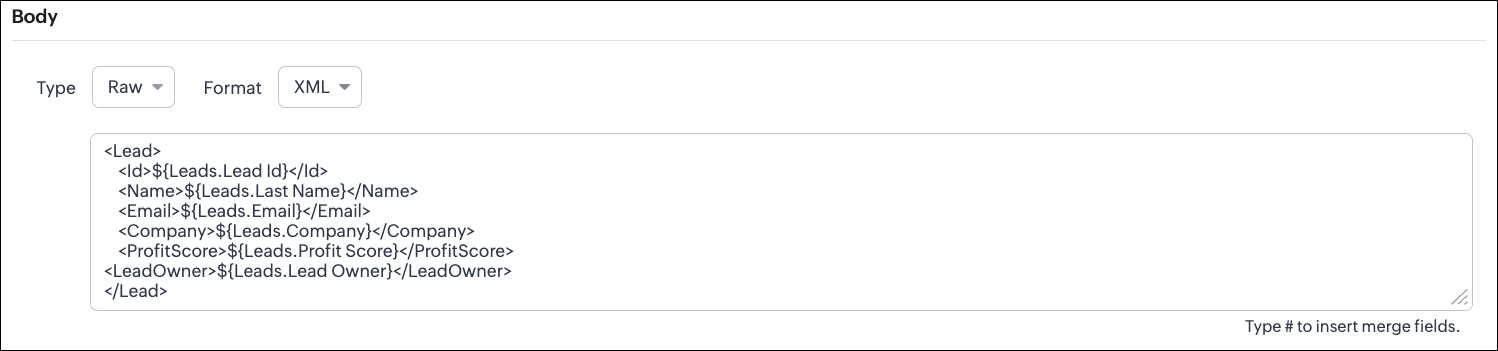
Configuring the Body of a Webhook - Raw - "XML" via Create Webhook API
{ "webhooks": [ { . . . "raw_data_content": "<Lead>\n <Id>${!Leads.id}</Id>\n <Name>${!Leads.Last_Name}</Name>\n <Email>${!Leads.Email}</Email>\n <Company>${!Leads.Company}</Company>\n <ProfitScore>${!Leads.Profit_Score}</ProfitScore>\n<LeadOwner>${!Leads.Owner}</LeadOwner>\n</Lead>", "format": "XML", "type": "raw" }, . . . } ] } |
- With older systems
- When the receiving system only supports XML
- When you switch the webhook method in the UI, Zoho CRM changes the options you can configure:
- Only URL Parameters are available
- Headers are hidden
- Body is hidden
- Because GET requests always send data through the URL and cannot carry a body.
- Headers are available
- URL Parameters are available
- Body is still not supported
- DELETE requests can include headers, but Zoho CRM does not allow sending a body for DELETE webhooks.
- Date-time format:
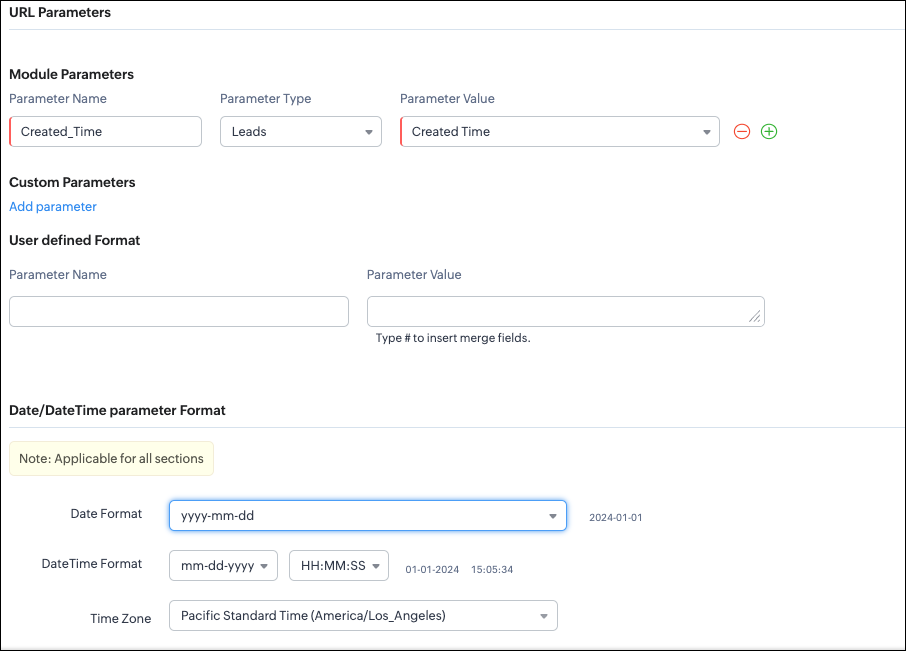
{ "webhooks": [ { "module": { "api_name": "Leads", "id": "5725767000000002175" }, "url_parameters": { "module_parameters": [ { "name": "Created_Time", "value": "${!Leads.Created_Time}" } ] }, "description": "Send leads with Profit Score > 80 to validation system.", "http_method": "GET", "name": "Push High Score Leads", "date_time_format": { "datetime_format": "mm-dd-yyyy HH:MM:SS", "date_format": "yyyy-mm-dd", "time_zone": "America/Los_Angeles" }, "authentication": { "connection_name": null, "type": "general" } } ] } |
- How to manage Webhooks using the GET, PUT, and DELETE Webhook APIs
- How to associate a Webhook with a Workflow
- How to perform real-time testing by creating records
- How an external application receives data from Zoho CRM via Webhook.
- Kaizen #213 - Workflow APIs - Part 1
- Kaizen #214 - Workflow APIs - Part 2
- Kaizen #215 - Workflow APIs - Part 3 - Create and Update Workflow Rules
- Kaizen #216 - Actions APIs : Email Notifications
- Kaizen #217 - Actions APIs : Tasks
- Kaizen #218 - Actions APIs: Field Update
Zoho Campaigns Resources





Topic Participants
Subramanian K
Sticky Posts
Kaizen #198: Using Client Script for Custom Validation in Blueprint
Nearing 200th Kaizen Post – 1 More to the Big Two-Oh-Oh! Do you have any questions, suggestions, or topics you would like us to cover in future posts? Your insights and suggestions help us shape future content and make this series better for everyone.Kaizen #226: Using ZRC in Client Script
Hello everyone! Welcome to another week of Kaizen. In today's post, lets see what is ZRC (Zoho Request Client) and how we can use ZRC methods in Client Script to get inputs from a Salesperson and update the Lead status with a single button click. In thisKaizen #222 - Client Script Support for Notes Related List
Hello everyone! Welcome to another week of Kaizen. The final Kaizen post of the year 2025 is here! With the new Client Script support for the Notes Related List, you can validate, enrich, and manage notes across modules. In this post, we’ll explore howKaizen #217 - Actions APIs : Tasks
Welcome to another week of Kaizen! In last week's post we discussed Email Notifications APIs which act as the link between your Workflow automations and you. We have discussed how Zylker Cloud Services uses Email Notifications API in their custom dashboard.Kaizen #216 - Actions APIs : Email Notifications
Welcome to another week of Kaizen! For the last three weeks, we have been discussing Zylker's workflows. We successfully updated a dormant workflow, built a new one from the ground up and more. But our work is not finished—these automated processes are
Zoho CRM Plus Resources
Zoho Books Resources
Zoho Subscriptions Resources
Zoho Projects Resources
Zoho Sprints Resources
Zoho Orchestly Resources
Zoho Creator Resources
Zoho WorkDrive Resources


Zoho CRM Resources
Get Started. Write Away!
Writer is a powerful online word processor, designed for collaborative work.
-
オンラインヘルプ
-
Webセミナー
-
機能活用動画
-
よくある質問
-
Ebook
-
-
Zoho Campaigns
- Zoho サービスのWebセミナー
その他のサービス コンテンツ
ご検討中の方
Recent Topics
Intergrating multi location Square account with Zoho Books
Hi, I have one Square account but has multiple locations. I would like to integrate that account and show aggregated sales in zoho books. How can I do that? thanks.Emails being blocked / spamcop
Hello, I am unablr to send any single email during the whole time due to the Zoho IP 136.143.188.16 being blocked by SpamCop.net Please help on this.Zoho IP blocked by SpamCop 136.143.188.16
Hello, I am unble to send any single email during the whole time due to the Zoho IP 136.143.188.16 being blocjed by SpamCop.net Please help on this.Is there a way to configure dark mode for Campaigns emails that go out to customers?
I've found a lot of information on how to configure dark mode for my (The user) personal Zoho workspace and email, but is there any way to edit dark mode settings on emails that we send out to customers via campaigns? We sent out a test email the otherCan I hide empty Contact fields from view?
Some contacts have a lot of empty fields, others are mostly filled. Is there a way I can hide/show empty fields without changing the actual Layout? I would like to de-clutter my view, and also be able to add information later as I am able. I would beAuto-publish job openings on my Zoho Recruit Careers Website
I have developed a script using the Zoho Recruit API that successfully inserts new jobOpening records to my Zoho Recruit website, but my goal is to auto-publish to the Careers Website. The jobOpening field data shows two possible candidates to make thisCredit Card Terminal for Zoho Books
Hello, Instead of punching the credit card number manually for customer payment, do you have a third-party hardware credit card reader that works with Braintree? Thank YouHow do you print out the invoices comments
I have some invoices where i need to print out the comments that show when reminders and etc were sent how do we print those out in Zoho Books.Feature Request: Enable Custom PDF Layout Editor for All Modules (Including Package Slips)
Hello Zoho Community and Product Team, I am writing to share a suggestion that would significantly enhance the customization capabilities within Zoho Books. We all appreciate the power of the Custom PDF Layouts (the "New" template engine) that allowsNeed advice for product/item search functionality when adding invoices.
My client uses "Catalog or Vendor" name and Product code to search for his items. But Zoho only allow to search by product name and SKU when adding items to Invoices/Estimates. Clients product codes are not unique as they may overlap from different catalogs/vendors.How to dynamically pass IDs from one API response to a second API call in Zoho DataPrep?
Hi Team, I am setting up a global consolidated reporting pipeline in Zoho Analytics (India) using Zoho DataPrep as the ETL engine. I am pulling data from multiple Zoho Books Data Centers (US, Singapore, India) thats why i used the URL Source (OAuth 2.0)Feature Request: "Send Invitation" Toggle for Events
I am writing to request a critical "Quality of Life" update for the Activities module. Currently, adding people to the Participants field in an Event triggers an automatic email invitation/acceptance tracking with no way to opt-out. For general eventsAccount Review Pending - Daily Limit 100
Hi ZeptoMail Team, I'm writing to request a manual review of my account. I am currently stuck on the 100-email daily limit and cannot purchase credits. Status: My domain is already verified (DKIM/CNAME). Issue: The "Customer Validation" option is no longerAutomation Series: Move Tasks to a different Task List on Status Change
In Zoho Projects, you can automatically move a task from one task list to another when its status is updated. This keeps your tasks organised and ensures better visibility while reducing manual work. For instance, during a product launch, the marketingIntroducing Bigin's all new integration with Microsoft Teams
Picture this: You are on call with your team to discuss some important deals that need to be closed soon. While discussing each deal, your team has to switch back and forth between your Teams account and Bigin account to refer to details about the deal.Scaling the customer journey: What's new in CommandCenter
Dear Customers, The last time we connected about CommandCenter, it was about the tool's new controls and revamped UI. Personally, the overhaul of the UI from the last update, still excites me. Today, we're here with news about its scalability and addedAdjusting Physical Inventory
Not getting very far with support on this one, they say they are going to fix it but nothings happened since November. Please give this a thumbs up if you would like to see this feature or comment if you have some insight. Use Case: Inventory set to beDynamic Remaining Quantity in Lookup During Allocation
Hi everyone, From what I understand in Zoho Creator, lookup fields only display the stored value from the source record and do not dynamically update while a form is being filled. Because of this, showing a real-time updated remaining quantity insideIs it possible to use HTML formatting in SMS messages sent from Zoho?
Hi everyone, I have a question regarding sending SMS from Zoho When we send emails from Zoho, we can include HTML code to format the message (like adding links, styling, etc.). Is it possible to do something similar when sending SMS messages through ZohoImportant update: Migrate to the new SalesIQ live chat widget before April 14, 2026
The old SalesIQ live chat widget will be deprecated on April 14, 2026. This is a final reminder to migrate to the new SalesIQ live chat widget before this date. After April 14, 2026, the old widget will no longer be maintained, which can lead to slowerIf your IM chats aren’t auto-assigning, here’s what to check
Hey everyone! We’ve been seeing quite a few questions around Instant Messaging (IM) Chat Routing in Zoho Desk, especially around how it actually behaves in real time. So I thought I’d share a practical breakdown of what’s happening behind the scenes.connect zoho creator with google drive
Hello everyone, I need to connect to a folder drive. The idea, is that google drive loads a text document with some data, I must read that text document to be able to autofill a form that I have in zoho creator with that data. I also attach PDFs and placeUploaded files are not included when using "Include user submitted data" in Email Notification
In Send Email notification workflow in Zoho Creator, there is an option called "Include user submitted data" which allows the email to contain all the form submission details. However, when this option is enabled, files or images uploaded through FileExtend Zoho Canvas Customization to Zoho Creator Forms and Reports
Currently, Zoho Canvas allows users to design and customize the UI of Zoho CRM modules with a much better visual experience. This helps organizations create cleaner layouts, improve usability, and design interfaces that match their workflows. However,Kanban View for Projects.
At our organization, we describe active projects with various statuses like "In Proofing" or "Printing" or "Mailing". In the Projects view, one can set these project statuses by selecting from the appropriate drop-down. While this works, it's difficult to view and comprehend the progress of all of your projects relative to each other in a table. Creating a Kanban view for projects where I can move them from one status to another allows me to see where each project is in the order of our workflow.Button ''I'm Interested'' won't translate
Since our main platform is in French, I would like to get this ''I'm Interested'' button translated to French ''Je suis intéressé''. We managed to translate the whole carreer site in French, except the button. How come ? We have a standard subscription,Feature request - image resizing on sales orders
I need to be able to show the items on the sales orders, currently the item image shows really small and no way to resize it, need the ability to make the image larger to showcase the product on the pdfsEmail Parser Not Extracting Fields Correctly with Certain Label Formats
I’ve been testing the Email Parser functionality in Zoho CRM to automatically extract data from incoming emails and map it to CRM fields. During testing, I noticed that parsing sometimes fails when the email contains field labels formatted like this:Zoho CRM Community Digest - February 2026 | Part 1
Hello Everyone! February has been off to a productive start in the Zoho CRM Community, with several thoughtful product enhancements and helpful technical discussions making their way into the forums. To help you stay up to speed, we’ve rounded up theNouvelle fonctionnalité : donnez du style à vos pages avec le Branding
Que vous prépariez un webinaire important. Vous avez investi du temps dans votre contenu, invité des intervenants de qualité, et les inscriptions commencent à affluer. Mais votre page d’inscription ? Elle ressemble à toutes les autres : générique, sansHow to sync Zoho CRM Quotes with Zoho Books/Finance Estimates or Quotes
Hi everyone, We’re building quotes in the Zoho CRM Quotes module because of its strong CPQ features and better communication options (multiple contacts, email customization, etc.). However, these don’t sync directly with Zoho Books/Finance for invoicing.Marketing Tip #24: Encourage customers to leave reviews
Reviews are one of the strongest trust signals in ecommerce. When shoppers see real feedback from other customers, they feel more confident about buying, especially when they’re choosing a brand for the first time. Not all reviews are equal. DetailedAbility to Attach Record-Specific Files Automatically in Workflow Email Templates
Currently in Zoho CRM, email templates allow attachments to be added, but these attachments are static and remain the same for every recipient. There is no straightforward option to automatically attach a file that is stored within the specific CRM recordThis version of app doesn't support this notecard type Error
So this problem is happening for any notes created within the last week, as well as any note recently edited on Android. I can open them on my phone fine, but they don't open on the website version. They DO work on the desktop app version. It's just webIssue with Picklist Dropdown Not Opening on Mobile
Hello I am experiencing an issue with picklist values on mobile. While the arrow is visible, the dropdown to scroll through the available values often does not open. This issue occurs sporadically, it has worked occasionally, but it is very rare and quite{Action Required} Re-authenticate your Google Accounts to Continue Data Sync
Hello Users! To align with Google’s latest updates on how apps access files in Google Drive, we’ve enhanced our integration to comply with the updated security and privacy standards, ensuring safer and more reliable access to your data. With this update,Allocating inventory to specific SO's
Is there a way that allocate inventory to a specific sales order? For example, let's say we have 90 items in stock. Customer 1 orders 100 items. This allocates all 90 items to their order, and they have a back order for the remaining 10 items which couldIs this a SCAM email or is it really Zoho?
L.S. I received the following message. Is this from Zoho? I have had a Zoho One account for many years and my website has been online for years. If it is a scam, I think you should know about it.How to close an estimate ?
Hello, I have created estimates, and converted them to invoices to get 50% payment. Now I have 2 cases where the estimate stills shows status partially invoiced, however: 1. for one of them, project stopped half way, so the remaining part will never beUpdating Analytical Fields Data
Dear Zoho team, I'm having an issue with the recently added fields in both Analytical Desk and Analytical. How can I generate the data in Analytical when new fields are added? https://analytics.zoho.com/workspace/2436819000000007005/edit/24368190000Next Page