Kaizen #59 - Creating alerts and custom messages using Client Script
Hello everyone!
We are happy to resume our Zoho CRM Developer Community series - The Kaizen series!
Welcome back to the new start of Kaizen!
What is Client Script?
The Client Script feature gives you a seamless platform for achieving and extending your business cases in Zoho CRM by allowing Java Script code execution in your browser. It enables you to configure events for the UI components and define the actions once those events are triggered.
The ZDK Client Functions available in Client Script are,
ZDK Client Function | Description |
showMessage | To display a text message on create/clone/edit/detail(canvas) page. |
showConfirmation | To display a confirmation box with accept and reject message on create/clone/edit/detail(canvas) page. |
showAlert | To show alert message on create/clone/edit/detail(canvas) page. |
openMailer | To open mailer component from detail(canvas) page. |
Use Case
Let us consider that you want to achieve the following using Client Script.
- Calculate age based on Date of Birth and display the message "Age is more than 80" whenever the age is above 80 in create page of Policyholder module.
- Show the alert message "You cannot change the Rating of a verified account" whenever you try to update the field Rating in Accounts module.
- When you click the mail button on detail(canvas) page, ask for confirmation and open a mailer window.
Solution using Client Script
Note:
The solution listed in this post includes detail(canvas) page and create page.
To create a canvas page,
- Go to Setup > Customization > Canvas
- Click Create Record Detail Page.
- On the Create a Custom Record pop up that appears, select the module as "Accounts" and select the required layout for the canvas page
- Choose a template from the gallery and click Select.
- Enter a name and save the canvas page.
- Click Canvas Assignment and assign the page to the required profiles.
- Click here for more details on creating a canvas page(Customizing the record detail page).
1. Calculate age based on Date of Birth and display the message "Age is more than 80" whenever the age is above 80 in create page of Policyholder module
- Go to Setup > Developer Space > Client Script. Click +New Script.
- Specify the details to create a script and click Next.
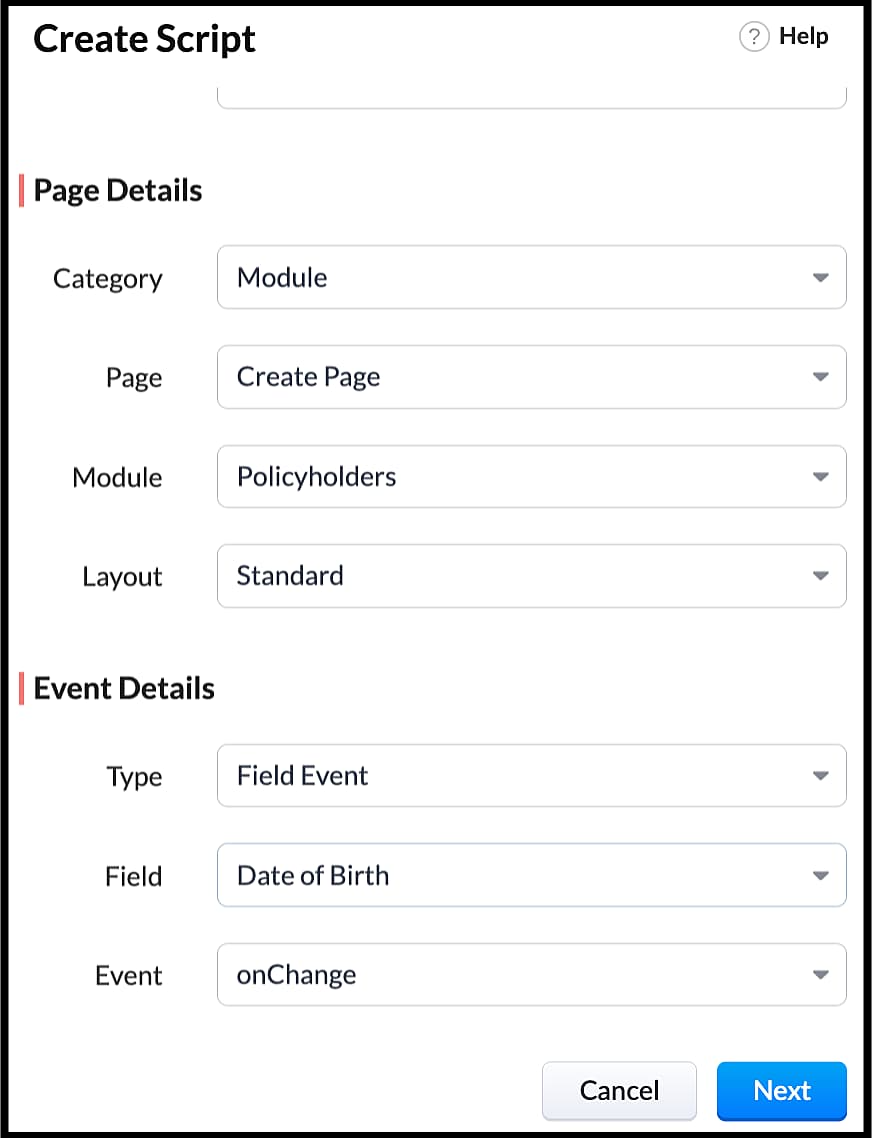
- Enter the following script in the Client Script IDE and click save.
- function getAge(dateString)
- {
- var today = new Date();
- var birthDate = new Date(dateString);
- var age = today.getFullYear() - birthDate.getFullYear();
- var m = today.getMonth() - birthDate.getMonth();
- if (m < 0 || (m === 0 && today.getDate() < birthDate.getDate()))
- {
- age--;
- }
- return age;
- }
- let age = getAge(value);
- var age_field = ZDK.Page.getField("Age");
- var category_field = await ZDK.Page.getField("Category");
- age_field.setValue(age);
- if (age > 80) {
- ZDK.Client.showMessage('Age is more than 80', { type: 'info' });
- }
- You can see the code working from the create page. You can also see how the client script works using the Run component of the Client Script IDE.
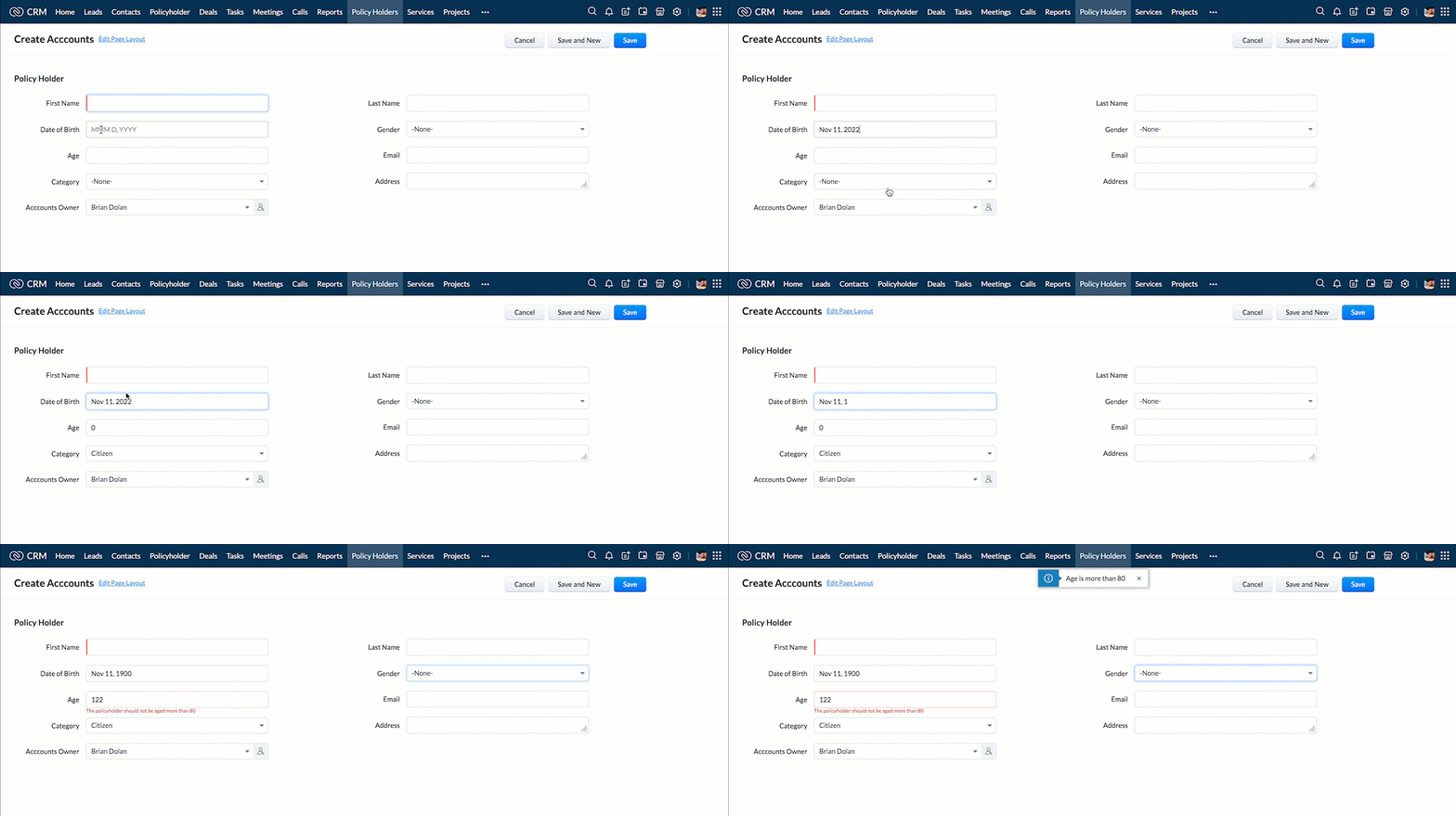
- You can use any of the following types in showMessage() function
Possible 'type' | Script |
info | ZDK.Client.showMessage('message', { type: 'info' }); |
warning | ZDK.Client.showMessage('message', { type: warning }); |
| error | ZDK.Client.showMessage('message', { type: error }); |
success | ZDK.Client.showMessage('message', { type: success }); |
2. Show the alert message whenever you try to update the field Rating
- Go to Setup > Developer Space > Client Script. Click +New Script.
- Specify the details to create a script and click Next.
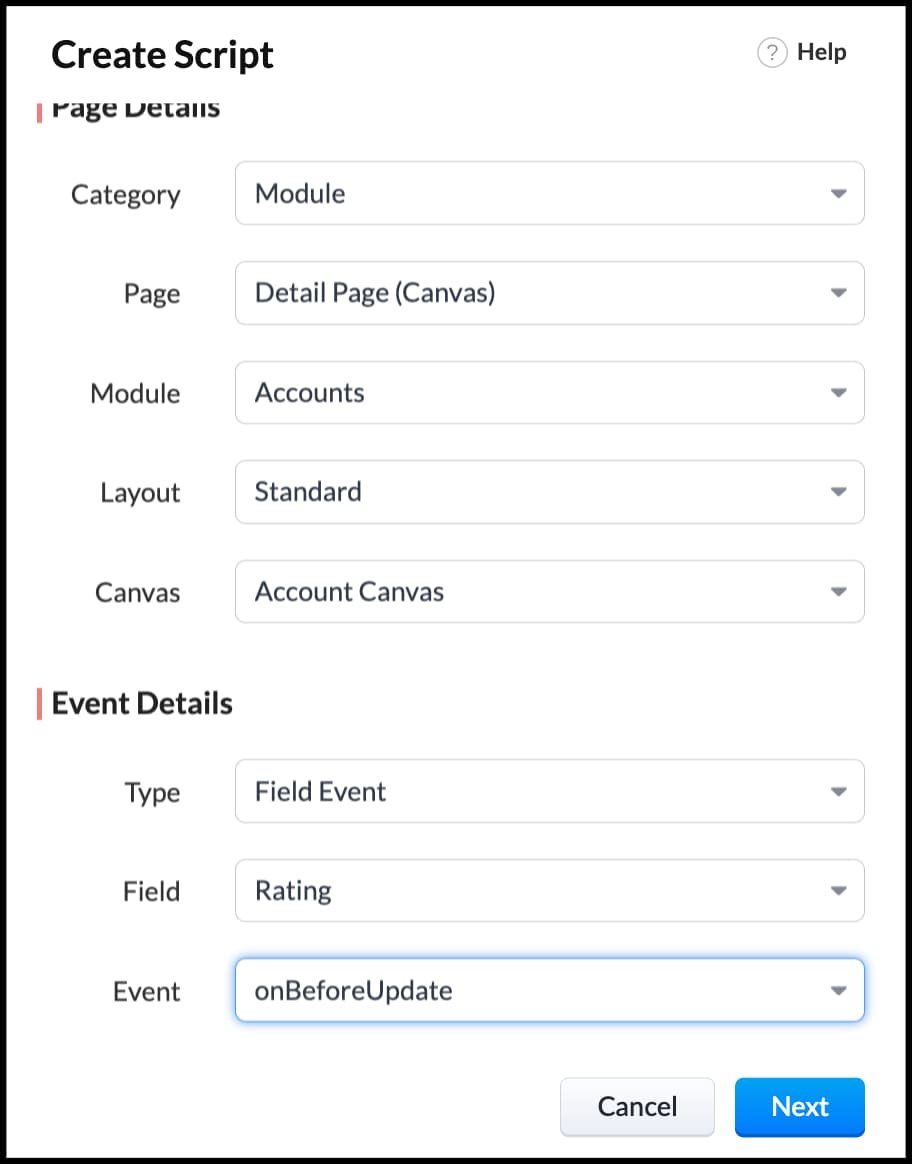
- Enter the following script in the Client Script IDE and click save.
- ZDK.Client.showAlert('You cannot change the Rating after account creation');
- Here is how the Client Script works. You can also see how the client script works using the Run component of the Client Script IDE.
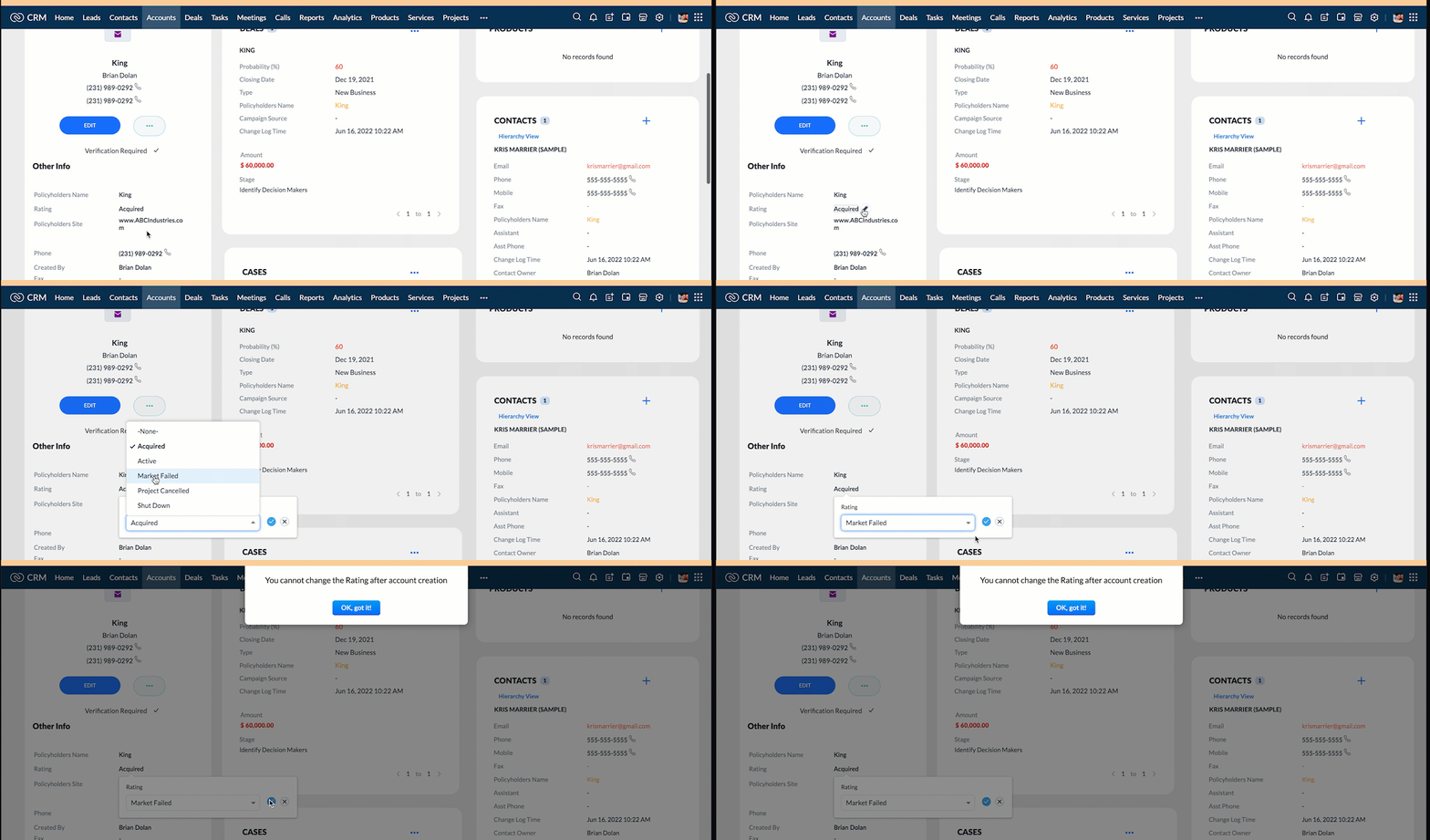
3. Configure the mailer box with the click of a button
First of all, you need to add the button to the detail(canvas) page.
- Go to Setup > Customization > Canvas.
- Right click on the Canvas page for Accounts module and click Edit.
- Click Elements, drag and drop the button wherever required and specify a label for the button.
- Right click on the button, select Add Element ID and enter the ID of the button in the pop up that appears.
- Once the button is created, you can configure Client Script in two ways:
- Right click on the button--> Add Client Script-->onClick. The Client Script IDE appears with the event type as Canvas Button Event.
(or)
- Go to Setup > Developer Space > Client Script. Click +New Script.
- Specify the details to create a script and click Next.
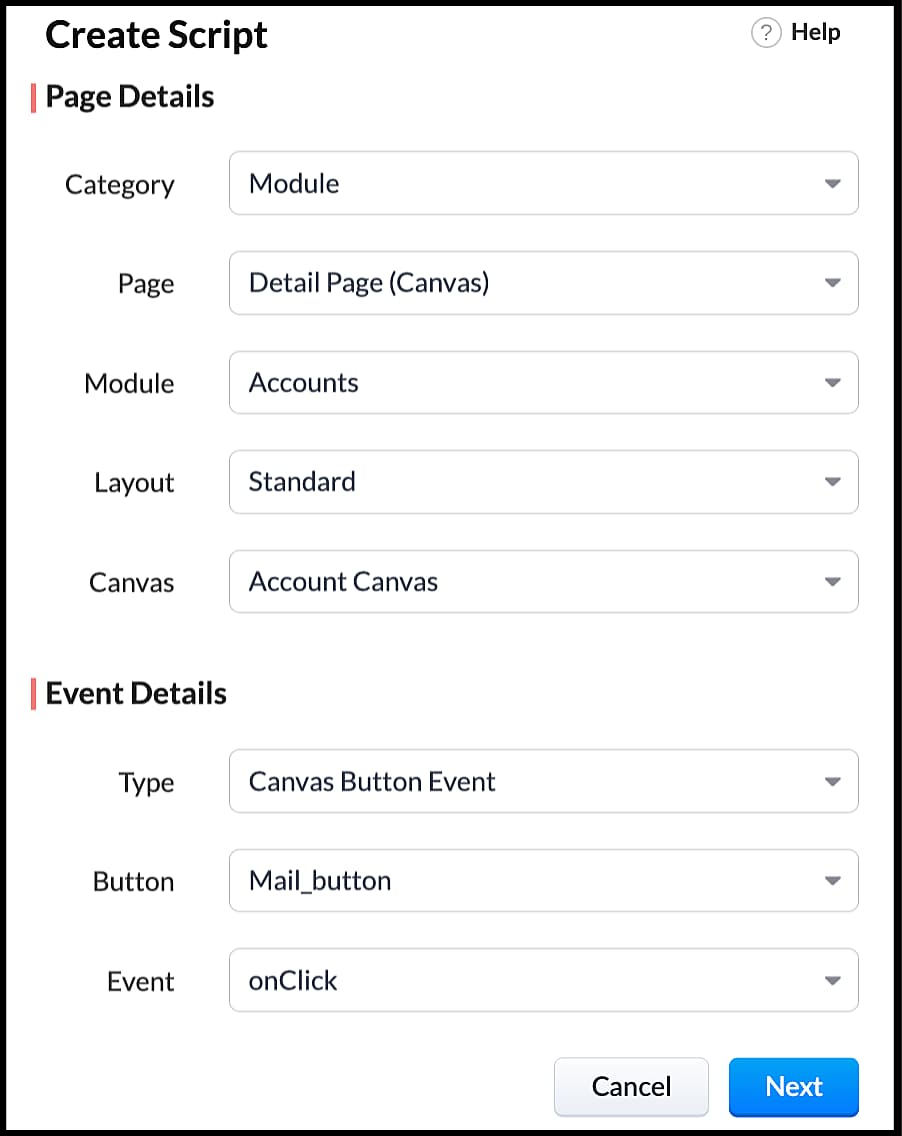
- Enter the following script and click save.
- var isProceed = ZDK.Client.showConfirmation('Do you want to open the mailer window?','Proceed','Cancel');
- //If user clicks Proceed button
- if (isProceed) {
- ZDK.Client.openMailer({ from: '', to: [{ email: '', label: 'ABC Industries' }], cc: [{ email: '', label: 'ABC Industries' }], subject: 'Greetings from ABC Industries!', body: ' ' });
- }
- The showConfirmation() function will return a boolean value based on the user selection. You should capture this boolean value using a variable and write the actions based on the boolean value returned. Here the variable isProceed will capture the user response and based on that boolean value, the mailer box will get displayed.
- Here is how the client Script works,
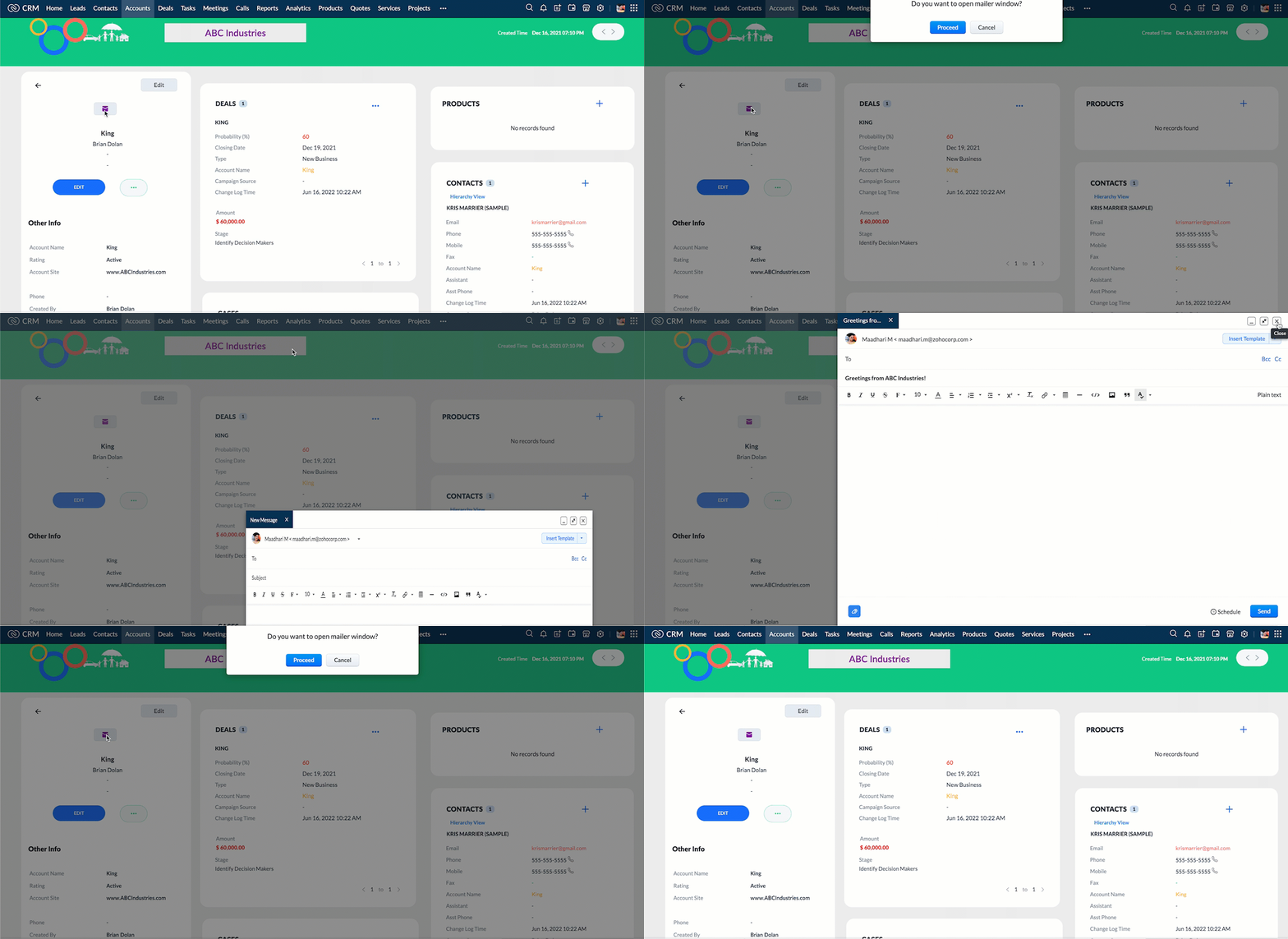
We hope you found this post useful. We will meet you next week with another interesting topic!
If you have any questions let us know in the comment section.
Cheers!
Click here for more details on Client Script in Zoho CRM.
Related Links
New to Zoho Recruit?
Zoho Campaigns Resources





Topic Participants
Maadhari M
tbiedma
Joe Sweeney
Anz
Jason
Sticky Posts
How to reach the official Zoho Support channels and avoid fake ones.
Dear Customers, Thanks a lot for choosing Zoho! Our applications are built to help achieve your day-to-day business goals. We are committed to engaging with you, to understand and develop solutions that enhance your productivity. We are happy and ready to help you use our services effectively. Understanding and avoiding fake support Just like using popular bank names and financial applications for phishing purposes, using Zoho and claiming to be providing Zoho Support or services with false numbersFunction #35: Close all tasks associated with a lead and create a new task.
Welcome back everyone! Last week, we learnt how to close all tasks of a deal depending upon the deal stage. This week, let's look at a custom function that lets you close all of the tasks associated with a lead while simultaneously creating a new task, like when you need to halt all progress towards a lead while the lead is not available at the moment but create a reminder task. Business scenario: The success of a company, in one way or another, is determined by the leads it gets. Each lead is justZoho CRM Webinar - Redesigning Daily User Experiences with Canvas
<br> Your users across roles use the CRM for day-to-day tasks that are necessary. Whether they perform their tasks on time, the right way, or at all depends on a lot of factors, including User Experience. Many businesses struggle with rigid layouts,Join us at the Canada ZUG Meetup: What’s New in Zoho CRM
Hello Zoho Community! Start your year with fresh insights into Zoho CRM’s latest updates and tools. Whether you're a CRM beginner or a experienced user, this meetup is crafted to help you optimise your processes and leverage new features. Explore practicalCRM Hack #2: Automate sending of birthday greetings to your customers.
Hello everyone! What sets you apart as a sales person is your ability to add that personal touch to your business relationship with your customers. Sending a gift on a special day, or leaving a note wishing them on their birthdays, are small, yet significant actions that show your customers that you care. And these are actions done without any expectations :) You must be engaging with a lot of customers and it is highly unlikely that they all are your friends on Facebook or some social channel,
Zoho CRM Plus Resources
Zoho Books Resources
Zoho Subscriptions Resources
Zoho Projects Resources
Zoho Sprints Resources
Zoho Orchestly Resources
Zoho Creator Resources
Zoho WorkDrive Resources


Zoho CRM Resources
Get Started. Write Away!
Writer is a powerful online word processor, designed for collaborative work.
Zoho CRM コンテンツ
-
オンラインヘルプ
-
Webセミナー
-
機能活用動画
-
よくある質問
-
Ebook
-
-
Zoho Campaigns
- Zoho サービスのWebセミナー
その他のサービス コンテンツ
ご検討中の方
Recent Topics
Inappropriate Removal of Features
It's the first with any software where I am experiencing that an existing customer has some of his exiting features removed. Moreover, new Zoho One users are paying less than us. Is this going to be Zoho's "normal behaviour". If so, it is going to beFiltering report embeded in page
Right now we are using a page variable to filter a report on a page. However, it being a page variable makes it reset if you go to another report/form, we want the filter to be kept the same. I tried using an application variable according to zoho youZia summarizes your IM bot chats in real time
Hello everyone! Let's say you’re an agent taking over a chat where a customer was booking a flight through a bot on WhatsApp. They've already shared key details, like their destination, travel date, and number of passengers. You need to understand theMegamenu
Finally! Megamenu's are now available in Zoho-Sites, after waiting for it and requesting it for years! BUT ... why am I asked to upgrade in order to use a megamenu? First: Zoho promised to always provide premium versions and options for all included Zoho-applicationsCancel and refund
Hi, Yesterday I paid for the Zoho email subscription. Within a few minutes, I realized that the subscription counts one email ID as one user. To make another email ID for the same domain name, I'd have to pay for another user. I emailed right away toOne Contact with Multiple Accounts with Portal enabled
I have a contact that manages different accounts, so he needs to see the invoices of all the companies he manage in Portal but I found it not possible.. any idea? I tried to set different customers with the same email contact with the portal enabled andKaizen# 209 - Answering Your Questions | All About Client Script
Hello everyone! Welcome back to another exciting Kaizen post! Thanks for all your feedback and questions. In this post, let's see the answers to your questions related to Client Script. We took the time to discuss with our development team, carefullyTo Do: shareable task links without login
Hi! I’m using Zoho Mail and ToDo in my daily work, and I’ve run into one limitation that’s a real blocker for me. Right now, to share tasks with managers or directors, they need to have a Zoho account and be added to a group. In practice, many of themAbility to turn off "Would you like this amount to be reflected in the Payment field?" message
Team, Is there any way to turn off the message" Would you like this amount to be reflected in the Payment field?" when I make a payment? This is so annoying. This happens EVERY TIME I put an amount in the Payment Made field.Unlock agreement intelligence with Zoho Sign's latest AI updates
Hello! If you've been struggling with long, complex agreements and spending way too much time on them, here's exactly what you'll want to hear: Zoho Sign now integrates with OpenAI's ChatGPT to make agreement management smarter and simpler. Acting likeCurrency abbreviations
Hello, Im stuck, and need help. I need the currency fields for example, opportunity value, or total revenue, to be abbreviated, lets say for 1,000 - 1K, 1,000,000 - 1M, and so on, how should I do this?Embed Sign Document
Has anyone tried embedding a document in a webpage? I'm building a webpage (using PowerPage) and I'm trying to embed it using an iframe then I got this error: Refused to display 'https://sign.zoho.com/' in a frame because it set 'X-Frame-Options' toWe’re transitioning from Zoho ShowTime to TrainerCentral
Hello everyone, Zoho ShowTime was originally built as a training platform to serve training agencies, HR teams, and individual trainers. As the platform grew, we realized that more creators and businesses could benefit from its capabilities. That’s whyEmails Are Not Being Delivered to My Inbox
Hello Zoho Support Team, I am experiencing an issue with my Zoho Mail account. The most important problem is that emails are not being delivered to my inbox. Details: My Zoho Mail address: info@coreforcelife.com What happens: I am not receiving any incomingRadar In Focus: Track customer support metrics using Radar's static reports
Hello everyone, Welcome back to the Radar In Focus series, where we explore how Radar features can add value to your business. In this episode, we're looking at Radar static reports. The help desk is filled with vast amounts of data that can be analyzedMail ToDo & Tasks Webhooks
Our company uses Zoho ToDo inside Mail to manage our tasks. When I create a task and assign it to a team member it does not notify them unless I add a reminder via mail. I'm trying to create a webhook for when a task is created to send a cliq messageAllocating inventory to specific SO's
Is there a way that allocate inventory to a specific sales order? For example, let's say we have 90 items in stock. Customer 1 orders 100 items. This allocates all 90 items to their order, and they have a back order for the remaining 10 items which couldImproved UI for a Seamless User Experience - Calls, Tasks, and Meetings
Hello all, We are making UI unification across CRM so that the UI experience is seamless across the product. As part of that effort, we have made changes to the details page of activity-based module records—Meetings, Calls, and Tasks. Let's look at theseWhere can I find rejected inbound mails and their reason for rejection
Hi, I was recently made aware by a mailing list which I am subscribed to (ffmpeg-devel@ffmpeg.org) that my Zoho mail Mail account is rejecting some emails. If I look under Admin Panel > Security & Compliance > Quarantine > Incoming, the list there isRefund
Hi There, Please refund me asap possible, because of no support given. Thank youتغيير عمله الدفع"Change payment currency"
ما هى طريقه تغيير عمله الدفع "ما هي طريقة تغيير عملة الدفع؟"How do I fix this? Unable to send message; Reason:554 5.1.8 Email Outgoing Blocked.
How do I fix this? Unable to send message; Reason:554 5.1.8 Email Outgoing Blocked.Attention API Users: Upcoming Support for Renaming System Fields
Hello all! We are excited to announce an upcoming enhancement in Zoho CRM: support for renaming system-defined fields! Current Behavior Currently, system-defined fields returned by the GET - Fields Metadata API have display_label and field_label propertiesZia's ability to generate and improve content extended to Desk mobile app (iOS and Android)
In support, agents will have to understand customers' pain points completely to provide empathetic personalized solutions and a positive experience. However, at times, agents might find it challenging to comprehend the customer issues and connect withBANK FEED - MAYBANK , provider from YODLEE IS NOT WORKING
As per topic, the provider YODLEE is not working for the BANK FEED. It have been reported since 2023 Q3, and second report on 2023 Q4. now almost end of 2024 Q1, and coming to 2024 Q2. Malaysia Bank Maybank is NOT working. can anyone check on this issue?Zoho Sign product updates - Q3 2025
Hello everyone! Q3 was all about AI. Here's the list of features and enhancements that have gone live, along with a list of what we have in pipeline for the last quarter: AI-powered agreement management Sending documents and authenticating recipientsZoho sites header
Good day, Im stuck with this situation. I choose a template for my website creation. I have tweaked every instance of the visual editor, regarding the header, I have created created customize fonts presets... I have followed every single step. and myQuick Create needs Client Script support
As per the title. We need client scripts to apply at a Quick Create level. We enforce logic on the form to ensure data quality, automate field values, etc. However, all this is lost when a user attempts a "Quick Create". It is disappointing because, fromKaizen #152 - Client Script Support for the new Canvas Record Forms
Hello everyone! Have you ever wanted to trigger actions on click of a canvas button, icon, or text mandatory forms in Create/Edit and Clone Pages? Have you ever wanted to control how elements behave on the new Canvas Record Forms? This can be achievedDNS set up
I want to create an email with my company domain. When I tried to add new record with cloudflare it didn't work. The DNS record can't be manually added. I followed the instruction but still can't add it. Could you help?Pocket from Mozilla is closing shop. Don’t lose your favorites . Move them to Zoho Mail Bookmarks now! 📥🔖
The end of Pocket shouldn't mean the end of your important links and content. Easily import them into Zoho Mail's Bookmarks and continue right where you left off. You can bring over your entire Saves, Collections, and tags just the way they are. BookmarksGeneral suggestions
Hello, I've picked this forum as it is at the top of the list! :) First suggestion: A general forum for issues and comments that are not specific to a particular Zoho application. Second suggestion: Put a link on the home page to "Zoho Identity Access Manager" The first suggestion came about because I didn't know where to post the second! ;) Regards MarkCan't upload attachments.
I can't upload attachment in Zoho Mail.Need Guidance on SPF Flattening for Zoho Mail Configuration
Hi everyone, I'm hoping to get some advice on optimizing my SPF record for a Zoho Mail setup. I use Zoho Mail along with several other Zoho services, and as a result, my current SPF record has grown to include multiple include mechanisms. My CloudflareHow use
Good morning sir I tried Zoho MailZoho Mail Desktop App Not Loading + Can’t Manage Multiple Accounts
Hi everyone, I’ve been having ongoing issues with the Zoho Mail desktop app for the past few weeks. The app starts to load but gives up midway and never actually opens — there’s no error message, it just stops loading. The main reason I use the desktopError when sending emails from Zoho
Hello, When trying to send an email from Zoho CRM I keep getting the below error: javax.mail.AuthenticationFailedException: 535 5.7.139 Authentication unsuccessful, the user credentials were incorrect. Any support on this will be much appreciated. Thanks,Zoho Tables is now live in Australia & New Zealand!
Hey everyone! We’ve got some great news to share — Zoho Tables is now officially available in the Australian Data Center serving users across Australia and New Zealand regions! Yes, it took us a bit longer to get here, but this version of Zoho TablesNot all emails from outlook365 migrated to my new zoho account
I recently setup a new email address hosted by zoho. I migrated all my folders and email from my Outlook365 account to my new zoho account, but not all my emails migrated. Looks like only the past 12 months, or so, made the move. How do I get the restMax numbr of IMAP Accounts in Zoho Mail?
In Zoho mail, you can manage the inboxes of other accounts using IMAP (and POP, actually) https://www.zoho.com/mail/help/external-imap-accounts.html Is there a max to the number of inboxes we can add?Next Page