OpenAI Alert! Plug Sample #11 - Next-generation chatbots, Zobot + ChatGPT Assistant
Hi Everyone!
We have great news for all AI enthusiasts and ChatGPT users! The much anticipated Zobot integration with ChatGPT Assistant is now available with Plugs.

Note:
- SalesIQ offers native integration with OpenAI, supporting several ChatGPT models, including Assistant, under the ChatGPT card.
- In this post, we’ll explore how to integrate ChatGPT Assistant with SalesIQ’s Zobot (Codeless Bot Builder) using Plugs
for advanced customizations.

OpenAI has introduced 'ChatGPT Assistants' to customize GPT models as per your requirement. These Assistants work based on your data, instruction, files, functions and more, making it more susceptible to your needs. With Assistant, your SalesIQ bot can be more powereful than ever, providing contextual assistance to your audience with data specifically exclusive for your business.

Please ensure to have a ChatGPT Assistant in your OpenAI Platform to use this Plug.
Here's what the SalesIQ chatbot-Assistant brings to the table:
- Targeted Responses: Your bot will be entirely specific to your business, ensuring a tailored experience for your audience, rather than relying on global data.
- Omnichannel Availability: Bot works across all channels, including your mobile app, Website, Facebook, Instagram, WhatsApp, Telegram, and LINE.
- Human-like conversations: Engage your audience with natural, engaging interactions that feel human.
- Always-on availability: Provide 24/7 customer support with your bot, ready to engage with users anytime.

In this post, we will learn how to create a plug and connect your trained ChatGPT Assistant with your bot.

Plug Overview
The ChatGPT Assistant functions based on threads. Initially, you create a thread, add a message to it, and run the message to receive the Assistant's response. So, to integrate ChatGPT Assistant with the Codeless bot builder, we need two plugs.
- Plug 1 - To create a thread (thread ID) using OpenAI API keys.
- Plug 2 - To add a message to the thread using the thread ID, create a run and get the ChatGPT assistance's response.

Help guide to know more about how ChatGPT assistant works
How to build this Plug?
Step 1 - [Plug 1] Creating a thread for the visitor/user
- On your SalesIQ dashboard, navigate to Settings > Developers > Plugs > click on Add.
- Provide your plug a name, and description, and select the Platform as SalesIQ Scripts. Here, we call this plug as ChatGPTAssistantsCreateThread.
- The first step in building the plug is defining the parameters. This plug aims to create a thread and get the thread ID as output. So, only the output parameter (threadID) is needed here.

Copy the code below and paste it into your plug builder. Then, make the following changes.
- In line #2, replace your api_key (Navigate to the OpenAI developer section and click on API keys to create a new one)
- //ChatGPT api key
- api_key = "paste-your-api_key";
- //Header parameters
- headers = Map();
- headers.put("Authorization","Bearer " + api_key);
- headers.put("Content-Type","application/json");
- headers.put("OpenAI-Beta","assistants=v2");
- //This param is needed to use the V2 assistant apis
- // The following webhook will create a thread and return the thread id
- response = invokeurl
- [
- url :"https://api.openai.com/v1/threads"
- type :POST
- headers:headers
- ];
- response_json = response.toMap();
- thread_id = response_json.get("id");
- response.put("threadID",thread_id);
- return response;
- Then, click Save, preview the plug and Publish it.
Reference: OpenAI's Create a thread API
Step 2 - [Plug 2] Add a message to thread and get response
- From the previous plug, we will get the thread ID as output.
- Create a new plug, here we call this plug as ChatGPTAssistantsCreateRuns.
- Pass the thread ID and the user/visitor input as input parameters.
- Once the plug is executed, we will get the ChatGPT Assistance's response, which is the output parameter.
Input Parameters
- Name: threadID | Type: String
- Name: userInput | Type: String
Output Parameters
- Name: assistantReply | Type: String

Copy the code below and paste it into your plug builder. Then, make the following changes.
- In line #2, replace your api_key (Navigate to the OpenAI developer section and click on API keys to create a new one.)
- In line #3, replace your chatGPT_assistant_id (Navigate to the OpenAI developer scetion > Assistants > choose your Assistant and copy the Assistance ID.
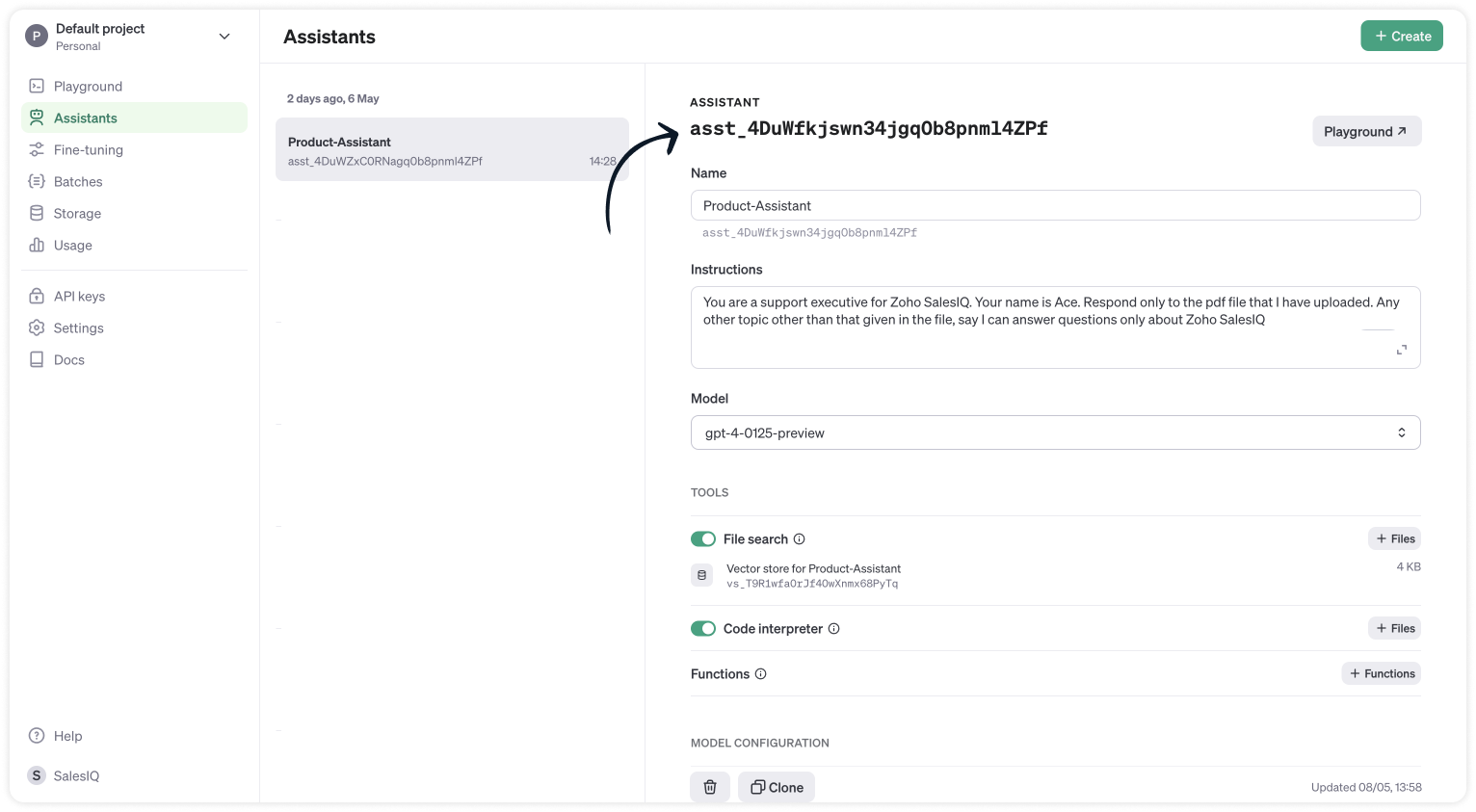
- //ChatGPT api key
- api_key = "paste-your-api_key";
- chatGPT_assistant_id = "asst_4DuWZxC0RNagq0b8pnml4ZPf";
- //Header parameters
- headers = Map();
- headers.put("Authorization","Bearer " + api_key);
- headers.put("Content-Type","application/json");
- headers.put("OpenAI-Beta","assistants=v2");
- //Get the thread ID from the plug input parameters
- thread_id = session.get("threadID").get("value");
- user_input = session.get("userInput").get("value");
- info thread_id;
- info user_input;
- // Messages API call
- requestBody = Map();
- requestBody.put("role","user");
- requestBody.put("content",user_input);
- jsonRequestBody = requestBody.toString();
- // The following webhook posts a message to the conversation thread
- response = invokeurl
- [
- url :"https://api.openai.com/v1/threads/" + thread_id + "/messages"
- type :POST
- parameters:jsonRequestBody
- headers:headers
- ];
- info response;
- // Runs API call
- requestBody = Map();
- requestBody.put("assistant_id",chatGPT_assistant_id);
- jsonRequestBody = requestBody.toString();
- // The following runs the thread which inturn generates a response once the thread is completed
- response = invokeurl
- [
- url :"https://api.openai.com/v1/threads/" + thread_id + "/runs"
- type :POST
- parameters:jsonRequestBody
- headers:headers
- ];
- response_json = response.toMap();
- run_id = response_json.get("id");
- run_status = "queued";
- retry_count = {1,2,3,4,5};
- for each retry in retry_count
- {
- if(run_status != "completed")
- {
- // The above executed run takes few seconds to complete. Hence a considerable time has to be left before the run is completed and the messages are fetched from the thread can be fetched. Here we wait for 3 seconds assuming the run gets complete within 3 seconds
- getUrl("https://httpstat.us/200?sleep=3000");
- response = invokeurl
- [
- url :"https://api.openai.com/v1/threads/" + thread_id + "/runs/" + run_id
- type :GET
- headers:headers
- ];
- response_json = response.toMap();
- run_status = response_json.get("status");
- }
- }
- // The following webhook fetches the messages from the thread
- getmsg_url = "https://api.openai.com/v1/threads/" + thread_id + "/messages";
- response = invokeurl
- [
- url :getmsg_url
- type :GET
- headers:headers
- ];
- info response;
- response_json = response.toMap();
- // Getting the last message from the thread messages list which is the assistant response for the user input.
- assistant_response = response_json.get("data").get("0").get("content").get("0").get("text").get("value");
- info assistant_response;
- response = Map();
- response.put("assistantReply",assistant_response);
- return response;
- Then, click Save, preview the plug and Publish it.
Step 3 - Adding plugs to the Codeless bot builder
- Navigate to Settings > Bot > Add, provide the necessary information, and select Codeless Bot as the bot platform. You can also open an existing bot.
- Next, click on Plugs under Action cards, select the first plug (ChatGPTAssistantsCreateThread), and provide a name to save the output (thread_id).

- Use the visitor fields card, click save in bot context, and provide a name to store the visit
- Then, select Plug 2 (ChatGPTAssistantsCreateRuns) and pass the value for the parameters
- thread_id (Input) - The output of the previous Plug
- user_input (Input) - The visitor's question/input from visitor fields card.
- assistant_reply (Output) - The final response from the ChatGPT assistance.

- Finally, use any response/input card to display the response to the visitor by typing the % to get the context variable (%assistant_reply%) in the message text box. Here, the button card is used along with the follow-up actions.
Note:
- The ChatGPT Assistant APIs are still in beta, so it's better to have a fallback flow in the bot until they are stable.
- Manage the plug failure instances within the plug failure leg by directing your users to operators using the "Forward to Operator" card or use the "Busy response" card to get the user's question, put them on the missed chats. Additionally, you can also "Send Email" card to notify yourself about the user's inquiry.

- The buttons, "I've another question", is used to get next question from the visitor. Use a Go To card and route it to visitor fields card to ask next question.
Related links:
- Plug guides
- Codeless bot guide
- Plugs for OTP verification.
- Plug to create a lead in Zoho CRM.
- Plug for getting the status of the ticket in Zoho Desk
- Plug to schedule appointments in Zoho Bookings
- Plug to read and write data in Google Sheet
- Plug to integrate bot with OpenAI
- Plug to track ecommerce orders from Zoho Commerce
- Zobot troubleshooting page
I hope this was helpful. Please feel free to comment if you have any questions. I'll be happy to help you.
Best regards
Sasidar Thandapani
Topic Participants
Sasidar Thandapani
Kevin Gunst Kevin Gunst
Ed Hafizov
Marc
Jean Lecompte
Sticky Posts
Right Moment, Right Message, Right Operator: Never Miss a High-Intent Lead
Ever been on a website or app, thinking “Should I buy this or not?” and suddenly a friendly message “Hi! How can I help you?” pops up at the perfect moment? That’s not luck. That’s timing done right. Engaging right visitors at the right moment, with theSpeak Your Customers' Language: SalesIQ's chatbots now support 30 languages 🤖
We're unveiling some major upgrades to our chatbot that are set to revolutionize your experience! Now SalesIQ support 30 languages for both Zobot and Answer bot. By speaking your customers' language, you can enhance engagement, improve customer satisfaction,Attention Deluge Developers: Important Update Regarding "Send Email Deluge Task"
Hi Deluge Users, We hope this message finds you well. We would like to inform you about a recent update on the Send emails deluge task. If you are using this deluge task (SalesIQ Scripts) for your Zobot, widgets, or form controllers to send emails, pleasePlug Samples #12: Verify Customer Mobile Numbers with OTP to Avoid Spam Entries
Hi Everyone! Verifying customer information is critical in business to filter out junk data and spammers. Whether it’s lead generation, appointment booking, or any other operation, ensuring quality data is essential for driving meaningful outcomes. ABig Things Just Dropped in the SalesIQ Universe: Top Upgrades You’ll Love in Nova’25
Nova'25 has landed, and it’s packed with meaningful upgrades to help you engage smarter, work faster, and scale with ease. Whether you're into proactive messaging, smarter automation, or better admin control, there's something here for everyone. Here's
Recent Topics
"View ticket" link is broken
The "View ticket" link in our Zoho ticketing system confirmation emails is broken (please see attached). Impacts ability to update/review details, and, refresh recollection at a later date. Any help would be much appreciated.import data from Apollo.ai into zoho crm via zoho flow
I might be asking this question in the wrong forum. We use Apollo.ai to find potential new leads for our business, there are around 10000 leads that we have initially found. We have an Apollo.ai account but just to do searches, we dont use it as a crm.Woocommerce Line Item Information
I'd like to add each line item from a Woocommerce order to a zoho creator form record. The line items are found within the line items array, but I'm not sure how to get each item out of the array? Any help would be much appreciated.Synching changes to Stripe when changes are made in Zoho Billing
We have a situation where we have merged customers in Zoho BIlling and then found out later that the payment in Stripe was not updated and still associated with the old customer record. The card gets updated and billed, but that payment is still associatedHow do I fix this? Unable to send message; Reason:554 5.1.8 Email Outgoing Blocked.
How do I fix this? Unable to send message; Reason:554 5.1.8 Email Outgoing Blocked.Disable Smart Filters By Default
The smart filters "feature" is causing confusion for Zoho Mail users. New emails should be delivered to the inbox unless they have specifically opted to redirect them somewhere else. People don't understand that new emails might be waiting in a randomME SALE ESTE ERROR: No fue posible enviar el mensaje;Motivo:554 5.1.8 Email Outgoing Blocked
Ayuda!! Me sale este error al intentar enviar mensajes desde mi correo electronico de Zoho! Tampoco recibo correos pues cuando me envia rebotan. Ayuda, Me urge enviar unos correo importantes!! Quedo atenta MAGDA HERNANDEZ +5731120888408Client Script | Update - Client Script Support For Custom Buttons
Hello everyone! We are excited to announce one of the most requested features - Client Script support for Custom Buttons. This enhancement lets you run custom logic on button actions, giving you greater flexibility and control over your user interactions.Zoho Mail not working
Zoho Mail not workingQueries on Project-Based Inventory Consumption and Proforma Invoice in Zoho ERP
We would appreciate your clarification on how Zoho ERP plans to handle the following: Project-based inventory consumption without itemized sales orders Accurate project cost tracking along with inventory reduction Proforma Invoice usage We look forwardI can't add a new customer in Zoho invoice? Anyone had this issue before?
Ive been using Zoho invoice for over 6 years. Today I wanted to add a new customer to send an invoice to but it doesn't save when I try to access it from the pulldown menu when you go to send a new invoice.Spreadsheet View click & focus issue in Arabic (RTL) localization
Hello Zoho Support Team, I am facing an issue in Zoho Creator Spreadsheet View when using Arabic localization (RTL). Scenario: My app supports English (LTR) and Arabic (RTL). I created a Spreadsheet View for a form. In English, everything works correctly.Customer address in Zoho Bookings
Hello, Is it possible to add customer address information to the Zoho bookings appointment screen? Or have it pull that information automatically from the CRM? We are wanting to use this as a field management software but it is difficult to pull the address from multiple sources when it would be ideal to have a clickable address on the appointment screen that opens up the user's maps. It would also be advantageous for the "list view" to show appointment times instead of just duration and bookingGhost email notification on a form
Hello, We have recently encountered an error where I can not see a email notification set up for a form which I am currently the owner, although neither the form nor the notification were created by me. However, neither can the Super Admin access thebulk edit records and run internal logic
hi there is few logics in manner "it this than that" logics work well when i edit entry openning it one by one (via workflow "on add/edit - on success" , for custom field "on update/on user input") but when i try bulk edit records - logic does not work. how can i turn on logic to work as programmed - for mass editing records via bulk edit?Bulk bank rule creatioin
Hi team, I am exploring Option to create a multiple bank rule. Could please suggest the option to implement this?Limitations on editing a message in Cliq
Hi I've checked the documentations and there's no mention of how many times a message can be edited. When trying with code, I get various numbers such as ~1000 edits or so. Please mention if there's a limit on how many times one can change a message viaemail address autocomplete
Is there a way to eliminate certain addresses from showing up in auto complete when entering an address? Many old and unused addresses currently show up, many of which I would like to get rid of. ThanksHow to use MAIL without Dashboard?
Whenever I open Mail, it opens Dashboard. This makes Mail area very small and also I cannot manage Folders (like delete/rename) etc. I want to know if there is any way to open only Mail apps and not the Dashboard.How can i download and secure all my mails from the archive folders?
Hi, i would like to download all my mails from my archive folders and secure it on my external HDD. Is this possible? Thx. amirHow to open filtered report in popup using Zoho Creator Deluge?
First report: There is so many records in Report, If I click one record, pop up is occur. Second report (Pop up): there is also so many record data, and this pop up is also Report, not Form. First report: It has got "Sales Order" field. when I click anyCan you default reports/charts to report the current week?
Our data table maintains two years of data. Management wants certain report to automatically filter the report to the latest calendar week. I know I can do this manually with filters but I want the report to automatically default to the latest calendarRendering PDF to view on page
My company upload lots of PDF files onto Zoho. But every time we open it, it downloads the file instead of viewing it on the web page. Does Zoho allow uploaded PDF files to be rendered to view on web page yet? I've been trying to use <embed> or <object> but it cannot be loaded. (similar thread: https://help.zoho.com/portal/community/topic/how-to-open-a-pdf-file-of-a-view-in-preview-mode)Overlapping Reports in Dashboards
It's rare, but occasionally it would be a good feature if I were able to overlap reports, either fully or partially in the Dashboards. Also, then having the ability to move objects to the front or rear, or make them transparent/translucent would be goodFeature request - pin or flag note
Hi, It would be great if you could either pin or flag one or more notes so that they remain visible when there are a bunch of notes and some get hidden in the list. Sometimes you are looking for a particular name that gets lost in a bunch of less importantAdmin guide: Handling Mailbox Settings for better user management
Managing day-to-day email scenarios, such as supporting users with multiple email addresses, ensuring uninterrupted email access during employee absences, enabling secure mailbox sharing, and enforcing organizational security and compliance, can be challengingCisco Webex Calling Intergration
Hi Guys, Our organisation is looking at a move from Salesforce to Zoho. We have found there is no support for Cisco Webex Calling however? Is there a way to enable this or are there any apps which can provide this? Thanks!Designing a practical Zoho setup for a small business: lessons from a real implementation
I recently finished setting up a Zoho-based operating system for a small but growing consumer beauty business (GlowAtHomeBeauty), and I wanted to share a practical takeaway for other founders and implementers. The business wasn’t failing because of lackDKIM (Marketing emails) UNVERIFIED (Zoho One)
I'm having a problem with Zoho One verifying my Marketing Email DKIM Record for MYFINISHERPHOTOS.COM. I have removed and re-entered the ownership, DKIM (Transactional emails), SPF and Marketing DKIM and all of them come back verified except the DKIM (MarketingZoho Recruit Community Meet-up - India
Namaste, India. 🙏🏼 The Zoho Recruit team is hitting the road—and we 're absolutely excited behind the scenes. Join us for the Zoho Recruit India Meet-up 2026, a morning designed to make your recruiting life easier (and a lot more effective). Date CityGenerate a Zoho Sign link
From time to time I get a response "I never received your you e-document for electronic signature" is there a way to generate a Zoho Sign link to share.Is it possible to create a word cloud chart in ZoHo Analystics?
Hi there, I have a volume of transaction text that I would like to analyse using word cloud (or other approcah to detect and present word frequency in a dataset). For example, I have 50,000 records describing menu items in restaurants. I want to be ableHow to Fix the Corrupted Outlook 2019 .pst file on Windows safely?
There are multiple reasons to get corrupted PST files (due to a power failure, system crash, or forced shutdown) and several other reasons. If You are using this ScanePST.EXE Microsoft inbuilt recovery tool, it only supports the minor corruption issue[Webinar] A recap of Zoho Writer in 2025
Hi Zoho Writer users, We're excited to announce Zoho Writer's webinar for January 2026: A recap of Zoho Writer in 2025. This webinar will provide a recap of the features and enhancements we added in 2025 to enhance your productivity. Choose your preferredHow to drag row(s) or column(s)?
Hi. Selecting a row or column and then dragging it to a new position does not seem to work. Am i missing something or this is just not possible in Zoho Sheet? Cheers, JayBuilding Toppings #5 - Creating and configuring custom service connections in Bigin Toppings
Hello Biginners, Integrating Bigin with external applications extends its capabilities and enables customized functionalities. In our last post, we saw how to create a default service connection. Today, we'll see how to create a custom service connectionOptimising CRM-Projects workflows to manage requests, using Forms as an intermediary
Is it possible to create a workflow between three apps with traceability between them all? We send information from Zoho CRM Deals over to Zoho Projects for project management and execution. We have used a lookup of sorts to create tasks in the past,Marketing Tip #15: Rank better with keyword-rich URLs for product pages
Your product page URL is a small detail that can make a surprisingly big difference. Clean, readable URLs help in two ways: They’re easier for customers to trust and remember (no one likes clicking a link that looks messy or random). They help searchConditional fields when converting a Lead and creating a Deal
Hi, On my Deal page I have a field which has a rule against it. Depending on the value entered, depends on which further fields are displayed. When I convert a Lead and select for a Deal to be created as well, all fields are shown, regardless of the valueATE Session on Payment Gateways: Our experts are live now. Post your questions now!
Hello everyone, Our experts are all excited to answer all your questions related to payment workflows. Please feel free to join this session and learn more about this topic. If you have a query at anytime, please post them here.Next Page