Integrating SalesIQ + WeChat: Converse with WeChat users directly from SalesIQ!

Integrating SalesIQ + WeChat: Converse with WeChat users directly from SalesIQ!

Hello everyone. We're back with another exciting update!

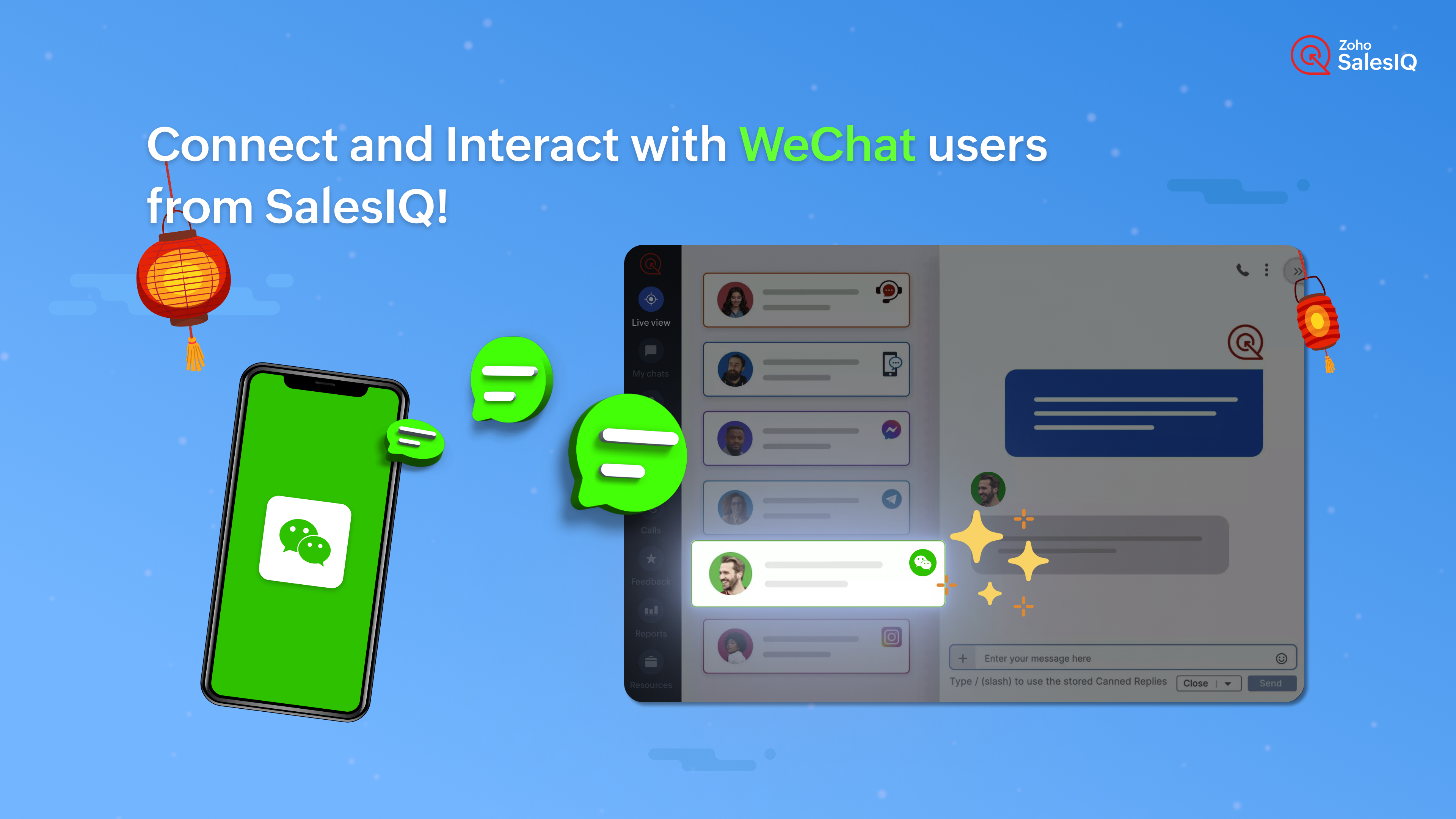
The much-awaited integration of SalesIQ with China's most-used instant messaging application, WeChat is here. With this integration, you can now connect your business' WeChat account with SalesIQ. When a user messages your business on WeChat, you will receive that message right within your SalesIQ dashboard, allowing your operators to assist WeChat users, without moving anywhere.

How can this help your business?

With this channel, connecting and engaging with your WeChat users has become easier and more seamless than ever before.
  • Streamline customer support by bringing in WeChat conversations into SalesIQ, thereby eliminating the need to switch between platforms.
  • Equip operators with SalesIQ's support tools like canned replies, articles, FAQs, tags, widgets etc., enhancing their ability to provide contextual assistance.
  • You can easily nurture the leads from WeChat by adding their basic details to SalesIQ and pushing them to CRM for further conversions and follow-ups.
  • You can also convert the chats from WeChat to helpdesk tickets and push them to Desk with a single click.
  • Gather valuable insights about your support activities by analysing customer satisfaction levels and feedback from WeChat user chats on SalesIQ to make informed decisions.

And best of all?

All your business communications can be unified under one roof. Along with your chats from WeChat, you can also bring in chats from the other SalesIQ channels like Facebook, Whatsapp, Instagram, Telegram, and LINE and manage all your business interactions from all these platforms on SalesIQ, making it an all-powerful communication hub for engagement and assistance.

Isn't this Omni-channel support? Yes, it is.

A Business Example:

Meet Sarah, the owner of a thriving e-commerce business specializing in fashion accessories. With a significant portion of her customer base located in China, Sarah gets a lot of incoming messages to her business' WeChat account.

Her problems on WeChat?

  • Her team could not keep track of all the lead enquiries and customers.
  • No support and assistance features on WeChat to handle the volume of chats.
  • Juggling between WeChat and her CRM system to handle leads/customer details.
  • Could not keep a check on the complaints and grievances received.

What change did the SalesIQ + WeChat integration bring in Sarah's business?

With the SalesIQ + WeChat integration, Sarah was able to streamline her workflow effectively.
  • Now, all WeChat messages and inquiries are seamlessly integrated into SalesIQ, allowing her support team to manage them alongside other customer interactions.
  • No more juggling between WeChat and her CRM system, Sarah was able to push the lead details to her CRM easily with SalesIQ's CRM integration.
  • Not just that, she was also able to keep track of issues and grievances with the Desk integration.  
  • And Sarah's support team can now provide timely assistance to WeChat users directly from SalesIQ, utilizing all the support features like canned replies, articles, FAQs, Smart suggestions, Tags, widgets, Open AI integration etc.
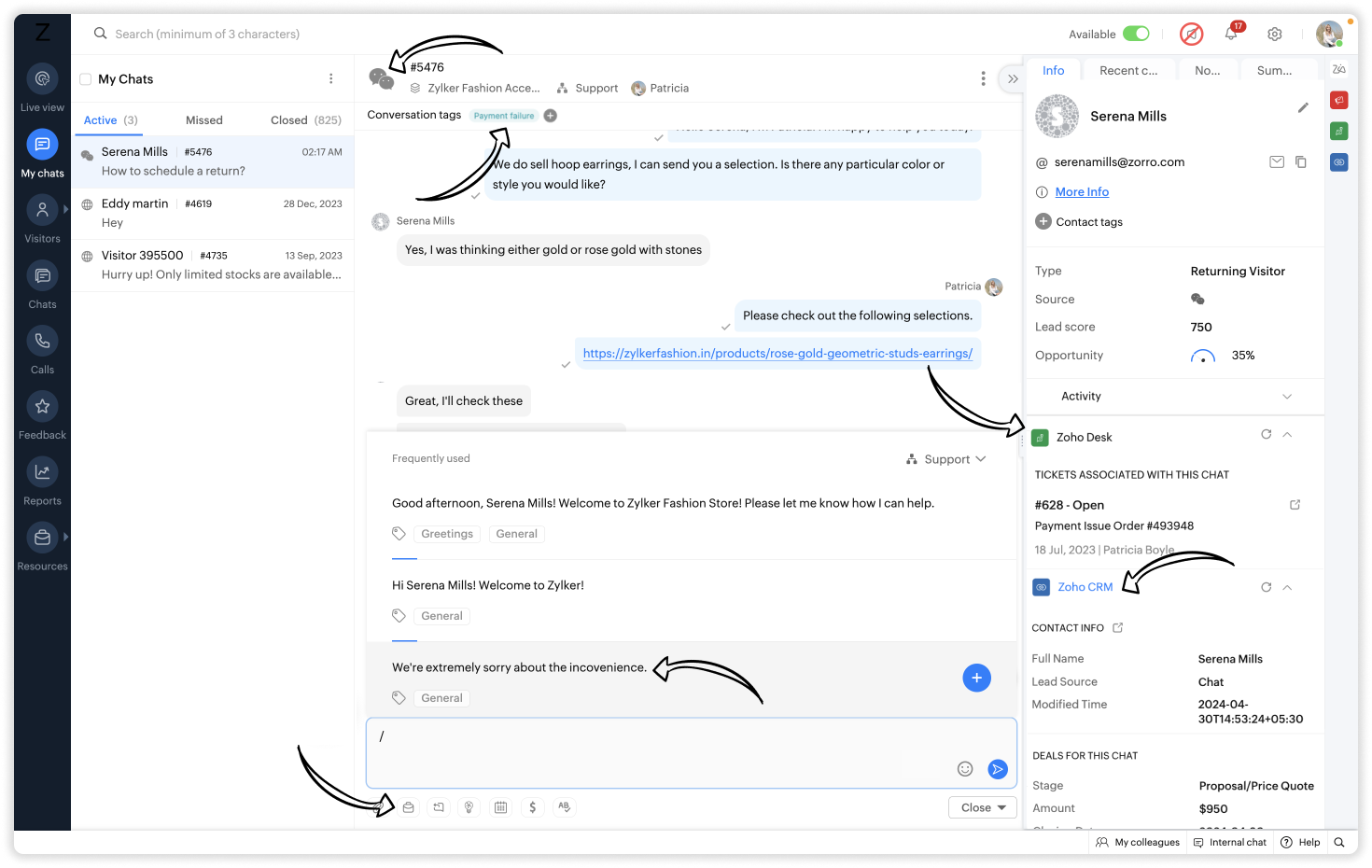
Thanks to the SalesIQ + WeChat integration, Sarah's business has seen a significant improvement in customer support efficiency, resulting in happier customers and increased sales.

WeChat Channel Set-up

The set-up process for the WeChat channel involves getting key attributes from your WeChat and SalesIQ accounts and linking them as per the steps. Check out the below video to get a clear idea of the integration procedure.


For the complete process, check out our help guide here.

We'd love to hear your thoughts on this release. Do leave us your comments and we'll see you soon with another update.

Best regards,
Hameetha

    Access your files securely from anywhere

        All-in-one knowledge management and training platform for your employees and customers.


                              Zoho Developer Community


                                                    • Desk Community Learning Series


                                                    • Digest


                                                    • Functions


                                                    • Meetups


                                                    • Kbase


                                                    • Resources


                                                    • Glossary


                                                    • Desk Marketplace


                                                    • MVP Corner


                                                    • Word of the Day


                                                    • Ask the Experts


                                                              Manage your brands on social media


                                                                    Zoho TeamInbox Resources


                                                                        Zoho CRM Plus Resources

                                                                          Zoho Books Resources


                                                                            Zoho Subscriptions Resources

                                                                              Zoho Projects Resources


                                                                                Zoho Sprints Resources


                                                                                  Qntrl Resources


                                                                                    Zoho Creator Resources


                                                                                        Zoho CRM Resources

                                                                                        • CRM Community Learning Series

                                                                                          CRM Community Learning Series


                                                                                        • Kaizen

                                                                                          Kaizen

                                                                                        • Functions

                                                                                          Functions

                                                                                        • Meetups

                                                                                          Meetups

                                                                                        • Kbase

                                                                                          Kbase

                                                                                        • Resources

                                                                                          Resources

                                                                                        • Digest

                                                                                          Digest

                                                                                        • CRM Marketplace

                                                                                          CRM Marketplace

                                                                                        • MVP Corner

                                                                                          MVP Corner


                                                                                            Design. Discuss. Deliver.

                                                                                            Create visually engaging stories with Zoho Show.

                                                                                            Get Started Now


                                                                                              Zoho Show Resources

                                                                                                Zoho Writer

                                                                                                Get Started. Write Away!

                                                                                                Writer is a powerful online word processor, designed for collaborative work.

                                                                                                  Zoho CRM コンテンツ


                                                                                                    Nederlandse Hulpbronnen


                                                                                                        ご検討中の方


                                                                                                                • Recent Topics

                                                                                                                • Cliq iOS can't see shared screen

                                                                                                                  Hello, I had this morning a video call with a colleague. She is using Cliq Desktop MacOS and wanted to share her screen with me. I'm on iPad. I noticed, while she shared her screen, I could only see her video, but not the shared screen... Does Cliq iOS is able to display shared screen, or is it somewhere else to be found ? Regards
                                                                                                                • Replies sometimes creating separate ticket

                                                                                                                  Sometimes when a customer responds to an email coming from Zoho Desk, instead of adding a reply to the original ticket, a separate ticket is created. This happens even though the response subject line contained the ticket number, and the person responding
                                                                                                                • Show backordered items on packing slip

                                                                                                                  Is it possible to show a column on the Packing Slip that shows number of backordered items when a PO is only partially filled? I would also like to see the Backordered column appear on POs after you receive items if you didn't get ALL of the items or partial amounts of items. And lastly, it would be nice to have the option of turning on the Backordered column for invoices if you only invoice for a partial order. -Tom
                                                                                                                • Global Sets for Multi-Select pick lists

                                                                                                                  When is this feature coming to Zoho CRM? It would be very useful now we have got used to having it for the normal pick lists.
                                                                                                                • Tables for Europe Datacenter customers?

                                                                                                                  It's been over a year now for the launch of Zoho Tables - and still not available für EU DC customers. When will it be available?
                                                                                                                • Inactive License for free account.

                                                                                                                  I recently upgraded my Cliq subscription not my team (on the free version), are unable to login to their accounts. The error message received is Inactive License Looks like you have not been covered under the current free plan of users. Please contact
                                                                                                                • List of All Contacts on "Do-Not-Mail List"

                                                                                                                  I have several contacts that are UNKNOWN among my thousands of email addresses who would like to be put back on the active mailing list.  I require a list of ALL my contacts on "Do-Not-Mail List" - How to I receive this list? Note: "We're sorry, but this is not possible" is not an acceptable answer. I must receive this list form Zoho Campaigns or directly from someone within Zoho Technical Support.  Thank you, Justin
                                                                                                                • Cliq Bots - Post message to a bot using the command line!

                                                                                                                  If you had read our post on how to post a message to a channel in a simple one-line command, then this sure is a piece of cake for you guys! For those of you, who are reading this for the first time, don't worry! Just read on. This post is all about how
                                                                                                                • Auto-sync field of lookup value

                                                                                                                  This feature has been requested many times in the discussion Field of Lookup Announcement and this post aims to track it separately. At the moment the value of a 'field of lookup' is a snapshot but once the parent lookup field is updated the values diverge.
                                                                                                                • Edit 'my' Notes only

                                                                                                                  The permissions around Notes should be more granular, and allow to user to be able to edit the notes he created only. The edit Notes permission is useful as it allows the user to correct any mistakes or add information as needed. However, with this same
                                                                                                                • [Free webinar series] Get to know Deluge: Zoho’s powerful scripting language

                                                                                                                  Hello Everyone, We are much elated to invite you all to our upcoming session in Zoho Deluge! Bringing on to your table - Get to know Deluge: Zoho’s powerful scripting language Understanding Deluge Zoho’s suite of applications offers robust solutions for
                                                                                                                • Account blocked

                                                                                                                  Yesterday I got my Zeptomail account blocked due to too many hard bounces. My account is used exclusively for sending transactional emails (eg. your order has been shipped, a form has been filled, etc) and the sudden blocking impacted hundreds of websites
                                                                                                                • What is wrong with this sendmail message?

                                                                                                                  I keep getting improper statement errors on the message, but I cannot see a problem. Also, if the message is much longer the whole message turns black instead of being coloured yellow, red and blue. client = Clients[ID == input.Client_Lookup]; sendmail
                                                                                                                • How to size a QR image in a report PDF?

                                                                                                                  I've created a report template for a client record which has a QR code field. I've tried inserting the field into a paragraph element and also as a field element that I have resized. The QR code is shown at the same, large size on the page either way.
                                                                                                                • How do create a validation rule / function to check datetime field is within Business Hours?

                                                                                                                  I've got a field called Scheduled_Time. People keep accidently inputting 2am when they mean 2pm. Realistically this field is never going to be before 7am or after 9pm. I'd like to add validation rule to the field (which is a datetime field). Using the
                                                                                                                • Creating a report for a subform child record and show parent data

                                                                                                                  I have a Client form (Name, Address) under which I can add a child Appointment (Date, Time, Location, SalesRep) in a subform. Now I want to set up a report where I can view an Appointment and send it to a Sales rep for their records. I want to automatically
                                                                                                                • Tropicalize Books

                                                                                                                  Books is an incredibly powerful tool that works well in many countries. But I feel that it is a product that is not yet "tropicalized" for Brazil as we speak (this would be like adapting the local reality). We have many strong competitors who do more
                                                                                                                • Generate print-ready documents from Zoho Books with the Zoho Writer extension

                                                                                                                  Hi everyone, We're excited to introduce the Zoho Writer Templates for Zoho Books extension. Create customized templates to generate professional, print-ready documents such as invoices, estimates, purchase orders, and expense reports, populated with real-time
                                                                                                                • Tip #73 - Exploring Technician Console: Diagnostics - 'Insider Insights'

                                                                                                                  Hello Zoho Assist Community! Say you're remotely supporting a client whose machine is behaving erratically. Applications are freezing, services keep stopping on their own, and the user has no idea what's going wrong under the hood. You need to dig deeper,
                                                                                                                • NEED HELP

                                                                                                                  I have below data po no invoice no Party inv date value status 1 aa1 ABC 01-May-26 100 Under Cr 2 aa2 XYZ 02-May-26 200 Over Due 3 aa3 ABC 02-May-26 300 Under Cr 4 aa4 XYZ 03-May-26 400 Under Cr I need result as below using formulas (not Pivot table)
                                                                                                                • Pasting images is a mess

                                                                                                                  I’m trying to paste images into my tickets, in the comments field. But when I paste images, they end up in the wrong order or behind the text.
                                                                                                                • A way to create kits (groups of items) that do not require bundling and are added to an order as the individual items

                                                                                                                  We are evaluating moving off of Sage BusinessWorks (which handles accounting, order entry, inventory control, accounts receivable, etc) to Zoho Books/Inventory. One of the things we heavily use is a feature called Kits, which allows creating a group of
                                                                                                                • Refering cell from other sheet

                                                                                                                  Hi, If we want to refer any cell in the same sheet its very easy, like suppose if I want to refer cell A2  in P7 I just need to type =A2 in P7, similarly how can I refer a cell present in different sheet ( I mean refer cell A2 from Sheet1 into Sheet2) Thanks
                                                                                                                • How to prevent users from switching price lists in an order?

                                                                                                                  Hi, I have Zoho Finance integrated with Zoho CRM. My team will be placing orders through the CRM using the Finance module. When creating a new customer I will assign it a price list, I don't want the sales rep to switch to a different Price List, other
                                                                                                                • Invoice emails repeatedly "Bounced back" from perfectly good email address of clients.

                                                                                                                  Hi For a couple of months now I am getting tens of invoice email invoices "bounced back" from perfectly sound email addresses when they are sent via Zoho Books. (see attached or an example) (the common theme seems to be that the emails are going to either
                                                                                                                • Paying a credit card

                                                                                                                  When you move money from your operating account to the credit card account to pay the balance does you select "Pay Credit Card" or "Transfer". Doers it matter? Also I seem to be doing transfers and sometimes I get a list of possible matches and I select
                                                                                                                • Timer not appearing to update

                                                                                                                  For the last couple of days, I've noticed my timer is not updating. When I start it, it doesn't show as started until I refresh the page. When I pause it, it doesn't show as paused until I refresh the page. But it does register a stop correctly in real
                                                                                                                • Proforma Invoice

                                                                                                                  Is there an option to create proforma and advance invoices in professional
                                                                                                                • Zoho Books | Product updates | May 2026

                                                                                                                  Hello users, We're back with the latest updates and enhancements we've rolled out in Zoho Books. From sales tax automation to scanning receipts for free, explore the updates designed to upgrade your bookkeeping experience. Sales Tax Automation [US & Canada
                                                                                                                • Restrict Ticket Movement to Specific Departments in Zoho Desk

                                                                                                                  Hello Zoho Desk Team, Greetings, and hope you are doing well. We would like to submit a feature request regarding the ability to control ticket movement between departments in Zoho Desk. Current Limitation: At present, Zoho Desk allows agents to move
                                                                                                                • Bounced Contacts

                                                                                                                  We recently started using Zoho and hadn’t sent out campaigns in quite some time. With our first campaign, we saw a high number of bounce backs, which we expected due to the age of some contacts in our database. After doing some research, I understood
                                                                                                                • DYK 5 - Soft and Hard Links in Task Dependency

                                                                                                                  Did You Know you can manage dependent task schedules with Zoho Projects? In a project, some tasks are linked while others progress on their own. When a task is hard linked to another, its schedule is automatically adjusted when the predecessor moves.
                                                                                                                • No Ability to Rename Record Template PDFs in SendMail Task

                                                                                                                  As highlighted previously in this post, we still have to deal with the limitation of not being able to rename a record template when sent as a PDF using the SendMail Task. This creates unnecessary complexity for what should be a simple operation, and
                                                                                                                • Whats app integration

                                                                                                                  Do we have a whats app integration as wel for Zoho recruit please.. If so how can we process it
                                                                                                                • Global/Overall Reports & Dashboards in Zoho Sprints

                                                                                                                  Hi, Do we have an option to refer Global Level Reports & Dashboards in Zoho Sprints? We could see that we have Project specific Reports & Dashboards inside every Project. However, for a management level we want Reports & Dashboards visibility at a Global
                                                                                                                • AI-Powered Summaries for Records, Notes, and Emails

                                                                                                                  Recruiters spend a significant part of their day catching up on context. Reviewing candidate records before a call, scrolling through notes after an interview, or reading lengthy email threads to understand the latest update. As hiring volume grows, finding
                                                                                                                • Cross Module Filtering – Use Fields from Lookup modules in Custom Views criteria and Advanced Filters

                                                                                                                  Hello everyone, Zoho CRM now enables you to achieve deeper filtering of records in a module, using fields of a lookup, thereby enhancing your data management experience manifold. This filtering based on lookup module fields is now available in advanced
                                                                                                                • Zoho Recruit Extension - Recruit Variables

                                                                                                                  I am creating a zoho recruit extension. I have created a zoho recruit variable "token". The user who installs the token is supposed to fill this field. This is now connected with a workflow of "Job Create". I am using a deluge function that sends ths
                                                                                                                • Direct URL to "View Record"

                                                                                                                  I would like to create a button (Deluge Script) to jump to the "view record" without passing by the record menu, but I can not aford to find the right url. I don't want the "view record" as a single page. I want the "view record" in the application like the picture below: Thanks in advance for your help
                                                                                                                • Zoho recruit's blueprint configuration is not functioning as mapped

                                                                                                                  Current Status: Zoho Blueprint is not functioning as configured. Issue: We are moving a Candidate status in Zoho Recruit "for active file" but we encountered: "Status cannot be changed for records involved in Blueprint." This happens to various client
                                                                                                                • Next Page