Create Your Own Issue Management System
Effective issue management is a cornerstone of project success. Every bug or issue, no matter how small, needs to be tracked and resolved in time to maintain project momentum. In this post, we’ll explore how an issue management system in Zoho Projects is used to manage issues in our own product management process.
Real-time Example:
During the software testing process, when the tester identifies an issue impacting the Global Web Tab feature task where the alignment breaks in certain browsers, it follows a predefined process for resolution. Here’s how the issue management system handles this end-to-end.
Submit Issues using Custom Fields
Custom fields are created within the Issue Layout, allowing testers to submit issues with key details like severity, module, browser type, and font family. In the case of the Global Web Tab alignment issue, the browser type field helps pinpoint which environment is affected.

How Other Industries Can Use Issue Layouts In This Process:
Construction: Track issues like material defects or design flaws using custom fields such as location, material type, grade, etc.
Manufacturing: Track production line breakdowns or machine malfunctions issues with custom fields like product phase, machine type, location, etc.
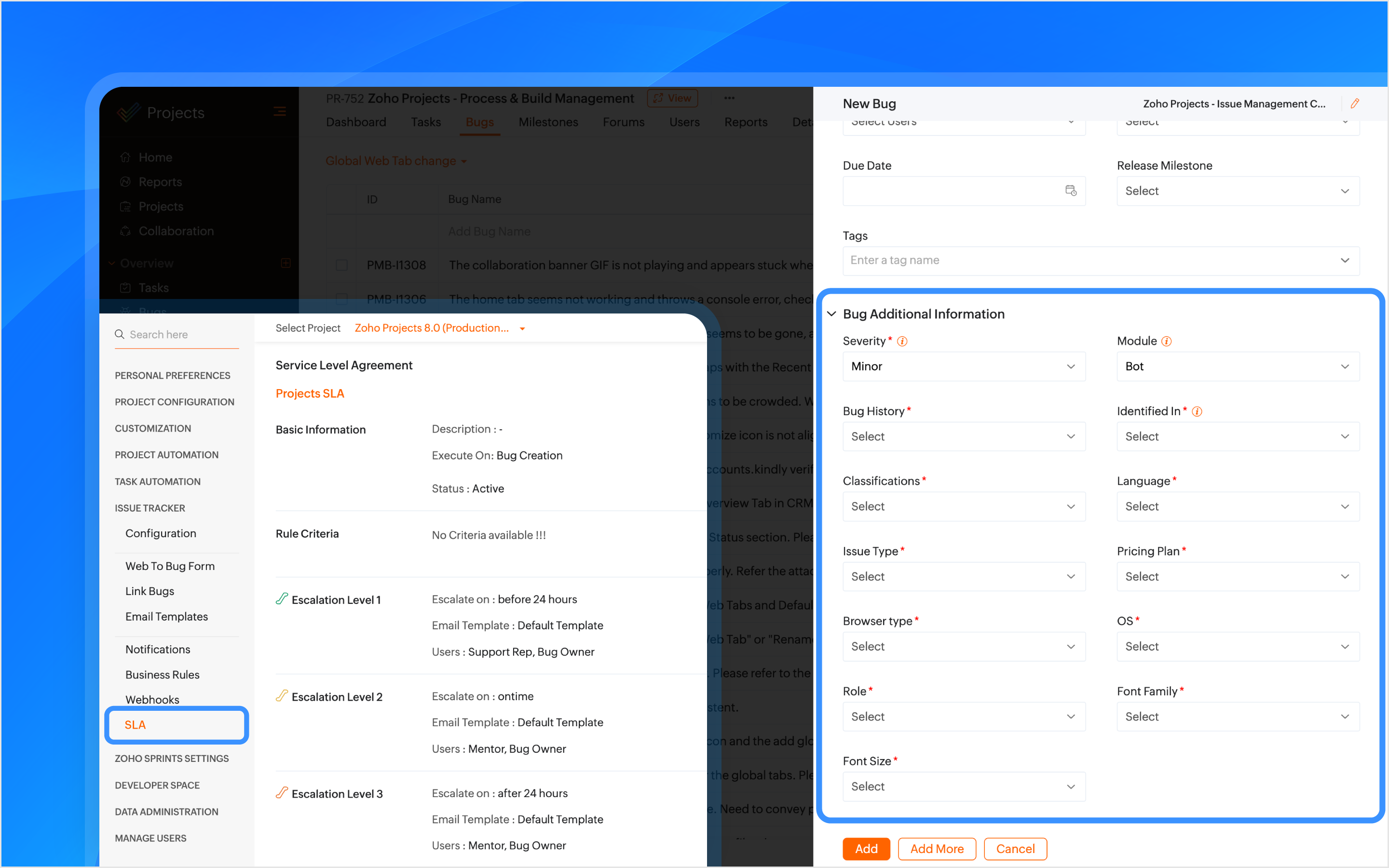
SLAs Based on Issue Type
SLAs are configured based on the issue type, such as Support, Security, Privacy, or Performance, to set resolution deadlines. If the issue is categorized as one of these types, the SLA triggers a resolution within 24 hours. If the issue remains unresolved, it escalates through Levels 1–4.
How Other Industries Can Use SLAs In This Process:
Construction: Set SLAs to resolve critical issues like safety violations or structural failures quickly.
Manufacturing: Set SLAs for issues like production line stoppages to minimize downtime.
Automate Assigning Issues
A tag is created using the feature name and is associated with the issue when it is submitted. Business rules are created using the tags as criteria to automatically assign the issue to the relevant developers, designers, managers, and project managers (PMs).
How Other Industries Can Use Tags In This Process:
Construction: Automatically assign issues using the issue type as tags, such as plumbing or electrical, to the appropriate contractors or subcontractors.
Manufacturing: Use tags like machinery or production to assign issues to maintenance teams or shift managers automatically.
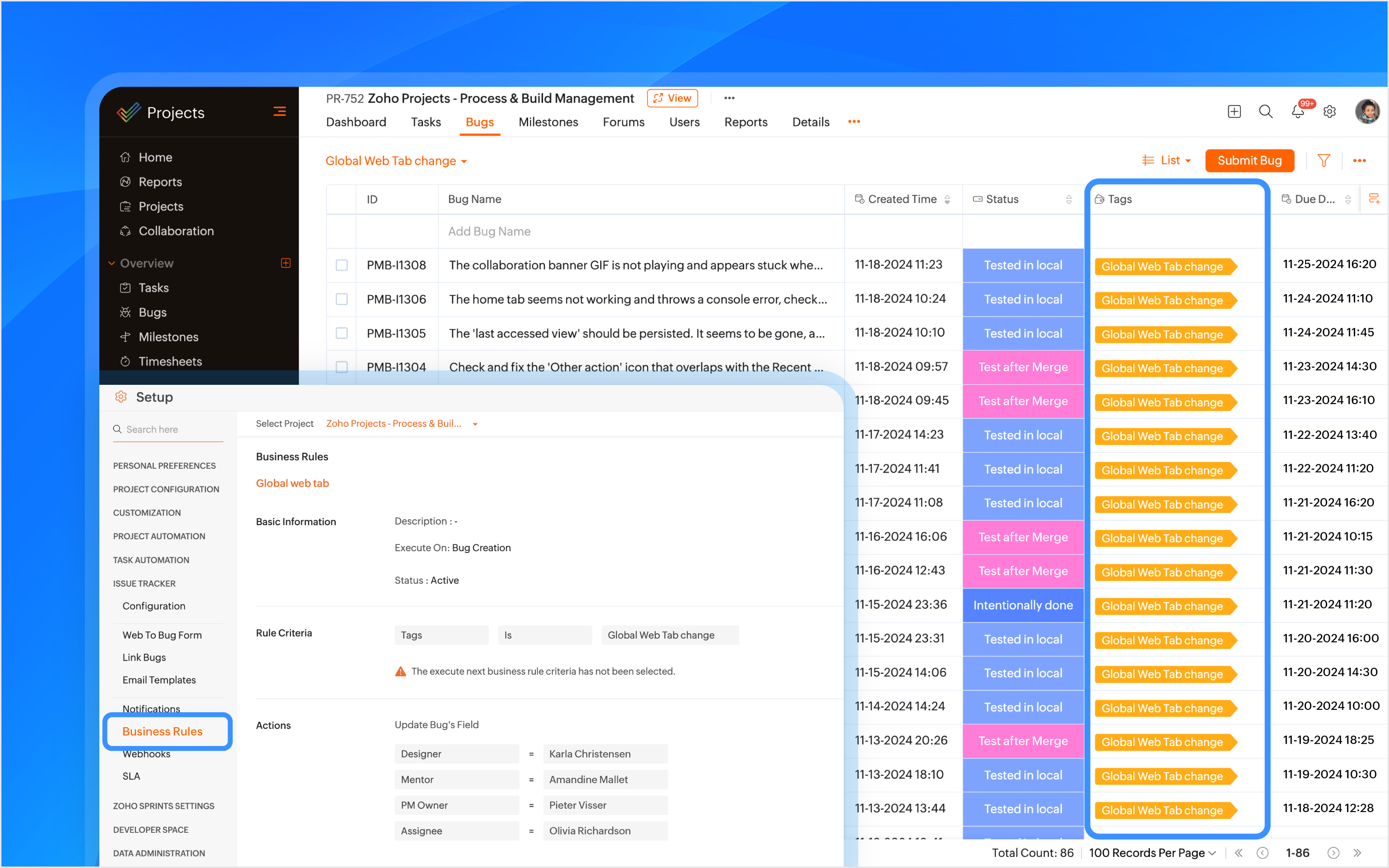
Bulk Update Issues
A custom view is created to track and bulk update all issues related to the feature using the tag as a criteria.
How Other Industries Can Use Custom Views In This Process:
Construction: Create custom views to track and update issues related to electrical work.
Manufacturing: Create custom views to track and update production-related issues.

Manage Duplicate Issues
If a duplicate issue is submitted, the developer can link it to the original issue using the is duplicate of link type for identification. A custom function is created to ensure that duplicate issues are closed only when the original issue is closed ensuring no redundancy in the issue tracking process.
How Other Industries Can Use Link Issues In This Process:
Construction: Link duplicate issues like multiple reports of the same electrical fault.
Manufacturing: Link duplicate maintenance issues to the original issue to ensure a single resolution.

Associate Tasks to Issues
The Global Web Tab task is associated with the issue, allowing both the development and QA teams to monitor the progress of the work item from a single place. When a tester opens the task, they can view all associated issues, and when opening an issue, they can easily track the associated task.
How Other Industries Can Use Task Association In This Process:
Construction: Associate tasks like Foundation to issues like Cracked Foundation for easy tracking.
Manufacturing: Associate maintenance tasks to machinery issues to track progress.
Automating Status Updates
A custom function is created to automate the update of issue statuses. when the tester updates the task status to Started Testing, the associated issue status is automatically updated to In QA Process. Similarly, when a developer resolves the issue and updates the task status to Resubmit for QA, the associated issue status is updated to To be tested. Issue Tracker Notifications are used to send notifications to all team members to keep everyone informed about such status updates.
How Other Industries Can Use Custom Functions In This Process:
Construction: When the Electrical Safety Check issue status is updated to Passed, the associated task, such as Wiring Installation, will automatically update its status to Inspection Complete.
Manufacturing: When the Material Shortage issue is updated to Resolved, the task status for Electrical Installation will automatically update to Work Completed.
Automate Adding Followers
Sometimes issues need further validation before they are resolved. Developers can update the issue status, such as Intentionally Done or Discuss with the PM. Business rules are created to automatically add relevant product managers (PMs) and other team members as followers with such statuses as criteria. This ensures that decisions are validated and any necessary inputs are added through comments before moving forward.
How Other Industries Can Use Business Rules In This Process:
Construction: Automate adding followers to validate electrical safety checks or structural issues before moving forward.
Manufacturing: Automate adding followers to validate machine repair statuses before completing maintenance tasks.
Checklist for Testers
Once the feature is reviewed and tested, the Checklist Extension is used for the associated task. The tester is required to complete a predefined checklist within the task to verify that all relevant testing scenarios have been covered. This checklist ensures that no critical testing aspects are missed.
How Other Industries Can Use Checklist Extension In This Process:
Construction: Use checklist to create a punch list to ensure all inspections, tests, and final verifications are completed before a task issue is marked as completed.
Manufacturing: Create a compliance checklist to ensure product assembly and quality control steps are completed before a task issue is marked as completed.
Note: Checklist extension can be used for both tasks and issues.

Resolve Issues
Upon resolving the issue, the developer can resolve the issue from the issue details page with the context.
Custom Notifications
Custom email templates in Issue Tracker Notifications are used to automate communication. Developers and the relevant team members are automatically notified about reopened issues. This helps prevent delays in the project.
How Other Industries Can Use Email Templates In This Process:
Construction: Create customized email template and use it in issue tracker notifications for critical issues like safety violation when reopened.
Manufacturing: Create customized email template and use it in issue tracker notifications for maintenance issues when reopened.
Features used in the process: Issue Layouts, SLAs, Tags, Business Rules, Issue Tracker Notifications, Link Issues, Custom Function, Checklist Extension, and Email Templates.
Topic Participants
Navya Nune
frankn66
François
Monica P
Sticky Posts
Introducing the Zoho Projects Learning Space
Every product has its learning curve, and sometimes having a guided path makes the learning experience smoother. With that goal, we introduce a dedicated learning space for Zoho Projects, a platform where you can explore lessons, learn at your own pace,Update on V2 API End-of-Life Timeline
Dear Users, Earlier this year, we shared the launch of the V3 APIs and requested users to migrate from the older V2 APIs by December 2025. We have received valuable feedback from our users and partners regarding their migration timelines. We are happyAutomation Series: Auto-update Phase Status
Hello Folks! You can auto-update your phase's status based on status of underlying tasks using custom functions. In this series, we will showcase how to create and run custom functions, using Deluge, with ease. Follow the steps below and automate yourAutomate Timesheet Approvals with Multi-level Approval Rules
Introducing Approval Rules for Timesheets in Zoho Projects. With this automation, teams can manage how timesheets are reviewed and approved by setting up rules with criteria and assigning approvers to handle submissions. Timesheet, when associated toAccessibility Spotlight Series - 1
Every user interacts with products differently, what feels intuitive to one may be challenging for another. Addressing this, accessibility is built into Zoho Project's design philosophy. This helps users navigate and perform actions with ease irrespective
Recent Topics
Customer Management: #2 Organize Customers to Enhance Efficiency
When Ankit started his digital services firm, things felt simple. A client would call, ask for a website or a one-time consultation, Ankit would send an invoice, get paid, and move on. "Just one client, one invoice. Easy.", he thought. Fast forward aZoho Mail and Zoho Flow integration to automatically create ToDo tasks from outbound emails
How do i setup Zoho Mail and Zoho Flow integration to automatically create ToDo tasks from outbound emailsAttachments between Zoho and Clickup, using Flow.
Olá suporte Flow, tudo bem ? Estamos usando o flow para integrar Zoho Desk com o clickup. Não localizamos a opção de integrar anexos entre do zoho Desk para o clickup. Gostaríamos de saber se migrando para o plano pago, teremos suporte para fazer a integraçãoAdding an Account on Zoho Mail Trigger in Zoho Flow
I'm trying to create a flow using the zoho mail trigger "Email Receive". My problem is that when I select this trigger, it only shows one account from the account dropdown. I'm planning to assign it on a different email. How can I add other email adLinnworks
Unless I am missing something, the Linnworks integration is very basic and limited. I have reached out to support but the first response was completely useless and trying to get a reply in a timely manner is very difficult. Surely I should be able toTest data won't load
I am using a Flow to receive orders from WooCommerce and add them to a Zoho Creator app. I recently received an order which failed, and when attempting to test the order I found that it just shows a loading animation and shows up in the history as "queued."AddHour resets the time to 00:00:00 before adding the hour.
Based on the documentation here: https://www.zoho.com/deluge/help/functions/datetime/addhour.html Here's my custom function: string ConvertDateFormat(string inputDate) { // Extract only the date-time part (before the timezone) dateTimePart = inputDate.subString(0,19);WhatsApp Link is not integrating
Hello, I am using zoho flow. when new row added in google sheet it sends email to respected person. In email body I have a text "Share via WhatsApp". behind this text I putted a link. But when the recipient receives email and wants to share my given infoZoho flow - Webhook
If I choose an app as a trigger in Zoho Flow, is it still possible to add a webhook later in the same flow?Zoho Flow + Bigin + Shopify
We are testing Zoho Flow for the first time and want to create a flow based in first purchases. When a client makes his first order, we're going to add the "primeiracompra" (first order) tag to his account in Shopify (it's not efficient, but that's theIs it The Flow? Or is it me?
I want to do some basic level stuff, take two fields from a webhook, create a zsheet from a template using one field with date appended, create a folder using both fields as the name, and put the zsheet into that folder. I was going to elaborate - butHaving problem with data transferring from Google sheet to ZMA
When connecting Google sheet with Zoho marketing automation it is having the email as a mandatory field. Can I change it as non-mandatory field or is there any other way to trasnfer data from google sheet to ZMA. I have leads which we get from whatsapp,Dropbox to Workdrive synchronisation
I want to get all the files and folders from Dropbox to Workdrive and each time a new file or folder is added in dropbox i want it to be available in Workdrive and wise versa. Sync Updates to Files Trigger: "File updated" (Dropbox). Action: "Upload file"Microsoft Planner Task to Service Desk Plus Request - error n4001
Hi there. I'm trying to create a flow that will create a new request in ServiceDesk Plus when a new task is created in Microsoft Planner. I have succesfully connected both Planner and ServiceDesk Plus, and have configured the 'create request' sectionTrailing Space in "Date and time scheduled "
I am trying to use the Zoho Projects - Create event action in a flow. It is failing with the output error as: "Action did not execute successfully due to an unknown error. Contact support for more details." The input is: { "Duration - Minutes": 30, "Project":Project name by deal name; project creation via flow
Hello, I want to create a project in zoho projects using flow by a trigger at the crm. My trigger is the update of a deal (stage). The project name should be the account name/ deal name. But I dont find the solution to it. Can you please give me the answerSlack / Zoho Flow; Repl
I am trying to add a comment in a zoho ticket when someone reply's to a message in a thread. The Message posted to public channel trigger doesn't seem to pick up thread messages. I also cannot use the thread_ts field as it doesn't seem to pull that in.Get Holiday ready with Zoho Mail's Templates
As the holiday season approaches, it’s time to step away from work and unwind. You may not be able to respond to every email or send individual messages to wish everyone holidays greetings—but It is still important to stay connected. How do you send thoughtfulCustomize folder permissions in a Team Folder in a Team Folder via zoho Flow
HI All, on the nth level folder of a team folder I would like to Customize folder permissions when it's created in the flow of Creating folders. That last level I only want to grant access to a specific group, goup ID 201XXXXXXXX. Can you help with aAssociating a Candidate to a Job Listing
Hello, I am trying to use Zoho Forms embedded on my website for candidates to apply for a job opening. I want the form then to tie directly with zoho recruit and have the candidate be automatically inputed into Recruit as well as associated with the specificAutomate reminder emails for events
Hi team, I am trying to automate send event reminders via zoho campaign to my attendees 1 day prior to my scheduled events. I used zoho flow, autoresponder in zoho campaign, as well as I used workflow and automation - but none of these methods are working.Update related module entry Zoho Flow not working with custom module ?
Hi everyone. I am facing an issue here on Zoho Flow. Basically what I am doing is checking when a module entry is being filled in with an Event ID. Event is a custom module that I created. If the field is being filled in I fetch the contact with its IDHow to disable time log on / time log off
Hi We use zoho people just to manage our HR Collaborators. We don't need that each persona check in and out the time tracker. How to disable from the screen that ?Dealing With One-Time Customers on Zoho Books
Hello there! I am trying to figure out a way to handle One-Time customers without having to create multiple accounts for every single one on Zoho Books. I understand that I can create a placeholder account called "Walk-In Customer", for example, but IZoho Flow - Add to Google Calendar from trigger in Zoho Creator App
Hello! New to Zoho Flow, but I believe I have everything setup the way it should be however getting an error saying "Google Calendar says "Bad Request". Any idea where I should start looking? Essentially some background: Zoho Creator app has a triggerEmail authentication
أريد التحقق من البريد الإلكترونيWhat’s New in Zoho Analytics – December 2025
December is a special time of the year to celebrate progress, reflect on what we have achieved, and prepare for what’s ahead! As we wrap up the year, this month’s updates focus on refining experiences, strengthening analytics workflows, and setting theMarketing Tip #12: Earn trust with payment badges and clear policies
Online shoppers want to know they can trust your store. Displaying trust signals such as SSL-secure payment badges, return and refund policies, and verified reviews shows visitors that your store is reliable. These visual cues can turn hesitation intoThe improved portal experience: Introducing the template view for inventory modules, enhanced configurations, and PDF export support
Availability: Open for all DCs. Editions: All Hello everyone, You can now achieve a seamless, brand-aligned portal experience with our enhanced configuration options and the new template view for inventory modules. Your clients will now be able to viewZoho Analytics Bulk Api Import json Data
HI, I’m trying to bulk-update rows in Zoho Analytics, and below are the request and response details. I’d like to understand the required parameters for constructing a bulk API request to import or update data in a table using Deluge. Any guidance onProject Management Bulletin: December, 2025
The holiday cheer is in the air and it’s time to reflect on the year that was. At Zoho PM Suite, we've been working behind the scenes on something huge and exciting all year and now we are almost ready—with just a bit of confetti—for our grand releaseInventory batch details
Hi there, I'm trying to get the batch details of an item, here's what I've done so far. I've sent cUrl request to the below endpoint and I get a successful response. Within in the response I find the "warehouses" property which correctly lists all theAuto check out after shift complete
i'm just stuck here right now, i wanna know how to do this thing, now tell me, how can i configure a custom function that runs after complete shift time if employee forget to check-out ?How to create a flow that creates tickets automaticaly everyday based on specific times
Hi guys Does anyone know how to create a flow that will create tickets automaticaly in ZOHO Desk when a certain time is reached. Im havin a hard time configuring a flow that will create tickets automaticaly everyday during specific hours of the day ForZOHO FLOW - ZOHO CREATOR - ZOHO WRITER : Get Related records
Bonjour, J'ai besoin que vous m'ajoutiez la solution "Get related Records" dans la liste de choix de zoho creator (sous Zoho flow). En effet, j'ai besoin de récupérer les champs d'un sous formulaire pour l'ajouter à l'impression de mon document. MerWill zoho thrive be integrated with Zoho Books?
titleConnecting email for each department in ZohoDesk
Hi! Could someone help me to go through connecting emails for each department?How do I trigger a Flow based on a campaign response?
Is there a way to trgiider a Zoho Flow based upon a lead opening an email sent via Zoho Campaigns? I see that the data is recorded in the 'Campaigns' section of Zoho CRM under 'Member Status' and I want to trgigger a flow based upon that record changing.All Zoho Flows are filtered
My two flows operate perfectly when I run them as a test, but when they're activated each run ends with a status of neither success, nor fail, but filtered. I haven't set up any filters. I don't see where to turn off filters. When I test run on a sequenceCreating Multiple Items on Sales Order
Hi, I’m trying to automate some processes using Zoho Flow, specifically the creation of sales orders in my Zoho Inventory. However, Zoho Flow's Create Sales Order function can only add one item. I would like to include multiple items in a single salesNext Page