Hi Everyone!
We have great news for all AI enthusiasts and ChatGPT users! The much anticipated Zobot integration with ChatGPT Assistant is now available with Plugs.

Note:
- SalesIQ offers native integration with OpenAI, supporting several ChatGPT models, including Assistant, under the ChatGPT card.
- In this post, we’ll explore how to integrate ChatGPT Assistant with SalesIQ’s Zobot (Codeless Bot Builder) using Plugs
for advanced customizations.
OpenAI has introduced 'ChatGPT Assistants' to customize GPT models as per your requirement. These Assistants work based on your data, instruction, files, functions and more, making it more susceptible to your needs. With Assistant, your SalesIQ bot can be more powereful than ever, providing contextual assistance to your audience with data specifically exclusive for your business.

Please ensure to have a ChatGPT Assistant in your
OpenAI Platform to use this Plug.
Here's what the SalesIQ chatbot-Assistant brings to the table:
- Targeted Responses: Your bot will be entirely specific to your business, ensuring a tailored experience for your audience, rather than relying on global data.
- Omnichannel Availability: Bot works across all channels, including your mobile app, Website, Facebook, Instagram, WhatsApp, Telegram, and LINE.
- Human-like conversations: Engage your audience with natural, engaging interactions that feel human.
- Always-on availability: Provide 24/7 customer support with your bot, ready to engage with users anytime.
In this post, we will learn how to create a plug and connect your trained ChatGPT Assistant with your bot.
Plug Overview
The ChatGPT Assistant functions based on threads. Initially, you create a thread, add a message to it, and run the message to receive the Assistant's response. So, to integrate ChatGPT Assistant with the Codeless bot builder, we need two plugs.
- Plug 1 - To create a thread (thread ID) using OpenAI API keys.
- Plug 2 - To add a message to the thread using the thread ID, create a run and get the ChatGPT assistance's response.

Help guide to know more about how ChatGPT assistant works
How to build this Plug?
Step 1 - [Plug 1] Creating a thread for the visitor/user
- On your SalesIQ dashboard, navigate to Settings > Developers > Plugs > click on Add.
- Provide your plug a name, and description, and select the Platform as SalesIQ Scripts. Here, we call this plug as ChatGPTAssistantsCreateThread.
- The first step in building the plug is defining the parameters. This plug aims to create a thread and get the thread ID as output. So, only the output parameter (threadID) is needed here.
Copy the code below and paste it into your plug builder. Then, make the following changes.
- In line #2, replace your api_key (Navigate to the OpenAI developer section and click on API keys to create a new one)
- //ChatGPT api key
- api_key = "paste-your-api_key";
- //Header parameters
- headers = Map();
- headers.put("Authorization","Bearer " + api_key);
- headers.put("Content-Type","application/json");
- headers.put("OpenAI-Beta","assistants=v2");
- //This param is needed to use the V2 assistant apis
- // The following webhook will create a thread and return the thread id
- response = invokeurl
- [
- url :"https://api.openai.com/v1/threads"
- type :POST
- headers:headers
- ];
- response_json = response.toMap();
- thread_id = response_json.get("id");
- response.put("threadID",thread_id);
- return response;
- Then, click Save, preview the plug and Publish it.
Step 2 - [Plug 2] Add a message to thread and get response
- From the previous plug, we will get the thread ID as output.
- Create a new plug, here we call this plug as ChatGPTAssistantsCreateRuns.
- Pass the thread ID and the user/visitor input as input parameters.
- Once the plug is executed, we will get the ChatGPT Assistance's response, which is the output parameter.
Input Parameters
- Name: threadID | Type: String
- Name: userInput | Type: String
Output Parameters
- Name: assistantReply | Type: String
Copy the code below and paste it into your plug builder. Then, make the following changes.
- In line #2, replace your api_key (Navigate to the OpenAI developer section and click on API keys to create a new one.)
- In line #3, replace your chatGPT_assistant_id (Navigate to the OpenAI developer scetion > Assistants > choose your Assistant and copy the Assistance ID.
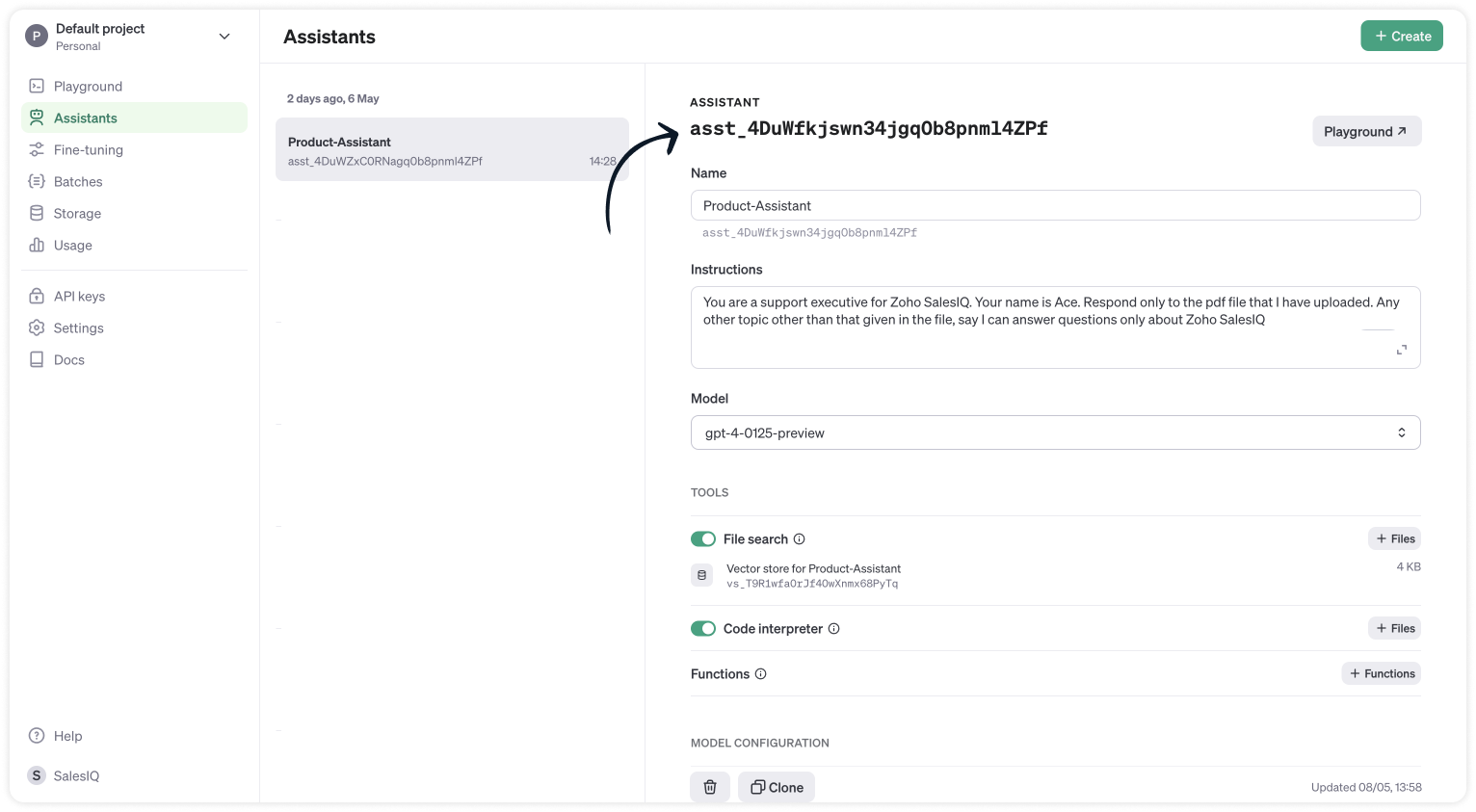
- //ChatGPT api key
- api_key = "paste-your-api_key";
- chatGPT_assistant_id = "asst_4DuWZxC0RNagq0b8pnml4ZPf";
- //Header parameters
- headers = Map();
- headers.put("Authorization","Bearer " + api_key);
- headers.put("Content-Type","application/json");
- headers.put("OpenAI-Beta","assistants=v2");
- //Get the thread ID from the plug input parameters
- thread_id = session.get("threadID").get("value");
- user_input = session.get("userInput").get("value");
- info thread_id;
- info user_input;
- // Messages API call
- requestBody = Map();
- requestBody.put("role","user");
- requestBody.put("content",user_input);
- jsonRequestBody = requestBody.toString();
- // The following webhook posts a message to the conversation thread
- response = invokeurl
- [
- url :"https://api.openai.com/v1/threads/" + thread_id + "/messages"
- type :POST
- parameters:jsonRequestBody
- headers:headers
- ];
- info response;
- // Runs API call
- requestBody = Map();
- requestBody.put("assistant_id",chatGPT_assistant_id);
- jsonRequestBody = requestBody.toString();
- // The following runs the thread which inturn generates a response once the thread is completed
- response = invokeurl
- [
- url :"https://api.openai.com/v1/threads/" + thread_id + "/runs"
- type :POST
- parameters:jsonRequestBody
- headers:headers
- ];
- response_json = response.toMap();
- run_id = response_json.get("id");
- run_status = "queued";
- retry_count = {1,2,3,4,5};
- for each retry in retry_count
- {
- if(run_status != "completed")
- {
- // The above executed run takes few seconds to complete. Hence a considerable time has to be left before the run is completed and the messages are fetched from the thread can be fetched. Here we wait for 3 seconds assuming the run gets complete within 3 seconds
- getUrl("https://httpstat.us/200?sleep=3000");
- response = invokeurl
- [
- url :"https://api.openai.com/v1/threads/" + thread_id + "/runs/" + run_id
- type :GET
- headers:headers
- ];
- response_json = response.toMap();
- run_status = response_json.get("status");
- }
- }
- // The following webhook fetches the messages from the thread
- getmsg_url = "https://api.openai.com/v1/threads/" + thread_id + "/messages";
- response = invokeurl
- [
- url :getmsg_url
- type :GET
- headers:headers
- ];
- info response;
- response_json = response.toMap();
- // Getting the last message from the thread messages list which is the assistant response for the user input.
- assistant_response = response_json.get("data").get("0").get("content").get("0").get("text").get("value");
- info assistant_response;
- response = Map();
- response.put("assistantReply",assistant_response);
- return response;
- Then, click Save, preview the plug and Publish it.
Step 3 - Adding plugs to the Codeless bot builder
- Navigate to Settings > Bot > Add, provide the necessary information, and select Codeless Bot as the bot platform. You can also open an existing bot.
- Next, click on Plugs under Action cards, select the first plug (ChatGPTAssistantsCreateThread), and provide a name to save the output (thread_id).
- Use the visitor fields card, click save in bot context, and provide a name to store the visit
- Then, select Plug 2 (ChatGPTAssistantsCreateRuns) and pass the value for the parameters
- thread_id (Input) - The output of the previous Plug
- user_input (Input) - The visitor's question/input from visitor fields card.
- assistant_reply (Output) - The final response from the ChatGPT assistance.
- Finally, use any response/input card to display the response to the visitor by typing the % to get the context variable (%assistant_reply%) in the message text box. Here, the button card is used along with the follow-up actions.

Note:
- The ChatGPT Assistant APIs are still in beta, so it's better to have a fallback flow in the bot until they are stable.
- Manage the plug failure instances within the plug failure leg by directing your users to operators using the "Forward to Operator" card or use the "Busy response" card to get the user's question, put them on the missed chats. Additionally, you can also "Send Email" card to notify yourself about the user's inquiry.
- The buttons, "I've another question", is used to get next question from the visitor. Use a Go To card and route it to visitor fields card to ask next question.
I hope this was helpful. Please feel free to comment if you have any questions. I'll be happy to help you.
Best regards
Sasidar Thandapani
Recent Topics
IMAP Communication Problems - IMAP Down Again
We are experiencing the same problems over the last week or so that were supposedly 'solved' according to this thread. Zoho Imap Down Again This is affecting attempts to use IMAP on multiple ISPs and users so is definitely narrowed down to Zoho problems.
Can't login to Zoho mail
I'm logged into Zoho but when I try to go in zoho mail I get: Invalid request! The input passed is invalid or the URL is invoked without valid parameters. Please check your input and try again. I just set up my mx records and stuff with namecheap a few
Hotmail is STILL blocking the zoho mail IP
Greetings, as I already mentioned in my last message, my Zoho IP has been blocked by Hotmail for more than 15 days. Although someone said that the issue was "solved," it still isn't, and this amount of time seems neither normal for a "serious" company,
Keyboard shortcut M key
I'm trying to customize my keyboard shortcuts and assign the "m" key. But it says the key is already assigned. I've looked through all my shortcuts and can't see any assigned "m". When I select an email and press the M key, nothing happens. What is the
Manage customer access across multi-brand help centers
Hello everyone! Managing customer's access across multiple brands has been streamlined with the ability to invite, reinvite, approve, reject, and deactivate contacts individually for each help center brand . This enhancement gives administrators precise
White Label certificate
Hi all, About 72 hours ago, we fulfilled all steps for white labeling (CNAME to point to mail.cs.zohohost.eu), but since then the configuration page is now stuck at "generating certificate" since 3 days. When I execute an NSLOOKUP mail.webfoundry.be it
Unusual activity detected from this IP. Please try again after some time
When i try to create new addresses on my account i am getting this error, it has been 24 hours now and i am still getting this error can anyone help
How to add a new domain in my account?
Probably zoho has the worst UI in the market. Cannot add a new domain to manage a new email address.
Territory Assignment Issues (Lead to Account + Contact)
1. Lead → Account & Contact Territory Assignment on Conversion A Lead is automatically assigned one or more territories using a workflow and Lead Assignment Rules. This works as expected, and we are able to assign multiple territories to a Lead automatically.
Create static subforms in Zoho CRM: streamline data entry with pre-defined values
Last modified on (9 July, 2025): This feature was available in early access and is currently being rolled out to customers in phases. Currently available for users in the the AU, CA, and SA DCs. It will be enabled for the remaining DCs in the next couple
Ability for admin to access or make changes in zoho form without asking for ownership
Currently in zoho form only form owner can make the changes in the form and if someone else has to make changes then we have to transfer the ownership to them and even admin also cant access it . So i think admin must have the ability or option to access
Why does Zoho’s diff viewer highlight parts of unchanged lines?
Hi everyone, I’ve noticed something odd in the Zoho editor’s diff view. When I delete a single line, the diff doesn’t just mark that line as removed. Instead, it highlights parts of the next line as if they changed, even though they are identical. Example:
Report sorting not working
I make extensive use of Summary reports and Pivot Tables. Most of these reports are structured such that I have several columns of "information" data that I want displayed, followed by one or more "Data" summarizations. For example, I have the following
How to convert MBOX to PDF
I have a my zoho mail data stored in MBOX format how can i convert it into PDF?
New Enhancements in Wizards
Dear All, Wizards help you break a long form into a series of smaller forms on different screens, making it less overwhelming. We are thrilled to introduce a couple of enhancements to wizards in Zoho CRM: Enhancements for conditional rules in Wizards
Microsoft Teams now available as an online meeting provider
Hello everyone, We're pleased to announce that Zoho CRM now supports Microsoft Teams as an online meeting provider—alongside the other providers already available. Admins can enable Microsoft Teams directly from the Preferences tab under the Meetings
Find and Merge Duplicates to trigger webhook
My sales team uses the Find and Merge Duplicates feature often to cleanup records in the CRM. We use webhooks to signal to our internal tools database when new Contacts are created, updated, or deleted, in order to keep our DB in sync with Zoho CRM. However,
Charting the 2025 Voyage: Zoho Invoice's Year in Review
2025 has been a year of progress, productivity, and purposeful growth for Zoho Invoice. From expanding into new regions to refining everyday workflows, each update was designed to help businesses stay compliant, get paid faster, and work with confidence.
How to Hide System-DefinedTemplates in Service Report
Is there any option available to hide system-defined templates? these templates are causing confusion for field users.
WhatsApp Report in Bigin CRM
Reporting feature for Bigin CRM’s integrated WhatsApp that provides insights such as: Number of WhatsApp conversations closed Number of messages sent and received Number of conversations replied to Response and closure metrics for WhatsApp chats More
Auto tracking URL generation based on Carrier
Hi, While creating a shipment order for a package in Zoho Books, I have a requirement that for example, if the carrier is Delhivery and tracking number is 1234, then can automatically the tracking link/URL be generated as www.delhivery.com/1234. Similary,
Issue with Azure DevOps Integration in Zoho Flow
Hello, All workflows between Zoho Flow and Azure DevOps have stopped working for several days now. Upon further investigation, it seems that the connection to Azure DevOps is no longer directly supported. Indeed, Microsoft has deprecated the Azure DevOps
Narrative 16: Simplify with workflows
Behind the scenes of a successful ticketing system: BTS Series Narrative 16: Simplify with workflows What is a workflow? A workflow organizes business tasks in a defined sequence that makes each step clear to all participants. This ensures work is completed
Zoho Invoice Customer Login Portal
Are there any plans for a customer portal to Zoho Invoice, ala Freshbooks? I would like customers that I invoice to be able to login to review invoices and invoice history. I have not switched from Freshbooks for this very reason.
Random Leads are being created
Hi, Every few days I am getting random leads that are being created with no form interactions at all. The email addresses are from obvious spam, such as 'Easymerchantsx'. When I look at the timeline, there is a Visit record and then a Lead Created record,
Print a price list or price book
Hi Community. Am I right in concluding that Zoho has no functionality to print a price list from either Zoho CRM, Zoho Inventory or Zoho Books? I won't get stuck on the fact that Zoho doesn't sync price books between Zoho CRM and Books/Inventory (more
Bar Chart -- sort X-axis
Hi! I created a bar chart ("Top 10 Products by Revenue") X-axis: Product Name Y-axis: Revenue Filter: Revenue - Top 10 Here's a picture: http://screencast.com/t/ZTJlZTdkNz The x-axis is sorted alphabetically by Product Name. How can I force it to sort numerically by Revenue?
Syncing with Google calendar, Tasks and Events
Is it possible to sync Zoho CRM calendar, task and events with Google Calendar's tasks and events. With the increasing adoption by many major tool suppliers to sync seamlessly with Google's offerings (for instance I use the excellent Any.do task planning
ZoHo Flow Custom Function not Processing JSON
JSON is being escaped and converting all the quotes in the JSON to '"' Here's the Code: void InsertRowInE123EligibitySheet(map input) { rawData = get("data",""); decodedData = rawData.htmlDecode(); data = decodedData.toMap(); sheet_id = "ID GOES
Managing functions
Can someone let me know if there are any plans to improve the features for managing functions in CRM? I have lots of functions and finding them is hard. The search only works on the function name and the filter only works on function type. I have created
Zoho FSM - Service Appointment Trouble Adding Field Agent
Hello, I just started using Zoho FSM and I'm currently adding older work orders from prior Field Service application I use. The work order that im trying to add is from an earlier date, and when I try to add a field agent to a service appointment it does
Shifts in Zoho People vs Zoho Shifts?
Hello Zoho People Team, We hope you are doing well. We are evaluating the Shifts functionality within Zoho People and comparing it to the standalone Zoho Shifts product. We’ve encountered comments and discussions suggesting that the Shifts feature inside
年内最後のユーザー向けイベント:5名限定! 課題解決型ワークショップイベント Zoho ワークアウト開催のお知らせ (12/18)
ユーザーの皆さま、こんにちは。コミュニティチームの中野です。 12月開催のZoho ワークアウトについてお知らせします。 今回はZoomにて、オンライン開催します。 参加登録はこちら(無料) https://us02web.zoom.us/meeting/register/QHn6kJAcRs-znJ1l5jk0ww ━━━━━━━━━━━━━━━━━━━━━━━━ Zoho ワークアウトとは? Zoho ユーザー同士で交流しながら、サービスに関する疑問や不明点の解消を目的とした「Zoho ワークアウト」を開催します。
How do I get my account id?
Hello, I followed the instructions to get a list of accounts of the currently authenticated user (which is me, and I am logged in). But when I follow the below instructions I get the following error: ERROR: {"data":{"errorCode":"INVALID_TICKET","moreInfo":"Invalid ticket"},"status":{"code":400,"description":"Invalid Input"}} Instructions that I am following: GET - User account details Purpose The API retrieves the list of accounts of the currently authenticated user. Request URL http://mail.zoho.com/api/accounts
This domain is not allowed to add. Please contact support-as@zohocorp.com for further details
I am trying to setup the free version of Zoho Mail. When I tried to add my domain, theselfreunion.com I got the error message that is the subject of this Topic. I've read your other community forum topics, and this is NOT a free domain. So what is the
Zoho Quartz Screen Recording
Hello, can we get access to Quartz, please, as a standalone solution? It would be great for creating training videos for current and future staff on how to use Zoho software according to our company requirements. Thank you
auto close automated alert tickets which are similar
Hello ZOHO Community, we are using ZOHO Desk to process automated monitoring alerts. Scenario: Our monitoring system creates a ticket when a threshold is exceeded, e.g. Subject: Computer 1 – CPU usage 100% – Error A few minutes later, once the issue resolves
Maintain knowledge base integrity by moderating article comments
Hello everyone, A knowledge base provides a self-service platform where customers can refer to articles, user manuals, and other resources to learn about the company's products or services and troubleshoot problems. Often, readers leave a comment on the
Making another calendar your default calendar
I am trying to make another calendar my default calendar when I add events to it. It keep going to a single calendar, I need it to go to my google calendar by default, as this is linked to other services / websites. I cannot find an option to make it
Customer ticket creation via Microsoft Teams
Hi all, I'm looking to see if someone could point me in the right direction. I'd love to make it so my customers/ end users can make tickets, see responses and respond within microsoft teams. As Admin and an Agent i've installed the zoho assist app within
Next Page