Announcing new features in Trident for Windows (v.1.26.5.0)
Hello Community,
Trident for Windows is here with exciting new features to elevate your email communication and enhance productivity. Let’s dive into what’s new!
Open .eml files in Trident.
You can now open .eml files directly using Trident. This makes it easy to access email content stored locally on your system.
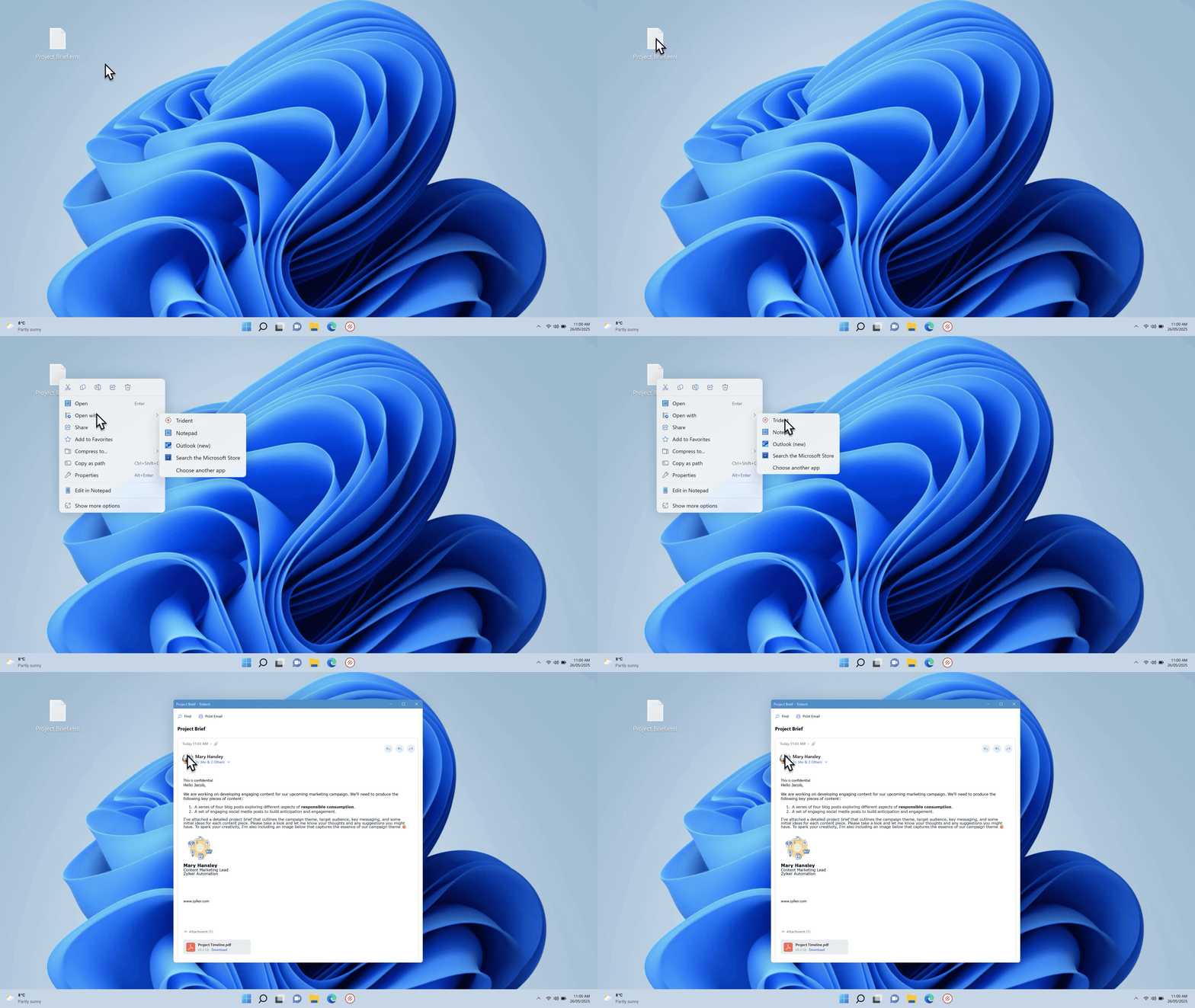
You can now open .eml files directly using Trident. This makes it easy to access email content stored locally on your system.
Switch between light and dark modes in email detail view.
In addition to the Dark, Light, and System themes available in Trident's customization options, you now view the email detail in Light and Dark modes without changing the app's Dark theme.

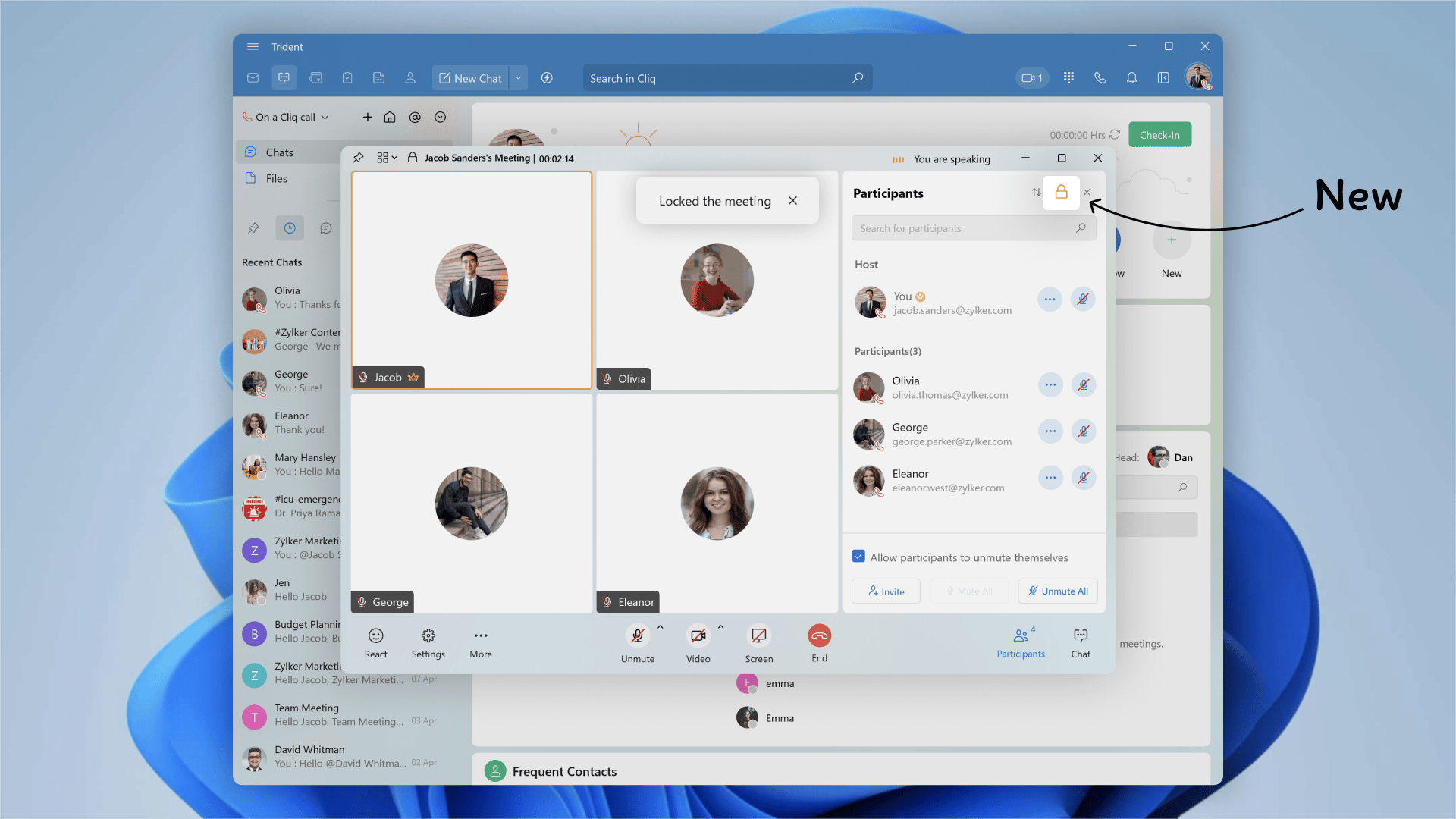
Host locked meetings for private conversations.
The host and co-host of audio and video meetings can now lock an ongoing meeting. This prevents unauthorized persons from joining the meeting, allowing you to host truly private and secure meetings.
Search within conversations.
You can now search for messages, files, and more right the within the chatbox. Quickly find the information you need from within channels, groups, and personal chats.

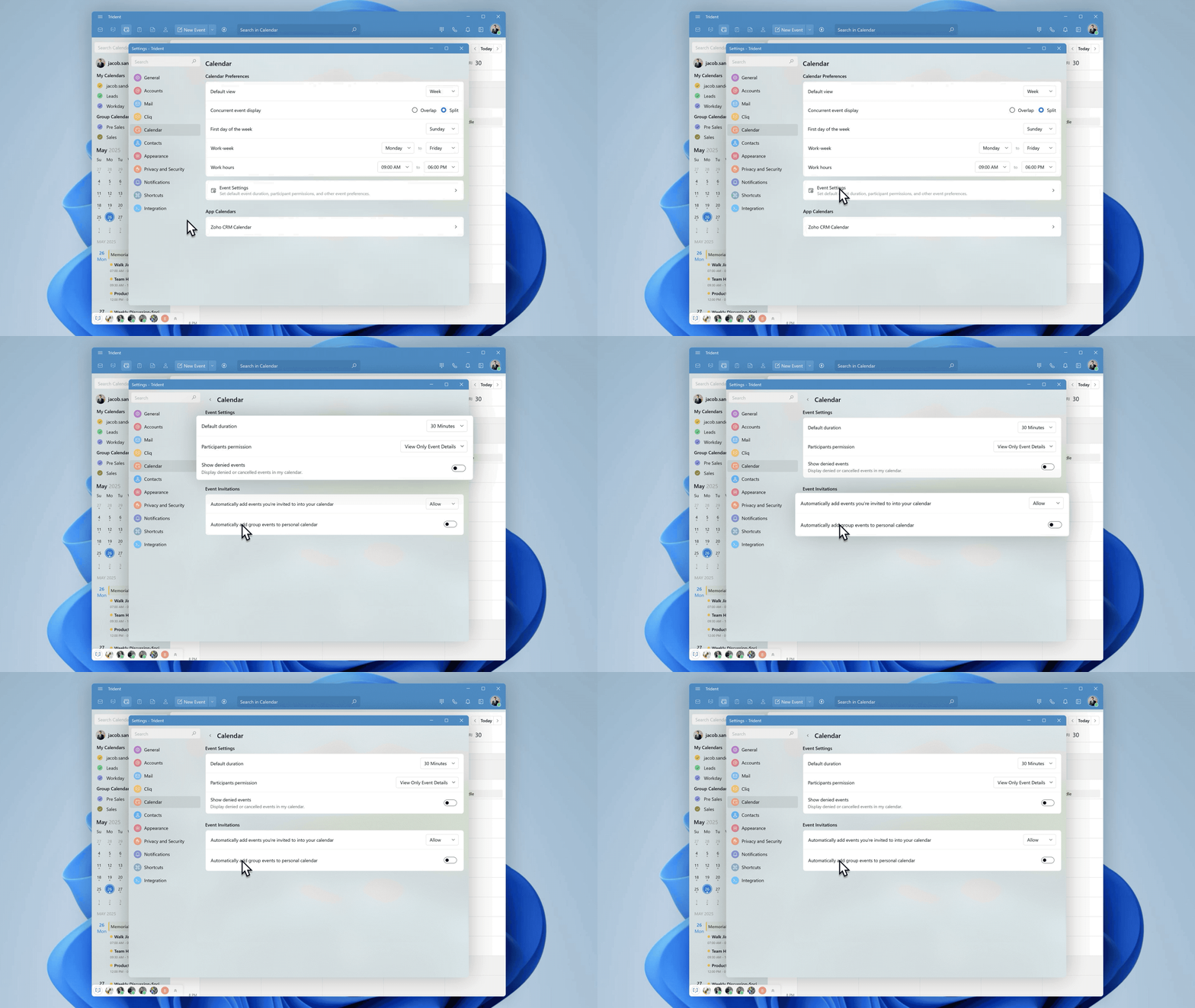
Customize calendar event settings.
You can now customize default calendar event settings in Trident, including setting the default event duration, managing participant permissions, deciding whether to show declined events in your calendar, and more.
More conference platform options.
Along with the existing conference platform options, Webex is now available for use when scheduling calendar events. To access these platforms in Trident, ensure that your email account is configured with these platforms and the integrations are enabled in Zoho Calendar web.

Add multiple assignees to a task.
You can now assign more than one person to a task, enabling better collaboration, shared ownership, and improved task tracking within your team.

Delete personal contacts.
You can now delete personal contacts to remove outdated or duplicate entries and keep your contact list organized.

To leverage these new features in Trident, update the app to the latest version by following the steps below:
- Click the Main Menu icon on the top-left corner of the app.
- Select Check for Updates from the menu list.

If you haven't already downloaded the app, you can download it here. Trident is available for free for all paid and trial users of Zoho Mail, Zoho Workplace, and Zoho One (using Zoho Mail).
Give these features a spin and let us know your experience, as well as any suggestions, by submitting feedback right within the app. You can also reach us at trident@zohosupport.com.
To submit your feedback directly through the app, follow the steps below:
- Click the Main Menu icon in the top-left corner of the app.
- Select Feedback.
- In the feedback window, enter the necessary details under Subject and Feedback Content.
- Once you're ready, click Submit.
We look forward to hearing from you!
Until next time,
Sneha
Sneha
New to Zoho Recruit?
Zoho Campaigns Resources





Topic Participants
Sneha Bharathi V
Zoho CRM Plus Resources
Zoho Books Resources
Zoho Subscriptions Resources
Zoho Projects Resources
Zoho Sprints Resources
Zoho Orchestly Resources
Zoho Creator Resources
Zoho WorkDrive Resources


Zoho CRM Resources
Get Started. Write Away!
Writer is a powerful online word processor, designed for collaborative work.
Zoho CRM コンテンツ
-
オンラインヘルプ
-
Webセミナー
-
機能活用動画
-
よくある質問
-
Ebook
-
-
Zoho Campaigns
- Zoho サービスのWebセミナー
その他のサービス コンテンツ
ご検討中の方
Recent Topics
Bigin’s 2025 Evolution: Highlights from 2025 and What’s Ahead in 2026
Dear Biginners, Wishing you a very happy New Year! As we stand at the cusp of endless possibilities in 2026, we would like to take a moment to reflect on what we achieved together in 2025. Your continued support, thoughtful feedback, and kind words ofSend Supervisor Rule Emails Within Ticket Context in Zoho Desk
Dear Zoho Desk Team, I hope this message finds you well. Currently, emails sent via Supervisor Rules in Zoho Desk are sent outside of the ticket context. As a result, if a client replies to such emails, their response creates a new ticket instead of appendingZoho Desk - Change Time Zone for all users and set default for new user
Hi, Is there a way to set a default time zone so that when user creates an account via the Zoho Desk invitation, they don't need to select the time zone via the hundreds of choice? And, for already created users, can we edit the incorrect time zone selected by the user at the account creation ? Thanks ! FredIntroducing WhatsApp integration in Bigin
Greetings! In today's business landscape, messaging apps play a significant role in customer operations. Customers can engage with businesses, seek support, ask questions, receive personalized recommendations, read reviews, and even make purchases—allAllow Manual Popup Canvas Size Control
Hello Zoho PageSense Team, We hope you're doing well. We would like to request an enhancement to the PageSense popup editor regarding popup sizing. Current Limitation: Currently, the size (width and height) of a popup is strictly controlled by the selectedWhy does Zoho’s diff viewer highlight parts of unchanged lines?
Hi everyone, I’ve noticed something odd in the Zoho editor’s diff view. When I delete a single line, the diff doesn’t just mark that line as removed. Instead, it highlights parts of the next line as if they changed, even though they are identical. Example:CRM x WorkDrive: File storage for new CRM signups is now powered by WorkDrive
Availability Editions: All DCs: All Release plan: Released for new signups in all DCs. It will be enabled for existing users in a phased manner in the upcoming months. Help documentation: Documents in Zoho CRM Manage folders in Documents tab Manage filesWrapping up 2025 on a high note: CRM Release Highlights of the year
Dear Customers, 2025 was an eventful year for us at Zoho CRM. We’ve had releases of all sizes and impact, and we are excited to look back, break it down, and rediscover them with you! Before we rewind—we’d like to take a minute and sincerely thank youPassing the CRM
Hi, I am hoping someone can help. I have a zoho form that has a CRM lookup field. I was hoping to send this to my publicly to clients via a text message and the form then attaches the signed form back to the custom module. This work absolutely fine whenAutomating Employee Birthday Notifications in Zoho Cliq
Have you ever missed a birthday and felt like the office Grinch? Fear not, the Cliq Developer Platform has got your back! With Zoho Cliq's Schedulers, you can be the office party-cipant who never forgets a single cake, balloon, or awkward rendition ofDrop Down Value
Hi, May I know why Zoho Flow treat this drop down as number and not as string. If so, how can I fetch the right value for filtering. This field is from Creator, in Creator upon checking by default it is a string since it's not a lookup field.SMS to customers from within Bigin
Hi All, Is there anyone else crying out for Bigin SMS capability to send an SMS to customers directly from the Bigin interface? We have inbuilt telephony already with call recordings which works well. What's lacking is the ability to send and receiveZoho Survey reminder settings are extremely confusing
Hi, I just want to set 3 reminders, one week apart from the first email out. Your form is too confusing and I don't understand. Can you simplify and be more specific regarding the language used on the form ?Add deluge function to shorten URLs
Zoho Social contains a nice feature to shorten URLs using zurl.co. It would be really helpful to have similar functionality in a Deluge call please, either as an inbuilt function or a standard integration. My Creator app sends an email with a personalisedform data load issue when saving as duplicate record is made
Hello. I have a form with a lookup when a value is selected the data from the corresponding record is filled into all of the fields in the form. But the form is loaded in such a state that if any value is changed it will take all of the values pre loadedRecurring Tasks and Reminders in Projects
Recurring tasks are tasks that are created once, and then recreated automatically after a designated time period. For example, the invoice for your billable tasks is due every week. You can set that task to recreate itself every week. Also, the futureUnable to remove the “Automatically Assigned” territory from existing records
Hello Zoho Community Team, We are currently using Territory Management in Zoho CRM and have encountered an issue with automatically assigned territories on Account records. Once any account is created the territory is assigned automatically, the AutomaticallyTrack online, in-office, and client location meetings separately with the new meeting venue option
Hello everyone! We’re excited to announce meeting enhancements in Zoho CRM that bring more clarity and structure to how meetings are categorized. You can now specify the meeting venue to clearly indicate whether a meeting is being held online, at theGoogle Fonts Integration in Pagesense Popup Editor
Hello Zoho Pagesense Team, We hope you're doing well. We’d like to submit a feature request to enhance Zoho Pagesense’s popup editor with Google Fonts support. Current Limitation: Currently, Pagesense offers a limited set of default fonts. Google FontsImproved Contact Sync flow in Google Integration with Zoho CRM
Hello Everyone, Your contact sync in Google integration just got revamped! We have redesigned the sync process to give users more control over what data flows into Google and ensure that this data flows effortlessly between Zoho CRM and Google. With thisImproved Functionality PO Bill SO Invoice
Hello, I need to enter over 100 items, it's frustrating to scroll a few item rows and wait for more to load, then scroll again. It would be nice to have buttons that scroll to the top or bottom with one click. Furthermore, these items I'm adding are VATWishes for 2026
Hello, and a happy new year 2026! Let's hope it's better for everyone. I'd like to share some thoughts on Zoho One and what could be useful in the short, medium, and long term. Some things are already there, but not applied to Zoho One. Others seem likeHow to Integrate Zoho Books with Xero (No Native Connection Available)
Hi everyone, I’m currently facing an issue with integrating Zoho Books invoices with Xero, as I’ve noticed Zoho does not provide a native integration with Xero at this time. I would like to ask: What are the common or recommended solutions for syncingHow to install Widget in inventory module
Hi, I am trying to install a app into Sales Order Module related list, however there is no button allow me to do that. May I ask how to install widget to inventory module related list?error while listing mails
I can't access email in any of my folders: Oops, an error occurred - retry produces the second error response: error while listing mails (cannot parse null string). I've signed in and out of Zoho, restarted my iMac.Unlocking New Levels: Zoho Payroll's Journey in 2025
Every year brings its own set of challenges and opportunities to rethink how payroll works across regulations and teams. In 2025, Zoho Payroll continued to evolve with one clear focus: giving businesses more flexibility, clarity, and control as they grow.Zoho Browser??
hai guys, this sounds awkward but can v get a ZOHO BROWSER same as zoho writer, etc. where i can browse websites @ home and continue browsing the same websites @ my office, as v have the option in Firefox, once i save and close the browser and again when i open it i will be getting the same sites. If u people r not clear with my explanation, plz let me know. Thanks, SandeepSync desktop folders instantly with WorkDrive TrueSync (Beta)
Keeping your important files backed up and accessible has never been easier! With WorkDrive desktop app (TrueSync), you can now automatically sync specific desktop folders to WorkDrive Web, ensuring seamless, real-time updates across devices. Important:MCP no longer works with Claude
Anyone else notice Zoho MCP no longer works with Claude? I'm unable to turn this on in the claude chat. When I try to toggle it on, it just does nothing at all. I've tried in incognito, new browsers, etc. - nothing seems to work.Ability to Edit YouTube Video Title, Description & Thumbnail After Publishing
Hi Zoho Social Team, How are you? We would like to request an enhancement to Zoho Social that enables users to edit YouTube video details after the video has already been published. Your team confirmed that while Zoho Social currently allows editing theFree Webinar : Unlock AI driven business insights with Zoho Inventory + Zoho Analytics
Are you tired of switching between apps and exporting data to build customized reports? Say hello to smarter & streamlined insights! Join us for this exclusive webinar where we explore the power of the Zoho Inventory–Zoho Analytics integration. LearnCritical Issue: Tickets Opened for Zoho Support via the Zoho Help Portal Were Not Processed
Hi everyone, We want to bring to your attention a serious issue we’ve experienced with the Zoho support Help Portal. For more than a week, tickets submitted directly via the Help Portal were not being handled at all. At the same time no alert was postedHide/Show Subform Fields On User Input
Hello, Are there any future updates in Hide/Show Subform Fields "On User Input"?Cloning Item With Images Or The Option With Images
Hello, when I clone an item, I expect the images to carry over to the cloned item, however this is not the case in Inventory. Please make it possible for the images to get cloned or at least can we get a pop up asking if we want to clone the images asCustom validation in CRM schema
Validation rules in CRM layouts work nicely, good docs by @Kiran Karthik P https://help.zoho.com/portal/en/kb/crm/customize-crm-account/validation-rules/articles/create-validation-rules I'd prefer validating data input 'closer to the schema'Adding Default Module Image into mail merge field
As with most people finding their way to these forums i have a specific requirement that doesn't seem to be supported by Zoho I have created 2 custom modules to suit my purpose 1 is an inventory type module that lists aluminium extrusions, and all relevantIs it possible to roll up all Contact emails to the Account view?
Is there a way to track all emails associated with an Account in one single view? Currently, email history is visible when opening an individual Contact record. However, since multiple Contacts are often associated with a single Account, it would be beneficialFree Training - Explore What’s New in Zoho One 2025
Greetings! We hope you have all had a chance by now to get hands-on with the new features and updates released as part of ZO25. Yes, we understand that you may have questions and feedback. To ensure you gain a comprehensive understanding of these updates,Good news! Calendar in Zoho CRM gets a face lift
Dear Customers, We are delighted to unveil the revamped calendar UI in Zoho CRM. With a complete visual overhaul aligned with CRM for Everyone, the calendar now offers a more intuitive and flexible scheduling experience. What’s new? Distinguish activitiesQuick way to add a field in Chat Window
I want to add Company Field in chat window to lessen the irrelevant users in sending chat and set them in mind that we are dealing with companies. I request that it will be as easy as possible like just ticking it then typing the label then connectingNext Page