[Early Access] Circuits in Zoho CRM- Orchestrate Functions in Zoho CRM
Early Access | |
Resources | |
Feature availability | Currently supported for CRM accounts in US Data Centers |
Editions | CRM Enterprise & Ultimate, CRMPlus, Zoho One |
Default credits added | 15,000/Month - Enterprise | 20,000/Month - Ultimate |
Usability | For Workflows, Blueprints, and Custom Buttons |
Customers often need a way to extend their CRM functionality through various means. Functions, a simple way to write code, can define business logic on top of the CRM offerings.
Often, functions become bloated as the business needs grow. Invariably, they become big monolithic blocks of code. Their maintenance, re-use, debugging, etc., become a challenge.
Moreover, when you want to offload the series of operations to be orchestrated by functions, based on various business scenarios, customer touch points, or any third party application’s status, etc., it becomes even more cumbersome to make the functions work.
This is where Circuits in Zoho CRM come in very handy. Through Circuits, you can orchestrate the business flow through functions asynchronously offloaded from the CRM layer, still meaningfully hooked into the salesforce automation. It offers a great platform to write a typical step-function with easy using drag-and-drop(DIY builder) interface, adding great value to the business users.
Circuits offer a cascading structure to different states in a business process, allowing you to write functions that each individually feed their output into the next one, or any other one you pre-define. Not just that, it allows you to reroute, park for a certain period, or feed it in batches to enable just about any sort of action.
Circuits offer the following benefits that allow developers to focus more on business logic:
- Low-code - Create a circuit effortlessly with the visual drag-and-drop interface, which makes it easier for the users with minimum coding knowledge.
- Developer-friendly - Circuits help you manage parallel processes, service integrations, spot failures, retry, and view logs, within minutes. Developers can focus on the business logic and not worry about these factors.
- Orchestrate CRM Functions - Use various CRM functions on your circuit to integrate multiple third-party apps and Zoho CRM, seamlessly. Write functions once, and orchestrate them in circuits to solve different business needs.
- Automate IT and business processes within CRM - Create a circuit, associate it to a workflow, blueprint, or button, and automate your entire business process. With high availability, scalability, and fault tolerance, circuits ensure the performance of your workflow remains consistent even with changing states and an increase in frequency.
Sample business scenario
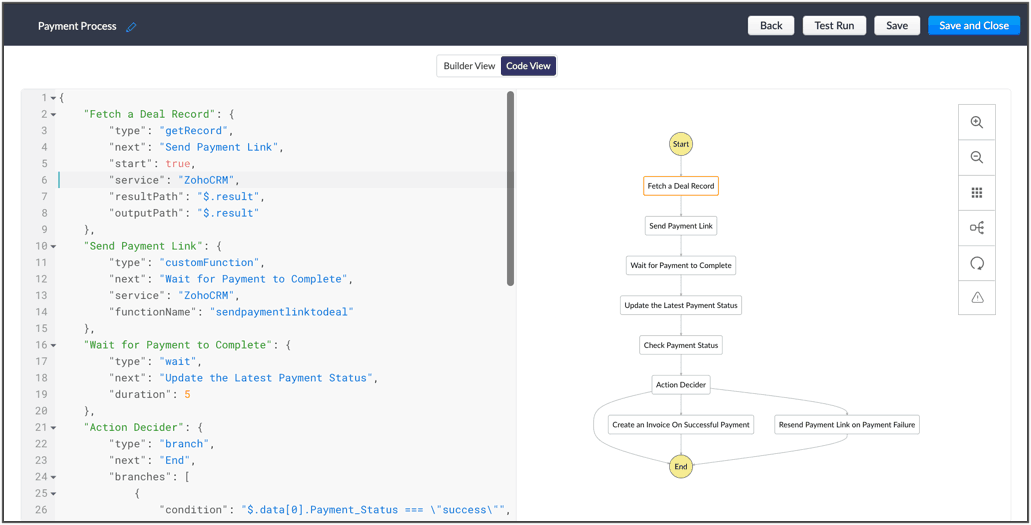
To put it in action, let's talk about payment processes, that are a part of most business processes. Say for your business process, once a deal is won, you'd like to send a payment link to said deal, and then generate an invoice on successful payment. If the payment is unsuccessful, the link is re-sent.
Here, we're building a circuit with two functions, in the order as mentioned below, and with the output of the former feeding into the consecutive function
A function that parses the details of the deal record, fetches the email ID, fetches the right payment URL and sends it to the deal.
A function that checks the payment status and updates the corresponding fields in CRM and generates an invoice on successful payment or resends the payment link to the deal upon payment failure.
So, let's understand why circuits are necessary in this business scenario.
- The order of orchestration - While CRM offers the option to write individual functions, as and when necessary for custom actions and workflows let you automatically execute them, Circuits goes one step further and streamlines the flow of your functions' logic, and simultaneously performs error handling. This ability to pick the order and states of your functions lets you pull in different third-party or external services to address minute use-cases.
- A single, editable space - A flow diagram that uses states and flows that include everything from functions to trigger record movement, using wait or parallel actions as others simultaneously occur, to record states that give you the record details. This not only gives you a bird's eye view of all that's configured in your circuit, but also, allows you to pinpoint issues, modify or reorganize it.
- Diagnose errors and view audit logs - A detailed log of each execution provides the status of each state's task execution, the payload and parameters passed, and the responses and exceptions generated.
- Use Existing Functions - From picking functions you've already tried, tested, and are up and running in your CRM account, to using a circuit within another circuit, this flexibility opens up possibilities of handling so much of your out-of-the box requirements in a single space.
The flow of action here:
Other examples of actions that can be performed with Circuits:
- Generate reports automatically, track inventory, fulfil orders and track them, and generate receipts.
- Trigger a circuit when a deal is won, update the deal's details in a sheet, calculate the commission based on the revenue, and update the details back in CRM.
- Manage users, send custom push notifications based on specific conditions, and manage user-generated files in applications, automatically.
Once enabled for your account, Circuits will be available under:
Setup > Developer Space > Circuits
Learn more about the components of Circuits and how you can make the most of it in the help documentation. Once we enable early-access to Circuits for your account, we'll send out an email confirming the same.
Cheers!
Shylaja
Shylaja
New to Zoho Recruit?
Zoho Campaigns Resources





Topic Participants
Shylaja S
Ryan N.
Sunderjan Siddharth
Greg Robson
Praveen Sankar
Sticky Posts
Announcing Early Access to "Zoho CRM for Everyone" — A new and exciting update to Zoho CRM
Update : Zoho CRM For Everyone's Nextgen Interface gets an upgrade! Hello everyone, We’ve updated the Zoho CRM for Everyone Nextgen interface based on your feedback. The UI is now simpler with a unified sidebar, a more visible global search and features[Early Access] Voice of the Customer (VoC) for Zoho CRM
Happy new year, everyone! We have an exciting addition to our suite of features and would like to introduce you to VoC (Voice of the Customer) for Zoho CRM, powered by Zia. 2023 is definitely the best time to be a customer with rapid innovations and advancementsAdding calls as a channel in Voice of the Customer
Dear All, We hope you're well! It's been almost a year since we opened Zoho CRM's Voice of the Customer solution up for early access. We are grateful for the reception and support you have been showing us with regards to its adoption and feedback. Since
Zoho CRM Plus Resources
Zoho Books Resources
Zoho Subscriptions Resources
Zoho Projects Resources
Zoho Sprints Resources
Zoho Orchestly Resources
Zoho Creator Resources
Zoho WorkDrive Resources


Zoho CRM Resources
Get Started. Write Away!
Writer is a powerful online word processor, designed for collaborative work.
Zoho CRM コンテンツ
-
オンラインヘルプ
-
Webセミナー
-
機能活用動画
-
よくある質問
-
Ebook
-
-
Zoho Campaigns
- Zoho サービスのWebセミナー
その他のサービス コンテンツ
ご検討中の方
Recent Topics
Syncing stuck for days
Hello when I made an account a few days ago and synced all my notes to it, it is still syncing. My app is only 400mb so I do not know why it is taking so long. Please helpWorkflow runs on every edit despite not ticking the field repeat this workflow whenever a parent is edited.....
Hi, It is my understanding that this workflow should only trigger once. Why is this triggering on every edit of the field? Based on another support query - directly from Zoho, If i tick the box 'repeat this workflow whenever a parent is edited' it shouldHow do you add or update tags on Zoho CRM records via n8n? (Workarounds or best practices?)
Hi all, I’m running into some limitations with the Zoho CRM node in n8n and was wondering how others have handled this: From what I see, the standard Zoho CRM node in n8n doesn’t allow you to add or update tags when creating or updating contacts/leads.API PARAMETER FOR TICKET CLOSED TIME
Hi, Is there a parameter for filtering tickets by closed time in zoho api, i can see closed time in the API response i get, but can't get tickets by that field while calling. Regards, Anvin AliasReply to email addresses wrong.
I have setup my Zoho mail account using my main domain and I also have an Alias setup from a different domain. In Settings - Mail - Compose I have selected to the option "For replies, send using The same email address to which the email was sent to".Meeting integration with Otter.ai
Would love for an integration with an AI transcription service like Otter.ai to be integrated with Zoho Meeting. ThanksHow to close/delete a free creator account?
I have a free zoho creator account associated with my email address that is not being used. I want to become a user of another paid zoho creator account but I can not associate with the paid account with the same email. I assume if I can close or delete the free account I will be able to use the paid account. I have emailed support but no response. Suggestions?Zoho books and zapier causes Invalid data provided
I have been using zoho books with zapier for over 2 years now, everything was working fine. On September 13th my zaps stopped working. Now on step create sales invoice in zoho books i get an error: Failed to create a create_invoice_v2 in Zoho Books TheCRM report
Is it possible to pull a contacts report that also includes the company industry, as well as the company name? I’m having trouble combining company and contact fields – any help is appreciated. Thank you, SamEnhancements to Client script?
Hi Zoho CRM, I've been extensively using Client Scripts to enhance our Deal form experience, particularly for real time validations and auto updating fields based on specific logic. However, I've encountered a challenge regarding permission boundaries.Add views to new CRM UI navigation + Unlimited Webtabs
Zoho CRM is so close now to being the ultimate business application with the new UI, as soon as this one feature is added. This is probably where Zoho is headed but if it's not I want to BEG for this to be incorporated. What we need is to be able to putE-Mail Distribution List
How do I create an e-mail distribution list in Zoho Mail?Custom "create meeting" button with more functionality than Zoho currently has?
I'm looking for a little help/direction in how to do this. Even just some general high level pointers on how this might be able to be done. The current Zoho Meeting Activity functionality is not ideal for my org's workflow. I'd like to try and createError Code 4: Invalid value passed for JSONString
Okay, I want to start by saying I know I'm a terrible scripter, so sorry if this is a dumb mistake. I just can't figure it out, even with LLM help. Here's my code: // --- Input Variables --- customer_id = salesorder.get("customer_id"); so_id = salesorder.get("salesorder_id");Organizing contacts/members by company
I work for a membership organization (representing businesses) and am trying to use Zoho CRM more effectively for managing the points of contact for our members. Currently, our members are listed in our CRM by the primary point of contact's name, butUnable to search in Zoho Email
I've started using Zoho Email (free version) recently and realized that it doesn't have email search functionality. Am I missing anything here? I've gone through the Zoho tutorial which does show the search bar on the right top of the Zoho UI. But inResponse Time Report
From data to decisions: A deep dive into ticketing system reports Every organization that interacts with its customers should have an established timeframe for how soon an agent is expected to send the first response and any reply to any follow-up messages.Zoho - Outlook plugin
Does anyone know if there is a way to modify the autofill in the Zoho plugin in outlook? When we create a contact, it enters the correct email address and name, but then pulls information from our own signature line to add phone number, address, etc.Zoho Books - Sales Person Information
Hi Team, On Invoices, Quotes, etc... I can include the Sales Person, but it only shows their name and not their email or phone number. It would be great to have place on invoice templates where we can manage what sales person information should be showsOffline working in Zoho Creator portal
Zoho's help says that offline working is only available in the Creator mobile app and not in the portal app. But I can see offline options in the portal app too and it seems to work when I test it. My portal users are often in areas where there is poorFetch Records using Dynamic Criteria
Hi, I have a form that builds a filter based on user input. I need to fetch the records based on dynamic criteria. How would I accomplish this as there is no eval function? For example: desiredRecord = Form1[dynamicCriteria];Url filter Report date (pivot chart)
Hello. Is it possible to filter the data in pivot char using parameters in the url? I'm trying but I should not doing very well. Something like: https://creator.zoho.com/.../....../#Report:MyPivotChartReport?MyDate=01-Jan-2012;31-Jun-2012;MyDate_op=58 SaludosSending gmail to a particular person fails because the address gets changed to "gmaill", with a second "l" typo somewhere
I send to bob@gmail.com (example) and get an error sending to bob@gmaill.com, only for this one person. Note the extra "l" in the email the system tried to send to, which was not in the address I entered. Can't find a typo in the contact or anywhere elseEmoji Support in Bigin CRM
We request the implementation of emoji support across Bigin CRM. This feature should allow users to seamlessly use emojis in text fields, headlines, and deals. It would enhance communication, improve the visual appeal of records, and bring more personalizationBigin Booking Pages enhancements
I would like to ask for several enhancements for the brand new (and promising) Booking feature. 1. Add "Contact/Mobile" Field to Booking form We use Mobile as key (id), but unfortunately it is missing from the Booking form, only Home Phone is available.Amount in words in Indian format
Hi, I had coded the following code to convert amount in words. But in the code in the format of US like million. But i need in Lakh and Crore. So pls suggest ideas r post corrected code string Num2Words(int val) { val_s = input.val.toString(); th = {"", "thousand", "million", "billion", "trillion"}; // uncomment this line for English Number System // th = {"","thousand","million", "milliard","billion"}; dg = {"zero", "one", "two", "three", "four", "five", "six", "seven", "eight",What are people using to send Service based emails?
Zoho Campaigns is for marketing. Users can unsubscribe from these emails. Service based emails need to be delivered and can without the worry of Can-spam act. What are people using to send service based emails? My mailing list is derived from a databaseStandalone LMS tool
Will Zoho release a standalone LMS (Learning management System) than can be used by external parties (guest)?Announcing Kiosk 1.1 - Customize screen titles, configure new fields & actions, use values from your Kiosk to update fields, and more.
Hello all We are back again with more enhancements to Kiosk. So what's new? Enhancements made to the Components Add titles for your Kiosk screens and adjust its width to suit your viewing preferences. Three new fields can be added to your screen: Percentage,An Overview of Dario Schiraldi Deutsche Bank Executive
Hello Community, Dario Schiraldi is an executive at Deutsche Bank, focused on advancing the firm’s financial services and crafting its global strategic vision. With 20 years of expertise in leadership roles, he has spearheaded successful market acquisitionsEmailing a document to WorkDrive
Does WorkDrive include the ability to upload a document by sending an attachment to an email address? (Books and Expenses include this functionality) If it doesn't is it under consideration? on the Road Map?Allow Changing Appointment Status from "Completed" to "No Show" or Other Valid States
Hi Zoho Bookings Team, We hope you're doing well. We would like to submit a feature request regarding appointment status management in Zoho Bookings. 🎯 Use Case Sometimes, an appointment is mistakenly marked as Completed, but later we realize that theZoho One and Tally Integration
Has Anyone in this forum done any implementation with Zoho CRM and Tally accounting software. If so who have you used and how easy was it?Microsoft PowerPoint files Extremely slow to save
I and others on my team have noticed that Microsoft PowerPoint documents are extremely slow to save when using WorkDrive. It always takes over 30 seconds to save a file. Word and Excel files seem to save in a typical length of time, but PowerPoint isHow can users unblock their blocked Zoho Mail accounts?
After the reason for the account block (storage exceeded, spam detection etc.) has been rectified, the user can unblock the account from the UnBlock Me page. Account support@edu2review.com Edu2Review is an education review platform, we rate the qualityAdding additional fields for batch information
Hello, I am looking at adding additional information into our inventory module. we would like to be able to see up to 8 attributes that will be individual & different for each batch (i.e. batch specific information) but currently I seem to only be ableDynamic Pickup List Values using Deluge and Client Script
I would like to dynamically show Pickup List Values For example we need to fetch some data from an on premise application and display it so they can choose and pick This can be done in Creator but I didn't find anything for CRMValidation Rule for Controlled Stage Movement in Deals Module (Deluge Script)
For keeping a control over module stage or status, you can use the below deluge script. The below deluge script defines validation control over deals module stages: // Function to validate allowed stage transitions in the Deals module map validation_rule.LeadStatustValidation1(StringPick List Issues
I have created a pick list that looks at a table in a sheet, it selects the column I want fine. Various issues have come along. The option to sort the pick list is simplistic, only allows an ascending alphabetical sort. Bad luck if you want it descending.Four types of task dependencies
"Nothing is particularly hard if you divide it into small jobs." - Henry Ford Projects, small or large, are driven by simple work units called tasks. Monitoring standalone tasks might look simple but as the workflow becomes elaborate, tasks may start relying on one another. In project management, this relationship between tasks is termed as "Task Dependencies". Dependency between tasks ariseNext Page