Kaizen #161: Global Sets using Zoho CRM APIs
Hello all!
In this week, we will see how to work on the Global Sets using our Zoho CRM APIs. Global Picklist APIs were introduced in Zoho CRM API version 6.
In this post, we will cover the following
- Global Sets in Zoho CRM
- Advantages of the Global Sets
- Use case
- Create a Global Set using the POST Global Picklist API
- Use the Global Set with a Picklist Field in the Required Modules
- Update the Global Set Values Using the PATCH Global Picklist Field API
- Conclusion
Global Sets in Zoho CRM
Zoho CRM offers an efficient way to maintain a set of data that will be used commonly across the modules to maintain accuracy via the Global Sets or Global Picklists.
Global Sets or Global Picklists are collections of picklist values that can be associated with multiple picklists across modules. When you create Global Sets, you define a set of values that can be associated with fields in different CRM modules, ensuring uniformity in data input across your organization. Refer to this link to know more about Global Sets.
Advantages of Global Sets
- Consistency: The same list of values is available across multiple modules, reducing errors and inconsistencies in data entry.
- Time-saving: You do not have to update picklist values in each module manually. Once updated centrally, changes reflect across all associated fields in all modules.
- Scalability: Easily expand your picklist when your business grows, adding new values (e.g., Adding new showroom location for franchises) without repetitive work.
- Easy Management: Centralized management of picklist values means less administrative work.
Use case
Global Picklist for Showroom Locations at Zylker Electronic Franchise
Zylker, an electronics business franchise, operates several showrooms across multiple cities, all managed in Zoho CRM. As the franchise expands, they need to add new showrooms to various modules such as Leads, Deals, and Services frequently. Whenever a new showroom opens, they can update the Global Picklist, ensuring that all modules are updated instantly and preventing inconsistencies.
In these situations, different teams manually entering showroom locations in the picklist field can lead to mistakes like typos or different spellings of the same location.
By implementing a Global Picklist for "Showroom Location," Zylker ensures that all teams select from the same list of showroom locations.
Create a Global Set using the POST Global Picklist API
Create a Global Set with the desired values.
Request URL: {api-domain}/crm/{version}/settings/global_picklists
Request Method: POST
Request Body:
{ "global_picklists": [ { "display_label": "Showroom Location", "description": "Use this picklist option to manage showroom locations across all modules in your CRM.", "pick_list_values": [ { "display_value": "New York Showroom", "sequence_number": 1, "actual_value": "New York Showroom" }, { "display_value": "Los Angeles Showroom", "sequence_number": 2, "actual_value": "Los Angeles Showroom" }, { "display_value": "Chicago Showroom", "sequence_number": 3, "actual_value": "Chicago Showroom" }, { "display_value": "Houston Showroom", "sequence_number": 4, "actual_value": "Houston Showroom" } ] } ] } |
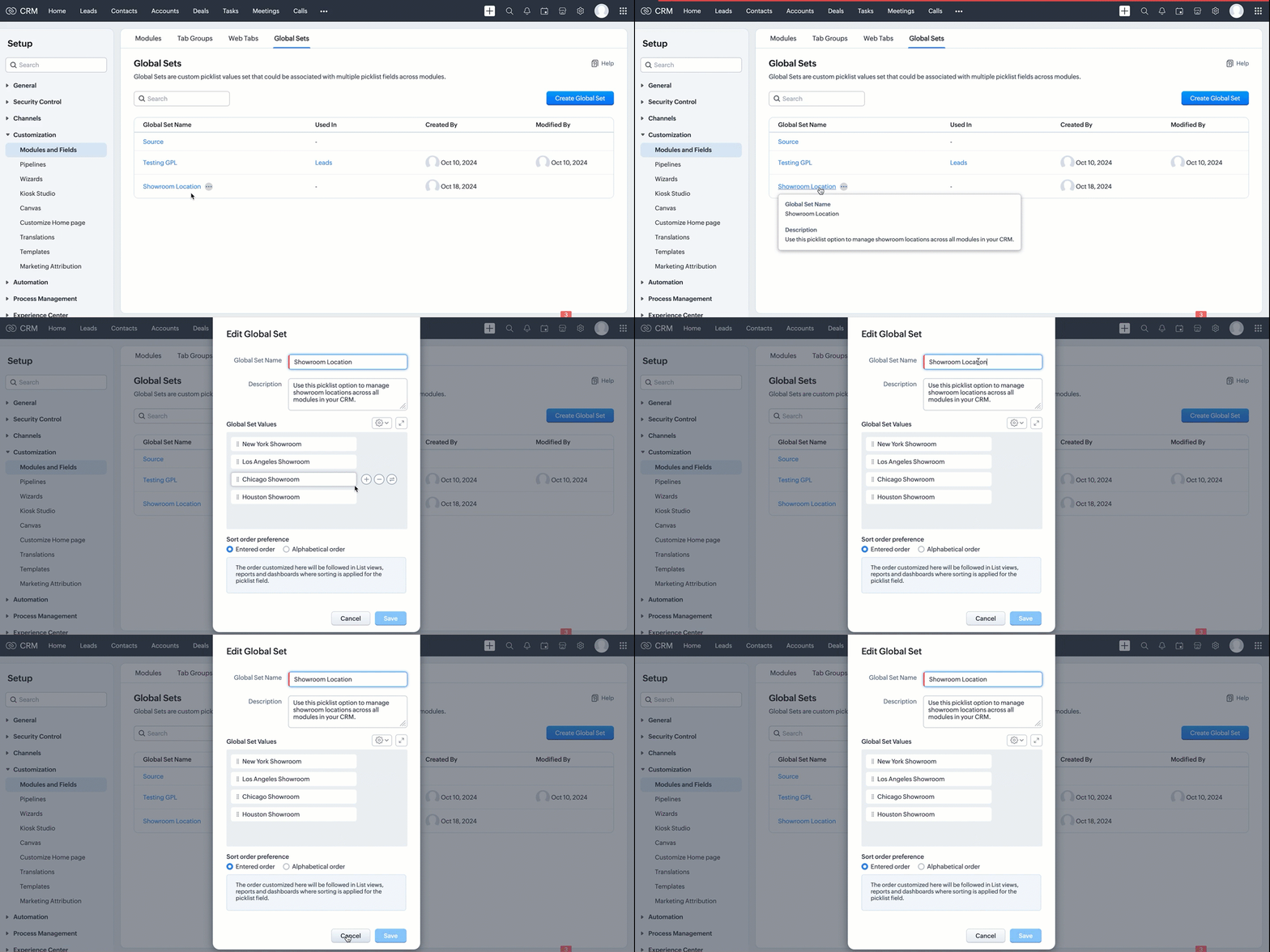
If the API call is successful, a global picklist will be created with the specified options. The following GIF demonstrates the newly created global picklist in the UI.
Use the Global Set with a Picklist Field in the Required Modules
Create picklist fields in the required modules, such as Leads and Contacts, and link the created Global Set with a picklist field in modules using the Create Custom Field API.
Follow the below steps to link the created Global Set with a picklist field in a module.
Step 1: Retrieve the unique ID of the Global Set
Retrieve the unique ID of the created Global Set using the GET - Global Picklists API to link it with a picklist field. The below URL retrieves all Global Sets in your org.
Request URL: {api-domain}/crm/{version}/settings/global_picklists
Request Method: GET
Response:

The API retrieves all available Global Sets in the organization.
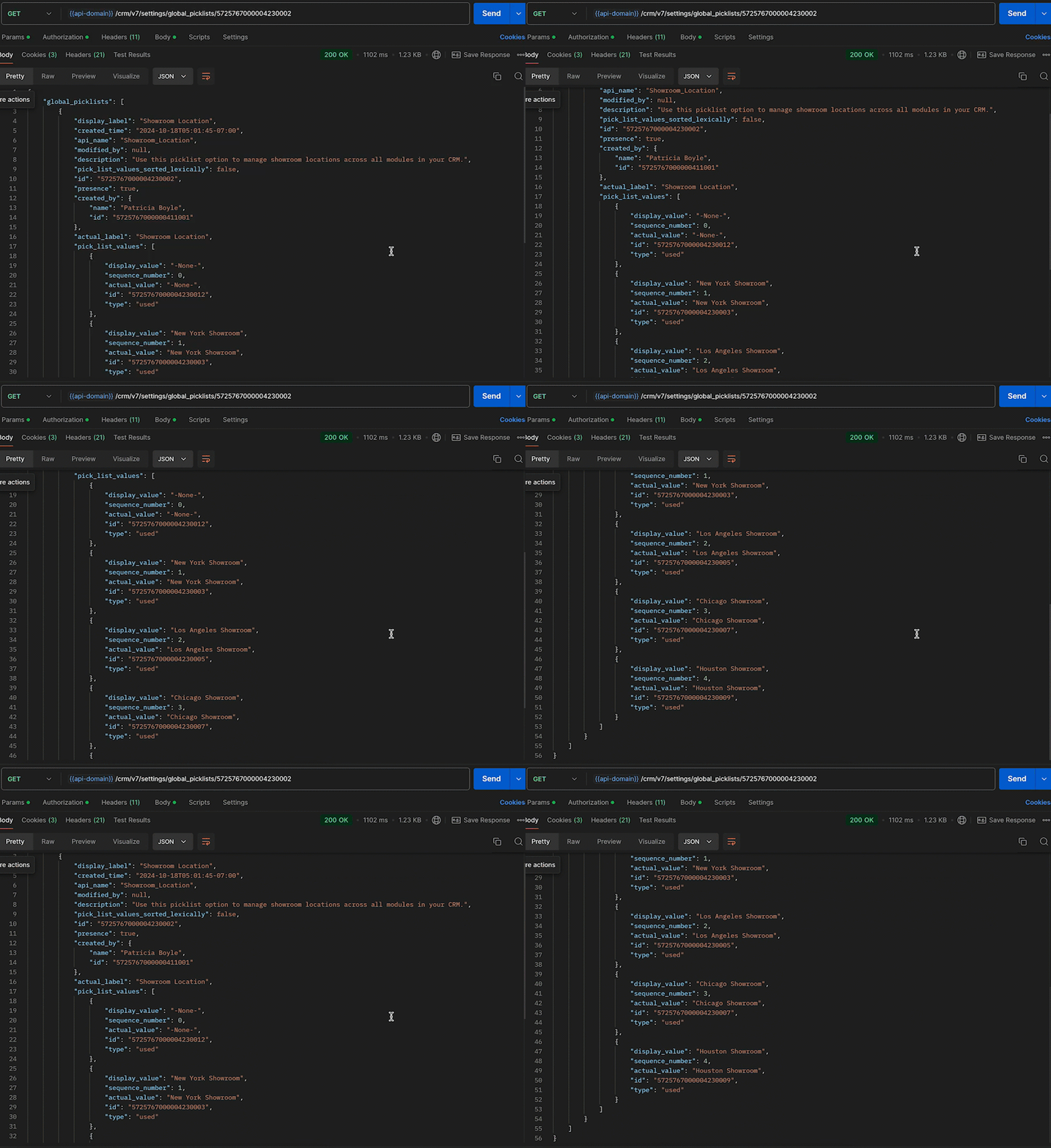
In this case, the "Showroom Location" field needs to be associated with the modules, and its unique ID is 5725767000004230002. Use the following request URL to view the specific global picklist field along with its options.
Request URL: {api-domain}/crm/{version}/settings/global_picklists/5725767000004230002
Request Method: GET
Response:
Step 2: Use the Global Set in the desired module
Create a new picklist field in the required modules and associate the "Showroom Location" Global Set with the picklist field.
- Leads - To track customer inquiries by showroom location.
- Deals - To monitor sales by showroom location.
- Sales Orders - To process orders based on showroom location.
- Service Requests - To handle customer service tickets by showroom location.
This post uses the "Leads" module as an example. Use the Create Custom Field API to associate the Global Set with the Leads module.
Request URL: {api-domain}/crm/{version}/settings/fields?module=Leads
Note: The module parameter is mandatory to create a field in a module.
Request Method: POST
Request Body:
{ "fields": [ //Associating the Showroom Location Global Set with the Leads module { "field_label": "Showroom", //The Showroom field in the Leads module, where the "Showroom Location" Global Set is associated "data_type": "picklist", //To associate a global picklist, use the data type "picklist" "global_picklist": { "id": "5725767000004230002" //ID of the global picklist } } ] } |
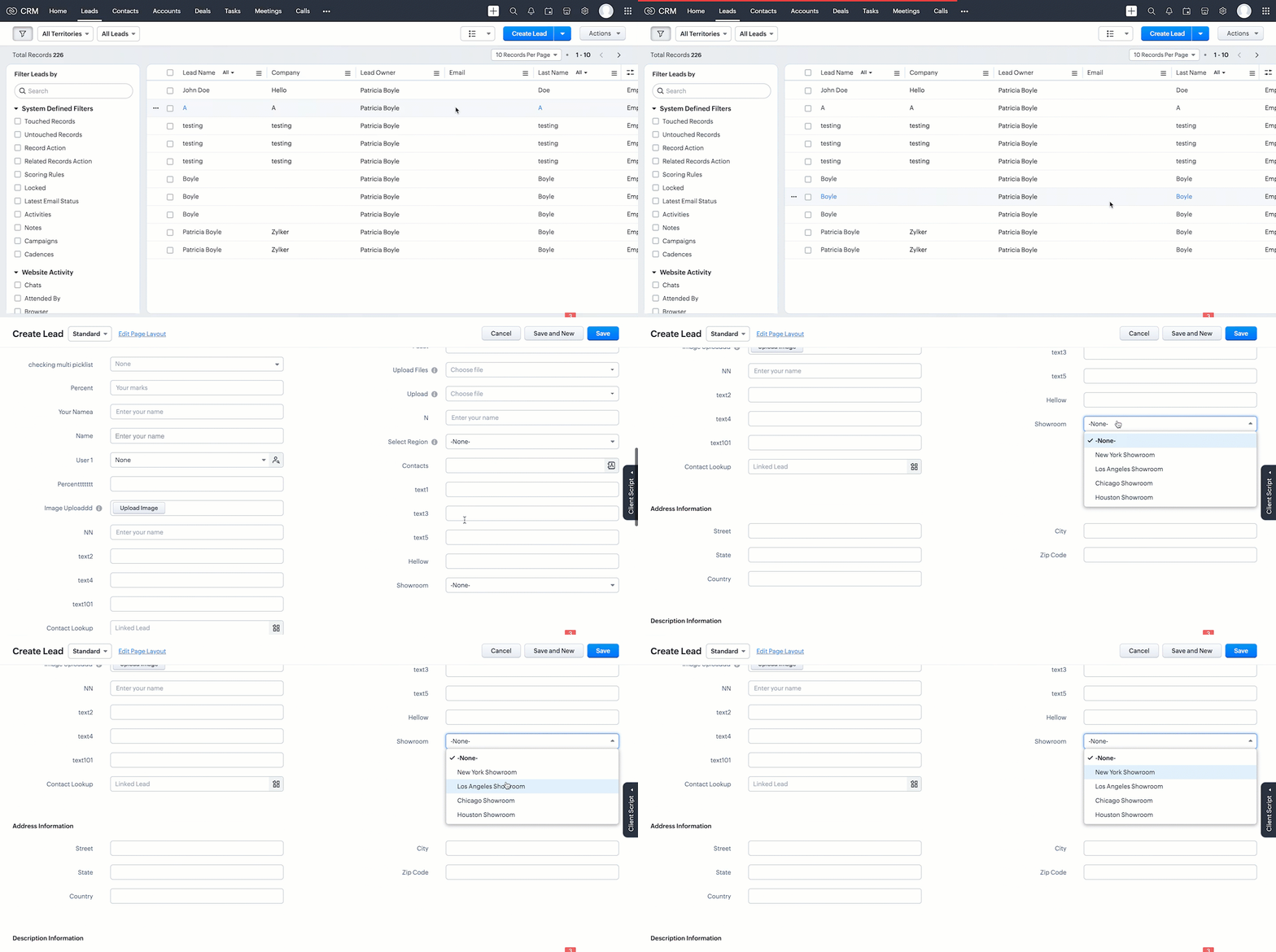
Response in the UI:
Use the above process to create the Global Set across modules using the Create Custom Field API.
Below are the request URLs to associate the field with other modules as per our use case:
|
Update the Global Set Values Using the PATCH Global Picklist Field API
Any changes made to the Global Set will automatically reflect across all modules associated with it. Use the PATCH - Global Picklist Field API to update the values in a Global Set.
Request URL:
{api-domain}/crm/{version}/settings/global_picklists/5725767000004230002
Request Method: PATCH
Request Body:
{ "global_picklists": [ { "pick_list_values": [ { //"display_value": "New York Showroom", "id": "5725767000004230003", "type": "unused" // to move the option to the unused state }, { "display_value": "Chicago Showroom", "sequence_number": 3, "actual_value": "Chicago Showroom", "id": "5725767000004230007", "type": "unused", "_delete": null // deleting the option from the global Field }, // Creating a new option or adding a new showroom location to the Global Set { "display_value": "San Francisco Showroom", "actual_value": "San Francisco Showroom" }, { "display_value": "Boston Showroom", "actual_value": "Boston Showroom" } ] } ] } |
Using the PATCH Global Picklist API, you can easily manage and perform various operations. In the above request, Zylker performed the following operations:
- Moving an Option to Unused State: The "New York Showroom" option is marked with "type": "unused", meaning the showroom is moved to the "unused" state, indicating the option is no longer active but has not been deleted from the system.
- Deleting an Option: The "Chicago Showroom" option is deleted from the picklist field using the "_delete": null, meaning the option is removed or deleted from the system and is no longer valid.
- Adding New Options: In addition to the above operations, two new showrooms namely "San Francisco Showroom" and "Boston Showroom", are added to the field using the "display_value"(mandatory) and "actual_value" (optional), as Zylker expands its franchise to new cities and manages them across the modules.
Note: The updated value will replace its old value in areas such as Records, Criteria, Workflow Actions, and Field Dependency.
Conclusion
Hence, the Global Sets help Zylker keep the showroom location list up-to-date and consistent across modules, making it easier to manage showroom locations in their CRM system.
We trust that this post meets your needs and is helpful. Let us know your thoughts in the comment section or reach out to us at support@zohocrm.com
Stay tuned for more insights in our upcoming Kaizen posts!
Cheers!!!

Previous Kaizen Post: Kaizen #160 - Automating ZDK CLI commands using shell scripting | Kaizen Directory | Kaizen Collection
New to Zoho Recruit?
Zoho Campaigns Resources





Topic Participants
Subramanian K
Vitor
Jeganprabhu S
Anamika Prasanth
Sticky Posts
Kaizen #217 - Actions APIs : Tasks
Welcome to another week of Kaizen! In last week's post we discussed Email Notifications APIs which act as the link between your Workflow automations and you. We have discussed how Zylker Cloud Services uses Email Notifications API in their custom dashboard.Kaizen #216 - Actions APIs : Email Notifications
Welcome to another week of Kaizen! For the last three weeks, we have been discussing Zylker's workflows. We successfully updated a dormant workflow, built a new one from the ground up and more. But our work is not finished—these automated processes areKaizen #152 - Client Script Support for the new Canvas Record Forms
Hello everyone! Have you ever wanted to trigger actions on click of a canvas button, icon, or text mandatory forms in Create/Edit and Clone Pages? Have you ever wanted to control how elements behave on the new Canvas Record Forms? This can be achievedKaizen #142: How to Navigate to Another Page in Zoho CRM using Client Script
Hello everyone! Welcome back to another exciting Kaizen post. In this post, let us see how you can you navigate to different Pages using Client Script. In this Kaizen post, Need to Navigate to different Pages Client Script ZDKs related to navigation A.Kaizen #210 - Answering your Questions | Event Management System using ZDK CLI
Hello Everyone, Welcome back to yet another post in the Kaizen Series! As you already may know, for the Kaizen #200 milestone, we asked for your feedback and many of you suggested topics for us to discuss. We have been writing on these topics over the
Zoho CRM Plus Resources
Zoho Books Resources
Zoho Subscriptions Resources
Zoho Projects Resources
Zoho Sprints Resources
Zoho Orchestly Resources
Zoho Creator Resources
Zoho WorkDrive Resources


Zoho CRM Resources
Get Started. Write Away!
Writer is a powerful online word processor, designed for collaborative work.
Zoho CRM コンテンツ
-
オンラインヘルプ
-
Webセミナー
-
機能活用動画
-
よくある質問
-
Ebook
-
-
Zoho Campaigns
- Zoho サービスのWebセミナー
その他のサービス コンテンツ
ご検討中の方
Recent Topics
Yahoo is rejecting e-mails sent from a Zoho server
Diagnostic-Code: 4.7.0 [TSS04] Messages from 136.143.169.51 temporarily deferred due to unexpected volume or user complaints - 4.16.55.1; see https://postmaster.yahooinc.com/error-codes Remote-MTA: dns; mta5.am0.yahoodns.netYahoo blocks e-mail sent from Zoho servers
Getting this for a bunch of Yahoo addresses. Do you know if some of your servers got blacklisted? Diagnostic-Code: 4.7.0 [TSS04] Messages from 136.143.169.51 temporarily deferred due to unexpected volume or user complaints - 4.16.55.1; see https://postmaster.yahooinc.com/error-codesWorking with dates and Function Field
Hello friends! I'm trying to add days to a date, however the field function will always shows 00:00:00 after the resultant date. How can I display only the date, whithout the time? toDate(input.request_date.addDay(input.Prazo_acordado),"MM,d,yyyy") The code above will result something like "11-Feb-2020 00:00:00", but I want to display only "11-Feb-2020"What's New in Zoho Analytics - November 2025
We're thrilled to announce a significant update focused on expanding your data connectivity, enhancing visualization capabilities, and delivering a more powerful, intuitive, and performant analytics experience. Here’s a look at what’s new. Explore What'sUnable to send message;Reason:550 5.4.6 Unusual sending activity detected. Please try after sometime.
Please help my account got blocked automatically, can you help me how to avoid it? Thanks so muchAccessing shared mailboxes through Trident (Windows)
Hi, I have a created a couple of shared mailboxes. The mailboxes are showing up on the browser based Zoho workplace, but I cannot seem to figure out how to access my shared inboxes through Trident (Windows). Am I missing something or is this feature notUnusual activity detected from this IP. Please try again after some time
When i try to create new addresses on my account i am getting this error, it has been 24 hours now and i am still getting this error can anyone helptemporary system errorlouis
J'essaye d'envoyer des mails avec mes 2 adresses mail qe nous avons sur le compte arthur@lepunch.fr et louis@lepunch.fr mais j'ai toujours le message temporaire system error, je reçois les mails mais impossible d'en envoyer a qui que ce soitHow to Cancel/Delete Queued Mail Merge?
Hi. I just tried to do a mail merge before realizing there's a limit on number of sends. I accidentally sent one of my lists twice, and all of those emails are currently queued. Is there any way to cancel or delete a queued mail merge? Would love to beNeed to add a new admin for my domain
Hello Zoho Support, I am the owner of the domain localeistanbul.com. The current super admin account (admin@localeistanbul.com) is not accessible. I do not want to reset or delete the existing account because I need to keep all existing emails. PleasePossible Fraud Site.
Hello. I received a text with the sender's name as zoho, claiming that my account was at risk and that I should sign in at https://verify.zohomails.ru/signin to verify my account. I signed in on the web address above, and a few days later someone hackedZoho mail to Teaminbox
Hello, We're searching for new mail program. Now I'm testing a bit with zoho mail and team inbox. My findings in the research: Pop mail throught zoho mail is almost instant. Any pop or imap via external provider takes a couple minutes to 15 minutes beforeCrear tarea CRM con recordatorio desde Zoho Flow
Hola, estoy intentando crear desde Zoho Flow una tarea en CRM. Lo he logrado hacer pero sin recordatorio, ya que no se como se debe escribir el string adecuado. He probado varias alternativas, pero ninguna me funcionó hasta ahora. - FREQ=NONE;ACTION=EMAIL;TRIGGER=DATE-TIME:${FechaVto}Tip of the week #16 - Search and filter threads based on criteria
Zoho TeamInbox lets you search and filter threads with any information that you have about the thread. You just have to input the criteria and Zoho TeamInbox will list all the threads that match the condition. Firstly, there is a global search you canInquiry Regarding Automated Assignment of Zoho TeamInbox Messages using Zoho Flow and Deluge
Hello, Our company is currently using Zoho TeamInbox, and we are interested in automating the assignment of responsible parties using tools such as ZOHO Flow and Deluge. Is it possible to achieve this? Allow me to provide more details. Currently, whenCustomizing Global Search Settings for All Users
Hi Our team use the brilliant global search functionality within CRM many many times daily. But, we struggle with the out-of-the box columns that CRM gives you. We are always telling users to customize this look to more suit our business, to show theQwen to be the default open source Generative AI model in Zoho Desk
Hello everyone, At Zoho Desk, we will make the latest Qwen (30B parameters) the default LLM for our Generative AI features, including Answer Bot, Reply Assistant, and others. As a subsequent step, we will discontinue support for Llama (8B parameters).Condition based aggregate fields in subforms
Hello everyone, We're excited to inform you about the latest enhancements made to our aggregate field capabilities in subforms; create aggregate fields based on conditions! An aggregate field is a column on which a mathematical function has been applied.Upgrade Zoho Desk Agent-Side Answer Bot to GenAI
Hello Zoho Desk Team, We hope you're doing well. Following the recent announcements and rollout of the GenAI-based Answer Bot in Zoho SalesIQ (Nova '25), we’d like to formally request a similar upgrade for the Answer Bot used by agents inside Zoho Desk.Marketers' Space: The importance of warming up your sender domain
Hello Marketers, Welcome back to yet another post! Today, we'll talk about why warming up your sender domain matters. Imagine you've recently started a business and want to share the news with your customers. You've designed a great email campaign usingAn Exclusive Session for Zoho Desk Users: AI in Zoho Desk
A Zoho Community Learning Initiative Hello everyone! This is an announcement for Zoho Desk users and anyone exploring Zoho Desk. With every nook and corner buzzing, "AI's here, AI's there," it's the right time for us to take a closer look at how the AISearch Just Got Smarter in Notebook
Hello there! Introducing Our New & Improved Search Experience! We heard your feedback! Many of you shared that our previous search had some challenges like • Inconsistent results across different clients • Limited accuracy in finding the right contentClient Portal ZOHO ONE
Dear Zoho one is fantastic option for companies but it seems to me that it is still an aggregation of aps let me explain I have zoho books with client portal so client access their invoice then I have zoho project with client portal so they can access their project but not their invoice without another URL another LOGIN Are you planning in creating a beautiful UI portal for client so we can control access to client in one location to multiple aps at least unify project and invoice aps that wouldZoho Desk app update - AI Integration for IM Chats
Hello everyone! We have now introduced AI integration for IM Chats within the Zoho Desk mobile app. To access the feature, please enable the 'Generative AI' settings on the desktop site(desk.zoho.com). Please refer to the help link attached below: ZohoOpen A.I assistant Connect with Zoho Desk instant Message Conversations
I would like to know how do I connect my instant messenger in Zoho desk with my Open A.I Gpt Assistant. this is very easy to setup using the Salesiq Zobot but when it comes to Zoho Desk i cannot figure how to make the connection. Ideal workflow CustomersCannot upgrade subscription plan due to payment error message
Hi Zoho team, This is to request support on an issue I am facing during an upgrade I am trying to make to our company's yearly Zoho subscription. I am trying to add 3 more license to my plan and during the payment phase I get the below error as in theEnhancing Zia's service with better contextual responses and article generation
Hello everyone, We are enhancing Zia's Generative AI service to make your support experience smarter. Here's how: Increased accuracy with Qwen One of the key challenges in AI is delivering responses that are both contextually accurate and empathetic whileZoho Desk app update: AI powered features
Hello everyone! We’ve introduced various AI-powered services on the Zoho Desk app. Let's take a look at what's new. Generate Content: Generate Content uses AI to formulate responses based on the your query and provides a ready-to-use reply which can bePassing the CRM
Hi, I am hoping someone can help. I have a zoho form that has a CRM lookup field. I was hoping to send this to my publicly to clients via a text message and the form then attaches the signed form back to the custom module. This work absolutely fine whenBulk update Archived Ticket
Dear All We would like to update the "Category" values to the new filed. We found the archived Ticket seems to be don't support the bulk action. Do we have any way to update it. Finally, we would to generate a report for our ticket system. Regards ISalesInbox
Sorry for saying this but SalesInbox is a really mess. BIG FAIL. Bad UX and VERY bad IMAP sync. I don't know how can someone use this to be more productive. It's just the oposite. I'm trying to use SalesInbox for a while but sales people do not have just sales activities so we still have to came back to the mail app anyway. Folders of SalesInbox are not in sync with folders of mail server (wich syncs Ok to mobile) and vice-versa wich leads to double work as now you have to cleanup 3 inboxes (MailChannel Configuration and Default Channels
There are some of the default fields that cannot be removed or changed. Examples are the social media ones, such as Facebook. It would be nice to be able to remove these fields as it would be confusing if someone selected this but it's not configureAutomating Employee Birthday Notifications in Zoho Cliq
Have you ever missed a birthday and felt like the office Grinch? Fear not, the Cliq Developer Platform has got your back! With Zoho Cliq's Schedulers, you can be the office party-cipant who never forgets a single cake, balloon, or awkward rendition ofDelay function execute
I've got a workflow which uses a webhook to send information to Flow, which in return updates a record in Creator. Problem is, by the time this has executed, the rest of my script has run and can't find the (yet to be) updated info in the record. Is thereKiosk Button Actions
I need to add an action to a Kiosk Button to loop me back to start the kiosk again and I am not sure what that looks like (function, etc.).Support www.camcard.com
Hi, Is it possible CRM Zoho have integrations with https://camcard.com/? Thanks Br, AndyOption to Customize Career Site URL Without “/jobs/Careers”
Dear Zoho Recruit Team, I hope you are doing well. We would like to request an enhancement to the Career Site URL structure in Zoho Recruit. In the old version of the career site, our URL was simply: 👉 https://jobs.domain.com However, after moving toCan't make a document editable to anyone
Hey everyone, I am using Zoho Workdrive and trying to share a document so that it is editable by anyone with the link. I am trying to convince people to shift from Google to Zoho, but they don't have accounts yet. When I try to change the share settingsEdit Default Print
What I want to do is create / edit the "Default Print" template without changing the layout I'm using. Currently I can create "Email Templates" but I don't use them for emailing and getting to that selection takes multiple clicks. If an email template could be set to be the Default Print template that would be helpful. I'd also like to print these in bulk but don't see that option (there is a mail merge macro but that goes straight to emailing, not to print or PDF).Widget shows error
Hi, May I ask why below characters will be auto added into the widget link and how to solve this error? As my widget shows 404 error now. ?serviceOrigin=https%3A%2F%2Fcrm.zoho.com&frameorigin=https%3A%2F%2Fcrm.zoho.comNext Page