Kaizen 208 - Answering your Questions | Functions, AI and Extensions

Hello Developers!
Welcome back to a fresh week of Kaizen!
We are grateful for your active participation in sharing feedback and queries for our 200th milestone. This week, we will answer the queries related to Functions and Extensions in Zoho CRM.
1. Default value in parameter, also instant return must capable to do in deluge and also capable to use closure in deluge function.
Based on the query, we are assuming that by default value, the user is referring to using
placeholder values during testing or debugging. In Deluge, such defaults are provided at the browser level.

For instant returns and closure, we need a few more details to give you the right guidance. We recommend reaching out to our support team with additional context so they can assist you further.
2. Please provide asynchronous script support or at least an option to increase the timeout limit for heavy processes.
Please increase the file size limit for invokeUrl tasks or introduce a more robust file streaming capability.
Based on overall runtime statistics, most functions complete within 5 minutes of runtime. Assuming your requirement involves longer-running processes, we recommend using Circuits or Schedules to handle such cases effectively.
Regarding file size limits for invokeUrl tasks, we assume your use case requires
handling larger payloads. In this case, we need more details to evaluate and provide a suitable solution, so we recommend reaching out to Zoho CRM Support.
3. I will be happy if I will can search on the Function list if some filed is exist on a function.
So if I change the API name I will be easy update the fields.
We understand that your use case is about quickly identifying functions that reference a particular field, especially when API names are updated. At the moment, this support is not directly available.
We are working on a feature revamp that will allow you to assign tags to functions for quicker access. For example, you’ll be able to tag functions with relevant keywords and then create custom views based on those keywords to easily locate them.
We have planned to roll out the feature revamp by early 2026.
4. I would love to hear more about Zoho CRM and its connection/setup/integration with AI and some use cases on how to currently improve business processes within the Deals Pipelines, and Sales.
We understand your interest in learning more about how Zoho CRM can connect with AI to improve business processes. Refer to this Smart Prompt help document to configure Zia and Open AI within Zoho CRM.
We have also recently introduced several AI-driven capabilities in Zoho CRM to help you work smarter and faster. These include workflow creation to automate routine tasks, record summaries for quick insights, image-to-canvas to seamlessly convert visuals into Canvas, and AI-assisted email creation for more effective communication.
Check out Zia’s Next Best Experience help page to understand how to effectively use Zia to enhance your business processes with real-time use cases.
These features are being rolled out across all data centers in a phased manner.
5. Bulk Data Enrichment: Script-based enrichment from services like Clearbit or internal ERPs.
As of now, bulk data enrichment is not natively supported in Zoho CRM. If you could share more details about your requirements with our support team, we will be glad to suggest a suitable workaround for your use case.
However, we offer a pre-built Clearbit extension that lets you quickly configure data enrichment without any need to write any scripts.
Install the Extension
1. Log in to your Zoho CRM account.
2. Navigate to Setup > Marketplace > All.
3. In the All Extensions tab, search for Clearbit Extension for Zoho CRM and click Install.
4. Agree to the terms and conditions, then click Install.

5. A pop-up will appear asking you to Choose Users/Profiles. Select who can enrich data, and click Confirm to install the extension.
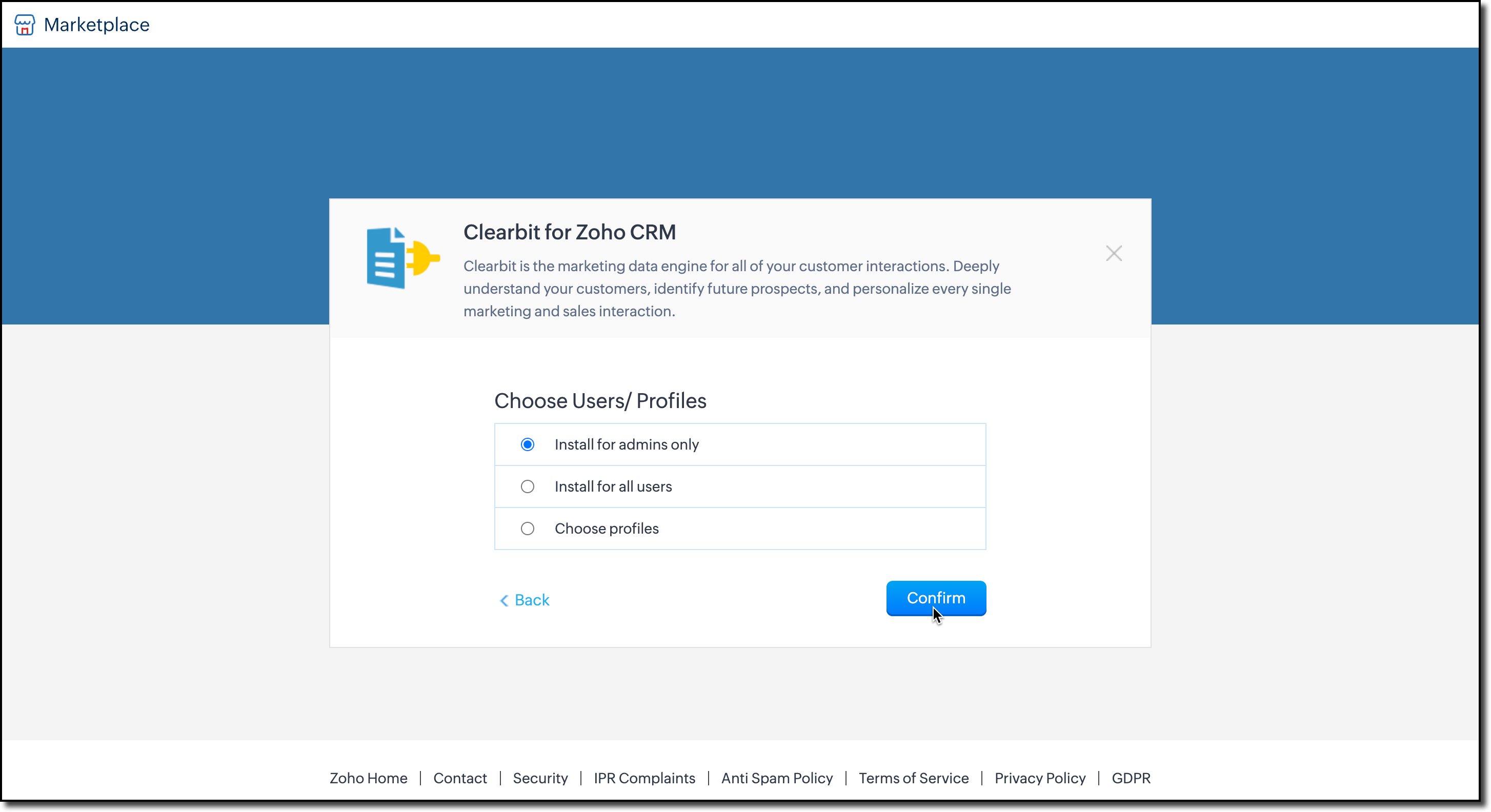
6. You’ll then be prompted to enter your Clearbit account API key. This key allows Zoho CRM to fetch data from Clearbit and update your records.
Enter the key and click Save.

7. Next, choose the modules where you want data enrichment. The extension currently supports Leads, Contacts, and Accounts.

You can change these configurations anytime by clicking Settings in the extension detail page.

You can also access the settings from Extensions list view as shown here.

Enrich your Data
The extension pulls enriched data from Clearbit using the email address on the record. Once installed, a business card will automatically appear on the record’s detail view page.

Note: The email field is mandatory for data enrichment.

To update your CRM fields with Clearbit data:
1. Click Add to CRM at the top-right corner of the business card.
2. A field mapping iframe will open, where you can map Clearbit fields to your CRM fields.

3. After mapping, click Update to add the details to the record.
We hope we answered your questions and you found this useful. For the queries we mentioned that we require more details and if we assumed it the other way around, please reach out to us at support@zohocrm.com.
We would be happy to connect and help you!
Cheers!
--------------------------------------------------------------------------------------------------

Previous Post: Kaizen 207 - Advanced Queries using COQL API | Kaizen Directory: Home
New to Zoho Recruit?
Zoho Campaigns Resources





Topic Participants
Kiruthiga G
Sticky Posts
Kaizen #222 - Client Script Support for Notes Related List
Hello everyone! Welcome to another week of Kaizen. The final Kaizen post of the year 2025 is here! With the new Client Script support for the Notes Related List, you can validate, enrich, and manage notes across modules. In this post, we’ll explore howKaizen #217 - Actions APIs : Tasks
Welcome to another week of Kaizen! In last week's post we discussed Email Notifications APIs which act as the link between your Workflow automations and you. We have discussed how Zylker Cloud Services uses Email Notifications API in their custom dashboard.Kaizen #216 - Actions APIs : Email Notifications
Welcome to another week of Kaizen! For the last three weeks, we have been discussing Zylker's workflows. We successfully updated a dormant workflow, built a new one from the ground up and more. But our work is not finished—these automated processes areKaizen #152 - Client Script Support for the new Canvas Record Forms
Hello everyone! Have you ever wanted to trigger actions on click of a canvas button, icon, or text mandatory forms in Create/Edit and Clone Pages? Have you ever wanted to control how elements behave on the new Canvas Record Forms? This can be achievedKaizen #142: How to Navigate to Another Page in Zoho CRM using Client Script
Hello everyone! Welcome back to another exciting Kaizen post. In this post, let us see how you can you navigate to different Pages using Client Script. In this Kaizen post, Need to Navigate to different Pages Client Script ZDKs related to navigation A.
Zoho CRM Plus Resources
Zoho Books Resources
Zoho Subscriptions Resources
Zoho Projects Resources
Zoho Sprints Resources
Zoho Orchestly Resources
Zoho Creator Resources
Zoho WorkDrive Resources


Zoho CRM Resources
Get Started. Write Away!
Writer is a powerful online word processor, designed for collaborative work.
Zoho CRM コンテンツ
-
オンラインヘルプ
-
Webセミナー
-
機能活用動画
-
よくある質問
-
Ebook
-
-
Zoho Campaigns
- Zoho サービスのWebセミナー
その他のサービス コンテンツ
ご検討中の方
Recent Topics
Automatic Portal invite
We have numerous customers we move through a blueprint in deals, when they get to a certain point we need to give them portal access, how can this be done through deluge or a workflow? Latest Update (December 2025): The option to automate portal invitationsMarketer's Space: Why mobile optimization deserves a place in your email strategy
Hello Marketers, Welcome back to Marketer's Space! Today, we'll talk about the importance of creating mobile-friendly email designs. While mobile phones were once used only to make phone calls, today they're used for almost everything, including texting,Enhancements in Canvas
Dear All, Greetings! Canvas lets you design the record details page to suit your brand or business preferences. We are glad to introduce the following enhancements to uplift your design experience. Reusable Components Style Presets Let's go! ReusableIntroducing Dark Mode / Light Mode : A New Look For Your CRM
Hello Users, We are excited to announce a highly anticipated feature - the launch of Day, Night and Auto Mode implementation in Zoho CRM's NextGen user interface! This feature is designed to provide a visually appealing and comfortable experience forABN with Legal Entity Name
Hi, How can I execute this? The ABN number is entered in Accounts Module and ideally, it should display or suggest the correct Legal Entity Name based on the ABN lookup. ex. Account Name: JPG Resources ABN Number: 65 067 761 871 Legal Entity Name: (autoUnify Overlapping Functionalities Across Zoho Products
Hi Zoho One Team, We would like to raise a concern about the current overlap of core functionalities across various Zoho applications. While Zoho offers a rich suite of tools, many applications include similar or identical features—such as shift management,Issue: Ticket Export Does Not Include Ticket Threads
Dear Zoho Desk Support Team, I hope you’re doing well. I wanted to bring to your attention that the current ticket export feature in Zoho Desk does not seem to include the ticket threads or conversation history. When exporting tickets, only the summaryPushover Notification Module
Hello, it would be good if there would be a "Pushover" (https://pushover.net/) module besides the standard SMS module. Pushover is now very well known, especially in IT, and is becoming more and more popular. The biggest advantage are the customizableForward - no Ticket Number
Hello, when I send an email to Zoho Desk via Reply or Reply All, the ticket number is in the subject line. But if I use forward then not. Is there an option to change this? We often forward e-mails and a reply to this will of course create a new ticketCheckout: Adding Images
Hello everyone, I’m trying to add a small GoGreen logo in the shipping section of the checkout to promote our sustainable shipping. While I can insert text without any issues, it seems that adding images is not supported in this area. Is there currently[solved] #original_sender trick not working for us
Hello community ! We really like DESK.. it's working like a charm for us but I have a request. Some users are sending emails personnaly to me (instead of using the support adress).. and I saw there was a possibilty to use : #original_sender {mail@mail.com}SalesIQ Chat Notifications
I am the admin of our salesIQ implementation. About two weeks ago, I started hearing/seeing notification for ALL chats messages from monitored agents/chat participants. I don't need to see these, we have a manager who deals with this. I can't stop theCorrelated subqueries not supported in Zoho Analytics. This creates huge limitations
Running into a major limitation in Zoho Analytics: correlated subqueries simply don’t work, even in completely standard SQL patterns inside a JOIN. Example: LEFT JOIN "Bills" b ON d."Id" = b."Deal ID" AND EXISTS ( SELECT 1 FROM "BillBatch Emails in CRM Plus without using a template?
Hi guys. Is it possible to send the same email to multiple people at the same time within CRM Plus without using an email template? At the moment we create a custom view in Contacts to display the people that we need. We then click the boxes on the left, and click 'Send Mail', but always need to select a template. Sometimes its better to write a quick one off message, without needing to set up a template first. Thanks.bank charge
a charge to my account was made that I did not authorize, of $16.46, for something that looks like "computer maintenance or something to that matter". please refund.[Free Webinar] Product Updates: Quick Catch-Up Session - Part II - Creator Tech Connect
Hello Everyone! We welcome you all to the upcoming free webinar on the Creator Tech Connect Series. The Creator Tech Connect series is a free monthly webinar featuring deep-dive technical sessions designed for developers, administrators, and app builders.Introducing Liquid Glass UI on the Zoho Mail iOS app
Hello everyone! We're excited to announce that the Zoho Mail app is now fully optimised for iOS 26's Liquid Glass design on both iPhone and iPad! The updated interface features transparent layers, smooth animations, and refined visual elements that enhancePlan change from Zoho One to Zoho Workplace
Hello Zoho, Following the recent pricing update for Zoho One, we are interested in transitioning to Zoho Workplace products. Please inform us about the necessary steps for this process so we can proceed promptly. Kind regards,Partner with HDFC And Sbi Bank.
Hdfc and sbi both are very popular bank if zoho books become partner with this banks then many of the zoho books users will benefit premium features of partnered banks.Links in Instagram
Hi there, I have been using Later for a while now but keen to come back to Zoho Social as Later doesn't offer tagging of pages on Facebook but they offer something Zoho doesn't. You can add a link to your bio which opens up your profile feed where imagesSpotlight #7 - Automatic Transitions in Blueprint
Previously, records could not be moved from one state to another without user intervention. With automatic transitions, move records from one state to another automatically, when it elapses its pre-defined time. This Spotlight discusses how automaticSub Folders
It would be great if there could be sub-folders in reports. We have a ton of individual reports and folders that would be easier to navigate this wayZoho CRM Community Digest - November 2025 | Part 2
Hello Everyone! Second half of November brought several exciting updates, especially around Zia, making AI assistance smarter, faster, and more context-aware. We also feature engaging community snippets highlighting members who went the extra mile toZoho CRM - Writing Assistant Tone
Hi Zoho CRM Team, Text in my emails often gets underlined in yellow because I tend to use a more informal tone with my client's, like using "I'm" instead of "I am". Is there some way for me to tell the system that this is my preferred writing tone, soHide Contact Number for Field Users & Agents
Is it possible to hide the contact number in both the Service Appointment and Work Order modules for field users and agents? The agents are using the Zoho FSM mobile app, and we want to restrict them from viewing the contact number.Zoho Flow Credits
Hi , I would like to ask the reason why every time I added plus credit but few days later I will return back to default? (as below I add credit to 3000 but today It change back to 1000) Most important is, when the credit fully used, not any reminder toForm Submission Emails
Is there a current delay with submission emails being sent? We've had 10-20 forms completed today but only a handful of emails.Subform edits don't appear in parent record timeline?
Is it possible to have subform edits (like add row/delete row) appear in the Timeline for parent records? A user can edit a record, only edit the subform, and it doesn't appear in the timeline. Is there a workaround or way that we can show when a user【Zoho CRM for Everyone】設定画面のアップデート
ユーザーの皆さま、こんにちは。コミュニティチームの藤澤です。 今回は「Zoho CRM アップデート情報」の中から、Zoho CRM for Everyone の設定画面のアップデート情報をご紹介します。 目次 設定ホーム画面の追加 設定画面での検索結果の表示形式の変更 設定画面でのよく使用する機能の表示 設定メニューの展開/折りたたみ状態の保持 1. 設定ホーム画面の追加 ホーム画面の設定項目は、直感的に分類できるように"カテゴリごと"で分けられています。 このような一元化された表示により、各ツールが1つの画面に集約され、必要な機能をより簡単に見つけられるようになりました。What's New - November 2025 | Zoho Backstage
A new month, a new set of updates. With a mix of new features and thoughtful improvements, you get smoother workflows and better control across registrations, exhibitors, and communications. Let's take a look at what's new and enhanced in Zoho BackstageZoho Checkout - Duplicate Customer record created for each payment received
Hi All. We are using Zoho Checkout to capture online payments for a club membership form (in Zoho Forms). We've noticed that each new payment seems to create a new customer record, regardless of whether the customer already exists in the Zoho FinanceIssue with "Add Your Mobile Number"
Hello, I am trying to sign up for email service for a domain name, and I cannot finish the authentication. When I enter my mobile number, I receive the message "We’re unable to send OTP to this mobile number. Please contact support-as@zohocorp.com". ITemplates for Zoho Desk - Knowledge Base
We are looking at migrating our Knowledge base into Zoho Desk. Is there a way of creating templates for article in Knowledge base. We want to be able to set templates for certain types of content. Is this possibleImport KB template OR Export template for zoho desk?
Greetings. Can you tell me if there is a way to get an EXPORT of my KB articles? OR is there a template you supply for importing KB articles into my zoho desk? I am looking for a method of understanding what fields can be imported, and what their possibleWhat KPIs Do You Use to Measure Your Support Team’s Performance in Zoho Desk?
Hi everyone, We hope you’re all doing well. We are trying to improve how we measure the performance and effectiveness of our support department, and we would really appreciate learning from the community. We assume there are several common and widely-usedBackorder quantity change
New Purchase Order × Almost there, but... Quantity of items in this purchase order is greater than the quantity that can be backordered from that sales order. Why can't I change the quantity of a backorder purchase? It looks like a normal order form and I would like to use it as one because I increased the amount and added some items.How to Associate multiple contacts with deal in Sales Inbox
Hello, I have many deals that have multiple potential customers associated with a single deal, for example an engineer and a manager. The manager is the Deal's primary contact in CRM and the Engineer is added to the deal in the "Contact Roles" Associated"code": "500","description": "Account not exists", mail api
I have been through all the steps and have a functioning Oath access_token etc etc... I then GET https://mail.zoho.com/api/organization And get my zoid then GET http://mail.zoho.com/api/organization/<hidden>/accounts and get the account details, whichRTL Support for Webforms in Zoho CRM
Dear Zoho CRM Support Team, We are writing to request an enhancement to the webform builder functionality within Zoho CRM. Currently, to create a webform in a right-to-left (RTL) language, the entire CRM instance must be set to RTL, which can be inconvenientImported contacts succesful but contacts do not show up in Contacts
I imported +300 contacts. I can see them in import history. When clicking on a contact in import history I see all the imported contact details for any given contact. So import seems to be successful. However the imported contacts do not show up in the contacts tab. Not in All contacts, and not in a filtered view where they absolutely should show up. The search function also does not find any imported contact. Help?Next Page