Level up your data collection game with the intuitive Zoho Forms mobile app!
In today's fast-paced world, mobility is essential for staying competitive. When it comes to collecting data, you need a tool that helps you gather and analyze essential information on the go. That's where Zoho Forms' mobile app comes in. With native applications for both Android and iOS, you can create and edit forms, collect data offline, scan codes and cards, and more—all from your mobile device. In this article, we'll share some tips and tricks for unlocking the full potential of Zoho Forms' mobile app. Let's dive in!
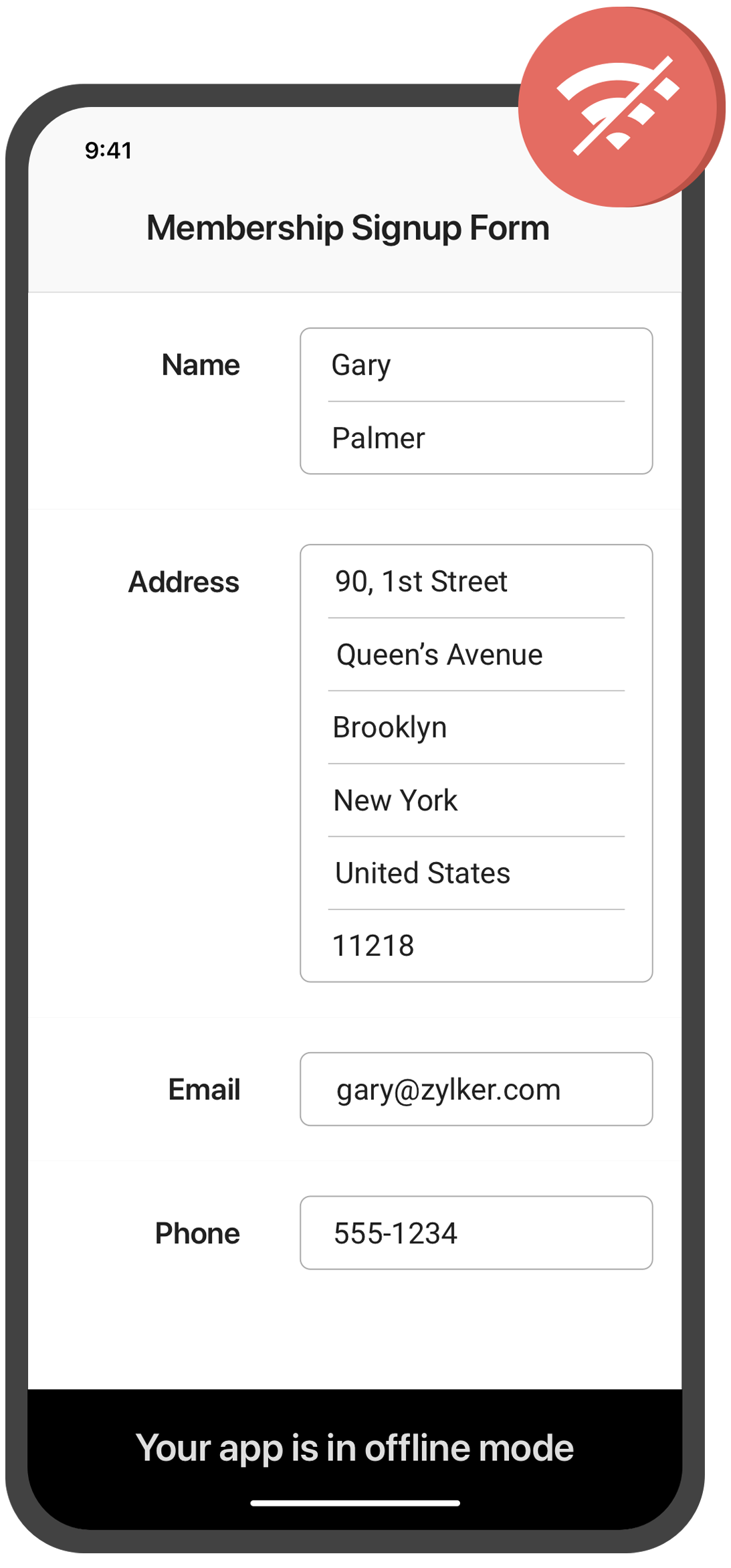
Collect data offline
Need to collect data in remote locations with no internet connection? With the Zoho Forms mobile app, you can fill out forms and collect data even when you're offline. This feature is especially useful for field workers, surveyors, and other professionals who work in areas with poor or no connectivity. Once you're back online, your data will automatically sync with your account.
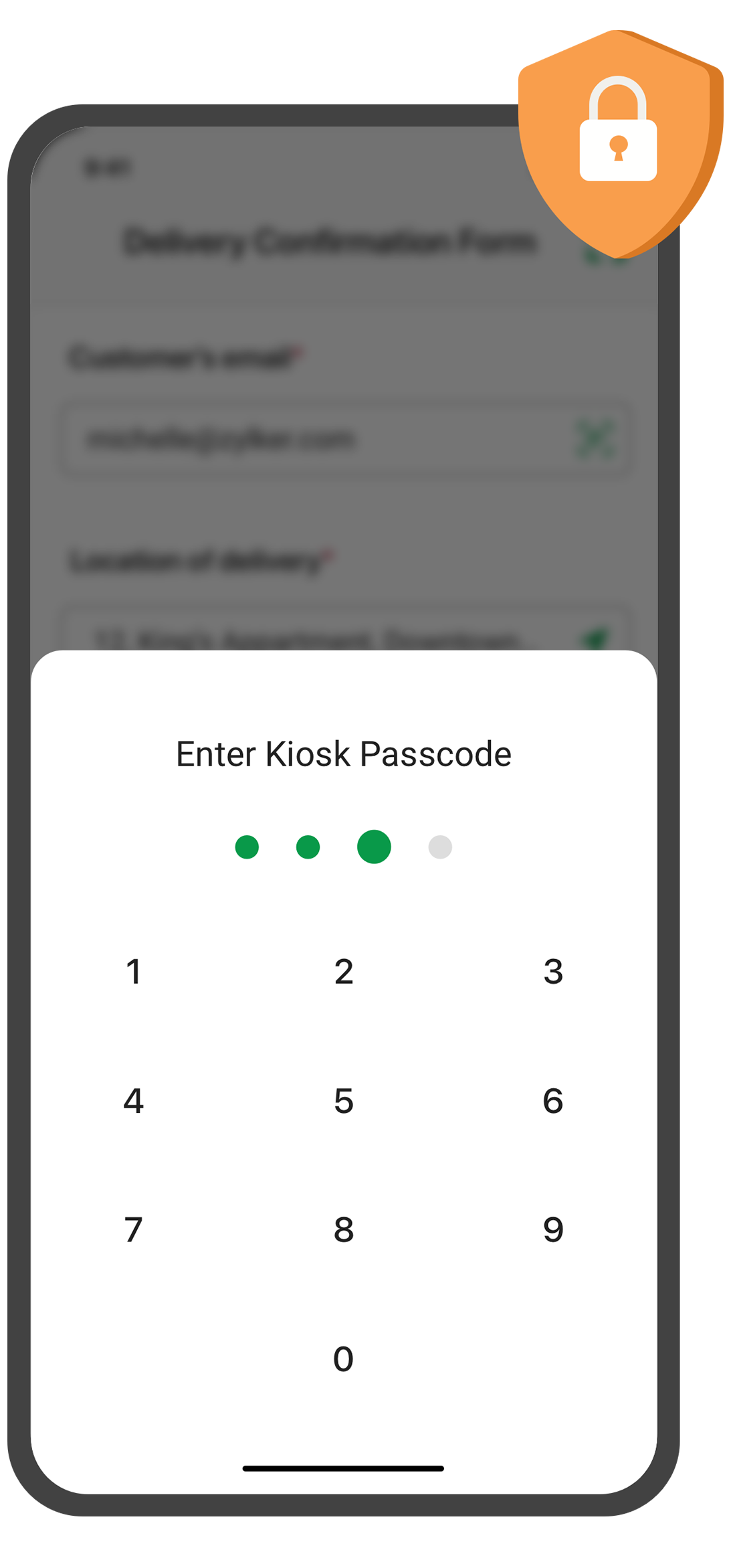
Create self-service kiosk
Looking for an easy way to collect data at events and trade shows, or in your store? With the Zoho Forms mobile app, you can turn your mobile device into a self-service kiosk with password protection. Effortlessly collect leads, contacts, and feedback!
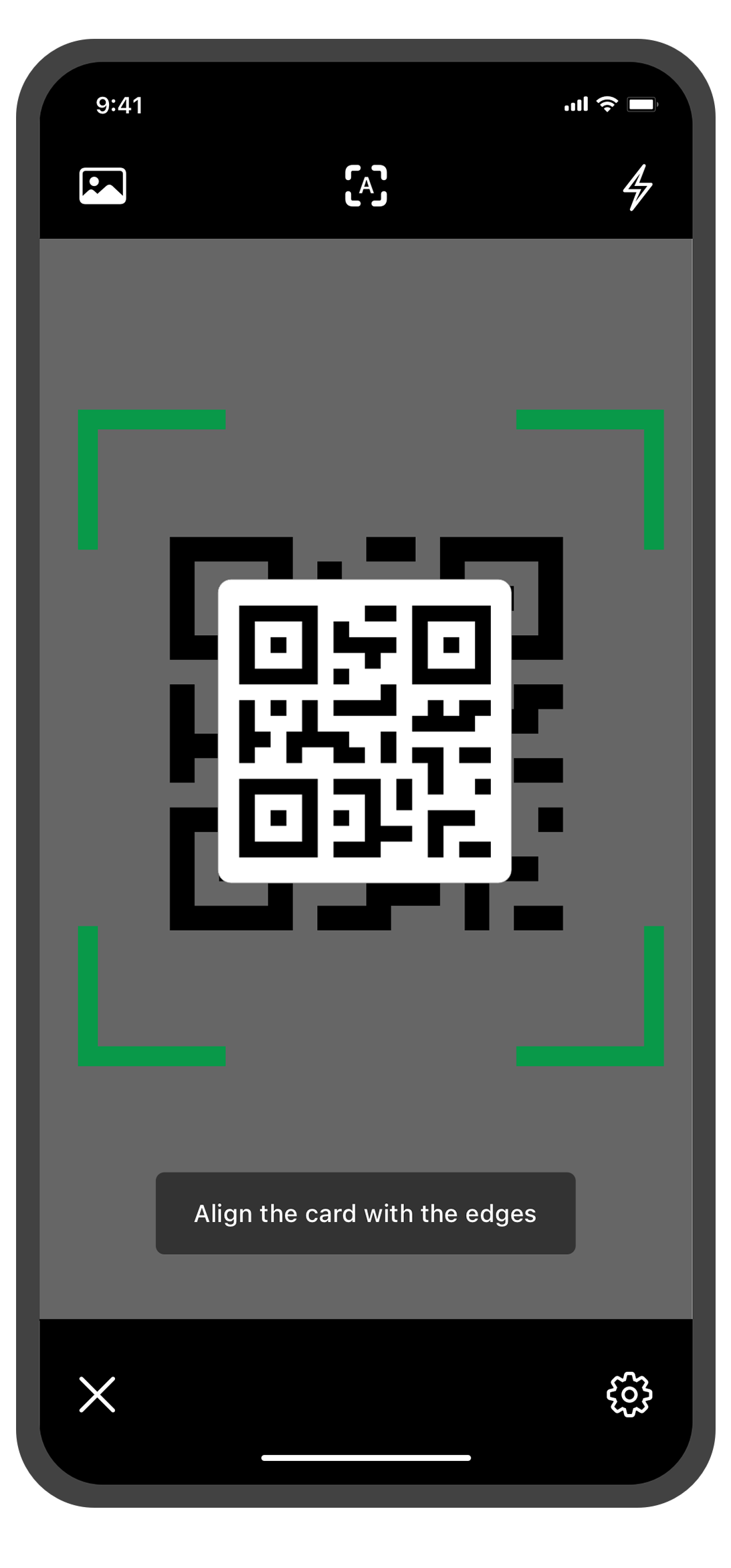
Scan QR codes and barcodes
Need to enter data quickly and accurately? The Zoho Forms mobile app lets you use your device's camera to scan QR codes and barcodes. No more manual data entry errors or wasted time! This feature is especially useful for inventory management, event registration. You can customize the form fields to more accurately reflect the data you want to collect from the codes.
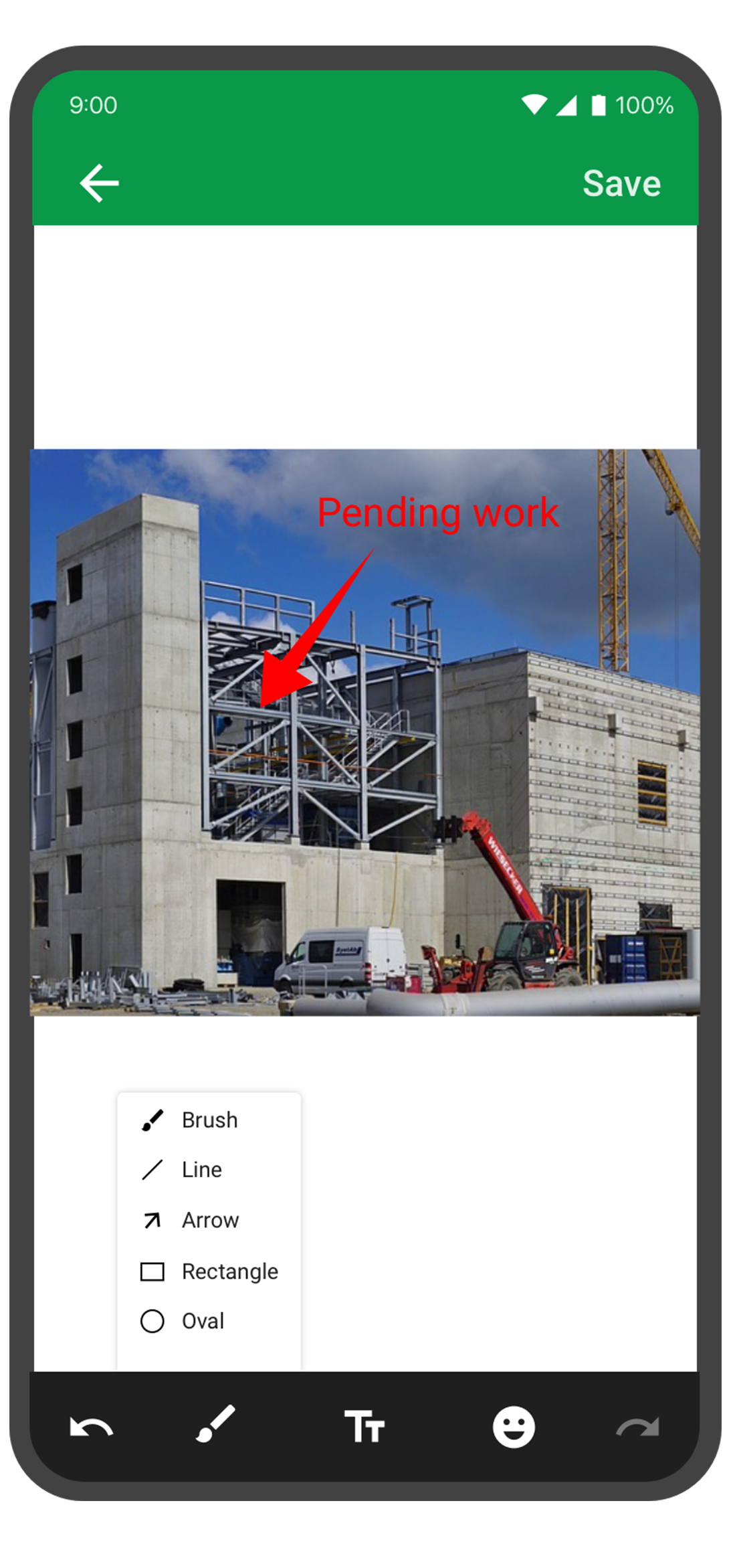
Annotate images
With the Forms mobile app, your team can capture and annotate images to make data collection more accurate and efficient. This feature is especially useful for field engineers, architects, and designers who need to capture and share information about a project. You can annotate images and mark areas of interest with text, arrows, shapes, and freehand drawings. Once the images are uploaded, you can view them under Form Submissions.
Draft entries
With this feature, you no longer have to worry about losing your progress if you need to pause or abandon filling in form. Should you experience an unexpected interruption, like a phone call or an app malfunction, the Zoho Forms app saves your progress as a draft entry. This way, you can easily pick up right where you left off at a later time without having to start from scratch. This feature can save you time and effort, and make the form-filling process more seamless and less stressful.
The Zoho Forms mobile app is a powerful tool that helps you collect data anytime, anyplace. With these tips and tricks, you can take full advantage of Forms' features and streamline your data collection process.
Try them out, and let me know how it goes! You can also send your thoughts and feedback to support@zohoforms.com.
Until next fortnight,
Niveditha
New to Zoho Recruit?
Zoho Campaigns Resources





Topic Participants
Niveditha Raghuram
Sticky Posts
Easily track referrals with Zoho Forms
Referral tracking can be a powerful way for businesses to understand where their leads are coming from. With Zoho Forms, tracking the referral sources of your leads is an easy and straightforward process. Here are some tips to help you make the most of9 Ways to use Zoho Forms this Navratri
Hello form builders!Navratri is almost here! It is a time for celebration and culture in the Indian community, and organizing such a grand event can be overwhelming. But with the right tools, you can streamline the process and focus on creating unforgettableThe secret to collecting data from valid users
Collecting accurate data is crucial for making informed decisions. Zoho Forms offers two efficient ways to validate user data and ensure that you collect entries exclusively from valid users. Double Opt-in: Double Opt-in is a privacy feature that ensuresStorage space in Zoho Forms: The ultimate guide to efficiently managing your data
Are you using Zoho Forms for data collection? As with any data-intensive application, understanding how storage space is calculated is essential. That's why we've created this guide— to show you everything you need to know about managing storage spaceLinking primary form submissions to a second form submission
Let's imagine you have a form that you use to request a minimal amount of data from your users. To collect additional information, you redirect them to another form either automatically or based on a condition. During the course of redirection, you can
Zoho CRM Plus Resources
Zoho Books Resources
Zoho Subscriptions Resources
Zoho Projects Resources
Zoho Sprints Resources
Zoho Orchestly Resources
Zoho Creator Resources
Zoho WorkDrive Resources


Zoho CRM Resources
Get Started. Write Away!
Writer is a powerful online word processor, designed for collaborative work.
Zoho CRM コンテンツ
-
オンラインヘルプ
-
Webセミナー
-
機能活用動画
-
よくある質問
-
Ebook
-
-
Zoho Campaigns
- Zoho サービスのWebセミナー
その他のサービス コンテンツ
ご検討中の方
Recent Topics
Introducing AI-powered Assessments & Zoho's native LLM, Zia
We’ve shipped a cleaner, faster way to create assessments in Zoho Recruit. 🚀 Instead of manually building question banks or copying old templates, you can now generate ready-to-use assessments in just a few clicks, all tailored to the role you’re hiringAbility to Reset Visitor Fields During an Active Chat Flow
Hello Zoho SalesIQ Team, We hope you are doing well. We would like to propose a feature enhancement to Zoho SalesIQ regarding the management of visitor fields within Zobot flows. Use Case: Our bot asks the visitor to provide information about a 3rd personExternal ID in Zoho CRM
Hello everyone! We know that Zoho CRM allows you to integrate third-party apps and manipulate data through APIs. While you integrate a third-party application, you may want to store the third-party reference IDs in Zoho CRM's records. To meet this needSome emails are not being delivered
I have this problem where some of my mail just seems to disappear. When I send it, it appears as sent with no mention of any problem, but my recipient never gets it, not even in the Spam folder. Same for receiving, I have a secondary e-mail address, andNew in Zoho Chat : Search for contacts, files, links & conversations with the all new powerful 'Smart Search' bar.
With the newly revamped 'Smart Search' bar in Zoho Chat, we have made your search for contacts, chats, files and links super quick and easy using Search Quantifiers. Search for a contact or specific conversations using quantifiers, such as, from: @user_name - to find chats or channel conversations received from a specific user. to: @user_name - to find chats or channel conversations sent to a specific user. in: #channel_name - to find a particular instance in a channel. in: #chat_name - to findTemplate modifiactions
Hello, I am struggling with the templates in ZOHO Books. Especially with the placement of some items, like company address, ship to, bill to etc. For example: One item I like from template X (placement of ship to and bill to next to each other in theAggregating the First Value in the Group By of a dataset
Hi I am trying to get the following Aggregate Formula to work in my chart, but cannot seem to get the right format. I have a series of data that I am running an include_groupby and want to SUM only a column in the first row of each group. So for example.Track Zoho Campaign and Workflow sales impact
I am attempting to measure the performance of our marketing workflows and campaigns by comparing the date each campaign was sent to a contact with the purchase date of the contact. For example, if Contact A was sent Email A on 9/1 and made a purchaseWhat is a line break code for zoho?
Hi, I am archiving data by adding values from a single line field from one form to a multi-line field in another form. So I need a code/function that starts a new line on that multi-line field so it does not just keep adding it on the same line. Example, doing something like this means that it will be on a same line. archive.field1 = archive.field1 + input.Field1 I need a code so the input.Field1 can just start on the next line. Instead of "value 1, 2,3,4,5" It will be: "1 2 3 4 etc.". somethingAutomatic Project Owner change
Is there a way to change Project Owner automatically once a specific Milestone in a project is marked as completed. Different Teams are working on projects in our Org, they have their own Milestones to complete and so we transfer the project from teamButton to add product to cart
Is there a way to have a button on a page, that when clicked, will add Qty 1 of a product to the cart?Problem with Submit Button Design
I have made a template to apply to my forms and under the button controls, I have it set to "standard" and yet it's still filling the container. This is super frustrating and looks weird. Why do we not have full control over button size? How can I fixZoho CRM- Authorize your Microsoft Teams account issue
Hi, I tried to link Zoho CRM with Teams and I got the following message: Clicking "Authorize now" sent me to the following page, Microsoft tried to start a session but, after 3 seconds the page closed and nothing happened. I get the same message eachIs there a way to associate an email in ZOHO Main to a Vendor record in ZOHO CRM
My situation is as below, I have a vendor in ZOHO CRM lets say "Vend A" and an associated contact, "Cont A" If Cont A sends me an email using the email I've registered in the contact record the standard OOTB email sync will work. But the vendor has someKaizen #207 - Answering your Questions | Advanced Queries using COQL API
Hi everyone, and welcome to another Kaizen week! As part of Kaizen #200 milestone, many of you shared topics you would like us to cover, and we have been addressing them one by one over the past few weeks. Today, we are picking up one of those requestsPrésentation de SecureForms dans Zoho Vault
Soyons francs : demander à quelqu’un de transmettre un mot de passe ou des informations sensibles n’est jamais une tâche facile. On attend, on relance, parfois de nombreuses fois. Et quand l’information arrive, elle se retrouve souvent dispersée dansIntroducing Connected Records to bring business context to every aspect of your work in Zoho CRM for Everyone
Hello Everyone, We are excited to unveil phase one of a powerful enhancement to CRM for Everyone - Connected Records, available only in CRM's Nextgen UI. With CRM for Everyone, businesses can onboard all customer-facing teams onto the CRM platform toGranular Email Forwarding Controls in Zoho Mail (Admin Console and Zoho One)
Hello Zoho Mail Team, How are you? At present, the Zoho Mail Admin Console allows administrators to configure email forwarding for an entire mailbox, forwarding all incoming emails to another address. This is helpful for delegation or backup purposes,Kaizen #190 - Queries in Custom Related Lists
Hello everyone! Welcome back to another week of Kaizen! This week, we will discuss yet another interesting enhancement to Queries. As you all know, Queries allow you to dynamically retrieve data from CRM as well as third-party services directly withinNeed the ability to have read only fields on a form.
There needs to be functionality in Creator that allows a field on a form to be read only. Most screen building software applications have this capability. I know you can hide certain fields from specific users and that you can also make the whole form read only but that's not the functionality I need. I want to be able to create a form where certain fields are editable and other are for display purposes only (read only). For example if the form was displaying information on an item that the userReverse payment on accidentally closed invoice.
An invoice was closed accidentally with the full payment added. However, only partial payment was paid. How can I reopen the invoice and reverse this to update it to show partial payment?New integration: Track booking page appointments in Google Analytics 4
Hello all, Greetings from the Zoho Bookings team! We’re excited to introduce our new Google Analytics 4 (GA4) integration designed to help you track booking activity, understand customer behavior, and measure marketing performance, all in one place. WhatHow to list emails in a folder, e.g. Inbox, on multiple pages when using Zoho mail webpage?
Something as shown in the figure. There are totally 50 emails in Sent folder. If "Mail per page" equals 20, then the Sent folder is split into 3 pages. When I wander through Sent folder, I can just select a specific page to jump to. BTW, it seems thatZoho Calendar soft bounce on @hotmail.com and @yahoo.com email addresses
Hello, our Zoho calendar recently does not send the calendar invites to emails with hotmail and yahoo domains and comes back with a "soft bounce". other domains like Gmail works fine. Also sending "email" to the same emails to the above domains work wellERROR CODE :512 - 5.4.4 DNS error:NXDOMAIN.
Suddenly we cant send mail, we are getting this error for all outbound mail to multiple domains.Can Zoho Flows repeat Actions more than once?
I'm attempting to make an intentional Zoho Flow loop using the below layout. However, when "WithinLimit" condition is met, the program fails to execute the action "Get & Add Request Co..." again. Is this by design? Is Zoho Flows unable to repeat actionsUnveiling Cadences: Redefining CRM interactions with automated sequential follow-ups
Last modified on 01/04/2024: Cadences is now available for all Zoho CRM users in all data centres (DCs). Note that it was previously an early access feature, available only upon request, and was also known as Cadences Studio. As of April 1, 2024, it'scustomer data security
We are exploring ways to enhance our within Zoho CRM. Our Goal: We want to fully integrate RingCentral with Zoho CRM to enable click-to-call functionality for our sales team. However, to comply with data privacy regulations and protect customer contactZoho Cliq not working on airplanes
Hi, My team and I have been having this constant issue of cliq not working when connected to an airplane's wifi. Is there a reason for this? We have tried on different Airlines and it doesn't work on any of them. We need assistance here since we are constantlySync CRM inventory data with Zoho Books
I just switched everything over to ZoHo books, but I am trying to find out why the CRM Estimates, Invoices, and Sales Orders created in ZoHo CRM are not then duplicated in ZoHo Books? I had Quickbooks before, and had to do everything twice, I thoughtmask Customer phone number and agents cant see customer phone number
Is there any way we can integrate Zoom Phone with Zoho CRM while ensuring that customer phone numbers remain masked? We need a solution where agents can make outbound calls but cannot see customer phone numbers. Please let us know if there is any solutionEmail Reminders on Shared Calendars
How do we turn off the setting that emails reminders to everyone who has accepted or declined a calendar invite? If 8 of us have been invited to the same meeting, we receive 8 notifications for every step of the process, from invitation to decision.How to refresh a ticket view ?
I am doing a widget where I send a rest api call to make a new draft to the ticket I am viewing. The issue is sometimes it refresh a ticket view and I can see inserted draft right away, but sometimes I do not see it even if it is inserted correctly andUgh! - Text Box (Single Line) Not Enough - Text Box (Multi-line) Unavailable in PDF!
I provide services, I do not sell items. In each estimate I send I provide a customized job description. A two or three sentence summary of the job to be performed. I need to be able to include this job description on each estimate I send as it's a criticalMerge Items
Is there a work around for merging items? We currently have three names for one item, all have had a transaction associated so there is no deleting (just deactivating, which doesn't really help. It still appears so people are continuing to use it). I also can't assign inventory tracking to items used in past transactions, which I don't understand, this is an important feature moving forward.. It would be nice to merge into one item and be able to track inventory. Let me know if this is possible.Supervisor Rules - Zoho Desk
Hi, I have set up a Supervisor Rule in Zoho Desk to send an email alert when a ticket has been on hold for 48 hours. Is there a way to change it so that the alert only sends once and not on an hourly basis? Thank you LauraResponseCode 421, 4.7.0 [TSS04] Messages from 136.143.188.51 temporarily deferred due to user complaints
Had email bounce. Let me know if you can fix this. Thanks. MichaelAutomation #15: Automatically Adding Static Secondary Contacts
Rockel is a top-tier client of Zylker traders. Marcus handles communications with Rockel and would like to add Terence, the CTO of Zylker traders to the email conversations. In this case, the emails coming from user address rockel.com should have TerenceNew Zoho triggers Google Dangerous flag due toabnormal charcters
Just signed up and doing my first email test. I sent it to my google email account but it got flagged as Dangerous" due abnormal characters. My DNS setup looks ok. Page snips attached Help Please Thanks, Rick DC PowerWorldIs there a API to fetch tasks in a Board/Section
I am writing a scheduled function that retrieves all the tasks and send an reminder on cliq. I cannot seem to find a API to fetch tasks (by user / board / section) What are the way to fetch tasks?Next Page