LINE 公式アカウントへのメッセージをSalesIQ から確認・返信できるようになりました
本投稿は、本社のZoho SalesIQ コミュニティに投稿された以下の記事を翻訳したものです。
Now connect and engage with your LINE chat users right from SalesIQ!
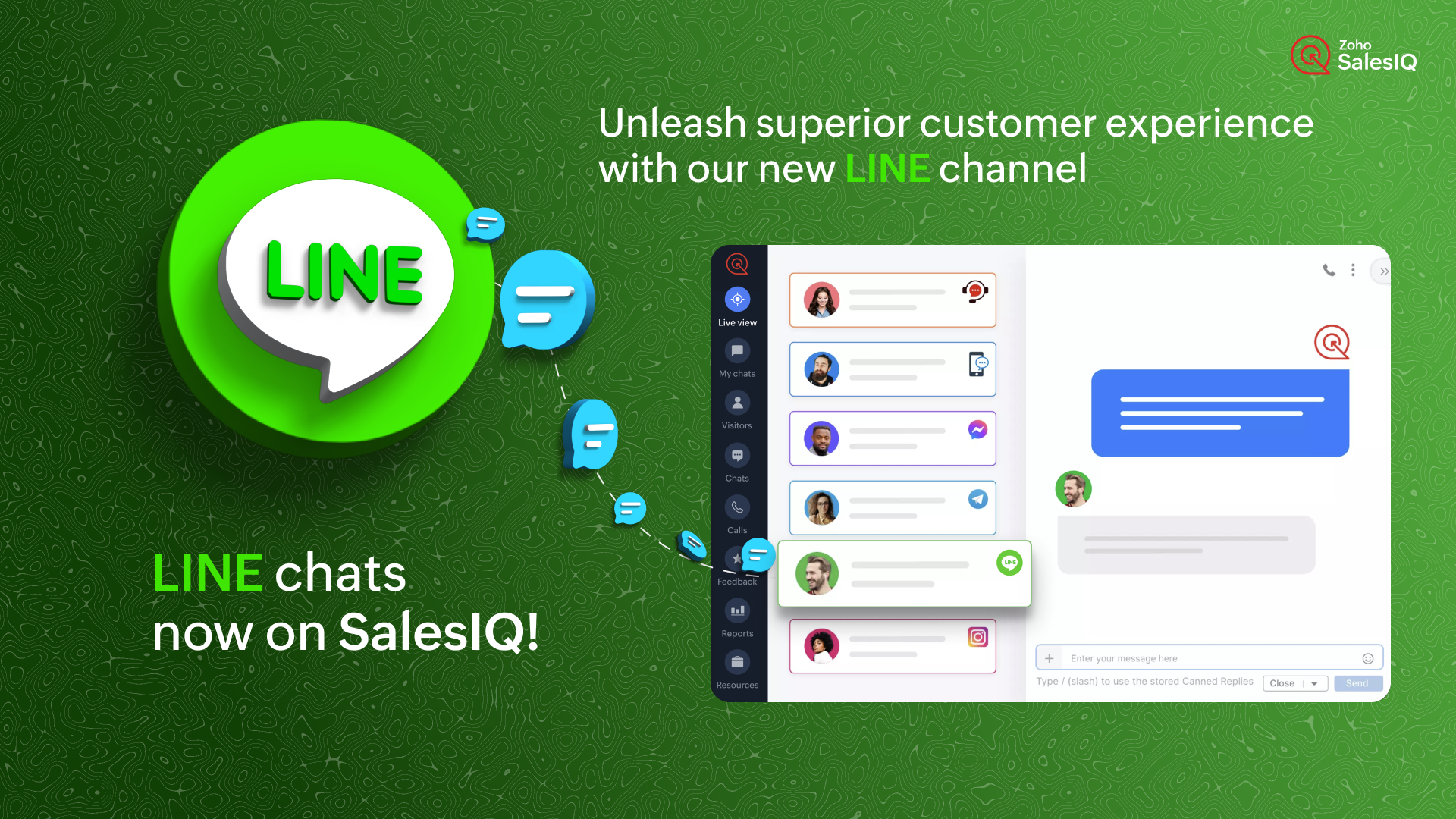
SalesIQ のIMチャンネルファミリーに、新しい仲間が加わりました。LINE とSalesIQ の連携を紹介します。このチャンネルを利用すれば、SalesIQ の管理画面から、LINE ユーザーと便利につながり、交流することができます。
LINE は世界で最も人気のあるインスタントメッセージングプラットフォームの1つであるため、この連携によって新たな可能性が広がり、さまざまな地域の顧客が好みのメッセージングアプリで即座に貴社のビジネスにアクセスできるようになります。
どのように機能するのでしょう?
SalesIQ のチャンネルにLINE を設定すると、LINE 公式アカウントで受信したすべてのチャットを、SalesIQ の管理画面に直接取り込むことができます。これにより、SalesIQ から簡単にメッセージを送受信することができます。
ビジネスでの利用例
ソーシャルメディアにビジネスプロフィールをアップしている場合、LINE や他のソーシャルメディアアプリからのチャットを担当する特定の担当者がいる可能性があります。
インスタントメッセージングアプリからすべてのチャットに対応し、合理的なカスタマーサポートを提供することは、控えめに言っても面倒なことです。それはなぜでしょうか?
- 顧客に最高のサービスを提供するために設計された追加サポート機能はありません。
- また、このような場合、かなりの確率でチャットが見逃されるおそれがあります。
インスタントメッセージングプラットフォームは個人的な使用には適していますが、ビジネス目的、特にカスタマーサポートに活用するには限界があります。顧客のニーズに真に応え、卓越したエンゲージメントとサポートを提供するには、これらのタスクのために特別に設計された堅牢なプラットフォームが不可欠です。
SalesIQ のような強力なツールにLINE のチャットを組み込むことで、既存のオペレーターが使い慣れた、卓越したカスタマーアシスタンスを提供するために必要なすべてのツールを装備することができます。このシームレスな組み合わせは、通常のサポートにとどまらず、カスタマーサービスをまったく新しいレベルに引き上げます。
SalesIQ のLINE チャネルを活用したカスタマージャーニー
ジャックはあなたのビジネスにコンタクトしようとしており、あなたのビジネスのLINE 公式アカウントにメッセージを送信しています。SalesIQ のオペレーターであるあなたには、SalesIQ のダッシュボード上ですぐにチャットの招待が届きます。
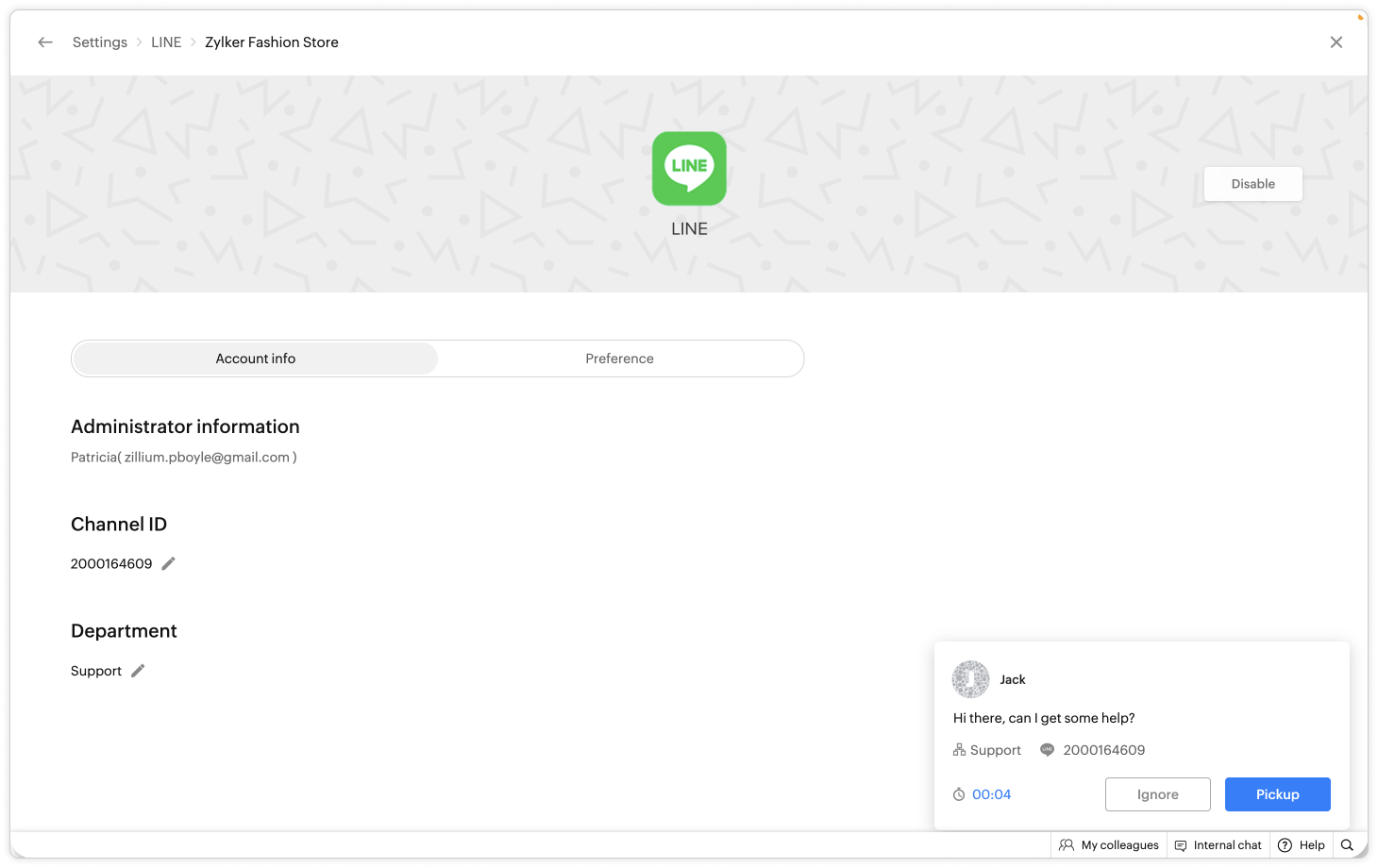
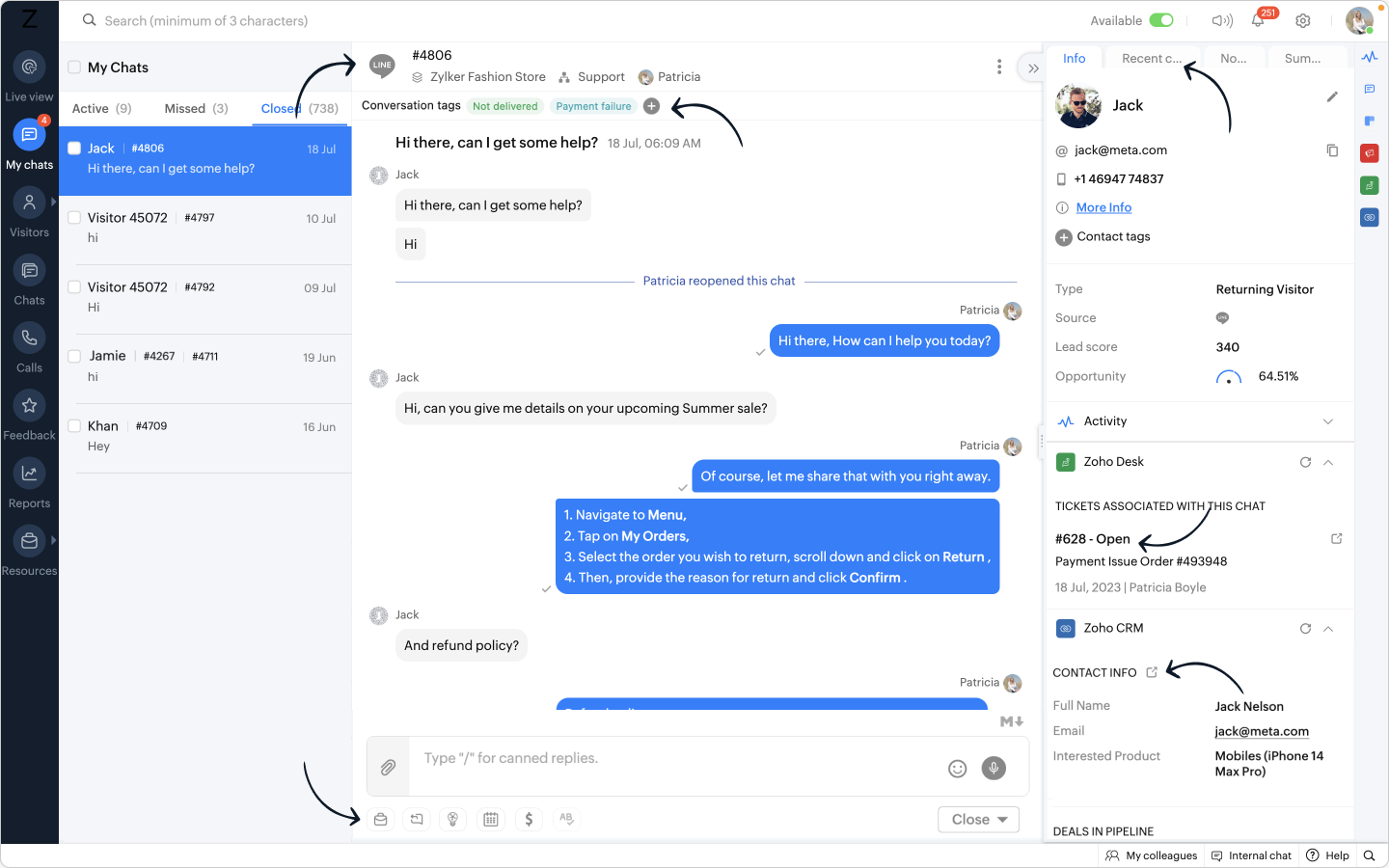
- あなたはジャックにお気に入りの定型文を使ってあいさつし、会話した後、ジャックが返金に関して問題を抱えていることを知りました。
- あなたはすぐに、自社の返金ポリシーに関するFAQ をジャックに伝えました。
- さらに、別のウィンドウに移動することなく、SalesIQ オペレータチャットウィンドウから Zoho Desk ウィジェットを利用し、ヘルプデスクソフトウェア上に即座にチケットを作成することができます。
- また、関連するタグを会話に追加することで、将来簡単にフィルタリングできるように効果的に分類できます。
おまけ:
- LINE からあなたのビジネスに新しい訪問者が近づいた場合、彼らの名前は自動的にオペレータのチャットウィンドウに入力され、簡単にあなたの会話をパーソナライズすることができます。
- 相手の連絡先情報を取得し、Zoho CRM ウィジェットを使用して CRM 上ですぐにリードを作成し、SalesIQ のオペレータチャットウィンドウから CRM に相手の詳細をプッシュすることができます。
このような顧客が、LINE から数日後に再びコンタクトしてきた場合、
- CRM に格納された顧客の詳細情報は、Zoho CRM ウィジェットで利用できるようになります。
- デスクチケットはZoho Desk ウィジェットで利用できるようになります。
- 過去の会話は「最近のチャット」に保存されます。
ここに可能性を感じませんか?
- LINE アカウントとSalesIQ を連携させることで、SalesIQ のダッシュボードにLINE のトークが表示されます。
- SalesIQ のダッシュボードには重要な訪問者/顧客情報がすべて保存され、後で参照することができます。
- SalesIQ のオペレータチャットウィンドウの強力な機能を利用し、生産性と効率を最大化することができます。

追加されたメリット:
リーチの拡大:LINE との連携により、膨大なユーザーベースを活用し、LINE を好みのメッセージングプラットフォームとして使用する顧客とつながることができます。この連携により、より多くのユーザーにリーチし、リアルタイムでエンゲージすることができます。
SalesIQ の機能の使用:ウィジェット、返信定型文、FAQ、OpenAI 連携などの機能をオペレーターが活用することで、健全なサポートとエンゲージメントを実現し、より有意義で文脈に即した会話が可能になります。
効率的なサポート:特定のオペレーターや専門部署をLINE チャネルのチャット管理のみに割り当てる柔軟性があり、お客さま独自のニーズに応じて効率性を最適化できます。
簡単なセットアップ:LINE との連携設定はとても簡単で、いくつかのステップを踏むだけでSalesIQ 内でLINE 公式アカウントへのメッセージを受信できるようになります。
注:Zobotは他のIMプラットフォームと同様、LINE チャンネルに近日登場する予定です。お客さまのカスタマーエクスペリエンスを向上させるシームレスな連携にご期待ください。待ち時間はそう長くありませんし、その価値は十分にあります!
LINE チャンネル設定手順
SalesIQ のLINE チャンネルでは、簡単なステップでLINE 公式アカウントとSalesIQ を連携させ、シームレスにコンタクトとつながることができます。LINE 公式アカウントの管理画面からチャンネルID とチャンネルシークレットを取得し、SalesIQ のLINE チャンネルページに貼り付けるだけです。
連携の手順については、以下のビデオをご覧ください。
SalesIQ は、Whatsapp、Facebookメッセンジャー、Instagram、Telegram など他のIMプラットフォームとの連携も行っており、幅広く利用されています。
Topic Participants
Junya Nakano
VEMULA MANEESH
Nederlandse Hulpbronnen

Recent Topics
Unify Overlapping Functionalities Across Zoho Products
Hi Zoho One Team, We would like to raise a concern about the current overlap of core functionalities across various Zoho applications. While Zoho offers a rich suite of tools, many applications include similar or identical features—such as shift management,Automation #7 - Auto-update Email Content to a Ticket
This is a monthly series where we pick some common use cases that have been either discussed or most asked about in our community and explain how they can be achieved using one of the automation capabilities in Zoho Desk. Email is one of the most commonlyTicket to article and Ticket to template
Hello! I would like to know if it is possible (and how) to do the following actions: 1. To generate an article from a ticket (reply + original message) 2. Easy convert an answer to an email templateIs there API Doc for Zoho Survey?
Hi everyone, Is there API doc for Zoho Survey? Currently evaluating a solution - use case to automate survey administration especially for internal use. But after a brief search, I couldn't find API doc for this. So I thought I should ask here. ThanWindows Desktop App - request to add minimization/startup options
Support Team, Can you submit the following request to your development team? Here is what would be optimal in my opinion from UX perspective: 1) In the "Application Menu", add a menu item to Exit the app, as well as an alt-key shortcut for these menusKaizen #225 - Making Query-based Custom Related Lists Actionable with Lookups and Links
Hello everyone! Welcome back to another post in the Kaizen series! This week, we will discuss an exciting enhancement in Queries in Zoho CRM. In Kaizen #190, we discussed how Queries bridge gaps where native related lists fall short and power custom relatedWebDAV / FTP / SFTP protocols for syncing
I believe the Zoho for Desktop app is built using a proprietary protocol. For the growing number of people using services such as odrive to sync multiple accounts from various providers (Google, Dropbox, Box, OneDrive, etc.) it would be really helpfulNon-responsive views in Mobile Browser (iPad)
Has anyone noticed that the creator applications when viewed in a mobile browser (iPad) lost its responsiveness? It now appears very small font size and need to zoom into to read contents. Obviously this make use by field staff quite difficult. This is not at all a good move, as lots of my users are depending on accessing the app in mobile devices (iPads), and very challenging and frustrating.[Free Webinar] Learning Table Series - AI-Enhanced Logistics Management in Zoho Creator
Hello Everyone! We’re excited to invite you to another edition of Learning Table Series, where we showcase how Zoho Creator empowers industries with innovative and automated solutions. About Learning Table Series Learning Table Series is a free, 45-60Customizable UI components in pages | Theme builder
Anyone know when these roadmap items are scheduled for release? They were originally scheduled for Q4 2025. https://www.zoho.com/creator/product-roadmap.htmlFeature Request - Set Default Values for Meetings
Hi Zoho CRM Team, I would be very useful if we could set default values for meeting parameters. For example, if you always wanted Reminder 1 Day before. Currently you need to remember to choose it for every meeting. Also being able to use merge tags toHow to use Rollup Summary in a Formula Field?
I created a Rollup Summary (Decimal) field in my module, and it shows values correctly. When I try to reference it in a Formula Field (e.g. ${Deals.Partners_Requested} - ${Deals.Partners_Paid}), I get the error that the field can’t be found. Is it possibleZoho Creator to Zoho CRM Images
Right now, I am trying to setup a Notes form within Zoho Creator. This Notes will note the Note section under Accounts > Selected Account. Right now, I use Zoho Flow to push the notes and it works just fine, with text only. Images do not get sent (thereCRM gets location smart with the all new Map View: visualize records, locate records within any radius, and more
Hello all, We've introduced a new way to work with location data in Zoho CRM: the Map View. Instead of scrolling through endless lists, your records now appear as pins on a map. Built on top of the all-new address field and powered by Mappls (MapMyIndia),Error Logs / Failure logs for Client Scripts Functions
Hi Team, While we are implementing client scripts for the automation, it is working fine in few accounts but not working for others. So, it would be great if we can have error Logs for client scripts also just like custom functions. Is there any way thatAutomate pushing Zoho CRM backups into Zoho WorkDrive
Through our Zoho One subscription we have both Zoho CRM and Zoho WorkDrive. We have regular backups setup in Zoho CRM. Once the backup is created, we are notified. Since we want to keep these backups for more than 7 days, we manually download them. TheyZoho Books blocks invoicing without VeriFactu even though it is not mandatory until 2027
I would like to highlight a very serious issue in Zoho Books for Spain. 1. The Spanish government has postponed the mandatory start of VeriFactu to January 1st, 2027. This means that during all of 2026 businesses are NOT required to transmit invoicesProblem : Auto redirect from zoho flow to zoho creator
Hi there, I've been waiting for zoho team to get back on this for last couple of days. Anyone else have the problem to access zoho flow? everytime I click on zoho flow it redirects me to zoho creator. I tried incognito mode but it still direct me to zohoTrouble with using Apostrophe in Name of Customers and Vendors
We have had an ongoing issue with how the system recognizes an apostrophe in the name of customers and vendors. The search will not return any results for a name that includes the mark; ie one of our vendors names is "L'Heritage" and when entering theWhy am I seeing deleted records in Zoho Analytics syncing with Zoho CRM?
I have done a data sync between Zoho CRM and Zoho Analytics, and the recycle bin is empty. Why do I see deleted leads/deals/contacts in Zoho Analytics if it doesn't exist in Zoho CRM? How can I solve this problem? ThanksHow to use MAIL without Dashboard?
Whenever I open Mail, it opens Dashboard. This makes Mail area very small and also I cannot manage Folders (like delete/rename) etc. I want to know if there is any way to open only Mail apps and not the Dashboard.Peppol: Accept Bill (Belgium)
Hi, This topic might help you if you're facing the same in Belgium. We are facing an issue while accepting a supplier bill received by Peppol in Zoho Books. There is a popup with an error message: This bill acceptance could not be completed, so it wasZoho Books is now integrated with Zoho Checkout
Hello everyone, We're glad to be announcing that Zoho Books is now integrated with Zoho Checkout. With this integration, you can now handle taxes and accounting on your payment pages with ease. An organization you create in Zoho Checkout can be added to Zoho Books and vice-versa. Some of the key features and benefits you will receive are: Seamless sync of customer and invoice data With the end-to-end integration, the customer and invoice details recorded via the payment pages from Zoho CheckoutSync Issue
My Current plan only allows me with 10,000 rows and it is getting sync failure how to control it without upgrading my planAdd Zoho PDF to Zoho One Tool Applications
It should be easy to add from here without the hassle of creating a web tab:JOB WISE INVOICE PROCESS
I WANT TO ENABLE JOB WISE TRACKING OF ALL SALES AND PURCHASEPDF Template have QTY as first column
I want to have the QTY of an item on the sales orders and invoices to be the first column, then description, then pricing. Is there a way to change the order? I went to the Items tab in settings but don't see how to change the order of the columns onRAG (Retrieval Augmented Generation) Type Q+A Environment with Zoho Learn
Hi All, Given the ability of Zoho Learn to function as a knowledge base / document repository type solution and given the rapid advancements that Zoho is making with Zia LLM, agentic capabilities etc. (not to mention the rapid progress in the broaderWelcome to the Zoho ERP Community Forum
Hello everyone, We are thrilled to launch Zoho ERP (India edition), a software to manage your business operations from end to end. We’ve created this community forum as a space for you to ask questions, comment answers, provide feedback, and share yourIn App Auto Refresh/Update Features
Hi, I am trying to use Zoho Creator for Restaurant management. While using the android apps, I reliased the apps would not auto refresh if there is new entries i.e new kitchen order ticket (KOT) from other users. The apps does received notification but would not auto refresh, users required to refresh the apps manually in order to see the new KOT in the apps. I am wondering why this features is not implemented? Or is this feature being considered to be implemented in the future? With theConsolidated report for multi-organisation
I'm hoping to see this feature to be available but couldn't locate in anywhere in the trial version. Is this supported? The main aim to go to ERP is to have visibility of the multi-organisation in once place. I'm hopeful for this.IMAP mail after specify date
Hi My customer's mail server is on premise and mail storage is very huge. So It never finish sync. and finally stop sync. Cloud CRM have a option like zoho mail sync mail after some date.Claude + MCP Server + Zoho CRM Integration – AI-Powered Sales Automation
Hello Zoho Community 👋 I’m excited to share a recent integration we’ve worked on at OfficehubTech: ✅ Claude + MCP Server + Zoho CRM This integration connects Zoho CRM with Claude AI through our custom MCP Server, enabling intelligent AI-driven responsesNotes badge as a quick action in the list view
Hello all, We are introducing the Notes badge in the list view of all modules as a quick action you can perform for each record, in addition to the existing Activity badge. With this enhancement, users will have quick visibility into the notes associatedSearch Bar positioning
Why is the Search bar on the far right when everything is oriented towards the left?The Social Playbook - January edition: Getting started with content creation
Social media isn’t just about posting some random content. It’s about why certain content works, how brands stand out, and what makes people pause mid-scroll. The Social Playbook is a monthly community series where we break all of that down. Through realImport Error: Empty values for mandatory fields - Closing Date
Hello, I've tried multiple times to import a CVS Potential list from another Zoho account. But the error message I get is: Empty values for mandatory fields - Closing Date There are valid dates in this field, so I don't understand why this error messagesAdding custom "lookup" fields in Zoho Customization
How can I add a second “lookup” field in Zoho? I’m trying to create another lookup that pulls from my Contacts, but the option doesn’t appear in the module customization sidebar. In many cases, a single work order involves multiple contacts. Ideally,Feature Requests - Contact Coloured Picklist Visibility & Field Visibility During Ticket Creation
Hi Desk Team, I have 2 feature requests for you. Since Coloured Picklists are now available in Desk, It would be great if the colours were visible on the Related Details (Contact Information) when creating a ticket. In the screenshot below, I have 2 fieldsHow to integrate XML with Zoho CRM
Hi, I have an eCom service provider that gives me a dynamic XML that contains order information, clients, shipments... The XML link is the only thing I have. No Oath or key, No API get... I want to integrate it into Zoho CRM. I am not a developer norNext Page