Zoho Desk: Q1 2025 | What's New
Hello everyone,
Our first release for the year 2025 is here!

The diverse capability of AI and its avatars has been the center of attention lately, and we've made some significant strides in this area. We now have a spectrum of other features to meet business's evolving customer service landscape.
This post is categorized into the following topics to maintain brevity and clarity:
- Zia: Content generation and writing assistance services
- Computational and analytical ability
- Agent productivity and reply readiness
- User inclusivity and help center security
- Improved ticket assignment and workflow
- Data administration: Audit logs and criteria-based exports
- Instant messaging and guided conversations
- Marketplace
- Enhancements in ASAP
- Mobile apps (Android, iOS, and Radar)
Register here for the What's New Webinar on 22nd April 2025.
Zia: Content generation and writing assistance services
Zia (powered by open source language model [Llama 3.1]), can perform a variety of actions from predicting behavior to automating crucial ticket handling actions to providing 24x7 self-service to customers. Zia can now help agents craft more empathetic, personalized responses in the customer's language of choice.
Highlighting the tone and underlying sentiment gives agents crucial cues about the conversation. Insights display a collection of key points or terms that are used in the conversation, and this gives agents an idea about the topic being discussed. Using this information, the agent can draft an appropriate, empathetic reply. They can prioritize tickets with negative sentiment to contain critical issues from escalating.
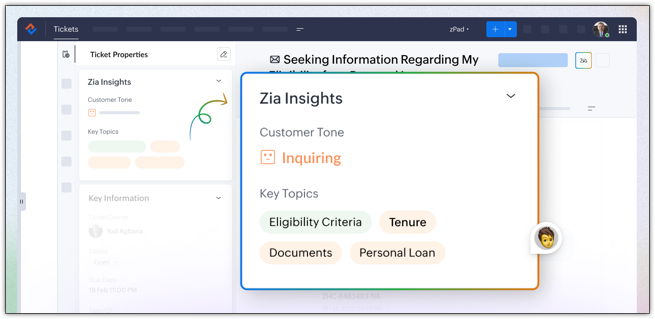
The ticket summary is repositioned within the reply interface to provide a better usability experience and provide more clarity. The thread summary will give you an overview of the conversation in a thread.Generate content: Aside from responding to ticket queries, agents sometimes need assistance drafting invitation emails, meeting reminders, follow-up mailers, and more. Zia's writing assistant abilities can help generate content based on the prompt; for example, "Generate invitation email for the upcoming sales." The content can be used as a reply or regenerated with a different prompt.

The tone of the entire response or a section of the content can be adjusted to meet the customer's conversational style. You can adjust the tone to formal, informal, diplomatic, assertive, or humorous.

Agents can check the quality of their response before sending it to their customers. Zia will highlight spelling and grammatical errors and offer suggestions. It will also provide the readability score and sentence length.

Agents need to engage with customers beyond just troubleshooting and resolving queries such as inviting them for events, follow-up meetings, onboarding follow-up etc. In these cases, Generate Content can assist agents by creating custom content on demand through prompts. Agents also have the flexibility to modify the prompt, use the generated content as a response, or regenerate it by adjusting the tone and length to fit the context better.

Computational and analytical ability
Support managers can actively monitor the ticket handling process and improve the existing strategies by defining better criteria and optimizing resource allocation for critical services. The lifecycle report will highlight the time spent at each stage; the number of tickets that are moved to another team, agent, or department; and how much time it took to resolve a ticket, which are all critical in identifying bottlenecks and improving assignment strategy.
For example, if L3 tickets are frequently reassigned and take longer to resolve as a result, it can indicate that the tickers are being classified incorrectly. By redefining the criteria and setting proper filters, these tickets can be correctly identified at the submission stage and assigned to the right department, team, or agent.

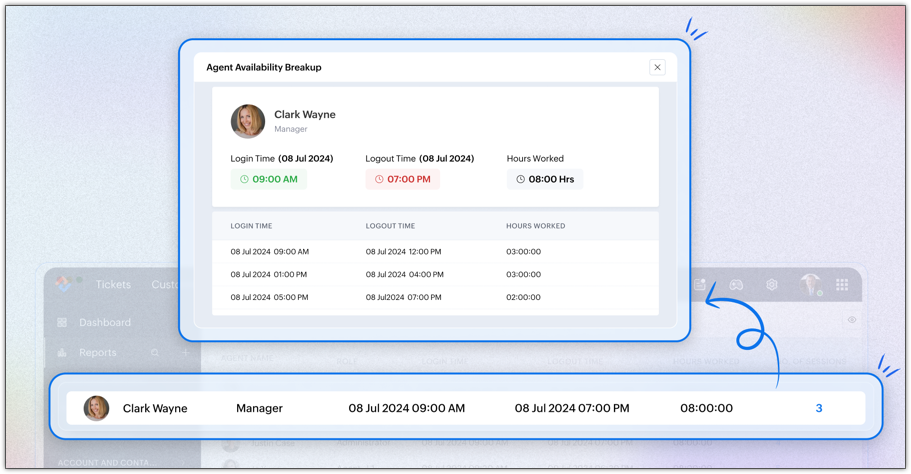
Managers can track each agent's active working hours to calculate the billable hours. They can regulate agents' availability by closely monitoring their session timings.
The report is drilled down into:
- Summary view: An overview of an agent's daily attendance, including their first login time, last logout time, total hours worked, and the number of sessions they conducted.
- Session view: A detailed breakdown of the login and logout times of each session. It provides insights into how often an agent logs in and out and the duration of each session.
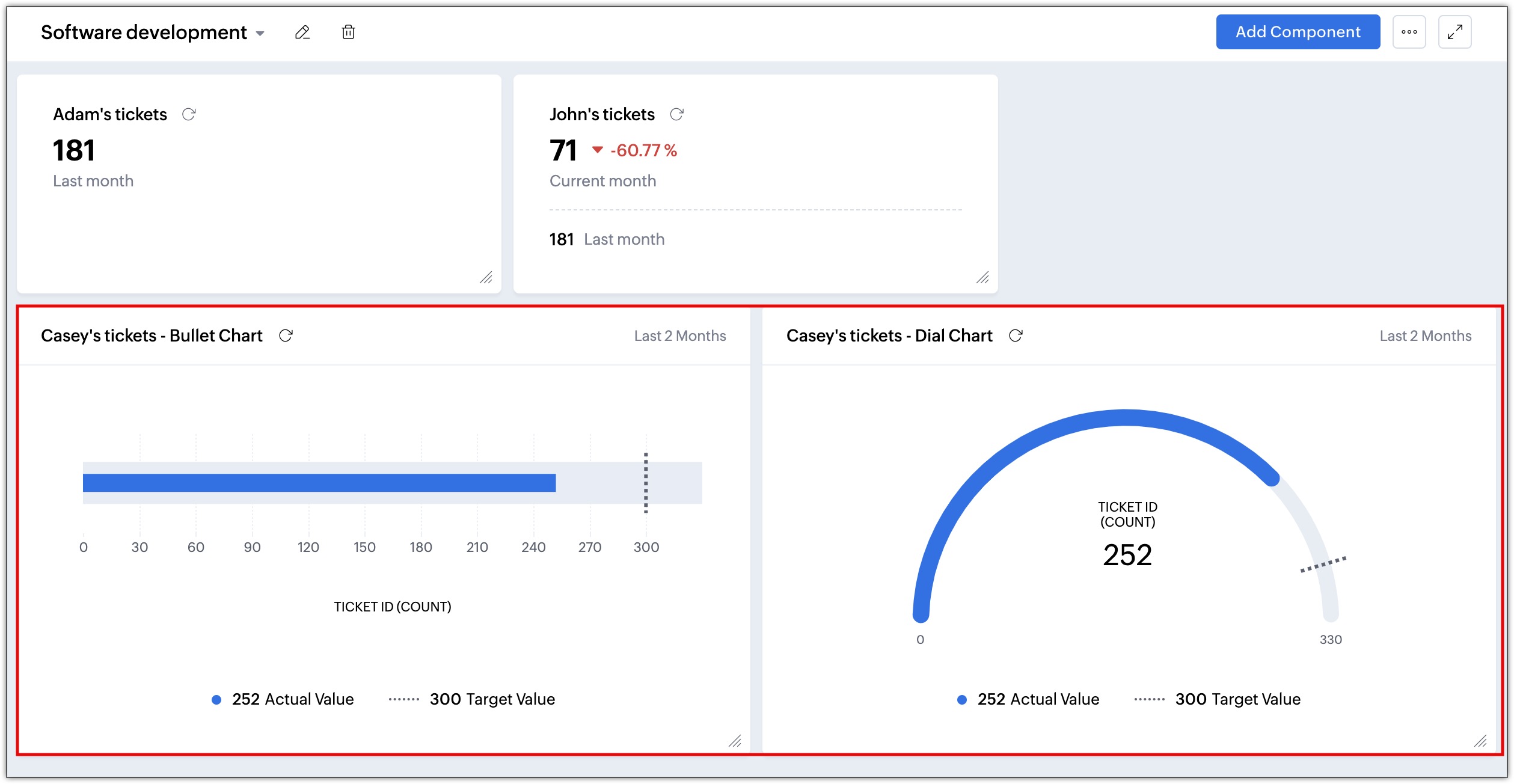
Monitoring the performance of an individual, a team, or a process identifies areas needing improvement. KPIs can also track progress or decline, and make periodic corrections. Some common performance indicators—like the number of tickets closed, task completion rates, monthly outbound calls, and pending asset requests—can all indicate whether there are any delays or if the agent requires training in handling special cases. KPI components such as metric cards, comparison indexes, bullet and dial charts provide visual representation of important business metrics that help with:
- Resource management: Monitoring agent productivity can help managers understand agents' bandwidth and allocate tickets and tasks accordingly.
- Performance tracking: Measuring First Response Time (FRT) and Time to Resolution (TTR) can help identify underlying reasons for any delays and take necessary actions to improve resolution time.
- Goal alignment: By measuring FRT or resolution time, businesses can align support activities to bigger goals, such as quicker ticket closure, improved customer satisfaction, and a decrease in tickets.
The Tickets module facilitates automatic computation of the customer's age in years, insurance policy tenure, claim amounts, service costs, and more, which would otherwise require an agent to calculate manually.

Agent productivity and reply readiness
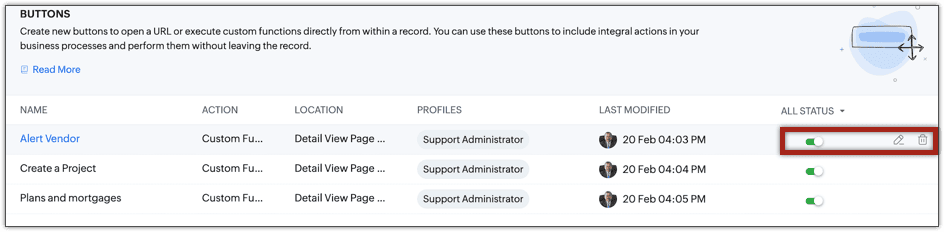
This functionality allows agents to perform actions, send information, track locations, and alert third-party vendors with the click of a button. Buttons can be accessed from the Ticket Detail view. It can invoke a URL or initiate a spectrum of actions through functions.
- Agents can refer to the company's term insurances, plans, benefits, and payout details while addressing a customer issue from the ticket.
- The customer's exact location can be found using the correct coordinates in the navigation service URL.
- Agents can create a record or initiate a process in another tool, such as creating a project in Zoho Projects or filing a bug in JIRA.
Businesses that use custom or private extensions (that aren't available in Zoho Marketplace) to manage their processes can add those extensions to the custom module. This allows them to view data generated by location trackers, forecast budgets, or even load and view images right inside the module's subtab, improving accessibility and usability.

The Community module UI has been redesigned to enhance its visual appeal and improve the user experience.
We've upgraded the filters, the community detail view, and the moderation settings page with a sleek new design, making navigation and accessibility simpler and more intuitive for users. With the new Approve All button, admins can now approve all posts that are pending approval at once.

Multiple contacts can be sent a WhatsApp message at once, saving time. Agents can also select multiple contacts and update a value or delete them.
Agents have the flexibility to respond to a ticket that was submitted through the IM channel via email.
User inclusivity and help center security
These have been introduced to provide help center users with ease of navigation.
The happiness rating feedback form can be translated in multiple languages to improve outreach and allow customers to submit feedback for the support they received in their native language.
These templates allow businesses to store multiple language versions under a single template ID, ensuring that messages are sent in the recipient’s preferred language. This eliminates the complexity of managing multiple templates and streamlines the WhatsApp approval process. These templates can also be triggered via our API, allowing businesses to automate multilingual messaging and enhance customer engagement at scale.
These bots allow customers to interact with you in their preferred language with multilingual GC bots in WhatsApp, Telegram, Line, Facebook Messenger, Instagram, and Business Messaging. It detects the user’s language, translates, and provides responses accordingly, eliminating the need for separate language-specific bots.
OTPs allow users to access the help center without their login credentials. Sometimes, when users are in a rush or have forgotten their login credentials, an alternative secure login system keeps them connected. OTP-based user authentication is currently available only for India-based customers.
Users can verify their identity using either of the options while accessing the help center.
Improved tickets assignment and workflow
Businesses that use custom modules can use workflow rules to update the field values in these records automatically. The "update record action" will update static and dynamic values in the custom module and its related modules. For example, if the employee name is updated in the Employee module, the name will be updated in the Payroll module as well.
These logs offer a detailed record of both successful and failed custom function executions triggered by automation rules. It includes execution details, passed arguments, and print statements, helping you debug issues and identify the causes of any failures.
Data administration: Audit Log enhancements
- The Audit Log is now available for both the Contacts and Accounts modules. Admins can track the changes and actions performed in these modules to gain more visibility.
- The Detail view of the Audit Log is introduced to view and analyze all of the logs. Admins can track specific actions and events all in one place to gain more clarity instead of navigating back to each record individually.
- Audit log data can be exported in CSV format file for future reference. Read more
Instant messaging and guided conversations
The AnswerBot can generate relevant answers from knowledge base articles to automate chat interactions and reduce response times. The agents can review the answers and choose whether to send them. Chat services on WhatsApp, Telegram, Line, Facebook Messenger, Instagram, and Business Messaging help manage high chat volumes, provide 24/7 support, and ensure quick resolution for common questions. When necessary, the AnswerBot will transfer conversations to human agents, ensuring a smooth customer experience while optimizing agent availability and efficiency across multiple messaging channels.
Triage chat conversations by systematically routing each new inquiry to the next available agent in a predefined sequence. This ensures an even workload distribution, eliminates manual assignment efforts, and enhances response efficiency, leading to better customer service and streamlined operations.
AI inside the CPaaS inbox offers real-time message suggestions, conversation summaries, sentiment analysis, and intelligent response recommendations. Available for WhatsApp, Telegram, Line, Facebook Messenger, Instagram, and Business Messaging, it facilitates faster resolution of customer queries while maintaining consistency in responses.
The AI-powered composer enhances the agent's productivity by offering real-time writing assistance, language translation, and tone adjustments. It ensures clear, refined, and contextually appropriate communication that resonates with the brand's messaging.
Generate AI-powered responses with context retention in Guided Conversations. The Generative AI Block understands complex queries and remembers the conversation history within a session to give personalized replies. It also provides a chat summary for agents, ensuring a smooth transition and better customer interactions.
Use industry-specific templates from the gallery to build contextual chatbot ready-made flows that are optimized for multiple languages and channels.
Connect Guided Conversations with Zoho CRM, Zoho Cliq, Zoho Connect, Zoho Projects, Zoho Mail, and Zoho Calendar. These integrations enable data exchange and automate workflows across platforms for smoother operations.
Create and deploy chatbots with unified widgets and flows. Switch between editing and viewing modes, preview blocks on hover, and customize the block listing panel. Reposition the panel for flexibility and track real-time metrics to optimize chatbot performance.
Automate user actions and personalize chats across messaging platforms like WhatsApp, Telegram, and Facebook Messenger by using the IM variable in the GC flow. IM variables enable session-specific actions, user identification, and ticket management for smoother interactions.
Personalize the logo, theme, launcher, and background. Set custom session end rules, idle timeouts, and enable multilingual support for a tailored chat experience.
The GC Mobile SDK (Android and iOS) supports multiple languages, adapting to the user’s device or preferred language. It ensures a consistent chatbot experience. App Clip and instant app Cliq support enables instant chatbot access without installing the full app.
Merge multiple variables and text into a single structured variable for better data integration. Use it to streamline workflows, improve ticket creation, and enhance AI responses. This reduces manual effort and ensures better context retention in conversations.
Marketplace
Zoho Desk can be integrated with Microsoft Azure DevOps, a suite of cloud-based tools and services developed to support the software development lifecycle (SDLC). Integration improves collaboration between support and development teams by enhancing communication and visibility of requirements, progress, and issues.
For example, a ticket raised for a feature request or feature enhancement by the customer is handled by the customer support team in Zoho Desk. The software development team handles their tasks, such as validating the request, coding, and testing in Azure DevOps.
Enhancements in ASAP
- Voice-to-Text Search: Android SDK customers can use voice-to-text search instead of typing.
- Comprehensive callback functionality: We've introduced callback events for Knowledge Base and Community interactions. These callbacks allow developers to track user engagement and integrate support usage data with their preferred analytics tools. This provides valuable insights for optimizing support content and identifying areas for improvement.
- Targeted content display: Support content can now be customized based on application screens and user contexts. For example, you can display a specific forum topic on a dedicated screen or show a particular ticket status on a ticket management page. This allows for a more tailored support experience.
Mobile apps: (Android, iOS, and Radar)
- Schedule and record calls (Android and iOS): The details of inbound and outbound calls can be recorded for transparency and tracking the agent's progress.
- Create stand-alone activities (Android and iOS): Individual tasks, events, and calls can be created without associating them with tickets, such as onboarding requests, service maintenance, and more. Activities can be sorted and viewed under system-defined list views or custom views.
- Customizing the list view in a custom module (Android): The list view in a custom module can be personalized by adding or removing the columns as needed. For example, in a custom module called Tour Packages, the users can select fields like country of travel, duration, package type, and visa requirements in the list view for easy access. The fields and layouts within a module can be rearranged, and the appearance and alignment of each card in the module can also be customized.
- Generate quick and accurate replies using Zia insights in IM chats (Android and iOS): Zia insights in IM chats will help agents understand complex queries by generating a summary of the chat session. Reply suggestions can also be generated to provide contextually accurate replies, reducing the time spent on drafting replies. The tone of the incoming message can be read using Zia insights, helping agents to align their conversation to that of the customer.
- Use Radar permissions to control who can use what in the app: Radar permissions let admins customize app access based on a user's profile. This way, users can access only the tools and data needed to discharge their duties. By removing distractions and reiterating responsibilities, Radar permissions help users collaborate while staying within the confines of their roles, enhancing overall efficiency and productivity.
- Make the Radar app follow your device's time zone: Empower agents to provide support from anywhere in the world using the Radar app. Its "Use Device Timezone" setting synchronizes the help desk application's clock with that of the agent's device. Consequently, agents can view all time-related data (e.g., created time, due time) in their local time, enabling punctual, well-timed responses.
Topic Participants
Anumita Gupta
Hadi
Shivani | Zoho Desk
Sticky Posts
Zoho Desk Partners with Microsoft's M365 Copilot for seamless customer service experiences
Hello Zoho Desk users, We are happy to announce that Zoho Desk has partnered with Microsoft's M365 to empower customer service teams with enhanced capabilities and seamless experiences for agents. Microsoft announced their partnership during their keynoteWhatsApp pricing changes: Pay per message starting July 1, 2025
Starting July 1, 2025, WhatsApp is shifting from conversation-based pricing to per-message billing. That means every business-initiated message you send will count. Not just the first one in a 24-hour window. Pricing updates on the WhatsApp Business PlatformLive Webinar - Work smarter with Zoho Desk and Zoho Workplace integration
Hello customers! Zoho Desk and Zoho Workplace are coming together for a webinar on 14th May, 2024. Zoho Workplace is a suite of productivity apps for email, chat, docs, calls, and more at one single place. Zoho Desk is closely integrated with a few toolsApple iOS 17 and iPadOS 17 updates for Zoho Desk users
Hello Zoho Desk users! Apple recently announced the release of iOS 17 and iPad OS 17. These latest OS updates will help you stay productive and efficient, through interactive and seamless user experiences. Zoho Desk has incorporated the updates to helpZoho Desk Cheat Sheet For The Year-End
Check out these Zoho Desk best practices to end this year on a high and have a great one ahead! #1 Set Business (Holiday) Hours - If you have limited working hours, please make sure you restrict your business hours or set them as holidays for the coming days. Let your customers know when you will, and won't, be available. #2 Update the Annual Holiday List - Check the holidays for the new year and update the holiday schedule. Usually, holidays from the current year will be carried over for the next
Recent Topics
Inactive License for free account.
I recently upgraded my Cliq subscription not my team (on the free version), are unable to login to their accounts. The error message received is Inactive License Looks like you have not been covered under the current free plan of users. Please contactSyncing zoho books into zoho crm
I was wondering how I can use zoho books in crm as I have been using them separately and would like to sync the two. Is this possible and if so, how? ThanksAnnouncing new features in Trident for Mac (1.34.0)
Hello everyone! We’re excited to introduce the latest updates to Trident, which are designed to take workplace communication to the next level. Let’s take a quick look at what’s new. Connect with customers using Zoho Voice integration. You can now easilyThe Social Wall: January 2026
Hello everyone, We’re back with the first edition of The Social Wall of 2026. There’s a lot planned for the year ahead, and we’re starting with a few useful features and improvements released in January to help you get started. Create a GBP in SocialHow to block whole domain?
I am getting at least 50-75sometimes over 100 spams emails a day. I see a lot of the spam is coming from .eu domains. I would like to block /reject all email coming for the .eu domain. I do not have any need for email from .EU domains. Why won't the BlackListHow Zoho Contracts Makes Negotiations Clear, Secure, and Transparent
Negotiation is one of the most critical—and often most chaotic—stages of the contract lifecycle. Multiple stakeholders review the same document, propose changes, debate terms, and exchange feedback. Without the right tools, this collaborative processError: Invalid Element tax_override_preference
In both Books and Inventory, we're getting the following error whenever we try to enter any Bill: I think this is a bug. Even cloning an old bill (that obviously was entered just fine), this error occurs.Assign Income to Project Without Invoice
Hello, Fairly new user here so apologies if there is a really obvious solution here that I am just missing... I have hundreds of small deposits into a bank account that I want to assign to a project but do not want to have to create an invoice every timeHow to Print the Data Model Zoho CRM
I have created the data model in Zoho CRM and I want the ability to Print this. How do we do this please? I want the diagram exported to a PDF. There doesnt appear to be an option to do this. Thanks Andrewour customers have difficult to understand the Statements
our costumers have big problems to understand Zohos Statements. we need a text box after the payment number to explain what the payments are for. Is it possible to develop a version of the Statement with that kind of box and if so whu can do itHow to track a list of ALL the items that ONE customer bought?
Hello, I am interested in getting a list of all the items that only ONE of my customers bought, and the invoices are what show up instead. It's very tedious to go through every single invoice when we sell a lot of items to this customer. Surely thereExchange Rate Updates
Hi, It would be great that when you work with multiple currencies, the exchange rate updates automagically every day (as seen on Zoho Books) or at least that when you create/update an opportunity the exchange rate could be manually updated, or maybe both!Locked Out of Super Admin Account
I'm locked out of my Super Admin account and the external e-mail is no longer associated with it. There seems to be a problem during set up, the system ought to ask to assign a new password instead of using Google accounts. Please help me get back access.Emails are going to notification folder and not in inbox
emails are going to notification folder and not into inbox550 5.4.6 Unusual sending activity detected. Please try after sometime
Hi, I am receiving this error message when trying to send my emails. The only reason I can think why this is happening is my previous two emails were bounced back to me due to a non working mailbox error. I have followed the online links for unblockingProjects Home Customization
Hello! We've been in Zoho One since July of last year, and my team has started providing feedback on what they'd like to do. Their latest wish is that they could have more control over the Projects Home content. For example, they want a card that showsIMAP search support
Does Zoho Mail support IMAP search? https://www.rfc-editor.org/rfc/rfc9051.html#name-search-command TEXT <string> Messages that contain the specified string in the header (including MIME header fields) or body of the message. Servers are allowed to implementPerformance is degrading
We have used Mail and Cliq for about three years now. I used to use both on the browser. Both have, over the past 6 months, had a severe degradation in performance. I switched to desktop email, which appeared to improve things somewhat, although initialCannot reorder fields in Page Layout in Expenses and Purchase Requests
It is very inconvenient that the custom fields in Page Layout cannot be re-ordered. The only way is to remove the fields and re-create them; however, it is impractical. This would affect the reports and dashboards we are having. Not able to re-order thebouncing emails
My recurring invoices have bounced backProbable Scam / Phising attempt from email pretending to be Zoho
I think this is a scam email right? It says "zohCworkplace.com". I'm on the Mail Free plan The link in the CTA button seems to go to a redirect. Just wanted to bring it up to the security team.Feature Request: Ability to set Default Custom Filters and apply them via URL/Deluge
I've discovered a significant gap in how Zoho Creator handles Custom Filters for reports, and I'm hoping the Zoho team can address this in a future update. This limitation has been raised before and continues to be requested, but remains unresolved. TheEmail Address Search in "To" Field Search is broken, Zoho refuses to fix it
Typing a part of the email address string other than the beginning of the string does NOT work, I kindly urge Zoho to fix this. Let's say you remember writing an email so someone called "smith" from company "corp.com", but can't remember their first name,Emails not being received by @hotmail.com, @outlook.com and a few others
When I try to send emails from zoho mail to people with email addresses ending @outlook.com and @hotmail.com (and a few others), I get a 'delayed' automatic email and then a few hours later, an 'undelivered' automatic email. This has started a few monthsscroll bar for far left of screen
I am unable to even see the scroll bar to the right of "inbox" etc on the left; it is stuck at "streams" and I can't get to inbox or anything else. It would help if it could be made a lighter color as the black or dark grey can't bee seen.OUt of office every friday
Hi, I tryed to configure my out of office, because i'm not working or emailing on fridays. But when i select only friday as unavailable day, the out of office still sets for the whole week. What am I doing wrong?Signature line
How do I set signature line in emailZoho email
I cannot send email to mail.ru【参加無料】東京 Zoho ユーザ交流会 NEXUS ー CRMで始めるマーケティング事例 / AI活用法(Zia Agents)
ユーザーの皆さま、こんにちは。コミュニティチームの藤澤です。 3月27日(金)に東京、新橋で東京 Zoho ユーザー交流会 NEXUS を開催します! 昨年度までより、さらにパワーアップして戻ってきました! ユーザー活用事例は、2人のユーザーさんからお話しいただきます。Zoho サービスの活用の幅を広げたい方や、他のユーザーの利用法を気軽に知りたい方など、多くの方にとって学びのあるセッションになること間違いなしです✨ また今年は、これまで以上に、AI機能にも焦点を当てて行く予定です。 初回として、Zoho社員からZohoIssue Exporting Data – CSRF Token Invalid Error
Dear Zoho Team, We are experiencing an issue when exporting data from our Analytics workspace. Whenever we attempt to export data from our analytical pool, the system displays the following alert message: Alert Message: The CSRF token is invalid. It couldDeluge Learning Series – Client functions in Deluge | January 2026
We’re excited to kick-start the first session of the 2026 Deluge Learning Series (DLS) with Client functions in Deluge. For those who are new to DLS, here’s a quick overview of what the series is all about: The Deluge Learning Series takes place on theZoho Mail 505 error I can not send email
Hi, I’m having issues sending emails from my custom domain email address. When I send emails to Outlook addresses, I receive an “Undeliverable 505” error. However, emails send and receive correctly when I use Gmail. This is important for my business,Multiple MFA Methods
With SMS-based MFA methods being discontinued, there is now no way to have mutliple MFA methods. I'd like to add my zoho account on two seperate phones using the Google Authenticator app. In the https://accounts.zoho.com/home#multiTFA/modes you can onlyReuse Standalone Function
I noticed that there's a missing information in documentation to reuse a standalone function and it is because the parameters require an argument. Here is my code and it is working. response = invokeurl [ url: "https://people.zoho.com/api/v3/function/sample/execute"Domain renewals
Need to know how hoe to renew the domainMX shopify problem
hello, i added all MX values in my shopify DNS - it shows those values on the shopify panel + your toolkit. I tried to send some email and it works, however on my gmail it says they cant verify this email. When i try to answer into my domain's email -Best Way to Manage Email Notifications While Running a Strategy Website
I am currently managing a content-based website, and I use Zoho Mail for handling contact forms, user queries, and collaboration emails. One challenge I am facing is organizing incoming emails efficiently, especially when messages come from differentWhat is the maximum email domains ?
I help manage about 20 associations and I'm looking for a way to centralize them in one place. Does Zoho Mail pro or enterprise support 20-30 domains for 3-5 users each?Add to Workdrive filter
I'm trying to create a filter that will upload attachments in emails and the e-mail body to a folder in workdrive. I am able to do one or the other (attachment, or e-mail content), but not both. I first tried it using the "Email (EML) + attachment" option.Forgot my admin Panel Id and password
Sir, I have an account , where a domain mycityestate.in is added for Zoho email , now it is hard for me to manage email because i have forgotten the Email account and password registered with Admin Panel of Zoho. Just need email name which is registeredNext Page