Create Your Own Issue Management System
Effective issue management is a cornerstone of project success. Every bug or issue, no matter how small, needs to be tracked and resolved in time to maintain project momentum. In this post, we’ll explore how an issue management system in Zoho Projects is used to manage issues in our own product management process.
Real-time Example:
During the software testing process, when the tester identifies an issue impacting the Global Web Tab feature task where the alignment breaks in certain browsers, it follows a predefined process for resolution. Here’s how the issue management system handles this end-to-end.
Submit Issues using Custom Fields
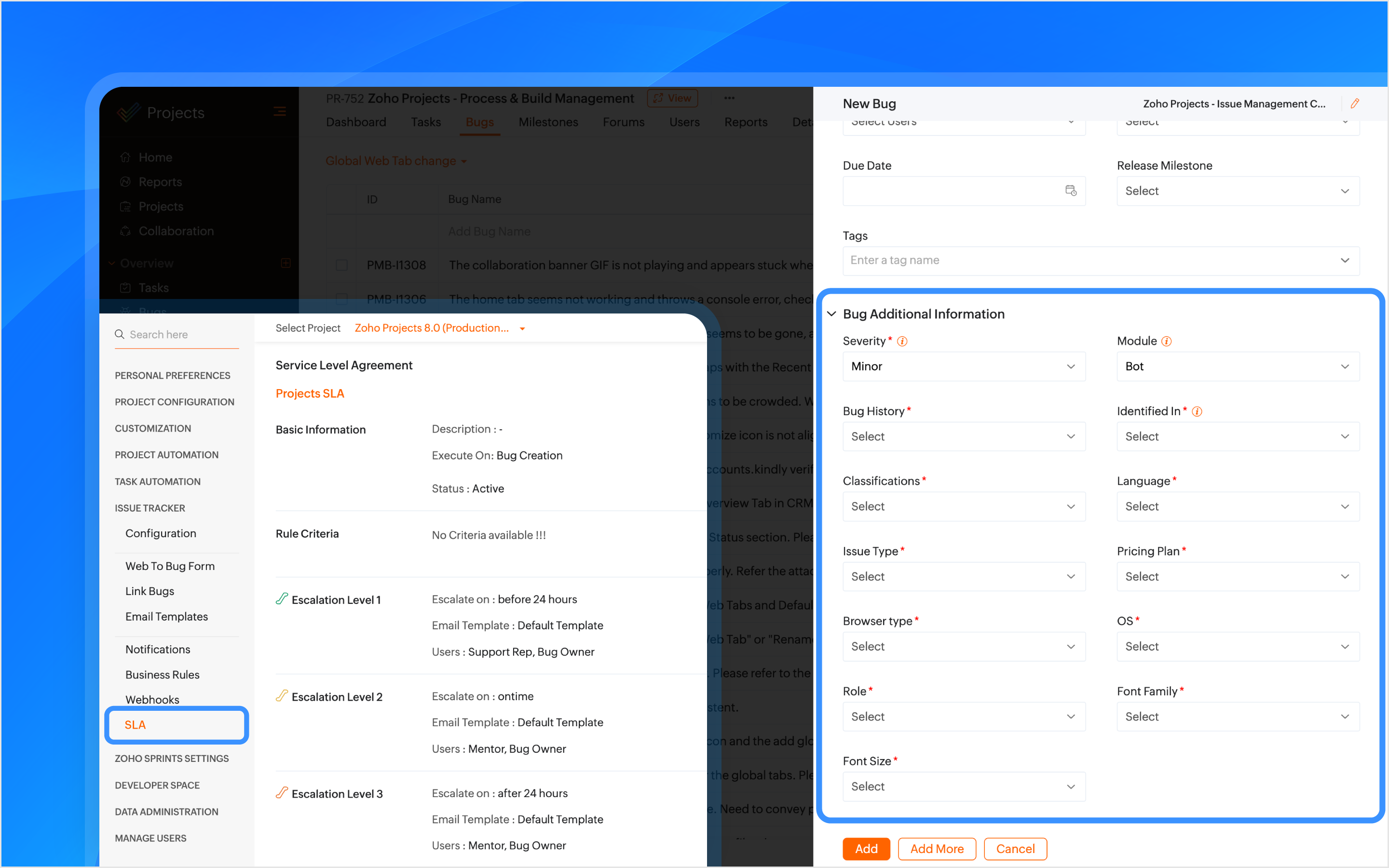
Custom fields are created within the Issue Layout, allowing testers to submit issues with key details like severity, module, browser type, and font family. In the case of the Global Web Tab alignment issue, the browser type field helps pinpoint which environment is affected.

How Other Industries Can Use Issue Layouts In This Process:
Construction: Track issues like material defects or design flaws using custom fields such as location, material type, grade, etc.
Manufacturing: Track production line breakdowns or machine malfunctions issues with custom fields like product phase, machine type, location, etc.
SLAs Based on Issue Type
SLAs are configured based on the issue type, such as Support, Security, Privacy, or Performance, to set resolution deadlines. If the issue is categorized as one of these types, the SLA triggers a resolution within 24 hours. If the issue remains unresolved, it escalates through Levels 1–4.
How Other Industries Can Use SLAs In This Process:
Construction: Set SLAs to resolve critical issues like safety violations or structural failures quickly.
Manufacturing: Set SLAs for issues like production line stoppages to minimize downtime.
Automate Assigning Issues
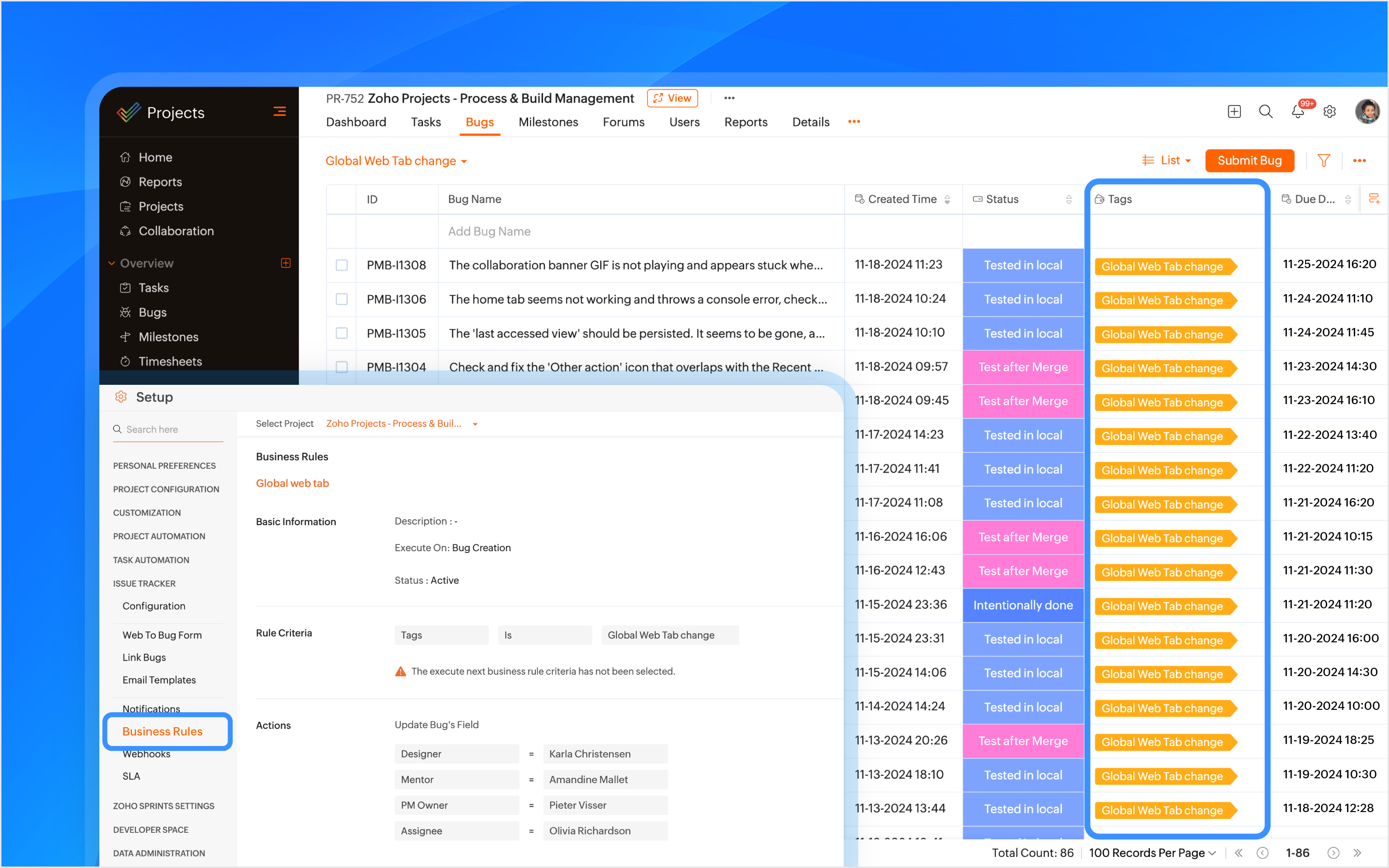
A tag is created using the feature name and is associated with the issue when it is submitted. Business rules are created using the tags as criteria to automatically assign the issue to the relevant developers, designers, managers, and project managers (PMs).
How Other Industries Can Use Tags In This Process:
Construction: Automatically assign issues using the issue type as tags, such as plumbing or electrical, to the appropriate contractors or subcontractors.
Manufacturing: Use tags like machinery or production to assign issues to maintenance teams or shift managers automatically.
Bulk Update Issues
A custom view is created to track and bulk update all issues related to the feature using the tag as a criteria.
How Other Industries Can Use Custom Views In This Process:
Construction: Create custom views to track and update issues related to electrical work.
Manufacturing: Create custom views to track and update production-related issues.

Manage Duplicate Issues
If a duplicate issue is submitted, the developer can link it to the original issue using the is duplicate of link type for identification. A custom function is created to ensure that duplicate issues are closed only when the original issue is closed ensuring no redundancy in the issue tracking process.
How Other Industries Can Use Link Issues In This Process:
Construction: Link duplicate issues like multiple reports of the same electrical fault.
Manufacturing: Link duplicate maintenance issues to the original issue to ensure a single resolution.

Associate Tasks to Issues
The Global Web Tab task is associated with the issue, allowing both the development and QA teams to monitor the progress of the work item from a single place. When a tester opens the task, they can view all associated issues, and when opening an issue, they can easily track the associated task.
How Other Industries Can Use Task Association In This Process:
Construction: Associate tasks like Foundation to issues like Cracked Foundation for easy tracking.
Manufacturing: Associate maintenance tasks to machinery issues to track progress.
Automating Status Updates
A custom function is created to automate the update of issue statuses. when the tester updates the task status to Started Testing, the associated issue status is automatically updated to In QA Process. Similarly, when a developer resolves the issue and updates the task status to Resubmit for QA, the associated issue status is updated to To be tested. Issue Tracker Notifications are used to send notifications to all team members to keep everyone informed about such status updates.
How Other Industries Can Use Custom Functions In This Process:
Construction: When the Electrical Safety Check issue status is updated to Passed, the associated task, such as Wiring Installation, will automatically update its status to Inspection Complete.
Manufacturing: When the Material Shortage issue is updated to Resolved, the task status for Electrical Installation will automatically update to Work Completed.
Automate Adding Followers
Sometimes issues need further validation before they are resolved. Developers can update the issue status, such as Intentionally Done or Discuss with the PM. Business rules are created to automatically add relevant product managers (PMs) and other team members as followers with such statuses as criteria. This ensures that decisions are validated and any necessary inputs are added through comments before moving forward.
How Other Industries Can Use Business Rules In This Process:
Construction: Automate adding followers to validate electrical safety checks or structural issues before moving forward.
Manufacturing: Automate adding followers to validate machine repair statuses before completing maintenance tasks.
Checklist for Testers
Once the feature is reviewed and tested, the Checklist Extension is used for the associated task. The tester is required to complete a predefined checklist within the task to verify that all relevant testing scenarios have been covered. This checklist ensures that no critical testing aspects are missed.
How Other Industries Can Use Checklist Extension In This Process:
Construction: Use checklist to create a punch list to ensure all inspections, tests, and final verifications are completed before a task issue is marked as completed.
Manufacturing: Create a compliance checklist to ensure product assembly and quality control steps are completed before a task issue is marked as completed.
Note: Checklist extension can be used for both tasks and issues.

Resolve Issues
Upon resolving the issue, the developer can resolve the issue from the issue details page with the context.
Custom Notifications
Custom email templates in Issue Tracker Notifications are used to automate communication. Developers and the relevant team members are automatically notified about reopened issues. This helps prevent delays in the project.
How Other Industries Can Use Email Templates In This Process:
Construction: Create customized email template and use it in issue tracker notifications for critical issues like safety violation when reopened.
Manufacturing: Create customized email template and use it in issue tracker notifications for maintenance issues when reopened.
Features used in the process: Issue Layouts, SLAs, Tags, Business Rules, Issue Tracker Notifications, Link Issues, Custom Function, Checklist Extension, and Email Templates.
Topic Participants
Navya Nune
frankn66
François
Monica P
Sticky Posts
CodeX Scripts for Enforcing Custom Project Logic
Every organization has a defined way of executing projects. There are clear expectations around how tasks should move, when projects should progress, and which actions require validation. When these rules are consistently followed, projects remain structuredAutomation Series: Auto-create Dependent Task on Status Change
In Zoho Projects, you can automatically create and assign a dependent task when a task’s status is updated. This helps teams stay aligned, ensures reviews happen on time, and reduces manual effort. In this post, we’ll walk through an easy setup usingTime Log Reminder
Tracking the time spent on tasks and issues is one of the most important functions of a timesheet. However, users may forget to update the time logs because they have their own goals to achieve. But, time logs must be updated at regular intervals to keepIntroducing the Zoho Projects Learning Space
Every product has its learning curve, and sometimes having a guided path makes the learning experience smoother. With that goal, we introduce a dedicated learning space for Zoho Projects, a platform where you can explore lessons, learn at your own pace,Update on V2 API End-of-Life Timeline
Dear Users, Earlier this year, we shared the launch of the V3 APIs and requested users to migrate from the older V2 APIs by December 2025. We have received valuable feedback from our users and partners regarding their migration timelines. We are happy
Recent Topics
Can multiple agents be assigned to one ticket on purpose?
Is it possible to assign one ticket to two or more agents at a time? I would like the option to have multiple people working on one ticket so that the same ticket is viewable for those agents on their list of pending tickets. Is something like this currentlyWhere is the settings option in zoho writer?
hi, my zoho writer on windows has menu fonts too large. where do i find the settings to change this option? my screen resolution is correct and other apps/softwares in windows have no issues. regardsWhen Does WorkDrive integrate with Books?
When Does WorkDrive integrate with Books?CRM gets location smart with the all new Map View: visualize records, locate records within any radius, and more
Hello all, We've introduced a new way to work with location data in Zoho CRM: the Map View. Instead of scrolling through endless lists, your records now appear as pins on a map. Built on top of the all-new address field and powered by Mappls (MapMyIndia),Zoho Sign Not Delivering
I have sent several contracts out via Zoho Sign. They do not seem to be getting delivered. I had one person receive it, but the others have not. I had one person tell me they sent it back to me and never got it and doesn't show as signed. I've sentBank Feeds Breaking Constantly
Hey Everyone, I have already reached out to support about this issue but I am wondering if anyone else is having the same issue. My bank feeds keep breaking within days of me fixing them by updating the credentials. Its been happening for a while andAutomatic Matching from Bank Statements / Feeds
Is it possible to have transactions from a feed or bank statement automatically match when certain criteria are met? My use case, which is pretty broadly applicable, is e-commerce transactions for merchant services accounts (clearing accounts). In theseZoho Payroll's USA and KSA editions are available in Zoho One!
Greetings! We’re excited to share that Zoho Payroll, currently available only in India and the UAE, is now introducing the KSA (Kingdom of Saudi Arabia) edition and the USA (United States of America) edition, and these editions are now available in ZohoTip #63- Exploring Technician Console: Elevate to Admin Mode (Windows & Mac)- 'Insider Insights'
Hello Zoho Assist Community! Ever been in a remote support session where you couldn’t complete a task because you didn’t have admin privileges? Maybe installing software, accessing secure system areas, or rebooting into Safe Mode just didn’t work becausePrevent accidental duplicate entry of Customer Ordersome
Zoho Support has confirmed that Zoho currently does not have any method (using Deluge, flow or any other method) to alert a user when a sales order has been entered twice using the same customer reference number (i.e. a duplicate). Most ERP platformsPermissões granulares por usuário além do modelo baseado exclusivamente em perfis
Atualmente, o modelo de segurança do Zoho CRM é fortemente baseado em perfis. Embora funcional, esse modelo apresenta limitações quando equipes possuem variações individuais de acesso dentro do mesmo grupo operacional. Em cenários reais, é comum que usuáriosEvolução do modelo de ambientes: Dev, Homologação e Produção com pacotes versionados
Hoje o Zoho CRM já oferece Sandbox, o que é um avanço importante para organizações que trabalham com customizações mais complexas. No entanto, na prática, o modelo atual ainda apresenta limitações significativas quando múltiplas equipes ou consultoriasRemove my video
Hi, How can I remove my video so that I don't have to see myself. It's weird so I always remove my own video from what I see but cannot find this feature here. Thanks!Zoho Mail - Email Reminder template (default)
Zoho Mail Users, Does anybody here use the email reminder template? I'm asking Zoho to allow and add us to select which one of our many templates will be our default. It allows us to operate more efficiently. It's a Checkbox. If you feel this can benefitWindows Desktop App - request to add minimization/startup options
Support Team, Can you submit the following request to your development team? Here is what would be optimal in my opinion from UX perspective: 1) In the "Application Menu", add a menu item to Exit the app, as well as an alt-key shortcut for these menusCanva Integration
Hello! As many marketing departments are streamlining their teams, many have begun utilizing Canva for all design mockups and approvals prior to its integration into Marketing automation software. While Zoho Social has this integration already accomplished,Announcement integration between Zoho People and Zoho Connect
As we're using these 2 products, there're areas of overlapping especially in the Announcement. When there's a new announcement in Zoho People, can it push to the company wall in Zoho Connect?Does Zoho Mail Have Popout windows?
I recently switched my work email over to Zoho and everything I read said that you can popout the draft email as you're writing, however, all the pictures or info I've seen show the typical popout arrow in the top right, which I can not for the life ofCan I reorder how the staff are displayed on the booking page?
As the title suggests, can I change this? Either reorder manually reoreded to my preference, or automatically (a-z, z-a etc.)Bulk upload image option in Zoho Commerce
I dont know if I am not looking into it properly but is there no option to bulk upload images along with the products? Like after you upload the products, I will have to upload images one by one again? Can someone help me out here? And what should I enterEnhancement to ICR’s field prompting: Preferred data extraction using advanced field prompting
Dear Customers, We hope you’re well A quick background Intelligent Character Recognition (ICR) comes as part of Zia’s optical recognition capability called Zia Vision. When we introduced it last April, the data extraction was training-based and was applicableSubheaders for Sections in forms
Currently, every form section has a field name, which one can choose to show/hide to the end user. It would be great if there was an option to show a SUB-HEADER in addition to a header. It would be useful for explaining to the end user what the sectionCustom view inconsistencies
Why is "is not" missing from criteria, along with other comparison operators ??? It makes it almost impossible to build required custom views, I don't want "void" invoices listed & why on earth would "Void" invoices be showing when the criteria includesCRM x WorkDrive: We're rolling out the WorkDrive-powered file storage experience for existing users
Release plan: Gradual rollout to customers without file storage add-ons, in this order: 1. Standalone CRM 2. CRM Plus and Zoho One DCs: All | Editions: All Available now for: - Standalone CRM accounts in Free and Standard editions without file storagePromote a layout to standard so I can delete one layout
Similar to this and many other topics: https://help.zoho.com/portal/en/community/topic/set-layout-as-standard The problem, every model has a standard layout, which is what we use most of the time... But as the business grows and evolves we may have toAdding VENDOR SKU to PURCHASE ORDERS
how can we add the Vendor SKU when issuing a Purchase Order , so the PO shows the Supplier SKU and our own Internal SKU , which is what we want to receive into the system .Can Zia summarize fields?
A great use case of AI for me would be summarizing company descriptions. We often get long winded descriptions from databases or scraping websites, then reduce them to a couple of sentences stating what a company actually does. Is there any way withinZoho Recruit Community Meet-up - India (Venues Finalised)
Zoho Recruit Community Meet-up - India (Venues Finalised) Namaste, India. 🙏🏼 The Zoho Recruit team is hitting the road—and we're absolutely excited behind the scenes. Join us for the Zoho Recruit India Meet-up 2026, a morning designed to make your recruiting[Webinar] Solving business challenges: Secure, real-time, and external collaboration
Hi Zoho Writer users, We are excited to announce Zoho Writer's webinar for March 2026: Solving business challenges: Secure, real-time, and external collaboration. Zoho Writer supports real-time collaboration by allowing teams to work together in documents.Table dimensions
I try changing the dimensions of the table on my computer but it doesn't change. Do I have to be a premium member or does it only work on the app?Zoho CRM Community Digest - January 2026 | Part 2
Hello Everyone! Here’s the second part of January’s Zoho CRM Community Digest, rounding up the remaining highlights from the month. From newly rolled out updates to thoughtful implementation questions and practical solutions, the community once againFind and Merge Duplicates to trigger webhook
My sales team uses the Find and Merge Duplicates feature often to cleanup records in the CRM. We use webhooks to signal to our internal tools database when new Contacts are created, updated, or deleted, in order to keep our DB in sync with Zoho CRM. However,Introducing WhatsApp integration and quick editing capabilities in Zoho Sign
Hi there, Zoho Sign already helps users collect signatures via email and SMS, and we're happy to announce that you can now send documents and authenticate recipients right through WhatsApp. Some of the key benefits include: Communication with recipientsDynamic Field Folders in OneDrive
Hi, With the 2 options today we have either a Dynamic Parent Folder and lots of attachments all in that one folder with only the ability to set the file name (Which is also not incremented so if I upload 5 photos to one field they are all named the sameLogging Out of FSM
I have tried to log out of FSM app of the last person and it will not let me do so. I need to log in to my account.Super Admin Logging in as another User
How can a Super Admin login as another user. For example, I have a sales rep that is having issues with their Accounts and I want to view their Zoho Account with out having to do a GTM and sharing screens. Moderation Update (8th Aug 2025): We are workingEnhancement in Zoho CRM: Control who gets to participate in a forecast by customizing the user hierarchy
Include only users from the sales function; exclude the rest Dear Customers, We hope you're well! We started this year with a series of exciting enhancements to Zoho CRM and to this list, we are thrilled to add an enhancement to forecasting. Let's talkMultiple Zoho One accounts
Hello. I'm searching for a solution to run multiple organizations under 1 Zoho One account or have a different Zoho One account for each organization and still be able to easily login to each. Currently Zoho One doesn't allow the same email address toTips and tricks #63: Hold and Drag to select elements in the Show app for iOS
Hello everyone! Welcome to another tips and tricks article. In today's article, we will learn about the Hold and Drag function in the Show app for iOS. The Hold and Drag option lets you select multiple elements on a slide quickly. Once they are selected,Organize and manage PDFs with Zoho PDF Editor's dashboard
Hello users, Zoho PDF Editor's dashboard is a one-stop place to upload, sort, share PDF files, and more. This article will explore the various capabilities that Zoho PDF Editor's dashboard offers. A few highlights of Zoho PDF Editor's dashboard: UploadNext Page