Building Extensions #13: Creating widgets with the JS SDK bundle in Zoho Desk - Resources API
This series aims to equip developers with all they need to build extensions for Zoho Desk in Zoho Sigma and publish them in Zoho Marketplace.
The Zoho Desk platform supports custom fields. The custom fields can be introduced using an extension. The Zoho Desk platform supports this capability through resources.json found in the plugin-manifest file and the Resources API offered in the JS SDK bundle.
In this forum post, we'll explore the Resources API in detail with an example of creating custom fields. Other resource types offered by the Zoho Desk platform include webhooks, custom permissions, and channel connectors; we'll talk about these individually in our upcoming forum posts.
Need for custom fields
There are various scenarios that may call for custom fields. Without creating an exhaustive live, here are a few scenarios in which you may need custom fields in Zoho Desk:
- You might have to accommodate data from integrated third-party applications inside Zoho Desk. In such cases, you can add custom fields to help with this.
- Your extension functionality may require some new fields to be available in the Zoho Desk modules. E.g., a few additional fields in your Tickets or Customers modules. In such scenarios, you would add a custom field to the desk modules.
- You may want to provide agents with some additional information about the customer in the ticket's property section. You can add custom fields and pre-populate them with the relevant information.
Defining custom fields
The custom fields are to be included in Zoho Desk by defining them in the resources.json of the plugin-manifest file. Below is the structure of the resources.json with sample data filled in.
...
{
"fields": [{
"resourceName": "field1",
"module": "tickets",
"displayLabel": "Counter",
"type": "Text",
{
"fields": [{
"resourceName": "field1",
"module": "tickets",
"displayLabel": "Counter",
"type": "Text",
"defaultValue" : "none",
"maxLength": "100"
}]
},
...
"maxLength": "100"
}]
},
...
Every field you create should have a unique identifier that is defined using the mandatory resourceName key. The resourceName(s) specified in resources.json should be unique across the extension and will be validated before the extension is made available on the Zoho Marketplace. The resourceName also serves as the unique identifier across all organizations that install your extension. The new custom fields will be automatically mapped to the default layout configured for a department, so there is no need to pass the layoutId key anywhere else in the extension code.
Any field you include in your extension will be added to the user's Zoho Desk portal on the very first installation of the extension, while subsequent installations map to the fields already created. The fields are deleted from the portal on the last uninstallation of the extension. You can include a maximum of 10 custom fields in an extension.
Any field you include in your extension will be added to the user's Zoho Desk portal on the very first installation of the extension, while subsequent installations map to the fields already created. The fields are deleted from the portal on the last uninstallation of the extension. You can include a maximum of 10 custom fields in an extension.
Using custom fields in extensions
The resourceName defined in the resources.json file is automatically mapped with an ID and an apiName, which can be used in the APIs related to the resource as required. You need to retrieve the ID and/or the apiName of a resource to be used in the API calls of your extension.
To retrieve this, you can use one of the following approaches:
- Using merge fields in the invoke API
- Using the client SDK
Using the merge fields
This method is applicable for Desk's invoke API where you need to specify the resourceName value in the following format.
{{resourceType.resourceName.id}} or {{resourceType.resourceName.apiName}}
Note: The resourceType should be fields or webhook, based on your use case. The id returns the fieldId or webhookId, based on the value in resourceType. The apiName returns the apiName of the resource and is applicable only to fields.
Using the client SDK
In this method, you must use the Resource API to retrieve resource details.
Note: We will use the second approach in this forum post example; the first approach will be covered when we discuss Desk Invoke APIs.
Resource API
The resource details of the extension can be obtained using this API provided the resourceName key is given in the resources.json file.
Note: The response will be given against the resourceName given in the extension.
Note: The response will be given against the resourceName given in the extension.
Sample Request: Get the details of the resource "field1"
ZOHODESK.get("extension.resource", {resourceName: "field1", resourceType: "fields"}).then(function(response){
//response returns the value saved
}).catch(function(err){
//error handling
})
//response returns the value saved
}).catch(function(err){
//error handling
})
Response:
{
"status": "success",
"extension.resource": {
"resourceName": "field1",
"id": "4000000020060",
"resourceType": "fields",
"apiName": "cf_counter"
}
}
"status": "success",
"extension.resource": {
"resourceName": "field1",
"id": "4000000020060",
"resourceType": "fields",
"apiName": "cf_counter"
}
}
Scenario:
Let's say you plan to provide support agents with some additional information about the users in the tickets' details page. Specifically, you need to display whether the user is a new user or an existing user. If the user is an existing user, you also want to note how many tickets are associated with that user and the number of open tickets. This can be implemented by adding the required custom fields and writing a script that provides details about the user and the tickets associated with them.
Defining fields in resources.json
As per our use case, you can define two fields with the following properties:
Sl.No | Field name | Type |
1 | User type | Text |
2 | Number of open tickets | Text |
Below is the resource.json file that needs to be defined. As mentioned earlier, the resourceName key for every field needs to be unique and has to be defined for every field.
{"fields": [
{
"module": "tickets",
"displayLabel": "User Type",
"type": "Text",
"defaultValue" : "none",
"resourceName": "UserType",
"maxLength": 100
},
{
"module": "tickets",
"displayLabel": "Number of open tickets",
"type": "Text",
"defaultValue" : "none",
"resourceName": "openStatus",
"maxLength": 100
}
]
}
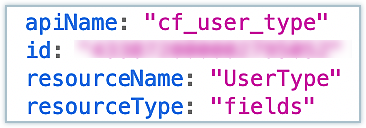
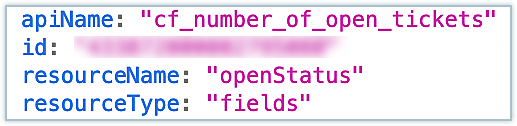
Note: You'll need the API names of the resources in your implementation whenever you refer to the respective resource. The Resources API can be used to fetch the API names. The code below has been used for fetching the API names for the two fields in our use case and the same API names are used in the code. The console output is added for reference.
ZOHODESK.get("extension.resource", {resourceName: "UserType", resourceType: "fields"}).then(function(response){
console.log(response);
}).catch(function(err){
console.log(err);
})
ZOHODESK.get("extension.resource", {resourceName: "openStatus", resourceType: "fields"}).then(function(response){
console.log(response);
}).catch(function(err){
console.log(err);
})
Use case implementation
To implement our use case, we perform the following steps in extension.onload. The code snippet is added below for reference:
- Get the email ID of the current ticket.
- Use the Zoho Desk search API to check if there are any other tickets from the same user.
- If the search API results show more tickets from the same email, check the status of those tickets.
- Finally, construct the result so it is set to the custom fields and update them accordingly.
Sample code:
Please check the attachments for the sample code.
Output:
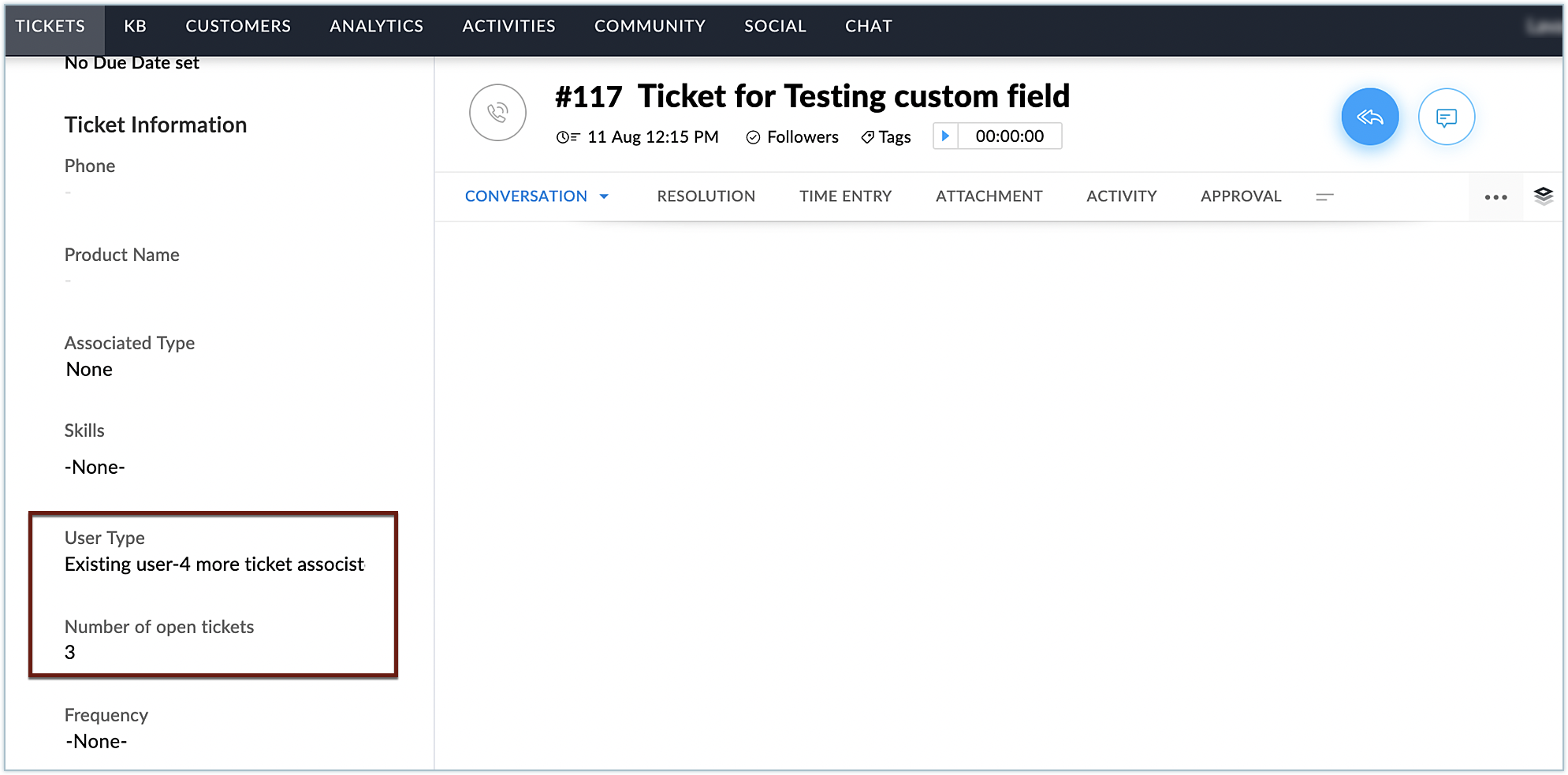
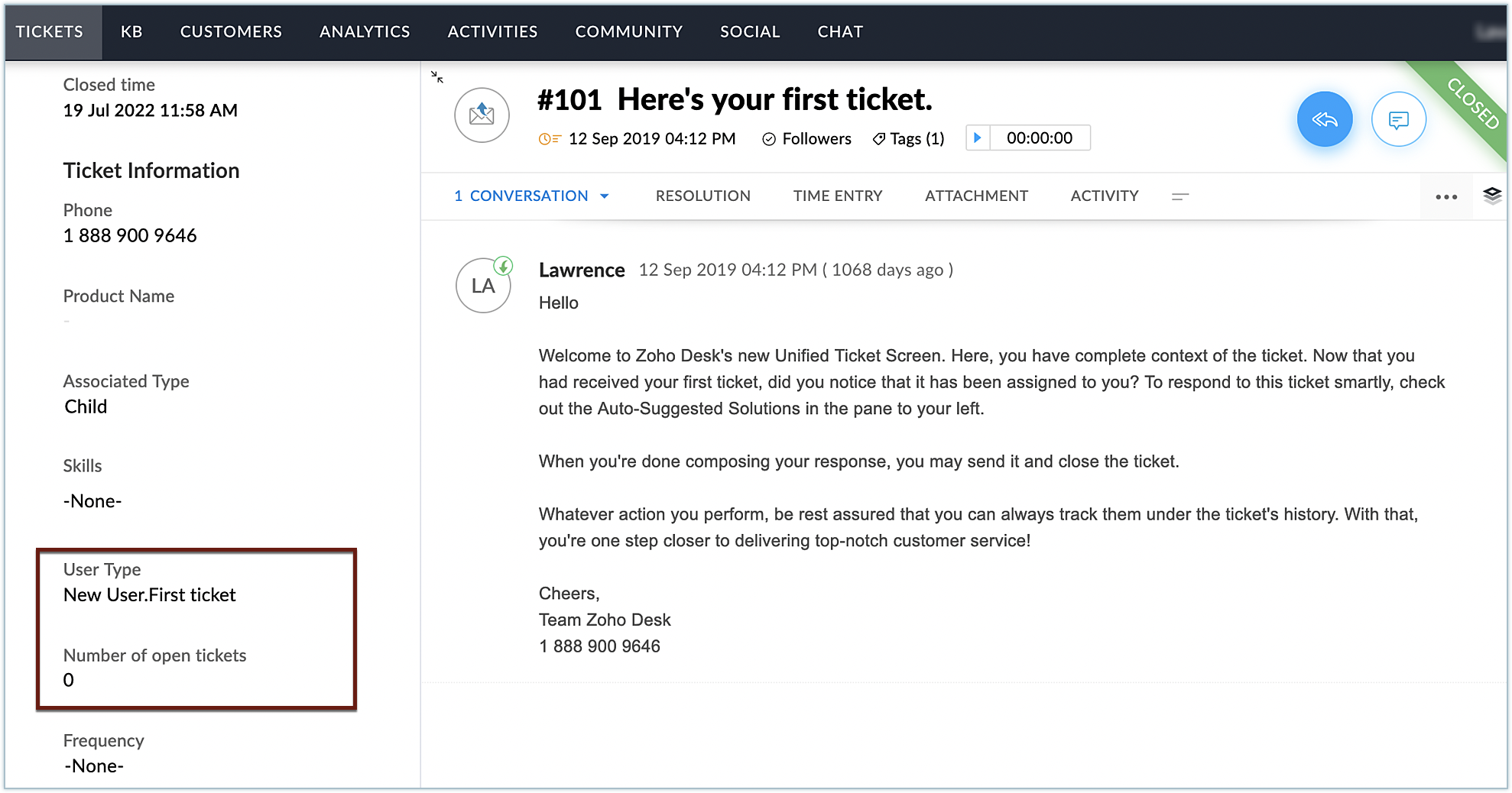
Here, you can see the text for the two custom fields were added to the ticket and were populated with the relevant values. In this manner, you can add required custom fields to Zoho Desk using extensions, based on your business needs.
Hope you found this post to be useful. Stay tuned for more posts in this space!
See Also
Create widgets using the JS SDK bundle in the Zoho Desk platform - Request API
Create widgets with the JS SDK bundle in Zoho Desk - Data Storage API
Create widgets with the JS SDK bundle in Zoho Desk - Data Storage API
Create widgets with the JS SDK bundle in Zoho Desk - Event API
Create widgets with the JS SDK bundle in Zoho Desk - Config Params
Create widgets with the JS SDK bundle in Zoho Desk - Hooks API
Create widgets with the JS SDK bundle in Zoho Desk - Config Params
Create widgets with the JS SDK bundle in Zoho Desk - Hooks API
New to Zoho Recruit?
Zoho Campaigns Resources





Topic Participants
Vinoth M
Brandon Witten
Vinoth Kumar
Zoho CRM Plus Resources
Zoho Books Resources
Zoho Subscriptions Resources
Zoho Projects Resources
Zoho Sprints Resources
Zoho Orchestly Resources
Zoho Creator Resources
Zoho WorkDrive Resources


Zoho CRM Resources
Get Started. Write Away!
Writer is a powerful online word processor, designed for collaborative work.
Zoho CRM コンテンツ
-
オンラインヘルプ
-
Webセミナー
-
機能活用動画
-
よくある質問
-
Ebook
-
-
Zoho Campaigns
- Zoho サービスのWebセミナー
その他のサービス コンテンツ
ご検討中の方
Recent Topics
How do I create an update to the Cost Price from landed costs?
Hi fellow Zoho Inventory battlers, I am new to Zoho inventory and was completely baffled to find that the cost price of products does not update when a new purchase order is received. The cost price is just made up numbers I start with when the productManage control over Microsoft Office 365 integrations with profile-based sync permissions
Greetings all, Previously, all users in Zoho CRM had access to enable Microsoft integrations (Calendar, Contacts, and Tasks) in their accounts, regardless of their profile type. Users with administrator profiles can now manage profile-based permissionsZoho OAuth Connector Deprecation and Its Impact on Zoho Desk
Hello everyone, Zoho believes in continuously refining its integrations to uphold the highest standards of security, reliability, and compliance. As part of this ongoing improvement, the Zoho OAuth default connector will be deprecated for all Zoho servicesVoC in Zoho CRM is now data savvy: Explore response drilldown, summary components and participation in CRM criteria
VoC has all the goods when it comes to customer intelligence—which is why we're constantly enhancing it. We recently added the following: A customer drilldown component that shows you the list of prospects and customers behind a chart's attribute ExpandedHow do I bulk archive my projects in ZOHO projects
Hi, I want to archive 50 Projects in one go. Can you please help me out , How can I do this? Thanks kapilError 0x800CCC0F Outlook
Hello, i cannot send or receive email in outlook. can you please help. 'Sending' reported error (0x800CCC0F) : 'The connection to the server was interrupted. If this problem continues, contact your server administrator or Internet service provider (ISP).'Passing the CRM
Hi, I am hoping someone can help. I have a zoho form that has a CRM lookup field. I was hoping to send this to my publicly to clients via a text message and the form then attaches the signed form back to the custom module. This work absolutely fine whenCan I add Conditional merge tags on my Templates?
Hi I was wondering if I can use Conditional Mail Merge tags inside my Email templates/Quotes etc within the CRM? In spanish and in our business we use gender and academic degree salutations , ie: Dr., Dra., Sr., Srta., so the beginning of an email / letterZoho vault instal on windows
I am trying to use Zoho Vault Desktop for Windows, but I am unable to complete the sign-in process. Problem description After logging in to my Zoho account and clicking Accept on the authorization page, nothing happens. The application does not proceedZoho Browser??
hai guys, this sounds awkward but can v get a ZOHO BROWSER same as zoho writer, etc. where i can browse websites @ home and continue browsing the same websites @ my office, as v have the option in Firefox, once i save and close the browser and again when i open it i will be getting the same sites. If u people r not clear with my explanation, plz let me know. Thanks, SandeepLet’s Talk Recruit: LinkedIn Cheatsheet
Welcome to the first edition of Let’s Talk Recruit for 2026. We are kicking off the year by revisiting one of the most asked about topics in Zoho Recruit. How our LinkedIn integrations actually work and how recruiters can get the most value from them.Zoho Forms API
Is there any way to get all form entry list using API? Looking forward to hear from youCreating a Chart from a Report
In Zoho Analytics, is it possible to create a chart from a Pivot View report? We are looking to use Zoho Analytics to replace Excel for Sales reports and would like to be able to show both the table and the chart together.Ability to Set Client Name During Portal Invitation
Hi Zoho Team, We would like to suggest an important enhancement to the Zoho Creator Client Portal functionality. Zoho Creator recently introduced the option to set a client’s display name in the Client Portal settings, which is very helpful for creatingMove email between inboxes?
Is it possible to move emails from one team inbox to another? We would like to be able to have a single "catch-all" inbox for incoming requests, and then move the email to the appropriate department inbox. I was hoping we would be able to accomplish thisPDF Attachment Option for Service Reports
Hello Team, I would like to check with you all if there is an option to attach PDF documents to the service reports. When I try to attach a file, the system only allows the following formats: JPEG, JPG, and PNG. Could you please confirm whether PDF attachments【Zoho CRM】データ一覧画面でのメモのバッジ機能リリースのお知らせ
ユーザーの皆さま、こんにちは。コミュニティチームの藤澤です。2026年度もゾーホーユーザーコミュニティをどうぞよろしくお願いいたします! 今回は「Zoho CRM アップデート情報」の中から、新機能のデータ一覧画面でのメモのバッジ機能をご紹介します。 目次 概要 メモのバッジ機能について メモの作成について メモに関する様々な処理について 最近追加したメモについて メモのバッジの非表示について クライアントスクリプトの対応 概要 メモのバッジ機能について 既存の活動バッジに加えて、すべてのタブのデータ一覧表示画面に、各データごとに利用できる「メモのバッジ」(キャプチャ内の赤枠部分)が新たに導入されました。is it possible to add more than one Whatsapp Phone Number to be integrated to Zoho CRM?
so I have successfully added one Whatsapp number like this from this User Interface it seems I can't add a new Whatsapp Number. I need to add a new Whatsapp Number so I can control the lead assignment if a chat sent to Whatsapp Phone Number 1 then assignCan’t find fsm in zoho one
Every other app is available to me in Zoho one except fsmPosibility to add Emoticons on the Email Subject of Templates
Hi I´ve tried to add Emoticons on the Subject line of Email templates, the emoticon image does show up before saving the template or if I add the Emoticon while sending an Individual email and placing it manually on the subject line. Emoticons also showTask Deletion Restriction & Strict Stage Control
Hello Zoho Community, We have the following two issues currently pending and under testing, for which we require a workable and reliable solution: 1. Task Deletion Restriction We are testing ways to ensure that staff users are not able to delete tasksUnable to mass update a picklist field
Hello, I have the records within our Accounts module divided between two account types: Parent Accounts & Member Accounts. I am attempting to mass update accounts from one picklist value to the other (within other specific criteria in our custom fields)Process checklist in CRM
Hi We've created a new sales process that I'm mapping into the CRM - issue I have is that some of the tasks / milestones I would like to capture require very simple tick box responses but there are quite a few under a variety of sub categories so I don'tCRM project association via deluge
I have created a workflow in my Zoho CRM for closing a deal. Part of this workflow leverages a deluge script to create a project for our delivery team. Creating the project works great however, after or during the project creation, I would like to associateHolidays - Cannot Enter Two Holidays on Same Day
I have a fairly common setup, where part-time employees receive 1/2 day's pay on a holiday and full-time employees receive a full day's pay. Historically, I've been able to accommodate this by entering two separate holidays, one that covers full-timeWhere is the settings option in zoho writer?
hi, my zoho writer on windows has menu fonts too large. where do i find the settings to change this option? my screen resolution is correct and other apps/softwares in windows have no issues. regardsFile emails in Shared email folder
Hi, I am unable to allow users to collaborate in Shared email folders: User 1 shares a folder let's say "SharedTopic" with full permissions Users 2 and 3 can see this folder but are unable to add emails to this folder or search in this folder. For example,How create a draft via workflow?
I wish to create a workflow rule for specific emails that creates a draft response - not an automatic email reply, but just a draft with a set response ready to be verified by an agent who can then manually select recipients. Alternatively, the workflowThis user is not allowed to add in Zoho. Please contact support-as@zohocorp.com for further details
Hi Team, when I,m trying to create a email account (imagixmidia.com.br) it's showing this error >> This user is not allowed to add in Zoho. Please contact support-as@zohocorp.com for further details plz help me thanksHow to manage task lists in Zoho Desk?
Hello, I use Zoho Desk for IT customer support. I have a list of standard operating procedures (SOPs), including SOPs for onboarding new users, offboarding users, losing a device, etc. These are lists of tasks to be performed depending on the situation.Zoho → ShipStation Integration – Sales Order–Driven Fulfilment Workflow
Hello All, I’m reaching out to explore the best way to integrate a shipping tool into our inventory which will speed our process up. We are looking to integrate ShipStation into our existing order-to-fulfilment workflow, as we’re keen to standardise onBusiness Day Logic Update: More Accurate Scheduling for Your Workflows
Hello everyone, We’re improving how business-day calculations work in workflows, especially when triggers happen on weekends. This update ensures that offsets like +0, +1, and +2 business days behave exactly as intended, giving you clearer and more predictableConvert Lead Automation Trigger
Currently, there is only a convert lead action available in workflow rules and blueprints. Also, there is a Convert Lead button available but it doesn't trigger any automations. Once the lead is converted to a Contact/Account the dataset that can be fetchedDefault Tagging on API-generated Transactions
If one assigns tags to an Item or Customer, those tags get auto-populated in each line item of an Invoice or Sales Order when one creates those documents. However, if one creates the Sales Order or Invoice via the API (either directly coding or usingUser
If user is already part of manage engine endpoint central , what hapens when i try to add them to another Zoho org / directory? Are these users added as external users?Adding a new section to the related details sidebar when creating a new ticket.
Hello, I was wondering if you can add a new section to the related details sidebar when creating a new ticket. I was wanting to have it to where it also shows the account information related to the contact chosen as well. This is the section I am referringDisplaying only unread tickets in ticket view
Hello, I was wondering if someone might be able to help me with this one. We use filters to display our ticket list, typically using a saved filter which displays the tickets which are overdue or due today. What I'd really like is another filter thatHow to compare a subform lookup field that allows multiple entries when edited
I have a form with a subform with multiple fields. One of the fields is a lookup field that allows a multi select. On edit validation, I want a workflow to execute only when the entries in that subform field has changed. The old. function is not workingIs Zoho Shifts included in the Zoho One plan?
In case the answer is no: there's any plan to make it available via One? Thank youZoho Tracking Image location
So we've been having an issue with tracking email opens. Specifically in Gmail. Our emails are not that long either, maybe 4 sections of image/250 characters of text/button per section. But all my test accounts I used via Gmail we're showing opens. But then come to find out the tracking image is at the very bottom of the email. So If the message is clipped (It always just clips our social icons on the bottom) and the user doesn't click the show more button it never tracks the open. Looking at otherNext Page