Zoho Inventory - Les premiers pas de la configuration

Le contrôle des stocks permet une visibilité de tous les produits qu'une entreprise possède à un moment donné. Le contrôle des stocks comprend la gestion des nouveaux stocks et ceux vendus. Lorsqu'une entreprise a une vue d'ensemble plus détaillée, elle est en mesure de répondre à la demande des clients plus efficacement et de réduire les coûts associés à la détention de stocks. C'est à dire le contrôle des stocks, la gestion des commandes, des chaînes de distribution et la valeur des stocks.
Dans cet article, nous allons découvrir quelques-unes des configurations de base de Zoho Inventory qui vous permettront de gérer le stock de votre entreprise depuis n'importe où.
Tableau de bord
Le tableau de bord vous donne une image précise des ventes et du rapport de stock de votre entreprise, notamment les commandes que vous avez générées, les articles les plus vendus, le stock acheté auprès de votre fournisseur pour la période sélectionnée et plus encore.
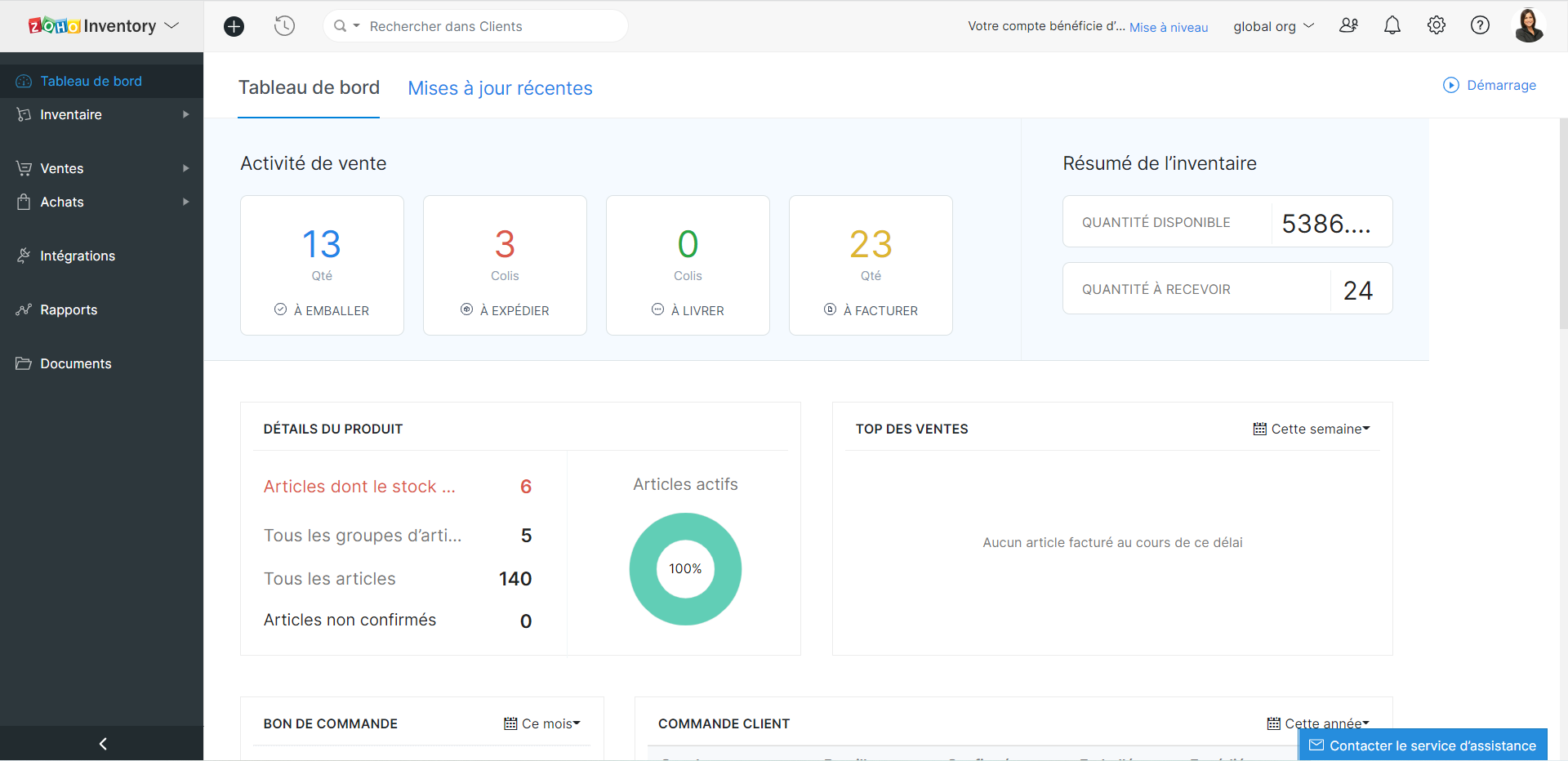
Astuces - Lorsque vous avez intégré Zoho Inventory avec Zoho Books, le tableau de bord de Zoho Inventory inclura également les données de Zoho Books.
Profil de l'organisation
Les informations sur l'organisation sont automatiquement enregistrées lorsque vous faites partie de l'écosystème Zoho One. Néanmoins, pour toute modification ou ajout, vous pouvez le faire depuis l'onglet "Profil de l'organisation" sous l'onglet "Paramètres".
Utilisateurs et rôles
Les utilisateurs peuvent accéder aux modules en fonction de leur rôle. Par défaut, Zoho Inventory vous propose le rôle d'administrateur. Les autres rôles peuvent être créés en définissant les niveaux d'accès et les permissions dans Zoho Inventory.
Créer des rôles d'utilisateur personnalisés
- Paramètres >> Utilisateurs et Rôles >> Rôles >> Nouveau rôle
- Saisisez le nom du rôle, configurez les permissions et enregistrez
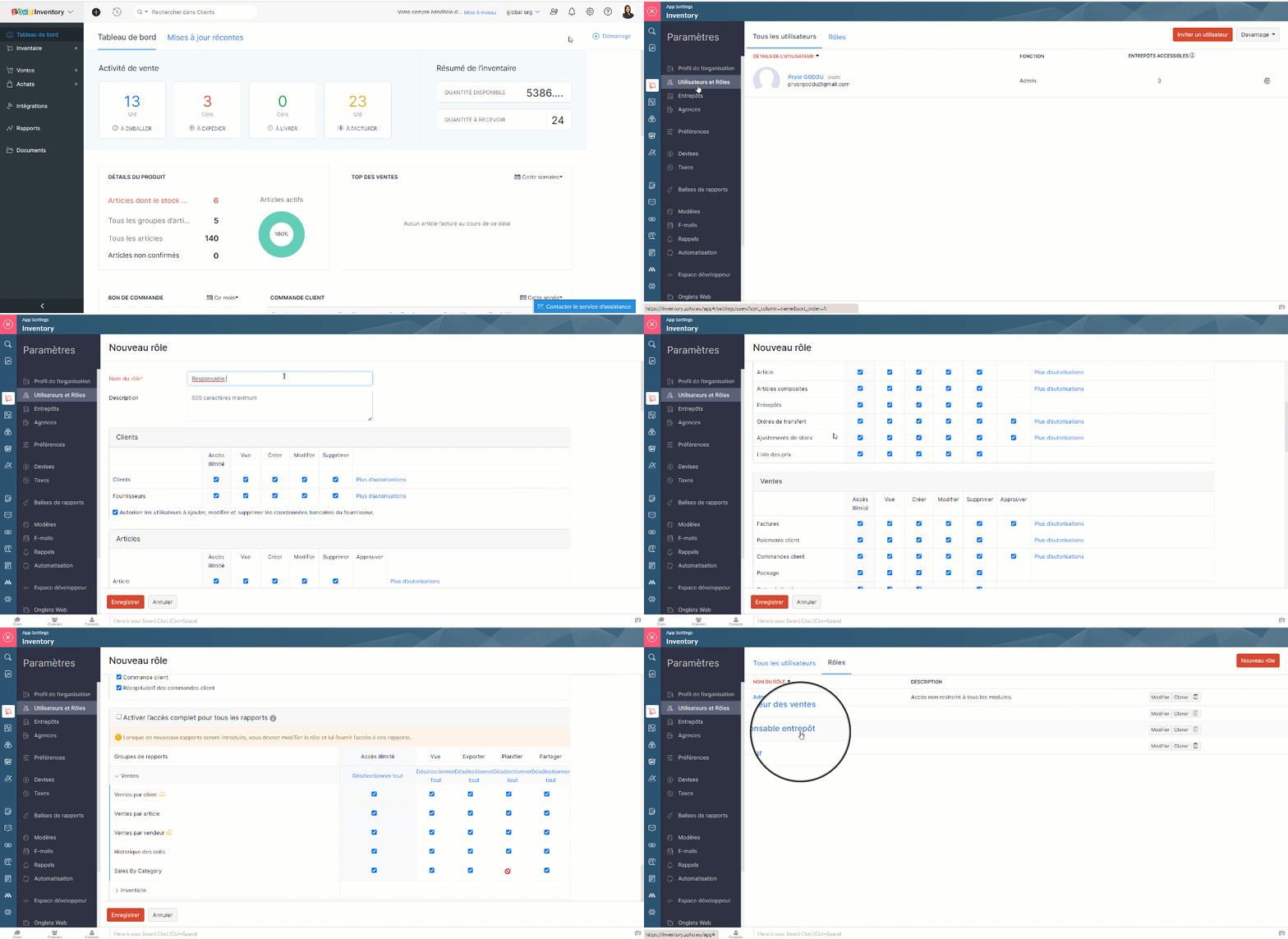
Ajouter les utilisateurs
- Paramètres >> Utilisateurs et Rôles >> Tous les utilisateurs >> Inviter un utilisateur
- Saisissez les détails demandés, enregistrez.
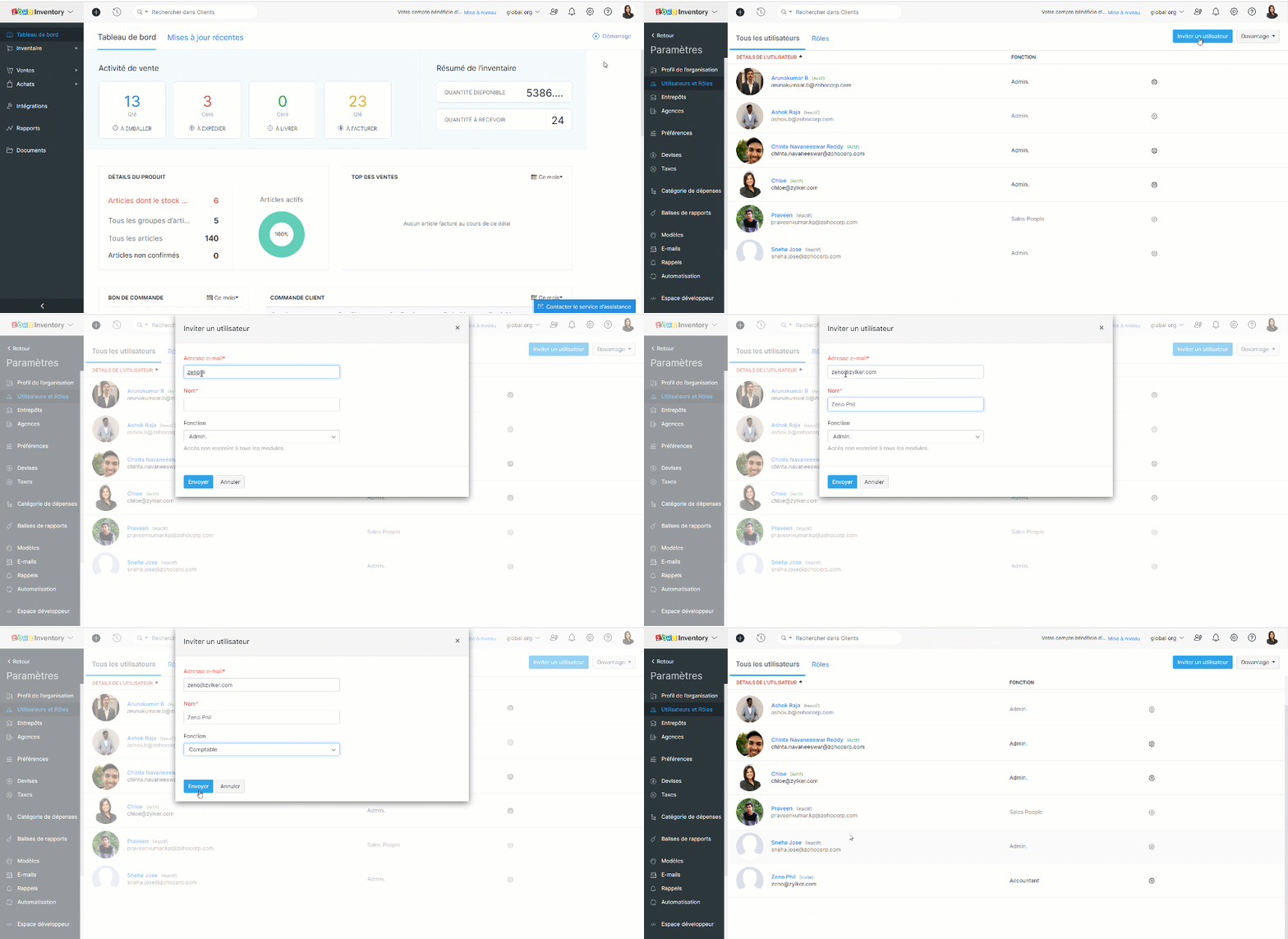
Une invitation est envoyée par e-mail et lorsque l'utilisateur clique sur le lien "Join Account", il peut accéder au portail Zoho Inventory de votre organisation.
Devises
Traitez-vous avec des clients et des fournisseurs de plusieurs pays ? Il est désormais facile de gérer toutes les devises. Il vous suffit de les ajouter ainsi queet les taux de change à votre compte Zoho Inventory.
Devise de base
Il s'agit de votre devise de fonctionnement par rapport à laquelle les taux de change sont proposés dans un pays donné. C'est vous qui la définissez lorsque vous créez votre organisation. La devise de base sera appliquée aux prix de vos articles, à vos transactions (pour autant que le contact ait la même devise) et à vos rapports.
Bon à savoir
Vous ne pouvez pas supprimer votre devise de base à tout moment. Cependant, vous pouvez la changer s'il n'y a pas de transactions dans votre compte Zoho Inventory. Dès que vous commencez à effectuer des transactions, la devise de base est appliquée de façon permanente à votre organisation.
Ajouter une nouvelle devise
- Zoho Inventory >> Paramètres >> Devises >> + Nouvelle devise
- Choisissez la devise, saisissez la symbole, le nom, décimales et enregistrez.
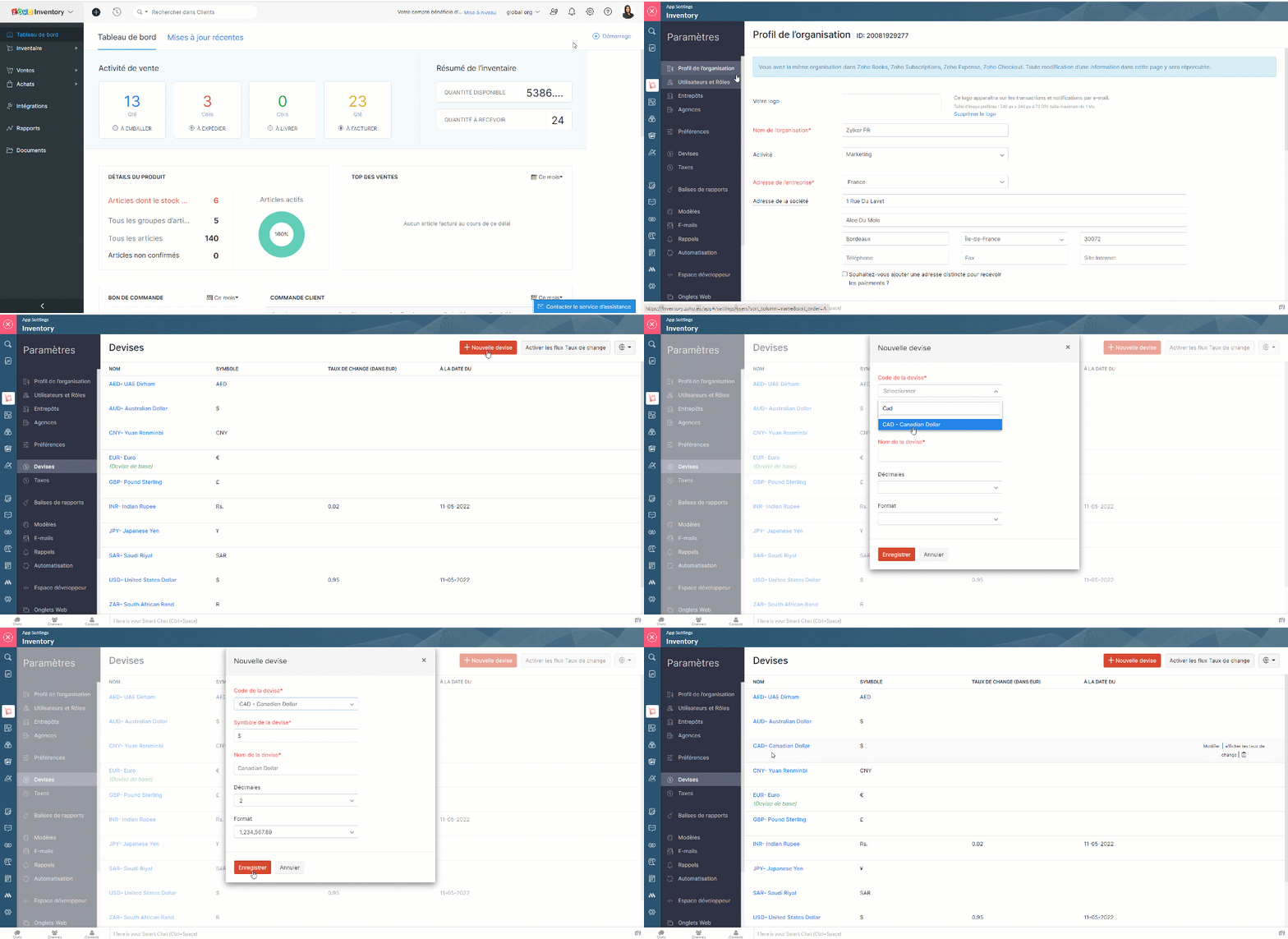
Associer des devises à un contact
Lorsque vous ajoutez un client ou un fournisseur à vos contacts, vous disposez d'un champ de devise dans lequel vous pouvez associer le contact à une devise spécifique. Dans le cas d'un client ou d'un vendeur du même pays que vous, la devise qui lui est associée sera votre devise de base. Par contre, si le client ou le vendeur est d'un autre pays, vous pouvez associer leur devise respective. Elle sera appliquée aux transactions que vous effectuez avec eux.
Activer le taux de change automatique
- Paramètres >> Devises >> Activer les taux de change
- Une fenêtre pop-up s'affichera, cliquez sur "OK" et vous avez activé les champs de taux de change.
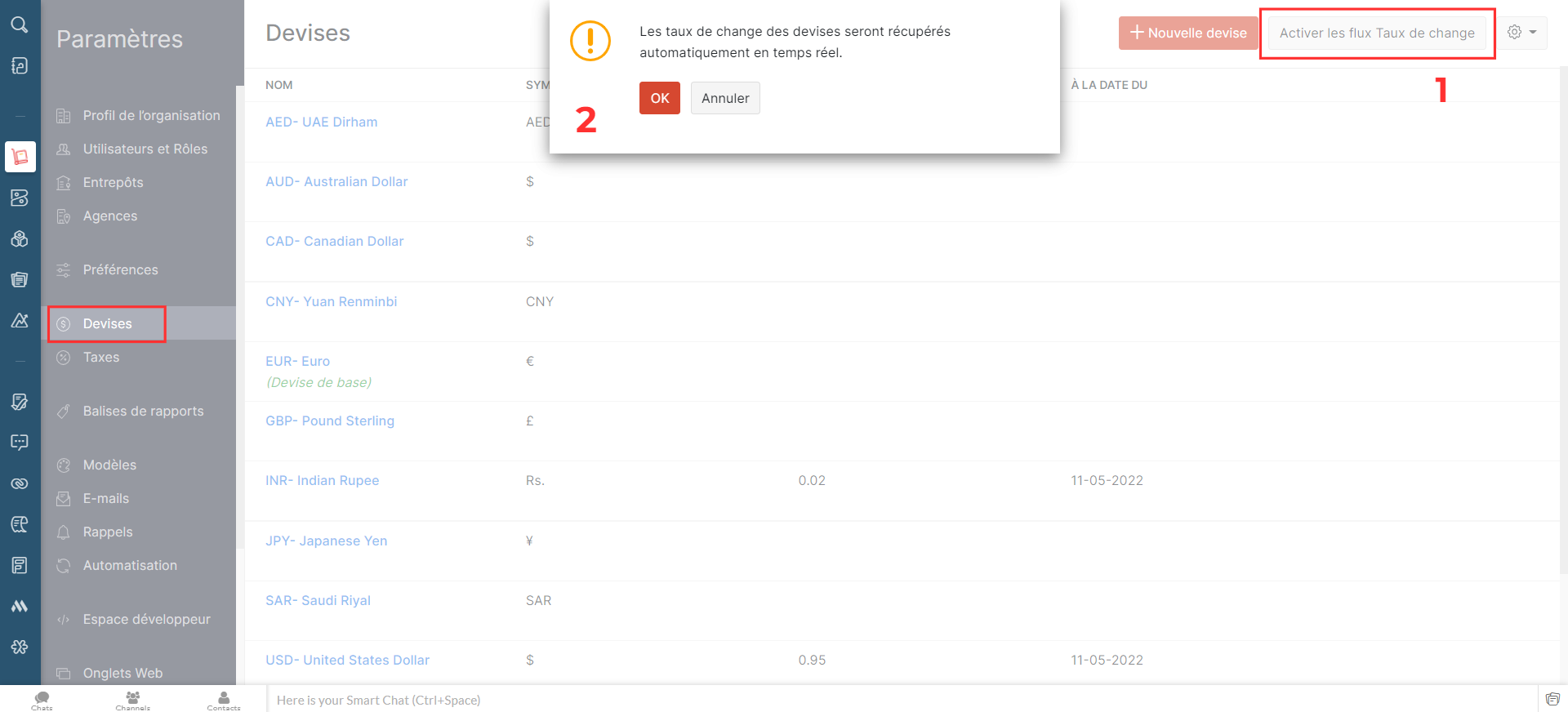
Ajouter les taux de change de façon manuelle
Pour ajouter le taux de change,
- Passez sur la devise pour laquelle vous souhaitez ajouter le taux de change.
- A droite, cliquez sur "afficher les taux de change"
- Sélectionnez "Ajouter un taux de change"
- Saisissez les détails demandés, enregistrez
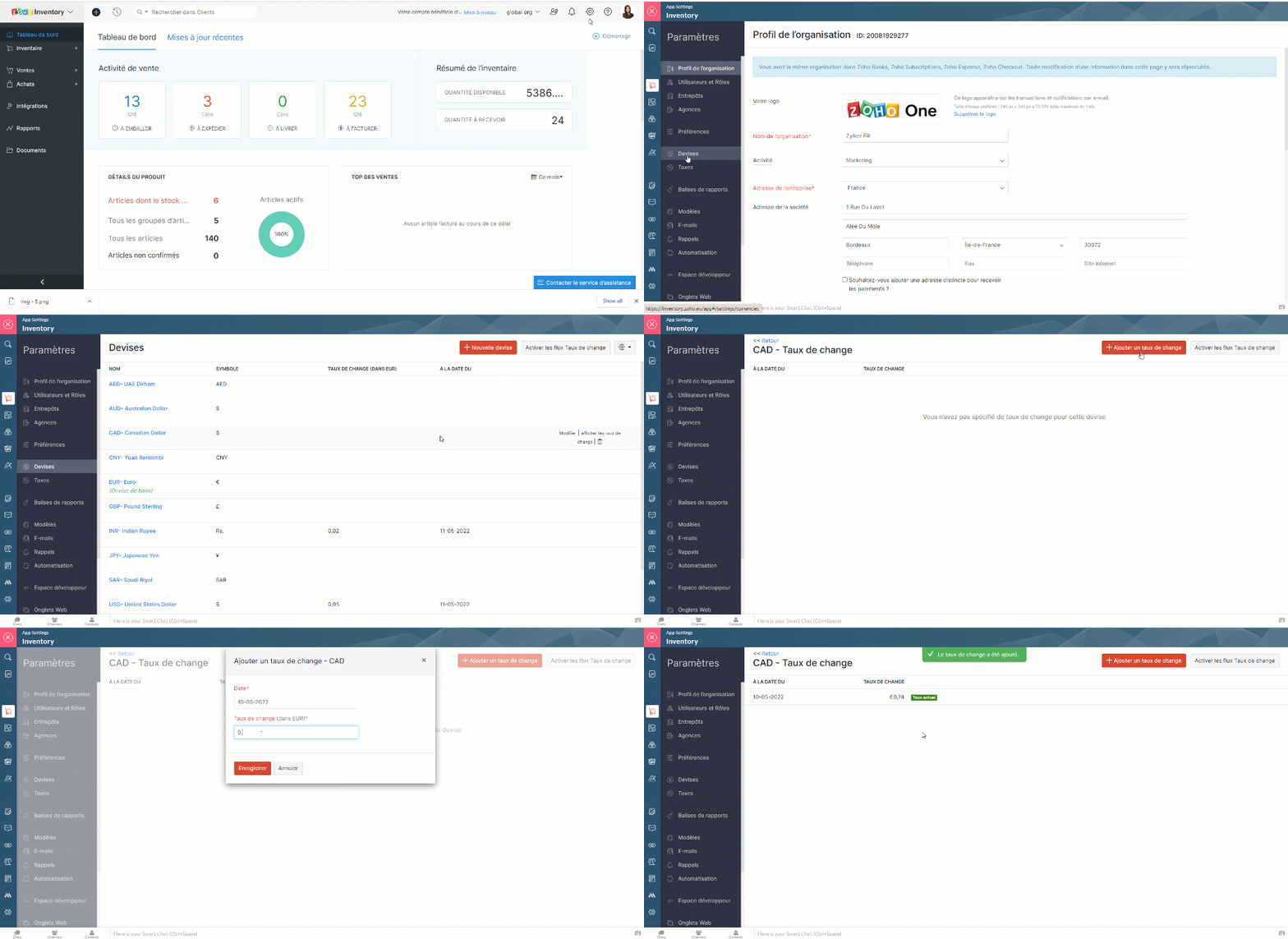
- Cela peut donner un bon aperçu des fluctuations des taux de change. Vous pouvez également supprimer un taux existant à partir de cette page.
Entrepôts
Zoho Inventory vous permet d'ajouter plusieurs entrepôts. Lors de la création de commandes, vous pouvez choisir l'entrepôt de/vers lequel vous voulez expédier (ventes) ou recevoir (achat) le stock. Vous pouvez également transférer des stocks entre vos différents entrepôts.
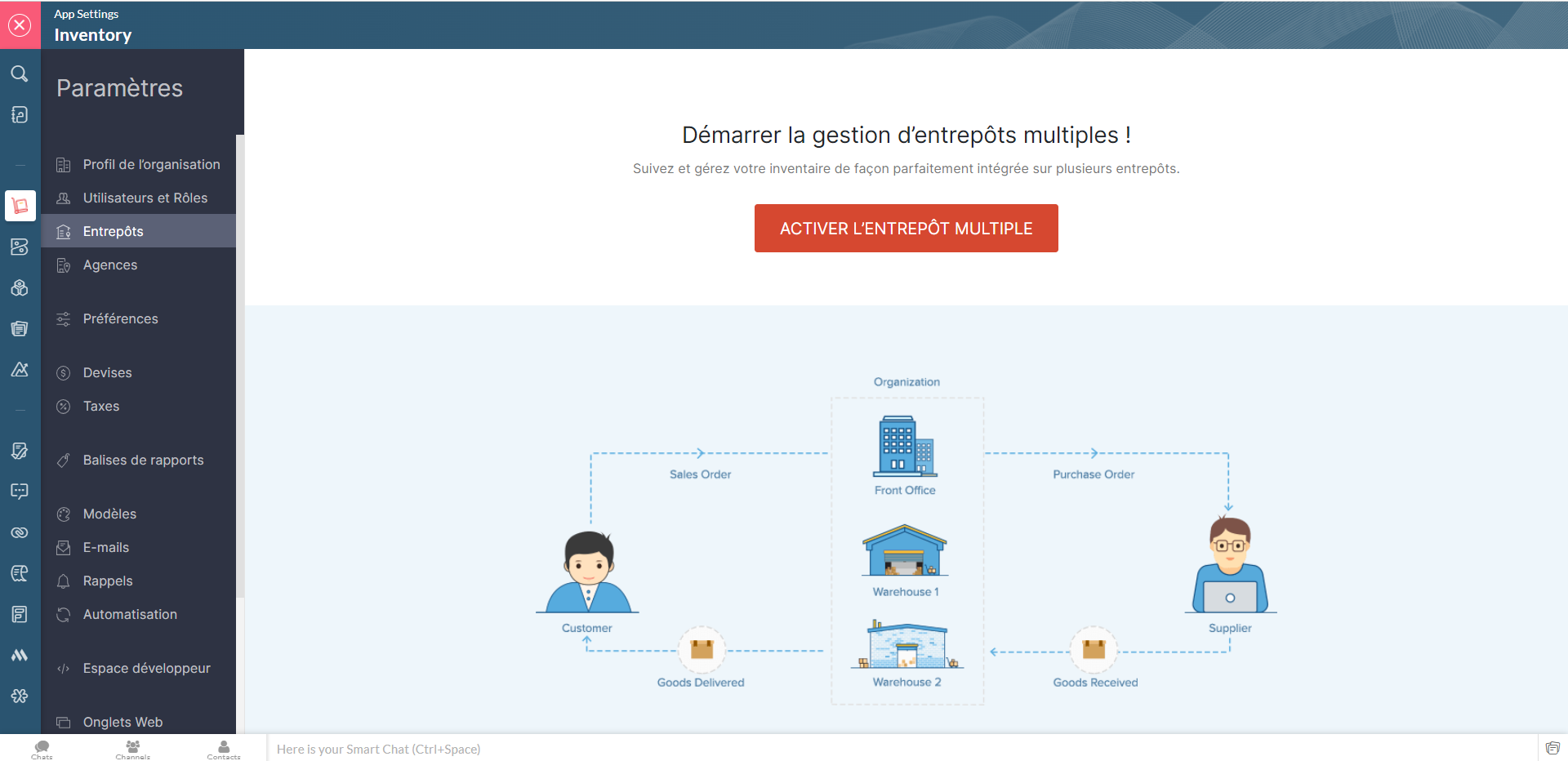
Gérer les multi-entrepôts
- Zoho Inventory >> Paramètres >> Entrepôts >>Activer l'entrepôt multiple
- Cette section, vous permet d'ajouter les nouveaux entrepôts, de modifier les informations attribuer sous chaque entrepôts, de supprimer celui qui est inactif et de modifier son statut (actif ou inactif).
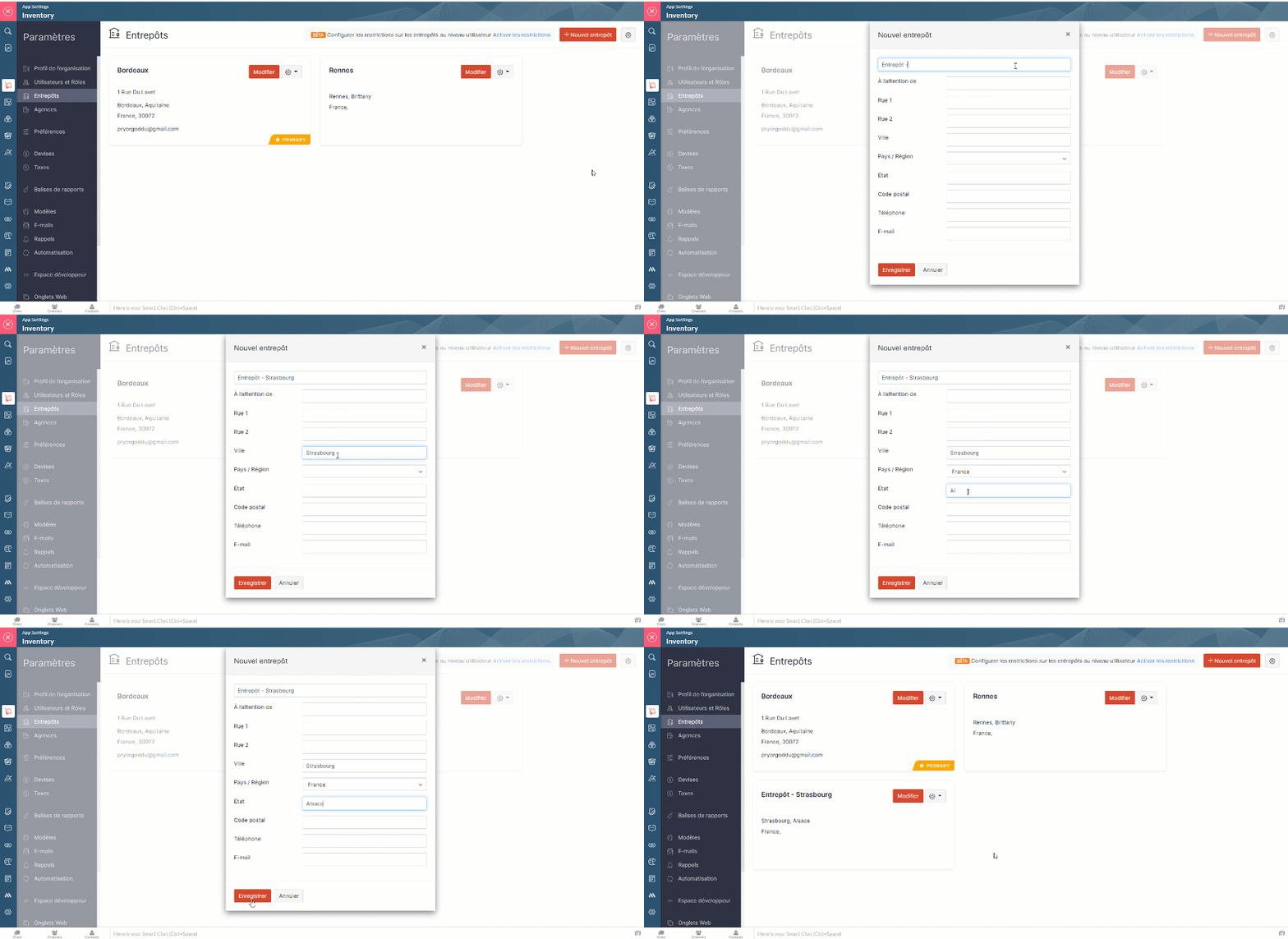
Limitations des entrepôts
Lorsque vous activez la gestion multi-entrepôts dans Zoho Inventory, tous les entrepôts seront initialement accessibles aux utilisateurs. Pour limiter leurs droits d'accès, vous pouvez mettre en place des limitations et associer les utilisateurs à des entrepôts spécifiques, afin qu'ils ne puissent voir que les détails de ces entrepôts.
Activer les droits d'accès
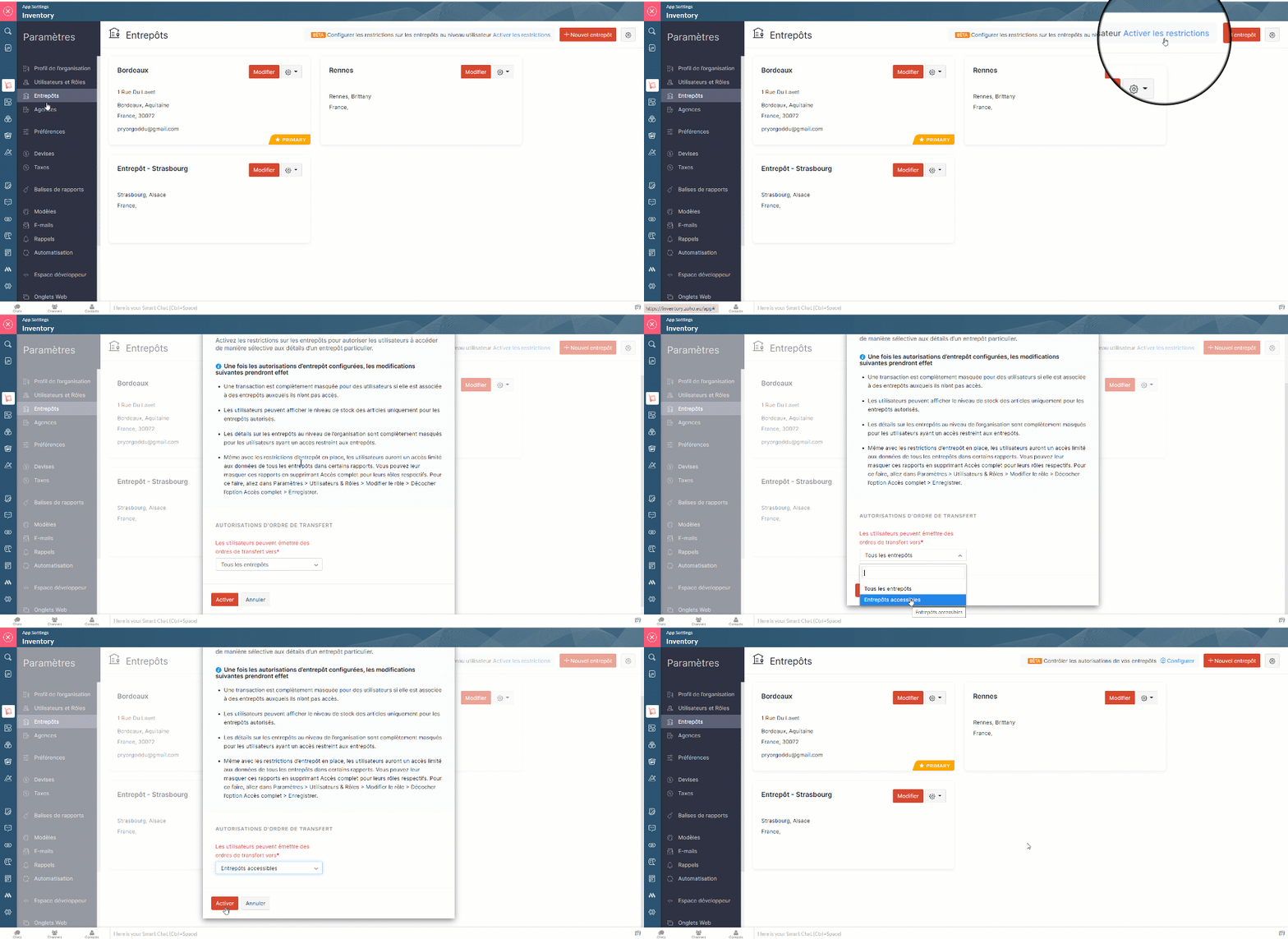
- Paramètres >> Entrepôts >> Activer l'entrepôt multiple >> Activer les limites. Seuls les utilisateurs avec l'accès administrateur peuvent activer cette fonction.
- A partir de la fenêtre pop-up qui s'affiche, choisissez si les utilisateurs peuvent émettre des ordres de transfert vers tous les entrepôts ou seulement vers ceux qui sont autorisés.
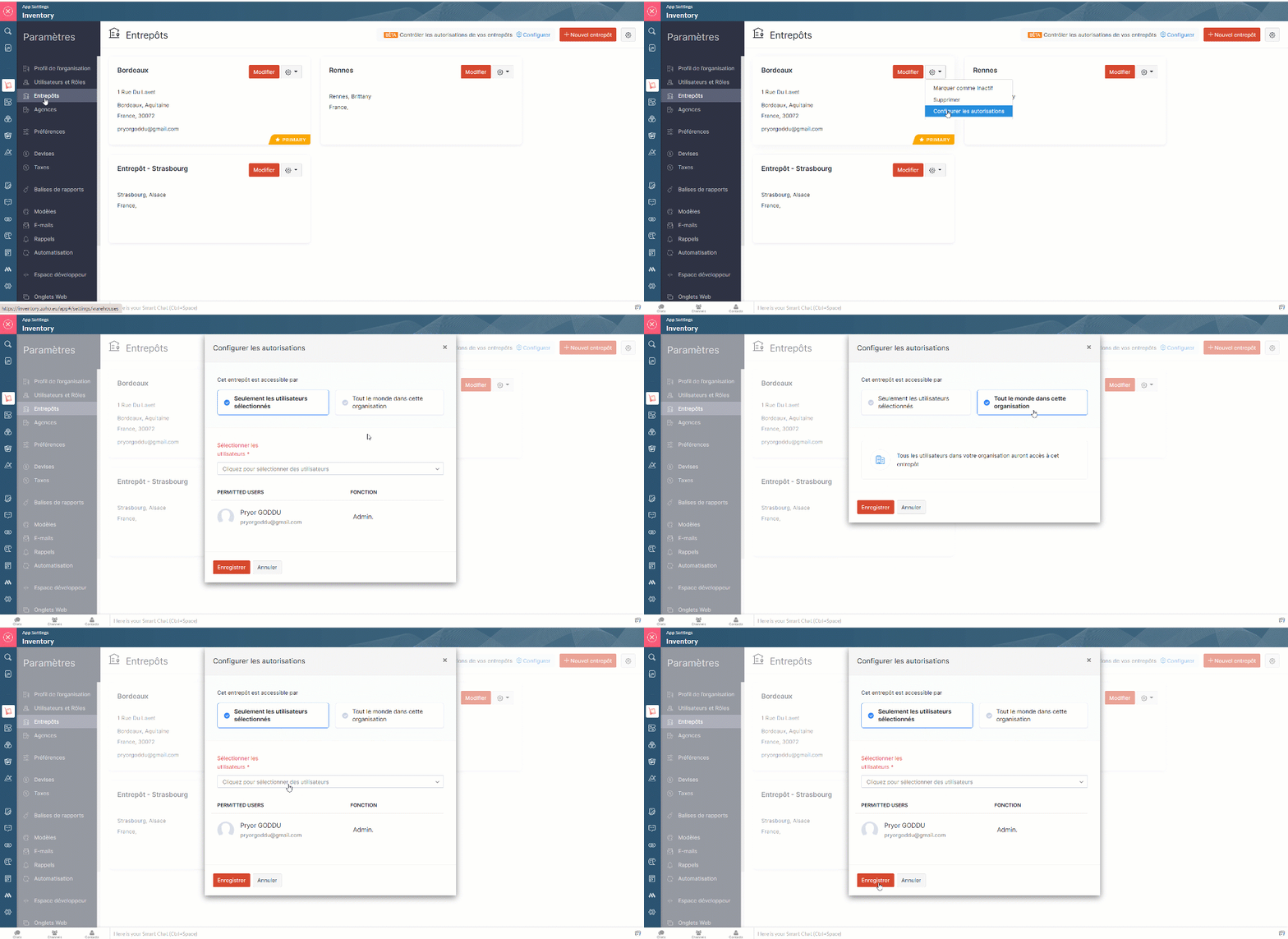
- Allez sur "Configurer les autorisations" depuis l'onglet "Paramètres" à partir d'entrepôt particulier.
- Dans la fenêtre pop-up, sélectionnez l'option "Seulement les utilisateurs sélectionnés" et depuis la liste déroulante attribuez les utilisateurs auxquels vous souhaitez donner accès à cet entrepôt précis.
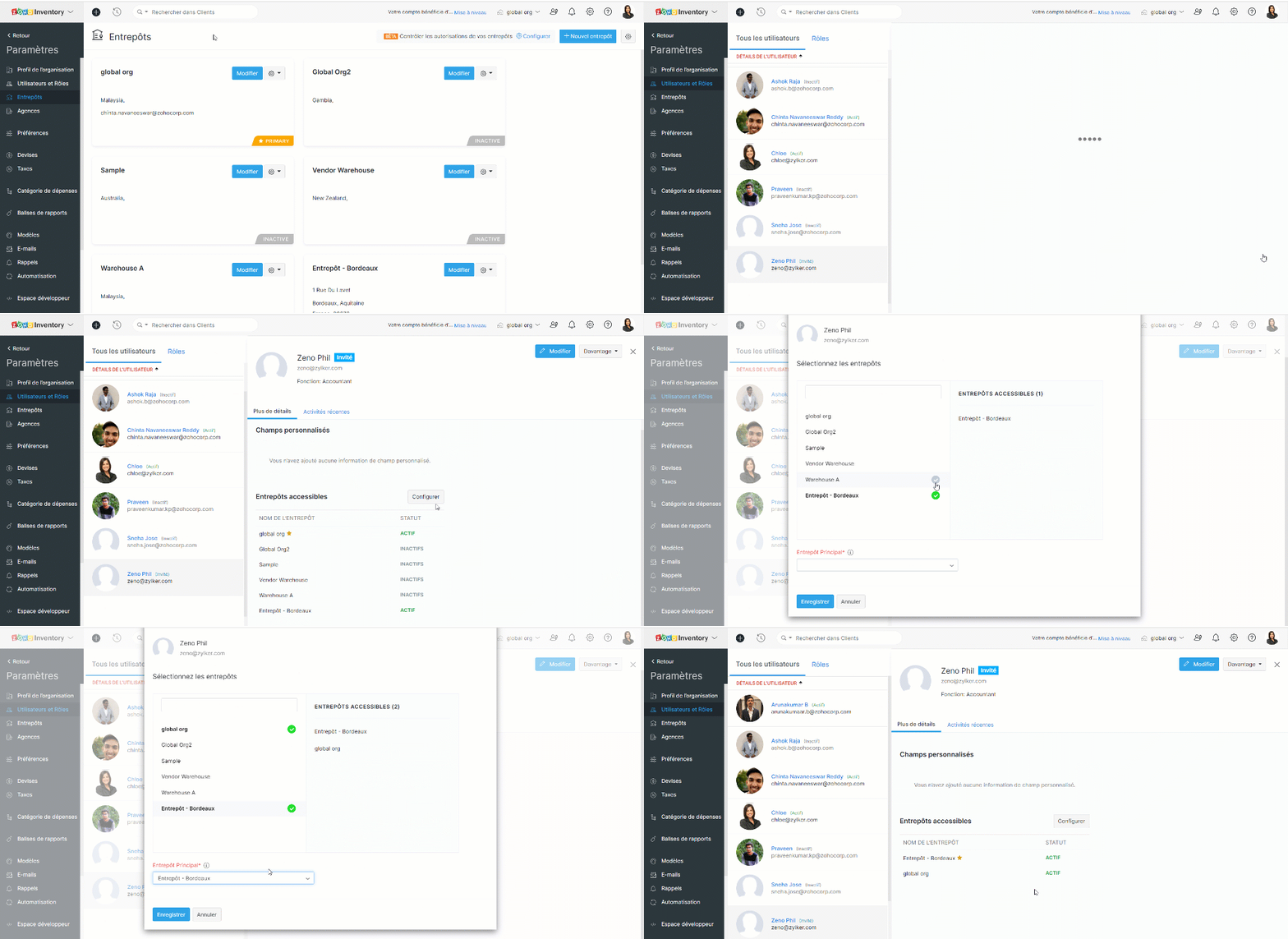
- Vous pouvez également attribuer les entrepôts depuis la section de "Utilisateurs et Rôles".
Lorsque vous avez configuré les autorisations, les changements ci-dessous sont effectifs :
- Le tableau de bord et les rapports restent non modifiés pour les utilisateurs ayant accès à tous les entrepôts, tandis que, les utilisateurs restreints peuvent uniquement voir les informations sur les ventes et les achats dans le tableau de bord et les rapports des entrepôts autorisés.
- Les utilisateurs peuvent visualiser les transactions dans la page de liste si celle-ci inclut au moins un entrepôt autorisé. Cependant, ils ne peuvent pas ouvrir une transaction s'ils n'ont pas accès à tous les entrepôts de la liste.
- Les utilisateurs à accès limité ne peuvent pas voir les détails du stock global dans la page de la liste des articles.
- Les organisations qui ont des limitations d'entrepôt activées sont indiquées par une icône de verrou à côté de leur nom d'organisation.
- Les utilisateurs non admins ayant les droits de créer/modifier des entrepôts peuvent :
- Créer des entrepôts et y attribuer des utilisateurs autorisés.
- Modifier la liste des utilisateurs autorisés pour les entrepôts auxquels ils ont accès.
L'équipe Zoho France
New to Zoho Recruit?
Zoho Campaigns Resources





Topic Participants
Kinjal Lodaya
Sticky Posts
Collaboration sans faille avec Zoho One
Bonjour à tous, Dans cet article nous allons voir comment Zoho One permet une collaboration à différents niveaux . La façon dont nous travaillons évolue. À mesure que les entreprises se mondialisent, la plupart des activités sont menées en équipe.
Zoho CRM Plus Resources
Zoho Books Resources
Zoho Subscriptions Resources
Zoho Projects Resources
Zoho Sprints Resources
Zoho Orchestly Resources
Zoho Creator Resources
Zoho WorkDrive Resources


Zoho CRM Resources
Get Started. Write Away!
Writer is a powerful online word processor, designed for collaborative work.
Zoho CRM コンテンツ
-
オンラインヘルプ
-
Webセミナー
-
機能活用動画
-
よくある質問
-
Ebook
-
-
Zoho Campaigns
- Zoho サービスのWebセミナー
その他のサービス コンテンツ
ご検討中の方
Recent Topics
Easily perform calculations using dates with the new DATEDIF function
Hey Zoho Writer users! We've enhanced Zoho Writer's formula capabilities with the new DATEDIF function. This allows you to calculate the difference between dates in days, months, and years. Function syntax: =DATEDIF(start_date, end_date, unit) Inputs:Adding Comments Using Workflows - How to Change User Attributed
We have worklflows in Desk where a comment is added to a ticket based on certain criteria. It seems that the comment added is always attributed to the user who last edited the workflow. This does not make sense for us because: - It's misleading to otherAdd Attachment Support to Zoho Flow Mailhook / Email Trigger Module
Dear Zoho Support Team, We hope you are well. We would like to kindly request a feature enhancement for the Mailhook module in Zoho Flow. Currently, the email trigger in Zoho Flow provides access to the message body, subject, from address, and to address,Conect chat of salesiq with zoho cliq
Is there any way to answer from zoho cliq the chat of salesiq initiated by customers?Les dernières avancées en saisie de données et collaboration
Après une année dédiée à la recherche et au développement, notre équipe est prête à dévoiler des améliorations majeures pour Zoho Sheet. Ces nouveautés seront lancées par étapes afin d’en assurer une prise en main optimale. Nous commençons avec des fonctionnalitésDeluge Learning Series – Client functions in Deluge | January 2026
We’re excited to kick-start the first session of the 2026 Deluge Learning Series (DLS) with Client functions in Deluge. For those who are new to DLS, here’s a quick overview of what the series is all about: The Deluge Learning Series takes place on theRich Text For Notes in Zoho CRM
Hello everyone, As you know, notes are essential for recording information and ensuring smooth communication across your records. With our latest update, you can now use Rich Text formatting to organize and structure your notes more efficiently. By usingImplement Meeting Polls in Zoho Bookings
Dear Zoho Bookings Support Team, We'd like to propose a feature enhancement related to appointment scheduling within Zoho Bookings. Current Functionality: Zoho Bookings excels at streamlining individual appointment scheduling. Users can set availabilityZoho Bookings and Survey Integration through Flow
I am trying to set up flows where once an appointment is marked as completed in Zoho Bookings, the applicable survey form would be sent to the customer. Problem is, I cannot customise flows wherein if Consultation A is completed, Survey Form A would beService Account Admin for API Calls and System Actions
Hello, I would like to request the addition of a Service Account Admin option in Zoho product. This feature would allow API calls and system actions to be performed on behalf of the system, rather than an active user. Current Issue: At present, API callsHow to apply customized Zoho Crm Home Page to all users?
I have tried to study manuals and play with Zoho CRM but haven't found a way how to apply customized Zoho CRM Home Page as a (default) home page for other CRM users.. How that can be done, if possible? - kipi Moderation Update: Currently, each user hasPlease can the open tasks be shown in each customer account at the top.
Hi there This has happened before, where the open tasks are no longer visible at the top of the page for each customer in the CRM. They have gone missing previously and were reinstated when I asked so I think it's just after an update that this featureHow to Customize Task Creation to Send a Custom Alert Using JavaScript in Zoho CRM?
Hello Zoho CRM Community, I’m looking to customize Zoho CRM to send a custom alert whenever a task is created. I understand that Zoho CRM supports client scripts using JavaScript, and I would like to leverage this feature to implement the alert functionality.Send Whatsapp with API including custom placeholders
Is is possible to initiate a session on whatsapp IM channel with a template that includes params (placeholders) that are passed on the API call? This is very usefull to send a Utility message for a transactional notification including an order numberConfigurable Zoho Cliq Notifications for Zoho People Alerts
Hello Zoho People Product Team, Greetings and hope you are doing well. We would like to request an enhancement to Zoho People notifications, enabling a native delivery via Zoho Cliq with admin-level control, similar to the notification settings availableAdd Israel & Jewish Holidays to Zoho People Holidays Gallery
Greetings, We hope you are doing well. We are writing to request an enhancement to the Holidays Gallery in Zoho People. Currently, there are several holidays available, but none for Israel and none for Jewish holidays (which are not necessarily the sameKeep Zoho People Feature Requests in the Zoho People Forum
Hello Zoho People Product Team, Greetings. We would like to submit a feature request regarding the handling of feature requests themselves, specifically for Zoho People. Issue: Feature Requests Being Moved to Zoho One Zoho People feature requests areZO25: The refreshed, more unified, and intelligent OS for business
Hello all, Greetings from Zoho One! 2025 has been a remarkable year, packed with new features that will take your Zoho One experience to the next level! From sleek, customizable dashboards to an all-new action panel for instant task management, we’veIntroducing Multi-Asset Support in Work Orders, Estimates, and Service Appointments
We’re excited to announce a highly requested enhancement in Zoho FSM — you can now associate multiple assets with Work Orders, Estimates, and Service Appointments. This update brings more clarity, flexibility, and control to your field service operations,[Product Update] Locations module migration in Zoho Books integration with Zoho Analytics
Dear Customers, As Zoho Books are starting to support an advance version of the Branches/Warehouses module called the Locations module, users who choose to migrate to the Locations module in Zoho Books will also be migrated in Zoho Analytics-Zoho BooksIntroducing Schedules for smarter availability management
Greetings from the Zoho Bookings team! We’re excited to introduce Schedules, a powerful enhancement to manage availability across your workspace. Schedules are reusable working-hour templates that help you define and maintain consistent availability acrossWhy Zoho Contracts Prefers Structured Approvals Over Ad-hoc Approvals
Approvals are one of the most important stages in a contract’s lifecycle. They determine whether a contract moves forward, gets revised, or needs further discussion. The approval process also defines accountability within the organization. Zoho ContractsWhatsapp Connection Status still "Pending" after migration
Hello, I migrated my WhatsApp API to Zoho from another provider a day ago. So far the connection status is still “Pending”. There is a problem? How long does it usually take?Kaizen #226: Using ZRC in Client Script
Hello everyone! Welcome to another week of Kaizen. In today's post, lets see what is ZRC (Zoho Request Client) and how we can use ZRC methods in Client Script to get inputs from a Salesperson and update the Lead status with a single button click. In thisHow to Filter timewise question to check uploaded one month or two months before in these community question ?
i want to find the question that is asked some month or before any particular year, so how can i filter it ?Proposal for Creating a Unique "Address" Entity in Zoho FSM
The "Address" entity is one of the most critical components for a service-oriented company. While homeowners may change and servicing companies may vary, the address itself remains constant. This constancy is essential for subsequent services, as it providesWorkflow Down/Bug
We have a workflow that sends an email to one of our internal departments 10 minutes after a record is created in a custom module. The workflow actually works correctly. However, we have now noticed that on January 8, between 3:55 p.m. and 4:33 p.m.,Service Locations: Designed for Shared Sites and Changing Customers
Managing service addresses sounds simple—until it isn’t. Large facilities, shared sites, and frequently changing customers can quickly turn address management into an operational bottleneck. This is where Service Locations deliver clarity and control.Can I re-send the Customer Satisfaction Survey after a ticket closure?
Hello, Some customers does not answer the survey right after closure, is it possible to re-send after a few days or weeks? Best Regards!Account blocked
Yesterday I got my Zeptomail account blocked due to too many hard bounces. My account is used exclusively for sending transactional emails (eg. your order has been shipped, a form has been filled, etc) and the sudden blocking impacted hundreds of websitesFilter contacts based on selected category in Zoho Desk ticket
Hello community, I’m setting up the Tickets module in Zoho Desk and I need help implementing the following: When a category is selected in a ticket, I want the Contact field to be filtered so that it only displays contacts that are related to that category.Mapping a new Ticket in Zoho Desk to an Account or Deal in Zoho CRM manually
Is there any way for me to map an existing ticket in Zoho desk to an account or Deal within Zoho CRM? Sometimes people use different email to put in a ticket than the one that we have in the CRM, but it's still the same person. We would like to be ableAssign Income to Project Without Invoice
Hello, Fairly new user here so apologies if there is a really obvious solution here that I am just missing... I have hundreds of small deposits into a bank account that I want to assign to a project but do not want to have to create an invoice every timeTracking Non-Inventory Items
We have several business locations and currently use zoho inventory to track retail items (sales and purchase orders). We were hoping to use zoho inventory to track our non-inventory items as well (toilet paper, paper towels, etc). I understand that weProfile Page View Customization
I need to change the fields, sections from the profile view of an emplyoyee.Zoho Desk Android app update: Filter, Sort and Saved filters Enhancements
Hello everyone! We are excited to introduce the below features on the Android version Zoho Desk mobile app: 1. Filter & Sort support has been introduced for the Contacts and Accounts modules. 2. Sort options is now available in Custom Modules as well.Accessing shared mailboxes through Trident (Windows)
Hi, I have a created a couple of shared mailboxes. The mailboxes are showing up on the browser based Zoho workplace, but I cannot seem to figure out how to access my shared inboxes through Trident (Windows). Am I missing something or is this feature notFeature Request: Ability to set Default Custom Filters and apply them via URL/Deluge
I've discovered a significant gap in how Zoho Creator handles Custom Filters for reports, and I'm hoping the Zoho team can address this in a future update. This limitation has been raised before and continues to be requested, but remains unresolved. TheClosing the Loop: Why Lookup Asymmetry is Harming Data Integrity in Creator
TL;DR: Lookup fields allow users to add new related records inline via the "+" icon, but there's no equivalent ability to edit an existing related record without navigating away and losing form context. Adding a native "Edit" icon—with automatic Userfiltering lookup field options based on information in another module.
In our CRM system. We have the standard Accounts and Deals modules. We would like to introduce the ability to classify Accounts by Sector. Our desired functionality is to have a global list of all sectors that an Account can select, with the ability toNext Page