Improving double opt-in contacts - Online Help | Zoho Campaigns

Improving double opt-in contacts


Imagine that a total stranger gets your contact info and continues to call you at random times. This would be frustrating, and you'd want to put an end to it as quickly as possible, right? You're definitely not alone in feeling that way. It's important to remember that your contact list isn't just a compilation of email addresses—there are real people on the other end. And these people have a real interest in what you do. This type of mailing list is known as an opt-in mailing list.

Building an opt-in mailing list is an organic process that brings about higher email deliverability rate. There are multiple ways to engage people in your product and service. After a positive engagement, many of them are sure to subscribe to your emails. They will let you keep them posted about new things you do.

Attracting users to what you do, can either be done via content or by creating scenarios where they opt in to your emails.

Bringing in opt-in contacts is the initial step; converting them as double opt-in contacts is the final step. For that to happen, make sure to send out confirmation emails to all your contacts without fail.
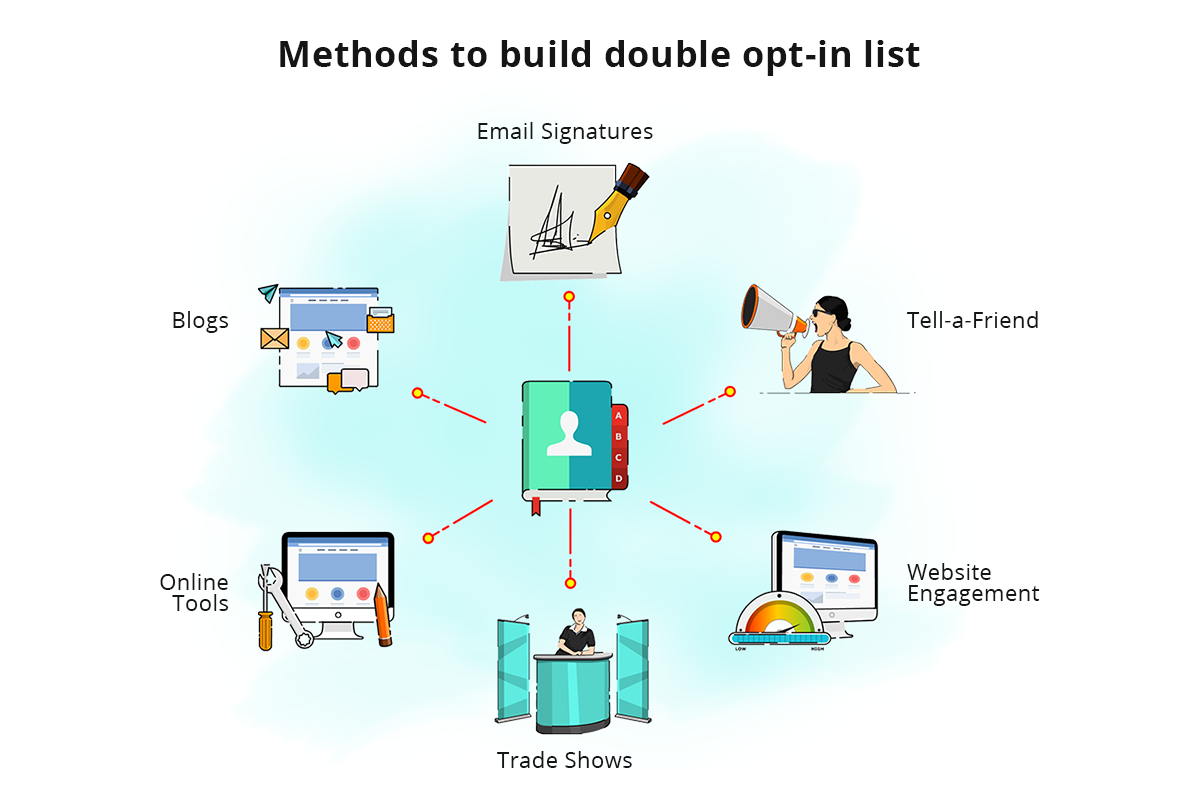
opt-in list

Trade Shows/Events

Organize trade shows or other events where people come in as with little idea about your product or service and leave as your contacts. Your responsibility will be to exhibit a likable product or service. An additional responsibility is to remind people to agree to receiving your emails. This is a time-taking and a completely manual process yet it yields good results.

Once you're done with collecting email addresses, send a confirmation email to all the potential contacts to make the opt-in mailing list double opt-in. Make sure that the email addresses you collect are free of typos.

Website Engagement

A subscription form on your website is a good way to build an opt-in list. People who sign up to your emails newsletters are opt-in contacts. Position the subscription form pop-up when the user/guest is likely to sign up. The checkbox that says ''I agree to receive newsletters from you'' should always be unchecked by default. Remember to store important contact information such as IP, browser, OS, date, etc.

Tell-A-Friend

When you craft quality email newsletters and send them to your existing customers/contacts, they might share it with their friends and acquaintances using Tell-A-Friend. This is a merge tag that you can include in the footer of your campaigns. People who hear about you through trusted sources are even more likely to become contacts.

Employee Signature Campaigns

This is a new email marketing tool. Your employees' signature will be visible across the organization, to partners, to re-sellers, and to customers. Imagine the potential of a sign-up link on a powerful signature campaign card that's guaranteed to be seen by a large number of people. And the best part about signature campaigns is that they get delivered for certain. The number of opens and clicks depend on how good your signature campaigns are. Remember to send the confirmation email to the contacts without fail.

Social Media

Social media is where most of today's marketing is done. The platform has expanded and is potent enough to accommodate other types of marketing in addition to connecting people. A Call-to-Action, or CTA, a button on your Facebook page can fetch you email addresses in an ethical way. Remember to send the confirmation email to the contacts without fail. Always promote an offer that requires email address submission.

Blogs and Online Tools

Blogs are interactive and are a great way to increase user engagement. This will shed more light on your product/work and encourage people to subscribe in order to learn more.

Build your mailing list with the help of relevant and genuine content. A user will be required to provide their information to access premium content. Creating premium content is an integral part in building a mailing list. To make it a double opt-in list, send out confirmation emails to all contacts.

  1. Building a double opt-in mailing list is like making friends with people without intruding on their privacy. To do this, you must
  1. Pick your target audience/customers
  1. Find out their tastes and preferences
  1. Understand their demographic information
  1. Only send content that you would open if you were a customer
  1. Analyze reports and work on future campaigns

Can I opt-in my old contact?

It's good to start over and build a new list. However, you can turn your old contacts in to opt-ins by notifying the contacts.
  1. Ask them if they are ready to receive mass emails from you or would they like to unsubscribe?
  1. There is a chance of you losing some contact, but that's the price you pay to convert a normal list to an opt-in list.
Discard the contacts that choose not to respond. Reach out only to those who respond to your reminder email.

Read our help article to enable the double opt-in feature for your mailing lists.

        Create. Review. Publish.

        Write, edit, collaborate on, and publish documents to different content management platforms.

        Get Started Now


          Access your files securely from anywhere

            Zoho CRM Training Programs

            Learn how to use the best tools for sales force automation and better customer engagement from Zoho's implementation specialists.

            Zoho CRM Training
              Redefine the way you work
              with Zoho Workplace

                Zoho DataPrep Personalized Demo

                If you'd like a personalized walk-through of our data preparation tool, please request a demo and we'll be happy to show you how to get the best out of Zoho DataPrep.

                Zoho CRM Training

                  Create, share, and deliver

                  beautiful slides from anywhere.

                  Get Started Now


                    Zoho Sign now offers specialized one-on-one training for both administrators and developers.

                    BOOK A SESSION


                                Quick LinksWorkflow AutomationData Collection
                                Web FormsEnterpriseOnline Data Collection Tool
                                Embeddable FormsBankingBegin Data Collection
                                Interactive FormsWorkplaceData Collection App
                                CRM FormsCustomer ServiceAccessible Forms
                                Digital FormsMarketingForms for Small Business
                                HTML FormsEducationForms for Enterprise
                                Contact FormsE-commerceForms for any business
                                Lead Generation FormsHealthcareForms for Startups
                                Wordpress FormsCustomer onboardingForms for Small Business
                                No Code FormsConstructionRSVP tool for holidays
                                Free FormsTravelFeatures for Order Forms
                                Prefill FormsNon-Profit

                                Intake FormsLegal
                                Mobile App
                                Form DesignerHR
                                Mobile Forms
                                Card FormsFoodOffline Forms
                                Assign FormsPhotographyMobile Forms Features
                                Translate FormsReal EstateKiosk in Mobile Forms
                                Electronic Forms
                                Drag & drop form builder

                                Notification Emails for FormsAlternativesSecurity & Compliance
                                Holiday FormsGoogle Forms alternative GDPR
                                Form to PDFJotform alternativeHIPAA Forms
                                Email FormsFormstack alternativeEncrypted Forms

                                Wufoo alternativeSecure Forms

                                TypeformWCAG


                                      All-in-one knowledge management and training platform for your employees and customers.

                                                Create. Review. Publish.

                                                Write, edit, collaborate on, and publish documents to different content management platforms.

                                                Get Started Now


                                                                  You are currently viewing the help pages of Qntrl’s earlier version. Click here to view our latest version—Qntrl 3.0's help articles.


                                                                      Manage your brands on social media


                                                                        • Desk Community Learning Series


                                                                        • Digest


                                                                        • Functions


                                                                        • Meetups


                                                                        • Kbase


                                                                        • Resources


                                                                        • Glossary


                                                                        • Desk Marketplace


                                                                        • MVP Corner


                                                                        • Word of the Day


                                                                        • Ask the Experts


                                                                          Zoho Sheet Resources


                                                                              Zoho Forms Resources


                                                                                Secure your business
                                                                                communication with Zoho Mail


                                                                                Mail on the move with
                                                                                Zoho Mail mobile application

                                                                                  Stay on top of your schedule
                                                                                  at all times


                                                                                  Carry your calendar with you
                                                                                  Anytime, anywhere


                                                                                        Zoho Sign Resources

                                                                                          Sign, Paperless!

                                                                                          Sign and send business documents on the go!

                                                                                          Get Started Now


                                                                                                  Zoho TeamInbox Resources


                                                                                                            Zoho DataPrep Demo

                                                                                                            Get a personalized demo or POC

                                                                                                            REGISTER NOW


                                                                                                              Design. Discuss. Deliver.

                                                                                                              Create visually engaging stories with Zoho Show.

                                                                                                              Get Started Now


                                                                                                                                  • Related Articles

                                                                                                                                  • Double opt-in vs. single opt-in

                                                                                                                                    Ever wondered why even after crafting the perfect campaign and implementing hygienic email sending practices, the campaign receives spam markings and unsubscribes? When you carefully analyze the issue, you will be surprised to find that the root ...
                                                                                                                                  • How do contacts get skipped in your workflow components?

                                                                                                                                    You successfully set up a workflow from scratch, then activated it. Unfortunately, some of your contacts have not been added to it. This may have you pondering over why and how this could have happened. This guide will take you through the most ...
                                                                                                                                  • How to create contacts in Zoho Campaigns?

                                                                                                                                    We have updated how Topics work in Zoho Campaigns. Hence, the Contacts section has also undergone changes. Please click here for the updated help document. Contacts are the most important part of any marketing business. In Zoho Campaigns, the All ...
                                                                                                                                  • Import Contacts from Zoho WorkDrive - New Version

                                                                                                                                    Zoho Campaigns lets you import contacts from different cloud storage services. You can import contacts stored in Zoho WorkDrive as contacts in Zoho Campaigns. The file to be imported should meet the following requirements, It should be in either ...
                                                                                                                                  • Manage Contacts - New Version

                                                                                                                                    Contacts are the most important part of any marketing business. In Zoho Campaigns, the All Contacts section under the Contacts module helps you build, organize, and maintain a high-quality contact database for your marketing activities. Contacts are ...
                                                                                                                                    Wherever you are is as good as
                                                                                                                                    your workplace

                                                                                                                                      Resources

                                                                                                                                      Videos

                                                                                                                                      Watch comprehensive videos on features and other important topics that will help you master Zoho CRM.


                                                                                                                                      eBooks

                                                                                                                                      Download free eBooks and access a range of topics to get deeper insight on successfully using Zoho CRM.


                                                                                                                                      Webinars

                                                                                                                                      Sign up for our webinars and learn the Zoho CRM basics, from customization to sales force automation and more.


                                                                                                                                      CRM Tips

                                                                                                                                      Make the most of Zoho CRM with these useful tips.


                                                                                                                                        Zoho Show Resources