Connecting the DHT22 Sensor
Prerequisite: Make sure you have set up the raspberry pi before proceeding with this step.
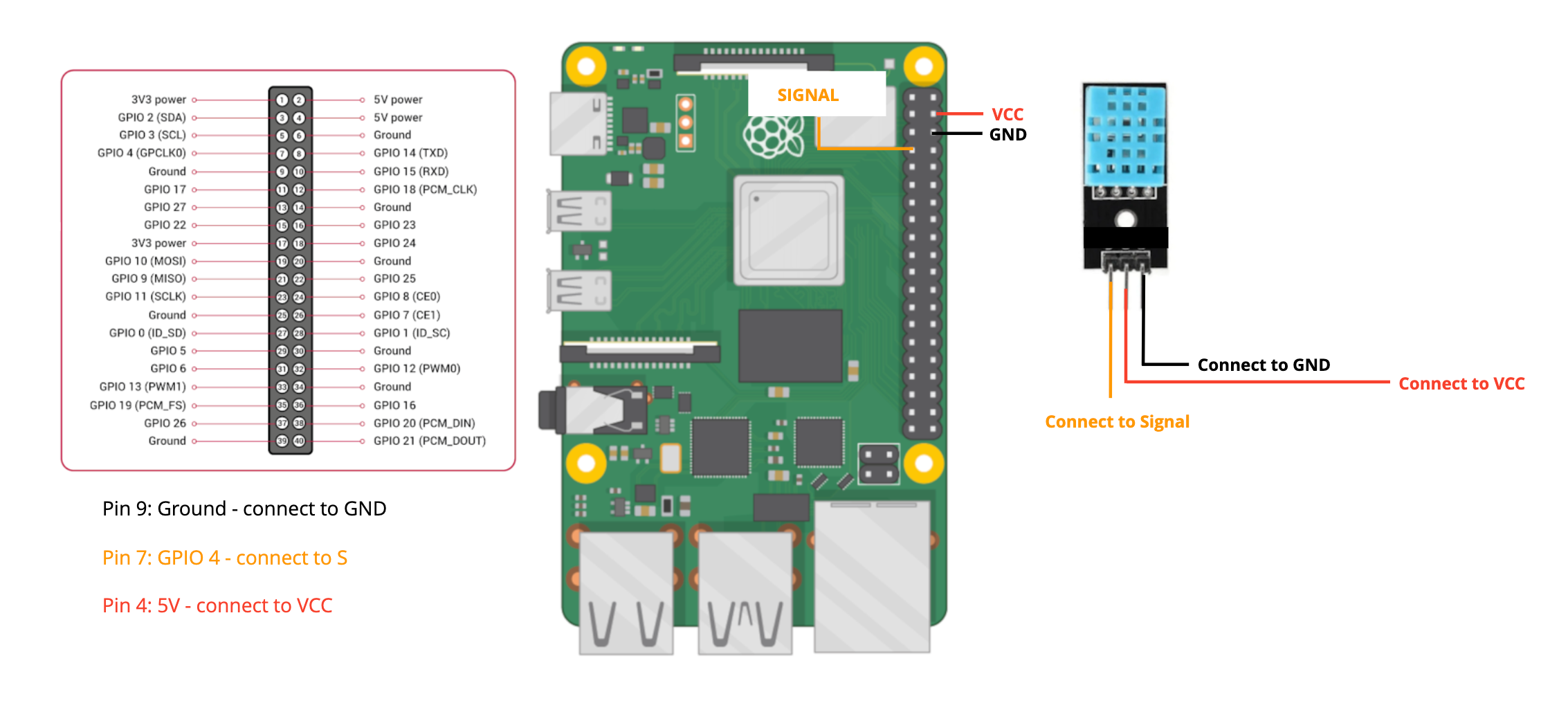
With your Raspberry Pi set up you can now connect the DHT22 sensor using jumper wires. Follow the connection layout carefully to ensure the sensor is correctly linked to the Raspberry Pi:
- Power Connection: Connect the VCC pin of the DHT22 sensor to the 3.3V pin on the Raspberry Pi.
- Ground Connection: Connect the GND pin of the DHT22 sensor to a GND pin on the Raspberry Pi.
- Data Connection: Connect the Data pin of the DHT22 sensor to one of the GPIO pins on the Raspberry Pi (e.g., GPIO4)
Refer to the layout below.
Once you've made the connections, by running in the script in the Zoho IOT SDK you can measure the temperature and humidity data of the room. Before that you need to create a device in the application and update the credentials in the python script to send the measured values.