Tips for using Zoho Forms to boost your sales this holiday season
With the holiday season quickly approaching, it's time to start using your forms to drive conversions. For many small business owners, this is the most crucial time of year. Customers always look forward to this time of year with great anticipation and are eager to begin shopping, while looking for great deals and special offers.
Firstly let's list out the 3 important dates coming up to connect with your customers:
-
Christmas – December 25, 2022
-
Kwanzaa – December 26, 2022
-
New Year’s Eve – December 31, 2022
Know your customers
While there are numerous channels to market your products, it is critical to focus your marketing efforts where you believe potential customers will seek you out. Assessing the efficiency of your past holiday strategies can help you understand your target audience's behavior. To generate leads, share your order forms directly on your social media channels.
Aside from conversions from your form embedded on website or AdWords campaigns, it's essential to comprehend your customers by knowing how they find you. This is where you can use the UTM tracking parameters to determine which of your marketing efforts is performing the best.
Geolocation tracking for mobile submissions can be helpful to learn where your visitors/customers are from.
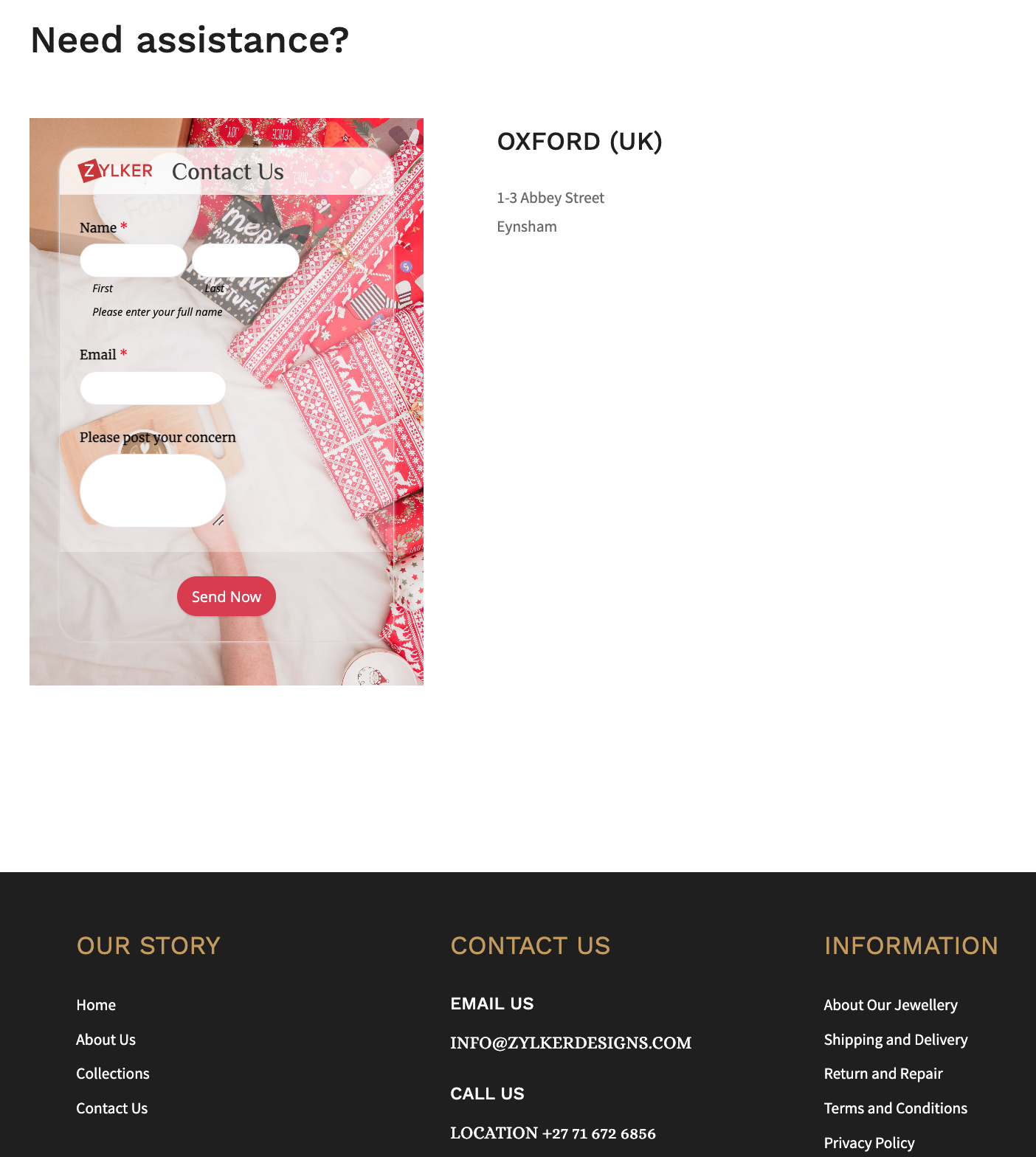
Show customers the different ways they can connect with you, by including social media links or embedding a
contact form at the end of your website footer.
Retain your loyal customers by making a list of your returning customers and create a buyer persona for them. This can help in your marketing success by getting you to foresee what they expect from you during the holiday shopping season. You can also use this information to customize the Thank you page, and the triggered emails, allowing you to create messaging that strikes a chord with your customers.
Revamp your forms and website
Add holiday flare to your website's home page and select a form background that reflects the holiday spirit, for example, a Christmas holiday theme featuring bells.
You can take behind-the-scenes photos of your business preparing for the holiday season and use them as wallpapers for your different forms to portray your realistic efforts for the customers. Use relevant images and include your brand logo wherever possible, such as in social media posts or email notifications. Choose festive CTAs (like SHOP NOW!) for your form to grab the attention of your online customers.
To connect with each of your customers, use personalized holiday greetings while customers fill out your form with our dynamic field labels.
Offer your best deals and offers with a lightbox order form just when the website visitor is about to abandon your webpage.
Use the form description to convey the perks that the customers will benefit from purchasing your products or services this holiday season. For example, reassure customers by announcing a free delivery or return policy and a 24/7 support in the form description to win the trust of your customers.
Reach out to the global market with translated forms and sell your merchandise worldwide to earn new customers! What's more? You can trigger acknowledgement emails in the same translated language as well!
Offer multiple payment gateways to collect payments and streamline the payment process, allowing customers to choose their preferred transaction gateway.
If your store gets a lot of foot traffic, you could place the QR code of a donation form at the check out counters to collect any festive donations.
Share your story in short
Figure out what information you require, and avoid asking for information you don't need. Instead of having a long form with multiple unnecessary questions, segment the form into multiple pages, where each page focuses on different information.
Use the first page of your form to tell the story of your brand, and the reason why this holiday is special, making it easier for you to create an impact on people to connect with you, no matter where they're from.
Following up your story with simple segmented questions will help closing the deals faster. You can also avoid showing up irrelevant questions or pages and customize the form filling experience for each customer based on the choices they make on your form with conditional rules. For example, if you have more than one event planned or you have different options to offer each attendee, you can avoid making multiple forms for each of them. Collect all the information you need in one form and customize the entry process with rules.
Customers are wary of advertisements that take advantage of the holiday season. Carefully use the holiday season to show appreciation to your customers, so that your message is heard and your actions are perceived as genuine, rather than as a ploy to make some easy money from them.
Send customized party invites to the participants
Share an event registration form or a custom RSVP form for any holiday event, say a Christmas party, or a game night.
As an attendee enters their data and submits the invite form, be sure to acknowledge them instantly. You can also send a personalized auto-generated party invite as an attachment to the acknowledgement email triggered.
Use the Document merge feature to merge form responses with document templates and generate personalized merged documents on each form submission.
Host virtual celebration with contests
Hosting an Ugly Christmas Holiday Sweater contest is a beloved Christmas tradition and hosting it virtually is just so simple with Zoho Forms. Create a contest form with a tacky sweater background and fields asking for name and email. Ask your respondents to upload their picture with their sweater on using the Image Upload field. They can just take a snap with their phone's camera and instantly upload it to your mobile form.
The judge can view and analyze the images consolidated at one place in the All Entries section, which can make it simpler to select the winner. Offering your products as freebies to the winners can drive traffic to your website, regardless of the nature of your business.
Over to you!
The goal of holiday season sales is to reach a larger audience and outperform your competitors. Taking a few of these steps will get you on your way to higher conversions. As you gear up for your holiday events, remember to spread the holiday cheer along the way! We'd love to hear about what you do to make your forms more exciting and stand out for your audience in the comments.
Topic Participants
Samhita Munukutla
Sticky Posts
Easily track referrals with Zoho Forms
Referral tracking can be a powerful way for businesses to understand where their leads are coming from. With Zoho Forms, tracking the referral sources of your leads is an easy and straightforward process. Here are some tips to help you make the most of9 Ways to use Zoho Forms this Navratri
Hello form builders!Navratri is almost here! It is a time for celebration and culture in the Indian community, and organizing such a grand event can be overwhelming. But with the right tools, you can streamline the process and focus on creating unforgettableThe secret to collecting data from valid users
Collecting accurate data is crucial for making informed decisions. Zoho Forms offers two efficient ways to validate user data and ensure that you collect entries exclusively from valid users. Double Opt-in: Double Opt-in is a privacy feature that ensuresStorage space in Zoho Forms: The ultimate guide to efficiently managing your data
Are you using Zoho Forms for data collection? As with any data-intensive application, understanding how storage space is calculated is essential. That's why we've created this guide— to show you everything you need to know about managing storage spaceLinking primary form submissions to a second form submission
Let's imagine you have a form that you use to request a minimal amount of data from your users. To collect additional information, you redirect them to another form either automatically or based on a condition. During the course of redirection, you can
Recent Topics
Exciting Updates to the Kiosk Studio Feature in Zoho CRM!
Hello Everyone, We are here again with a series of new enhancements to Kiosk Studio, designed to elevate your experience and bring even greater efficiency to your business processes. These updates build upon our ongoing commitment to making Kiosk a powerfulReply to Email for SO/PO
Hello, We are new to Zoho Books and running into an issue. Our support@ email is our integration user. When our team is sending out PO/SO's we are updating the sender email, but for some reason many of our responses are coming back to our support@ emailNew activity options for workflows
Greetings, We are excited to announce the addition of two new dynamic actions to our workflow functionality: Create Event and Schedule Call. These actions have been thoughtfully designed to enhance your workflow processes and bring more efficiency toRemove the “One Migration Per User” Limitation in Zoho WorkDrive
Hi Zoho WorkDrive Team, Hope you are doing well. We would like to raise a critical feature request regarding the Google Drive → Zoho WorkDrive migration process. Current Limitation: Zoho WorkDrive currently enforces a hard limitation: A Zoho WorkDriveKaizen #228 - Process Large-Scale Migrated Data Using Catalyst Solutions
Howdy, tech wizards! This week’s Kaizen explores how Catalyst Solutions in the Zoho CRM Developer Hub help import large volumes of data into Zoho CRM while improving data quality and simplifying the migration process. Why Catalyst Solutions? CatalystZoho Expense Import Reports Won't Work Because Default Accounts Already Exist
Im trying to import reports from another Zoho expense account to mine and im getting errors that won't allow the import to happen The account name that you've entered 'Ground Transportation' already exists. Enter another name for the account and try again.zInactive License for free account.
I recently upgraded my Cliq subscription not my team (on the free version), are unable to login to their accounts. The error message received is Inactive License Looks like you have not been covered under the current free plan of users. Please contactMake panel configuration interface wider
Hi there, The same way you changed the custom function editor's interface wider, it would be nice to be able to edit panels in pages using the full width of the screen rather than the currently max-width: 1368px. Is there a reason for having the configuration panel not taking the full width? Its impossible at this width to edit panels that have a lot of elements. Please change it to 100% so we can better edit the layouts. Thanks! B.2026 Product Roadmap and Upcoming Features
This is your guide to what is coming in Zoho Vertical Studio throughout 2026. We’ll update this post throughout the year as items move from development to release, and as and when new initiatives are added. Once a feature is released, it will be reflectedPlease, make writer into a content creation tool
I'm tired of relying on Google Docs. I'm actually considering moving to ClickUp, but if Writer were a good content creation tool instead of just a word processor, I would finally be able to move all my development within the Zoho ecosystem, rather thanSyncing zoho books into zoho crm
I was wondering how I can use zoho books in crm as I have been using them separately and would like to sync the two. Is this possible and if so, how? ThanksRelease Notes | January 2026
We have rolled out a set of powerful new enhancements across Zoho Vertical Studio that bring several long-awaited capabilities to your applications. These updates focus on deeper customization, smarter automation, better reporting, and improved usabilityAnnouncing new features in Trident for Mac (1.34.0)
Hello everyone! We’re excited to introduce the latest updates to Trident, which are designed to take workplace communication to the next level. Let’s take a quick look at what’s new. Connect with customers using Zoho Voice integration. You can now easilyMassive Zoho Books failure
We have not received any communication or notification from Zoho, but we have detected that Zoho Books is not working for all our users. We cannot access or use Zoho Books. This is critical. We are trying to contact Zoho on the Spain telephone number,The Social Wall: January 2026
Hello everyone, We’re back with the first edition of The Social Wall of 2026. There’s a lot planned for the year ahead, and we’re starting with a few useful features and improvements released in January to help you get started. Create a GBP in SocialHow to block whole domain?
I am getting at least 50-75sometimes over 100 spams emails a day. I see a lot of the spam is coming from .eu domains. I would like to block /reject all email coming for the .eu domain. I do not have any need for email from .EU domains. Why won't the BlackListHow Zoho Contracts Makes Negotiations Clear, Secure, and Transparent
Negotiation is one of the most critical—and often most chaotic—stages of the contract lifecycle. Multiple stakeholders review the same document, propose changes, debate terms, and exchange feedback. Without the right tools, this collaborative processError: Invalid Element tax_override_preference
In both Books and Inventory, we're getting the following error whenever we try to enter any Bill: I think this is a bug. Even cloning an old bill (that obviously was entered just fine), this error occurs.Assign Income to Project Without Invoice
Hello, Fairly new user here so apologies if there is a really obvious solution here that I am just missing... I have hundreds of small deposits into a bank account that I want to assign to a project but do not want to have to create an invoice every timeHow to Print the Data Model Zoho CRM
I have created the data model in Zoho CRM and I want the ability to Print this. How do we do this please? I want the diagram exported to a PDF. There doesnt appear to be an option to do this. Thanks Andrewour customers have difficult to understand the Statements
our costumers have big problems to understand Zohos Statements. we need a text box after the payment number to explain what the payments are for. Is it possible to develop a version of the Statement with that kind of box and if so whu can do itHow to track a list of ALL the items that ONE customer bought?
Hello, I am interested in getting a list of all the items that only ONE of my customers bought, and the invoices are what show up instead. It's very tedious to go through every single invoice when we sell a lot of items to this customer. Surely thereExchange Rate Updates
Hi, It would be great that when you work with multiple currencies, the exchange rate updates automagically every day (as seen on Zoho Books) or at least that when you create/update an opportunity the exchange rate could be manually updated, or maybe both!Locked Out of Super Admin Account
I'm locked out of my Super Admin account and the external e-mail is no longer associated with it. There seems to be a problem during set up, the system ought to ask to assign a new password instead of using Google accounts. Please help me get back access.Emails are going to notification folder and not in inbox
emails are going to notification folder and not into inbox550 5.4.6 Unusual sending activity detected. Please try after sometime
Hi, I am receiving this error message when trying to send my emails. The only reason I can think why this is happening is my previous two emails were bounced back to me due to a non working mailbox error. I have followed the online links for unblockingProjects Home Customization
Hello! We've been in Zoho One since July of last year, and my team has started providing feedback on what they'd like to do. Their latest wish is that they could have more control over the Projects Home content. For example, they want a card that showsIMAP search support
Does Zoho Mail support IMAP search? https://www.rfc-editor.org/rfc/rfc9051.html#name-search-command TEXT <string> Messages that contain the specified string in the header (including MIME header fields) or body of the message. Servers are allowed to implementPerformance is degrading
We have used Mail and Cliq for about three years now. I used to use both on the browser. Both have, over the past 6 months, had a severe degradation in performance. I switched to desktop email, which appeared to improve things somewhat, although initialCannot reorder fields in Page Layout in Expenses and Purchase Requests
It is very inconvenient that the custom fields in Page Layout cannot be re-ordered. The only way is to remove the fields and re-create them; however, it is impractical. This would affect the reports and dashboards we are having. Not able to re-order thebouncing emails
My recurring invoices have bounced backProbable Scam / Phising attempt from email pretending to be Zoho
I think this is a scam email right? It says "zohCworkplace.com". I'm on the Mail Free plan The link in the CTA button seems to go to a redirect. Just wanted to bring it up to the security team.Feature Request: Ability to set Default Custom Filters and apply them via URL/Deluge
I've discovered a significant gap in how Zoho Creator handles Custom Filters for reports, and I'm hoping the Zoho team can address this in a future update. This limitation has been raised before and continues to be requested, but remains unresolved. TheEmail Address Search in "To" Field Search is broken, Zoho refuses to fix it
Typing a part of the email address string other than the beginning of the string does NOT work, I kindly urge Zoho to fix this. Let's say you remember writing an email so someone called "smith" from company "corp.com", but can't remember their first name,Emails not being received by @hotmail.com, @outlook.com and a few others
When I try to send emails from zoho mail to people with email addresses ending @outlook.com and @hotmail.com (and a few others), I get a 'delayed' automatic email and then a few hours later, an 'undelivered' automatic email. This has started a few monthsscroll bar for far left of screen
I am unable to even see the scroll bar to the right of "inbox" etc on the left; it is stuck at "streams" and I can't get to inbox or anything else. It would help if it could be made a lighter color as the black or dark grey can't bee seen.OUt of office every friday
Hi, I tryed to configure my out of office, because i'm not working or emailing on fridays. But when i select only friday as unavailable day, the out of office still sets for the whole week. What am I doing wrong?Signature line
How do I set signature line in emailZoho email
I cannot send email to mail.ru【参加無料】東京 Zoho ユーザ交流会 NEXUS ー CRMで始めるマーケティング事例 / AI活用法(Zia Agents)
ユーザーの皆さま、こんにちは。コミュニティチームの藤澤です。 3月27日(金)に東京、新橋で東京 Zoho ユーザー交流会 NEXUS を開催します! 昨年度までより、さらにパワーアップして戻ってきました! ユーザー活用事例は、2人のユーザーさんからお話しいただきます。Zoho サービスの活用の幅を広げたい方や、他のユーザーの利用法を気軽に知りたい方など、多くの方にとって学びのあるセッションになること間違いなしです✨ また今年は、これまで以上に、AI機能にも焦点を当てて行く予定です。 初回として、Zoho社員からZohoNext Page