OpenAI Alert! Plug Sample #11 - Next-generation chatbots, Zobot + ChatGPT Assistant
Hi Everyone!
We have great news for all AI enthusiasts and ChatGPT users! The much anticipated Zobot integration with ChatGPT Assistant is now available with Plugs.

Note:
- SalesIQ offers native integration with OpenAI, supporting several ChatGPT models, including Assistant, under the ChatGPT card.
- In this post, we’ll explore how to integrate ChatGPT Assistant with SalesIQ’s Zobot (Codeless Bot Builder) using Plugs
for advanced customizations.

OpenAI has introduced 'ChatGPT Assistants' to customize GPT models as per your requirement. These Assistants work based on your data, instruction, files, functions and more, making it more susceptible to your needs. With Assistant, your SalesIQ bot can be more powereful than ever, providing contextual assistance to your audience with data specifically exclusive for your business.

Please ensure to have a ChatGPT Assistant in your OpenAI Platform to use this Plug.
Here's what the SalesIQ chatbot-Assistant brings to the table:
- Targeted Responses: Your bot will be entirely specific to your business, ensuring a tailored experience for your audience, rather than relying on global data.
- Omnichannel Availability: Bot works across all channels, including your mobile app, Website, Facebook, Instagram, WhatsApp, Telegram, and LINE.
- Human-like conversations: Engage your audience with natural, engaging interactions that feel human.
- Always-on availability: Provide 24/7 customer support with your bot, ready to engage with users anytime.

In this post, we will learn how to create a plug and connect your trained ChatGPT Assistant with your bot.

Plug Overview
The ChatGPT Assistant functions based on threads. Initially, you create a thread, add a message to it, and run the message to receive the Assistant's response. So, to integrate ChatGPT Assistant with the Codeless bot builder, we need two plugs.
- Plug 1 - To create a thread (thread ID) using OpenAI API keys.
- Plug 2 - To add a message to the thread using the thread ID, create a run and get the ChatGPT assistance's response.

Help guide to know more about how ChatGPT assistant works
How to build this Plug?
Step 1 - [Plug 1] Creating a thread for the visitor/user
- On your SalesIQ dashboard, navigate to Settings > Developers > Plugs > click on Add.
- Provide your plug a name, and description, and select the Platform as SalesIQ Scripts. Here, we call this plug as ChatGPTAssistantsCreateThread.
- The first step in building the plug is defining the parameters. This plug aims to create a thread and get the thread ID as output. So, only the output parameter (threadID) is needed here.

Copy the code below and paste it into your plug builder. Then, make the following changes.
- In line #2, replace your api_key (Navigate to the OpenAI developer section and click on API keys to create a new one)
- //ChatGPT api key
- api_key = "paste-your-api_key";
- //Header parameters
- headers = Map();
- headers.put("Authorization","Bearer " + api_key);
- headers.put("Content-Type","application/json");
- headers.put("OpenAI-Beta","assistants=v2");
- //This param is needed to use the V2 assistant apis
- // The following webhook will create a thread and return the thread id
- response = invokeurl
- [
- url :"https://api.openai.com/v1/threads"
- type :POST
- headers:headers
- ];
- response_json = response.toMap();
- thread_id = response_json.get("id");
- response.put("threadID",thread_id);
- return response;
- Then, click Save, preview the plug and Publish it.
Reference: OpenAI's Create a thread API
Step 2 - [Plug 2] Add a message to thread and get response
- From the previous plug, we will get the thread ID as output.
- Create a new plug, here we call this plug as ChatGPTAssistantsCreateRuns.
- Pass the thread ID and the user/visitor input as input parameters.
- Once the plug is executed, we will get the ChatGPT Assistance's response, which is the output parameter.
Input Parameters
- Name: threadID | Type: String
- Name: userInput | Type: String
Output Parameters
- Name: assistantReply | Type: String

Copy the code below and paste it into your plug builder. Then, make the following changes.
- In line #2, replace your api_key (Navigate to the OpenAI developer section and click on API keys to create a new one.)
- In line #3, replace your chatGPT_assistant_id (Navigate to the OpenAI developer scetion > Assistants > choose your Assistant and copy the Assistance ID.
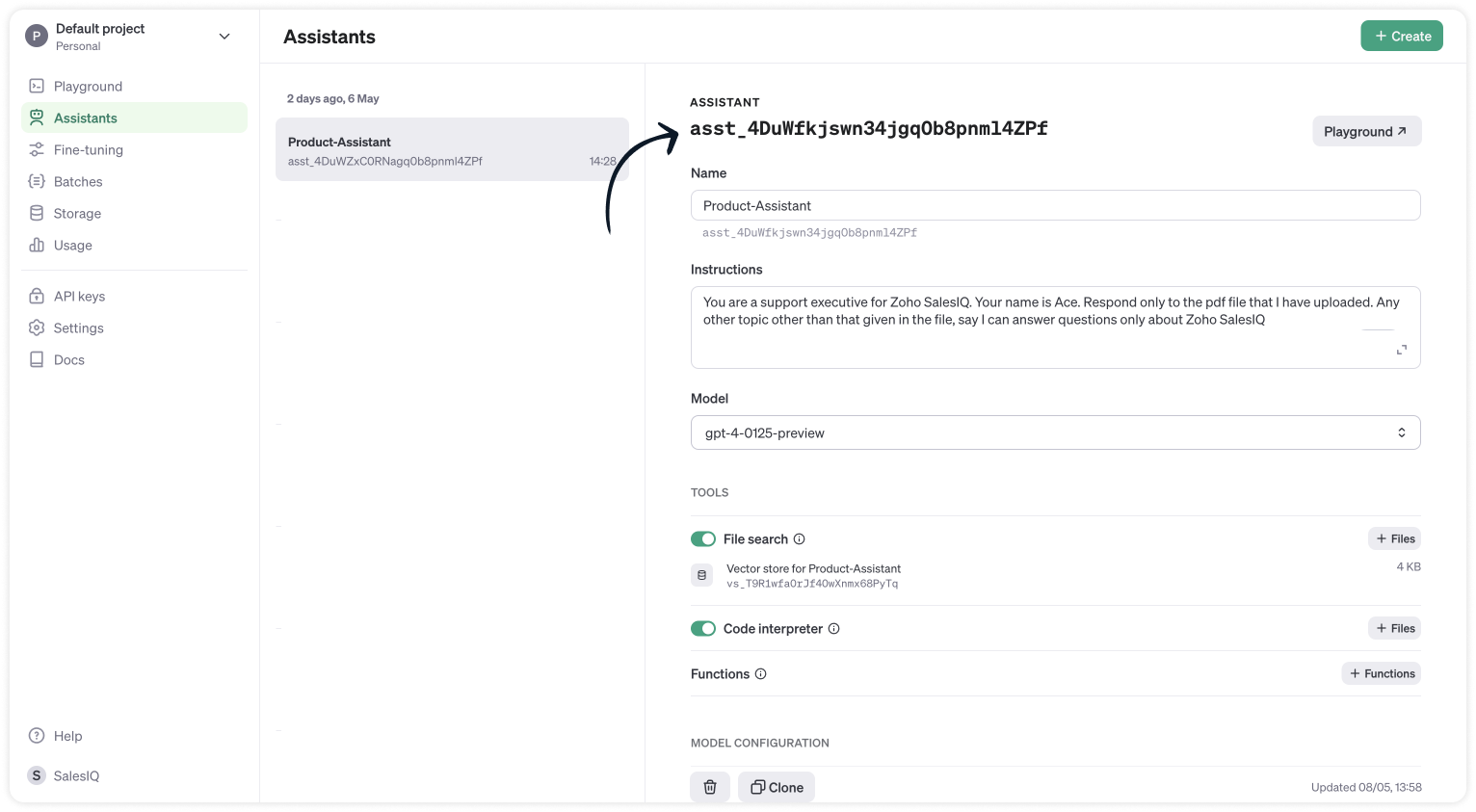
- //ChatGPT api key
- api_key = "paste-your-api_key";
- chatGPT_assistant_id = "asst_4DuWZxC0RNagq0b8pnml4ZPf";
- //Header parameters
- headers = Map();
- headers.put("Authorization","Bearer " + api_key);
- headers.put("Content-Type","application/json");
- headers.put("OpenAI-Beta","assistants=v2");
- //Get the thread ID from the plug input parameters
- thread_id = session.get("threadID").get("value");
- user_input = session.get("userInput").get("value");
- info thread_id;
- info user_input;
- // Messages API call
- requestBody = Map();
- requestBody.put("role","user");
- requestBody.put("content",user_input);
- jsonRequestBody = requestBody.toString();
- // The following webhook posts a message to the conversation thread
- response = invokeurl
- [
- url :"https://api.openai.com/v1/threads/" + thread_id + "/messages"
- type :POST
- parameters:jsonRequestBody
- headers:headers
- ];
- info response;
- // Runs API call
- requestBody = Map();
- requestBody.put("assistant_id",chatGPT_assistant_id);
- jsonRequestBody = requestBody.toString();
- // The following runs the thread which inturn generates a response once the thread is completed
- response = invokeurl
- [
- url :"https://api.openai.com/v1/threads/" + thread_id + "/runs"
- type :POST
- parameters:jsonRequestBody
- headers:headers
- ];
- response_json = response.toMap();
- run_id = response_json.get("id");
- run_status = "queued";
- retry_count = {1,2,3,4,5};
- for each retry in retry_count
- {
- if(run_status != "completed")
- {
- // The above executed run takes few seconds to complete. Hence a considerable time has to be left before the run is completed and the messages are fetched from the thread can be fetched. Here we wait for 3 seconds assuming the run gets complete within 3 seconds
- getUrl("https://httpstat.us/200?sleep=3000");
- response = invokeurl
- [
- url :"https://api.openai.com/v1/threads/" + thread_id + "/runs/" + run_id
- type :GET
- headers:headers
- ];
- response_json = response.toMap();
- run_status = response_json.get("status");
- }
- }
- // The following webhook fetches the messages from the thread
- getmsg_url = "https://api.openai.com/v1/threads/" + thread_id + "/messages";
- response = invokeurl
- [
- url :getmsg_url
- type :GET
- headers:headers
- ];
- info response;
- response_json = response.toMap();
- // Getting the last message from the thread messages list which is the assistant response for the user input.
- assistant_response = response_json.get("data").get("0").get("content").get("0").get("text").get("value");
- info assistant_response;
- response = Map();
- response.put("assistantReply",assistant_response);
- return response;
- Then, click Save, preview the plug and Publish it.
Step 3 - Adding plugs to the Codeless bot builder
- Navigate to Settings > Bot > Add, provide the necessary information, and select Codeless Bot as the bot platform. You can also open an existing bot.
- Next, click on Plugs under Action cards, select the first plug (ChatGPTAssistantsCreateThread), and provide a name to save the output (thread_id).

- Use the visitor fields card, click save in bot context, and provide a name to store the visit
- Then, select Plug 2 (ChatGPTAssistantsCreateRuns) and pass the value for the parameters
- thread_id (Input) - The output of the previous Plug
- user_input (Input) - The visitor's question/input from visitor fields card.
- assistant_reply (Output) - The final response from the ChatGPT assistance.

- Finally, use any response/input card to display the response to the visitor by typing the % to get the context variable (%assistant_reply%) in the message text box. Here, the button card is used along with the follow-up actions.
Note:
- The ChatGPT Assistant APIs are still in beta, so it's better to have a fallback flow in the bot until they are stable.
- Manage the plug failure instances within the plug failure leg by directing your users to operators using the "Forward to Operator" card or use the "Busy response" card to get the user's question, put them on the missed chats. Additionally, you can also "Send Email" card to notify yourself about the user's inquiry.

- The buttons, "I've another question", is used to get next question from the visitor. Use a Go To card and route it to visitor fields card to ask next question.
Related links:
- Plug guides
- Codeless bot guide
- Plugs for OTP verification.
- Plug to create a lead in Zoho CRM.
- Plug for getting the status of the ticket in Zoho Desk
- Plug to schedule appointments in Zoho Bookings
- Plug to read and write data in Google Sheet
- Plug to integrate bot with OpenAI
- Plug to track ecommerce orders from Zoho Commerce
- Zobot troubleshooting page
I hope this was helpful. Please feel free to comment if you have any questions. I'll be happy to help you.
Best regards
Sasidar Thandapani
Topic Participants
Sasidar Thandapani
Kevin Gunst Kevin Gunst
Ed Hafizov
Marc
Jean Lecompte
Sticky Posts
Right Moment, Right Message, Right Operator: Never Miss a High-Intent Lead
Ever been on a website or app, thinking “Should I buy this or not?” and suddenly a friendly message “Hi! How can I help you?” pops up at the perfect moment? That’s not luck. That’s timing done right. Engaging right visitors at the right moment, with theSpeak Your Customers' Language: SalesIQ's chatbots now support 30 languages 🤖
We're unveiling some major upgrades to our chatbot that are set to revolutionize your experience! Now SalesIQ support 30 languages for both Zobot and Answer bot. By speaking your customers' language, you can enhance engagement, improve customer satisfaction,Attention Deluge Developers: Important Update Regarding "Send Email Deluge Task"
Hi Deluge Users, We hope this message finds you well. We would like to inform you about a recent update on the Send emails deluge task. If you are using this deluge task (SalesIQ Scripts) for your Zobot, widgets, or form controllers to send emails, pleasePlug Samples #12: Verify Customer Mobile Numbers with OTP to Avoid Spam Entries
Hi Everyone! Verifying customer information is critical in business to filter out junk data and spammers. Whether it’s lead generation, appointment booking, or any other operation, ensuring quality data is essential for driving meaningful outcomes. ABig Things Just Dropped in the SalesIQ Universe: Top Upgrades You’ll Love in Nova’25
Nova'25 has landed, and it’s packed with meaningful upgrades to help you engage smarter, work faster, and scale with ease. Whether you're into proactive messaging, smarter automation, or better admin control, there's something here for everyone. Here's
Recent Topics
[Free webinar] Custom domains for portals in Zoho Creator - Creator Tech Connect
Hello everyone, We’re excited to invite you to another edition of the Creator Tech Connect webinar. About Creator Tech Connect The Creator Tech Connect series is a free monthly webinar featuring in-depth technical sessions designed for developers, administrators,Remove my video
Hi, How can I remove my video so that I don't have to see myself. It's weird so I always remove my own video from what I see but cannot find this feature here. Thanks!Marking a meeting 'done'.
I would like to somehow mark a meeting 'done' and placed under the contact's page rather than deleting it and having no record of it. Am I missing a button that does this?Feature Request: Enable Custom PDF Layout Editor for All Modules (Including Package Slips)
Hello Zoho Community and Product Team, I am writing to share a suggestion that would significantly enhance the customization capabilities within Zoho Books. We all appreciate the power of the Custom PDF Layouts (the "New" template engine) that allowsAllocating inventory to specific SO's
Is there a way that allocate inventory to a specific sales order? For example, let's say we have 90 items in stock. Customer 1 orders 100 items. This allocates all 90 items to their order, and they have a back order for the remaining 10 items which couldPartial payments for retainer invoices
When a customer does not pay the entire retainer invoice there is no way to apply a partial payment. PLEASE add this function.Can I export to PDF in Zoho Learn
I have seen help pages where export to pdf options are available but I do not see that option available from the application. I see that exprt is available in my free trial version but that is only to html pages. I need to be able to export my manualsService line items
Hello Latha, Could you please let me know the maximum number of service line items that can be added to a single work order? Thanks, Chethiya.Sending emails via Books
Anyone else getting similar problems recently ??..... Hi, Your message to the following recipient was not delivered. Please find the details below. Bounce Details: Bounced Address : someone@google.com Bounce Reason : other ; Status : 5.0.0 (undefined status) ; Daignostic-Code : smtp;542 someone@google.com Rejected ; Bounced Time : Sep 05, 2017 06:37 PM BST Regards, Zoho Team The email addresses were fine only a few days ago but are now being rejected ?PDF Generator Upgrade
Hi Team, What will happen if I don't make any changes for existing template. Zoho just ask us upgrade but haven't tell the benefit. Zoho CorporationNo Need To Fix Something That Is Working
Zoho Books is a great financial tool which helps businesses to become more efficient and productive with day-to-day operations. As such, every change, upgrade, improvement needs to be carefully thought before implemented in the software and I'm sure ZohoTotal Cost in reports showing zero
The image below shows my issue. The column Total Cost should show the cost to our company based on hours logged and the employee's rate. For instance, if the person working on Subtask 1 is paid 20/hr, then Total Cost should display $160 ($20x8 loggedZoho Books (and other finance suite apps) - Retrospective Linking of Invoice and Sales Orders to Quotes.
In some cases, Quotes and Invoies may be created sperately instead of using the convert feature. In this feature request I am asking for the Finance Suite team to consider adding a lookup field to reference the quote on Invoices and Sales Orders, or someBring real app analytics into Zoho Creator apps with Zoho Apptics
We’re kicking off the year with a release we’ve been looking forward to for a long time. After being in the works for a while, Zoho Creator and Zoho Apptics are now officially integrated, bringing in-depth product analytics directly into the Zoho CreatorEarly Access: Check Printing in Zoho Books
Hello Everyone, Are you constantly writing checks to pay your vendors? We've got a great news to share with you! You can now pay your vendors by writing and printing a check directly from Zoho Books. The feature is ready and we'll be rolling it out to our customers in phases. It is available in the US Edition of Zoho Books and also in the Global edition, where the country is selected as USA and the currency is USD. Here’s a summary of what’s possible: 1. Write and print a check. 2. MakeZohoMail's outbound webhook sends incorrect folderId and messageId
I used a webhook (outbound) from within ZohoMail to send message details when a new message arrives that meets specific criteria. I received this data correctly. Now I want to get the attachment from this email message. When I made an api call using folderUse URL field to populate Image in a Email Template
We have two records Record 1: Appointments (with a Lookup to Doctors module) Related Record 2: Doctors (with a URL field that is an image of the doctor) We would like to populate a CRM email template with the image of the URL field for the related doctorLooking for Guidance on Building a Zoho Website
I'm exploring the possibility of building a custom website with specific features using Zoho as an alternative platform. My goal is to create something similar to https://gtasandresapk.com , with the same kind of functionality and user experience. I'dAbility to add VAT to Retainer Invoices
Hello, I've had a telephone conversation a month ago with Dinesh on this topic and my request to allow for the addition of VAT on Retainer Invoices. It's currently not possible to add VAT to Retainer Invoices and it was mutually agreed that there is absolutely no reason why there shouldn't be, especially as TAX LAW makes VAT mandatory on each invoice in Europe! So basically, what i'm saying is that if you don't allow us to add VAT to Retainer Invoices, than the whole Retainer Invoices becomesZoho Bookings Forge: A hands-on workshop series
Hello all! We’re hosting a five-part, hands-on workshop series to help you optimize Zoho Bookings for your business. In these sessions, we’ll cover key features, practical use cases, and clear steps to get started or improve your current setup. Here areIntroducing parent-child ticketing in Zoho Desk [Early access]
Hello Zoho Desk users! We have introduced the parent-child ticketing system to help customer service teams ensure efficient resolution of issues involving multiple, related tickets. You can now combine repetitive and interconnected tickets into parent-childIntroducing Workqueue: your all-in-one view to manage daily work
Hello all, We’re excited to introduce a major productivity boost to your CRM experience: Workqueue, a dynamic, all-in-one workspace that brings every important sales activity, approval, and follow-up right to your fingertips. What is Workqueue? SalesDelete button
Hi, The delete button were hide into the three dot button. Can I display outside? why Zoho make this update?Zoho Vault CLI for Developers and Automations
Hi everyone, If you're managing credentials in scripts, CI/CD pipelines, or automation workflows, Zoho Vault's Command Line Interface (CLI) can help you securely access and manage secrets directly from your terminal. Zoho Vault was launched in 2013 asZoho Subscriptions -- Zoho Commerce integration
Is there integration between Zoho Subscriptions and Zoho Commerce? I would like to create subscription plans in Zoho Subscritpions and list them for on my Zoho Commerce store.Synching changes to Stripe when changes are made in Zoho Billing
We have a situation where we have merged customers in Zoho BIlling and then found out later that the payment in Stripe was not updated and still associated with the old customer record. The card gets updated and billed, but that payment is still associatedHow can I link Products in a Deal Subform to the Products Module
Hello, I have a pricing subform on our Deals page and use a lookup field to associate a product with each line. I want to be able to look at a product page within the Products module and see a list of the deals connected to that product. I have this workingHelp Center and SEO: Any Benefit to My Domain-Mapped Website Ranking?
First of, I love the Help Center which I've just decided to integrate into my website to replace its old-fashioned FAQs. So much more to achieve there now! Lots of new benefits to the site visitors and to me in terms of organizing and delivering all theBusiness Hours with lunch break
Our business hours are: mon - fri 08:30 - 13:00, 15:00 - 18:30. How can I handle the lunch break? If I use 8:30 - 18:30 it obviously breaks SLA. ThanksAutomatically Update Ticket Status in Zoho Desk Based on Actions in Zoho Projects
Hi Zoho Desk Team, Hope you’re doing well. We’re using the Zoho Desk–Zoho Projects integration to manage tasks related to customer tickets, and it works well for linking and tracking progress. However, there are a few important automation capabilitiesEnable Free External Collaboration on Notecards in Zoho Notebook
Hi Zoho Notebook Team, I would like to suggest a feature enhancement regarding external collaboration in Zoho Notebook. Currently, we can share notes with external users, and they are able to view the content without any issue. However, when these externalZoho Commerce
Hi, I have zoho one and use Zoho Books. I am very interested in Zoho Commerce , especially with how all is integrated but have a question. I do not want my store to show prices for customers that are not log in. Is there a way to hide the prices if notMulti-currency in Zoho CRM Forecast and Reports
As a company we have branches in 4 different countries with as many different currencies. Our Sales Teams would like to work with their local currency as much as possible. The Forecast module using only 1 currency is practically usable only by the salesZoho Sprints iOS app update: Global view, screen capture control, file encryption, tags enhancement
Hello everyone! We are excited to introduce new features in the latest version(v2.1) of the Zoho Sprints iOS app update. Let’s take a quick look at what’s new. 1. Global view Global view brings all your project items into one centralised space. You canZoho Projects Android and iOS app update: Conditional layout rules for Tasks
Hello everyone! Task conditional layout rules configured on the web app(projects.zoho.com) are now applied on the Zoho Projects Android and iOS app. Conditional layout rules can be set for the Add/ edit task form and it allows you to change the propertyHow to account for vat with postponed VAT accounting
Hi everyone, looking for some help with postponed VAT accounting, I use DHL express for my imports and they used to pay the VAT for me and then invoice me. I could then log this as a bill and the VAT element from import was recorded as input VAT, allIs there a way to show contact emails in the Account?
I know I can see the emails I have sent and received on a Contact detail view, but I want to be able to see all the emails that have been sent and received between all an Accounts Contacts on the Account Detail view. That way when I see the Account detailGood news! Calendar in Zoho CRM gets a face lift
Dear Customers, We are delighted to unveil the revamped calendar UI in Zoho CRM. With a complete visual overhaul aligned with CRM for Everyone, the calendar now offers a more intuitive and flexible scheduling experience. What’s new? Distinguish activitiesZoho mail admin panel not opening
Zoho CRM WooCommerce Integrtation
Looking for a solution for my 50 client to show detailed analytics on source of traffic that led to events, leads, conversions. Hi all, I have not been able to find a workable guide or solution to how exactly step by step integrate the Zoho CRM with WooCommerceNext Page