Bounces - Online Help | Zoho Campaigns

Bounces


Bounces occur when sent emails cannot be delivered. Typically, the email server will send you an error message, detailing the reason for the bounce. To learn more about this mechanism, let's walk through the process of sending an email and where bounces fit into the picture.
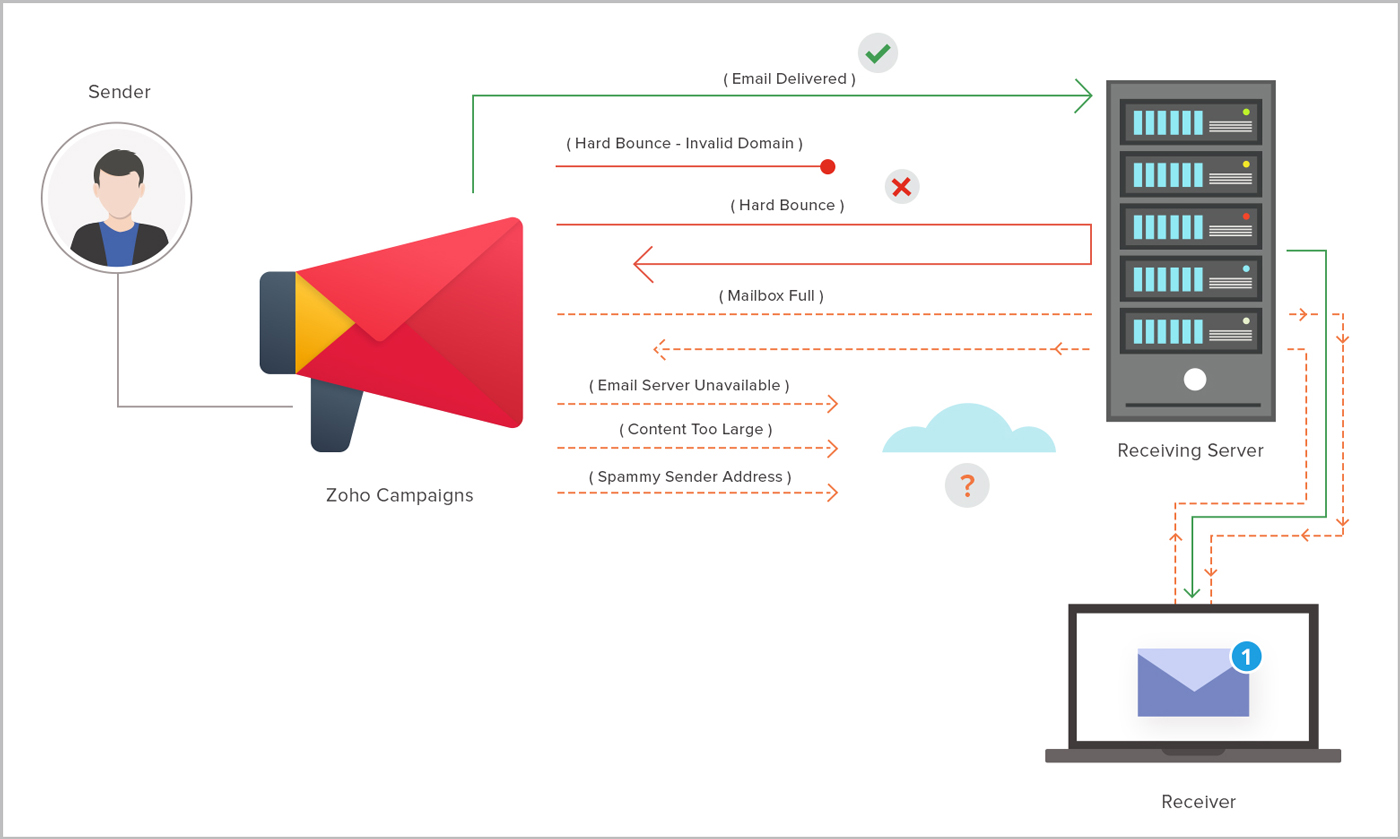
email-bounces

How are bounces generated?

Once an email is ready and the 'Send' button has been clicked, the system immediately looks up the recipient's domain and mail server. Once our system makes contact, the mail server looks at the message to determine if it will deliver the message. If the message passes through the mail server, then it is considered a success. If that server finds that the email address is invalid or does not exist, then the corresponding bounces will be returned back to our sender's server. This is called a 'hard bounce'.

If the recipient's email address exists but does not have enough storage space to accept the message, then it will bounce back to the sender as a 'soft bounce'. There is a possibility that these bounces may have occurred while the recipient system is busy or unable to handle requests. These emails will be retried within the next five days.

Our system will identify the mail delivery status based on the recipient system's response/status code/message, then generate a report for it.

Significance of bounce rates

Bounce rates are important to determine how many of your emails reach the contacts' inbox and how many don't. They also impact your domain reputation, so it's essential to keep an eye on your bounce numbers. Internet Service Providers (ISPs) and Email Service Providers (ESPs) set a certain threshold for bounce rates; exceeding that threshold may lead to a warning or account suspension.

At Zoho Campaigns, while sending a campaign, if the bounce rate exceeds 5%, we'll temporarily pause sending the campaign. We'll notify you about the campaign and resume sending the campaign after 24 hours. After we resume sending the campaign, if the emails bounce and if the bounce rate exceeds 5%, we will permanently cancel the campaign.

Bounce types

Bounces come in two categories: soft and hard bounces.

Soft bounces

A soft bounce is just a temporary delivery failure. It does not necessarily mean the email address is invalid or no longer active, so we will continue trying to send emails to these addresses.

These are a few commonly occurring soft bounces:
  1. Recipient's mailbox is full.
  2. Email server is temporarily unavailable.
  3. Email content is too large.
  4. Spammy content or blacklisted sender address.
In many cases, soft bounces are resolved on their own. Marketers should give utmost priority for these temporary failures in order to avoid a major breakdown in the future. A good marketer must have a plan to handle soft bounces.

If the emails sent to a particular address soft bounces around seven times, it will be considered a hard bounce, and that address will be added to the 'Bounced' list in order to preserve server and IP integrity.

Long story short, soft bounces = temporary deliverability failures.

Hard bounces

A hard bounce means there is a permanent reason for the delivery failure. Generally, the recipients' addresses are immediately added to the 'Bounced' list. Frequent hard bounces bring down the reputation of sending sources drastically.

Here are a few commonly occurring hard bounces:
  1. Recipient email address does not exist.
  2. Domain name does not exist.
  3. Typos render the email address invalid. (for example, gnail.com instead of gmail.com)
  4. Recipient email server has blocked delivery.
  5. The email address is inactive.
  6. Email account has been closed.
Hard bounces are quite serious. A raise in hard bounce rate badly affects your sender domain reputation with ESPs and ISPs, and may also lead to blacklisting of your email address.

You can find the hard bounced contacts under the Bounced Contacts view in Contacts section, as shown in the GIF below.


You can also go to Reports -> Sent Campaigns -> click a sent campaign and click the Bounces and Auto-replies tab to view a list of bounced contacts along with the bounce reason, as shown in the GIF below.


Long story short, hard bounces = permanent deliverability failures.

How to avoid bounces

You can practice the following techniques to avoid email bounce:
  1. Don't use purchased mailing lists.
  2. Use the double opt-in technique to prevent the entry of invalid email addresses into your mailing list.
  3. Regularly clean your mailing list using email validation services.
  4. Don't use blacklisted URLs or spam trigger words in your email content.
  5. Ensure that your sender domain doesn't receive abuse complaints.
  6. Maintain optimal email volume and a healthy email frequency.
  7. Authenticate your sender domain.


        Create. Review. Publish.

        Write, edit, collaborate on, and publish documents to different content management platforms.

        Get Started Now


          Access your files securely from anywhere

            Zoho CRM Training Programs

            Learn how to use the best tools for sales force automation and better customer engagement from Zoho's implementation specialists.

            Zoho CRM Training
              Redefine the way you work
              with Zoho Workplace

                Zoho DataPrep Personalized Demo

                If you'd like a personalized walk-through of our data preparation tool, please request a demo and we'll be happy to show you how to get the best out of Zoho DataPrep.

                Zoho CRM Training

                  Create, share, and deliver

                  beautiful slides from anywhere.

                  Get Started Now


                    Zoho Sign now offers specialized one-on-one training for both administrators and developers.

                    BOOK A SESSION


                                Quick LinksWorkflow AutomationData Collection
                                Web FormsEnterpriseOnline Data Collection Tool
                                Embeddable FormsBankingBegin Data Collection
                                Interactive FormsWorkplaceData Collection App
                                CRM FormsCustomer ServiceAccessible Forms
                                Digital FormsMarketingForms for Small Business
                                HTML FormsEducationForms for Enterprise
                                Contact FormsE-commerceForms for any business
                                Lead Generation FormsHealthcareForms for Startups
                                Wordpress FormsCustomer onboardingForms for Small Business
                                No Code FormsConstructionRSVP tool for holidays
                                Free FormsTravelFeatures for Order Forms
                                Prefill FormsNon-Profit

                                Intake FormsLegal
                                Mobile App
                                Form DesignerHR
                                Mobile Forms
                                Card FormsFoodOffline Forms
                                Assign FormsPhotographyMobile Forms Features
                                Translate FormsReal EstateKiosk in Mobile Forms
                                Electronic Forms
                                Drag & drop form builder

                                Notification Emails for FormsAlternativesSecurity & Compliance
                                Holiday FormsGoogle Forms alternative GDPR
                                Form to PDFJotform alternativeHIPAA Forms
                                Email FormsFormstack alternativeEncrypted Forms

                                Wufoo alternativeSecure Forms

                                TypeformWCAG

                                    All-in-one knowledge management and training platform for your employees and customers.

                                              Create. Review. Publish.

                                              Write, edit, collaborate on, and publish documents to different content management platforms.

                                              Get Started Now


                                                                You are currently viewing the help pages of Qntrl’s earlier version. Click here to view our latest version—Qntrl 3.0's help articles.


                                                                    Manage your brands on social media


                                                                      • Desk Community Learning Series


                                                                      • Digest


                                                                      • Functions


                                                                      • Meetups


                                                                      • Kbase


                                                                      • Resources


                                                                      • Glossary


                                                                      • Desk Marketplace


                                                                      • MVP Corner


                                                                      • Word of the Day


                                                                      • Ask the Experts


                                                                        Zoho Sheet Resources


                                                                            Zoho Forms Resources


                                                                              Secure your business
                                                                              communication with Zoho Mail


                                                                              Mail on the move with
                                                                              Zoho Mail mobile application

                                                                                Stay on top of your schedule
                                                                                at all times


                                                                                Carry your calendar with you
                                                                                Anytime, anywhere


                                                                                      Zoho Sign Resources

                                                                                        Sign, Paperless!

                                                                                        Sign and send business documents on the go!

                                                                                        Get Started Now


                                                                                                Zoho TeamInbox Resources


                                                                                                          Zoho DataPrep Demo

                                                                                                          Get a personalized demo or POC

                                                                                                          REGISTER NOW


                                                                                                            Design. Discuss. Deliver.

                                                                                                            Create visually engaging stories with Zoho Show.

                                                                                                            Get Started Now


                                                                                                                                • Related Articles

                                                                                                                                • How to Avoid Bounces

                                                                                                                                  Emails that are not delivered and are returned to sender are called bounces. Take a closer look at email bounces to learn why emails bounce. Check the reason for bounces In your campaign report, under Real-Time Campaign Data, you will find the ...
                                                                                                                                • What is the difference between hard and soft bounces?

                                                                                                                                  A soft bounce is just a temporary delivery failure. It doesn’t necessarily mean the email address is invalid or no longer active, so you can try to send emails to these addresses again. These are a few common reasons for a soft bounce: The ...
                                                                                                                                • What is the sender domain and bounce domain?

                                                                                                                                  As the name suggests, sender domain is the domain name used in the email address in the From field of any mail you receive. It helps the recipients identify where the mail came from. For example, in the email address “julius@zylker.com”, the sender ...
                                                                                                                                • Set up sync with Salesforce - New Version

                                                                                                                                  Using Zoho Campaigns' integration with Salesforce, create well designed branded email campaigns and send targeted emails to your contacts in Salesforce. Improve your engagement with your contacts using emails and measure how these email campaigns ...
                                                                                                                                • Set up sync with SugarCRM - New Version

                                                                                                                                  Integrating SugarCRM with Zoho Campaigns helps you to import leads and contacts from your Vertical CRM into Zoho Campaigns. You can set up a sync to schedule periodic syncing of all your contacts and leads between SugarCRM and Zoho Campaigns on a ...
                                                                                                                                  Wherever you are is as good as
                                                                                                                                  your workplace

                                                                                                                                    Resources

                                                                                                                                    Videos

                                                                                                                                    Watch comprehensive videos on features and other important topics that will help you master Zoho CRM.


                                                                                                                                    eBooks

                                                                                                                                    Download free eBooks and access a range of topics to get deeper insight on successfully using Zoho CRM.


                                                                                                                                    Webinars

                                                                                                                                    Sign up for our webinars and learn the Zoho CRM basics, from customization to sales force automation and more.


                                                                                                                                    CRM Tips

                                                                                                                                    Make the most of Zoho CRM with these useful tips.


                                                                                                                                      Zoho Show Resources