RingCentral Integration With Zoho Desk
Unlike the regular on-premise systems, RingCentral is a Cloud phone system. It helps you to know the help desk related information about your caller and also make calls to your contacts inside help desk. Once you integrate RingCentral with Zoho Desk, you can:
- See the details of the Zoho Desk contact when you receive an incoming call via RingCentral.
- Add a new contact for calls received from Unknown Callers.
- Calls made or received via RingCentral are automatically logged when you associate them with tickets.
- All unanswered or missed calls are automatically created as tickets.
- For this integration to work, you must have a RingCentral account.
- You must also have the RingCentral softphone installed on your device.
- Only an administrator of a Zoho Desk account can enable the RingCentral Integration.
- The integration must be enabled from the Telephony Marketplace.
- Once enabled, the integration is activated for all agents. Agents are required to log in to RingCentral with their unique credentials.
The RingCentral Integration setup includes two steps:
- Enable RingCentral integration
- Log in to your RingCentral account in Zoho Desk
Enabling RingCentral Integration
To begin with, you must enable the RingCentral integration in Zoho Desk.
To begin with, you must enable the RingCentral integration in Zoho Desk.
To enable RingCentral integration:
- Click the Setup icon (
)> Channels> Phone.
- Click Enable PhoneBridge.
- In the Telephony Marketplace page, click RingCentral.
- Click Enable on the RingCentral page.
The integration will be enabled.
Note:
- After clicking Enable, please wait while the page refreshes automatically.
Once you have enabled the RingCentral integration, you will be prompted to log in to your RingCentral account from Zoho Desk.
To log in to your RingCentral account:
- Click Login to RingCentral if you wish to log in to your account right away.
- You will be navigated to RingCentral Sign In page where you need to enter the login details and click Sign In.
- Once you login, specify how you want to make calls from the Preferences window.
Note:
- To log out of RingCentral, please follow the steps here.
- If you would use the RC toll-free number of your organization, please enter the extension number.
- If you log in later, you can use the Phone icon at the bottom right of the page to access the RingCentral Login screen.
Missed Call Preferences
By default, if a few agents of the call queue group do not accept an incoming call, a missed call will be logged for each agent in the Activities module. You can enable the "Do not log missed call if another Zoho User answers it" option if you don't want to log multiple entries of a missed call from a single number. You can also select which type of call should create a ticket and in which department.
To set these missed call preferences:
- Go to Settings > Channels > Phone.
- In the RingCentral Home Page, go to the Preference tab.
- Turn on the toggle under General Preferences.
- Under Zoho Desk Preferences, click Edit and do the following:
- Set your preference to be able to create tickets from missed calls.
- You can create tickets for all missed calls, inbound missed calls, or outbound missed calls.
- Select the department in which you want to create call activities for missed calls.
- This is in addition to the tickets created from missed calls in the above setting.
- Click Save.
Calling Preferences
You can configure the preferred way in which you would like to make calls. The preferences can be modified by clicking the Phone icon (  ) at the bottom right corner of your window.
You can make calls through:
- RingOut
- Browser
- Softphone
Making calls through RingOut
RingOut allows you to call your customers (any number) from your RingCentral account. The devices configured with RingCentral will be available, which you can use to make an outgoing call or receive an incoming call. The status of the softphone will either be Online or Offline. Please note that you cannot make or receive calls in Zoho Desk when the softphone is offline.
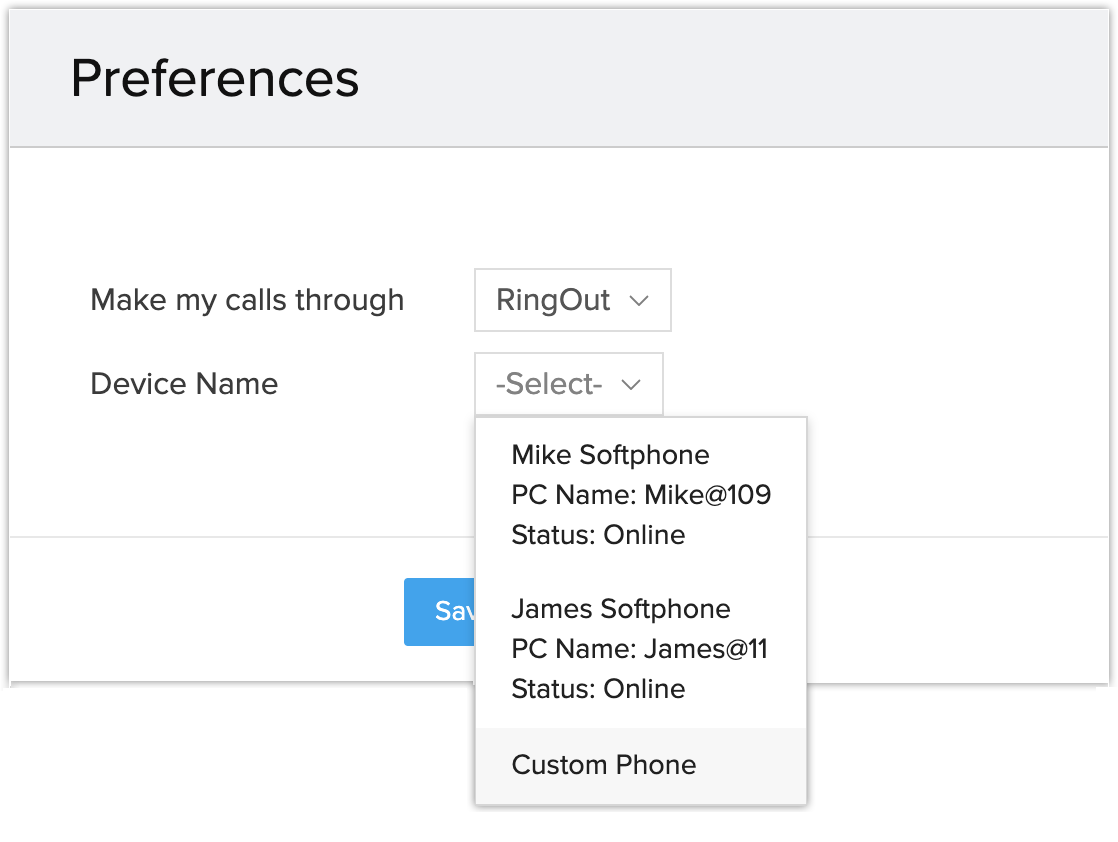
- Custom Phone
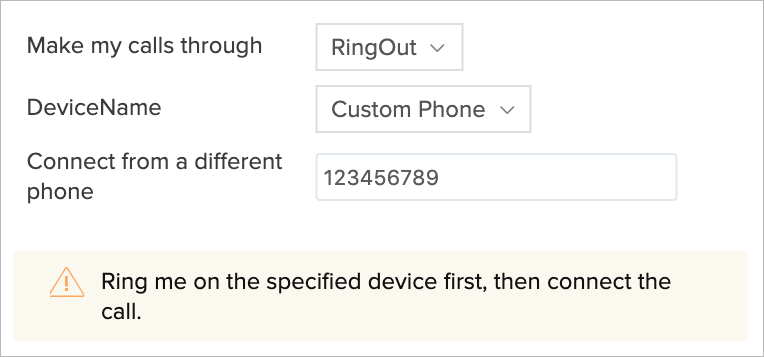
Apart from the softphone, you can also make calls by specifying the phone number. When you place a call to your customer, RingCentral will call your device first. A voice prompt will ask you to press 1. Once that is done, RingCentral will call your customer (or the number you wish to call).
Making calls through Browser
Browser calling for RingCentral allows you to make calls directly from Zoho Desk without having to toggle between your help desk account and RingCentral. WebRTC plugins are installed to give hassle-free browser calling, and a real-time communication will be established with the end-user.
You need to choose the Browser option from the call preferences pop-up to make calls through your browser. You can also save your preferences along with the Outbound Caller ID of the recipient so that you can easily identify your callers to your RingCentral numbers while making outbound calls.
You need to choose the Browser option from the call preferences pop-up to make calls through your browser. You can also save your preferences along with the Outbound Caller ID of the recipient so that you can easily identify your callers to your RingCentral numbers while making outbound calls.
You can now make calls directly from your browser without having to use a softphone. This also allows you to attend the incoming calls within your Zoho Desk directly.
Making calls through Softphone
You can choose to make calls to your customers using the RingCentral Softphone. For this, you must install the Softphone on your device.
Notes:
- Mute, Unmute, Hold, and Unhold functionalities will be included in the pop up for all the calling options.
- Dialpad functionality will be included in the pop-up if you choose the Browser option.
- Please refer to network requirements before selecting the Browser option.
- Browser calling will be supported only in Chrome 29 and above and Firefox 47 and above versions.
Disable RingCentral Integration
The RingCentral Integration can be disabled at any time. Only the administrator of a Zoho Desk account can disable the integration.
To disable RingCentral integration:
- Click the Setup icon (
- On the RingCentral page, click Disable.
Notes:
- On disabling the RingCentral integration, you will no longer be able to make calls in Zoho Desk via RingCentral.
- Once disabled by the administrator, the integration is disabled for all agents in the help desk account.
- Call details entered before the integration is disabled will remain intact.
Frequently Asked Questions
-
Unable to login to RingCentral. It shows an “Invalid username or password” error.
- You have not entered the country code with the number.
For example, a US RingCentral number should be entered as +1 followed by the number. (+1xxxxxxxxxx) - The credentials are wrong.
In this case, please double check the RC credentials and try again.
- You have not entered the country code with the number.
- Cannot make outbound calls via RingCentral in Zoho Desk.
- You may have logged into RingCentral softphone on multiple devices.
In this case, log out of your softphone(s), de-authorize the PC name for the primary and secondary PC names, and log back into the softphone on the primary digital line device. This is a limitation on RingCentral’s front when it comes to third party integrations. - You may not have logged into the softphone on the device associated with the primary digital line.
In this case, please log into the softphone on the device associated with the primary digital line and try click-to-call. - Not receiving caller details for incoming calls in Zoho Desk.
- You may have used the main company number without the extension to log into RingCentral inside Zoho Desk.
- Change my Outbound Caller ID for calls made via RingCentral in Zoho Desk.
- You must set the Outbound called ID in RingCentral’s Web Application. To do this:
- Click Phone System > Users > (Select User) > Outbound Caller ID > By Feature
- Select the required number under Ringout from Web.
The chosen number will be displayed as the Caller ID for all calls made from Zoho Desk via RingCentral.