LINE 公式アカウントへのメッセージをSalesIQ から確認・返信できるようになりました
本投稿は、本社のZoho SalesIQ コミュニティに投稿された以下の記事を翻訳したものです。
Now connect and engage with your LINE chat users right from SalesIQ!
SalesIQ のIMチャンネルファミリーに、新しい仲間が加わりました。LINE とSalesIQ の連携を紹介します。このチャンネルを利用すれば、SalesIQ の管理画面から、LINE ユーザーと便利につながり、交流することができます。
LINE は世界で最も人気のあるインスタントメッセージングプラットフォームの1つであるため、この連携によって新たな可能性が広がり、さまざまな地域の顧客が好みのメッセージングアプリで即座に貴社のビジネスにアクセスできるようになります。
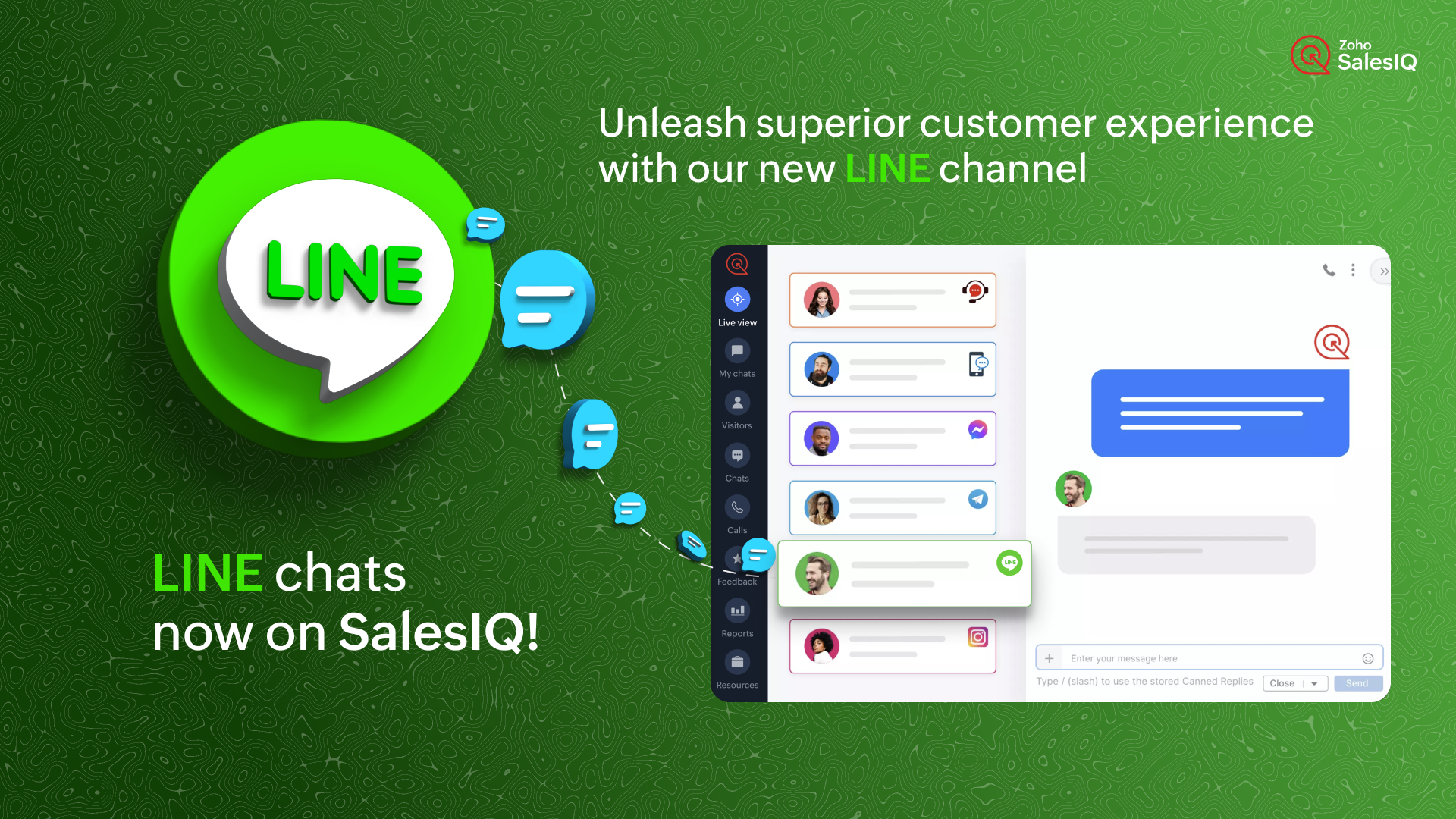
どのように機能するのでしょう?
SalesIQ のチャンネルにLINE を設定すると、LINE 公式アカウントで受信したすべてのチャットを、SalesIQ の管理画面に直接取り込むことができます。これにより、SalesIQ から簡単にメッセージを送受信することができます。
ビジネスでの利用例
ソーシャルメディアにビジネスプロフィールをアップしている場合、LINE や他のソーシャルメディアアプリからのチャットを担当する特定の担当者がいる可能性があります。
インスタントメッセージングアプリからすべてのチャットに対応し、合理的なカスタマーサポートを提供することは、控えめに言っても面倒なことです。それはなぜでしょうか?
- 顧客に最高のサービスを提供するために設計された追加サポート機能はありません。
- また、このような場合、かなりの確率でチャットが見逃されるおそれがあります。
インスタントメッセージングプラットフォームは個人的な使用には適していますが、ビジネス目的、特にカスタマーサポートに活用するには限界があります。顧客のニーズに真に応え、卓越したエンゲージメントとサポートを提供するには、これらのタスクのために特別に設計された堅牢なプラットフォームが不可欠です。
SalesIQ のような強力なツールにLINE のチャットを組み込むことで、既存のオペレーターが使い慣れた、卓越したカスタマーアシスタンスを提供するために必要なすべてのツールを装備することができます。このシームレスな組み合わせは、通常のサポートにとどまらず、カスタマーサービスをまったく新しいレベルに引き上げます。
SalesIQ のLINE チャネルを活用したカスタマージャーニー
ジャックはあなたのビジネスにコンタクトしようとしており、あなたのビジネスのLINE 公式アカウントにメッセージを送信しています。SalesIQ のオペレーターであるあなたには、SalesIQ のダッシュボード上ですぐにチャットの招待が届きます。
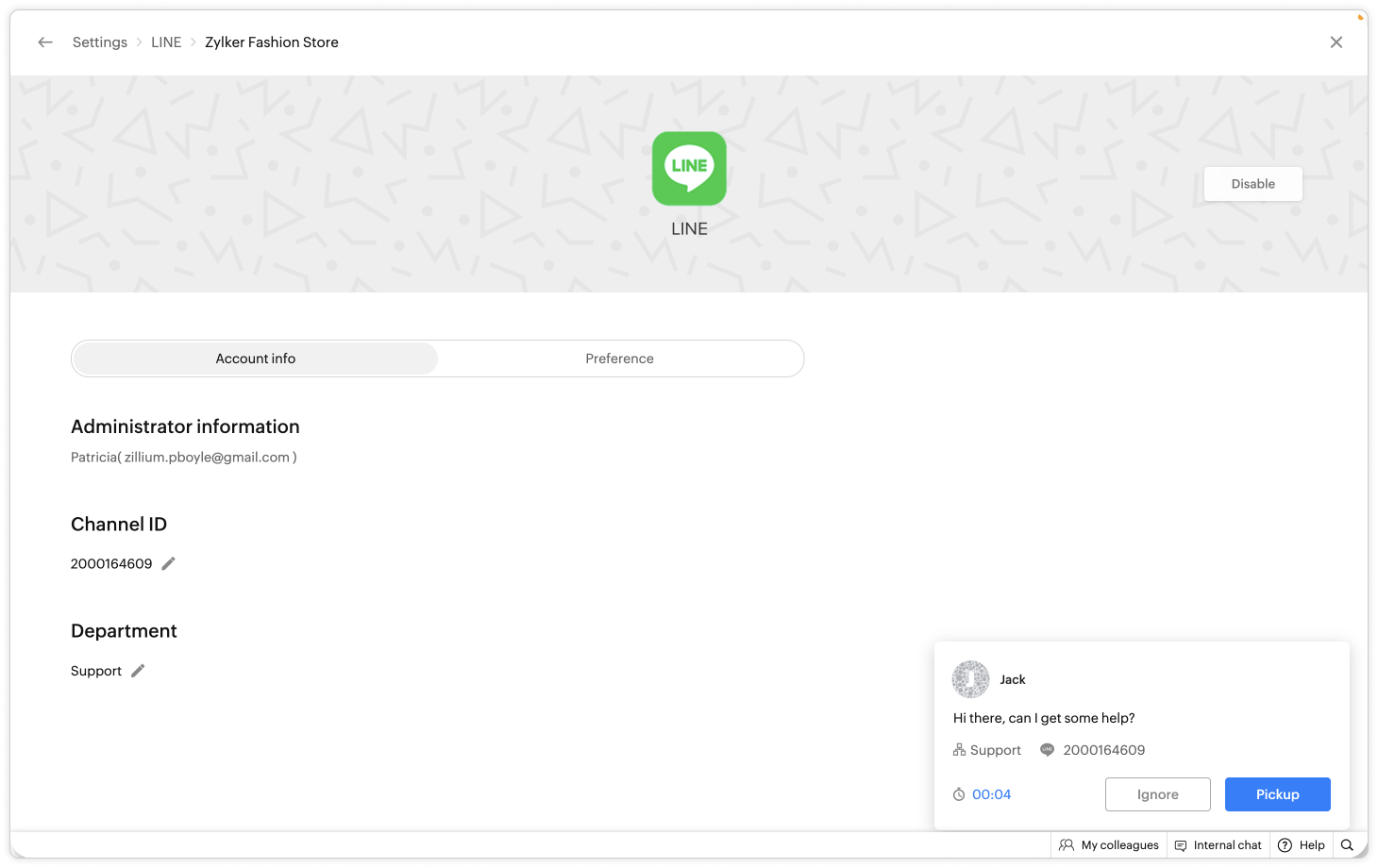
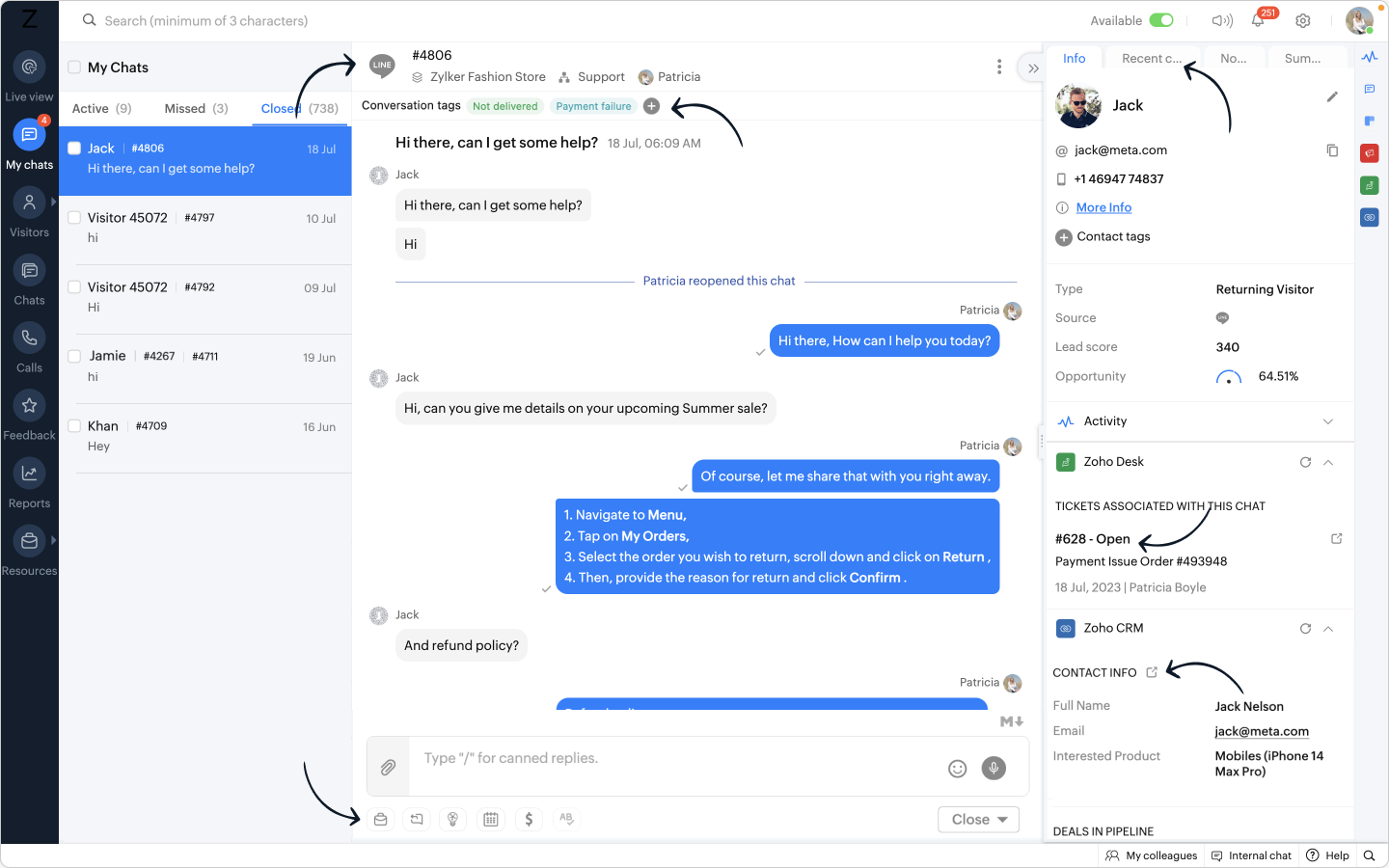
- あなたはジャックにお気に入りの定型文を使ってあいさつし、会話した後、ジャックが返金に関して問題を抱えていることを知りました。
- あなたはすぐに、自社の返金ポリシーに関するFAQ をジャックに伝えました。
- さらに、別のウィンドウに移動することなく、SalesIQ オペレータチャットウィンドウから Zoho Desk ウィジェットを利用し、ヘルプデスクソフトウェア上に即座にチケットを作成することができます。
- また、関連するタグを会話に追加することで、将来簡単にフィルタリングできるように効果的に分類できます。
おまけ:
- LINE からあなたのビジネスに新しい訪問者が近づいた場合、彼らの名前は自動的にオペレータのチャットウィンドウに入力され、簡単にあなたの会話をパーソナライズすることができます。
- 相手の連絡先情報を取得し、Zoho CRM ウィジェットを使用して CRM 上ですぐにリードを作成し、SalesIQ のオペレータチャットウィンドウから CRM に相手の詳細をプッシュすることができます。
このような顧客が、LINE から数日後に再びコンタクトしてきた場合、
- CRM に格納された顧客の詳細情報は、Zoho CRM ウィジェットで利用できるようになります。
- デスクチケットはZoho Desk ウィジェットで利用できるようになります。
- 過去の会話は「最近のチャット」に保存されます。
ここに可能性を感じませんか?
- LINE アカウントとSalesIQ を連携させることで、SalesIQ のダッシュボードにLINE のトークが表示されます。
- SalesIQ のダッシュボードには重要な訪問者/顧客情報がすべて保存され、後で参照することができます。
- SalesIQ のオペレータチャットウィンドウの強力な機能を利用し、生産性と効率を最大化することができます。

追加されたメリット:
リーチの拡大:LINE との連携により、膨大なユーザーベースを活用し、LINE を好みのメッセージングプラットフォームとして使用する顧客とつながることができます。この連携により、より多くのユーザーにリーチし、リアルタイムでエンゲージすることができます。
SalesIQ の機能の使用:ウィジェット、返信定型文、FAQ、OpenAI 連携などの機能をオペレーターが活用することで、健全なサポートとエンゲージメントを実現し、より有意義で文脈に即した会話が可能になります。
効率的なサポート:特定のオペレーターや専門部署をLINE チャネルのチャット管理のみに割り当てる柔軟性があり、お客さま独自のニーズに応じて効率性を最適化できます。
簡単なセットアップ:LINE との連携設定はとても簡単で、いくつかのステップを踏むだけでSalesIQ 内でLINE 公式アカウントへのメッセージを受信できるようになります。
注:Zobotは他のIMプラットフォームと同様、LINE チャンネルに近日登場する予定です。お客さまのカスタマーエクスペリエンスを向上させるシームレスな連携にご期待ください。待ち時間はそう長くありませんし、その価値は十分にあります!
LINE チャンネル設定手順
SalesIQ のLINE チャンネルでは、簡単なステップでLINE 公式アカウントとSalesIQ を連携させ、シームレスにコンタクトとつながることができます。LINE 公式アカウントの管理画面からチャンネルID とチャンネルシークレットを取得し、SalesIQ のLINE チャンネルページに貼り付けるだけです。
連携の手順については、以下のビデオをご覧ください。
SalesIQ は、Whatsapp、Facebookメッセンジャー、Instagram、Telegram など他のIMプラットフォームとの連携も行っており、幅広く利用されています。
Zoho Campaigns Resources





Topic Participants
Junya Nakano
VEMULA MANEESH
Zoho CRM Plus Resources
Zoho Books Resources
Zoho Subscriptions Resources
Zoho Projects Resources
Zoho Sprints Resources
Zoho Orchestly Resources
Zoho Creator Resources
Zoho WorkDrive Resources


Zoho CRM Resources
Get Started. Write Away!
Writer is a powerful online word processor, designed for collaborative work.
-
オンラインヘルプ
-
Webセミナー
-
機能活用動画
-
よくある質問
-
Ebook
-
-
Zoho Campaigns
- Zoho サービスのWebセミナー
その他のサービス コンテンツ
ご検討中の方
Recent Topics
in the Zoho creator i have address field based the customer lookup im selecting the addresss , some times the customer address getting as null i want to show as blank
in the Zoho creator i have address field based the customer lookup im selecting the addresss , some times the customer address getting as null ,i want to show as blank instead of showing null. input.Billing_Address.address_line_1 = ifNUll(input.Customers_Name.Address.address_line_1,"");Question about upgrade and storage space Zoho Notebook
After upgarding my Zoho Notebook plan, I am running into the following issue. I just upgraded from a free Zoho Notebook subscription to Pro Lite after I got a notification in my Window Zoho Notebook desktop app saying that I had run out of space. However,how to add email to existing organization i w
I am already registered my organization and i have an email id. I need one more email id but i can't find anywhere .i want the cheapest email id . how to add ?add zoho account
How to add a zoho mail to previous zoho account? I have twoName changed in settings for mailbox but still not changed when typed in To field
In the email account secretary@ i have updaetd the new staff members details but the old members name still appears when I type secretary@ in the To field. I cant work out where Zoho is finding the old name from. I have deleted the browser cache. If IPrinting to a brother label maker
I see allot of really old unanswered posts asking how to print to a label maker from a zoho creator app. Has their been any progress on providing the capability to create a customized height & width page or print template or whatever to print labels?Sync desktop folders instantly with WorkDrive TrueSync (Beta)
Keeping your important files backed up and accessible has never been easier! With WorkDrive desktop app (TrueSync), you can now automatically sync specific desktop folders to WorkDrive Web, ensuring seamless, real-time updates across devices. Important:Track online, in-office, and client location meetings separately with the new meeting venue option
Hello everyone! We’re excited to announce meeting enhancements in Zoho CRM that bring more clarity and structure to how meetings are categorized. You can now specify the meeting venue to clearly indicate whether a meeting is being held online, at theCalling the new 'Custom API' feature from within a Custom Widget
From what I've learned it is not possible to call an endpoint from the new "Custom API" feature within a Creator Widget. The SDK's doesn't support it yet, when calling it natively you end up with CORS issues or at least I couldn't get it working evenAnnouncing new features in Trident for Mac (1.32.0)
Hello everyone! We’re excited to introduce the latest updates to Trident, which are designed to reinforce email security and protect your inbox from evolving threats. Let’s take a quick look at what’s new. Deliver quarantined emails. Organization adminsZoho LandingPage is integrated with Zoho One!
Greetings to the Zoho One users out there! We're delighted to let you know that Zoho LandingPage is available in Zoho One too! With Zoho LandingPage, you can host custom-made landing pages, and persuade the visitors to dive deeper by making further clicks,Marketing Tip #5: Improve store speed with optimized images
Slow-loading websites can turn visitors away. One of the biggest culprits? Large, uncompressed images. By optimizing your images, your store loads faster and creates a smoother shopping experience leading to higher sales. It also indirectly improves SEO.PDF Attachment Option for Service Reports
Hello Team, I would like to check with you all if there is an option to attach PDF documents to the service reports. When I try to attach a file, the system only allows the following formats: JPEG, JPG, and PNG. Could you please confirm whether PDF attachmentsZOHO Work Drive Back Up
I am looking for a ZOHO Work Drive backup solution. Something that is cloud based. There's lots of these kinds of options for Google Drive and other providers, but I have not seen anything for WorkDrive. Any suggestions?Zoho Browser??
hai guys, this sounds awkward but can v get a ZOHO BROWSER same as zoho writer, etc. where i can browse websites @ home and continue browsing the same websites @ my office, as v have the option in Firefox, once i save and close the browser and again when i open it i will be getting the same sites. If u people r not clear with my explanation, plz let me know. Thanks, SandeepTask/Activity indicator in SalesPipeline overview has disappeared
I Just logged in my ZOHO CRM first 2026 checking my salespipeline overview , Every record card used to show an indication that there was an open task (Yellow if the expiry date was close, red if the expiry date was today and grey when it had expired).SMS to customers from within Bigin
Hi All, Is there anyone else crying out for Bigin SMS capability to send an SMS to customers directly from the Bigin interface? We have inbuilt telephony already with call recordings which works well. What's lacking is the ability to send and receiveNo OR Filter for Views with a Related Modules Criteria
We would like to create a Deal View where the User can see all their deals. For that, we would need an OR to connect the criteria. One of the Fields is a "multiselect User", these (Related Modules Criteria) can only be Filter with an AND. Even betweenAdmins cannot see each others' Scheduled Reports?!
Very frustrating that as an admin I cannot see what my reports my fellow admins have created and scheduled. After asking about this on the help chat, I was told the issue is trust and security. By giving someone Admin status, it means we trust them with those responsibilities. Please change this, it is not a good process to have to bother other users to change a report or change users within a report.Automatically CC an address using Zoho CRM Email Templates
Hi all - have searched but can't see a definitive answer. We have built multiple email templates in CRM. Every time we send this we want it to CC a particular address (the same address for every email sent) so that it populates the reply back into ourWriter update results in BitDefender blocking it as malware
After updating Writer to latest update, Bitdefender blocked the app and writer no longer runs.Is there a way to invoke deluge function from within a widget?
Hi! I have custom functions in deluge and I was wondering whether there is any way to call this function through a widget? Something like on click of a button inside a widget, run the deluge custom function. Would this be possible?Missing Import Options
Hello, do I miss something or is there no space import option inside of this application? In ClickUp, you can import from every common application. We don't want to go through every page and export them one by one. That wastes time. We want to centralizeZoho CRM Portal Field Level Permission Issue
Hi Support Team, I am using the Zoho CRM Portal and configuring field-level editing permissions. However, we are unable to restrict portal users from editing certain fields. We have created a portal and provided View and Edit (Shared Only) access forWhy am I seeing deleted records in Zoho Analytics syncing with Zoho CRM?
I have done a data sync between Zoho CRM and Zoho Analytics, and the recycle bin is empty. Why do I see deleted leads/deals/contacts in Zoho Analytics if it doesn't exist in Zoho CRM? How can I solve this problem? ThanksZoho Tables is now live in Australia & New Zealand!
Hey everyone! We’ve got some great news to share — Zoho Tables is now officially available in the Australian Data Center serving users across Australia and New Zealand regions! Yes, it took us a bit longer to get here, but this version of Zoho TablesCustom Fonts in Zoho CRM Template Builder
Hi, I am currently creating a new template for our quotes using the Zoho CRM template builder. However, I noticed that there is no option to add custom fonts to the template builder. It would greatly enhance the flexibility and branding capabilities ifIntroducing the Zoho Projects Learning Space
Every product has its learning curve, and sometimes having a guided path makes the learning experience smoother. With that goal, we introduce a dedicated learning space for Zoho Projects, a platform where you can explore lessons, learn at your own pace,All new Address Field in Zoho CRM: maintain structured and accurate address inputs
The address field will be available exclusively for IN DC users. We'll keep you updated on the DC-specific rollout soon. It's currently available for all new sign-ups and for existing Zoho CRM orgs which are in the Professional edition. Latest updateImport Function: ONLY update empty fields
When setting up an import from a spreadsheet to CRM, there is a checkbox "Don't update empty values for existing contacts" (see screenshot below). While I see some limited benefit from this functionality, I think there should also be an "ONLY update emptyCollaboration with customers made easy with Zoom Meeting and Zoho Desk integration
Hello everyone! We are happy to announce that you can now integrate your Zoho Desk account with Zoom Meeting. The integration bridges the gap between digital communication and human connection, empowering teams to deliver timely support when it mattersCRM Canvas - Upload Attachments
I am in the process of changing my screens to Canvas. On one screen, I have tabs with related lists, one of which is attachments. There doesn't appear to be a way to upload documents though. Am I missing something really obvious? Does anyone haveTrueSync regularly filling up my local disk
Seems that WorkDrive's TrueSync randomly starts filling up my local hard drive space. None of the folders have been set as "Make Offline" but still it seems to randomly start making file offline. The settings of the app is so minimal and is of no realKaizen #194 : Trigger Client Script via Custom buttons
Hello everyone! Welcome back to another interesting and useful Kaizen post. We know that Client Scripts can be triggered with Canvas buttons and we discussed this with a use case in Kaizen#180. Today, let us discuss how to trigger Client Script when a[Webinar] A recap of Zoho Writer in 2025
Hi Zoho Writer users, We're excited to announce Zoho Writer's webinar for January 2026: A recap of Zoho Writer in 2025. This webinar will provide a recap of the features and enhancements we added in 2025 to enhance your productivity. Choose your preferredPicklist field shows "none" as default
Hello, Is there an option to avoid showing "none" as the default value in a picklist field? I also don't want to see any option displayed. My expectation is to have a blank bar, and then when I display the drop-down list, I can choose whichever I waStage-probability mapping feature in custom module
Hi, I'm building a custom module for manage projects. I would like to implement the stage-probability feature that Potentials has. Is this possible?Create static subforms in Zoho CRM: streamline data entry with pre-defined values
Last modified on (9 July, 2025): This feature was available in early access and is currently being rolled out to customers in phases. Currently available for users in the the AU, CA, and SA DCs. It will be enabled for the remaining DCs in the next coupleField Description is very small
Hello, The field Description in the activity is very small. Why don't try open a new window, or a bigger popup, or increase the width of the "popup". Example:StatusIQ
Please add StatusIQ to data sources. We using site24x7 and StatusIQ together and site24x7 integration is already there. Thanks and regards, TorstenNext Page