Zoho Desk: Q2 2025 | What's New
Hello everyone,
We are excited to announce Zoho Desk's 2025 Autumn updates.
This release brings new features and enhancements that improve work management and enable businesses to provide a better overall support experience.
Spanning from Zia Agents to intelligent workflow management to advanced export capabilities and more, these updates will bring significant improvements in the way customer support is handled.

Let's explore each of these updates in detail.
For clear understanding the features are categorized below:
- Zia: Web and mobile
- Self-Service: Help Center and Knowledge Base
- Customization and Personalization
- Agent productivity: Web and Mobile
- Data Administration
- Integrations
- Instant Messaging
- Developer space
- ASAP
- Radar
Zia in web
Available on request basis only
AI agents can automate large amounts of work to reduce the load significantly and improve your team's efficiency. Zia Agents, namely Support Specialists and Resolution Experts, specialize in automating and simplifying daily support activities with the same precision you'd expect from any support professional. These AI agents assist human agents in resolving tickets faster by taking over simple tasks, which gives agents time to focus on complex issues that demand judgment, empathy, and deeper intervention.

The Support Specialist can draft empathetic, knowledge-base–driven replies for routine queries, ensuring faster responses while freeing agents from repetitive work. If the required information is unavailable, it steps back and reassigns the ticket to a human agent.

The Resolution Expert can automate adding of resolutions to the tickets by identifying the root cause and capturing the final solution. This saves significant amount of time, reduces manual effort, and ensures accuracy.
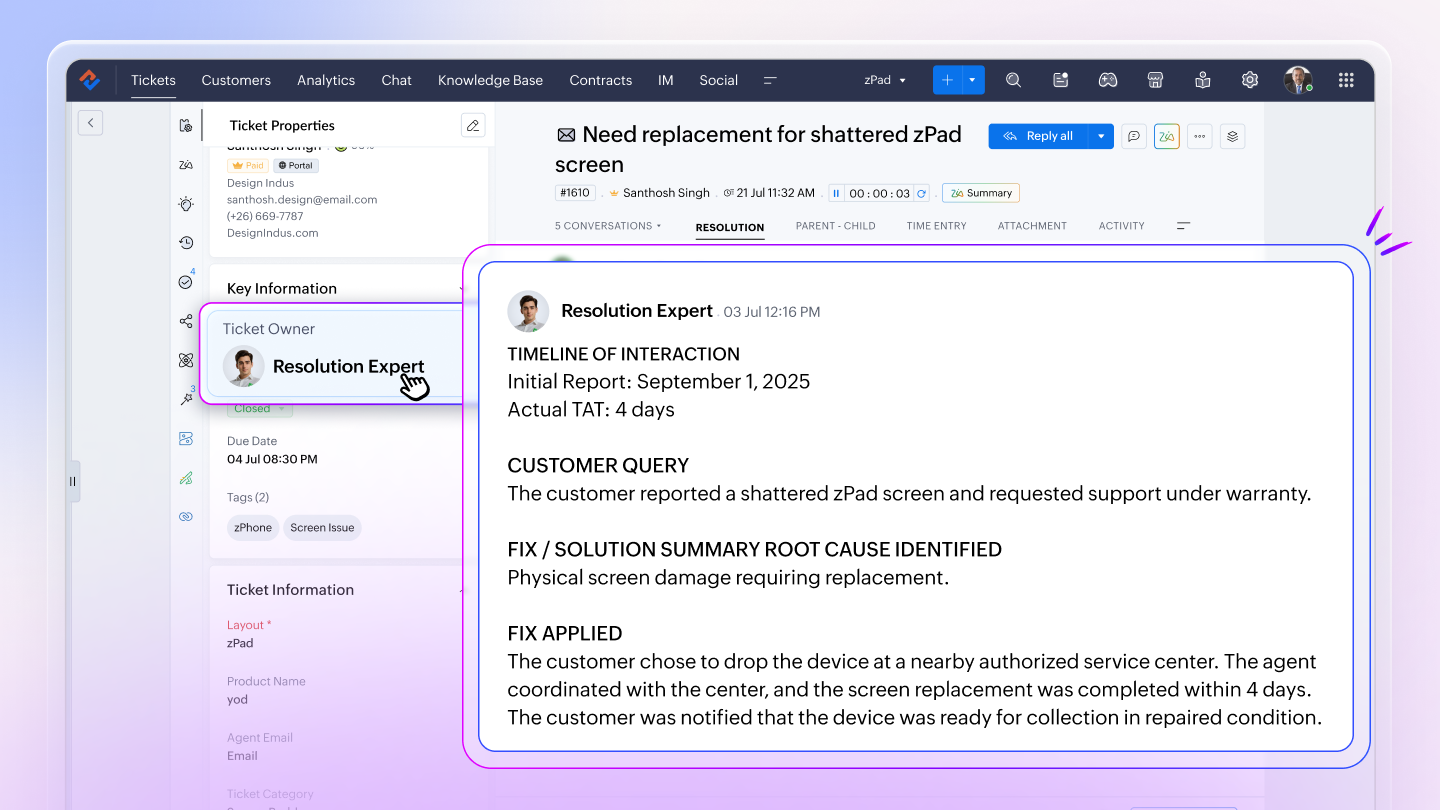
Together, Zia Agents help support teams scale efficiently, handle higher ticket volumes, and deliver a more reliable customer experience.
Every support ticket tells a story, because it often requires multiple conversations before the real problem is uncovered. These valuable interactions, however, remain locked within tickets.
With Zia’s Article Generation, agents can convert select ticket conversations into knowledge base articles, making solutions reusable for both agents and customers. The AI generates a draft article from chosen threads, which agents can refine before publishing in the Knowledge Base. This helps document real-time problems, reduce repetitive tickets, and improve self-service.

Zia’s Generative AI model, Qwen, delivers improved accuracy in content generation and ticket summarization, which enhances the overall performance and reliability of Zia’s Generative AI capabilities.
With 32 billion parameters, Qwen is trained on large-scale datasets, enabling it to generate more contextually accurate and relevant outputs for better user experiences.

AI-based automated actions executed through Workflows can improve work management capabilities in businesses by intelligently assisting human actions and decisions. Most importantly, these actions do not require training (except auto-email reply).
The following Zia actions are introduced in WFs:
Available on request basis only
Auto-email reply: Zia can analyze the ticket context and draft an email that best suits the reported issue while maintaining a tone that resonates with the customer's sentiment and intent. It sends the first response to the customer to help agents adhering to the SLAs.

Available on request basis only
Generate content: Zia can summarize the customer requirement and highlight the main points discussed in the email. It can also take into account fields such as recent thread content, ticket description, ticket status, priority level, and subject to understand the context and generate a summary. Users can also give a prompt instruction to help Zia generate a contextual summary. It then provides a concise, easy-to-consume text to help agents take appropriate actions quickly. The summary is auto- populated in the private comment, public comment, or in a multi-line text field as configured in the workflow.

Field prediction: Zia can analyze the email content, thread replies, subject, description, and several other fields available in the layout to predict values for specific fields. It evaluates the content and automatically maps the values to the most relevant field.

Field extraction: Zia can extract values, such as email, phone number, due date, case type, product code, order number, and purchase date, from the ticket conversation and autopopulate them in the ticket. This saves time and considerably reduces the chances of missing important details or causing errors while entering values manually.

Zia in mobile
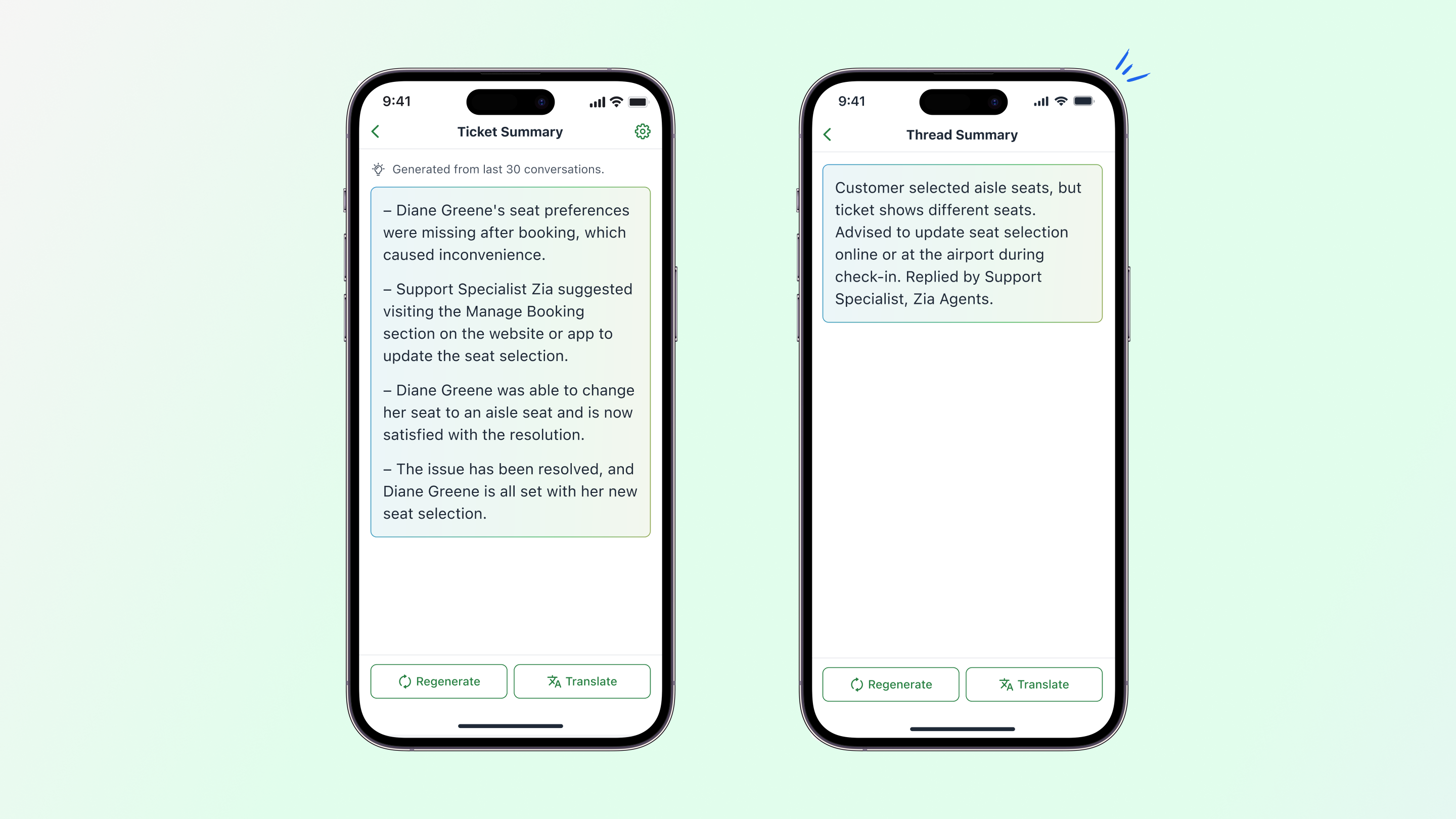
Zia simplifies the ticket and thread content and provides a concise overview in a simple, easy-to-understand summary to help agents comprehend the issues quickly. This text can also be regenerated and translated into multiple languages supported by Zia.
Agents can generate content other than ticket replies, including emails, invitations, announcements, community posts, and promotional content, by entering a prompt detailing their needs.

Zia can analyze tickets and IM chats to draft meaningful responses by leveraging the organization's knowledge base. This helps the agents send quick empathetic responses to customers while maintaining their company's standards.

Agents can rephrase ticket responses or chat replies right from the mobile app to modify the tone and length. They can either refine the whole reply or even selected sentences.

Self-Service: Help Center and Knowledge Base
The Help Center has reliably given customers the right platform for self-service tools where they can learn about the product or service, troubleshoot their problems, and engage with their peers and the organization's employees to share ideas and discuss their problems.
Now, we are extending this opportunity further to the internal stakeholders and employees of an organization to empower themselves with the self-serving capabilities of the Help Center.
The Employee Self-Service portal (ESSP) comprises two important tools that provide robust self-serving opportunity:
Knowledge base articles: Support agents or users in similar roles like IT or system administrators, employee help-desk professionals and the like can immensely benefit from having ready access to the knowledge base articles that they use to resolve internal and customer queries. For example, support agents may need to refer to pricing or subscription details, troubleshooting tips, customizable solutions, or additional charges while responding to customer queries.
These articles are not publicly available and published only under Agents mode. The ESSP, provides a single place for users to quickly access all such articles thereby saving time and preventing overseeing of information.

Training module: Organizations often run professional trainings for their employees, such as compliance and security training, training on soft skills and professional etiquette, and new employee or partner onboarding. ESSP brings these training courses within Desk by bridging two platforms: TrainerCentral (Zoho Spark) and Desk.

Zoho's online training and certification platform (TrainerCentral) integrates with Zoho Desk to facilitate the creation of courses within Desk's interface. It also provides employees an opportunity to complete these courses and view their certification status in Desk. The courses are readily accessible to the Desk users to complete at their own pace for a productive learning environment.
The Content Analysis tool acts as a digital proofreader. It scans KB articles to identify typos, logical errors, grammatical inconsistencies, poor sentence structure, readability scores, and more. This allows the writers to create more comprehensive, high-quality content that will be helpful to readers.

Documents created by different writers often follow different formats, which can bring inconsistencies to the overall structure of an article. Article Templates help define a consistent format for each type of content they create such as FAQs, learning guides, troubleshooting articles, and more. Templates ensure consistency is maintained for a specific content style irrespective who writes it, it can also help new writers adapt quickly, and greatly improve the readability and quality of documentation.

Open platforms help businesses engage with customers effectively, but they can also attract spam comments. To maintain brand's reputation and authenticity, KB admins can enable moderation settings.

Moderators can approve or reject public comments on articles to prevent spam or invalid comments from being published in the help center. Businesses that allow help center access to public can maintain brand authenticity and stay consistent with the guidelines by setting up moderation.

Customization and Personalization
Enhance the Help Center UI using JavaScript to create a more interactive interface. Add animations, improve visuals with responsive design, and integrate third-party tools such as analytics and feedback forms to boost user engagement and customer satisfaction.

For wider outreach and to address multilingual needs, the Help Center offers multi-lingual support for image (label) and audio-based captchas. During login, users can easily select their preferred language to understand and complete the captcha-based verification process.

Custom views are user specific; they allow a user to create exclusive lists of records that they frequently need for their daily activities, such as a list of premium accounts, overdue tickets, or high-value cancelled subscriptions.
Sometimes these views can be useful for other stakeholders in the organization, like the finance or logistics teams. To maintain data security and enhance collaboration, agents can be given permission to edit, share, re-share or view these custom views, depending on their role and requirement. This helps maintain data integrity and prevents accidental data loss.

Zoho Desk offers accessibility controls to help diverse user groups enhance their navigational experience and ensure complete inclusivity.
Help Center users can select an accessibility persona and further customize the elements such as color, font, alignment, and much more to make the interface comfortable and suit their individual needs


Help Center users can export tickets for reference and share them offline with other stakeholders for collaborative decision-making.

Admins who have the permission to manage agents can add a maximum of 10 agents at once. This can be particularly useful during onboarding, team scaling, and creation of new departments. While adding the agents, the number of remaining seats available under the current Zoho Desk subscription will be displayed for reference.
Users can apply filters to the standard and custom ticket views and save them to create user-specific views. These views can be beneficial in multiple cases, such as when support managers or leads need quick reference to premium business accounts; they can set the necessary filters and save them for quick access later. It saves time spent setting the same criteria multiple times, even reducing the chances of inadvertent errors. Saved filters are user-specific, allowing them to rename, delete, or modify it without affecting others' views.
Agents can be assigned tickets as soon as they close one from the backlog. This helps to prevent even minor time lapses that are very common due to the periodic assignment cycle. Most customer support services or critical operations where it's challenging to keep up with the rapid influx of tickets can benefit from immediate assignments.
Agent productivity: Web and Mobile
A spectrum of features have been introduced to improve agent productivity across web and mobile.
Web
Admins can send marketing template messages via Whatsapp from the Tickets and Contacts module, making it easier to connect with customers directly via one of the most widely preferred modes of communication. With this, teams can drive faster responses, deliver personalized campaigns using ticket history, and maintain brand consistency through pre-approved marketing templates. Agents can send messages individually, while admins can manage bulk or mass outreach.

Admins can improve outreach by sending bulk messages to multiple contacts from Tickets.
For example, service updates, reminders, cancellation notifications can be sent to the primary contacts from the relevant tickets.
This allows quick, consistent communication at all times.

Agents can receive task reminders, alerts, and notifications via Workflows through Zoho Cliq, Slack, Microsoft Teams, and Google Chat allowing smoother collaboration.

Mobile
Agents can send WhatsApp messages to customers in their preferred language without manual translation using pre-approved templates, thus increasing user engagement and reducing the time needed to draft responses.

Agents can view their profile in the mobile app to get an overview of information about the tickets they handle, including their average handling time, customers' happiness rating, and contact details.

Agents can quickly initiate personalized conversations with customers by selecting a pre-approved WhatsApp message template right from the ticket and contact detail page without navigating to the IM module.
Data administration
The user interface has been revised to keep it sleek, intuitive and engaging. The field mapping capabilities have been improved to allow users to select a module and easily map fields from the import file to the Zoho Desk module.

A real-time preview displays how the imported data will appear in the module, giving users full control and clarity on where each field goes.

The new and enhanced interface offers advanced filtering options that allow users to export data based on views, criteria, and time period, from both standard and custom modules.

Additionally, to support easy access, exports can be initiated directly from the view's more option. Both standard views and custom views can be exported from all standard modules.

The Audit Log displays the following:
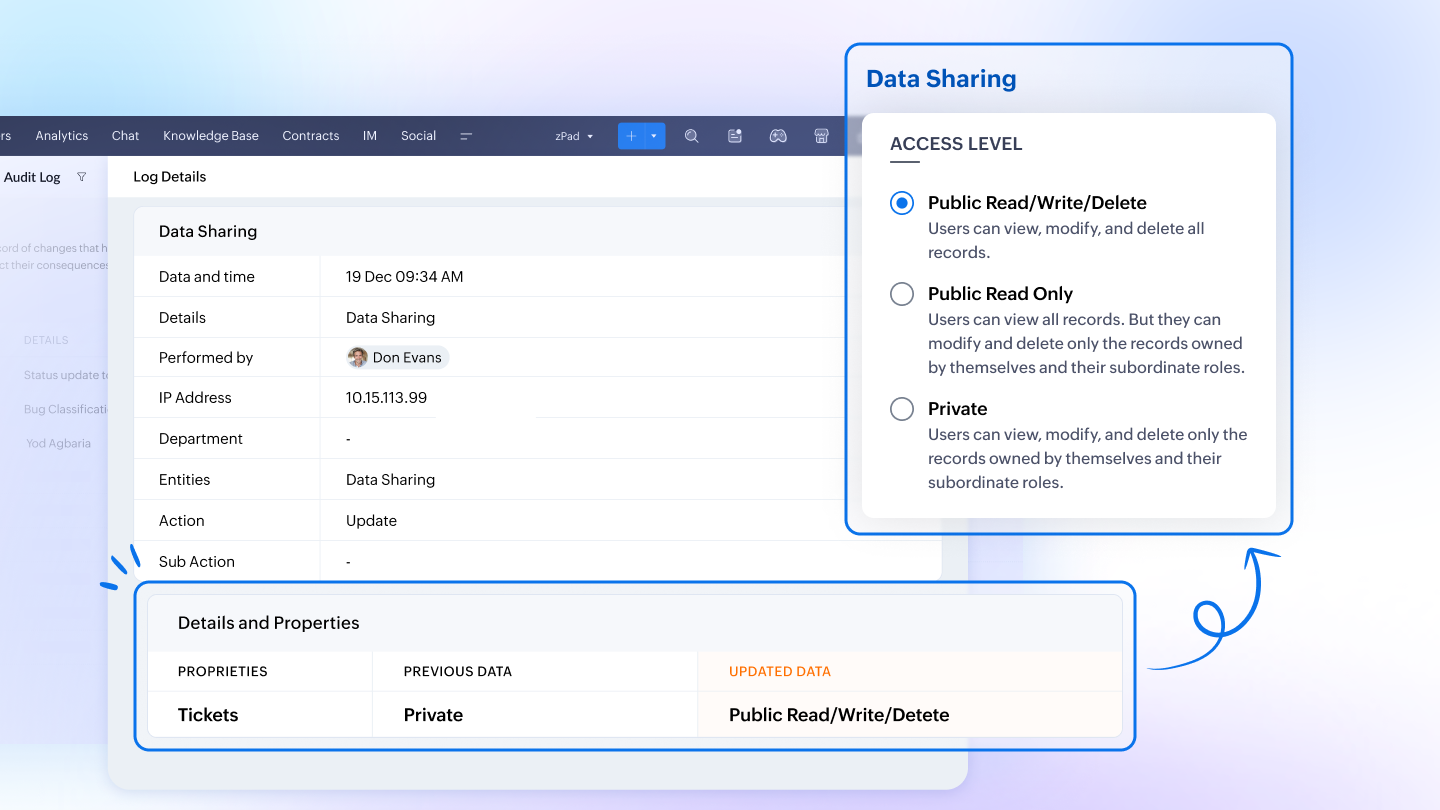
- Role and data sharing updates made to user profiles alongside addition, edit or deletion of users allow monitoring changes in roles and data accessibility across organization.
- See each agent's availability status (online or offline) across channels like email, phone, chat, and IM for greater visibility into agent availability.
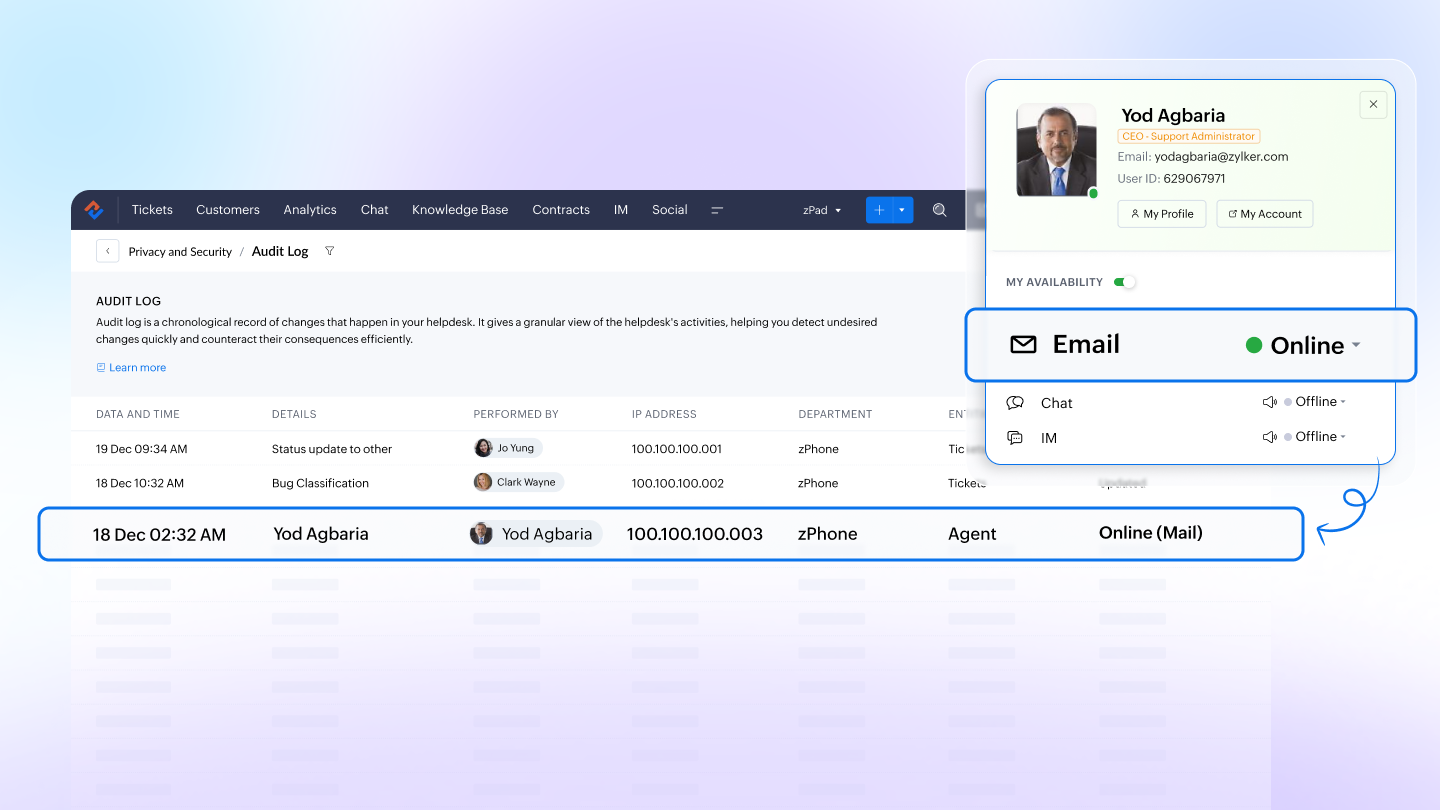
In addition, up to 60 days of data can be exported; users can also filter the data to view and export specific data that can be used for monitoring and compliance purpose.

Changes made in the Contacts, Accounts, and custom module records can be viewed in detail page under the History tab. The date and time, agent name, IP address, and the action performed are displayed to ensure transparency.


Integration
The integration helps in consolidating data from Desk and syncing it with PowerBI via API connectors, which allows real-time data sync, customizable DAX formulas, and rich visualizations. By utilizing these capabilities within the PowerBI platform, organizations can perform in-depth analysis of various customer support analytics and gain better insights to support informed decision-making.
Teams often use different platforms to manage their work. This integration allows agents to file customer issues within GitLab to streamline issue tracking and enhance cross-team collaboration. It keeps everyone aligned by syncing comments and statuses across tickets, commits, and merge requests to ensure real-time updates and improved workflow efficiency.

Instant Messaging
The new IM Session Status Webhook ensures you never miss a moment in your instant messaging conversations. It provides real-time notifications for every chat status update, whether a session is opened, picked up, put on hold, reassigned, ended, or blocked. The webhook also shares detailed payload data, including assignee, session state, and message counts. This helps you integrate chat insights into your support processes and stay in control of every customer conversation.

Voice Note allows agents to send voice messages directly from the reply editor, making conversations faster, more personal, and accessible. Instead of typing long replies, agents can record audio and send it for quick delivery. Voice Note is especially useful when explaining complex processes, comforting distressed customers, or engaging in multilingual conversations. It also helps busy agents work on their mobile devices or manage communication more efficiently while multitasking.

Dynamic URL Setup for WhatsApp Templates in IM lets you personalize links with recipient-specific details like name or email. Instead of sending the same static link to everyone, IM automatically replaces placeholders with real contact data to create unique URLs and ensure more accurate tracking. Agents can easily add placeholders such as Contacts.First Name or Contacts.Email to call-to-action buttons, making WhatsApp interactions more relevant and impactful.

Enhanced attachment support
Enhanced attachment support lets you receive and manage larger files directly within your instant messaging channels. Agents can now handle images, documents, videos, and audio files up to 50MB. Supported formats include popular file types such as .jpg, .pdf, .docx, .mp4, and .mp3. The update improves file sharing efficiency and enables richer interactions across IM channels.

Zia Reply Assistance in IM empowers agents with instant, context-specific solutions during live customer conversations. Zia analyzes queries in real time and retrieves relevant answers from the knowledge base. Agents can add the suggested reply into their composer, edit it if needed, and send it. By reducing research effort and improving accuracy, Zia enables faster resolutions and a better customer experience.
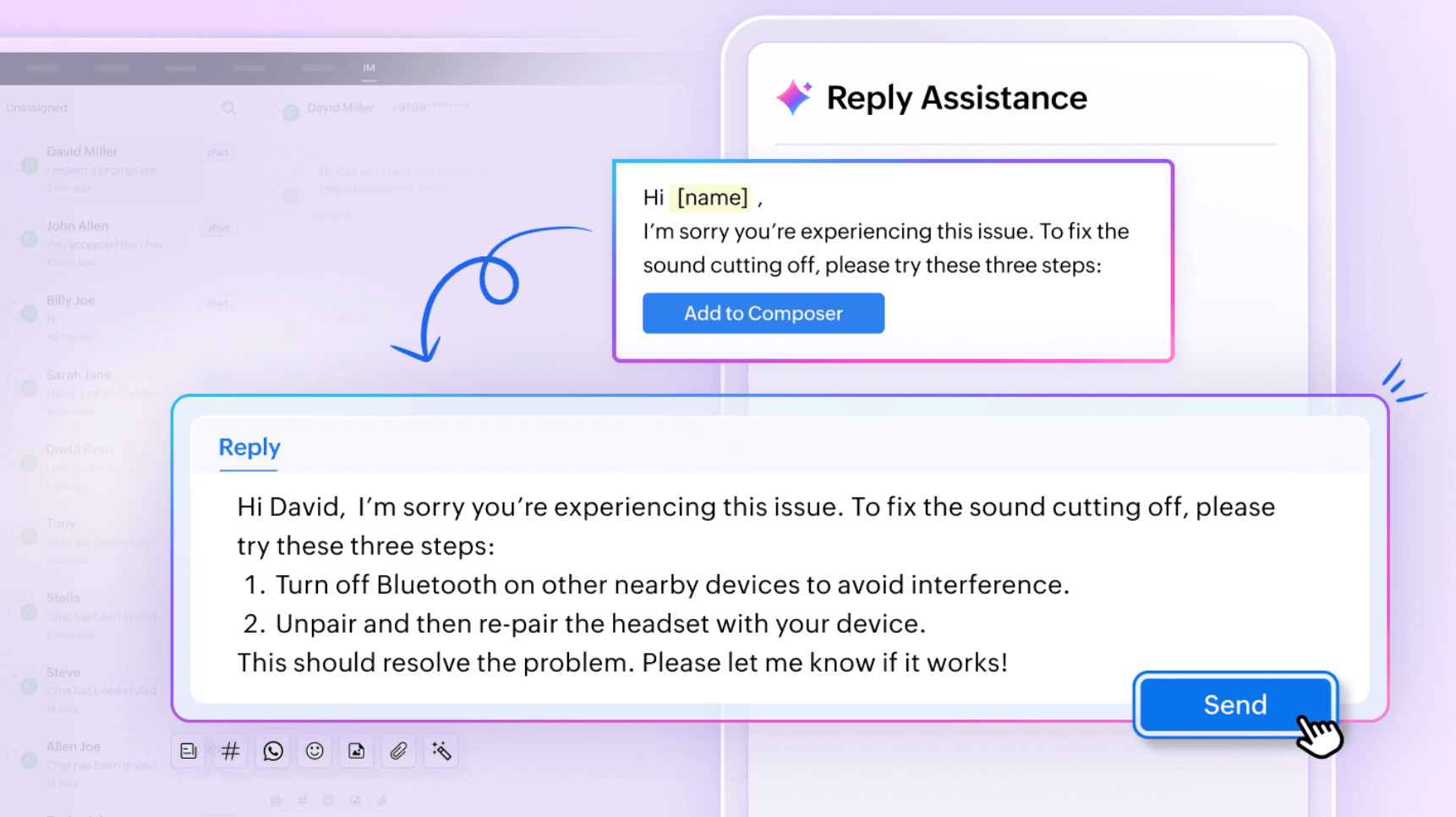
Message Suggestions in IM help agents reply faster with AI-generated responses tailored to each conversation. Powered by Zia, this feature analyzes the context of incoming messages and provides quick, relevant suggestions. Agents can use a message generated by Zia as-is or edit it for personalization. Suggestions can be previewed and inserted directly into the composer. They can also be adjusted to match the agent’s tone and style. By reducing repetitive typing and enabling timely responses, Message Suggestions improve efficiency and enhance customer experience.

In Instant Messaging, you can now set a timer to decide how long Zoho Desk should wait before converting a customer’s reply into a new ticket. You can choose a waiting period, select “None” for complete manual control, or use the new “Always” option. With “Always”, a ticket is instantly created whenever a customer responds. All subsequent replies are linked to the same ticket to reduce clutter and keep conversations organized.

Easily personalize the Business Messaging widget to match your brand. Control its placement by removing the default launcher. You can position the “Chat with us” button anywhere on your site and adjust the appearance with light or dark modes, theme colors, wallpaper images, and container settings. You can also toggle the “Powered By” tag for a clean, branded experience.

Leverage APIs to retrieve customer details such as name, phone, and email. This allows agents to access context-rich data during chats, enabling more efficient and personalized support.

Developer Space
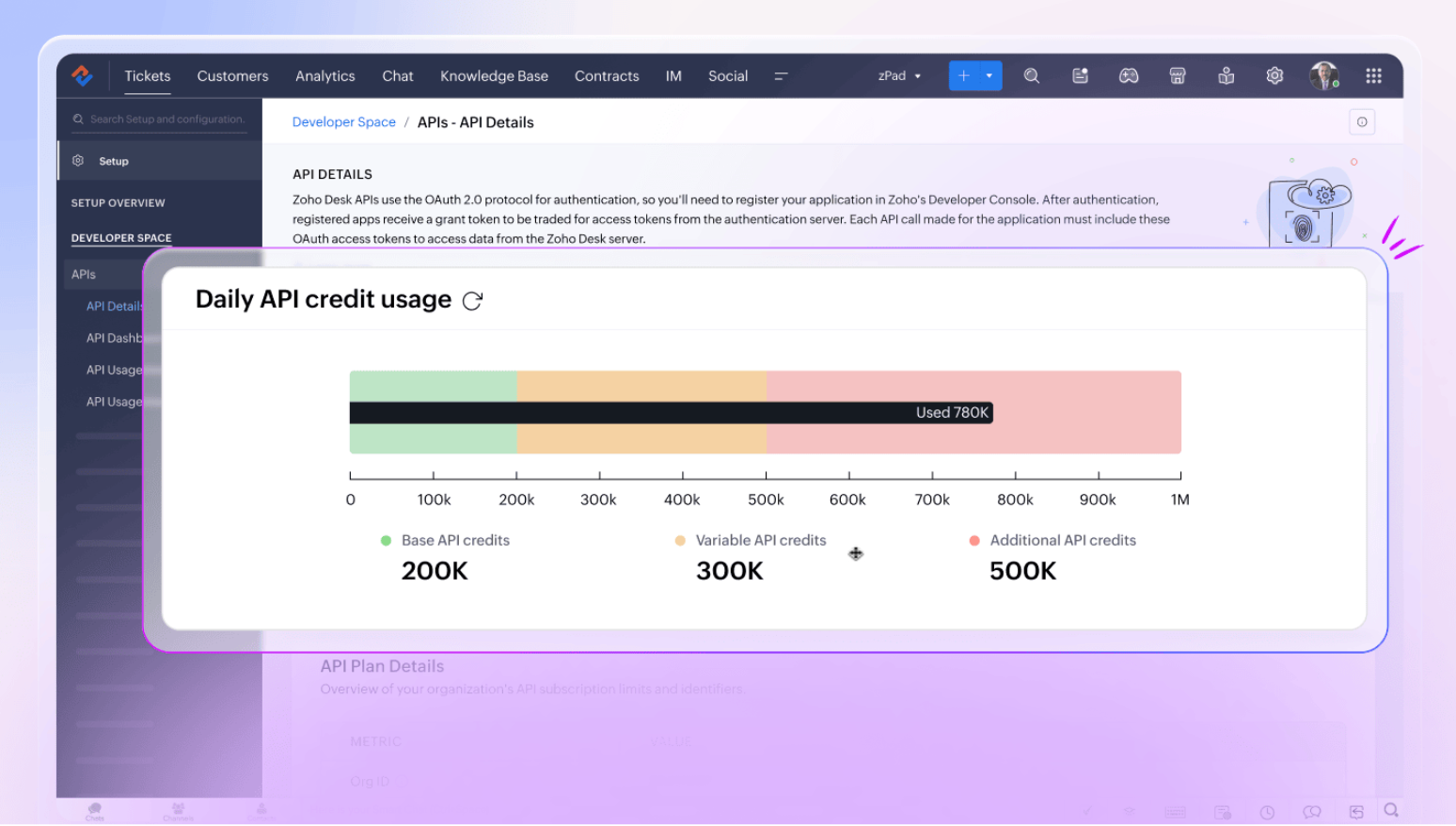
Zoho Desk has transitioned from the older API limit model to the new API credit system. In the previous model, every API call was counted the same, regardless of complexity. The new system introduces a more balanced approach by allocating base credits based on your edition and adding variable credits for each agent in your organization.
API credits are consumed based on the complexity of each call, ensuring efficient usage. If your business requires more capacity, you can also purchase additional credits to support higher workloads. Together, these changes make the API credit system a more flexible, scalable, and reliable way to manage API usage.
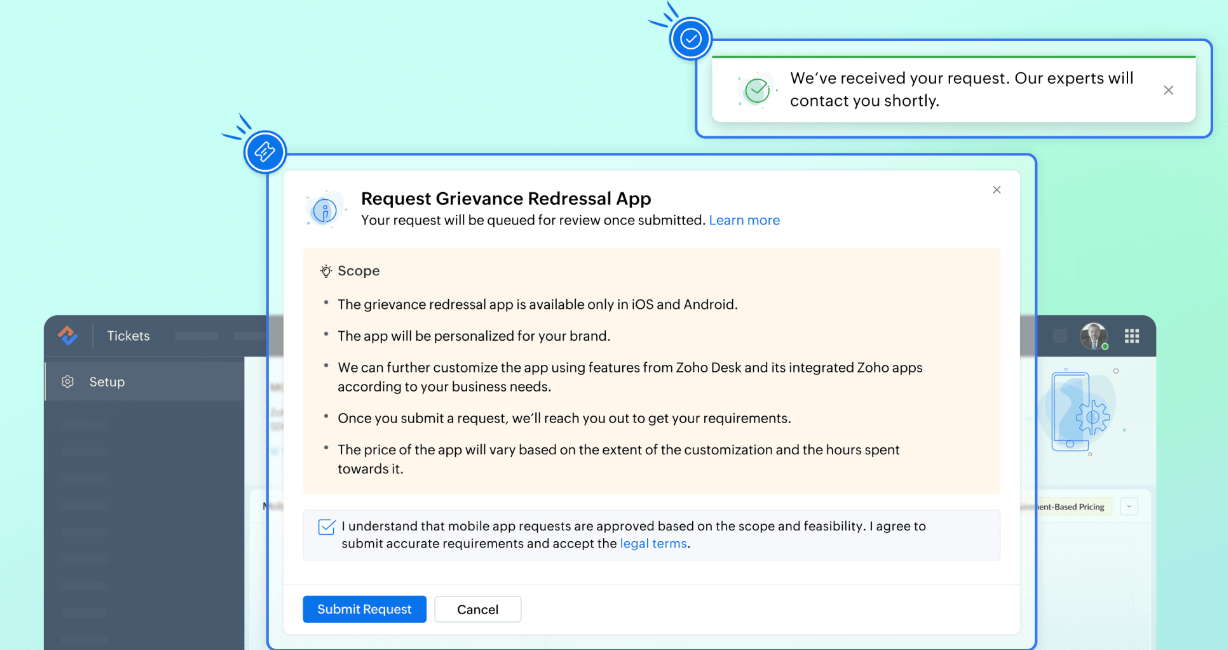
A custom mobile application, whether customer-facing or for internal use, is a value-add for any business. It bridges process gaps and brings businesses closer to their goals and customers, while facilitating remote work. However, developing such an app remains elusive as significant time and resources are involved.

The Zoho Desk On-Demand App Service is a viable solution for businesses looking to add a custom mobile app to their tech stack. Using the service means entrusting development to the minds behind Zoho Desk. From requirement gathering and design to delivery, you get to oversee and shape the entire lifecycle.

The mobile app gallery is an exclusive marketplace within Zoho Desk that hosts a curated list of templated apps purpose-built for specific industries or verticals. These apps work in tandem with Zoho Desk to meet the customer experience (CX) needs of specific business functions, such as field service, facility management, and public grievance redressal.

Help desk administrators can purchase the apps—rebranded for their organization—directly from the mobile app gallery. Alternatively, they can collaborate with the experts at Zoho Desk to make further modifications to the applications.
ASAP
The events callback for the Tickets module allows developers to track, monitor, and evaluate user engagement with tickets and view this data in their preferred analytic tool.

Submit your tickets securely through a CAPTCHA verification
Customers can submit their tickets in the help center securely by verifying themselves through a CAPTCHA mechanism.

Radar
Respond faster and better with Zia generative intelligence in Radar
Effective communication is key in customer support. Zia generative intelligence in mobile apps, viz Zoho Desk and Radar, empowers agents to enhance their communication and send fast, clear replies. With the ticket/thread summary, they can quickly get to the crux of the problem and follow up immediately with a refine-able, pre-drafted reply from the writing assistant. Alternatively, they can prompt Zia to generate a reply, comment, or any other type of content and send it to their customers instantly.


Express your thoughts clearly with Radar x Apple intelligence
Apple's Writing Tools help users articulate their thoughts fluently and present them in the tone, length, and structure that they want. Radar iOS users can access these tools within the Radar app to draft more effective responses. They can also use Apple's Image Playground in Radar to stylize their profile pictures.


Two much-awaited additions to Radar's analytical capabilities: global dashboards marshal data from all departments to provide a birds-eye view of the entire help desk. Static reports, on the other hand, provide a deep dive into each department separately.


Accessibility preferences in Radar
Accessibility is a core value at Zoho Desk, which is why its companion mobile app, Radar, also extends relevant personalization options to give users a seamless experience.
Radar iOS brings optimized color contrast, auto-resizing fonts, and supports screen readers and voice control.


That's a wrap!
We believe that these new features will enhance usability and customer experience to a great extent. These features are available across all data centers.
Kindly give them a try and share your feedback.
Regards,
Akshaya. B