Zoho Projects MCP Server

Zoho Projects MCP Server

Zoho MCP(Module context protocol) is the bridge that allows users to access Zoho Projects within any preferred Large Language Model(LLM) console. Users can prompt the LLMs to perform actions using natural language commands. They can interact with portal-specific Zoho Projects data, to manage modules without switching platforms.

Prerequisites

  1. AI agent with the appropriate plan to access the integration section.
  2. Portal in Zoho Projects.
  3. Zoho Projects API access.

Benefits

  1. Use natural language commands to retrieve and process data from Zoho Projects.
  2. Create and update records across modules from the LLM console.
  3. Execute commands with portal-specific context for accurate results.

Use Case

A project manager wants to analyze a house construction project using ChatGPT. By connecting Zoho MCP to ChatGPT, the project’s portal-specific data becomes accessible within the LLM. The project manager can then use natural language prompts to generate task reports for a specific project and analyze progress, and overall status, without switching platforms.

Glossary:

AI Agents - Software programs that interpret user prompts and perform actions using artificial intelligence.
MCP - A bridge that allows users to access Zoho Projects within a preferred LLM.
MCP Client - An interface where prompts are provided to initiate workflows through an AI agent. Eg. ChatGPT, Claude, VS Code.
MCP Server - An MCP Server manages backend operations by handling authentication, context, permissions, and execution for MCP Clients. Eg. Zoho Projects
MCP URL - The MCP URL is the endpoint used by an MCP Client to connect with the MCP Server of a service.
Eg. Configuring the Zoho Projects MCP URL in an AI agent to enable access to a specific portal.

Enable API Access in Zoho Projects

  1. Click  in the upper-right corner of the top navigation band.
  2. Navigate to Marketplace > Developer Space > API Access & Mobile Access.
  3. Select the check box to enable access and click Update.


APIs lets third-party users connect with your Zoho Projects portal.

Configuration

To create a Zoho MCP server,
  1. Navigate to the Zoho MCP console.
  2. Enter a name for the server.
  3. Click Create Server.

  4. Click Add Tools to select the required tools.
  5. Search and click Zoho Projects.
  6. Enable the checkbox beside the preferred tools.
  7. Click Add Now.

Notes
Zoho Project tools are the APIs that you would use to perform actions in your LLM.


Connect Zoho MCP to ChatGPT

Once the server is created, copy the Zoho Projects MCP server Url.

Set up Zoho MCP in ChatGPT

  1. Navigate to chatgpt.com and login into your paid account.
  2. Click your account name on the bottom-left corner of the page.
  3. Click Settings and navigate to Apps.
  4. Click on Advanced Settings.
  5. Enable the toggle to enter Developer Mode.
  6. Click the Create App button beside the Advanced Settings.

  7. Enter the Name, MCP Server URL and enable the checkbox.
  8. Click Create and allow ChatGPT to use the required tools.
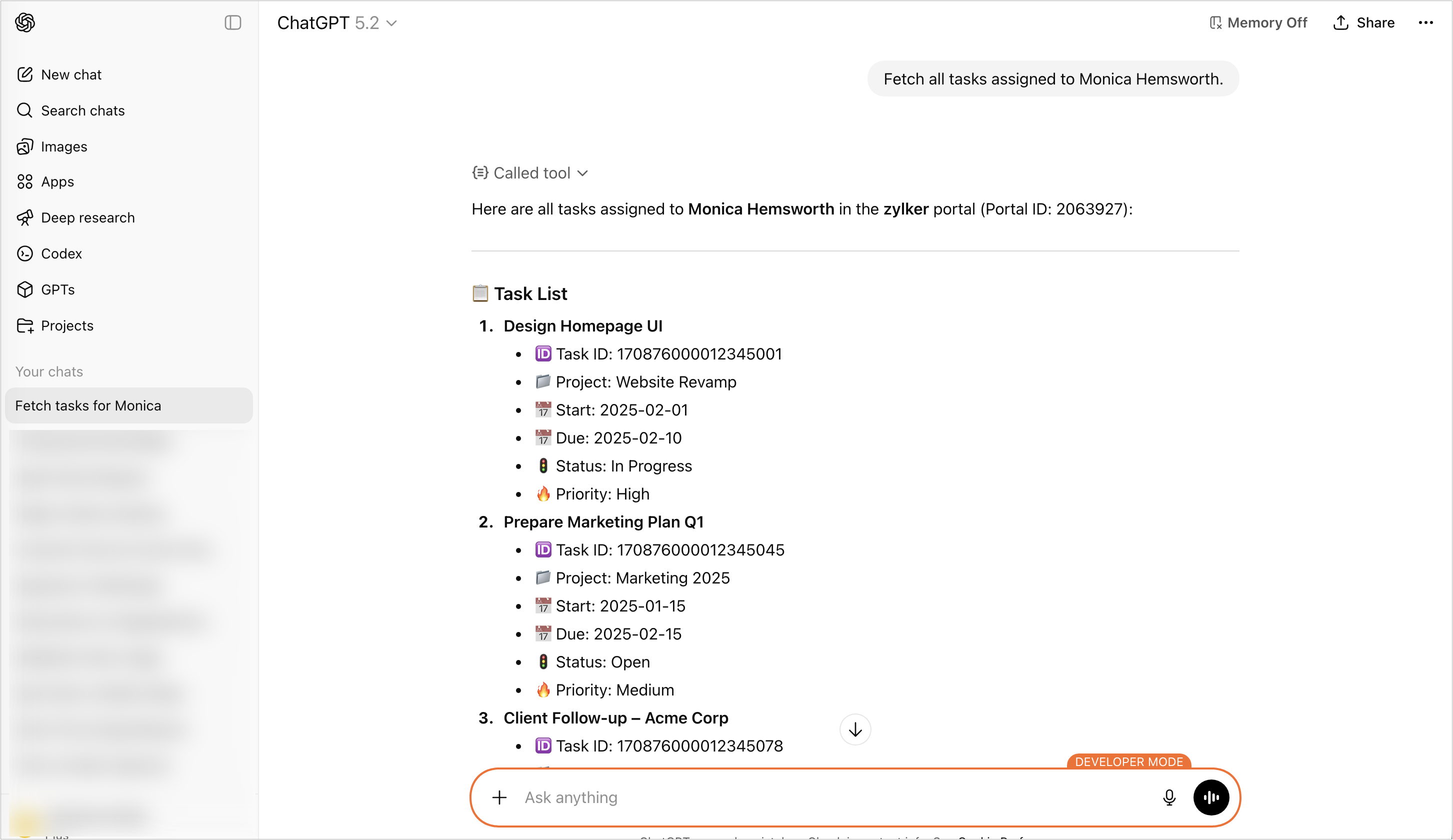
After setting up the connect, enter the app and provide a natural language command to perform an action.

Connect Zoho MCP to Claude

Connect claude with Zoho MCP, allowing it to handle real-world workflows through a secure and straightforward setup within your conversation window.

Set Up Zoho MCP in Claude

Notes
Only a Claude organization admin can complete these steps. Once connected, the integration will be accessible to everyone in your Claude organization, but only you can manage the tools linked to this Zoho MCP instance.
  1. Navigate to claude.ai/settings/integrations
  2. Click on Organization integrations.
  3. Select Add Integration.
  4. Enter a name.
  5. Copy and paste the MCP Server URL provided.
  6. Click Add.

Accessing Zoho MCP Tools in Claude

  1. Open a new chat.
  2. Choose Search and Tools.
  3. Select Zoho MCP connection.
  4. Select the required tools to use in the chat.
  5. Enter a prompt in Claude to perform any action.

Connect Zoho MCP to Cursor

Use tools from Zoho MCP directly inside Cursor IDE. Enable your AI assistant to perform real-world actions securely, without leaving your coding workspace.

Set Up Zoho MCP in Cursor

You can first try clicking the "Add to Cursor" button for automatic setup. If that does not work or you need to modify the installation, follow the directions below.

Add Zoho MCP Server

  1. Open Cursor settings (⇧ + ⌘ + J)
  2. Navigate to the MCP Tools tab and click New MCP Server.
  3. Copy and paste the following JSON configuration below, then save it using CMD + S or CTRL + S
  4. Activate Agent Mode
Make sure the chat is set to Agent mode to access Zoho MCP tools within Cursor.
  1. {
  2.         "mcpServers": {
  3. "ZohoMCP": {
  4.             "command": "npx",
  5.             "args": [
  6.                 "mcp-remote",
  7.                 "https://zylker-910551004.zohomcp.com/mcp/message?key=b82d9e313f8b04089df403e4dbe50180",
  8.                 "--transport",
  9.                 "http-only"
  10.             ]
  11.         }
  12.         }
  13. }
Info
Important: Treat your MCP server key like a password. It can trigger tools connected to your account and access sensitive information.

Connect Zoho MCP to Windsurf

Use Zoho MCP directly within Windsurf IDE. Let your AI assistant handle real-world actions through a secure, simple connection-right from your coding environment.

Configuring Zoho MCP in Windsurf

  1. Open Windsurf settings (⌘ + ,)
  2. Navigate to the Cascade tab and click Add Server.
  3. Select Add custom server +
  4. Add the following JSON configuration, replacing the placeholder key with your MCP key from below.
  1. {   
  2. "mcpServers": {
  3.         "ZohoMCP": {
  4.             "command": "npx",
  5.             "args": [
  6.                 "mcp-remote",
  7.                 "https://zylker-910551004.zohomcp.com/mcp/message?key=b82d9e313f8b04089df403e4dbe50180",
  8.                 "--transport",
  9.                 "http-only"
  10.             ]
  11.         }
  12.     }
  13. }
Notes
Treat your MCP server key like a password! It can trigger tools linked to this server and access your data.

Connect to Visual Studio Code

Use tools directly inside Visual Studio Code with Zoho MCP. Allow your AI assistant to perform real-world actions through a secure, simple connection—without leaving your coding workspace.
You must have GitHub Copilot enabled and set to Agent mode in Visual Studio Code for Zoho MCP to function correctly.

Configuring Zoho MCP in Visual Studio Code

  1. Open the Visual Studio Code Command Palette (⇧ + ⌘ + P on Mac, Ctrl + Shift + P on Windows)
  2. Type "MCP: Add Server..." and click Enter.
  3. Select "HTTP (HTTP or Server-Sent Events)" and click Enter.
  4. Paste your MCP key from below into the "Server Key" field and click Enter.
  5. Provide a server name and click Enter. Make sure GitHub Copilot is set to Agent mode.
  6. Ask GitHub Copilot to use tools from your Zoho MCP server.


Sample Natural Language Commands

  1. Create a task in Project "Zylker Constructions" with a due date of Friday.
  2. Show all the overdue tasks assigned to me this week.
  3. Update the status of the "Design Review" task to Completed.

      Create. Review. Publish.

      Write, edit, collaborate on, and publish documents to different content management platforms.

      Get Started Now


        Access your files securely from anywhere

          Zoho CRM Training Programs

          Learn how to use the best tools for sales force automation and better customer engagement from Zoho's implementation specialists.

          Zoho CRM Training
            Redefine the way you work
            with Zoho Workplace

              Zoho DataPrep Personalized Demo

              If you'd like a personalized walk-through of our data preparation tool, please request a demo and we'll be happy to show you how to get the best out of Zoho DataPrep.

              Zoho CRM Training

                Create, share, and deliver

                beautiful slides from anywhere.

                Get Started Now


                  Zoho Sign now offers specialized one-on-one training for both administrators and developers.

                  BOOK A SESSION


                              Quick LinksWorkflow AutomationData Collection
                              Web FormsEnterpriseOnline Data Collection Tool
                              Embeddable FormsBankingBegin Data Collection
                              Interactive FormsWorkplaceData Collection App
                              CRM FormsCustomer ServiceAccessible Forms
                              Digital FormsMarketingForms for Small Business
                              HTML FormsEducationForms for Enterprise
                              Contact FormsE-commerceForms for any business
                              Lead Generation FormsHealthcareForms for Startups
                              Wordpress FormsCustomer onboardingForms for Small Business
                              No Code FormsConstructionRSVP tool for holidays
                              Free FormsTravelFeatures for Order Forms
                              Prefill FormsNon-Profit

                              Intake FormsLegal
                              Mobile App
                              Form DesignerHR
                              Mobile Forms
                              Card FormsFoodOffline Forms
                              Assign FormsPhotographyMobile Forms Features
                              Translate FormsReal EstateKiosk in Mobile Forms
                              Electronic Forms
                              Drag & drop form builder

                              Notification Emails for FormsAlternativesSecurity & Compliance
                              Holiday FormsGoogle Forms alternative GDPR
                              Form to PDFJotform alternativeHIPAA Forms
                              Email FormsFormstack alternativeEncrypted Forms

                              Wufoo alternativeSecure Forms

                              TypeformWCAG

                                All-in-one knowledge management and training platform for your employees and customers.


                                            Create. Review. Publish.

                                            Write, edit, collaborate on, and publish documents to different content management platforms.

                                            Get Started Now


                                                              You are currently viewing the help pages of Qntrl’s earlier version. Click here to view our latest version—Qntrl 3.0's help articles.


                                                                  Manage your brands on social media


                                                                    • Desk Community Learning Series


                                                                    • Digest


                                                                    • Functions


                                                                    • Meetups


                                                                    • Kbase


                                                                    • Resources


                                                                    • Glossary


                                                                    • Desk Marketplace


                                                                    • MVP Corner


                                                                    • Word of the Day


                                                                    • Ask the Experts


                                                                      Zoho Sheet Resources


                                                                          Zoho Forms Resources


                                                                            Secure your business
                                                                            communication with Zoho Mail


                                                                            Mail on the move with
                                                                            Zoho Mail mobile application

                                                                              Stay on top of your schedule
                                                                              at all times


                                                                              Carry your calendar with you
                                                                              Anytime, anywhere


                                                                                    Zoho Sign Resources

                                                                                      Sign, Paperless!

                                                                                      Sign and send business documents on the go!

                                                                                      Get Started Now


                                                                                              Zoho TeamInbox Resources


                                                                                                        Zoho DataPrep Demo

                                                                                                        Get a personalized demo or POC

                                                                                                        REGISTER NOW


                                                                                                          Design. Discuss. Deliver.

                                                                                                          Create visually engaging stories with Zoho Show.

                                                                                                          Get Started Now


                                                                                                                              • Related Articles

                                                                                                                              • Zoho Projects: An Overview

                                                                                                                                Zoho Projects is an online project management software that helps you run your business with ease. It stands as a comprehensive solution to your day-to-day problems in project management and adds value to your business by leaps and bounds. Here is a ...
                                                                                                                              • Zoho Vault for Zoho Projects

                                                                                                                                Zoho Vault is an online password manager for teams. If you are struggling with remembering numerous passwords, Zoho Vault can keep them safe for you. It helps to store, share, and manage your passwords from anywhere. Zoho Vault is the best way to ...
                                                                                                                              • Installation & Login

                                                                                                                                Prerequisites to install the app Requires Android 6.0 A Google account Install Zoho Projects on your Android device Open the Play Store app on your Android. In the search bar, type Zoho Projects and tap on the Zoho Projects app from the search ...
                                                                                                                              • WHMCS for Zoho Projects

                                                                                                                                Provisioning Modules in WHMCS, also referred to as Product or Server Modules, enable provisioning and management of services for WHMCS. As an authorized Zoho reseller, you can configure Zoho Projects module in WHMCS and make it available to your ...
                                                                                                                              • Projects - Introduction

                                                                                                                                Projects - Introduction All projects in the portal will be listed in this module. Click the project name to have a detailed look at each project. Project views List view Thumbnail view Switch view Click the hamburger icon at the top-left corner. ...
                                                                                                                                Wherever you are is as good as
                                                                                                                                your workplace

                                                                                                                                  Resources

                                                                                                                                  Videos

                                                                                                                                  Watch comprehensive videos on features and other important topics that will help you master Zoho CRM.


                                                                                                                                  eBooks

                                                                                                                                  Download free eBooks and access a range of topics to get deeper insight on successfully using Zoho CRM.


                                                                                                                                  Webinars

                                                                                                                                  Sign up for our webinars and learn the Zoho CRM basics, from customization to sales force automation and more.


                                                                                                                                  CRM Tips

                                                                                                                                  Make the most of Zoho CRM with these useful tips.


                                                                                                                                    Zoho Show Resources