Plug-in question FAQ - Zoho ShowTime

Common Questions in the plug-in


1. What is ShowTime plug-in? Why do I need it?

The ShowTime plug-in is an available add-on for Microsoft PowerPoint. Using this plug-in, you can launch ShowTime right from within PowerPoint. While you might be used to presenting offline, this plug-in lets you deliver presentations online and connect with your audience during the session.

Installation requirements:
Operating System: Windows 7, 8 and 10.
Software: Microsoft PowerPoint 2010 and 2013, .NET Framework > 4.5.

2. How do I download and install the plug-in?

  1. Click here to download the plug-in.
  2. Double-click on the ShowTime.exe file from the downloads and click on run to install the plug-in.
  3. The plug-in requires.NET Framework 4.5. You will be prompted to download if your machine does not support it.
  4. Once done, each user can log in using his or her own Zoho account.
Note: The plug-in requires administrative privileges to install and update its version. The plug-in is accessible to all the users once the admin installs it.

3. Which ShowTime.exe file do i have to choose?

You can choose either the 32-bit version or the 64-bit version of the ShowTime.exe file. To know the version of Powerpoint in your computer,

1. Open PowerPoint and click on File in the top left corner.
2. Choose Accounts from the left pane and select About Powerpoint.


3. You can see the bit version listed on the top in this About Powerpoint section. Download the ShowTime.exe file that has the same bit specifications (32 or 64 bit file).


4. What do I do when the ShowTime Tab is not visible?

When the ShowTime tab is not visible after you open a presentation, follow the steps:

1. Click the File Menu.



2. Click Options in the left panel.
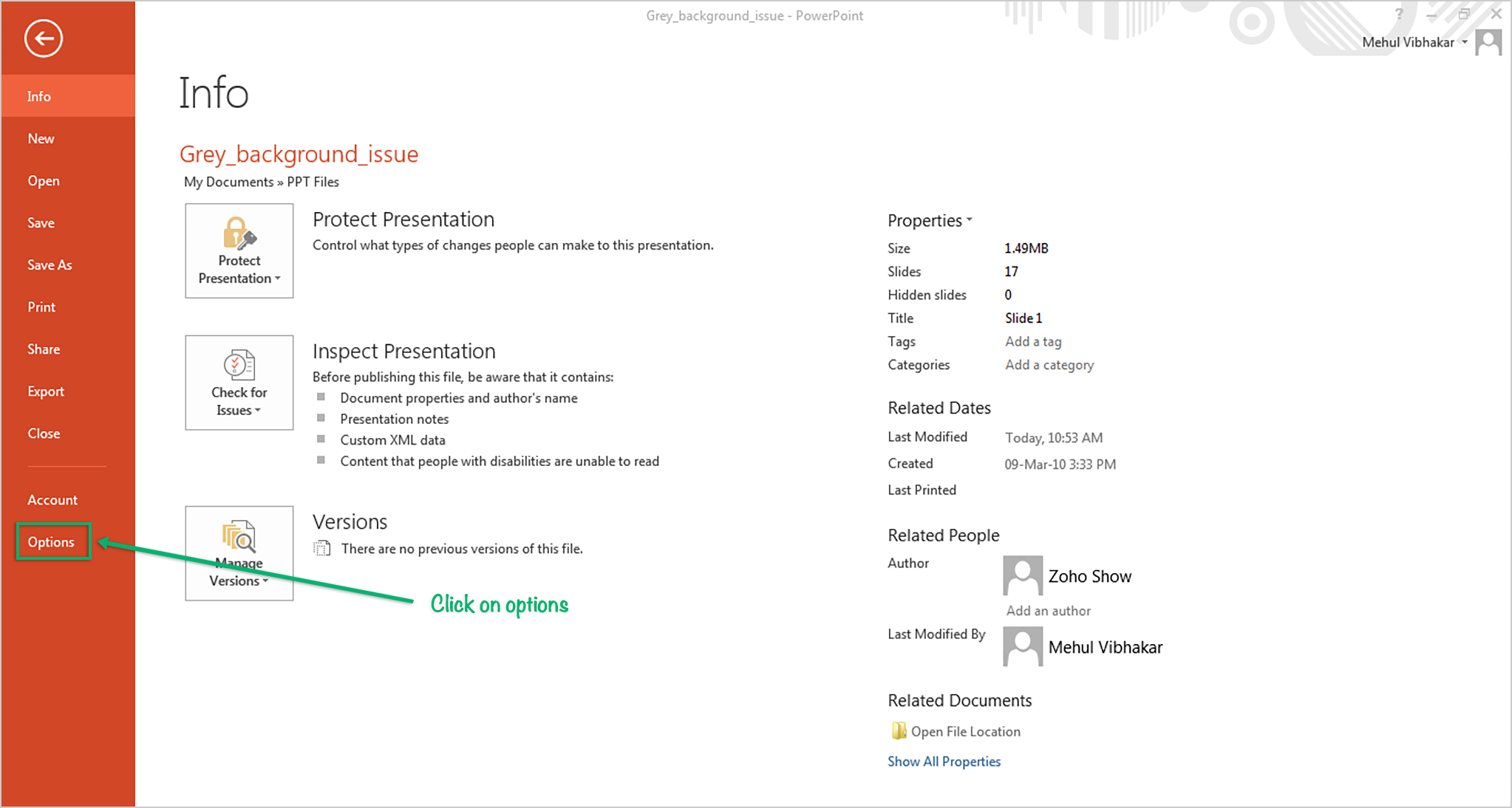


3. A pop-up will appear.
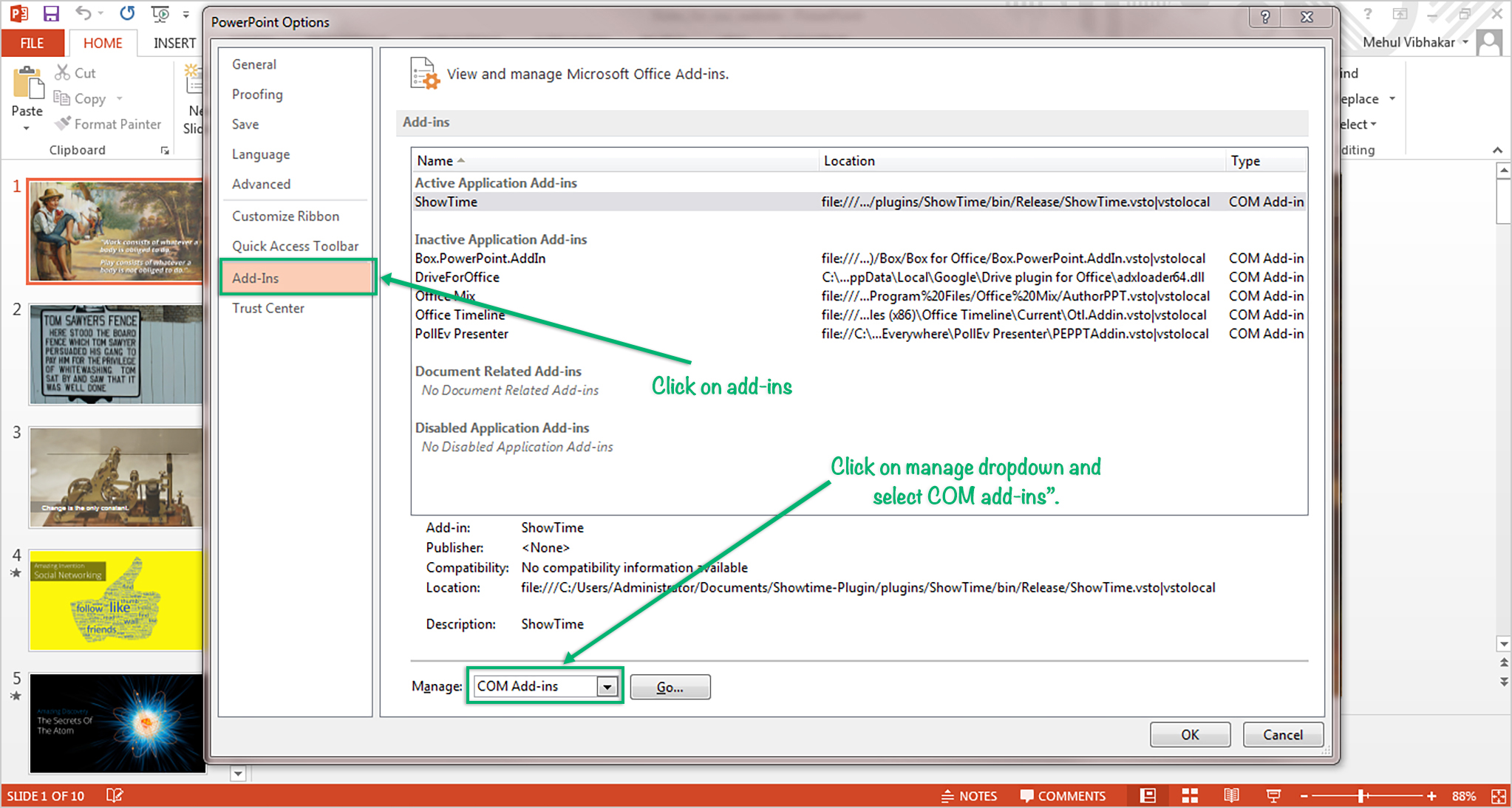
4. Click on Add-Ins from the window.
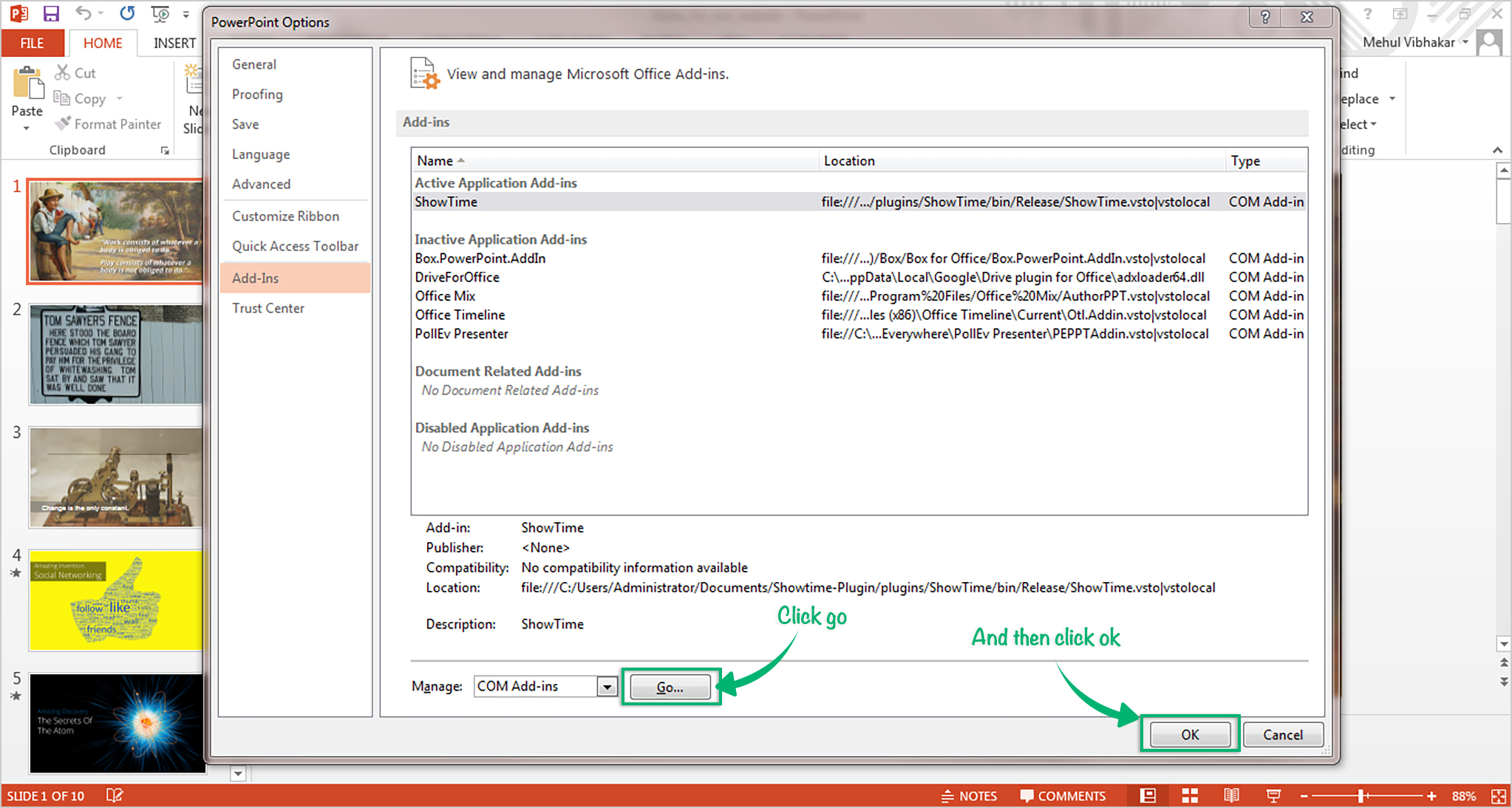
5. From the Manage drop-down menu at the bottom of the screen, choose "COM-Add-ins" and press GO.


4. Remember to click OK.
5. Now your ShowTime tab will be visible on the toolbar.

5. How do I start using the plug-in?

  1. Install the plug-in and open MS PowerPoint.
  2. Once you import a presentation, the ShowTime tab will be active.
Note: By default the ShowTime tab will be disabled.

6. What do I do when the ShowTime tab is not visible?

If the ShowTime plug-in tab is not visible on the toolbar, follow the below steps:
  1. Click on the File Menu.
  2. Click on Options from the left panel.
  3. A pop up will appear.
  4. Click on Add-Ins from the window.
  5. From the Manage drop-down menu at the bottom of the screen, choose "COM-Add-ins" and press GO.
  6. Remember to click OK.
Now your ShowTime tab will be visible on the toolbar.

7. I already have the plug-in installed. How do I update it to the latest version?

  1. Open MS PowerPoint.
  2. Click the ShowTime tab on the toolbar.
  3. Click on Update Now.
Note: The Update button will be enabled if there is a new version available.

8. How do I send feedback?

Our product team is interested in hearing new suggestions, ideas, and feedback to help us improve the product and serve you better.
Follow the below steps to send feedback
  1. Click the ShowTime tab on the toolbar.
  2. Click on Send Feedback.

9. What's the size limit of presentations that can be imported?

The file size is limited to 100MB.

In case of more than one user per machine, will the file storage be shared or separate?

ShowTime does not share file storage. The file storage for each user is separate.

10. What do I do when I get an 'access denied' error during the installation of the ShowTime.exe file?

To install the plug-in, administrator privileges are required. If you see the error, contact your system admin. Once the plug-in is installed on the local machine, it will be accessible to all the users.

11. When I launch my presentation on the projector screen my audience sees the slides as black images. Why?

Before you launch the presentation on the projector make sure that you connect your laptop to the projector. If not, the slide/animation will be processed as black screen. If this happens, you will have to relaunch your presentation after you connect your laptop to the projector screen.

      Create. Review. Publish.

      Write, edit, collaborate on, and publish documents to different content management platforms.

      Get Started Now


        Access your files securely from anywhere

          Zoho CRM Training Programs

          Learn how to use the best tools for sales force automation and better customer engagement from Zoho's implementation specialists.

          Zoho CRM Training
            Redefine the way you work
            with Zoho Workplace

              Zoho DataPrep Personalized Demo

              If you'd like a personalized walk-through of our data preparation tool, please request a demo and we'll be happy to show you how to get the best out of Zoho DataPrep.

              Zoho CRM Training

                Create, share, and deliver

                beautiful slides from anywhere.

                Get Started Now


                  Zoho Sign now offers specialized one-on-one training for both administrators and developers.

                  BOOK A SESSION


                              Quick LinksWorkflow AutomationData Collection
                              Web FormsEnterpriseOnline Data Collection Tool
                              Embeddable FormsBankingBegin Data Collection
                              Interactive FormsWorkplaceData Collection App
                              CRM FormsCustomer ServiceAccessible Forms
                              Digital FormsMarketingForms for Small Business
                              HTML FormsEducationForms for Enterprise
                              Contact FormsE-commerceForms for any business
                              Lead Generation FormsHealthcareForms for Startups
                              Wordpress FormsCustomer onboardingForms for Small Business
                              No Code FormsConstructionRSVP tool for holidays
                              Free FormsTravelFeatures for Order Forms
                              Prefill FormsNon-Profit

                              Intake FormsLegal
                              Mobile App
                              Form DesignerHR
                              Mobile Forms
                              Card FormsFoodOffline Forms
                              Assign FormsPhotographyMobile Forms Features
                              Translate FormsReal EstateKiosk in Mobile Forms
                              Electronic Forms
                              Drag & drop form builder

                              Notification Emails for FormsAlternativesSecurity & Compliance
                              Holiday FormsGoogle Forms alternative GDPR
                              Form to PDFJotform alternativeHIPAA Forms
                              Email FormsFormstack alternativeEncrypted Forms

                              Wufoo alternativeSecure Forms

                              TypeformWCAG


                                          Create. Review. Publish.

                                          Write, edit, collaborate on, and publish documents to different content management platforms.

                                          Get Started Now


                                                            You are currently viewing the help pages of Qntrl’s earlier version. Click here to view our latest version—Qntrl 3.0's help articles.


                                                                Manage your brands on social media


                                                                  • Desk Community Learning Series


                                                                  • Digest


                                                                  • Functions


                                                                  • Meetups


                                                                  • Kbase


                                                                  • Resources


                                                                  • Glossary


                                                                  • Desk Marketplace


                                                                  • MVP Corner


                                                                  • Word of the Day


                                                                  • Ask the Experts


                                                                    Zoho Sheet Resources


                                                                        Zoho Forms Resources


                                                                          Secure your business
                                                                          communication with Zoho Mail


                                                                          Mail on the move with
                                                                          Zoho Mail mobile application

                                                                            Stay on top of your schedule
                                                                            at all times


                                                                            Carry your calendar with you
                                                                            Anytime, anywhere


                                                                                  Zoho Sign Resources

                                                                                    Sign, Paperless!

                                                                                    Sign and send business documents on the go!

                                                                                    Get Started Now


                                                                                            Zoho TeamInbox Resources


                                                                                                      Zoho DataPrep Demo

                                                                                                      Get a personalized demo or POC

                                                                                                      REGISTER NOW


                                                                                                        Design. Discuss. Deliver.

                                                                                                        Create visually engaging stories with Zoho Show.

                                                                                                        Get Started Now


                                                                                                                            • Related Articles

                                                                                                                            • Common Questions

                                                                                                                              1. What is ShowTime? Zoho ShowTime is a web-conferencing and an online training delivery tool that lets you interact and engage with your attendees in real time.   2. What are the compatible browsers supported by ShowTime? ShowTime supports the ...
                                                                                                                            • Deliver a Face to Face Session using ShowTime Web

                                                                                                                              ShowTime Web offers a better way to deliver a face-to-face session to attendees who are in the same room with you and a remote session to attendees who are globally dispersed. It's typical to see a presenter tethered to their laptop in order to move ...
                                                                                                                            • ShowTime Voice, Video and Screen share

                                                                                                                              1. Where can I use ShowTime Voice and Video? ShowTime allows you to broadcast your voice, video and slides/screen to your attendees in locations across the globe. 2. Can I record my training session and publish it as a broadcast later? Yes, you can ...
                                                                                                                            • ShowTime Presenter App

                                                                                                                              The ShowTime Presenter app enables you to deliver and control all aspects of your presentation from your smartphone, thus giving you the ability to move freely among your audience. You are no longer locked onto the podium; you can become part of the ...
                                                                                                                            • Deliver a remote session using ShowTime Web

                                                                                                                              ShowTime Web allows you to broadcast your voice and video, screen share, showcase videos and present slideshows to attendees in different locations. By default, when you begin, ShowTime audio and video will be enabled. You can start a session either ...
                                                                                                                              Wherever you are is as good as
                                                                                                                              your workplace

                                                                                                                                Resources

                                                                                                                                Videos

                                                                                                                                Watch comprehensive videos on features and other important topics that will help you master Zoho CRM.


                                                                                                                                eBooks

                                                                                                                                Download free eBooks and access a range of topics to get deeper insight on successfully using Zoho CRM.


                                                                                                                                Webinars

                                                                                                                                Sign up for our webinars and learn the Zoho CRM basics, from customization to sales force automation and more.


                                                                                                                                CRM Tips

                                                                                                                                Make the most of Zoho CRM with these useful tips.


                                                                                                                                  Zoho Show Resources
