Bidirectional sync between Zoho Bookings and Zoho CRM - Part 2
Hey community members,
Welcome again!
This post continues our discussion of the bidirectional sync between Zoho Bookings and Zoho CRM, focusing on how to reschedule appointments in Zoho Bookings from Zoho CRM. If you've arrived at this community post directly, we recommend checking out Part 1 of this topic for a better understanding. You can access Part 1 through the following link: Bidirectional sync between Zoho Bookings and Zoho CRM - Part 1
How we're approaching this reschedule action:
Whenever a meeting initially scheduled through the Zoho Bookings application is rescheduled either within the Meetings module or through the CRM calendar, the changes are recorded and the corresponding appointment within Zoho Bookings is also rescheduled.
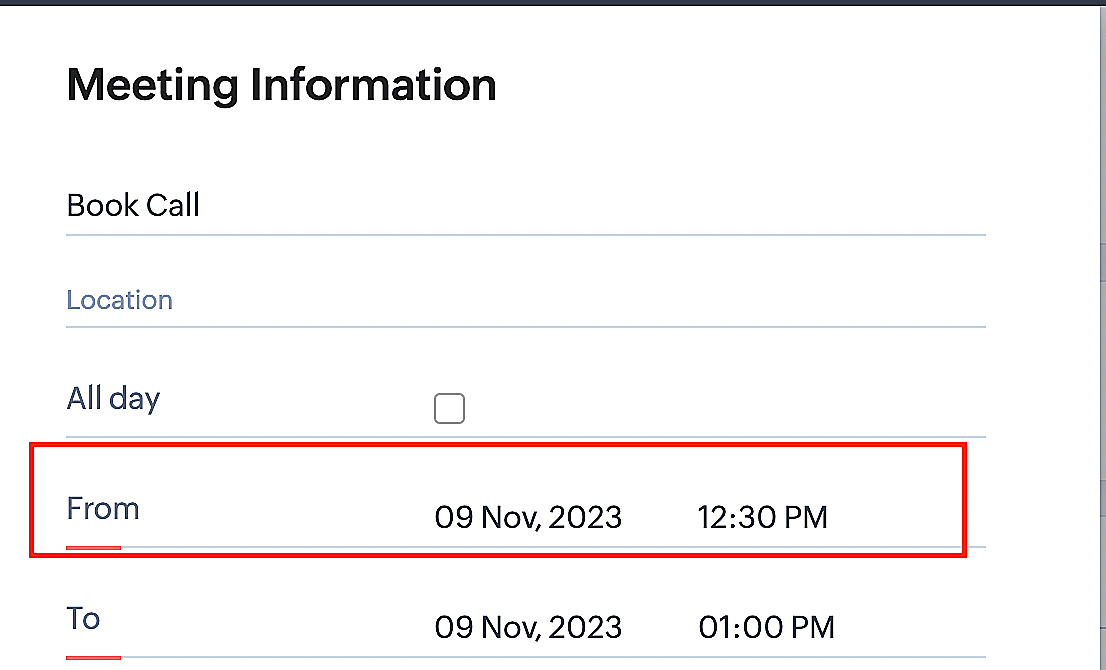
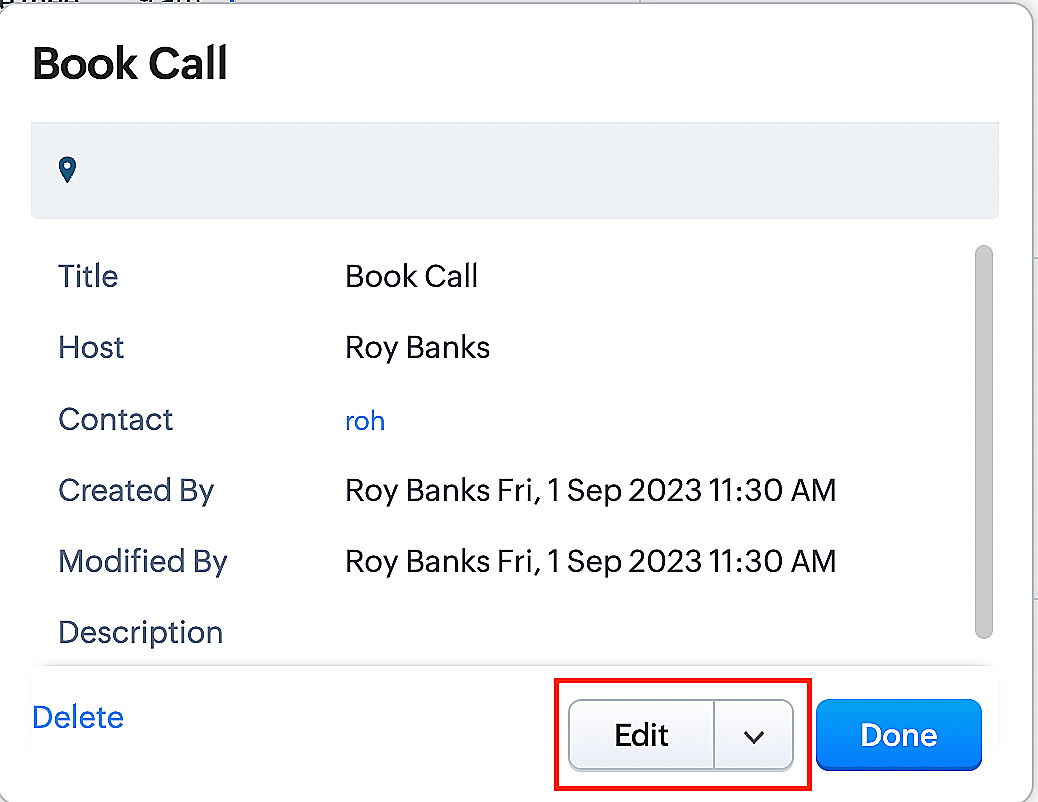
Create a function for rescheduling appointments
Complete these steps in Zoho CRM.
Step 1: Creating connections
You don't need to create a separate connection for the reschedule action. You can utilize the same connection name that we established in Part 1 of the Zoho Bookings - Zoho CRM bidirectional sync.
Step 2: Creating functions
Configuring a function that reschedules appointments differs slightly from the functions we discussed in Part 1 of the Zoho Bookings - Zoho CRM bidirectional sync.
Note: Here, we'll fetch the time zone in which the customer scheduled the appointment so that when we reschedule the booking, it will be rescheduled within the same time zone the customer initially chose.
Here are the steps:
1. Go to Setup > Developer Space > Functions.
2. In the Functions page, click + Create New Function.

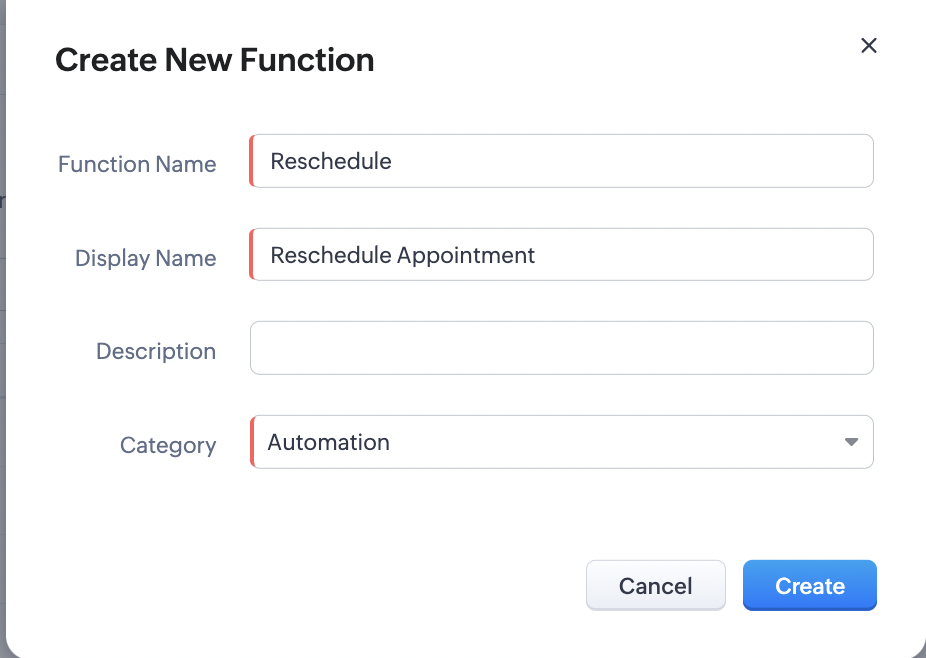
3. Configure the function name, display name, and description.
4. Set the category as automation.
Reference
Reference
5. Next, configure the function's arguments. For the reschedule function, we'll have to pass two arguments: bookingID
as a string, and from as a date.
a. Click on Edit Arguments on the Deluge script page.

b. Set the Parameter Name as bookingID. (Please note that the "bookingID" value is case sensitive and must match
the term used in the code).
c. Set the type as string.
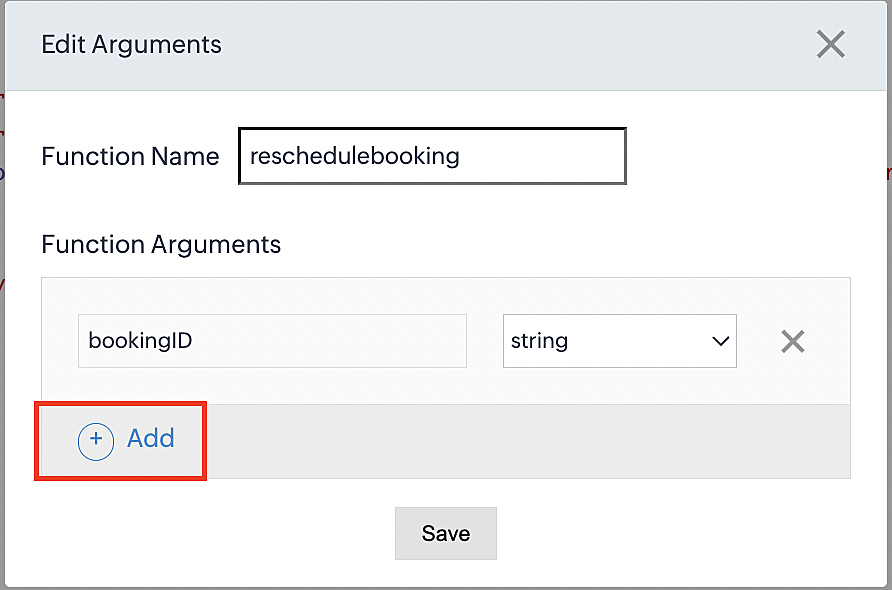
d. Click the +Add button to add a second argument.
e. Set the Parameter Name as from and its type as date.
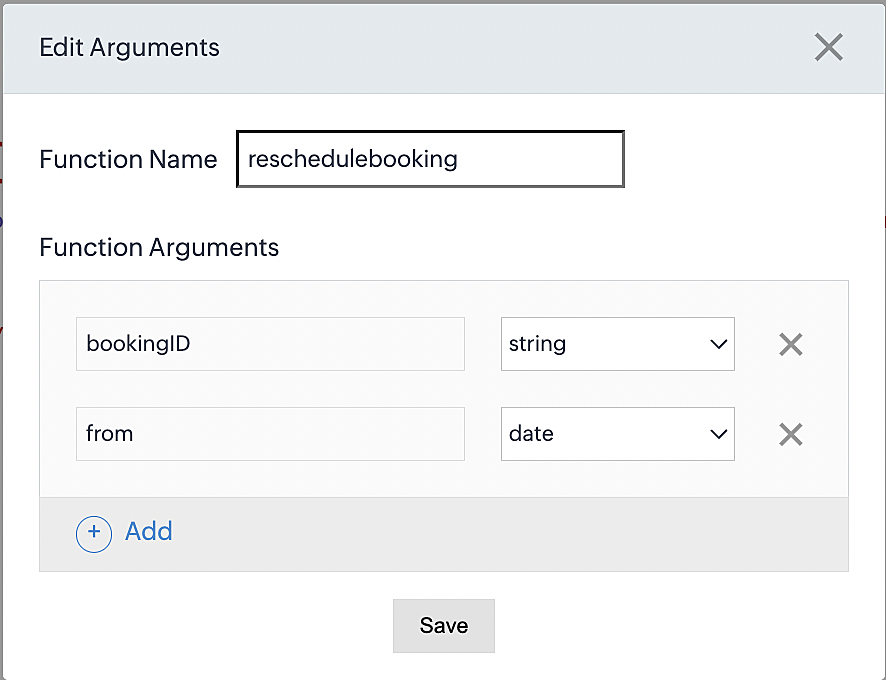
Here, we're using the reschedule appointment API. The term "from" specifically denotes the appointment's start time. In the reschedule API, the booking ID is a required parameter, and we must provide either the staff ID or the start time. Given that we're rescheduling based on the start time, we'll pass the start time as an argument and use "from" as the reference point.
More details: Reschedule Appointment API
Please configure the following code on the Deluge script page.
Code link: Rescheduling an appointment
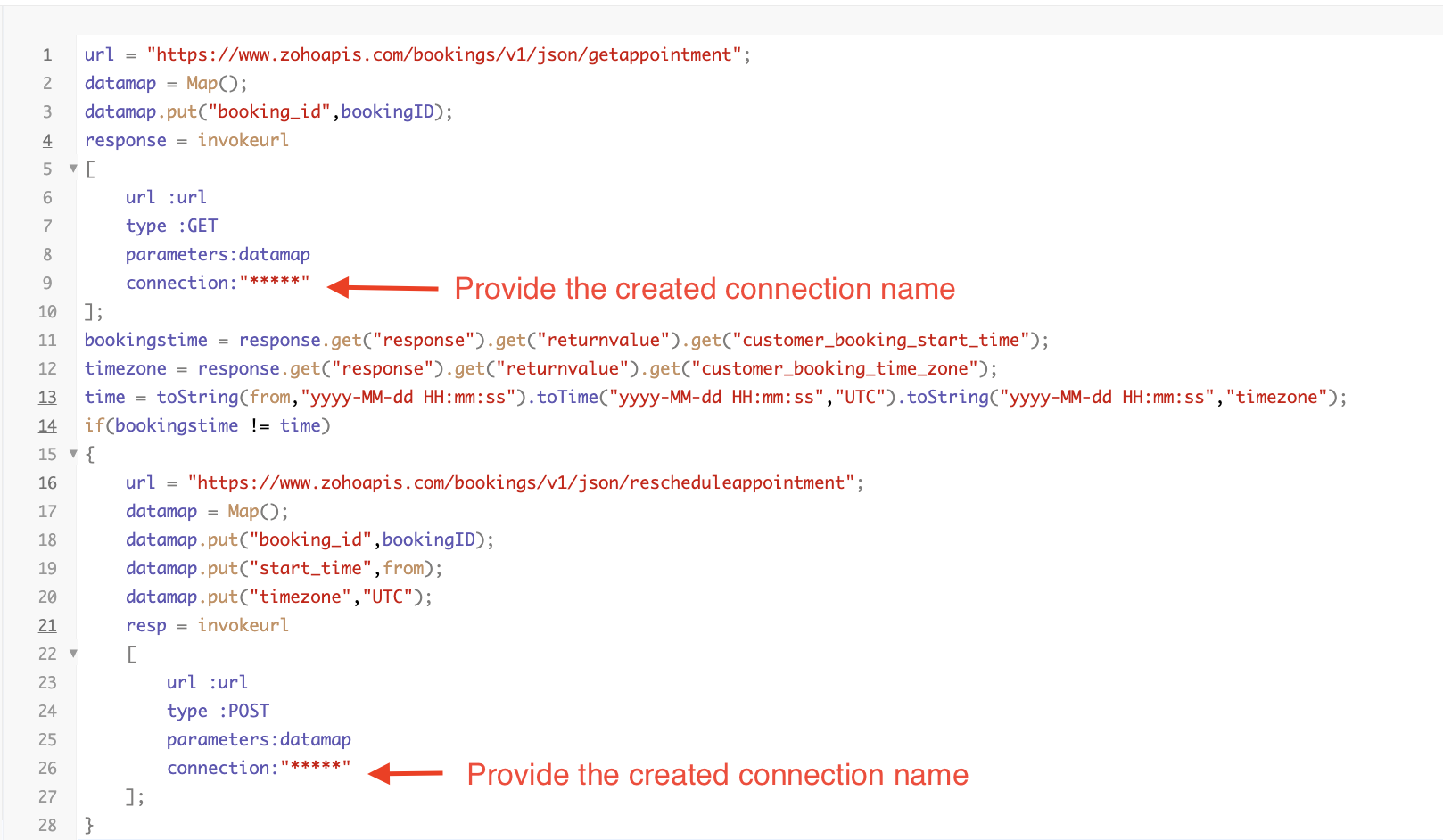
Here's an explanation of the code used for the reschedule function, split into three parts for purposes of clarity:
Lines 1-10 serve to invoke the "get appointment" API to retrieve the relevant booking ID and obtain the associated details. The purpose behind fetching this booking data is to access the actual booking start time and the time zone in which the customer initially scheduled the appointment using the Zoho Bookings application. This information is essential for comparing it with the rescheduled date and time.
- Line 1: Based on the Zoho Bookings account's data center, we'll set up the API endpoint URL configuration. More
details: Domain-specific API URLs
- Line 3: To obtain appointment details, we utilize the GET Appointment API. In this API, the booking ID is a mandatory
field, so we retrieve the booking ID from the Meetings module and subsequently pass it into the code to
retrieve the corresponding booking details.
- Lines 4-10: We use the invokeURL task for API calls. To learn more about the invokeURL task, please refer to the
following document: InvokeURL task for API calls
In lines 11-13, we execute booking data retrieval and date-time format conversion operations.
- Line 11: Here, we're fetching the booking's exact start time as scheduled by the customer.
- Line 12: Here, we're fetching the time zone in which the customer scheduled the appointment.
- Line 13: We perform the date-time format conversion to ensure compatibility with the reschedule appointment API. This API requires the appointment's start time to be in the format dd-MMM-yyyy HH:mm:ss. We retrieve the start time from the Zoho CRM Meetings module, match it to your CRM application's date and time format, and convert it to the format Zoho Bookings' reschedule appointment API supports.
Lines 14-27 serve to perform comparison and rescheduling operations.
- Line 14: Here, we're implementing an "if" condition to compare the actual booking start time (bookingstime) and the rescheduled time (time). We do this in order to execute the reschedule API function only if there is any change in the appointment's start date and time. If we don't implement the "if" condition to compare both inputs, the reschedule API function would enter a loop, continuously executing and potentially exceeding the API count limit.
- Lines 15-27: We use the reschedule appointment API, which requires the booking ID as a mandatory parameter, along with either the staff ID or start time. In this case, as we're rescheduling appointments based on the start time, we provide both the booking ID and the start time. The reschedule appointment API functions similarly to the APIs we've previously discussed, such as the cancel, mark as completed, and no-show APIs.
By reaching the end of these final steps, we've successfully created a function that executes rescheduling actions.
Now, let's proceed with creating a workflow and linking the reschedule function to it. This enables us to automate the syncing of appointment rescheduling actions from Zoho CRM to Zoho Bookings.
Creating a workflow
Create a workflow that handles appointment rescheduling in Zoho Bookings whenever a corresponding meeting is rescheduled within the Zoho CRM application
Part 1: Creating the rule
1. Go to Setup > Automation > Workflow Rules.
2. In the Workflow Rules page, click Create Rule.

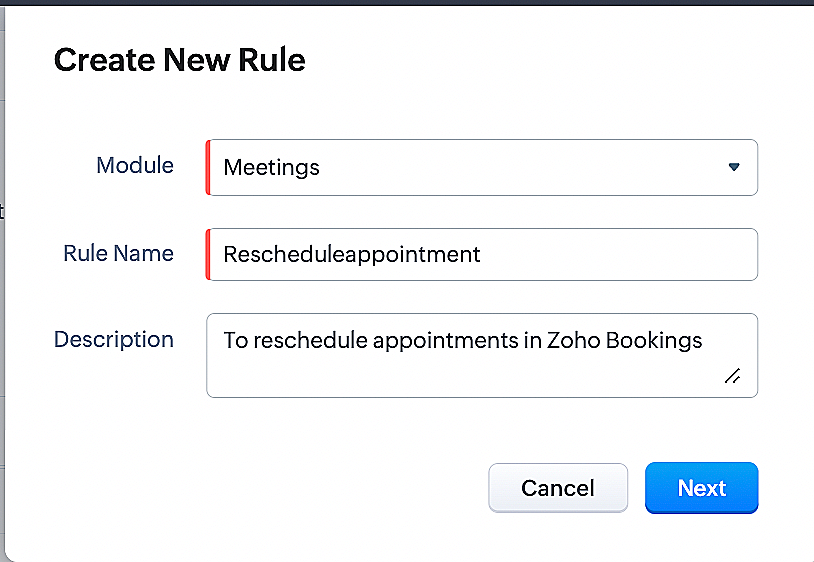
3. Select Meetings under Module and configure the rule name and description as required.
Reference:
Part 2: Specifying the rule trigger
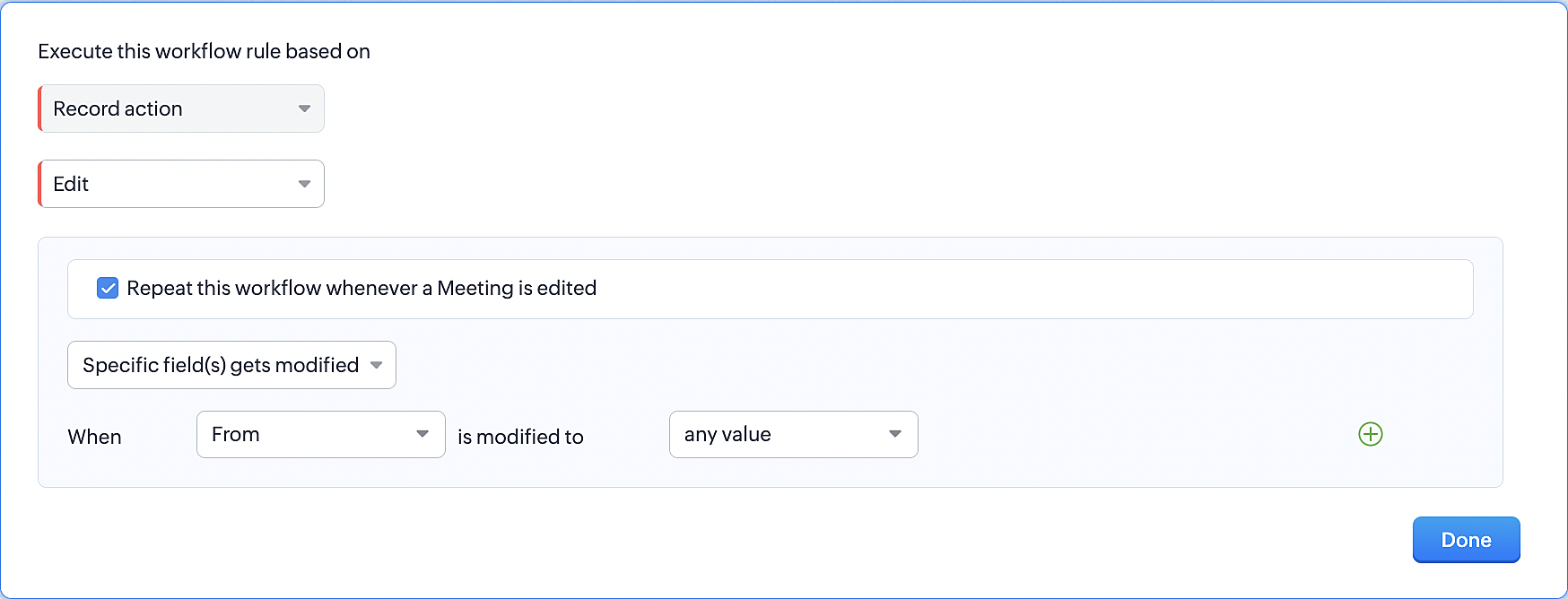
1. Record Action > Edit.
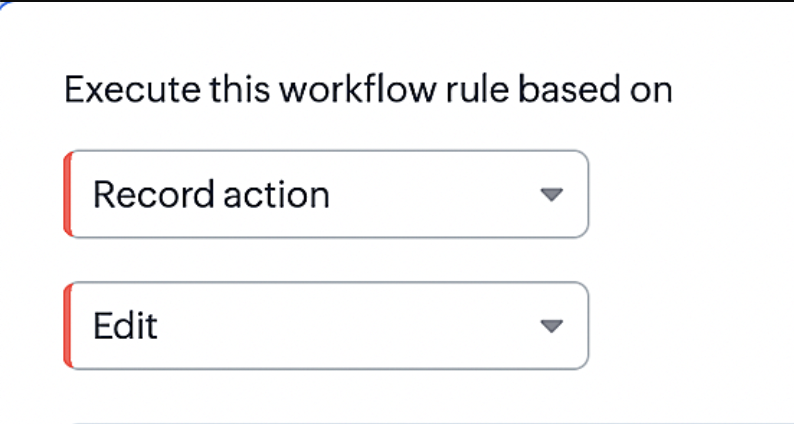
2. Enable the Specific field(s) gets modified setting and configure it per the screenshot below.
This serves to ensure that the workflow is executed only when the "From" field of the meeting is edited.
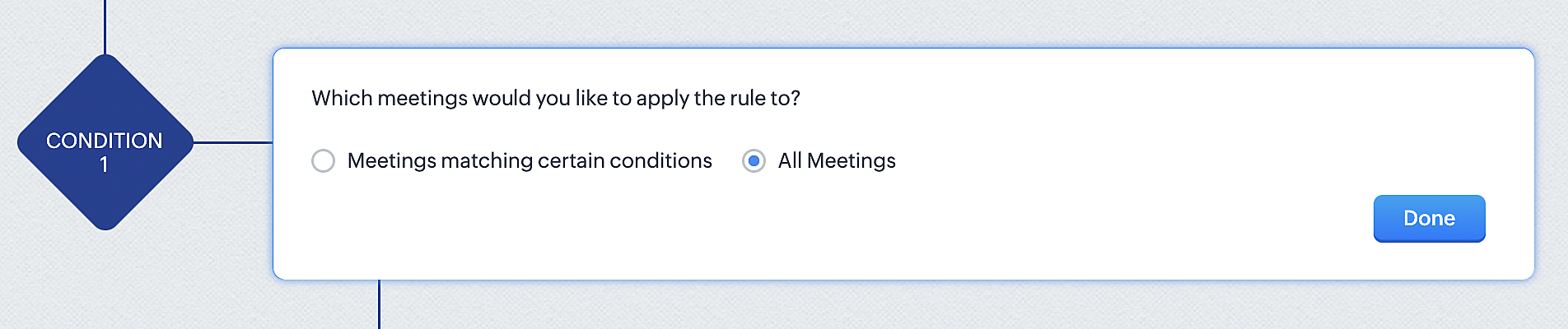
3. Configure condition > All Meetings.
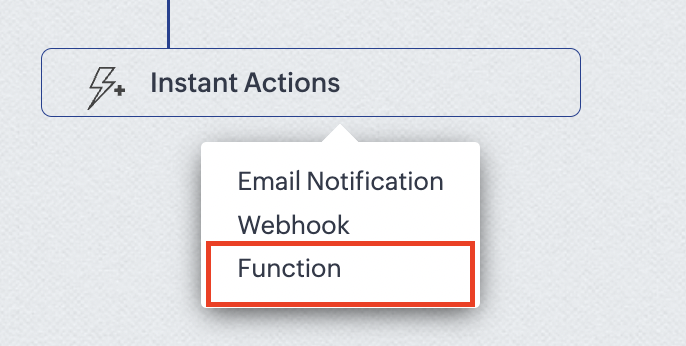
4.Instant Actions > Function.
5. Click the New Function button.

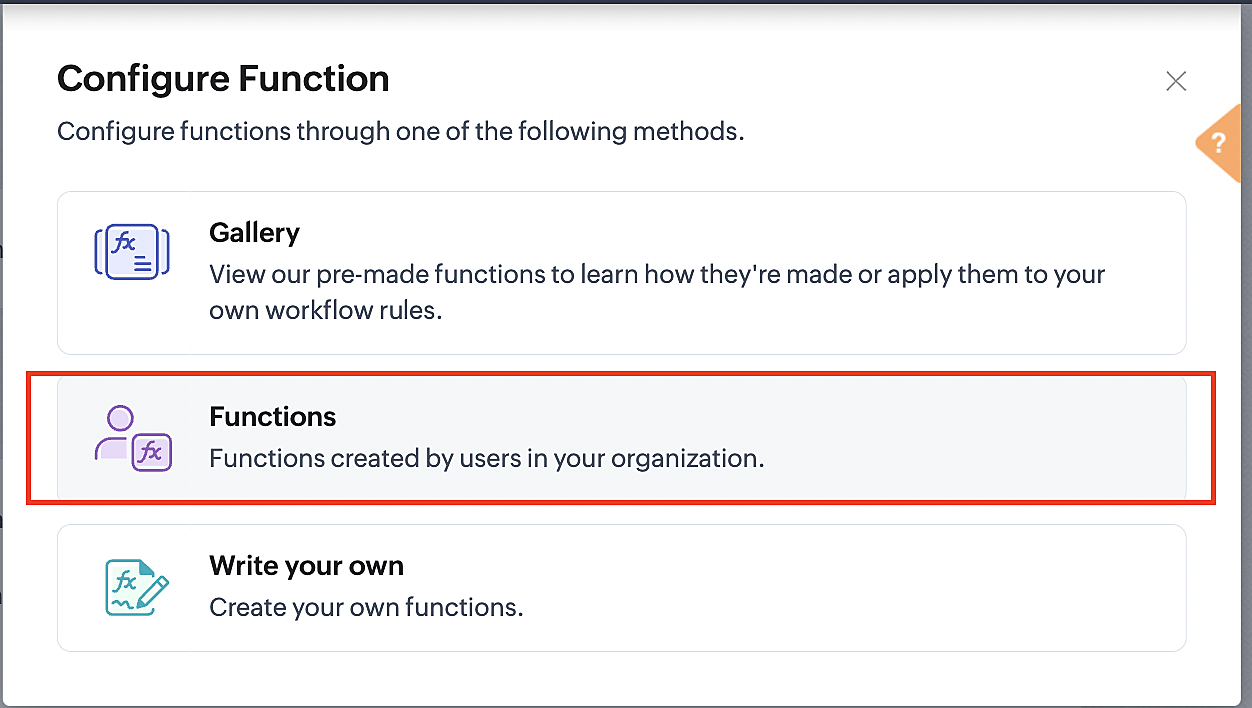
6. In the Configure custom function page, select the "reschedule" function you created from among the functions users in your organization have created.
More details: Specify rule triggers
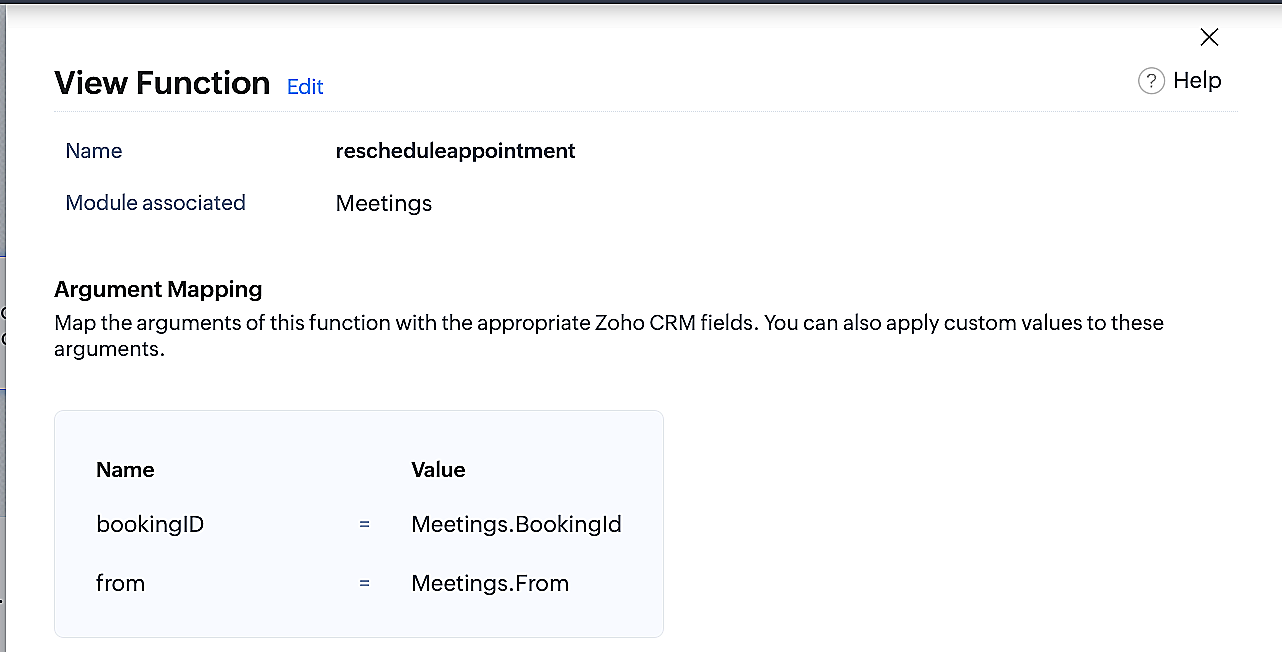
Part 3: Argument mapping
1. Press # to choose an argument value.
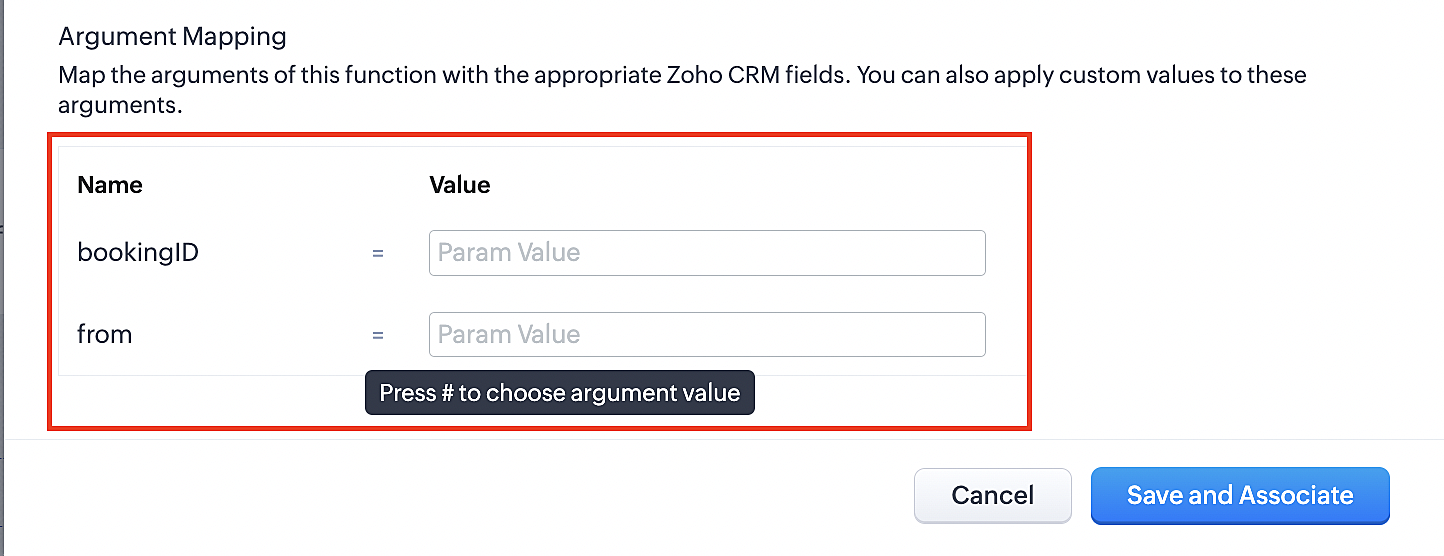
2. Select Meetings under Module and configure the field as "BookingId".
3. Select Meetings under Module and configure the field as "From".
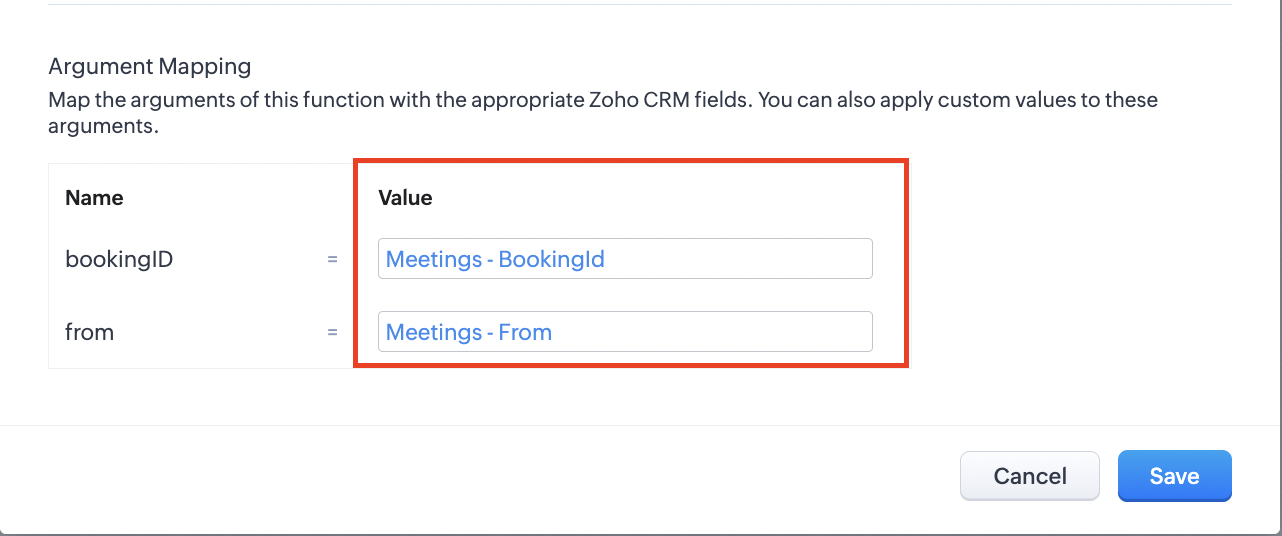
4. Click the Save and Associate button.
Reference:
Below is the final flow of the reschedule appointment workflow:
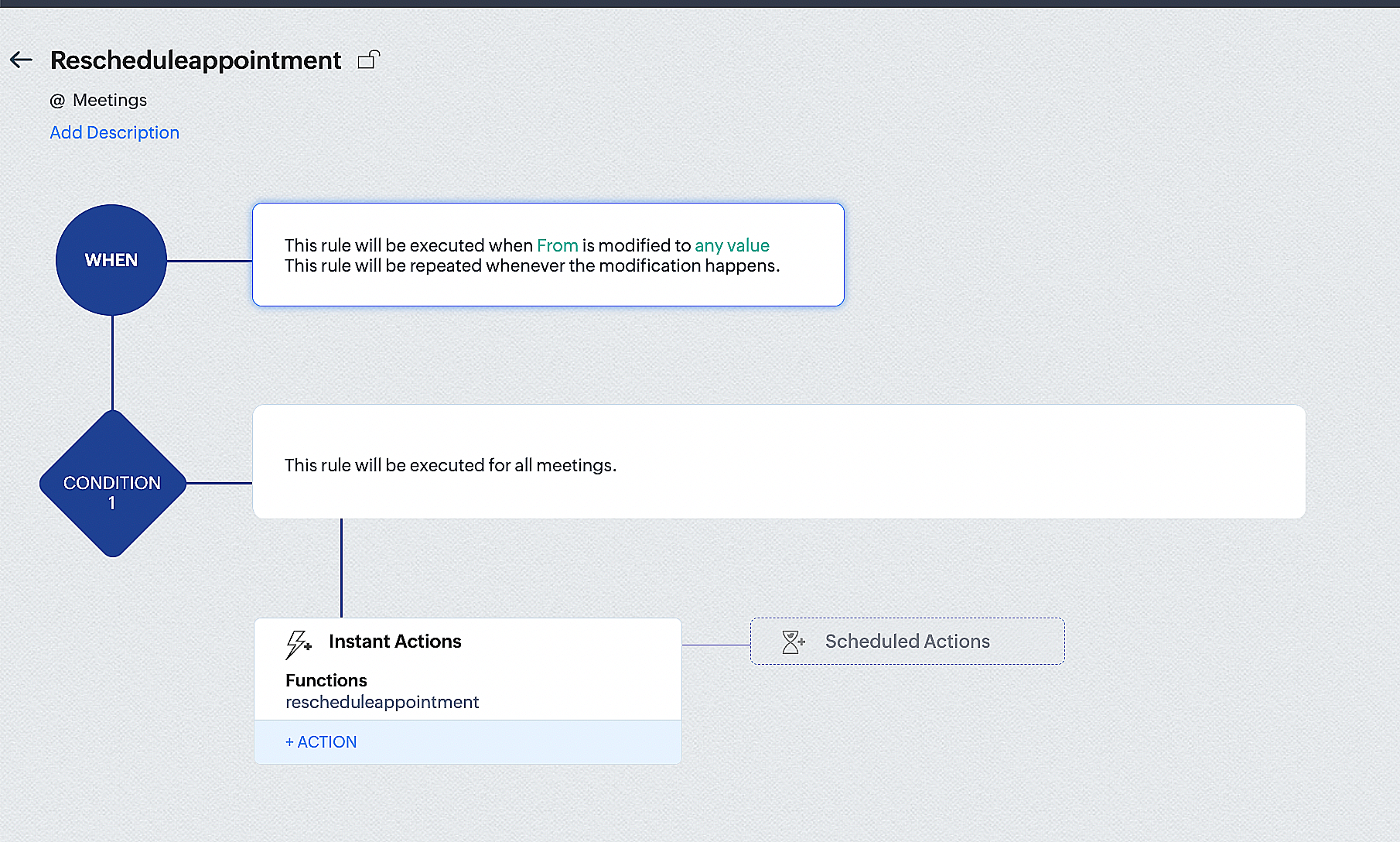
By the end of this process, we will have created a workflow that automatically executes when the "From" field in the Zoho CRM Meetings module is edited with a new date and time. As a result, this workflow will also reschedule the associated bookings for that meeting to the new date and time in Zoho Bookings.
Conclusion
We've arrived at the end of the community post. As mentioned in Part 1 of the Zoho Bookings—Zoho CRM bidirectional sync community post, with all of these configurations in place, you'll be able to book, cancel, reschedule, and update the status of appointments in Zoho Bookings directly from your Zoho CRM application. Which will make your appointment management easier.
If you have any questions or need assistance with your configuration, please email us at hello@zohobookings.com or support@zohobookings.com.
Access your files securely from anywhere
Centralize Knowledge. Transform Learning.
All-in-one knowledge management and training platform for your employees and customers.
New to Zoho Recruit?

Zoho Developer Community
New to Zoho LandingPage?
Zoho LandingPage Resources
New to Zoho Survey?
New to Zoho CRM Plus?
Deliver unforgettable customer experiences
New to Zoho CRM Plus?
Deliver unforgettable customer experiences
New to Zoho Marketing Plus?
Everything you need to run your marketing
New to Zoho Marketing Plus?
Everything you need to run your marketing
New to Bigin?





Topic Participants
Kaushik S
New to Zoho TeamInbox?
Zoho TeamInbox Resources
Zoho CRM Plus Resources
Zoho Books Resources
Zoho Subscriptions Resources
Zoho Projects Resources
Zoho Sprints Resources
Qntrl Resources
Zoho Creator Resources
Zoho CRM Resources
Design. Discuss. Deliver.
Zoho Show Resources

Get Started. Write Away!
Writer is a powerful online word processor, designed for collaborative work.
Zoho CRM コンテンツ
-
オンラインヘルプ
-
Webセミナー
-
機能活用動画
-
よくある質問
-
Ebook
-
-
Zoho Campaigns
- Zoho サービスのWebセミナー
その他のサービス コンテンツ
Nederlandse Hulpbronnen

ご検討中の方
Recent Topics
Need help getting my mail on iPhone and Tablet
I need to access my Zoho mail via the iPhone Mail app. I have entered the login name, password and the incoming and outgoing servers, which my Mail Settings page says are imappro.zoho.com and smtppro.zoho.com. The iPhone keeps saying it cannot authenticate.Add an background image to an email template in CRM
Hi all, We wants to put an background image behind all our email templates. Is there a way to import this thru html. If i put the option background image in <body style="background-image:...</body> and i look to the preview it shows our background, butHow do I bulk archive my projects in ZOHO projects
Hi, I want to archive 50 Projects in one go. Can you please help me out , How can I do this? Thanks kapilCopy contents of File Upload Field into Workdrive
Hello, I have set up our CRM so that a Workdrive folder is automatically created for each Deal via workflow, this adds the id of the folder into a dedicated field. We also have a field on each Deal called 'Approved Layout', which is a file upload field.ZeptoMail API
Hello Since today, we experience issues with the ZeptoMail API. When trying to send e-mails using: https://api.zeptomail.eu/v1.1/email we receive the error: (503) Site unavailable due to a traffic surge. Please try again shortly. I kindly ask you to identify553 Relaying disallowed. Invalid Domain - gzkcompany.ro
Hi there, Can you please assist me in getting the right domain settings? I just renewed my domain subscription, after expired and i got error: 553 Relaying disallowed. Invalid Domain - gzkcompany.ro Zoho mail can receive emails, but its impossible toNot able to receive emails for a while
I am not able to receive emails for a while now.Confirmation requested: eligibility and process to downgrade to Forever Free — tenant bigbanghawking.com
Thank you for your reply. I am testing Zoho Mail from Brazil with the tenant bigbanghawking.com (endpoint: mail.zoho.com) and we are currently on the Premium trial that expires 21/01/2026. Before deciding whether to pay or cancel, I need written confirmationZoho API v2.0 - get ALL users from ALL projects
Hello, I've been trying to work on an automatization project lately and I find it difficult to work with this strict structure. To be more explicit, if i would like to get all users participating in a project i would need to get all projects first. Same thing with projects. If i want to get all projects, I would need to get all portals first. The problem with this aproach is that it consumes a lot of time and resources. I want to ask if there is another way of gettingالموقع لا يقوم بالسداد
السلام عليكم ورحمة الله وبركاته وبعد من أمس وانا احاول السداد للدومين YELLOWLIGHT ولا اتمكن من السداد اقوم بتعبئة جميع البيانات ولكن دون جدوى يطلع لى حدث خطأ ماNew in Office Integrator: Enhanced document navigation with captions and cross references
Hi users, We're pleased to introduce captions, table of tables and figures, and cross-references in the document editor within Zoho Office Integrator. These features allow you to structure documents efficiently and simplify document navigation for yourWhere Do I set 24h time format in Cliq?
Where Do I set 24h time format? Thanks🎉 ¡Seguimos trayendo novedades a Español Zoho Community! 🎉 Confirmada la agenda y ubicación para los Workshops Certificados
Si todavía no te has hecho con tu entrada para nuestros Workshops Certificados del próximo 26 y 27 de marzo o, por el contrario, estabas esperando que confirmáramos dónde los celebraremos, ¡este post es para ti! 📍¿Dónde nos vemos?📍 Nuestros WorkshopsUser is already present in another account error in assigning users to marketing automation
Hello everyone Greeting, I had a problem in assigning user in marketing automation, when I try to add it I see this error: (User is already present in another account error) what should I do?What's New in Zoho POS - January 2026
Hello everyone, Welcome to Zoho POS’s monthly updates, where we share our latest feature updates, enhancements, events, and more. Let’s take a look at how January went. Sort and resolve conflicts Conflicts are issues that may arise when registers andNot receiving email from customers and suppliers
I am getting error . most of the customers tell me not able to send me email please check i have attached screenshotCreate user
Hello I want to create user, but i get this error Unusual activity detected from this IP. Please try again after some time.File emails in Shared email folder
Hi, I am unable to allow users to collaborate in Shared email folders: User 1 shares a folder let's say "SharedTopic" with full permissions Users 2 and 3 can see this folder but are unable to add emails to this folder or search in this folder. For example,Consolidated report for multi-organisation
I'm hoping to see this feature to be available but couldn't locate in anywhere in the trial version. Is this supported? The main aim to go to ERP is to have visibility of the multi-organisation in once place. I'm hopeful for this.How to Switch from Outlook for Mac to Outlook for Windows
The most often used file formats for users to manage crucial data are OLM and PST files. PST files keep a copy of data on the configured system from Outlook, while the OLM file contains the Mac Outlook data items, which are only accessible with OutlookZoho Books Inter-company integration
We have an Indian parent entity, and its accounting is managed in Zoho Books. We also have a subsidiary company in Dubai under the same parent entity, for which we have procured a separate Zoho Books license. I want to understand whether Zoho supportsName autocomplete
Hi, During searching emails the web tool does not always propose the auto-completion of the saved emails. As a result I either have to go to contacts and look up the exact email, or the exact full name including the middle name and any dots, which isAre custom portals accessible on the Zoho learn smartphone app?
In other words, can users external to my organisation, once signed up, use the app in the same way as internal users? ThanksHow to increase my Zoho sign limit.
I cannot send a document/contract for signature. Zoho sign says I reached my monthly limit. May I know how to fix this please? Thanks!Can not add m365 outlook account to zohomail.
I am attempting to use zoho mail as an imap client to add my outlook.com m365 account. In the m365 exchange admin center i have made sure the imap is enabled. In zoho mail i go to settings, mail accounts, add account, add imap account, i select "outlook",Unable to attach Work Order / Service Appointment PDF to Email Notifications (Zoho FSM)
I’m trying to include the Work Order PDF or Service Appointment PDF as an attachment in Email Notifications (automation/notification templates), but I don’t see any option to attach these generated PDFs. Is this currently supported in Zoho FSM? If not,local file csv import problem
The issue occurs when I upload a CSV file via Databridge. In the preview, everything looks correct — the values are in the proper columns. However, after clicking Import, the first column becomes empty, and the values from that column appear in a newFunción Deshacer y Rehacer
Hola. Soy un reciente usuario de Zoho Notebook que he migrado desde Evernote. He encontrado en falta una función que considero muy importante: un botón para "deshacer". Es frustrante cuando se borra un parte del texto o un archivo de una nota, generalmenteTip #59- Technician Console: Exploring View option- 'Insider Insights'
Hello Zoho Assist Community! Ever wondered how technicians adapt quickly during a live support session? Imagine a customer reaching out with an issue that’s disrupting their work. The technician starts a remote session and begins troubleshooting rightMRP or Manufacturing Module for Zoho
We have been searching for options for a production planning or MRP that will integrate with Zoho. Zoho Creator is pushed as a platform that can have an MRP built from scratch but we would like to find more of an out of the box solution and modify it to fit our needs. Are there any recommendations? Would Zoho consider creating a custom solution in Creator to support this need?encountering an error when attempting to associate an email with a Deal using the Zoho CRM extension in Zoho Mail.
When I click "Yes, associate," the system displays an "Oops!! Something went wrong" error message. I have attached a screenshot of the issue for reference.Can 1 Zoho CRM instance sync with 2 Zoho Marketing Automation instances?
Can 1 Zoho CRM instance sync with 2 Zoho Marketing Automation instances?Can I add Conditional merge tags on my Templates?
Hi I was wondering if I can use Conditional Mail Merge tags inside my Email templates/Quotes etc within the CRM? In spanish and in our business we use gender and academic degree salutations , ie: Dr., Dra., Sr., Srta., so the beginning of an email / letterZoho mail account ownership transfer
We recently took over another company and have assumed responsibility for its Zoho account, including Zoho Mail and all related services. We would like to formally transfer ownership of this account to our organization. Could you please outline the completeEmail Authentication is Failing
I'm trying to setup gitlab with email authentication. I used the following configs picked up from: https://docs.gitlab.com/omnibus/settings/smtp/ gitlab_rails['smtp_enable'] = true gitlab_rails['smtp_address'] = "smtp.zoho.com" gitlab_rails['smtp_port']DMARC reports for mail I didn't send: how to deal with?
I know the enthusiastic amateur's bare minimum about e-mail; am able to set up a Thunderbird account and know the basic acronyms. I have a Zoho Mail account connected to my domain, and have set up SPF, DMARC and DKIM successfully according to Zoho's instructionms
Email set up for communicationFix the speed
It takes ages to load on every step even though my dataset is quite small.Image field in custom module
Hi guy, Is there any hope of adding a custom image field in the custom module? We created a custom module to keep track of assets, and it would be helpful if we could attach an image to the record. Thanks RudyDeluge Function to Update Custom Field
I'm trying to get a Deluge function (which will run as part of a Schedule in Desk) that retrieves all tickets with the status "Recurring" and updates the custom field checkbox "cf_recurring" to "true". Here's what I have, which doesn't work: searchValueNext Page