Kaizen #174 : Client Script Commands

Client Script Commands feature is a highly anticipated functionality that enables users to trigger Client Scripts anywhere within Zoho CRM, extending the scope of client script beyond standard pages and events. In this Kaizen post, we'll explore how to implement and utilize this feature effectively.
In this post,
What are Client Script Commands?
How to create and use Client Script Commands?
Using Command Palette
Using Keyboard Shortcuts
Scenario - 1
Solution
Scenario - 2
Solution
Summary
Related Links
1. What are Client Script Commands?
Client Script Commands feature is another dimension of Client Script that enables users to trigger them anytime and anywhere in CRM, extending their event-driven functionality beyond just specific modules and pages. This functionality can be accessed through custom keyboard shortcuts or a command palette, making it easier for users to perform repetitive tasks quickly
2. How to create and use Client Script Commands?
Create a command by specifying the Category as Commands (instead of module) while creating a Client Script.

Check this documentation for more details.
To trigger a Command, you can use one of the following ways.
A. Using Command Palette
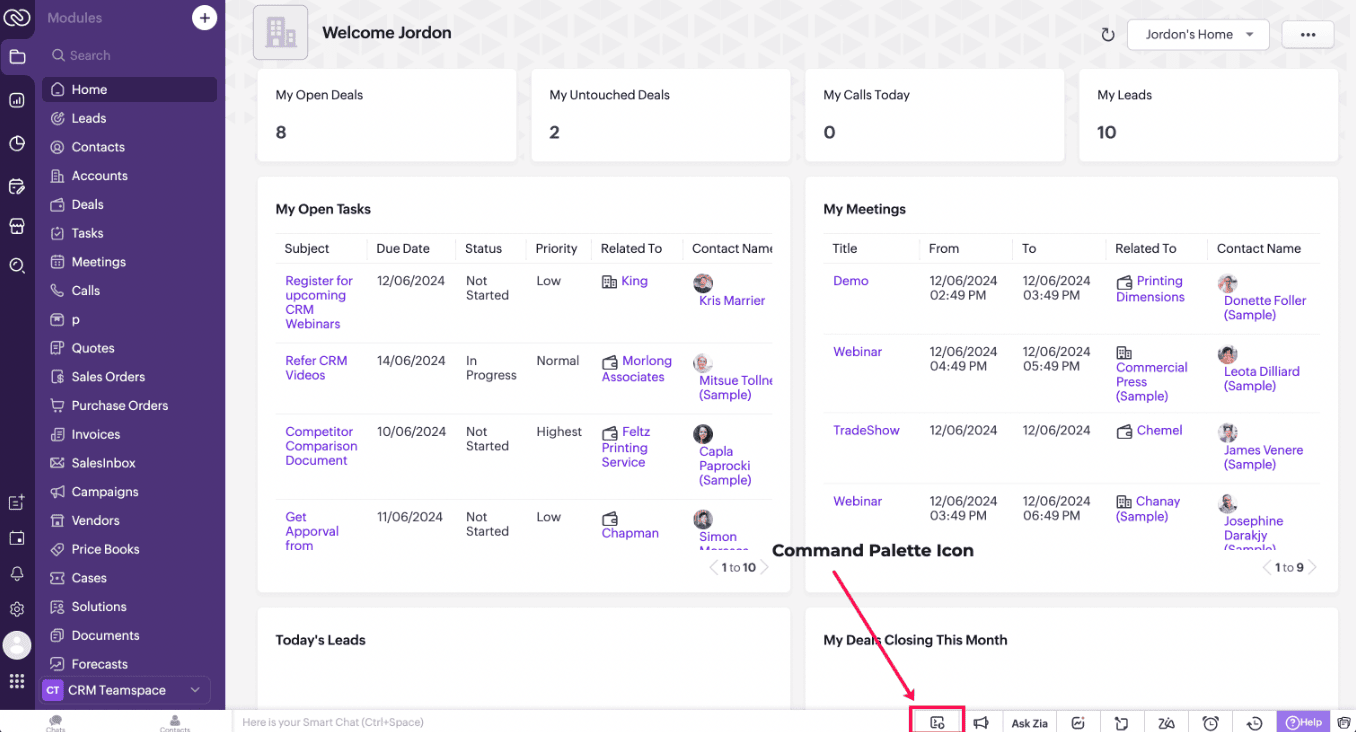
Click on the Command Palette icon in the footer of CRM and select the name of the Command that you want to trigger.
B. Using Keyboard shortcuts
You can also link each of the Commands to a shortcut key and trigger a Command using that designated shortcut key. Each user can set specific shortcuts based on individual preference and use them to trigger a Command.
Check this documentation for more details.
3. Scenario - 1
At Zylker, a financial company using Zoho CRM, Sales Advisors need a quick way to calculate EMI during customer phone calls. The solution should allow seamless access to an EMI Calculator from any page in Zoho CRM.
4. Solution
To achieve this in Zoho CRM, you need to create a Widget for EMI calculator and create a Client Script Command.
A. Create a Widget for EMI calculator
Install Zoho CLI, and follow the steps given in this document to create the Widget app folder. Then update the html, javascript, and css code as per your requirement.
index.html
<!DOCTYPE html>
<html lang="en">
<head>
<meta charset="UTF-8" />
<meta http-equiv="X-UA-Compatible" content="IE=edge" />
<meta name="viewport" content="width=device-width, initial-scale=1.0" />
<title>Document</title>
<link rel="stylesheet" href="style.css" />
</head>
<body>
<div class="loan-calculator">
<div class="top">
<h2>EMI Calculator</h2>
<form action="#">
<div class="group">
<div class="title">Amount</div>
<input type="range" min="1000" value="30000" max="50000" step="500" class="loan-amount" id="loanAmount" />
<div class="slider-label">$<span id="loanAmountValue"></span></div>
</div>
<div class="group">
<div class="title">Interest Rate</div>
<input type="range" min="5" value="6" max="100" step="1" class="interest-rate" id="interesRate" />
<div class="slider-label"><span id="interesRateValue"></span></div>
</div>
<div class="group">
<div class="title">Tenure (in months)</div>
<input type="range" min="6" max="100" step="1" value="12" class="loan-tenure" id="tenureMonth" />
<div class="slider-label"><span id="tenureMonthValue"></span></div>
</div>
</form>
</div>
<div class="result">
<div class="left">
<div class="loan-emi">
<h3>Loan EMI</h3>
<div class="value">123</div>
</div>
<div class="total-interest">
<h3>Total Interest Payable</h3>
<div class="value">1234</div>
</div>
<div class="total-amount">
<h3>Total Amount</h3>
<div class="value">12345</div>
<div class="right">
<canvas id="myChart" width="400" height="400"></canvas>
</div>
</div>
</div>
<script src="https://cdn.jsdelivr.net/npm/chart.js@3.6.2/dist/chart.min.js"></script>
<script src="https://live.zwidgets.com/js-sdk/1.2/ZohoEmbededAppSDK.min.js"></script>
<script src="main.js"></script>
</body>
</html>
Click here to view the complete code.
Once you have added the code, upload the zip file by following the below steps.
Go to Setup > Developer Space > Widgets.
Click Create New Widget and Fill in the details.
The Hosting should be "Zoho" and mention the html page of the app folder that you uploaded.

Note:
The widget should be of "button" type in order to render through a Client Script.
B. Create Client Script Commands.
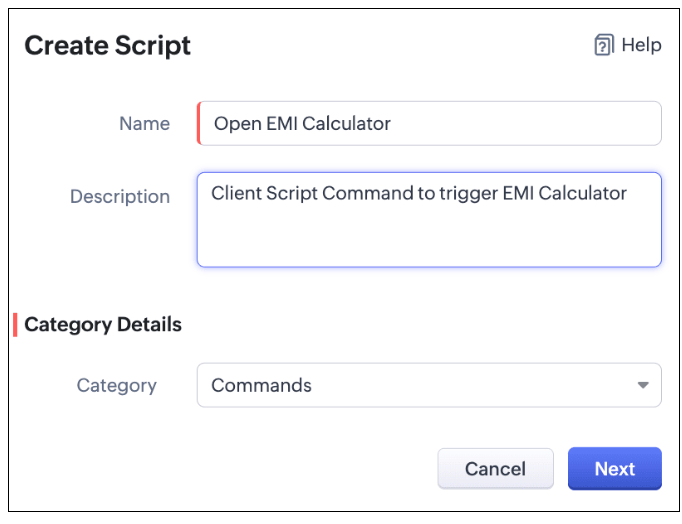
Configure a Client Script Command by specifying the Name and Description The Category should be Commands. Click Next. Click here to know how to configure a Client Script.
Enter the following script and click Save.
ZDK.Client.openPopup({ api_name: 'emi_calculator', type: 'widget', header: 'EMI Calculator', animation_type: 4, height: '750px', width: '500px', top:'100px',left: '500px' }, { data: 'sample data to be passed });
The syntax of openPopup() is as follows.
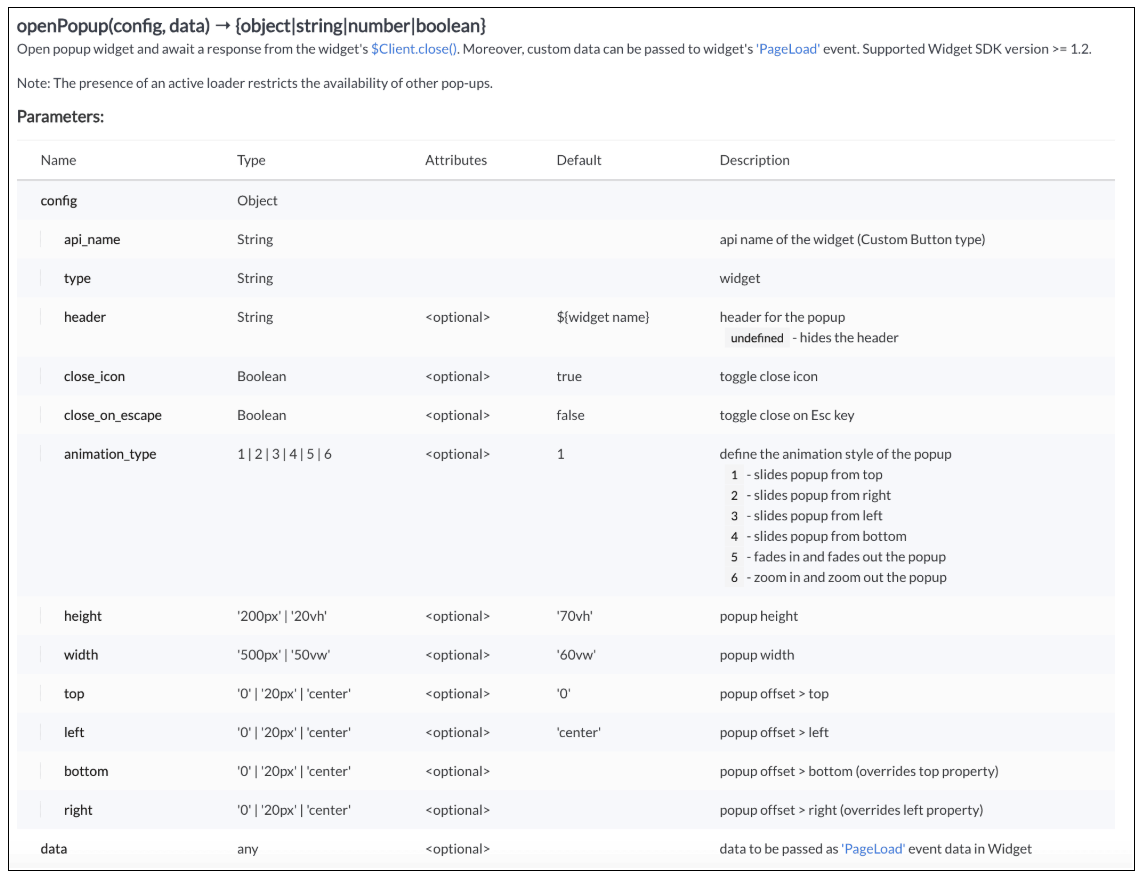
Here "emi_calculator" is the API name of the Widget,
Type is Widget,
Header is EMI Calculator,
animation type is 4 where the popup slides from the bottom.
The other parameters are optional and has default values as shown in the image.
Here is how the EMI Calculator appears as and when the salesperson needs. The user can either click on the Command Palette Icon at the footer or use a keyboard shortcut as per his convenience to open the calculator.
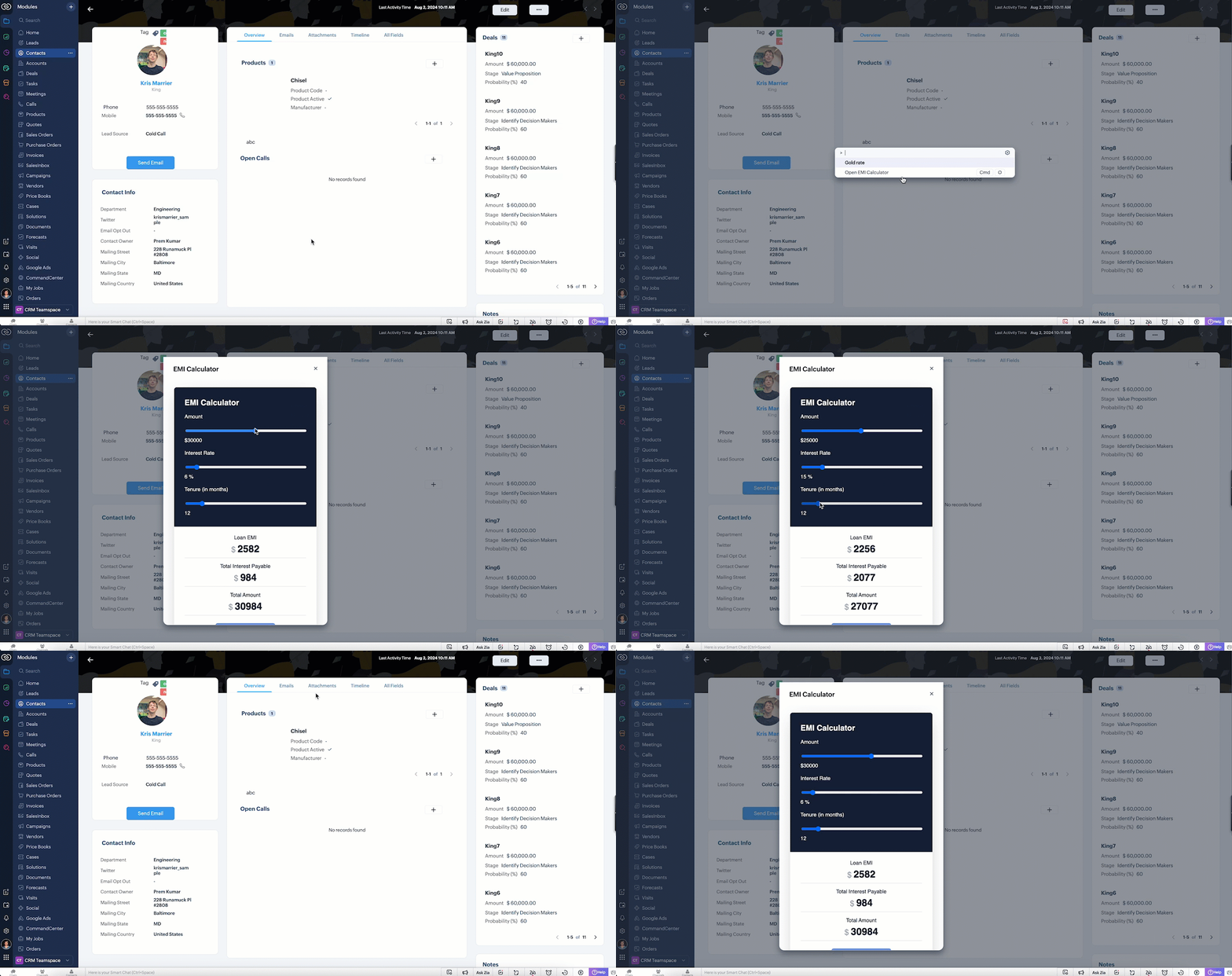
In the above gif, the keyboard shortcut is cmd O.
To customize the keyboard shortcut,
Go to Setup → General → Personal Settings. Select "Motor" from the Accessibility Tab and Click "View Shortcuts" as shown in the below gif.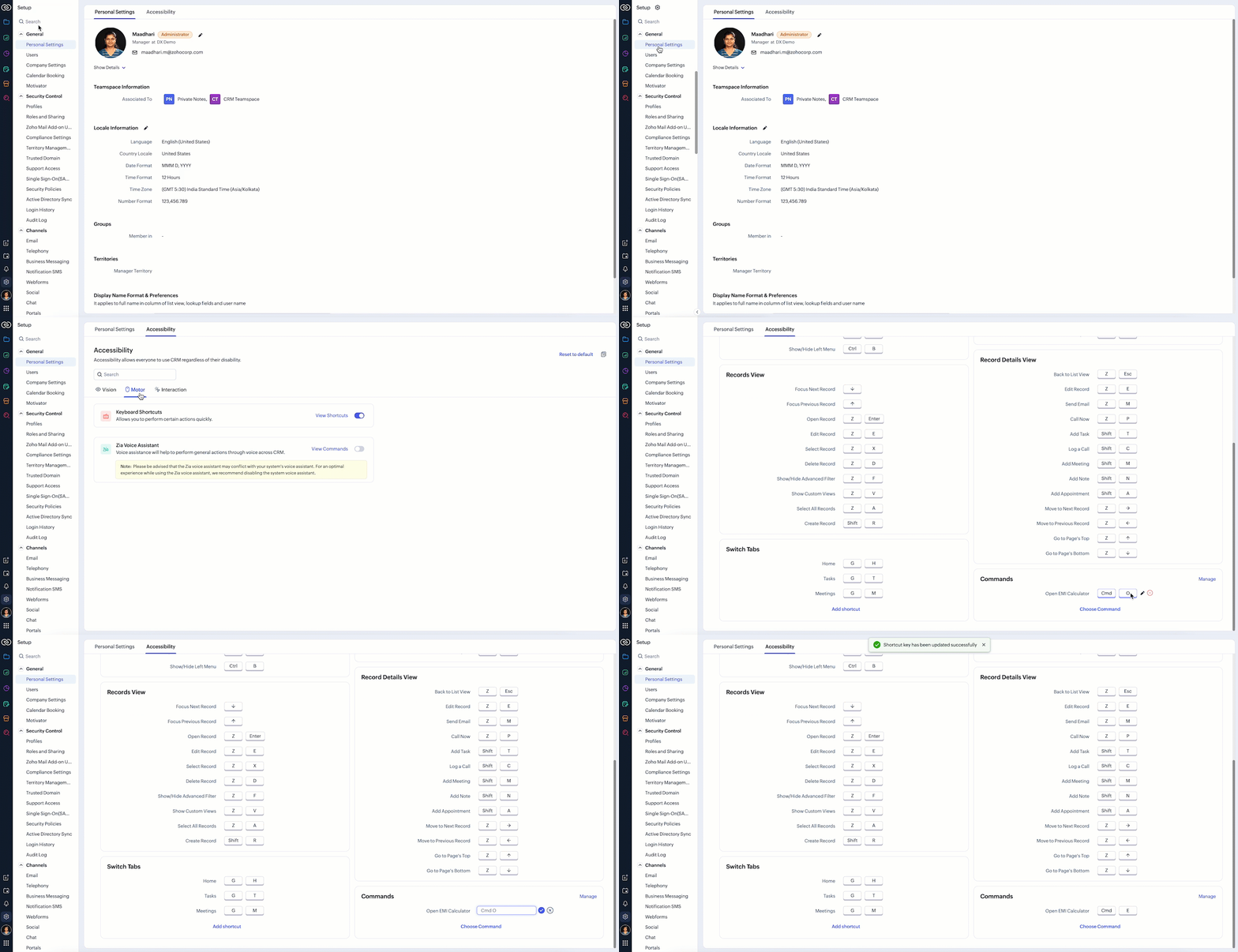
4. Scenario - 2
At Zylker, an international wholesale company using Zoho CRM, salespeople need a quick way to check real-time gold rates from different countries while discussing bulk orders with retailers. The solution should provide seamless access to updated, region-specific gold rates directly within the CRM interface to assist with accurate pricing decisions during customer interactions.
5. Solution
To achieve this in Zoho CRM, you need to create a Widget for EMI calculator and create a Client Script Command.
A. Create a Widget for gold rate
Install Zoho CLI, and follow the steps given in this document to create the Widget app folder. Then update the html, javascript, and css code as per your requirement.
index.html
<!DOCTYPE html>
<html>
<head>
<meta charset="UTF-8">
<script src="https://live.zwidgets.com/js-sdk/1.2/ZohoEmbededAppSDK.min.js"></script>
<div class="container">
<div style="display: flex;">
<label for="country" style="width: 70%;font-weight: bolder;">Today's Gold rate:</label>
<select id="country" onchange="updateGoldRates()" style="width: 30%;">
<option value="USD" >United States</option>
<option value="INR" selected>India</option>
<option value="GBP">United Kingdom</option>
<option value="AUD">Australia</option>
</select>
</div>
<table id="goldRatesTable">
<thead>
<tr>
<th>Type</th>
<th>Rate (Per Gram)</th>
</tr>
</thead>
<tbody>
</tbody>
</table>
</div>
<script>
const goldRatesData = {
};
const symbol = ['₹', '$', '£', 'A$'];
async function getLiveData (currency) {
var myHeaders = new Headers();
myHeaders.append("x-access-token", "goldapi-4wvh4nslzb5p0d5-io");
myHeaders.append("Content-Type", "application/json");
var requestOptions = {
method: 'GET',
headers: myHeaders,
redirect: 'follow'
};
let response = await fetch(`https://www.goldapi.io/api/XAU/${currency}`, requestOptions);
let res = await response.text();
let data = JSON.parse(res);
let desig;
if(data.currency === 'INR'){
desig = symbol[0];
}
else if(data.currency === 'USD'){
desig = symbol[1];
}
else if(data.currency === 'GBP'){
desig = symbol[2];
}
else if(data.currency === 'AUD'){
desig = symbol[3];
}
goldRatesData[`${data.currency}`] = [
{ type: '24K Gold', price: `${desig + " " + data.price_gram_24k}` },
{ type: '22K Gold', price: `${desig + " " + data.price_gram_22k}` },
{ type: '18K Gold', price: `${desig + " " + data.price_gram_18k}` }
];
};
async function updateGoldRates() {
var currency = document.getElementById("country").value;
console.log("Event:: ",currency);
const country = document.getElementById('country').value;
const tableBody = document.querySelector('#goldRatesTable tbody');
tableBody.innerHTML = '';
await getLiveData(currency);
if (country && goldRatesData[country]) {
const rates = goldRatesData[country];
rates.forEach(rate => {
const row = document.createElement('tr');
row.innerHTML = `
<td>${rate.type}</td>
<td>${rate.price}</td>
`;
tableBody.appendChild(row);
});
}
}
updateGoldRates();
ZOHO.embeddedApp.on("PageLoad",function(res){
document.getElementById('msg').innerText = res.data;
});
ZOHO.embeddedApp.init();
</script>
</body>
</html>
Once you have added the code, upload the zip file by following the below steps.
Go to Setup > Developer Space > Widgets.
Click Create New Widget and Fill in the details.
The Hosting should be "Zoho" and mention the html page of the app folder that you uploaded.
B. Create Client Script Commands
Configure a Client Script Command by specifying the Name and Description and click Next. Click here to know how to configure a Client Script.

ZDK.Client.openPopup({ api_name: 'goldrate', type: 'widget',header: undefined, animation_type: 4, height: '350px', width: '300px', top:'100px',left: '500px' }, { data: 'sample data to be passed' }); |
Click here to know more about openPopup().
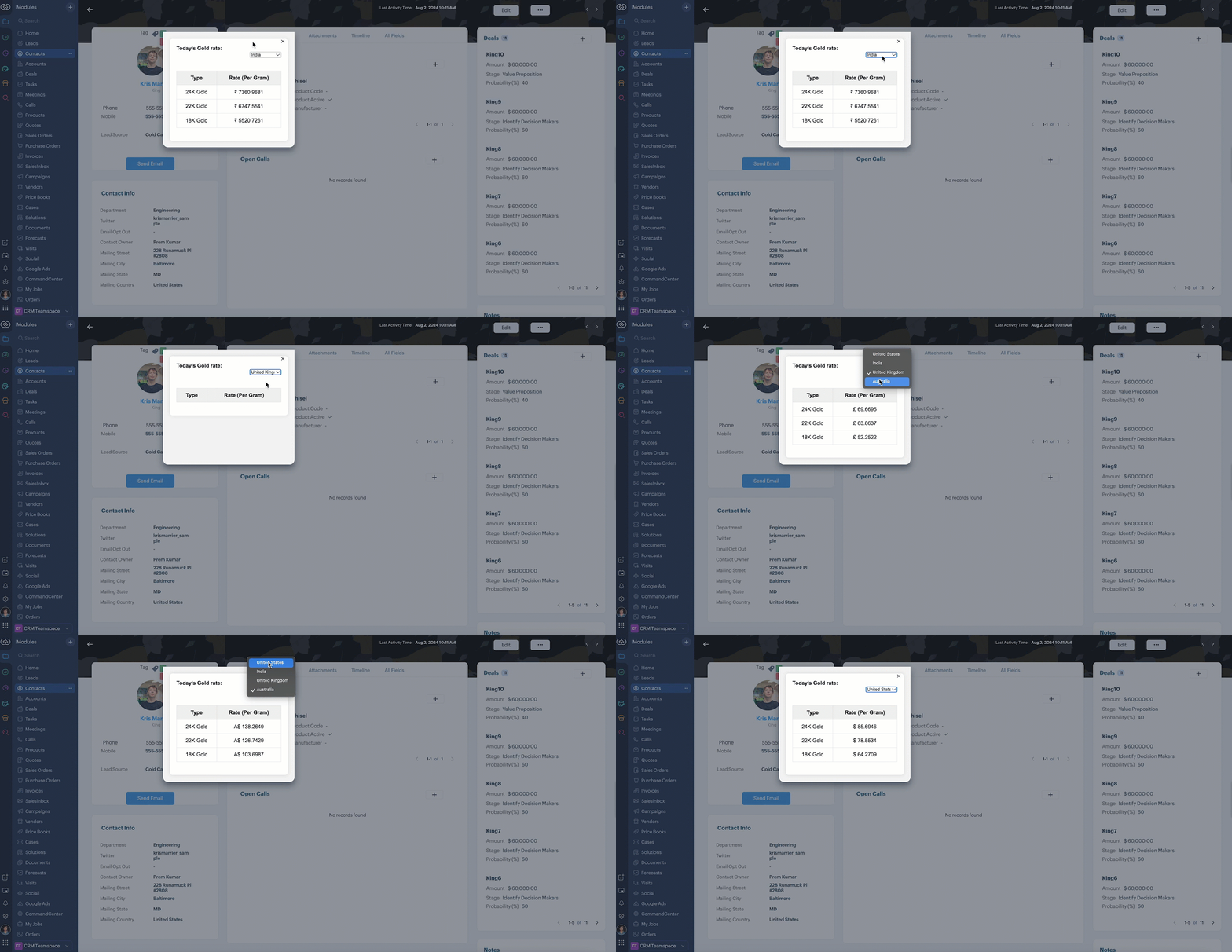
Consider that the user has created the shortcut CMD G to trigger Client Script.
Here is how the Gold Rate appears as and when the salesperson used the shortcut keys CMD G.
6. Summary
We have seen,
how to use Client Script Commands
how to create keyboard shortcuts for Commands
how to view Widget as a popup using Commands
7. Related Links

Access your files securely from anywhere
All-in-one knowledge management and training platform for your employees and customers.

Zoho Developer Community





Topic Participants
Maadhari M
Sticky Posts
Kaizen #198: Using Client Script for Custom Validation in Blueprint
Nearing 200th Kaizen Post – 1 More to the Big Two-Oh-Oh! Do you have any questions, suggestions, or topics you would like us to cover in future posts? Your insights and suggestions help us shape future content and make this series better for everyone.Kaizen #226: Using ZRC in Client Script
Hello everyone! Welcome to another week of Kaizen. In today's post, lets see what is ZRC (Zoho Request Client) and how we can use ZRC methods in Client Script to get inputs from a Salesperson and update the Lead status with a single button click. In thisKaizen #222 - Client Script Support for Notes Related List
Hello everyone! Welcome to another week of Kaizen. The final Kaizen post of the year 2025 is here! With the new Client Script support for the Notes Related List, you can validate, enrich, and manage notes across modules. In this post, we’ll explore howKaizen #217 - Actions APIs : Tasks
Welcome to another week of Kaizen! In last week's post we discussed Email Notifications APIs which act as the link between your Workflow automations and you. We have discussed how Zylker Cloud Services uses Email Notifications API in their custom dashboard.Kaizen #216 - Actions APIs : Email Notifications
Welcome to another week of Kaizen! For the last three weeks, we have been discussing Zylker's workflows. We successfully updated a dormant workflow, built a new one from the ground up and more. But our work is not finished—these automated processes are
Zoho TeamInbox Resources
Zoho CRM Plus Resources
Zoho Books Resources
Zoho Subscriptions Resources
Zoho Projects Resources
Zoho Sprints Resources
Qntrl Resources
Zoho Creator Resources
Zoho CRM Resources
Design. Discuss. Deliver.
Zoho Show Resources

Get Started. Write Away!
Writer is a powerful online word processor, designed for collaborative work.
-
オンラインヘルプ
-
Webセミナー
-
機能活用動画
-
よくある質問
-
Ebook
-
-
Zoho Campaigns
- Zoho サービスのWebセミナー
その他のサービス コンテンツ
Nederlandse Hulpbronnen

ご検討中の方
Recent Topics
Assign Meeting in records
It would be nice to be able to "call and assing" meetings from a record, for example from a Deal. Right now - calendar is synced with CRM - meetings show in calendar - you can go in each meeting and assign it to a record It would be nice to be able toSincronizar eventos de Bigin en Zoho Calendar (Zoho Mail)
Hola Me gustaría poder sincronizar mi Calendario de Zoho (Mail) con los eventos de Bigin. No veo la opción disponible.Sales Receipts in UK Free tier
Is Sales Receipts available in UK Books, specifically at the Free tier? None of the options from the help pages are available to me.My client requires me to have custom pdf file names to except payment for invoices, how can I customize this before emailing.
Hello! I love the program so far but there are a few things that are standing in the way. I hope you guys can code them in so I can keep the program for years to come. My client requires I customize the pdf file names I send in for billing. Can you pleaseWhen I schedule calendar appointments in zoho and invite external emails, they do not receive invites
Hello, We have recently transitioned to zoho and are having a problem with the calendar feature. When we schedule new calendar appointments in zoho the invite emails aren't being sent to the external users that we list in participants. However, this worksMigrate different zoho subscription to zoho one
Dear We have different zoho subscription we need to migrate it to zoho one. Currently we are paying for zoho email, zoho expense, zoho payroll etc under different admin We need to move it too zoho one flexlible plan for all my employeesBigin use in hospital- Human Med or Veterinary
I am looking for users who are in either human or veterinary medicine and use the CRM specifically for referral management tasks. Are you using the basic version? How many users update the CRM and is it effective? Did you pay for additional customizations?Standardize email communication with Signature Template
Maintaining a consistent and professional signature across all outgoing emails is essential for any organization. However, when users manage their signatures individually, it often leads to inconsistencies like varying formats, missing designations, orZoho Books: tax is not automatically pulled from product-data anymore - why?
Hi, until a short time ago, you could set a default taxrate for each product/item. This taxrate automatically appeared each time the item was chosen in an invoice or quote. Why does this not work anymore? The field is still there at the product record,Setting up property management in Zoho Books
Hi, I run a property management business that manages property complexes. There are multiple owners, some owning more than one property on the same complex. My role is to manage the fees they pay for maintenance of common areas, such as the swimming poolZoho Creator to GMAIL API Setup - Where Do I Begin?
Does anyone know how to connect Zoho Creator to Google Workspace (Specifically GMAIL?) We have FLOW setup and working fine to send emails via GMAIL, but Flow doesn't accept file attachments which is a major problem. So, we need to be able to send an emailKiosk Page Refresh
We have a Kiosk running from a button in contacts to update values and also add related lists, which works great, but when the kiosk is finished the page does not refresh to show the changes. Is there a way to force the contact to refresh/update whenSetting GC session variable programatically in a website
Hi! Is there a way now to programatically set session variables from a website for a Guided Conversations? The current available methods are dependent on react-native.Ticket Merge Error
Refresh frequency
Dear Zoho Team, I really, truly appreciate that Zoho Books gets frequent updates. As a matter of fact this is how a good SaaS company should stay on top. However, I feel that I have to hit refresh almost every day. This was exciting at the beginning butUpdate application by uploading an updated DS file
Is it possible? I have been working with AI on my desktop improving my application, and I have to keep copy pasting stuff... Would it be possible to import the DS file on top of an existing application to update the app accordingly?Two-factor authentication (2FA) Log-in Problems
The Two-factor authentication (2FA) Login on my passwords doesn't match , so it wont accept login I'm down to my last backup code.Remove my video
Hi, How can I remove my video so that I don't have to see myself. It's weird so I always remove my own video from what I see but cannot find this feature here. Thanks!Client Script: Any plans to add support for multi-select field with onChange
Client Script is fantastic and the documentation lists multiselect form fields as unsupported. Just wondering if there are any plans to make this a supported field. https://www.zoho.com/crm/developer/docs/client-script/client-script-events.html 2. FieldFeature Reqeust - Include MPN In Selectable FIelds
I have noticed that the MPN is not available to show in the list view of Items. Please consider adding it as EAN, UPC and ISBN are all available, so it doesn't make much sense to exclude this similar option. Thanks for considering my feedback.Experience effortless record management in CRM For Everyone with the all-new Grid View!
Hello Everyone, Hope you are well! As part of our ongoing series of feature announcements for Zoho CRM For Everyone, we’re excited to bring you another type of module view : Grid View. In addition to Kanban view, List view, Canvas view, Chart view andWindows Desktop Application for Bigin
I'm finding the need for a standalone Bigin desktop app for Windows users. Most of my daily work is done through a browser, so I often have several open tabs while working with customers and checking product information, etc. With Bigin currently onlySet another Layout as Standard
We created a few layouts and we want to set another one to standard:Salesforceに添付ファイルを格納したい
お世話になっております。 Salesforceに添付ファイルを格納したく、カスタムオブジェクトに連携し、 「ファイルのアップロード」項目を設けました。 実際、エラーもなく送信出来たのですが、実際生成されたカスタムオブジェクトのレコードを見ると、どこにも添付ファイルがありません。仕様として、この添付ファイルはSalesforceのどこに格納されるのでしょうか? 今回作りたいフォームは、複数の書類を添付するため、Zohoformのファイルアップロード項目「本人確認書類」「源泉徴収票」などの項目を、Salesforce側にも設けた「本人確認書類」「源泉徴収票」という各項目にURLリンクとして紐づけたいと思っておりました。Knowledge Base article lists
Is it possible to adjust the number of articles that are visible under a category of the Knowledge Base portal? Currently it looks like by default it populates about 5 articles before it puts the "more" option at the bottom. Looking to see if I can extendDiscrepancy in Contracts with Fields list/Layout
The Support Plan field on the layout isn't in the fields list. What am I missing?Migrating all workflows to another Zoho account
We are going to transfer into another company, and we are going to get new emails and new Zoho accounts. Is there a way to migrate (or save in some sort of external file) all presets and settings that we have on this account? That includes primarily workflows,Edit The Newsletter
There doesn't seem to be the ability add a title and a caption below the button. Can this be done?Unable to Delete Items – No Visible Transactions but Error “Items which are a part of other transactions cannot be deleted…”
Hello Community, We are using Zoho Inventory for our business and encountered a persistent issue that is preventing us from deleting certain items. The message shown is: “Items which are a part of other transactions cannot be deleted. Instead, mark themKeyboard UX for Assemblies
The new Assembly module has a counter-intuitive behavior that ought to be corrected. When an Assembly is ready to be entered, there are two options given, the blue-highlighted "Assemble" and the gray "Save as Draft". This correctly implies that the normallanded cost-need help with different currency under the same bill
I’m having trouble recording landed costs in Zoho Inventory/Books. My purchase order is in CNY, but the landed cost (freight) I pay is in USD. Zoho forces everything under the same bill to use one currency, so I can’t enter the landed cost in its actualImproved Functionality PO Bill SO Invoice
Hello, I need to enter over 100 items, it's frustrating to scroll a few item rows and wait for more to load, then scroll again. It would be nice to have buttons that scroll to the top or bottom with one click. Furthermore, these items I'm adding are VATGenerate a link for Zoho Sign we can copy and use in a separate email
Please consider adding functionality that would all a user to copy a reminder link so that we can include it in a personalized email instead of sending a Zoho reminder. Or, allow us to customize the reminder email. Use Case: We have clients we need toI would like to request a new feature or setting for SalesIQ.
Hello Zoho Team, I would like to request a new feature or setting for SalesIQ. Currently, when a user opens our contact widget and clicks on the "Chat with us" option, it opens a standard chat window that remains empty until either the user types a messageIn Zoho inventory Converting sales return to cerdit note from using Api from Creator Error details: {"code":-1,"message":"Invalid Sales Return ID."}
In Zoho inventory Converting sales return to cerdit note from using Api from Creator Error details: {"code":-1,"message":"Invalid Sales Return ID."} this is button Function used in the Creator map Inventory.Create_Credit_note(int CRE_ID) { return_valueZia should track how customer relationships evolve over time
Here's a feature idea that I've been thinking about The Problem Zia is great at analyzing individual interactions email sentiment, call transcription, best time to contact. But here's what it can't do: tell you how a relationship has evolved over time.FSM integration with Books
Hi, I have spent a few months working with FSM and have come across a critical gap in the functionality, which I find almost shocking....either that, or I am an idiot. The lack of bi-directional sync between Books and FSM on Sales Orders/ Work OrdersHow to Track Inventory Usage from Zoho FSM to Zoho Inventory?
Hi everyone, We’re currently working on integrating Zoho FSM with Zoho Inventory, and we’ve encountered a challenge we’re hoping the community can help us understand better. Here’s the context: When we create a Work Order in Zoho FSM that involves partsSet Field Mandatory by Client Script ZOHO CRM
#Tips of the day We can set the field as mandatory by the client script var field_obj = ZDK.Page.getField('Custom_Field1'); field_obj.setMandatory(true); Custom_Field1 = Field API Name Apart from is if you have required any kind of Zoho work please doassociating products with accounts
I have all my accounts and products in zoho now. I need to generate a sales order for an account. The product lookup feature on the sales order shows no products...how can I get them to appear.Next Page