Kaizen #172 - Leveraging the 'crmAPIResponse' Object in Queries

Hello everyone!
Welcome back to another week of Kaizen!
We released the Queries feature sometime back and hope you have tried it out.
A little gist about this feature before we move on to our post.
Zoho CRM's Queries feature enables dynamic data retrieval from both CRM modules and external services, facilitating seamless integration and informed decision-making.
Key Components
- Sources: Pre-configured sources like Modules and COQL are available, with the option to add custom sources via REST APIs.
- Queries: Fetch data by selecting modules, writing COQL statements, or specifying REST API endpoints, headers, and parameters.
- Variables: Incorporate variables in criteria, COQL statements, and endpoints to pass dynamic values during execution.
- Schema: Auto-generated schemas define the structure of query responses, with editable paths, field types, and labels for customization.
- Serializer: Utilize JavaScript to manipulate and customize query responses, ensuring data is in the desired format for further processing.
Types of Queries
- Modules: Retrieve records by selecting specific modules and fields, applying conditions to filter data as needed.
- COQL (CRM Object Query Language): Write SQL-like queries to fetch data, supporting complex operations like joins and aggregations.
- REST API: Fetch data from external services by specifying endpoints, headers, parameters, and connections.
With the Queries feature, you can efficiently access and display relevant data within Zoho CRM, enhancing workflow efficiency and decision-making capabilities.
A little insight into Functions before we dive into today's Kaizen!
Functions, Queries, you get the connection, right? Read on!
Many of us use Functions in Zoho CRM extensively to perform our business logic and customize the way things work in Zoho CRM. You can use Functions in blueprints, workflows, Circuits etc.
Let's say you have a function that gets the employee records from the Employees module. Technically, the function executes an API call or an integration task, and gives a response.
The response can be a string or map(JSON), depending on how the function is written and where it is used. Since functions can be used in many places, the same response format may not be the right one to be used in a circuit or a workflow.
This is where the genie 'crmAPIResponse' object comes into picture!
The power of the 'crmAPIResponse' object
The crmAPIResponse object to be returned in the CRM function should encapsulate the response in a way that it can be used in Queries, Circuit, workflow etc. The details needed are encapsulated as a map. It should include details like crmStatusCode, status, message, body in order to construct the desired format for handling data and customizing the error handling logic.
Let's consider the following example function where we use the getRecordByID integration task.
The response of the integration task contains all the fields in that module, but we want only certain parts of the response JSON and also add custom error messages, to be used in other components like Queries, Circuits, etc,.
Here is the code.
{ leadId = "3652397000018025772"; // Replace with a valid Lead ID // Initialize customAPIResponse map customAPIResponse = map(); // Fetch lead details crmResponse = zoho.crm.getRecordById("Leads", leadId); // Log the raw response for debugging info "CRM API Raw Response: " + crmResponse; // Validate and process the response to include only the required fields if (crmResponse != null && crmResponse.containsKey("id")) { // Extract required fields filteredData = map(); filteredData.put("id", crmResponse.get("id")); filteredData.put("Last_Name", crmResponse.get("Last_Name")); filteredData.put("Email", crmResponse.get("Email")); customAPIResponse.put("crmStatusCode", 200); customAPIResponse.put("status", "success"); customAPIResponse.put("message", "Lead data retrieved successfully."); customAPIResponse.put("body", filteredData); // Include only filtered data } else { customAPIResponse.put("crmStatusCode", null); customAPIResponse.put("status", "error"); customAPIResponse.put("message", "Invalid or null response from Zoho CRM API."); customAPIResponse.put("body", null); } // Return the customAPIResponse return {"crmAPIResponse": customAPIResponse}; } |
Here, you can see that we have parsed the response of the integration task to get the Last_Name, Email, and record ID using the crmResponse.get("field_API_name") statement and constructed the customAPIresponse object using the customAPIResponse.put("key", "value") statement.
The statement return {"crmAPIResponse": customAPIResponse}; returns the response body as depicted in the previous statements.
Response to the info "CRM API Raw Response: " + crmResponse; statement
"CRM API Raw Response: {"Owner":{"name":"Patricia Boyle","id":"3652397000000186017","email":"p.boyle@zylker.com"},"$field_states":null,..}}} |
Response of the return {"crmAPIResponse": customAPIResponse}; statement
{ "crmAPIResponse": { "crmStatusCode": 200, "status": "success", "message": "Lead data retrieved successfully.", "body": { "id": "3652397000018025772", "Last_Name": "Math", "Email": "math@gmail.com" } } } |
Error response
{ "crmAPIResponse": { "crmStatusCode": null, "status": "error", "message": "Invalid or null response from Zoho CRM API.", "body": null } } |
You can see that we have used the crmAPIResponse object to get only the required keys from the response and constructed a much simpler response.
Refer to our help page on Response Object for more details.
Finally, to today's Kaizen!
We've established that you can use the crmAPIResponse object to construct responses in a way that's suitable to be consumed at another place like a circuit or a workflow.
We also know that Queries allows you to have sources of the REST API type to fetch data from various sources. This means that you can have a standalone function that is enabled as a REST API as a source in Queries.
Let's see an example.
There is a simple function that uses the getRecords integration task to get the records from the Employees module.
I have used the crmAPIresponse object to construct a response as shown in the following code.
string standalone.getRecords() { result = zoho.crm.getRecords("Employees"); response = Map(); response.put("status_code",200); response.put("body",{"code":"success","details":result,"message":"function executed successfully"}); return {"crmAPIResponse":response}; } |
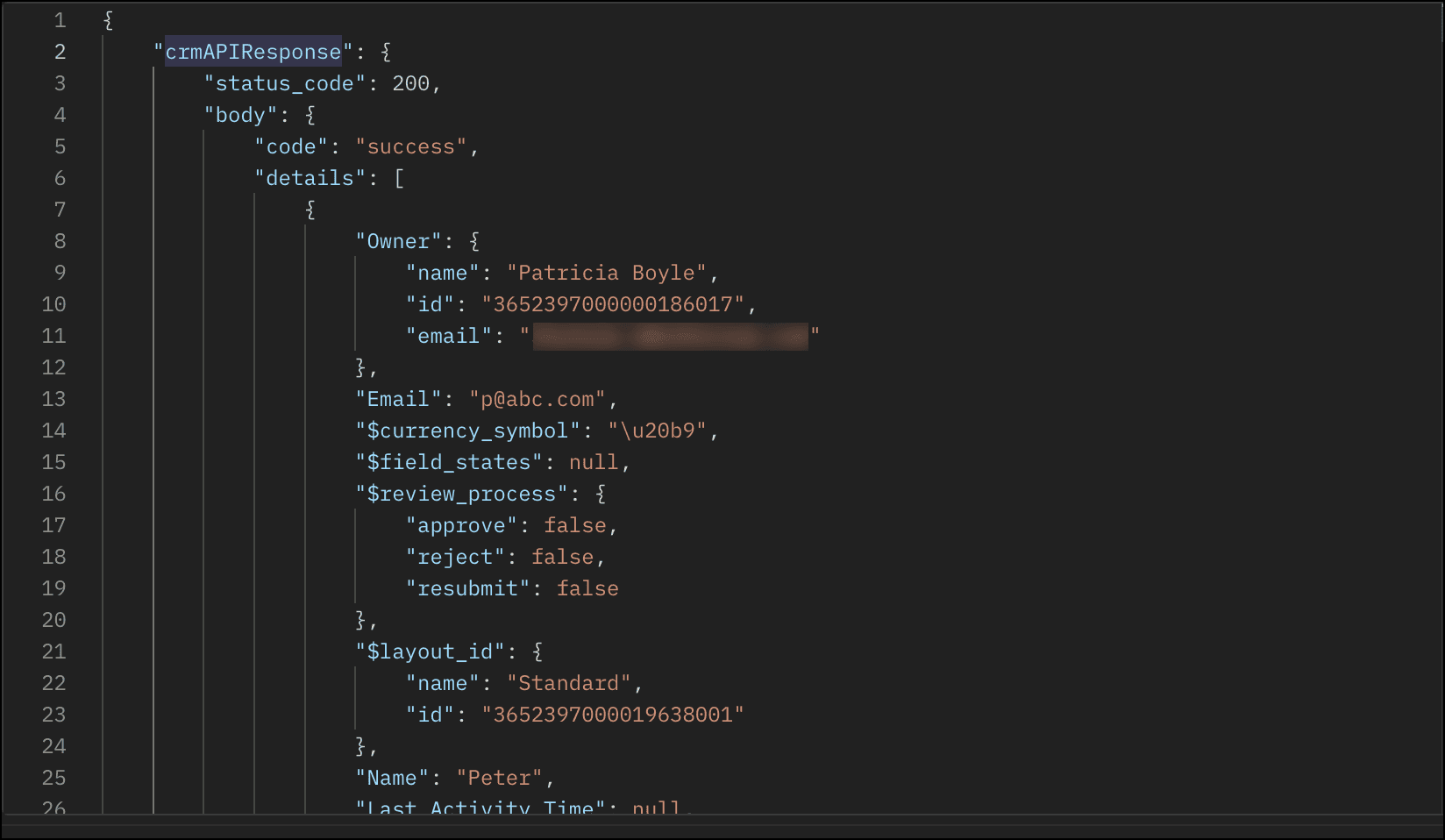
The response of this function is a string in the crmAPIResponse object as shown in this image.
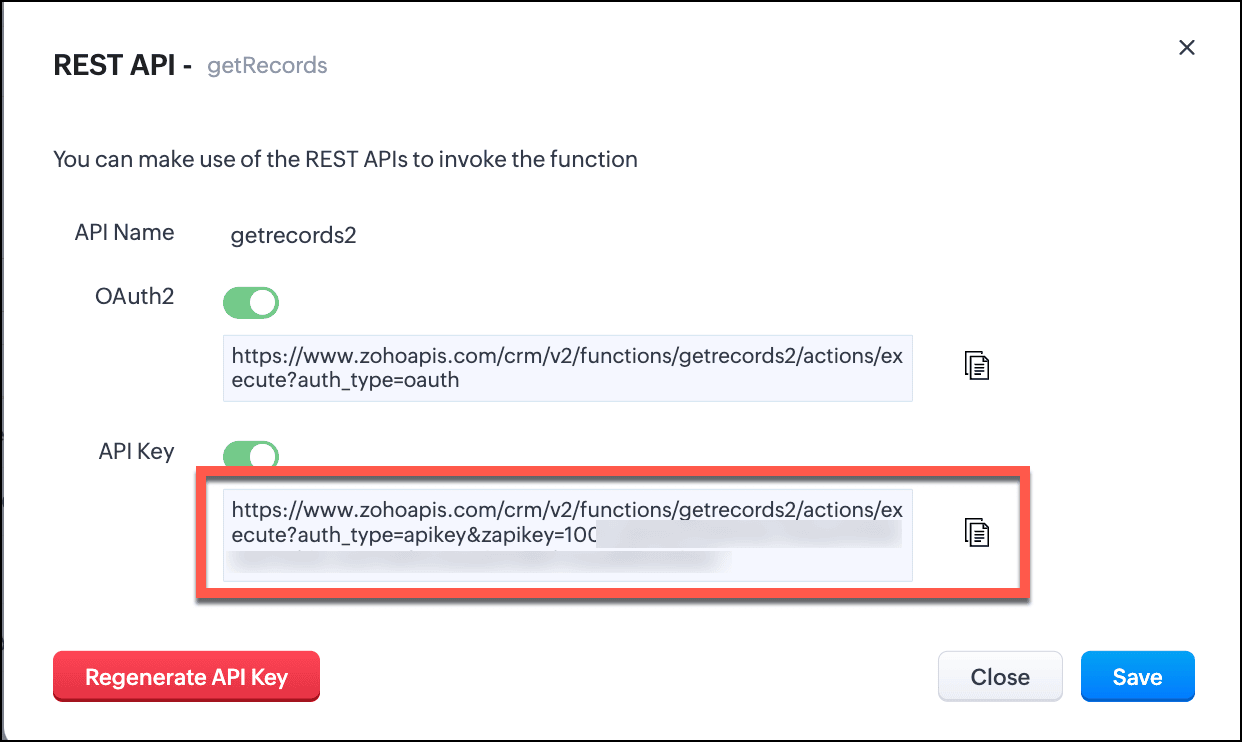
- Save this function and enable REST API.
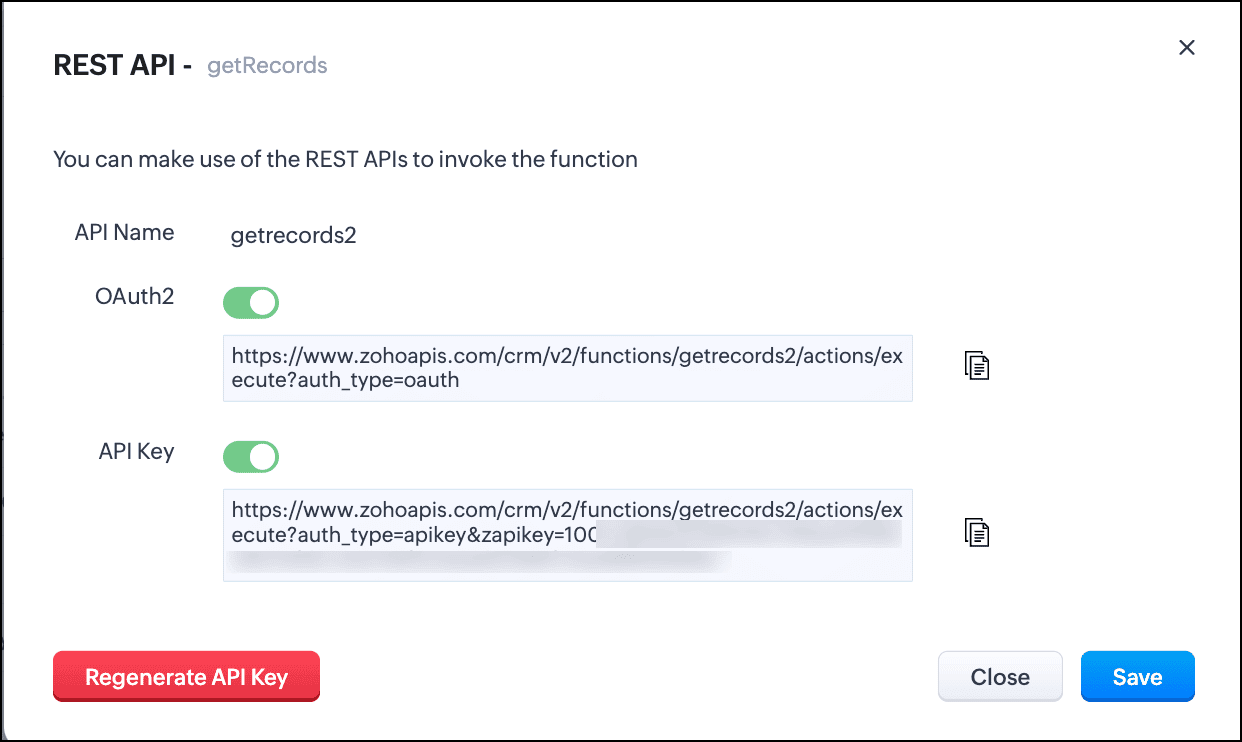
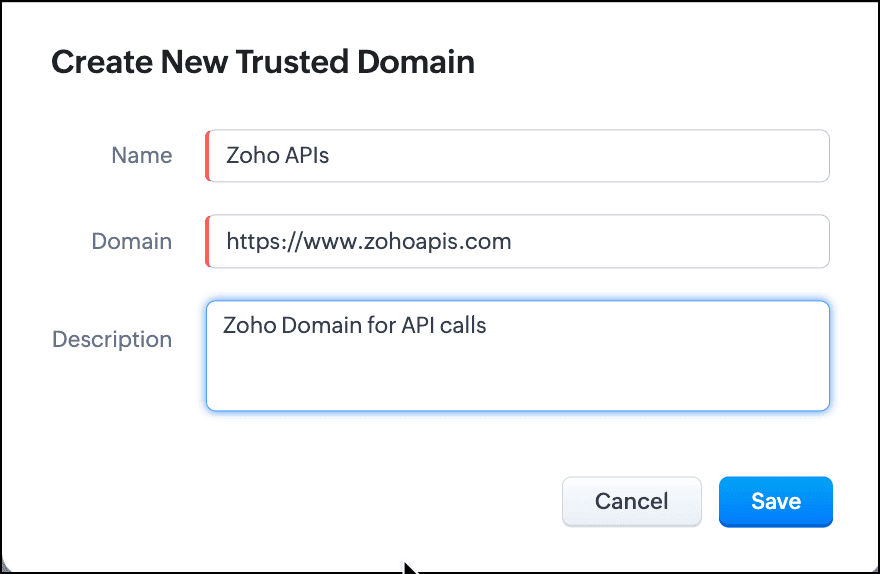
- You can see that the domain is https://www.zohoapis.com. To be able to use this in a Query, register this domain in Trusted Domain.
- To create a REST API type source, you must add the source. Go to Setup > Developer Hub > Queries > Sources tab.
- Click Add Source and give the details like the name, base URL, headers, and parameters under the Information section.
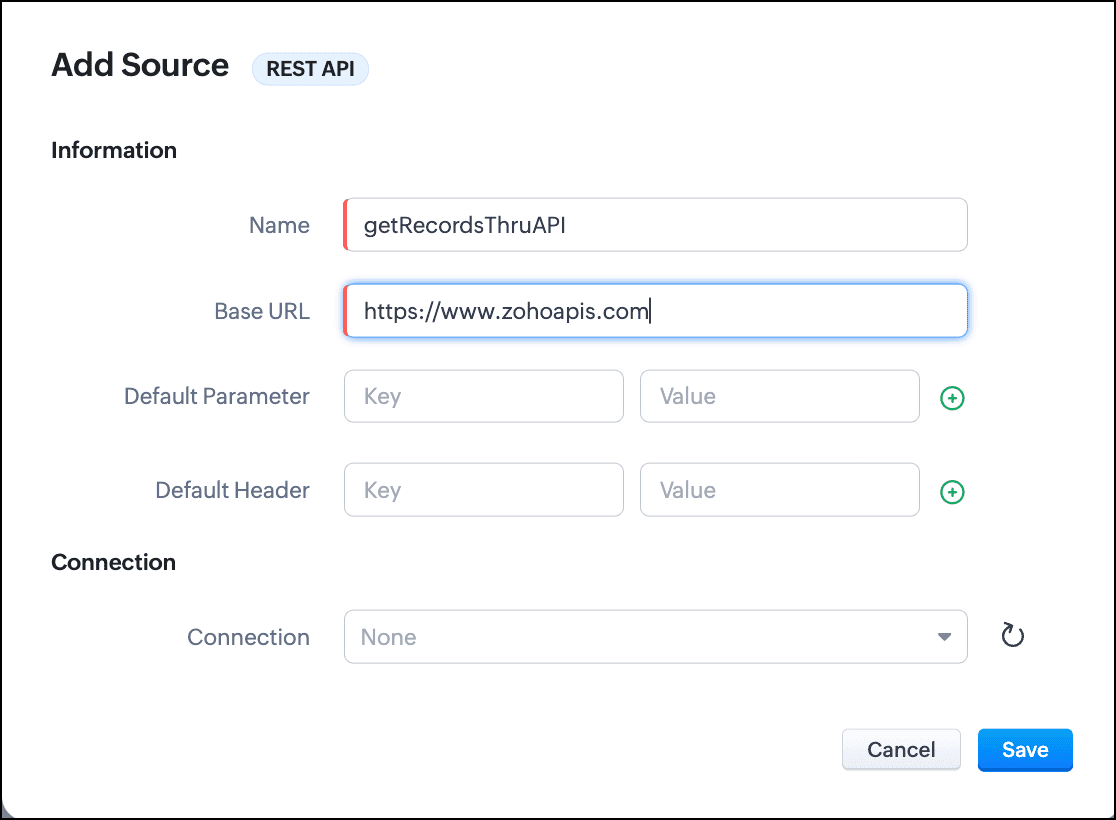
- Click Save.
- Go to the Queries tab and click Add Query.
- For Source, choose the source you just added.
- Under Information, enter the name, API name of the query.
- For the endpoint, enter the API Key URL of the function.
- Enter the parameter name and values in the Parameter field.
- Click Add Serializer if you want to serialize the response. In this example, I have serialized the response to include only the Name, Email, and Position fields in the output. The result contains the 'body' object that we returned in the crmAPIResponse object of the function.

- Click Save to save the serialization.
- Click Next to view the schema of the query. Make changes as required.
- Save the query.
You can now use this query in Canvas or associate it with Kiosk to solve your business needs.
Let us see how the crmAPIResponse object in the function affects the response of the query.
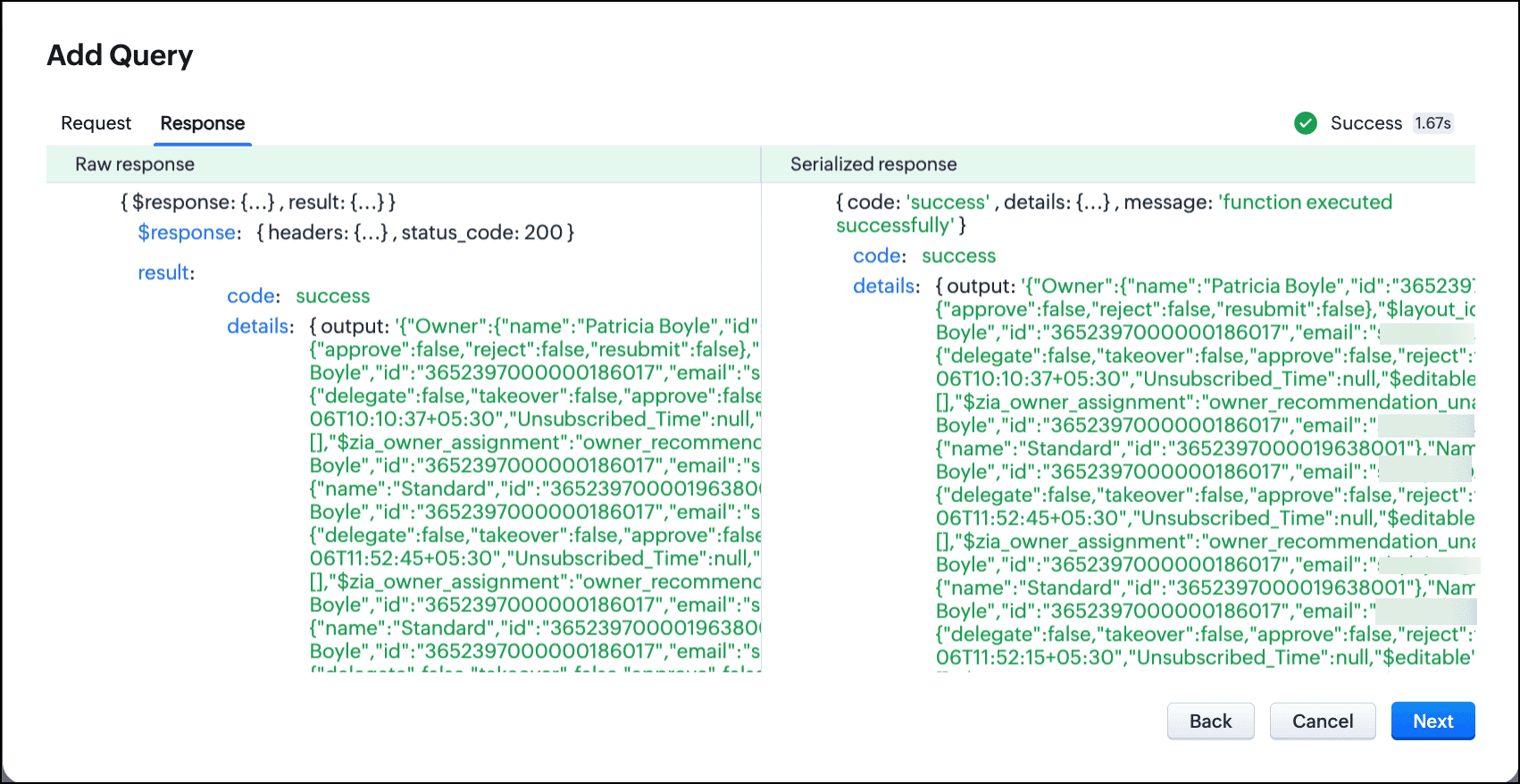
Query with the function without crmAPIResponse:
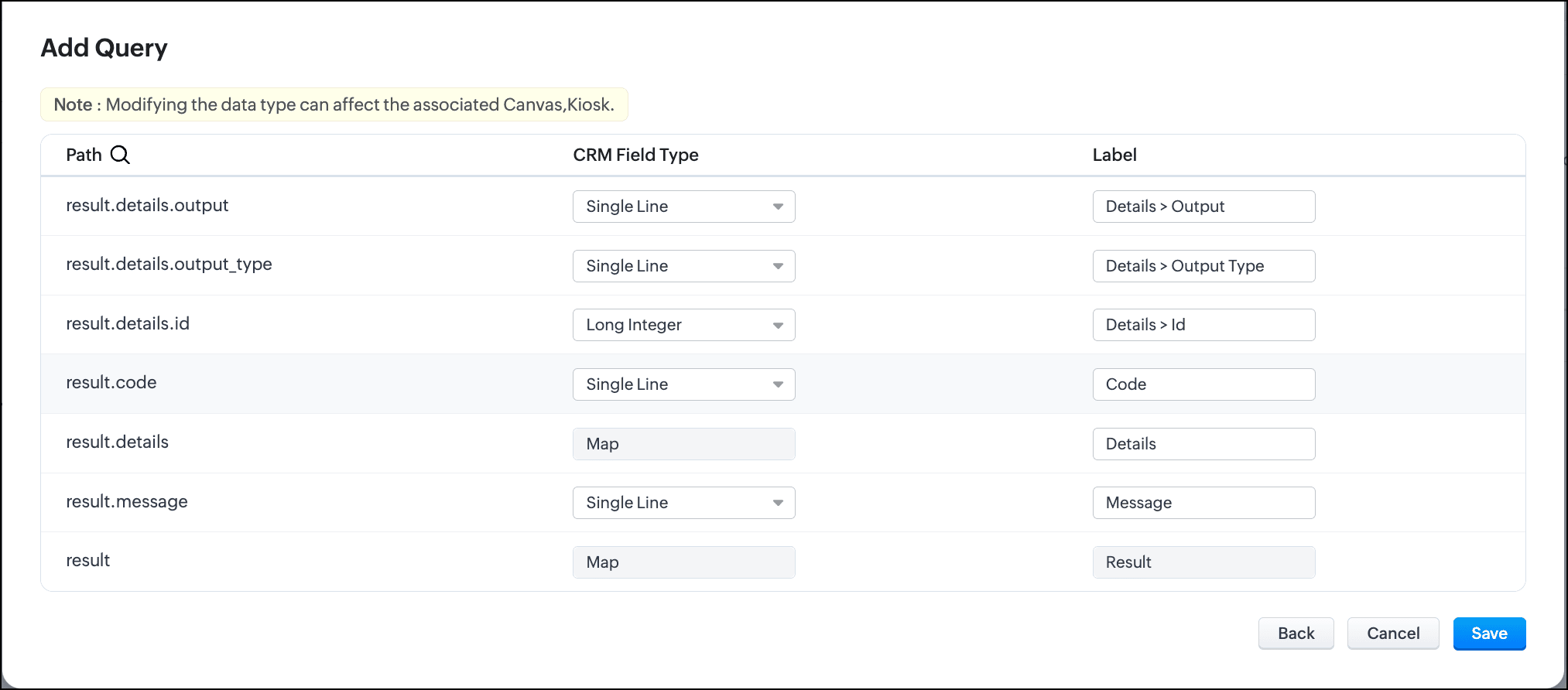
Let's consider that the function getRecords() does not use the crmAPIResponse object. In that case, the function returns a response that is a string. This response string cannot be serialized or used elsewhere.
Schema of the query without crmAPIResponse:
Query with the function with crmAPIResponse and serialization:
The same getRecords() function that uses the crmAPIResponse object allows you to construct the response as JSON. You can serialize this response easily and use it in a circuit, query, workflow etc.

You can see here that the response is now a JSON.
Schema of the query with crmAPIResponse:

In conclusion, you can use the crmAPIResponse object in Functions to construct the desired response and use the REST API-enabled function as a source in Queries.
Leveraging the advantage of the crmAPIResponse object in functions and using it in Queries increases the prospect of solving many more business cases easily and customize more efficiently.
We hope you liked this post and found it useful. Let us know your thoughts in the comments.
If you'd like us to cover any other topic in this series, feel free to comment or reach us at support@zohocrm.com.
Cheers!
------------------------------------------------------------------------------------------------------------------------------------------------

More enhancements in the COQL API are now live in Zoho CRM API Version 7. Check out the V7 Changelog for detailed information on these updates.

See Also
Access your files securely from anywhere
Centralize Knowledge. Transform Learning.
All-in-one knowledge management and training platform for your employees and customers.
New to Zoho Recruit?

Zoho Developer Community
New to Zoho LandingPage?
Zoho LandingPage Resources
New to Zoho Survey?
New to Zoho CRM Plus?
Deliver unforgettable customer experiences
New to Zoho CRM Plus?
Deliver unforgettable customer experiences
New to Zoho Marketing Plus?
Everything you need to run your marketing
New to Zoho Marketing Plus?
Everything you need to run your marketing
New to Bigin?





Topic Participants
Shylaja S
Zsolt Simon self-employed
Sticky Posts
Kaizen #198: Using Client Script for Custom Validation in Blueprint
Nearing 200th Kaizen Post – 1 More to the Big Two-Oh-Oh! Do you have any questions, suggestions, or topics you would like us to cover in future posts? Your insights and suggestions help us shape future content and make this series better for everyone.Kaizen #226: Using ZRC in Client Script
Hello everyone! Welcome to another week of Kaizen. In today's post, lets see what is ZRC (Zoho Request Client) and how we can use ZRC methods in Client Script to get inputs from a Salesperson and update the Lead status with a single button click. In thisKaizen #222 - Client Script Support for Notes Related List
Hello everyone! Welcome to another week of Kaizen. The final Kaizen post of the year 2025 is here! With the new Client Script support for the Notes Related List, you can validate, enrich, and manage notes across modules. In this post, we’ll explore howKaizen #217 - Actions APIs : Tasks
Welcome to another week of Kaizen! In last week's post we discussed Email Notifications APIs which act as the link between your Workflow automations and you. We have discussed how Zylker Cloud Services uses Email Notifications API in their custom dashboard.Kaizen #216 - Actions APIs : Email Notifications
Welcome to another week of Kaizen! For the last three weeks, we have been discussing Zylker's workflows. We successfully updated a dormant workflow, built a new one from the ground up and more. But our work is not finished—these automated processes are
New to Zoho TeamInbox?
Zoho TeamInbox Resources
Zoho CRM Plus Resources
Zoho Books Resources
Zoho Subscriptions Resources
Zoho Projects Resources
Zoho Sprints Resources
Qntrl Resources
Zoho Creator Resources
Zoho CRM Resources
Design. Discuss. Deliver.
Zoho Show Resources

Get Started. Write Away!
Writer is a powerful online word processor, designed for collaborative work.
Zoho CRM コンテンツ
-
オンラインヘルプ
-
Webセミナー
-
機能活用動画
-
よくある質問
-
Ebook
-
-
Zoho Campaigns
- Zoho サービスのWebセミナー
その他のサービス コンテンツ
Nederlandse Hulpbronnen

ご検討中の方
Recent Topics
Need code format to specify default values
Can someone please direct me to the code syntax or the proper translation per the instructions circled below. These instructions don't seem correct.AI Interview Insights: Turn Recorded Interviews into Quick Transcripts & Summaries
Evaluating interviews shouldn’t require replaying long recordings or taking manual notes. With AI Interview Insights, you can now review complete transcripts and AI-generated summaries of your One-way (Recorded) interviews right inside Zoho Recruit. ThisRecord payment: Payment Mode vs. Deposit To and how to "connect" them!?
How do we set up that when we choose: "Payment Mode"= Cash, then "Deposit to" is automatically set to Petty Cash, and if we choose "Payment Mode"= Check, then "Deposit to" is automatically set to Undeposited Checks, and if we choose "Payment Mode"=Grouping Undeposited Funds to Move to other accounts
In the bank option it would be nice to check what transactions in undeposited funds I want to move to other accounts. Then while checking this it can accumulate totals and created whats essentially a deposit slip. Once the transaction is moved it shouldDepositing funds to account
Hello, I have been using Quickbooks for many years but am considering moving to Zoho Books so I am currently running through various workflows and am working on the Invoicing aspect. In QB, the process is to create an invoice, receive payment and thenFacing email delivery issues? Verify your domain's DNS records
Have you ever wondered why your legitimate emails are landing in the recipient’s spam folder? Or been surprised to see emails sent from your registered domain getting rejected by recipient email servers? Why does this happen? In most cases, this happensOrder of Departments in Help Desk
In the end user portal, , the departments are sorted by the date of creation of the department (or perhaps their id). Is there a way to choose the display order of the departments or at least to be able to sort them alphabetically?COGS - Account showing negetive
I have multiple COGS account and in these all there is one account is negetive so suggest why it is showing negetive value.?Create CRM Deal from Books Quote and Auto Update Deal Stage
I want to set up an automation where, whenever a Quote is created in Zoho Books, a Deal is automatically created in Zoho CRM with the Quote amount, customer details, and some custom fields from Zoho Books. Additionally, when the Sales Order is converted%PaymentLink%
Does not work. Software creates a BAD link. ....and yes payment options are turned on. Link on the invoice pdf once opened will work but this template is a joke.Google Photos
I am hoping that my question already has a fix. I current have Google synced accounts that I want to get away from. One in particular on is Google photos. Is there any software, or 3rd parties that I can join to back my photos up straight to specifically designated file in the ZOHO cloud that's tied to Docs? Please advise... MikeZoho Books Items Categorisation/Grouping/Folder
Is there a way to do items categorisation? a folder structure? Product Type A - Option 1/2/3 Product Type B - Option 1/2/3 Current problem : I have more than 50 items on the list, its hard for team to navigate.Cash payments before invoice date
We have been using zoho books for our hospitality business for some time and have been very happy with the system. However in 2025 an update was pushed through and we are now not able to record payments for invoices before the invoice date. the case scenarioCopy / Duplicate Workflow
I have workflows setup that are very similar to each other. We have a monitoring system watching servers, and all notifications - no matter what client it is about - will come from a noreply@ address which is not very helpful in having it auto assigned to the right account. I have setup a workflow that will change the contact name of the ticket (currently it would say noreply@) to the correct customer which is based on the subject line, as that mentions which server the alert it is about. I needTransfer between two customers (Peters Rental account to Peters Private account)
we are a Property Management company. Our customers have to accounts (registered as two customers - Peter Rental and Peter Private On the rental account all income and costs fron rental activities are noted. On the private account all private are notedAutomation#18: Automatically Fetch Values from Contacts to the Tickets Module
Hello Everyone, Welcome to this week's edition, where you can seamlessly sync fields from the Contacts to the Tickets module. For efficient business operations, it's crucial to have details mapped across different modules. Zylker Secure offers antivirusCharge multiple invoices
We use auto-charge/recurring invoicing for 100's of clients. If we create a single manual invoice we can charge it to the credit card for these clients with the CC added to their recurring invoices. If a client has multiple outstanding invoices, is there a way to make one charge for all of the invoices instead of a separate charge to the cc for each invoice?Handling/tracking escalation management in Zoho
Hi all, I am working on finding a tool to register and track our escalation management process. Specifically, this is about client escalations, typically related to project delivery issues. The idea is that we could have some sort of form with core questionsGlobal Choice List share ownership
I have created several forms that use one or more Global Choice Lists. These lists have been published to Org. I would like to allow one or more admins to edit the choices in these lists. Any help appreciated. GeoffSetting up property management in Zoho Books
Hi, I run a property management business that manages property complexes. There are multiple owners, some owning more than one property on the same complex. My role is to manage the fees they pay for maintenance of common areas, such as the swimming poolHow to prevent users from switching price lists in an order?
Hi, I have Zoho Finance integrated with Zoho CRM. My team will be placing orders through the CRM using the Finance module. When creating a new customer I will assign it a price list, I don't want the sales rep to switch to a different Price List, otherUnable to Change Display Name for my outlook mail ID
Hello, I recently added my personal outlook mail to Zohomail (in the web interface) using POP3 options. I tried to change the display name of the outlook account, but it changes for a brief moment and reverts back to the old name. Kindly help me withMollie Connect in Zoho Books
Have noticed that Zoho Books is missing the most popular payment provider in Europe: Mollie. Knowing that Mollie has a solid Java SDK, why is this not yet implemented in Zoho Books for European customers? More info: https://docs.mollie.com/oauth/ovUnable to change Lookup field from Multi Select to Single Select
I am trying to change a Lookup field in my Zoho Creator form from Multi Select to Single Select, but I am unable to find any option to do this.Simple Callback Notifications Needed
My team are terrible at remembering their CRM callbacks, often due to how long in the future they are set for. Is there a way i can set an e-mail notification for when a callback is due? For example we set it for 9am one day and five minutes before theyPersonal Data (RODO), Cookies / Trackers - ePrivacy
I have noticed several issues that should be addressed on the customer support page. Zoho Desk provides the support portal, but it currently lacks the following options: A GDPR and personal data processing consent checkbox before logging in, located inHow to set a multi-lookup field as mandatory?
Allow Multiple Scheduled Appointments with Zoho Support
Dear Zoho Team, I hope you're doing well. First, thank you for introducing the option to schedule support calls via the Zoho CRM booking link. This has been a fantastic enhancement, eliminating the need for back-and-forth coordination when schedulingAudit Log for Zoho One Admin Panel
Dear Zoho One Team, We would like to request the addition of an Audit Log feature in the Zoho One Admin Panel. This log should provide visibility into any changes made within the Zoho One admin panel and directory, including but not limited to: Adding,Bug: OAuth 2.0 State Parameter fails with Pipe Delimiters (RFC 6749 Non-Compliance)
I've discovered a bug in how Zoho's API Console handles the OAuth 2.0 authorization flow when the state parameter contains pipe characters (|), and I'm hoping the Zoho team can address this in a future update. The Issue Zoho's OAuth 2.0 implementationCustom Function to increment a value by one
Hi, I'm trying to find a solution to set up a counter on CRM records that tracks how many times certain actions have taken place. As a specific example: We have a field on Deals called "Times Close Updated". This starts at 0 on record creation. I'd likeAccess token generate from the refresh token not working for API
Dear Sir/Madam, When I use my refresh token to obtain new access_token, that token return INVALID_TOKEN when the same API is called. I made sure that my api site is correct and match the auth web site. However the original access_token work fine.why does my campaign move back to draft?
Every time I try to send my email campaign, it reverts back to Draft status.. this has happened three times in a row..how do i find out what the problem is? ThanksService and Parts Line Item Limitations
Hi FSM Team, We work with clients who deliver large-scale field service projects. In many cases, a single work order can contain 200+ service and parts line items. Currently, Zoho FSM limits work orders to 30 service and parts line items. While this works【Zoho CRM】やりとりの要約機能リリースのお知らせ
ユーザーの皆さま、こんにちは。コミュニティチームの藤澤です。 今回は「Zoho CRM アップデート情報」の中から、新機能のやりとり要約機能をご紹介します。 Zoho CRMのやりとりの要約は、Ziaが生成する機能で、データに関連付けられた最近のやりとりを簡潔にまとめて提供します。 メール、通話、ミーティング、メモなどを1つの明確な要約にまとめ、重要なポイント、過去の話し合いの要点、結果、次のステップを表示することで、日常的な課題に対処します。 Ziaの強みは、単なる要約にとどまらず、内容の解釈も行える点です。やりとりの要約では、顧客との会話に潜む遅延、フォローアップ漏れ、約束、期限、感情、意図を特定します。Recent post analytics not very useful
Hi, I'm enjoying some aspects of the Zoho Social. like being able to schedule posts to multiple channels. However, the recent posts analytics is disappointing. For example, I put up a reel on Instagram and Facebook yesterday. Instagram insights showsWhat happens to the files created by user, whose account is deleted.
Hello, I created a folder in the My folders names "Quote" I shared the same with my colleague. She created some files and folders in that folder over the period of 1 and half year. Now she left company, and I deleted her account from Zoho. What happensInternal Error When Accessing Team Inbox.
All our users are seeing this error in teaminbox. Because its a critical tool kindly resolve this issue ASAP.Sharing URLs and direct access
Hello, I am storing my team's email signature images on Workdrive. I am creating a public image download share and adding “?directDownload=true” so that the image can be accessed without the Workdrive interface. A few questions: 1) Can we generate friendlyZoho Mail Android app update: Calendar enhancements
Hello everyone! In the most recent version of the Zoho Mail Android app update, we have introduced various new enhancements for the calendar module. Let's explore what's new. Drag and drop events to update the date and time We have enhanced the calendarNext Page