Nouvelle fonctionnalité Zoho Bigin : découvrez Team Pipelines
Bonjour à tous !
Il y a quelques jours, nous vous avions annoncé l'arrivée de la nouvelle version de Bigin.
Dans cet article nous avions fait le tour des nouvelles fonctionnalités développées pour booster la croissance de votre petite entreprise.
Aujourd'hui, nous abordons plus en détail la fonctionnalité la plus attendue de cette update : Team Pipelines.
Quel est l'intérêt de cette nouvelle mise à jour ?
Toute entreprise, petite ou grande, est caractérisée par de multiples opérations en contact avec la clientèle, telles que les ventes, le marketing ou le succès client.
En tant que propriétaire d'une petite entreprise, vous avez soit une équipe où chacun s'occupe de plusieurs opérations, soit des membres individuels qui s'occupent d'opérations spécifiques.
Idéalement, chaque élément d'information recueilli auprès de vos clients doit être ajouté à votre CRM afin que vous et votre équipe puissiez y accéder chaque fois que nécessaire.
En fin de compte, l'unification des informations sur les clients et la rationalisation de chaque élément de vos opérations quotidiennes deviennent la clé pour obtenir une vue panoramique sur vos clients et atteindre l'objectif difficile qui consiste à obtenir une source unique de vérité pour les données clients.
Actuellement, la plupart d'entre vous utilisent Bigin pour gérer leurs opérations de vente. Vous pouvez également renommer les modules, personnaliser les champs et les étapes de vos pipelines pour gérer des opérations autres que les ventes, comme l'accueil des clients, les études de cas marketing, la livraison des produits, etc.
Mais que se passe-t-il lorsque vous voulez gérer simultanément vos affaires, l'accueil des clients et la mise en œuvre, le tout dans le même compte Bigin ?
Ce que nous avons remarqué avec le système de pipeline actuel, c'est que la plupart des clients créent plusieurs comptes Bigin ou ont recours à d'autres outils tels que des feuilles de calcul, des logiciels d'assistance, etc. pour gérer les opérations de contact avec les clients autres que les ventes.
Mais dans de telles situations, les données de vos clients sont dispersées entre plusieurs outils, ce qui entraîne un manque de coordination entre les membres de votre équipe, avec pour conséquence un retard global dans les opérations et une expérience client amoindrie.
C'est pour remédier à ce manque d'unification que nous avons conçu Team Pipelines.
Présentation de Team Pipelines
Au cours du processus d'achat, vos clients s'adressent au service commercial, ce qui est généralement suivi dans le pipeline Deals. Si un contrat légal est impliqué dans la vente, il peut être géré par l'équipe juridique dans le pipeline juridique. Une fois l'affaire conclue, la livraison du produit peut être saisie dans le pipeline Delivery, et à chaque étape de ce pipeline, les clients peuvent être informés automatiquement de l'état de la livraison.
De même, une fois le produit livré, il peut y avoir d'autres étapes comme l'installation et l'activation qui peuvent être suivies dans les pipelines respectifs par les équipes.
Dans le parcours que nous venons de voir, au moins cinq personnes différentes travaillent ensemble pour offrir une excellente expérience aux clients.
Comment la nouvelle mise à jour va-t-elle vous aider ?
Avant Team Pipelines, aucun des membres de votre équipe n'aurait eu la visibilité des tâches et des opérations effectuées par les autres équipes. Ils auraient été obligés de s'appeler, de discuter ou de s'envoyer des e-mails, ce qui aurait rendu le parcours chaotique et inefficace pour vos clients.
À présent, avec Team Pipelines, les opérations de chaque équipe sont désormais visibles et accessibles à partir d'un seul compte Bigin. Il vous suffit de cliquer sur un contact pour connaître l'état de chaque activité associée à ce contact.
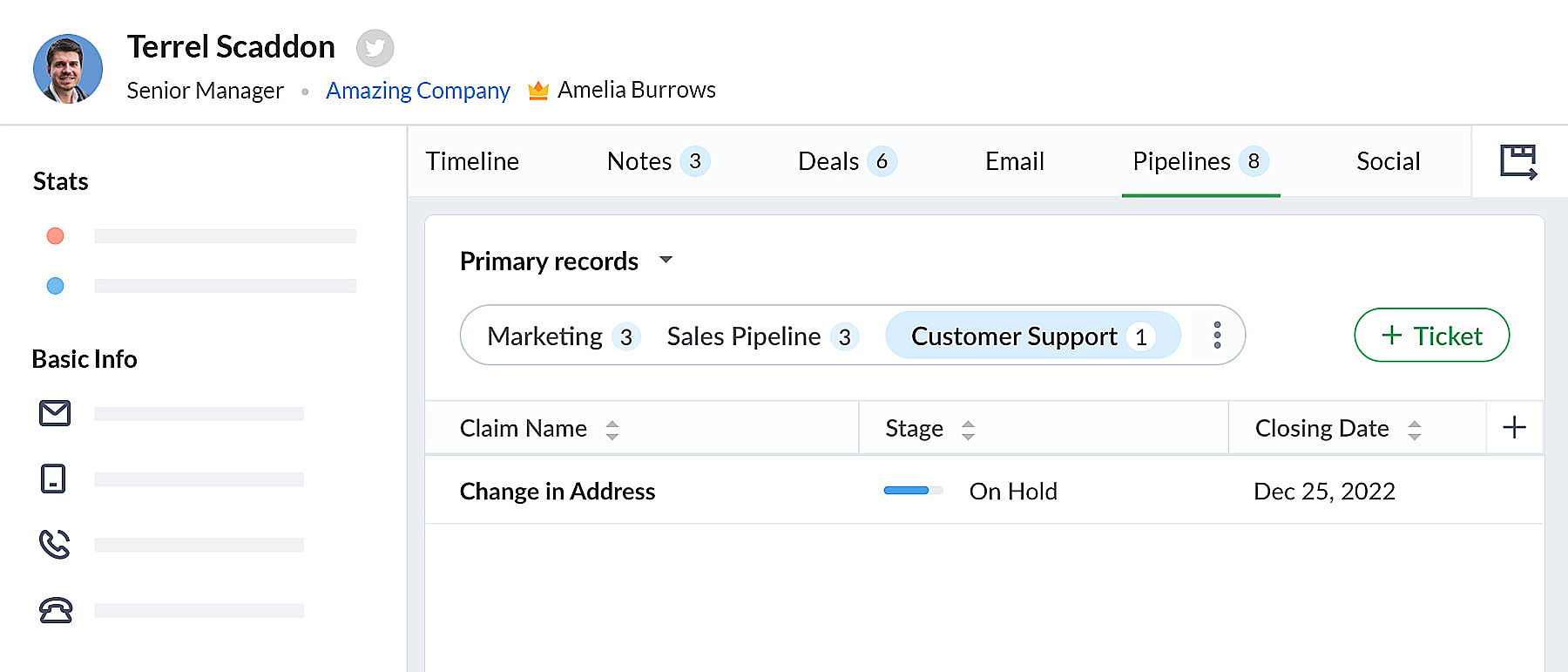 bigin pipeline
Team Pipelines et sous-pipelines : L'équipe idéale pour gérer les opérations uniques de vos clients
Au sein de chaque Team Pipelines, vous pouvez également créer différents sous-pipelines. Les sous-pipelines au sein d'un Team Pipelines ne diffèrent que par les étapes. Ainsi, au sein d'un Team Pipelines, si vous avez besoin de différents ensembles d'étapes pour différentes opérations, vous pouvez créer des sous-pipelines.
En d'autres termes, les sous-pipelines dans Bigin ne sont rien d'autre que la fonctionnalité multi-pipeline actuelle dont vous disposiez déjà.
Votre compte Bigin devient maintenant la source unique d'informations fiables sur vos clients. Il donne à tous les membres de votre équipe une vue à 360 degrés des informations sur les clients, leur permettant de gérer les relations et les interactions avec succès.
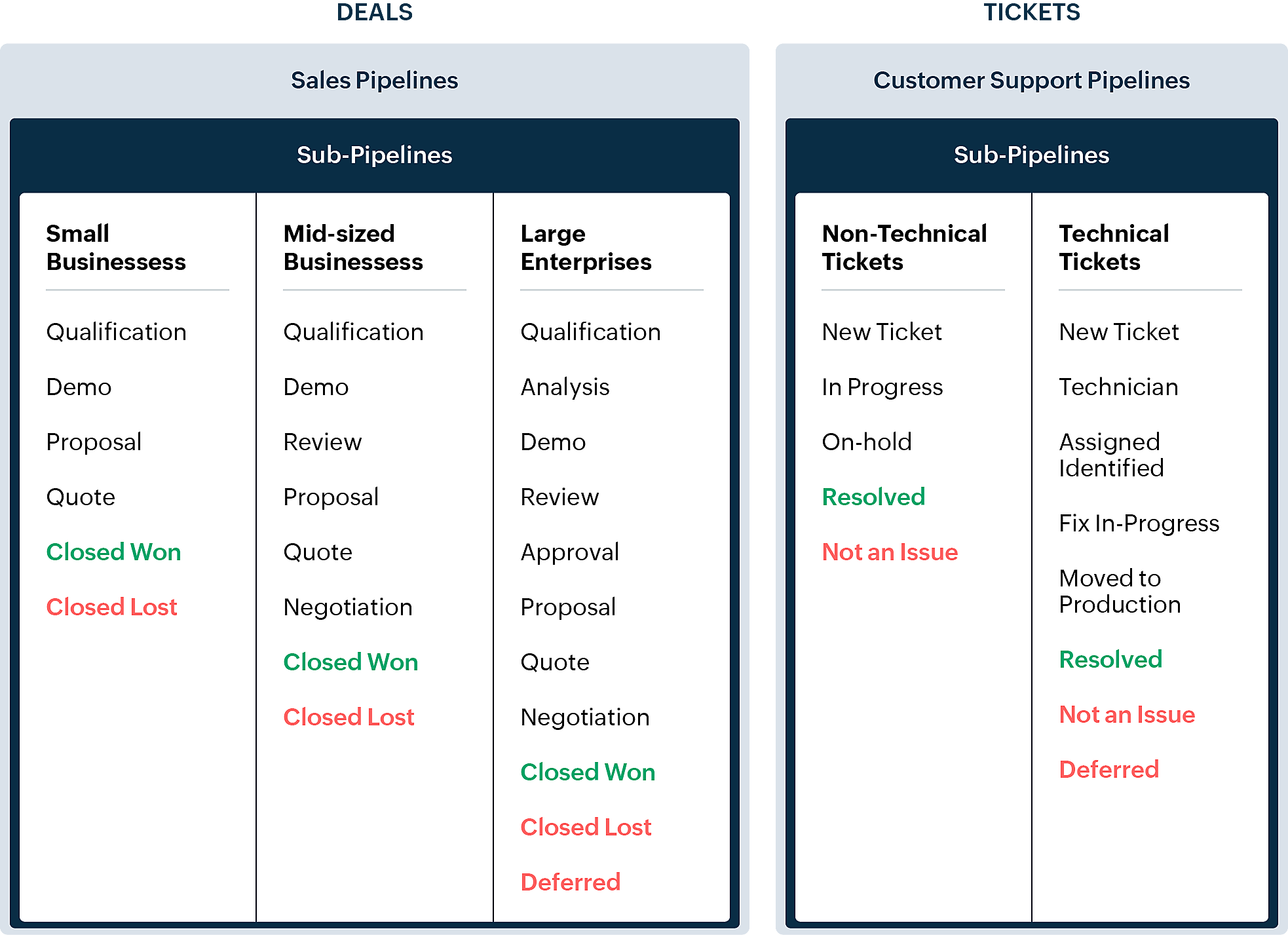
En quoi la nouvelle version est-elle différente de l'interface utilisateur Bigin existante ?
Pipelines est maintenant un module séparé dans Bigin. Là où il y avait auparavant les affaires/opportunités, vous avez maintenant les pipelines. Dans ce module, vous pouvez gérer plusieurs types d'enregistrements tels que les transactions, les tickets, les demandes, etc.
- Les anciennes versions des pipelines que vous avez créés précédemment seront disponibles en tant que sous-pipelines en bas à l'intérieur de chaque pipeline d'équipe.
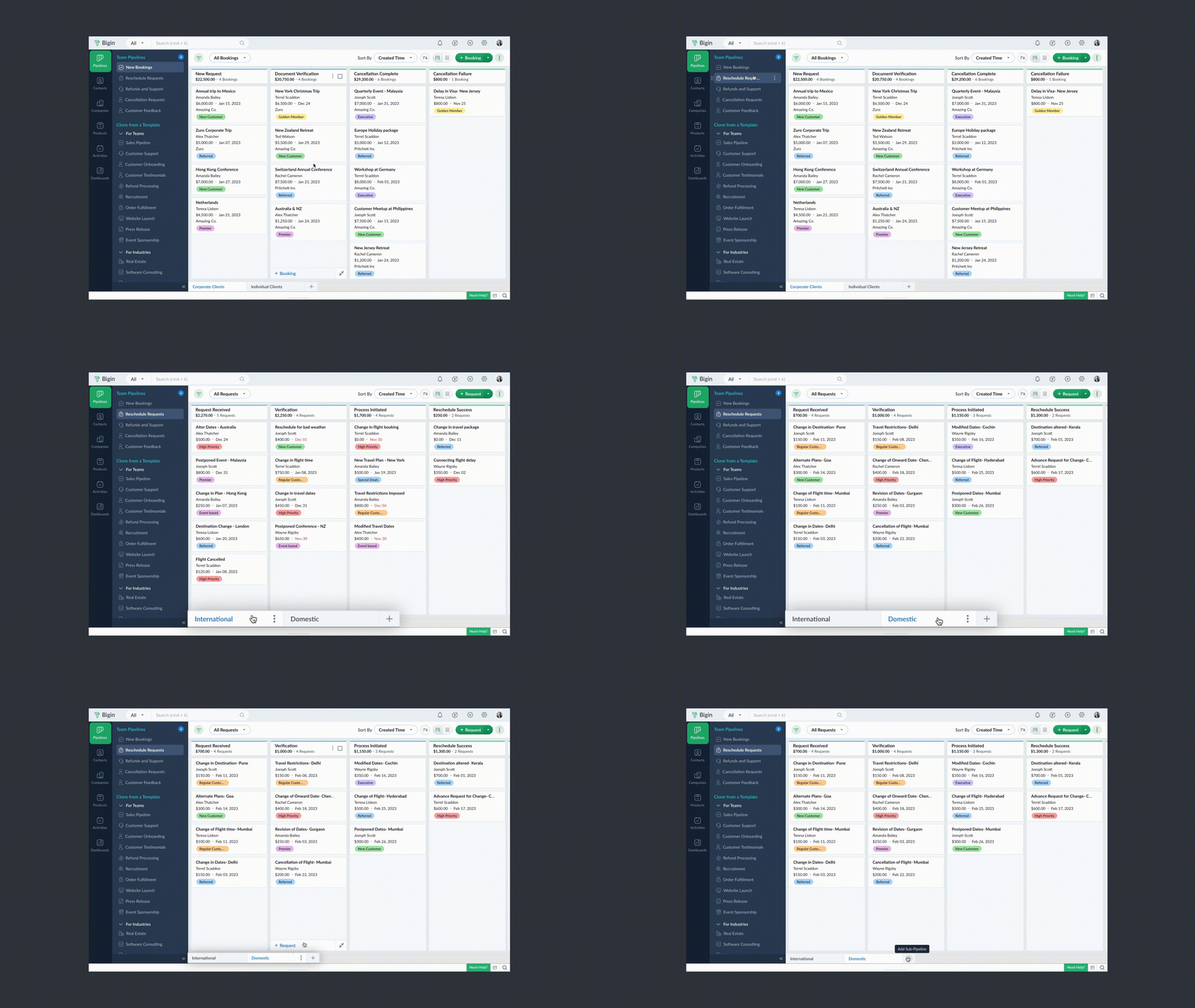
- Chaque pipeline d'équipe peut gérer un type d'enregistrement différent. Par exemple, vous pouvez gérer des transactions dans un pipeline de vente, des tickets dans un pipeline de support client, et ainsi de suite.
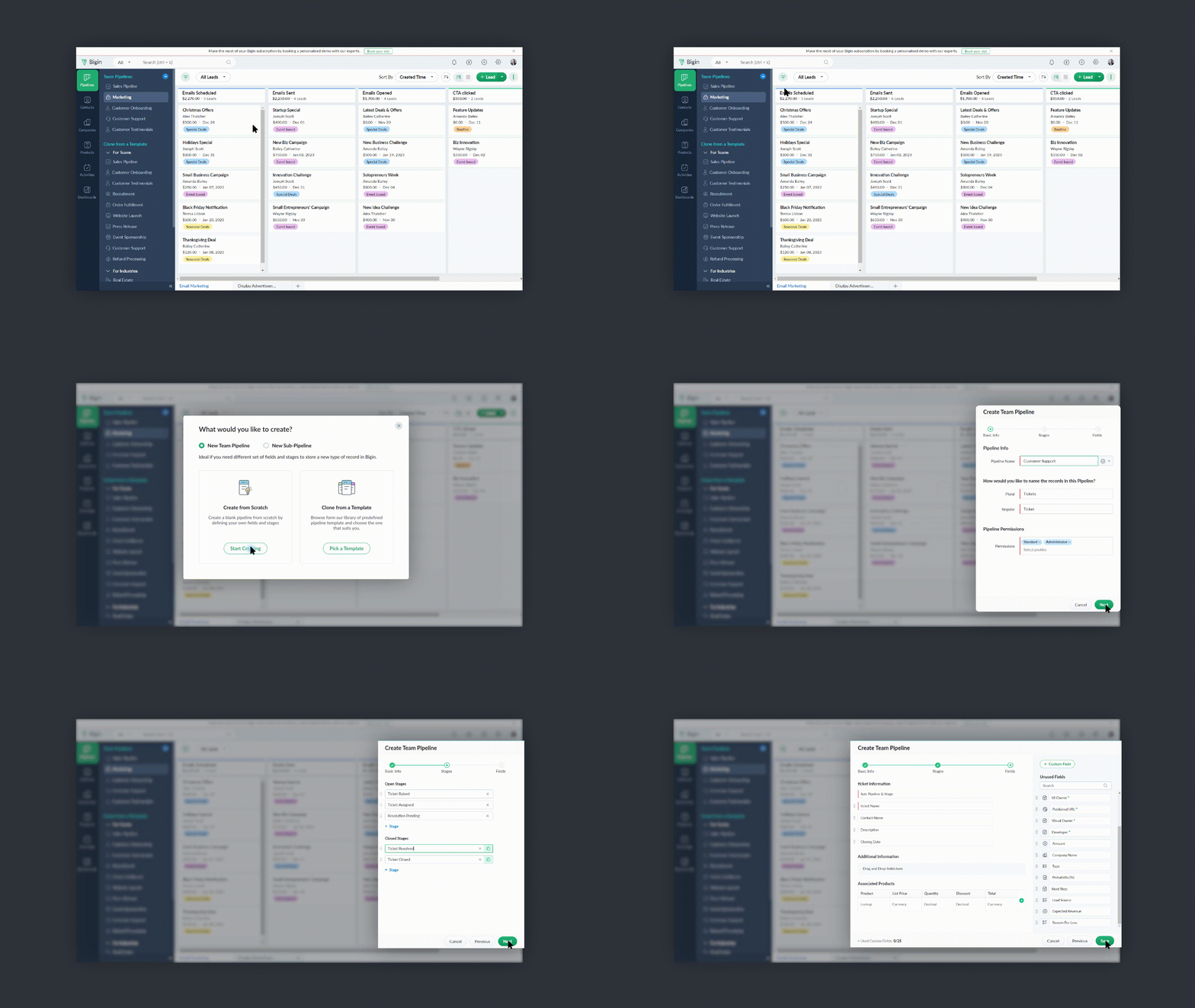
- Vous pouvez créer des pipelines à partir de zéro ou utiliser l'un des modèles proposés par Bigin.
- Vous pouvez rendre vos pipelines d'équipe extrêmement spécifiques aux opérations en leur donnant des noms pertinents, en choisissant les champs nécessaires, en ajoutant des étapes appropriées et en attribuant les bons profils d'utilisateurs pour accéder aux pipelines.
- Vous pouvez réduire le panneau Pipelines d'équipe lorsque vous n'en avez pas besoin en cliquant sur l'icône de la flèche de réduction en bas à gauche.
Comment accéder à cette nouvelle fonctionnalité ?
La fonctionnalité Team Pipelines est désormais accessible à tous nos clients directement depuis l'application Bigin. Il suffit de cliquer sur l'interface comme visible sur la photo ci-dessous :

Vous pouvez nous écrire à l'adresse support@eu.bigin.com à tout moment pour nous faire part de vos commentaires et de vos réactions.
PS : Je serai là si vous avez besoin d'aide pour la nouvelle mise à jour. Il vous suffit de laisser un commentaire dans cet article pour obtenir une réponse à vos questions.
Passez une bonne journée et à très bientôt pour découvrir les nouvelles fonctionnalités Bigin !
Access your files securely from anywhere

Zoho Developer Community





Topic Participants
Antoine Perrault
Sticky Posts
Bigin - Astuce #5 : Comment transférer le statut Super Admin ?
Bonjour Community France, Découvrons comment transférer le statut de Super Administrateur. Sachez que le statut de super administrateur ne peut être transféré à un autre utilisateur administrateur que par le super administrateur lui même. Pour transférerNouveau forfait Bigin Premier : Multi-devises, flux de travail avancés et plus encore !
Bonjour à tous, Nous sommes ravis d'annoncer une toute nouvelle édition de Bigin qui contient plusieurs nouvelles fonctionnalités comme la multidevise, des flux de travail avancés, des champs de recherche personnalisés et plus encore : l'édition Premier.Nouveauté Bigin : associez plusieurs contacts à une même affaire!
Bonjour à tous, Une transaction implique souvent plusieurs décideurs. Prenons l'exemple de l'entreprise Zylker qui utilise Bigin pour gérer ses pipelines de vente. Ils souhaitent acheter des meubles. Pour valider la vente, différents employés, de différentsPack débutant : vos premiers pas sur Zoho Bigin
Dans cet article nous verrons comment paramétrer votre CRM Bigin en 4 étapes : renseigner vos informations, gérer vos utilisateurs ainsi que leurs rôles et profils. Renseigner les informations de votre organisation Vous venez de vous inscrire à Zoho Bigin,Anniversaire Bigin : le CRM pour les petites entreprises évolue
Bonjour à tous ! Nous sommes de retour avec quelques annonces passionnantes. Mais d'abord, joyeux anniversaire à nous ! Bigin a eu un an récemment et nous avons un nouvel ensemble de fonctionnalités que nous sommes impatients de partager avec vous. Nous
Zoho TeamInbox Resources
Zoho CRM Plus Resources
Zoho Books Resources
Zoho Subscriptions Resources
Zoho Projects Resources
Zoho Sprints Resources
Qntrl Resources
Zoho Creator Resources
Zoho CRM Resources
Design. Discuss. Deliver.
Zoho Show Resources

Get Started. Write Away!
Writer is a powerful online word processor, designed for collaborative work.
-
オンラインヘルプ
-
Webセミナー
-
機能活用動画
-
よくある質問
-
Ebook
-
-
Zoho Campaigns
- Zoho サービスのWebセミナー
その他のサービス コンテンツ
Nederlandse Hulpbronnen

ご検討中の方
Recent Topics
Como se agregan los empleados
Necesito saber si para agregar empleados los mismos necesitan tener licenciasDeluge Error Code 1002 - "Resource does not exist."
I am using the following script in a Custom Button on a Sales Return. Basically, the function takes the information in the sales return (plus the arguments that are entered by the user when the button is pushed) and creates a return shipping label viaAdding multiple Attendee email addresses when adding a Zoho Calendar event in Zoho Flow
I am trying to integrate Notion and Zoho Calendar via Zoho Flow. However, the Attendee email address supported by Zoho Calendar - Create event only supports one email address, so I am having difficulty implementing automation to automatically registerGraceful Handling of Exceeded Option Limits
Hi Zoho SalesIQ team. I would like to submit a feature request to deal with a bug in salesIQ Current Behavior (Bug): When a dynamic list passed to the Single Select Option Card contains more than 20 options, the Zobot stops responding (freezes/hangs)System default SLA descriptions can't be modified
The system default SLAs have identical descriptions for all SLA levels, but their settings differ. However, I am facing an issue where I cannot modify these descriptions and save the changes. The content of the description box can be edited but the changesAdding non-Indian billing address for my Zoho subscription
Hey Need help with adding a non-Indian billing address for my Zoho subscription, trying to edit the address to my Singapore registered company. Won't let me change the country. Would appreciate the help. Regards, RishabhHow to create one ZohoCRM organisation out of a multi-organization?
Hi, we have a multi-org including two different Zoho CRM organizations for two companies using respectively EUR and USD as default currency. I was wondering if there is any easy way to merge the two organizations into just one, so that users may accessGray screen while signing documents
We are all getting a "gray" screen when trying to sign documents in Zoho sign. Anyone else having issues?Designing a practical Zoho setup for a small business: lessons from a real implementation
I recently finished setting up a Zoho-based operating system for a small but growing consumer beauty business (GlowAtHomeBeauty), and I wanted to share a practical takeaway for other founders and implementers. The business wasn’t failing because of lackLink Purchase Order to Deal
Zoho Books directly syncs with contacts, vendors and products in Zoho CRM including field mapping. Is there any way to associate vendor purchase orders with deals, so that we can calculate our profit margin for each deal with connected sales invoicesProjects custom colors replaced by default orange
Since yesterday, projects uploaded to Zoho, to which I had assigned a custom color, have lost the customization and reverted to the default color (orange). Has anyone else had the same problem? If so, how did you resolve it?Interview booked through Invite but no Notifications
We have a workflow that was developed through a developer/partner that was tested and worked. Today, we pushed a candidate through the process and invited them to an in-office interview. They were sent the booking link (as usual and as tested before successfully)WebDAV support
I need WebDAV support so that I can upload/download (and modify) documents from my local file system. Is anything planned in his direction?Automatiser la gestion des SLA dans Zoho Desk avec Zoho Contracts
Les équipes du service client s’efforcent d’assurer un support rapide, régulier et fiable pour garantir la satisfaction de chaque client. Les accords de niveau de service (SLA) permettent de clarifier les engagements en définissant les termes et conditionsiOS App doesn't refresh for Document Creation
Hello Zoho team, I have created a workflow to be used on a mobile iOS device which starts in Zoho Creater and ends with a murge and store function that then opens the newly created document within the Zoho Writer app. This process is working great howeverUploading a signed template from Sign to Creator
Good day, Please help me on how to load a signed document back into Creator after the process has been completed in Sign. Below is the code that I am trying, pdfFile = response.toFile("SignedDocument_4901354000000372029.pdf"); info pdfFile; // AttachZoho DataPrep and File Pattern configuration
I'm using Zoho data prep to ingest data from One Drive into Zoho Analytics... The pipeline is super simple but I can't any way to get all the files that I need. Basically I need to bring all the files with a certain pattern and for that I'm using a regexAssistance needed: Activation of a domain
Hello Zoho Support, I purchased the .com domain "primesolva.com" via Zoho 6 days ago. The domain is still pending, and I cannot access the DNS panel to add the TXT verification for domain ownership. Please confirm the registration status and help me activateOperation not permitted
I am trying to add an email address to the list of user but I am getting error Operation not permittedRequest to Permanently Delete Email User (info@mehbobgulf.com ) from Old Organization
Please permanently delete the user email info@mehbobgulf.com It is still associated with my old Zoho organization. I cannot delete it because it shows ‘You cannot delete email. Zoho host’. I need to use this email in a new Zoho account.”Client host [89.36.170.5] blocked using Spamhaus
Hello please make make actions for delist ..... "Client host [89.36.170.5] blocked using Spamhaus"Suggestion: Option to Re-run a migration
As I'm going through a migration process, I like the IMAP migration tool, but it would be better if there were an option to re-run the same migration as configured. There's not even an option to copy/edit one that's already there. Just run if it hasn'tIssue with "Add Your Mobile Number"
Hello, I am trying to sign up for email service for a domain name, and I cannot finish the authentication. When I enter my mobile number, I receive the message "We’re unable to send OTP to this mobile number. Please contact support-as@zohocorp.com". Izoho mail non vérifié
Bonjour, Il y'a un jour que j'ai acheté un domaine et toute les tentatives pour l'associé a mon compte shopify son vaine. j'ai essayé TXT sans suite après, j'ai essayer avec CNAME sans suite. j'aurais besoin de votre assistance pour associé mon mail.Unable to send message;Reason:553 Relaying disallowed. Invalid Domain
i have facing the issue "Unable to send message;Reason:553 Relaying disallowed. Invalid Domain" if i verify domain evertthing i did but still face the same error.ZohoMail is so close to being Perfect BUT
Why don’t you have HILIGHTING???!! I've been trying to find a substitute for Edison Mail but I want & need hilighting (preferably in more than just yellow)! Is this even on your To Do list? I’m so disappointed. 🙄Override Auto Number field?
We are preparing to migrate from Salesforce. In Salesforce, we auto-generate a unique number on our Opportunities (Potentials). If the Opportunity results in a contract, we use that unique number as the Contract number. There are some situations whereUsing a third party service provider want to move directly with Zoho
Hi good day I’m currently using Zoho but I’m using a third party service provider I want to move directly with you guys I’m using Zoho email and invoices and my domain please let me know if it’s possible to move away from the third party provider my emailRequest for Assistance Regarding Email Sending Issue (554 5.1.8 - Email Outgoing Blocked)
Dear Zoho Support Team, I hope this message finds you well. I am writing to request assistance with an issue we are currently facing regarding our Zoho Mail account. Our email account, admin@tuyensinhcanuoc.com, is encountering the following error whenZoho Mail API returns empty inbox (0 messages) but webmail shows 37 unread emails
Hello, I'm experiencing a discrepancy between Zoho Webmail and the Mail API (EU region). **Setup:** - Account: EU datacenter (mail.zoho.eu) - API: Self Client OAuth2 via api-console.zoho.eu - Scopes: ZohoMail.messages.READ, ZohoMail.messages.UPDATE, ZohoMail.folders.READ,Zoho Mail not working
Zoho Mail not workingShipStation and Zoho Inventory
Hello, I am looking to sync zoho inventory with shipstation ZOHO INVENTORY SHIP STATION Sales Order ==> create ORDERS INVOICE <== Shipments What exactly does BETA mean on the Shipstation connector? This is required for me to sign-on in the next month. Thanks in advance for your efforts550 5.4.6 Unusual sending activity detected. Please try after sometime
Hi, I am receiving this error message when trying to send my emails. The only reason I can think why this is happening is my previous two emails were bounced back to me due to a non working mailbox error. I have followed the online links for unblocking but it says there are no blocks on my account. How and when can I get my email working again to send emails? Thanks,E
We are trying to add our Zoho Form embed in our Elementor Page Builder. After adding Zoho Forms widget in elementor page builder it’s displaying in backend page builder but it’s giving 403 error while trying to save, as it’s not reflecting in front end.Formatting Problem | Export to Zoho Sheet View
When I export data to Zoho Sheet View, ID columns are automatically formatted as scientific notation. Reformatting them to text changes the actual ID values. For example, 6557000335603071 becomes 6557000335603070. I have attached screenshots showing thisConnecting Zoho Inventory to ShipStation
we are looking for someone to help connect via API shipStation with Zoho inventory. Any ideas? Thanks. Uricustom module import.
Is there a way to import data into a custom module? Thanks RudyHEIC File Type Viewer
Hi, It would be nice to be able to click on the images in the All Entries/Reports Tables which are HEIC the same as JPG, PNG, etc. so they open in a viewer from Zoho or the Attachment Service, today HEIC requires you to download each image and open itBuilding Toppings #4 - Setting up and using connections in Bigin toppings
When building a topping to extend Bigin's functionality and connect it with third-party applications, creating and handling connections is an important step. Connections provide a secure way for your topping to authenticate and communicate with otherNeed code format to specify default values
Can someone please direct me to the code syntax or the proper translation per the instructions circled below. These instructions don't seem correct.Next Page