What’s New in Zoho Expense: January - March 2025
Hello users,
We're excited to bring you the latest updates and improvements we've made to make your travel and expense management smoother and more effortless. Let's take a quick look at the important updates we've rolled-out in Zoho Expense between January and March.
We're excited to bring you the latest updates and improvements we've made to make your travel and expense management smoother and more effortless. Let's take a quick look at the important updates we've rolled-out in Zoho Expense between January and March.
To restrict users from creating reports for closed and cancelled trips, we've added a new option in the Trips preference. To enable this feature, you can mark the option Restrict report creation for trips and select the trip status from the dropdown.

Enhancements in Real-Time Card Feeds
1. Users using the German edition and five countries in the global edition, including the US, UK, Canada, Germany, and Italy, can now fetch their card feeds instantly in Zoho Expense as soon as a transaction is made using their cards, which are connected for real-time feeds.
Note: This feature is currently available in early access. Write to us at support@zohoexpense.com to enable it for your organization.2. In addition the Mastercard support for users using the UK edition of Zoho Expense, we now support Visa cards as well.
Quickly update the category, date, amount, merchant name, currency, description, and custom fields of your expenses from the expense detail page, without navigating to the edit page in the Expenses and Reports modules. Users can hover over the fields and click the Edit icon that appears next to it. Once the changes are made, click the tick icon next to the updated field to save the updates.

Export All Analytic Report Details
If you'd like to export or download all the data in an analytic report for backup, unmark Export Current View while exporting the analytic report. Once you click this, the report will be exported with all the data. However, this option is available only for exporting analytic reports in XLS, XLSX, CSV, or to Zoho Sheets.
Field Customizations For Recording Advance Refunds
If you'd like to capture specific details related to advance refunds for better clarity and record keeping, you can mandate the Refunded To, Notes, Reference#, and other custom fields for users while recoding an advance refund.
If you'd like to export or download all the data in an analytic report for backup, unmark Export Current View while exporting the analytic report. Once you click this, the report will be exported with all the data. However, this option is available only for exporting analytic reports in XLS, XLSX, CSV, or to Zoho Sheets.
Field Customizations For Recording Advance Refunds
If you'd like to capture specific details related to advance refunds for better clarity and record keeping, you can mandate the Refunded To, Notes, Reference#, and other custom fields for users while recoding an advance refund.
Note: This feature is available in early access. If you want to enable this feature for your organization, write to us at support@zohoexpense.com.
Associate multiple criteria to a workflow and automate tasks in Zoho Expense seamlessly. You can trigger actions such as an email, SMS alert, or custom functions, which will execute actions automatically whenever the set conditions are satisfied.
Introducing Online Advance Payments
In addition to recording advance payments offline, we've enabled online payments options for advances. Choose your preferred option to pay employees' advances from the Pay Advance dropdown on the advance details page. Users using the India edition of Zoho Expense can pay via ICICI, HSBC, and Yes Bank, while the US edition users can pay via ACH.
Note: This feature is only available to organizations that've enabled the Paid status feature for Advances.

Add Multiple Items at Once to Purchase Requests
If your users want to add multiple items at once to a purchase request, they can select + Add Items in Bulk from the dropdown next to + Add New Row in the items table. In the pop-up, all the available items in the organization will be displayed. Select the items you want to include in the purchase request and use the plus and minus icons to adjust the item quantity. Once done, click Add Items.
Filter and Import Users from Zoho People to Zoho Expense
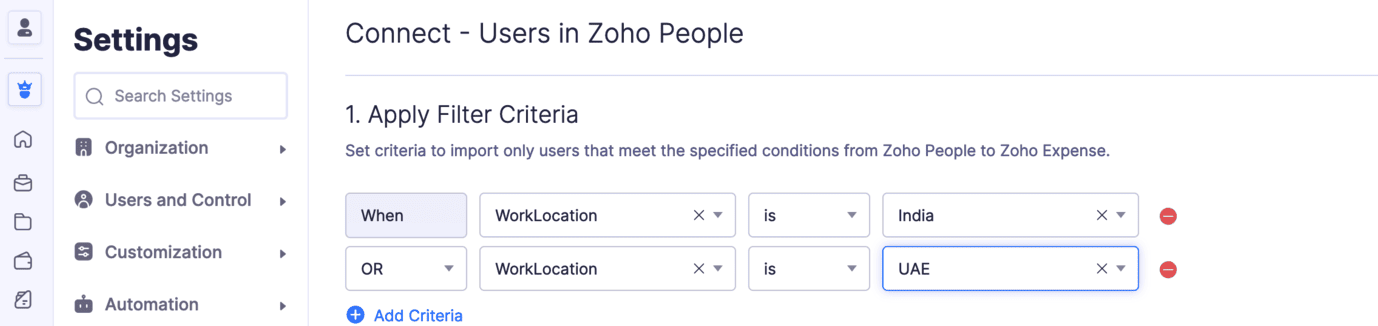
Set criteria and import only the users who meet the specified criteria into Zoho Expense. Once you integrate with Zoho People, you can sync its modules with Zoho Expense. Under the Users section, click Configure Now and set the criteria that will be used to filter and sync users into Zoho Expense.
iOS App Updates:
Calculate Mileage Expenses Using Maps: While calculating mileage expenses using maps, users can add their travel locations. Once added, all the possible routes will be displayed on the map. Choose the travel route, and the distance travelled will be calculated automatically. These details will also be displayed on the expense details screen.
Note: This feature is available in early access. Write to us at support@zohoexpense.com to enable it for your organization.
Additionally, users can also add their travel locations while creating mileage expenses using the Odometer reading or by manually entering the distance travelled, if you've enabled the calculate mileage using maps feature.
Try out all the new features and let us know what you think in the comments below. If you have any inquiries or feature requests, please write to us at support@zohoexpense.com.
Stay tuned for more updates!
Regards,
Zoho Expense Team
Access your files securely from anywhere
New to Zoho Recruit?

Zoho Developer Community
New to Zoho LandingPage?
Zoho LandingPage Resources
New to Zoho Survey?
New to Zoho CRM Plus?
Deliver unforgettable customer experiences
New to Zoho CRM Plus?
Deliver unforgettable customer experiences
New to Zoho Marketing Plus?
Everything you need to run your marketing
New to Zoho Marketing Plus?
Everything you need to run your marketing
New to Bigin?





Topic Participants
Geethanjali R K
Luke Anderson
Hemila S A
New to Zoho TeamInbox?
Zoho TeamInbox Resources
Zoho CRM Plus Resources
Zoho Books Resources
Zoho Subscriptions Resources
Zoho Projects Resources
Zoho Sprints Resources
Qntrl Resources
Zoho Creator Resources
Zoho CRM Resources
Design. Discuss. Deliver.
Zoho Show Resources

Get Started. Write Away!
Writer is a powerful online word processor, designed for collaborative work.
Zoho CRM コンテンツ
-
オンラインヘルプ
-
Webセミナー
-
機能活用動画
-
よくある質問
-
Ebook
-
-
Zoho Campaigns
- Zoho サービスのWebセミナー
その他のサービス コンテンツ
Nederlandse Hulpbronnen

ご検討中の方
Recent Topics
Inventory to Xero Invocie Sync Issues
Has anyone had an issue with Invoices not syncing to Xero. It seems to be an issue when there is VAT on a shipping cost, but I cannot be 100% as the error is vague: "Unable to export Invoice 'INV-000053' as the account mapped with some items does notHow to activate RFQ? What if a price list has ladder price for items?
Where can I find the option to activate request for quotation? How does it work? If the item has ladder price, does it gets calculated depending on how many items are in the cart?Can't join canal Developers Zoho User
Hello, I received an invitation to join this channel, but I get an error when I try to join it, and I get the same error when I go to the Zoho Cliq interface > Search for a channel. Is this because I don't have a license linked to this email address?Desk Email reply - set default font / use custom font
Hello, in our e-mails, which we send to our customers, a certain font must be used (Corporate Design): Segoe UI https://en.wikipedia.org/wiki/Segoe#Segoe_UI How can this be included? How can this be set as the default font to ensure that this font isPDF Templates - Checkbox Borders
Is there a way to remove the border of a radio/checkbox on a PDF? I'd like to use the function of checkbox but if there's no easy way to remove the border (the PDF form already has a rectangle so it gets cluttered), then I'm forced to create a singleSettings Icon No Longer in ZOHO Desk?
In ZOHO desk, there has been a gear icon for settings. as of yesterday, it is no longer there. I showed up briefly this morning but is gone again. Anybody else experiecing this?Tip #43 - Track, Review, and Analyze Your Assist Sessions with Reports-'Insider Insights'
Did you know you can generate detailed reports for both remote support sessions and unattended access sessions in Zoho Assist? This makes it easy to monitor technician activity, measure efficiency, and review customer interactions. Let us now take a closerSimplified Call Logging
Our organization would like to start logging calls in our CRM; however, with 13 fields that can't be removed, our team is finding it extremely cumbersome. For our use case, we only need to record that a call happened theirfor would only need the followingSub form doesn't as formula field
Is it possible to get formula field in sub form in futures?Week date range in pivot table
Hello, I need to create a report that breakouts the data by week. I am using the pivot table report, and breaking out the date by week, however the date is displayed as 'Week 1 2014' format. Is there anyway to get the actual dates in there? ex. 1/6/2014-1/12/2014 Thanks,How do I get Status History data of my Projects?
I want to build a table in Zoho Analytics that Groups by Date, when Projects entered a certain status. I cannot find Status History or any such useful data available in the Setup of my Data Source sync. Please advise how I can achieve this?Is it possible to hide fields in a Subform?
Since layout rules cannot be used with Subforms, is there another way, or is it even possible, to hide fields in a subform based on a picklist fields within said subform? For example, if the Service Provided is Internet, then I do not want to see theWeekly Tips :Instantly find what you need with Attachment Viewer
Your inbox must be packed with project emails, shared notes, and scattered attachments. You are looking for one specific file—a presentation slide or maybe a media clip from a team update—but don’t want to dig through endless email threads or switch betweenMissing Zoho Desk integration option for form workflows
According to the help page "Configure Zoho Desk integration in form workflows" we should be able to select Zoho Desk as an integration target but when I open the integrations list then Zoho Desk is not being listed in it. We are on the Premium plan which should already support Zoho Desk integrations.Gantt for 2 or more projects
Hello, I'm trying the free version of your produtc. It is veryyy good!!!! I don't know if in the Standard plan, I can overview a Gantt Graph for 2 or more Projects Milestone. This would be very helpfull for managing teams and taking decisions about who I will assign a task to. In the paid plan Do I have this possibility? Thank you.Integrating a Zoho Project Gantt Chart into Reports
Is is possible to integrate a Zoho Project Gantt Chart into a Zoho Report Dashboard. I am in the process of creating Project Status Dashboards for the projects that we track in Zoho Projects and I would like to incorporate the gantt chart within Reports. Please let me know! ThanksZOHO BOOKS - EXCESSIVELY SLOW TODAY
Dear Zoho Books This is not the first time but it seems to be 3 times per week now that the system is extremely slow. I work on Zoho Books 95% of my day so this is very frustrating. Zoho you need to do something about this. I have had my IT guy checkDisplaying related quotes in sales order and back
Hi, My colleague liked to see to which sales orders, the quote has been converted. Quote shows Invoices, but not SO. Same, they would like to see the quotes in the sales order, as they can see invoices, packages, shipment, How can we achieve this ? ThankTip of the Week #71–Auto-move incoming messages to the right inboxes with keywords
We all know that customer-facing teams, especially your sales and support teams, can’t afford to miss even a single customer conversation. But sometimes, sales queries or support requests can easily get lost in a crowded inbox or even end up in the wrongClearing Fields using MACROS?
How would I go about clearing a follow-up field date from my deals? Currently I cannot set the new value as an empty box.Migrating a Zoho Forms form into Zoho Creator
Hi, How can I migrate my Zoho Forms form into Zoho Creator? Thanks. Truly, EmadIs there any way to recall an email sent using Zoho CRM?
If an email is sent using Zoho Mail, there is a recall option/functionality that is available to the sender. Is there any way to recall an email if it was sent using Zoho CRM? I can't seem to find that option. Any help would be appreciated.Problem with reports due to "Connected" items change - Yes this IS a problem
Now that the change has been made to use "connected" items I can no longer run the reporting I need in CRM. I should be able to start with Deals as the parent, connect down to the Account (Account_Name) on the deal as the child, then to any child itemsIntroducing notifications in the vendor portal
Imagine this: You're a recruiter working with multiple vendors on a high-volume hiring project. You’ve just updated a job description after a last-minute change from the hiring manager. One of your vendors, however, is still working off the older versionAnalytics for notes created
Is there a way I can see how many notes were created per day? Via reporting or analytics?Cannot update Recurring_Activity on Tasks – RRULE not accepted
Hello, I am trying to update Tasks in Zoho CRM to make them recurring yearly, but I cannot find the correct recurrence pattern or way to update the Recurring_Activity field via API or Deluge. I have tried: Sending a string like "RRULE:FREQ=YEARLY;INTERVAL=1"Add image to report...
Greetings, I send a weekly color coded report via Creator email. I would like to add the legend somewhere in the report. Header, footer where ever. I have the legend saved on Google Drive and can access it via shared link. Sure someone has wanted to addMore controls for User Fields in CRM
Dear All, We are here with a minor but crucial enhancement to the user fields—now set accessibility permissions to the records for user field. User field allows you to extend co-ownership of records to your peers. You can collaborate with them for certainCalls to accounts rather than leads or contacts?
So..... We have a dilemma and I'm hoping someone has encountered this before and figured out a fix. We have just migrated to Zoho. It's great.....expect for how "Calls" are handled.... We are B2B. We do not use the leads module. A "Lead/Prospect" forImage Upload Field | Zoho Canvas
I'm working on making a custom view for one of our team's modules. It's an image upload field (Placement Photo) that would allow our sales reps to upload a picture of the house their working on. However, I don't see that field as a opinion when buildingPower of Automation :: Automated 'Delayed & Closed' Status Update Based on Due Date
Hello Everyone, A custom function is a software code that can be used to automate a process and this allows you to automate a notification, call a webhook, or perform logic immediately after a workflow rule is triggered. This feature helps to automateRange names in Zoho Sheet are BROKEN!
Hi - you've pushed an update that has broken range names. A previously working spreadsheet now returns errors because the range names are not updating the values correctly. I've shared a video with the support desk to illustrate the problem. This spreadsheetpopulate email address and name in zoho desk?
Is it possible to populate the email address and name in the zoho desk widget? We only use it in the context of an authenticated user, so we already know the user's name and email. Thanks,Are there default/pre-built dashboards in Zoho Desk?
Hi, I am looking for some pre-built dashboard templates in Zoho Desk, similar to what we can find in CRM/Projects, etc Thank youSAP S/4 HANA to CRM Integration - change the SAP Client ID
Hi I am trying to push the business partners from SAP S/4 HANA to ZOHO CRM module. The SAP Client ID is 421 in my case....kindly let me know how do I specify the sap client because it's a dropdown with specific values as of now. Thanks Ravi AswaniAdding branded signature to tickets reply
Hi, i am unable to figure out how to add signatures with logo to tickets reply. please advice .How to share ticket numbers across different ticket types
I'm running an event and have three different ticket types. Add on Event + Main Event - Early bird Main Event only - Early bird Add on Event only - Early bird And Standard class - shown but not available until early bird finishes Add on Event + Main EventAdding Social Media Buttons to Basic Campaigns
Hi, I'm quote new to using Zoho Campaigns and I can't work out how to add Social Media Buttons into my basic campaign? In MailChimp there's a button that brings the icons into your campaign for you. I've tried adding the social media icons as 'buttons' in Zoho but it's not looking great. Can anyone help? Thanks!Hide Inactive Social Sign-In Providers from Login Screen
Hello Zoho Team, We hope you are doing well. Currently, Zoho One allows admins to configure security policies and enable or disable Social Sign-In options for third-party providers such as Apple, Google, Microsoft, LinkedIn, Yahoo, Twitter, Facebook,[Free Webinar] AI Agents in Zoho Creator - Creator Tech Connect
Hello Everyone! We welcome you all to the upcoming free webinar on the Creator Tech Connect Series. The Creator Tech Connect series is a free monthly webinar that runs for around 45 minutes. It comprises technical sessions in which we delve deep intoNext Page