Zoho Projects - Rapports

Suite à l'article précédent, nous continuons la découverte des différents modules dans Zoho Projects. Dans cet article, découvrons les variétés de données en termes de diagrammes de Gantt et de rapports pour les tâches, les bugs et les feuilles de temps afin de vous aider à mesurer efficacement la productivité et la progression du travail.
Intérêt
- Garder la trace de toutes les tâches d'un projet.
- Gérer les activités qui se chevauchent et la surcharge des ressources.
- Gérer les dépendances des tâches.
Les différents types de rapports disponibles dans Zoho Projects comprennent :
- Les diagrammes de Gantt
- L'utilisation des ressources
- Planifié contre réel
- Les rapports de projet
- Les rapports de tâche
- Les rapports de feuilles de temps
Les diagrammes de Gantt
Un diagramme de Gantt est une représentation visuelle du déroulement du projet. Il affiche des informations sur la progression, le propriétaire, le statut de la tâche et d'autres données liées à cette tâche. Dans Zoho Projects, vous pouvez visualiser le diagramme de Gantt par deux moyens :
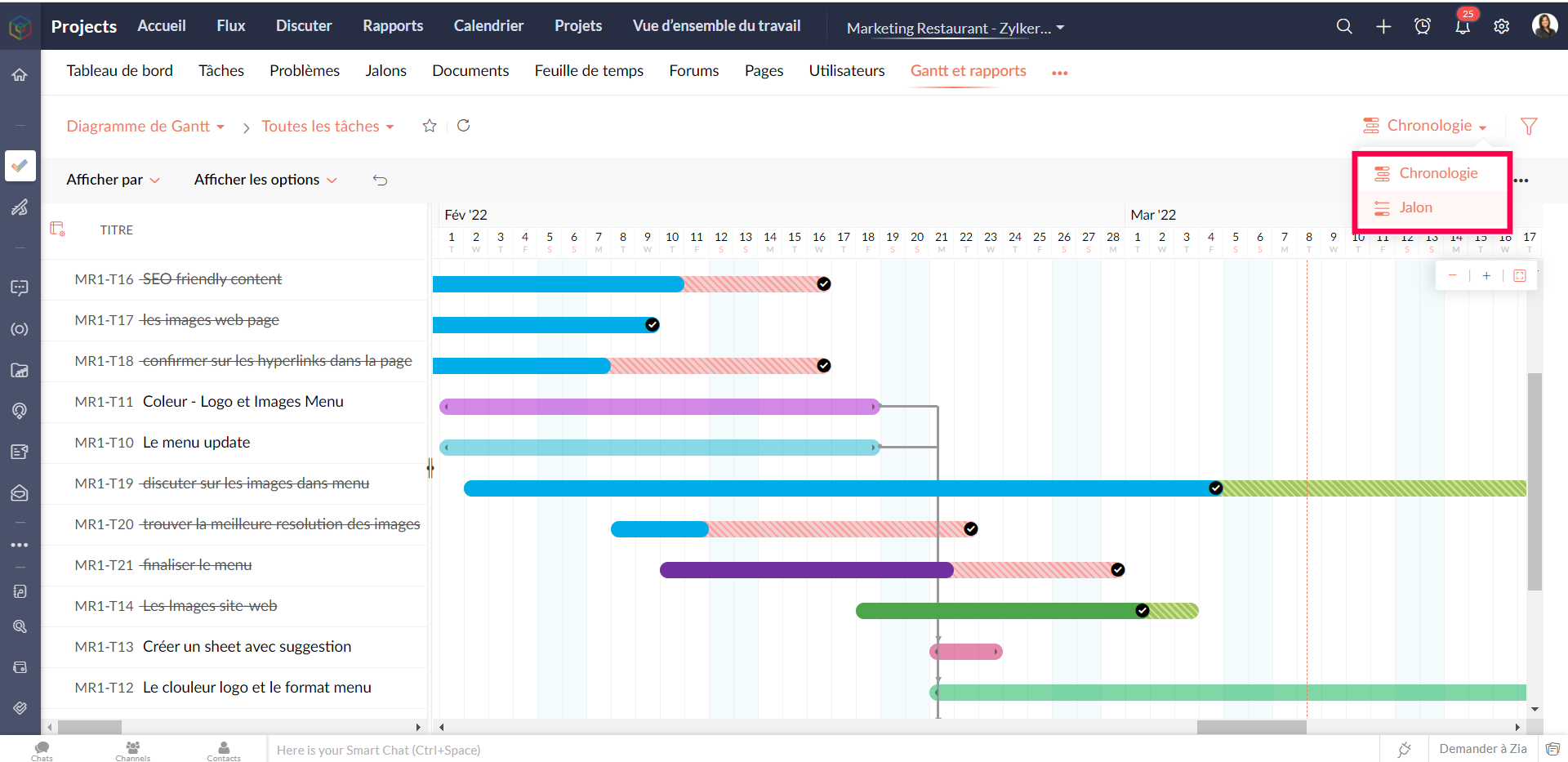
Gantt des jalons : Les jalons, les listes de tâches et les tâches sont affichés en fonction de leur hiérarchie dans le projet. Les jalons sont représentés par un panneau, les listes de tâches par des barres horizontales noires et les tâches de différentes couleurs par des barres de Gantt horizontales.
Que pouvez-vous faire avec le Gantt des jalons ?
- Modifiez n'importe quelle tâche dans le jalon de Gantt lui-même.
- Faites défiler l'écran vers la droite pour afficher d'autres détails sur les tâches, comme le pourcentage d'achèvement, la durée, la date de début, la date de fin, le propriétaire et la priorité. Vous pouvez également voir le pourcentage d'achèvement des jalons et des listes de tâches.
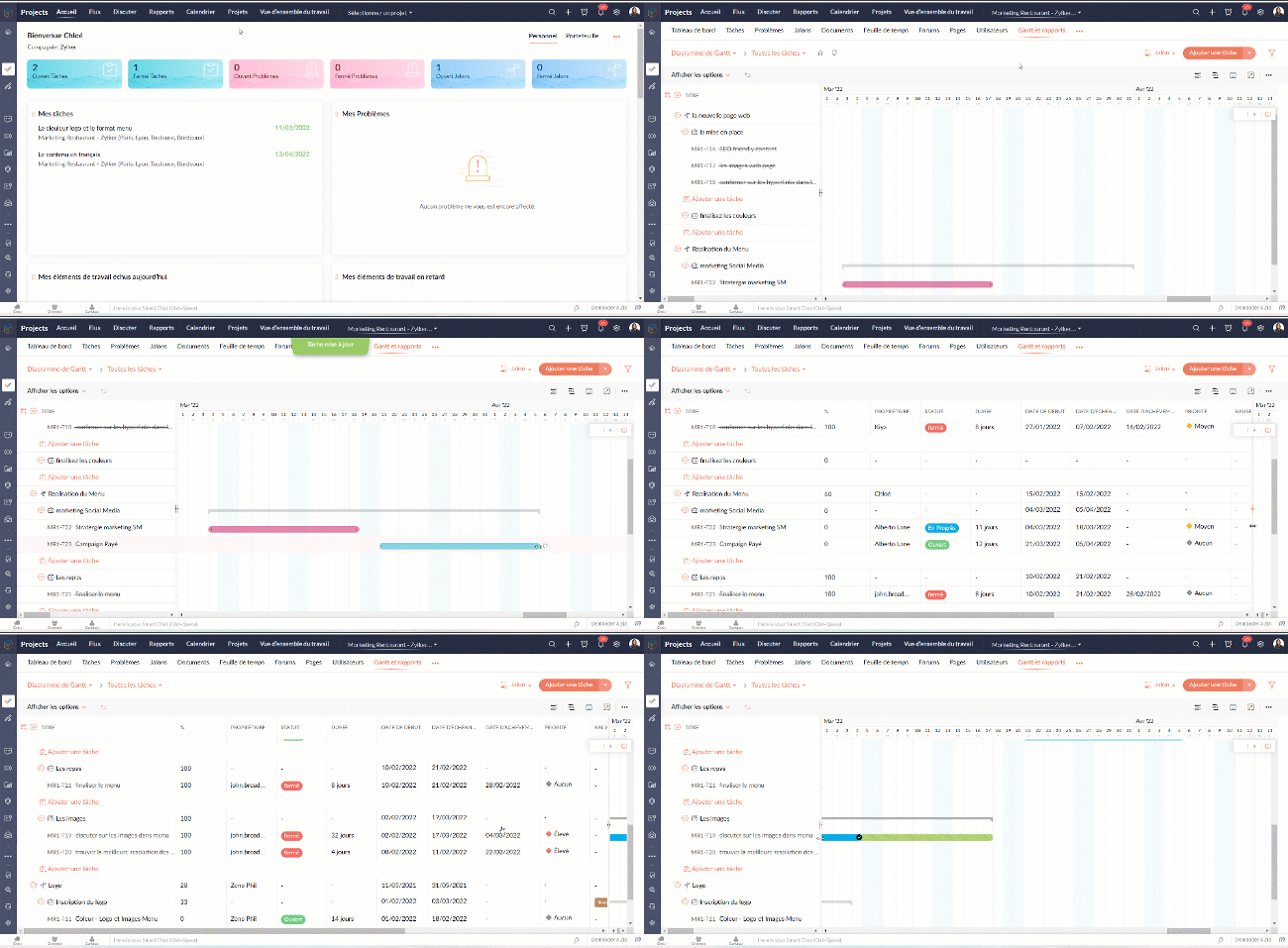
- Définissez la dépendance entre les tâches.

- Sur l'axe vertical, les jours fériés sont affichés en rouge et les week-ends en bleu.
- Pour accéder au jalon de Gantt à travers les projets, naviguez vers Accueil >> Rapports >> Jalon de Gantt. Dans cette section, vous pouvez consulter les jalons de Gantts pour tous les projets de votre entreprise. Si vous souhaitez afficher les résultats d'un projet spécifique ou d'un ensemble spécifique de projets, cliquez dans le coin en haut à droite pour filtrer les données en fonction du projet.
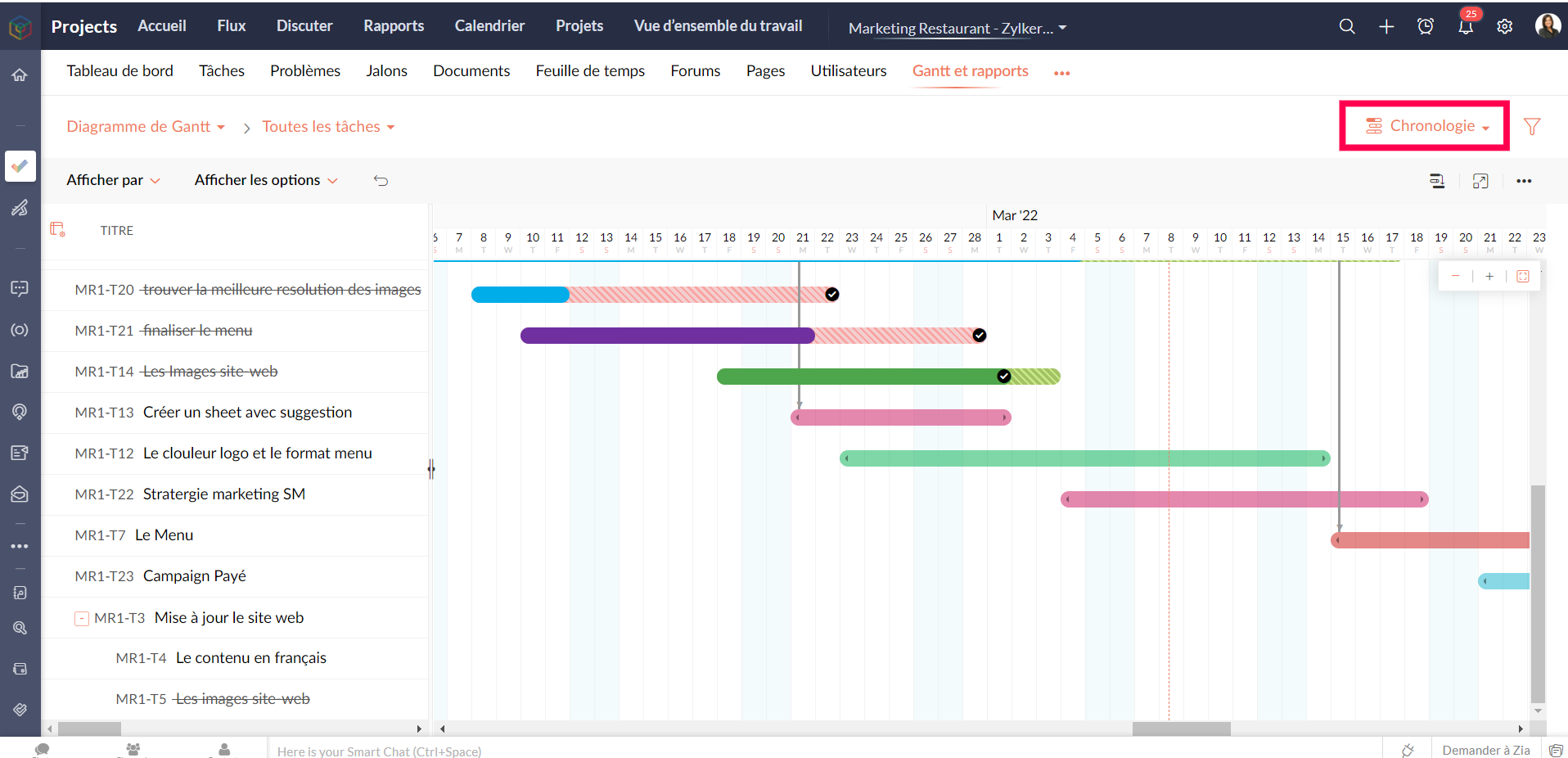
Gantt chronologique : Les barres de Gantt sont affichées en fonction de l'ordre de la date de début dans le projet. Les tâches et sous-tâches sont représentées par des barres de Gantt horizontales dans des couleurs différentes.
Personnaliser le diagramme de Gantt
Vous pouvez personnaliser les colonnes de Gantt depuis le bouton "Personnaliser colonne". Vous pouvez réorganiser l'ordre des colonnes ou même activer ou désactiver les champs à partir de ce bouton.

Pour personnaliser la couleur de la barre des tâches, survolez une barre de tâches, cliquez sur l'icône de personnalisation des couleurs et sélectionnez la couleur. La couleur de la barre est modifiée.
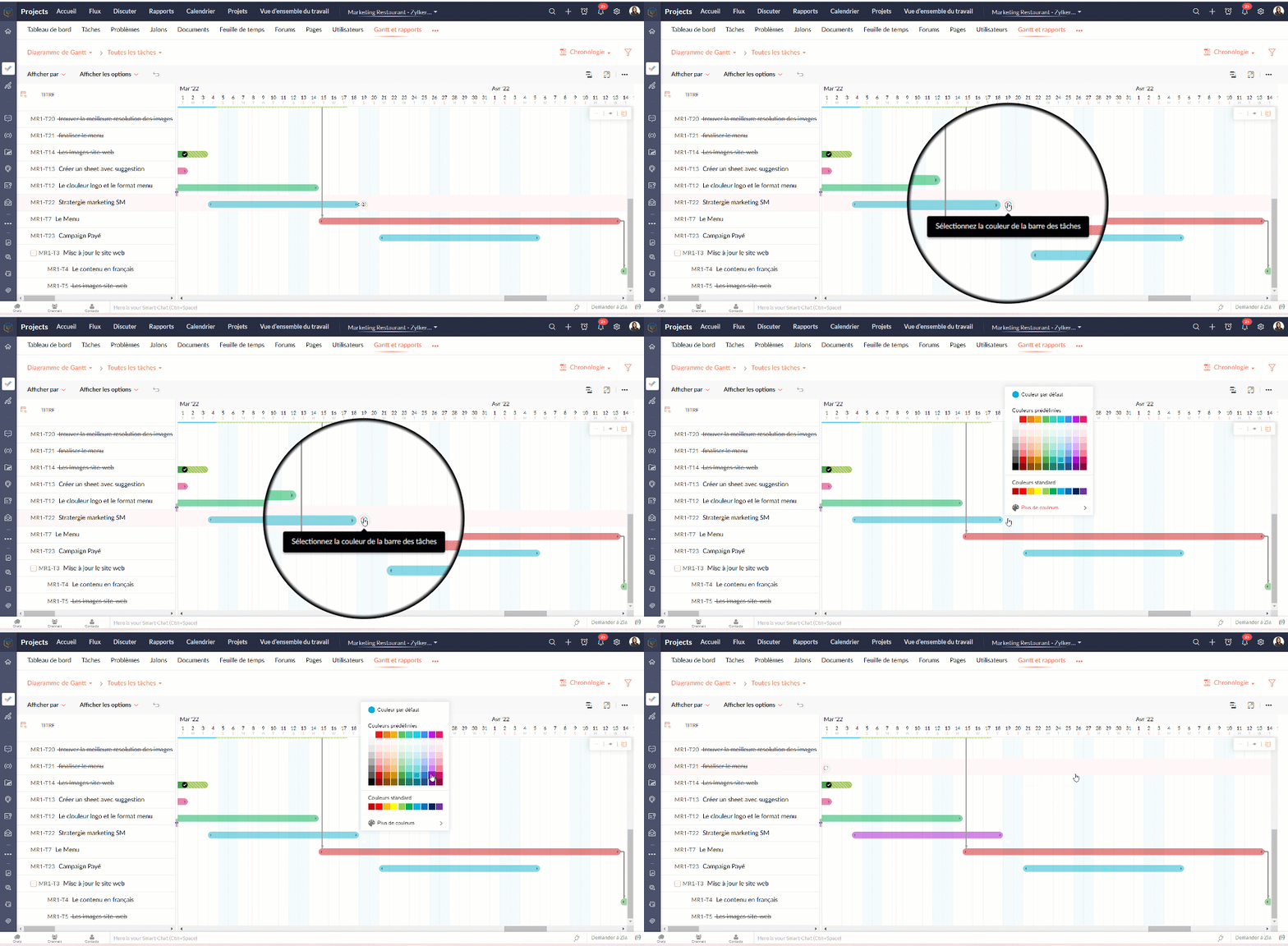
Tableau d'utilisation des ressources
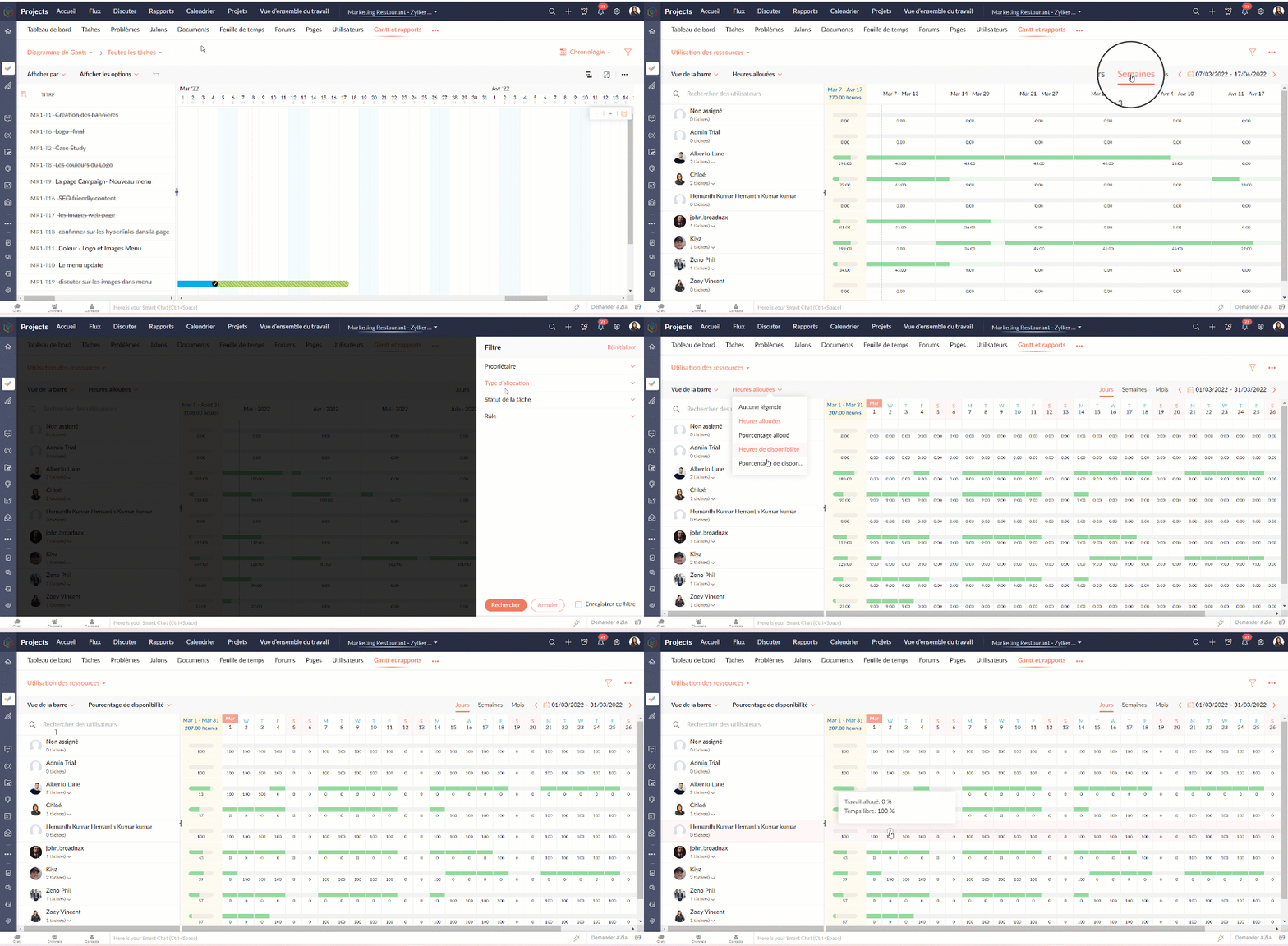
Le graphique d'utilisation des ressources montre visuellement le travail réparti en heures et en pourcentage. Le temps d'inactivité est reflété. Lorsqu'une ressource est surchargée, vous pouvez la reprogrammer soit vers une autre ressource, soit vers un autre jour avec des heures de travail disponibles. Vous pouvez ajouter directement des tâches sur le graphique pour tout usager sélectionné.
Attribuer les tâches à partir du tableau d’utilisation des ressources
- Allez dans "Rapports"
- Sélectionnez "Utilisation des ressources" dans la liste déroulante du graphique.
- Cliquez sur la barre de planification des tâches dans le graphique pour ouvrir la fenêtre pop-up "Attribuer un utilisateur".
- Sélectionnez les heures de travail standards ou flexibles dans la fenêtre pop-up "Attribuer un utilisateur".
- Remplissez les détails demandés.
- Cliquez sur "Soumettre" pour mettre à jour le propriétaire de la tâche.
Heures planifiées vs. réelles pour les tâches
Planifié vs Réel est une fonctionnalité qui indique la progression du travail de l'utilisateur en fonction de la différence entre ses heures planifiées et ses heures réelles. Vous pouvez visionner à la fois le total des heures planifiées d'un utilisateur et les heures réelles passées par l'utilisateur dans un projet. La différence entre les heures planifiées et les heures réelles indique la progression de l'utilisateur du projet.
Rapports de tâche
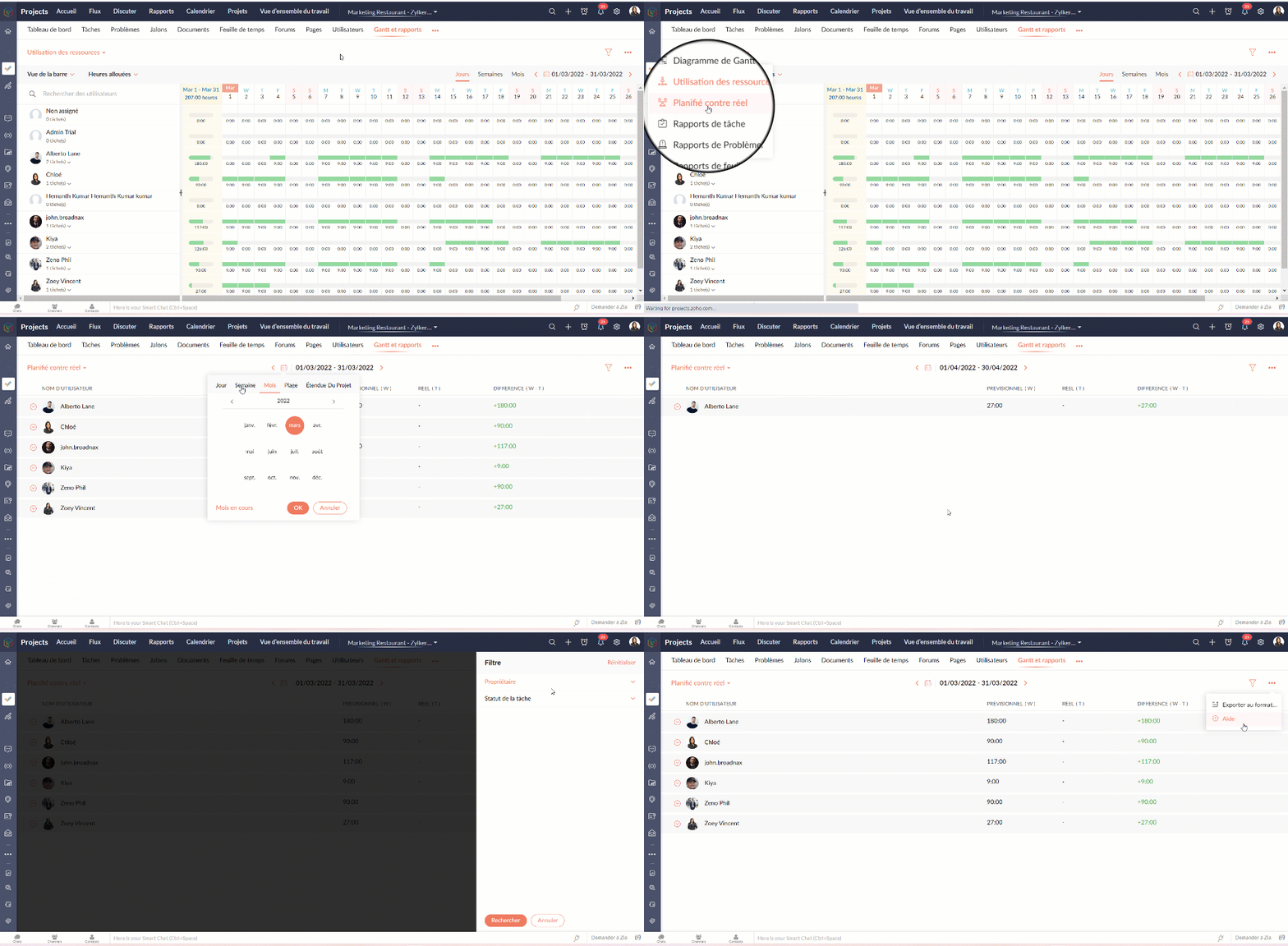
La vue des rapports de tâches fournit une vue consolidée de toutes les tâches d'un projet en fonction de leur statut, de leur jalon, de leur priorité, de leur propriétaire et de leur pourcentage d'achèvement.
Avantages
- Obtenir le nombre de tâches en fonction du pourcentage d'achèvement.
- Visualiser les tâches de chaque utilisateur en fonction du pourcentage d'achèvement.
- Créer des rapports sur mesure en comparant deux critères et en générant un rapport sur les tâches.
Types de rapports de tâches
Les rapports de base
Les rapports de base vous donnent le nombre de tâches par rapport à cinq critères différents : statut, priorité, balises, propriétaire, ou pourcentage de réalisation.
- Statut - Rapport généré pour afficher le nombre de tâches basé sur le statut des tâches.
- Propriétaire - Rapport généré pour afficher le nombre de tâches en fonction du propriétaire.
- Priorité - Rapport généré pour afficher le nombre de tâches en fonction de la priorité des tâches.
- Pourcentage de réalisation - Rapport généré pour afficher le nombre de tâches en fonction du pourcentage d'achèvement des tâches.
- Balises - Rapport généré pour afficher le nombre de tâches en fonction des balises.
- Projet - Rapport généré pour afficher le nombre de tâches dans chaque projet.
Les rapports avancés
Les rapports avancés vous donnent le nombre de tâches par propriétaire selon le statut, la priorité ou la réalisation. Vous pouvez également créer des rapports de tâches personnalisés basés sur différents critères.
- Owner-wise Task Status - Rapport généré pour afficher le nombre de tâches en fonction du statut défini par le propriétaire.
- Achèvement des tâches par le propriétaire - Rapport généré pour afficher le nombre de tâches en fonction du pourcentage d'achèvement défini par le propriétaire.
- Priorité de la tâche par le propriétaire - Rapport généré pour afficher le nombre de tâches en fonction de la priorité définie par le propriétaire.
- Rapport de tâche personnalisé - Rapport généré pour visualiser le nombre de tâches en comparant deux critères quelconques.
Vous pouvez changer le type de graphique à partir de la liste déroulante dans le coin supérieur droit. Cliquez pour personnaliser vos critères de filtrage et obtenir les résultats en conséquence.

Rapports sur les problèmes
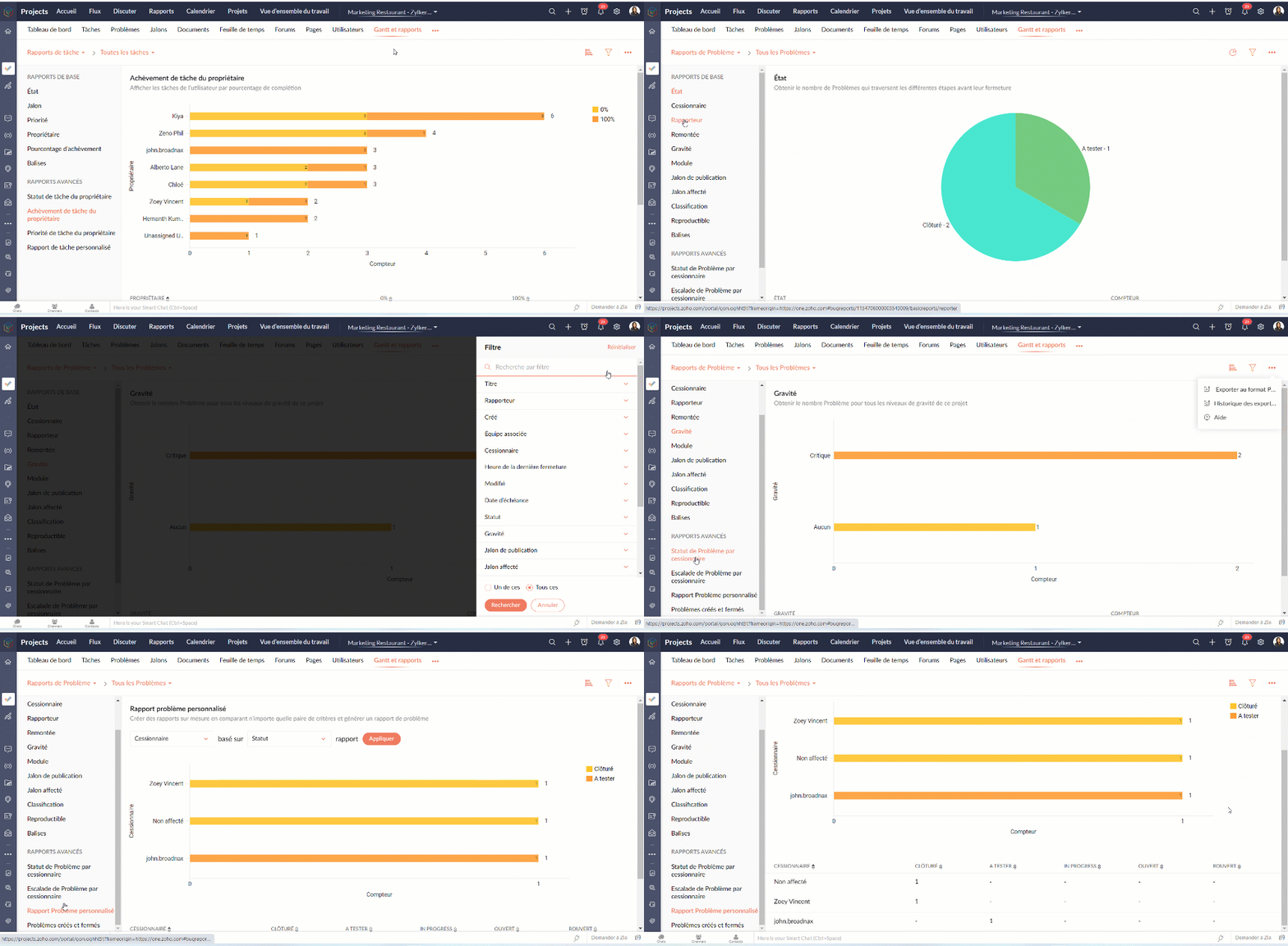
Les rapports sur les problèmes donnent un aperçu détaillé de l'état des problèmes. Les problèmes peuvent être analysés en fonction de nombreux paramètres.
Rapports de base
Les rapports de base montrent l'état des problèmes en utilisant les paramètres les plus courants tels que le statut, la gravité, la balise, le rapporteur, renvoi à l'échelon supérieur, etc
Rapports avancés
Les rapports avancés répondent à des questions telles que "Combien de problèmes un propriétaire a-t-il à chaque étape ?" ou "Combien de problèmes ont été remontés et à quel niveau ?".
Rapports sur les feuilles de temps
Les rapports sur les feuilles de temps vous aident à suivre les heures enregistrées pour les tâches et les problèmes. Les rapports avancés montrent les heures approuvées, rejetées et en attente pour chaque utilisateur. Le rapport sur les feuilles de temps facturables et non facturables montre, bien entendu, combien d'heures sont facturables et non facturables par utilisateur.
Nous continuerons d'en découvrir dans nos prochains articles. En attendant, n'hésitez pas à poser vos questions en commentaire.
L'équipe Zoho France
Access your files securely from anywhere
Centralize Knowledge. Transform Learning.
All-in-one knowledge management and training platform for your employees and customers.
New to Zoho Recruit?

Zoho Developer Community
New to Zoho LandingPage?
Zoho LandingPage Resources
New to Zoho Survey?
New to Zoho CRM Plus?
Deliver unforgettable customer experiences
New to Zoho CRM Plus?
Deliver unforgettable customer experiences
New to Zoho Marketing Plus?
Everything you need to run your marketing
New to Zoho Marketing Plus?
Everything you need to run your marketing
New to Bigin?





Topic Participants
Kinjal Lodaya
Sticky Posts
Collaboration sans faille avec Zoho One
Bonjour à tous, Dans cet article nous allons voir comment Zoho One permet une collaboration à différents niveaux . La façon dont nous travaillons évolue. À mesure que les entreprises se mondialisent, la plupart des activités sont menées en équipe.
New to Zoho TeamInbox?
Zoho TeamInbox Resources
Zoho CRM Plus Resources
Zoho Books Resources
Zoho Subscriptions Resources
Zoho Projects Resources
Zoho Sprints Resources
Qntrl Resources
Zoho Creator Resources
Zoho CRM Resources
Design. Discuss. Deliver.
Zoho Show Resources

Get Started. Write Away!
Writer is a powerful online word processor, designed for collaborative work.
Zoho CRM コンテンツ
-
オンラインヘルプ
-
Webセミナー
-
機能活用動画
-
よくある質問
-
Ebook
-
-
Zoho Campaigns
- Zoho サービスのWebセミナー
その他のサービス コンテンツ
Nederlandse Hulpbronnen

ご検討中の方
Recent Topics
452 Mailbox delivery restricted by policy error
We have been testing Zoho desk for about a week now and have been forwarding emails in via an Exchange Online Mail flow rule without issue until yesterday. Suddenly yesterday morning we started getting the vast majority of the emails stuck in PendingSend Email reply on behalf of Agent
Hi, When using the send email reply via the API I can set the reply on behalf of the customer by using impersonatedUserId in the header of the API call. Is there a way to do this for Agents too? I need to be able to send an email reply on behalf of anSharing Tickets to a team within a department
Hi there, We have a need for one department to be able to share tickets to a specific team within a department, I'm wondering if this is possible? All the shared tickets are going into the 'Shared Tickets' view for the whole department but is there aAutomatic Department and Employee Sync Between Zoho One and Zoho People
Dear Zoho Support, I'm writing to propose a valuable feature request that would streamline data management and improve user experience within the Zoho ecosystem: automatic synchronization between departments and employees in Zoho One and Zoho People.Maximum limit of bank accounts
I'm currently setting up Zoho Books in order to migrate at the start of our next financial year (April) and while adding bank accounts I've tried to add a second account from the same bank and receive an error about the maximum limit of bank accounts.Unable to load a specific image
Hi I am trying to upload an svg file, which reports that there is "a problem with the file", but does not say what sort of problem. I can't find anything which says which files are supported, so it may be it does not support svg. (which would be a real shame) The file itself will open in either Firefox or Chrome without problem. For the moment I am using a png file, which does not zoom well of course. DavidWhy does the Address field show the wrong map location even with a correct Pincode?
I am noticing an issue with the Address field map in Zoho Creator. When I enter a city name that exists in multiple locations within the same state, the map sometimes points to the wrong area even if I have entered the correct Pincode. Currently, it seemsArchive Option in Conversation View
Hello, I have a suggestion\request to add an "Archive Thread" button in conversation view of Zoho Mail. The best suggestion I have is to put an "Archive Thread" button next to the "Label Entire Thread" button in conversation view. Most users don't justOutlook/Hotmail Blocking Zoho SMTP IPs (S3150)
We are currently facing a serious deliverability issue with Zoho SMTP while sending transactional OTP emails for our production application. Emails sent to Outlook / Hotmail addresses are being rejected with the following error: 550 - 5.7.1 Unfortunately,Outlook is blocking incoming mail
Outlook is blocking all emails sent from the Zoho server. ERROR CODE :550 - 5.7.1 Unfortunately, messages from [136.143.169.51] weren't sent. Please contact your Internet service provider since part of their network is on our block list (S3150). It looksZoho Social API for generating draft posts from a third-party app ?
Hello everyone, I hope you are all well. I have a question regarding Zoho Social. I am developing an application that generates social media posts, and I would like to be able to incorporate a feature that allows saving these posts as drafts in Zoho Social.Temporarily rate limited due to IP reputation.
We have suddenly started receiving the following Mail Delivery Status Notification: Diagnostic-Code: 4.7.650 The mail server [136.143.184.12] has been temporarily rate limited due to IP reputation. For e-mail delivery information, see https://aka.ms/postmasterIMPORTANT: It doesn´t search for letters with portuguese characters.
Some of my articles have for example the word "vídeo". But if I search for "vídeo" it doesn´t find them. If I search for "video" it does find them. Idealy, it should find the articles either way. But if I have to choose, it would be better to find theIMPORTANT: It doens´t show full article name on search - Should add line break
When we search for articles, it doesn´t show the full name. There should be a line break so the user can see the full article name, otherwise the user can´t know if that´s the article he/she is looking for. This is very important, otherwise the user hasZoho Books - Payment Gateway - Revolut
Hi Books Team, My feature request if to include the popular platform Revolut as a payment collection option on invoices in Zoho Books. Please upvote if you are also looking for this option.Zoho Books | Product updates | January 2026
Hello users, We’ve rolled out new features and enhancements in Zoho Books. From e-filing Form 1099 directly with the IRS to corporation tax support, explore the updates designed to enhance your bookkeeping experience. E-File Form 1099 Directly With theKaizen #233 - Generating AI-powered Follow-up Emails Using CRM Functions and Widgets
Hey everyone! Welcome back to another interesting post in the Kaizen series! Sales teams regularly capture interaction notes in CRM after speaking with prospects. However, drafting a follow-up email that reflects the conversation context can be repetitiveConnect Bank in Zoho Books
Can I connect UOB or Ariwallex in Zoho Books?Using MPN across multiple SKUs and inventory tracking
I have several different SKU's that share a common MPN and would like to track inventory by MPN. SKU1 has MPN1 assigned SKU2 has MPN1 assigned Here is an example If I start with 5 of MPN 1 in stock I want each SKU1 and SKU2 to show as 5 in stock, If IMarketing Tip #1: Optimize item titles for SEO
Your item title is the first thing both Google and shoppers notice. Instead of a generic “Leather Bag,” go for something detailed like “Handcrafted Leather Laptop Bag – Durable & Stylish.” This helps your items rank better in search results and instantlyFeature Enhancement Request – Text Formatting Options in Item Description (Zoho Books/Quotes Module)
Dear Zoho Development Team, Greetings from Radiant360 Integrated Technical Services LLC. We would like to bring to your attention a functional limitation we've encountered within the Item Table / Quote Description section of Zoho Books (and Zoho CRM Quotes).ZOHO Books Query
Good day, Can someone please advise. I recently migrated from ZOHO Invoice to ZOHO Books. No that I want to use the inventory on Books I cant as all my items have transaction history. The person I spoke to at ZOHO said I need to create a new Company profileBest way to schedule bill payments to vendors
I've integrated Forte so that I can convert POs to bills and make payments to my vendors all through Books. Is there a way to schedule the bill payments as some of my vendors are net 30, net 60 and even net 90 days. If I can't get this to work, I'll haveinventory removal at packing list or shipment.
currently our system is set to remove inventory at invoice. This is creating an inventory nightmare? Is it possible to change the settings to remove the item from inventory at either the packing slip stage or shipping the item.How to add employee and not invite them to log in?
I want to add 50 employees, but invite them only when everything will be configured and ready. Is it possible? Should we create employee profiles and then convert them later? Thank you,Any Offline Developing Environements or IDE's for Zoho Creator
Hi there, Is there any offline developing environment for zoho creator like the Eclipse for sales force.com? So that i could make my development faster. Its taking a laot of time to write save and verify the code in Zoho Creator online. Thanks in advanceHow is Your eCommerce Experience w/Zoho Inventory?
First off, I'm SUPER grateful for the advent of Zoho Inventory and now the Zoho Commerce Suite. Overall, Inventory is a great product, especially for customers without an eCommerce presence. For eCommerce companies (especially those shipping more than ~10 packages/day), however, there are certain drawbacks that keep my clients from moving over to Zoho Inventory: Cons: 1. Invoice + Package Creation from Shopify/Other eCommerce Integrations: Zoho Inventory makes the somewhat perplexing decision toAbility to Use Both AND and OR When Creating Rules (Advanced Conditions)
I'd like to be able to use more complicated logic when setting up rules. E.g. in Zoho Mail, I can choose "Advanced conditions (AND/OR) to create a rule that can be applied to multiple subject lines from the same sender. But in Zoho TeamInbox, I will haveFacturation électronique 2026 - obligation dès le 1er septembre 2026
Bonjour, Je me permets de réagir à divers posts publiés ici et là concernant le projet de E-Invoicing, dans le cadre de la facturation électronique prévue très prochainement. Dans le cadre du passage à la facturation électronique pour les entreprises,Zoho Desktop App- Unable to Minimize/Freezes
I'm having issues with my Zoho Mail desktop app (PC). When go on my desktop and open the app this is what happens: - Unable to minimize and close app (in the screenshot attached you can see at the top right there is no option to minimize/close) - UnableZoho Invoice Zapier Integration
Is there still a way to use Zapier with Zoho Invoice? I've read online that that migrated to Zoho Books or Billing but since I am just using Invoice I can not find a Zapier Connection anymore.Conect chat of salesiq with zoho cliq
Is there any way to answer from zoho cliq the chat of salesiq initiated by customers?Bug: OAuth 2.0 State Parameter fails with Pipe Delimiters (RFC 6749 Non-Compliance)
I've discovered a bug in how Zoho's API Console handles the OAuth 2.0 authorization flow when the state parameter contains pipe characters (|), and I'm hoping the Zoho team can address this in a future update. The Issue Zoho's OAuth 2.0 implementationZobot with Plugs
Hello, I am having a problem with Zobot using Plugs. Here is my current flow: When I run the flow, I should immediately see the messages from the initial cards (Send Message cards), then after running the plug, and finally, see the messages after thePrint a document from Zoho Writer via Zoho Creator
If i use the code below i can get writer to create a new document or email it to me but i want to be able to print it directly from the browser and not have to send it via email and then print. Below is the code im using. Attached options form zoho writerTraining for How can i Operate the Software Features
need to Help for Training of the ZOHO Billing SoftwareAutomating Vendor Contract Management between Zoho Contracts and Zoho Books using Zoho Flow
Managing vendor agreements across procurement and finance systems often requires manually downloading executed contracts and attaching them to vendor records. This can become time-consuming and difficult to manage when dealing with a large number of contracts.VIEW HEADERS PARAMETERS
A function was created in zoho creator. In the microservices “https://creator.zoho.com/userhome/<adminuser>/admindashboard#/microservices”. A custom API was created and associate the function. In the postman I send some data, how can I visualize whatProblem applying batch operation error keeps looping that error
Problem applying batch operation error keeps looping that error an wont loginShared Email Sending Duplicate Copies of Emails
Hi there, We recently have moved our info@ email to Team Inbox to trial. We set this channel up using the Microsoft setup which works fine and have 3 users. I am wanting to know: 1. When I send a new email, it will create a copy of that email and sendNext Page