Orchestrate personalized journeys across touchpoints with CommandCenter in Zoho CRM Plus

Orchestrate personalized journeys across touchpoints with CommandCenter in Zoho CRM Plus

 What is CommandCenter? 

CommandCenter is a journey orchestration platform that helps businesses discover the path taken by the customers, personalize and automate various actions, and analyze the outcome. This includes all the touchpoints across sales, marketing, support modules such as CRM, Desk, SalesIQ, Backstage, Survey, and Webinar, ensuring you get a complete picture thus unifying the customer experience. 

CommandCenter comprises of Path Finder and Journey Builder.

Path Finder 

Path finder as the name suggests, traces the path taken by customers in your business process and gives you a visual map of all the touchpoints encountered by them while interacting with your business.

What do we mean by 'path taken by customer'?

Let's take the example of navigating between Sydney Opera House and Manly beach in NSW, Australia. We could take a couple of routes available via road, crossing the Sydney Harbour Bridge, or we could take a ferry to the beach as suggested by Maps. 


There could be 100 more ways in which we can reach the destination. If we plotted everyone's route, we can see that some paths glow brighter as they are most preferred when compared to the rest.
 
That's exactly what path finder in CommandCenter offers. It shows all paths taken by customers in your business as they navigate through the various touchpoints in place. Some paths are more preferred when compared to the rest and path finder helps you identify that, giving you a comprehensive visual representation of the journey.
 
Let's look at an example of the different stages or touchpoints involved in a prospect visiting your website to purchasing a product.
 
Path 1: Visits Website > Adds item to cart > Purchases the Product
Path 2: Visits Website > Adds item to cart > Abandons cart > Reminder email > Compares products > Purchase Product > Post purchase exclusive offer
Path 3: Visits Website > Live Chat Support > Add items to wishlist > Email notification urging to buy > Purchase Product > Post purchase exclusive offer
 
When you look at all three paths, they all end up purchasing the product, but the path taken by them is different. Path Finder tracks and maps this out for all touchpoints, giving you a complete picture of what your customers prefer the most, so that you can tailor your engagements accordingly.

Journey Builder 

Journey builder helps orchestrate dynamic and personalized engagements across various signals as they move from one stage to another.

For example, in a process to gather registrations for a webinar, a lead enters the journey after invites are sent to them via email and move to the Registered state once they sign up. The system automatically sends confirmation and reminder emails, then transitions the lead to Attended Webinar when participation is tracked. Based on attendance, Journey Builder triggers follow-up actions such as thank-you emails, lead scoring, and sales notifications, finally moving qualified leads into a sales stage for follow-up. This ensures every interaction is connected, timely, and consistent, creating a seamless experience from initial interest to sales engagement.
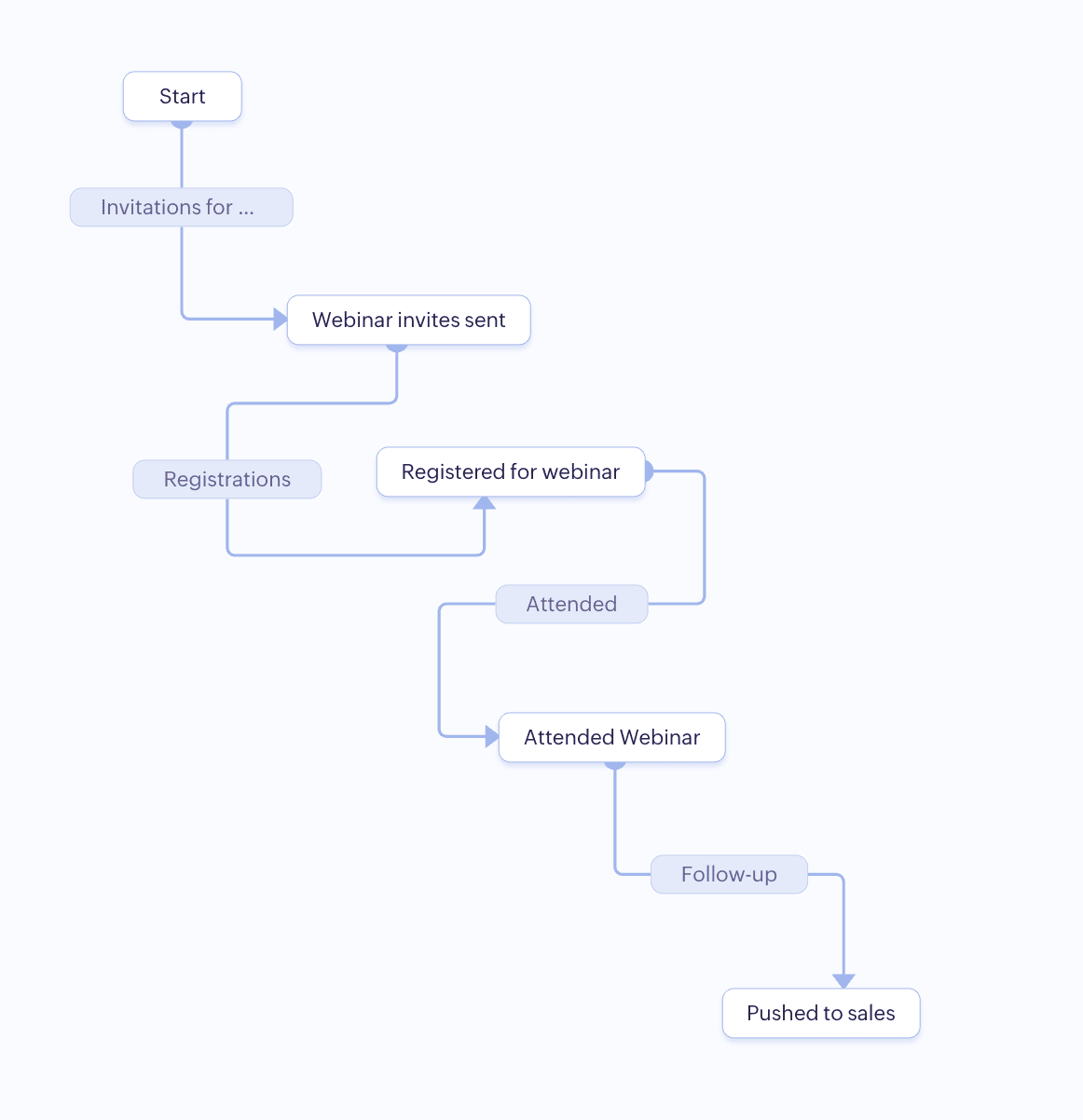


In short, path finder tells you what's happening and the journey builder helps you influence what happens next.


Both Path Finder and Journey Builder can work hand in hand. Path Finder will show you the various stages your customers follow to register for the webinar giving you a complete picture of how they engage and understand bottlenecks. With Journey Builder, we take those insights and tailor a personalized experience for your customers, nudging them along the various stages involved, ensuring that we achieve our goals.

Terms to follow in CommandCenter    

Stage: Represents the current state of the prospect/customer in your business process and are defined by the actions performed by them. For example, a customer submitting the registration form for a webinar will be in stage Registered. Once they attend the webinar, the stage changes to Attended.

Signals: A real time indication of an event or an activity being carried out, intimating the system that the person has done an action. This is key to moving records from one stage to another.
They can be categorized into four:
  1. Record Signals: Captures the changes happening to a record. i.e. when a record is created, updated, or deleted.
  2. User Signals: Captures the actions carried out by the lead or a contact, or the user in your organization such as opening an email, submitting a webform, checking in to an event.
  3. App-based Signals: Captures actions pertaining to the apps that are part of CommandCenter such as tickets when they become overdue in Desk, missed conversations in SalesIQ, outbound email bounced in CRM.
  4. Custom Signals: User defined signals that aren't part  of the default set available within the apps that are connected in CommandCenter.
Transition: The movement of the record from one stage to another that's triggered by the Signal.  
 
Identifiers: It's a unique piece of information about the user that helps the system recognize and trace the path taken by them. It could be the email, lead id, phone number, or any such unique information about the record. It's similar to how a GPS location from your mobile phone helps triangulate your exact location and follow the path taken, certain unique fields in CRM such as phone, email can help the system set them apart, and track the path followed in the journey.

Accessing CommandCenter in CRM Plus 

CommandCenter in CRM Plus can be accessed from the modules panel on the left, or by clicking More > CommandCenter.  


  1. Home: The home tab gives a quick glance of what's happening in CommandCenter. You can see details such as Records entered and exited in Journeys in this week, Records entered and exited in Path Finders in this week, Journey deadline in this week, and so on. You can click the information represented in the dashboard to view the underlying data.

  2. Path Finder: This module lets you create and manage all the paths. You can see the list of all the paths created, the version that's live, total records, and the last modified date. The toggle button lets you activate or deactivate a touchpoint, and the View Report gives you in-depth analysis as to what's happening in a path with the help of Path, Sankey, and Journey reports. Learn more: Setting up Path Finder


  3. Journey Builder: Here you can create and manage all the journeys that you want to orchestrate in your business process. The list view gives you a quick glance of all the journeys created along with the version that's live, total records, and the last modified date. The toggle button lets you activate or deactivate a journey, and the View Report gives you in-depth analysis such as the stage wise segregation of records, average time take in each stage which helps identify bottlenecks, and the overall record count showcasing how where they are in your journey with the help of a flow chat. Learn more: Orchestrating customer journeys using Journey Builder


  4. Records: This module displays a list of all the records that are part of CommandCenter in CRM Plus. You can view details such as Record ID, Current Stage, Path/Journey start time, status, and a lot more. You can select a record to find in-depth information about what's happening in the path/journey. Various filters are also available to help you drill down and find the data that you are looking for. Learn more: Managing records in CommandCenter


  5. Analytics: The Analytics tab helps you build custom dashboards and reports for Path Finder and Journey, enabling you to visualize and track important metrics. This makes it important in understand what's happening and improvise as required with the goal to offering seamless and unified customer experience.


  6. Settings: Here you can manage all the configurations, manage users, permissions, and so on. It's categorized into three sections, General, Configuration Blocks, and Data Administration.

Managing General Details and Users 

Personal Settings and Company Details 

Personal Details section lets you add/manage your information such as Name, Email, Mobile, Phone, Language, Currency Locale, Time Zone, Display Name Format, Number Format, and so on. In the Company Details page you can add details such as Contact information about the company, Address, and Locale.
  1. To access Personal Settings and Company Details, go to Settings > Apps > CommandCenter and navigate to Personal Settings and Company Details tab.
  2. Click the Edit icon to make changes and click Save.  

Managing Users and Profiles 

Users are the individuals who have access to CommandCenter and Profile determines what they can access and configure. By default CommandCenter comes with five different Profiles.
  1. Super Admin: The owner of the CRM Plus account and has unrestricted access to the data and functionalities in CommandCenter.
  2. Admin: The admin like the Super Admin has complete access to CommandCentre in CRM Plus. The only difference is that the Admin can't delete the organization.
  3. Standard: This profile has access create Path Finder, Journey, manage Analytics.
  4. Developer: This profile can only create Touchpoints in Path Finder and Journeys.
  5. CRM-Based user profile: Users in this profile will have the same access that they have to the CommandCentre in CRM.

To add users
  1. Go to Settings > Apps > CommandCenter and navigate to Users and Profiles tab.
  2. Click Invite New User.
  3. Enter the Email and select the Profile from the drop down list.
  4. Click Add User.

      Create. Review. Publish.

      Write, edit, collaborate on, and publish documents to different content management platforms.

      Get Started Now


        Access your files securely from anywhere

          Zoho CRM Training Programs

          Learn how to use the best tools for sales force automation and better customer engagement from Zoho's implementation specialists.

          Zoho CRM Training
            Redefine the way you work
            with Zoho Workplace

              Zoho DataPrep Personalized Demo

              If you'd like a personalized walk-through of our data preparation tool, please request a demo and we'll be happy to show you how to get the best out of Zoho DataPrep.

              Zoho CRM Training

                Create, share, and deliver

                beautiful slides from anywhere.

                Get Started Now


                  Zoho Sign now offers specialized one-on-one training for both administrators and developers.

                  BOOK A SESSION


                              Quick LinksWorkflow AutomationData Collection
                              Web FormsEnterpriseOnline Data Collection Tool
                              Embeddable FormsBankingBegin Data Collection
                              Interactive FormsWorkplaceData Collection App
                              CRM FormsCustomer ServiceAccessible Forms
                              Digital FormsMarketingForms for Small Business
                              HTML FormsEducationForms for Enterprise
                              Contact FormsE-commerceForms for any business
                              Lead Generation FormsHealthcareForms for Startups
                              Wordpress FormsCustomer onboardingForms for Small Business
                              No Code FormsConstructionRSVP tool for holidays
                              Free FormsTravelFeatures for Order Forms
                              Prefill FormsNon-Profit

                              Intake FormsLegal
                              Mobile App
                              Form DesignerHR
                              Mobile Forms
                              Card FormsFoodOffline Forms
                              Assign FormsPhotographyMobile Forms Features
                              Translate FormsReal EstateKiosk in Mobile Forms
                              Electronic Forms
                              Drag & drop form builder

                              Notification Emails for FormsAlternativesSecurity & Compliance
                              Holiday FormsGoogle Forms alternative GDPR
                              Form to PDFJotform alternativeHIPAA Forms
                              Email FormsFormstack alternativeEncrypted Forms

                              Wufoo alternativeSecure Forms

                              TypeformWCAG

                                All-in-one knowledge management and training platform for your employees and customers.


                                            Create. Review. Publish.

                                            Write, edit, collaborate on, and publish documents to different content management platforms.

                                            Get Started Now


                                                              You are currently viewing the help pages of Qntrl’s earlier version. Click here to view our latest version—Qntrl 3.0's help articles.


                                                                  Manage your brands on social media


                                                                    • Desk Community Learning Series


                                                                    • Digest


                                                                    • Functions


                                                                    • Meetups


                                                                    • Kbase


                                                                    • Resources


                                                                    • Glossary


                                                                    • Desk Marketplace


                                                                    • MVP Corner


                                                                    • Word of the Day


                                                                    • Ask the Experts


                                                                      Zoho Sheet Resources


                                                                          Zoho Forms Resources


                                                                            Secure your business
                                                                            communication with Zoho Mail


                                                                            Mail on the move with
                                                                            Zoho Mail mobile application

                                                                              Stay on top of your schedule
                                                                              at all times


                                                                              Carry your calendar with you
                                                                              Anytime, anywhere


                                                                                    Zoho Sign Resources

                                                                                      Sign, Paperless!

                                                                                      Sign and send business documents on the go!

                                                                                      Get Started Now


                                                                                              Zoho TeamInbox Resources


                                                                                                        Zoho DataPrep Demo

                                                                                                        Get a personalized demo or POC

                                                                                                        REGISTER NOW


                                                                                                          Design. Discuss. Deliver.

                                                                                                          Create visually engaging stories with Zoho Show.

                                                                                                          Get Started Now


                                                                                                                              • Related Articles

                                                                                                                              • Zoho CRM Plus - Getting started guide for Marketing teams

                                                                                                                                A day in the life of a marketer involves diverse responsibilities. Zoho CRM Plus has all it takes for your marketing teams to reach out to your prospects with the right messages, build a strong social media presence, and get meaningful returns on ...
                                                                                                                              • Zoho CRM Plus - Getting started guide for Sales teams

                                                                                                                                Every business goes through a sales cycle, from acquiring, nurturing, and following up on prospects to closing business deals with them. There may be many activities involved in each phase, such as scheduling appointments with your customers, ...
                                                                                                                              • The Admin panel - Overview

                                                                                                                                As your business grows, you will experience challenges in security and user administration. The more users you have, the more important it is to securely identify them and determine their level of access. The solution for effective security and user ...
                                                                                                                              • Integrating Zoho Directory with Zoho CRM Plus

                                                                                                                                What's Zoho Directory? Zoho Directory is a workforce identity and access management software that helps businesses manage access to applications and devices from a centralized location. This single point of control simplifies the process for the ...
                                                                                                                              • Marketing Automation in CRM Plus

                                                                                                                                Marketing Automation is an all-in-one marketing automation platform that lets you automate various marketing activities. Automating the repetitive tasks in your business does not only simplify your work, it also helps you visualize and automate the ...
                                                                                                                                Wherever you are is as good as
                                                                                                                                your workplace

                                                                                                                                  Resources

                                                                                                                                  Videos

                                                                                                                                  Watch comprehensive videos on features and other important topics that will help you master Zoho CRM.


                                                                                                                                  eBooks

                                                                                                                                  Download free eBooks and access a range of topics to get deeper insight on successfully using Zoho CRM.


                                                                                                                                  Webinars

                                                                                                                                  Sign up for our webinars and learn the Zoho CRM basics, from customization to sales force automation and more.


                                                                                                                                  CRM Tips

                                                                                                                                  Make the most of Zoho CRM with these useful tips.


                                                                                                                                    Zoho Show Resources