Analytics
What is Analytics in Zoho People?
Analytics in Zoho People allows users to generate and customize reports based on HR data, such as attendance, timesheets, and employee performance. It integrates with Zoho Analytics to create detailed visual reports, apply filters, schedule report deliveries, and share insights with specific users. The system also includes ownership management for analytics data.

Looking to learn about Advanced Analytics? Click here for a detailed overview.
Access Analytics Reports
- To access analytics reports in Zoho People 5.0, navigate to Reports > Analytics tab
- Use the tabs on the left to navigate between the various services, such as Leave, Attendance, etc.
- Use the form drop-down to view reports associated to a specific form in the selected service.
- Use the search bar to search for a report by name.

IMPORTANT
- Daily data sync is not possible for the attendance service in Zoho People.
- Pay period configuration is mandatory to generate attendance reports.
- Attendance data sync will happen only after the end of the configured pay period and hence reports can be generated only at the end of the configured pay period.
- For employees with unmatched pay periods, attendance data sync takes place at the end of each month.
- Analytics reports are not supported for the Performance service in Zoho People.
Creating a Custom Report
Follow these steps to create a report in Zoho People using the Analytics:
- Navigate to Analytics: From your Home page, go to Reports > Analytics > Create Report.
- Enter report details: Provide a name for your report.
- Select report type: Choose between Chart or Summary under Report Type.
- Choose data source: Under Report Based on, select the relevant form from which the data will be pulled.
- Create the report: Click Create to proceed.
- Customize Chart Data: On the left panel, drag and drop the required columns to set the X-axis and Y-axis.
Under Color, drag and drop a column to categorize data points by different colors, making it easier to distinguish between different data series.
Once completed, your report will display insights based on the selected parameters. To view the report immediately, click "Click here to Generate Graph" button.
Under Text, drag and drop the column that should be used as a data label in the chart, according to the function applied on the column.

INFO - USING FILTERS IN REPORTS
- Filters help refine data displayed to the viewer.
- Once a column is dropped, a list of available filtering options appears in the second box to the right of the Filter Shelf.
- Filtering options vary based on the data type of the selected column.
- User Filters allow dynamic filtering in reports view mode, enabling users to filter displayed data.
- The filter columns in User Filters can be presented using different display components, such as:
> Drop-down boxes
> Sliders
> Date range choosers
> And more, based on your needs.
For more advanced dynamic reports and dashboards in Zoho Analytics, navigate to this article to learn more.
Editing, Deleting or Cloning an Existing Report
Navigate to Reports > Analytics tab and hover pointer over an existing report to view options to Edit, Delete or Clone an existing report.
Sharing a Report
- Navigate to Reports > Analytics tab and click on the Share icon.
- Once inside the Share screen, click on the edit (pencil) icon on the top bar.
- You will be allowed to configure if the user will be allowed to export or view underyling data using the checkboxes
- Using the Share To section, select specific users or share to specific departments, roles, and locations.
- Click Submit.

NOTE
When you share reports with employees, the data they can view depends on the permissions you have configured for them. For example, if an employee does not have permission to view certain records in a form, they will not be able to see that data in the shared report, even if it is included in the report.
When you share reports with employees, the data they can view depends on the permissions you have configured for them. For example, if an employee does not have permission to view certain records in a form, they will not be able to see that data in the shared report, even if it is included in the report.
Report Scheduler
If you have reports created in Analytics, you can automatically send them to recipients using the Report Scheduler. The Report Scheduler allows you to:
- Create a workflow to select recipients.
- Map the appropriate reports to this workflow.
- Schedule reports to be delivered via email at a chosen frequency (e.g., weekly, monthly) and at a preferred time.
Exporting a Report
- Navigate to Reports > Analytics tab.
- Select any report. Once the report loads, click on the Share icon.
- You will see a host of different formats to export. Select the desired format to export the report.
Analytics Owner - Changing Ownership
Important points to note regarding People Analytics ownership change:
- The person who creates the first report by default becomes the analytics owner. Only the analytics owner has access to aggregate formulas* while creating reports.
- When super administrator is not the analytics owner they can take ownership. (ownership cannot be assigned to someone else as they would need the owner's authentication) the option to take ownership will be shown to super administrators only (when they are yet to take ownership)
- Employee role, employee status, and login status of the analytics owner cannot be changed. The analytics owner cannot be converted to an employee profile as well.
- In case the analytics owner leaves the organization, or if the analytics service is disabled for this person, the report's data from Zoho analytics will no longer be accessible. Data sync will also not take place. So it is imperative to transfer the ownership of the analytics owner before they leave the organization.
- To transfer ownership, the analytics owner should contact the super administrator. Only they can transfer the ownership.
To change ownership of Analytics owner,
- Navigate to Analytics
- Click the ellipsis icon
- Click Change Analytics Owner
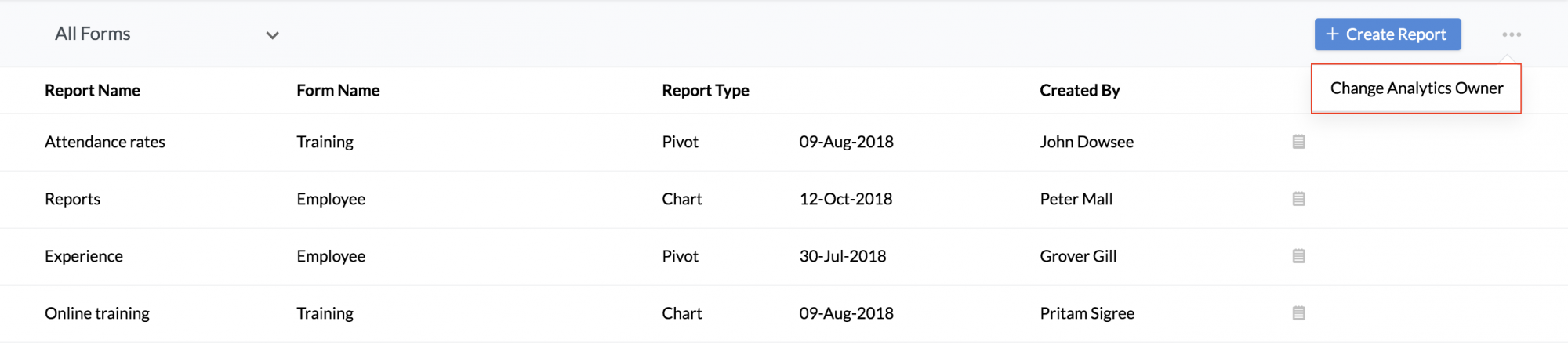
The process of changing the Analytics Owner will be initiated and a success or failure mail will be sent to the Super Administrator.
*Aggregate Formulas: These are formulas where you use aggregate functions (SUM, AVG..) in the calculation. The result of Aggregate Formulas will not be added as another column in the base table. They will just be associated to the table on which it has been created and can be used while creating reports (Charts, Pivot Tables and Summary Views) like any other table column Click here to learn more about Aggregate Formulas.