Working with Signals in Zoho CommandCenter
What are Signals?
Signals are Zoho’s sophisticated bus service that can identify interactions and events occurring in your business, capture, and notify the system of the same, real-time. Zoho CommandCenter uses these Signals as a qualifier to propel the records from one stage to another in their journey.
- Ticket created in Zoho Desk
- Record created in leads module in Zoho CRM
- Email sent but bounced.
- Email opened but not clicked by the customer
- Prospect subscribed to your newsletter
- Customer moved items from wish-list to cart
- Invoice created in Zoho Invoice
Are among examples of your consumers interacting with touchpoints in your business landscape. These interactions or events can be configured as distinct Signals in CommandCenter and whenever they are initiated (meaning, whenever there is an interaction), the dedicated Signal will be activated and the records resting in the source stage will be triggered and moved to the subsequent stage thereby making it the customers’ journeys.
While the act of an event taking place triggers the journey to move forward, an event doesn’t always indicate customer events. A signal can also be triggered by your users (say, a welcome email was sent by the marketer) or by the system itself (say, an API was called from the website).
Therefore, Signals become the backbone that powers your customers' journeys—discovering events and orchestrating their progression from start to finish.
Types of Signals in CommandCenter
Although the meaning and purpose of Signals signifies the events being captured, CommandCenter have four types of Signals:
Record Signals are Signals that capture CRUD (Create, Read, Update, Delete) events.
Example: Create of a record, Update to the Last modified time, Edit to the record, Delete of the record.
User Signals are Signals that are initiated by a human entity like a customer, prospect, or user in your organization like Emails, Calls, Webform submissions
Example: Submission of a webform, Receiving an incoming email, Attempting an outgoing call.
Example: Submission of a webform, Receiving an incoming email, Attempting an outgoing call.
App-based Signals: Events from Zoho’s applications authorized with Zoho CommandCenter.
Example: Visiting a Survey, Registration received for a Webinar, Receiving a Desk ticket.
Custom Signals: Any custom capability or behavior that can trigger the record’s movement in the journey.
Example: Prospect wish-listing a product, Abandoning a cart, Drop in demand observed in the MRP tool and so on.
Role of Signals in Path Finder and Journey Builder
Signals is available in both Path Finder and Journey Builder within Zoho CommandCenter with a central purpose to initiate and set a record or in motion.
Signals in Path Finder
For Path Finder, they are called as touchpoint Signals and will help in journey discovery and association.
For example, Outgoing email sent in Zoho CRM is an event you can configure as a Signal for the transition.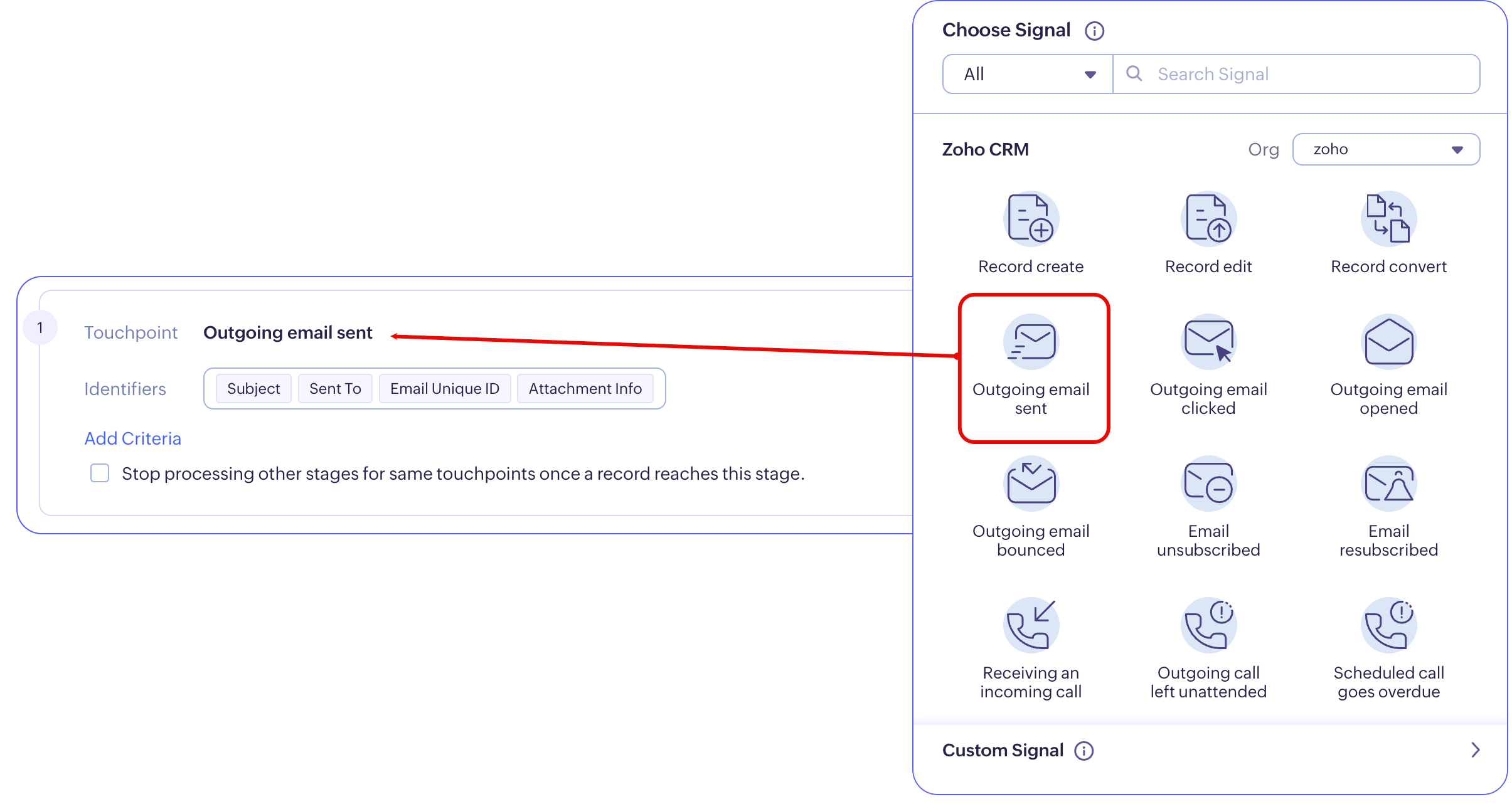
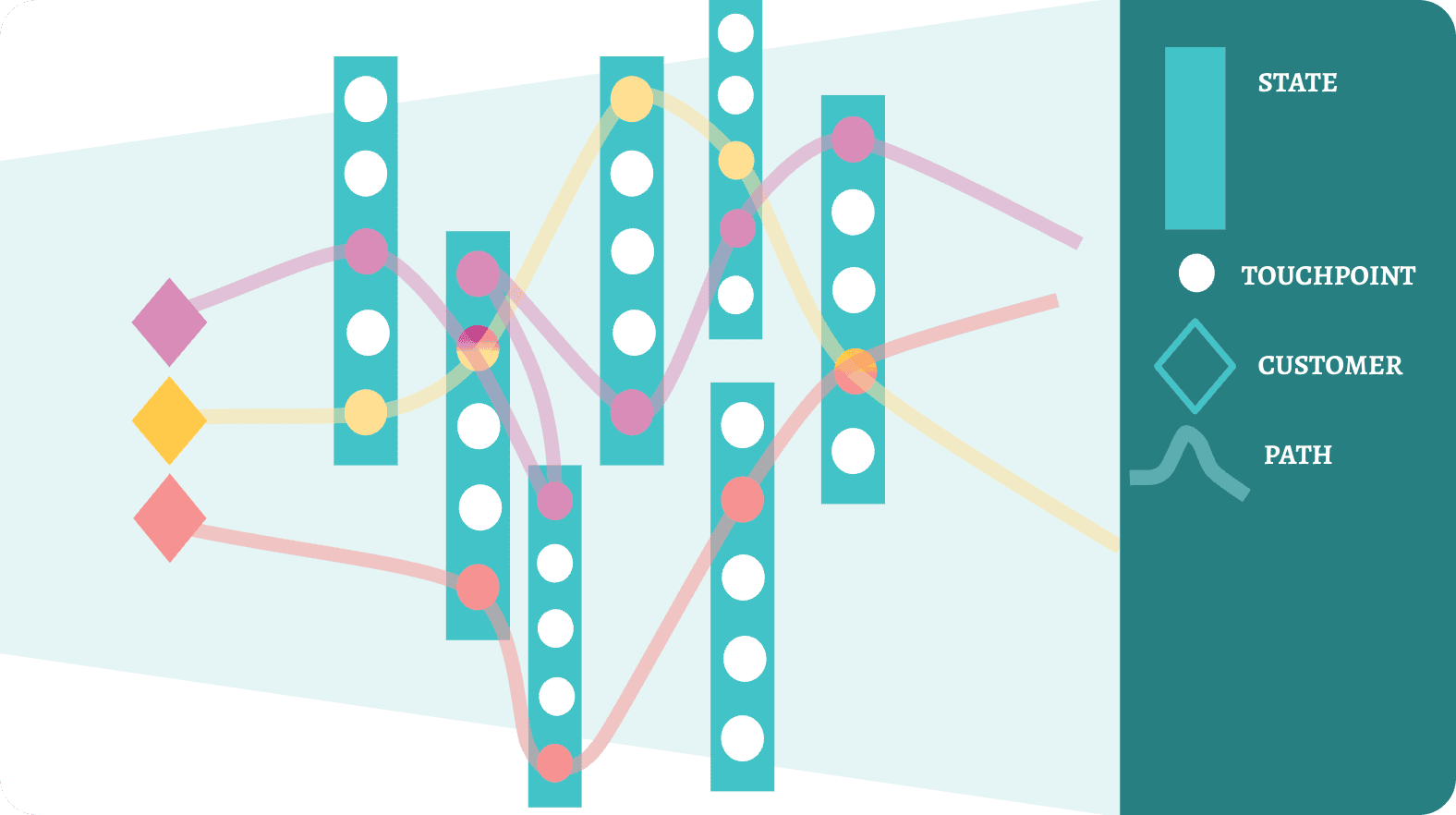
Remember, Path Finder discovers the interactions and associates these events to the respective CRM records. As and when a line of Signals are activated, these respective touchpoints are connected simultaneously to represent the path customers are already taking.
The act of an outgoing email being sent in Zoho CRM triggers that signal thereby activating that stage. When the next signal gets triggered, the previously activated stage will be connected to the current stage. This fashion of discovery, association, and activation will form a path representing your customers journeys.
Signals in Journey Builder
Journey Builder is all about building favorable journeys your consumers can traverse upon. Signals in Journey Builder act as a qualifier to proper customer records from one stage to another, as they progress on their journey.
Whenever a Signal is observed, it means a customer, user, or a system performed an event and that triggers the record in the previous stage to move to the subsequent stage. From the Journey Builder’s perspective, this will indicate the customer is progressing on the path you laid.
Signals in Journey Builder is available as part of Transitions.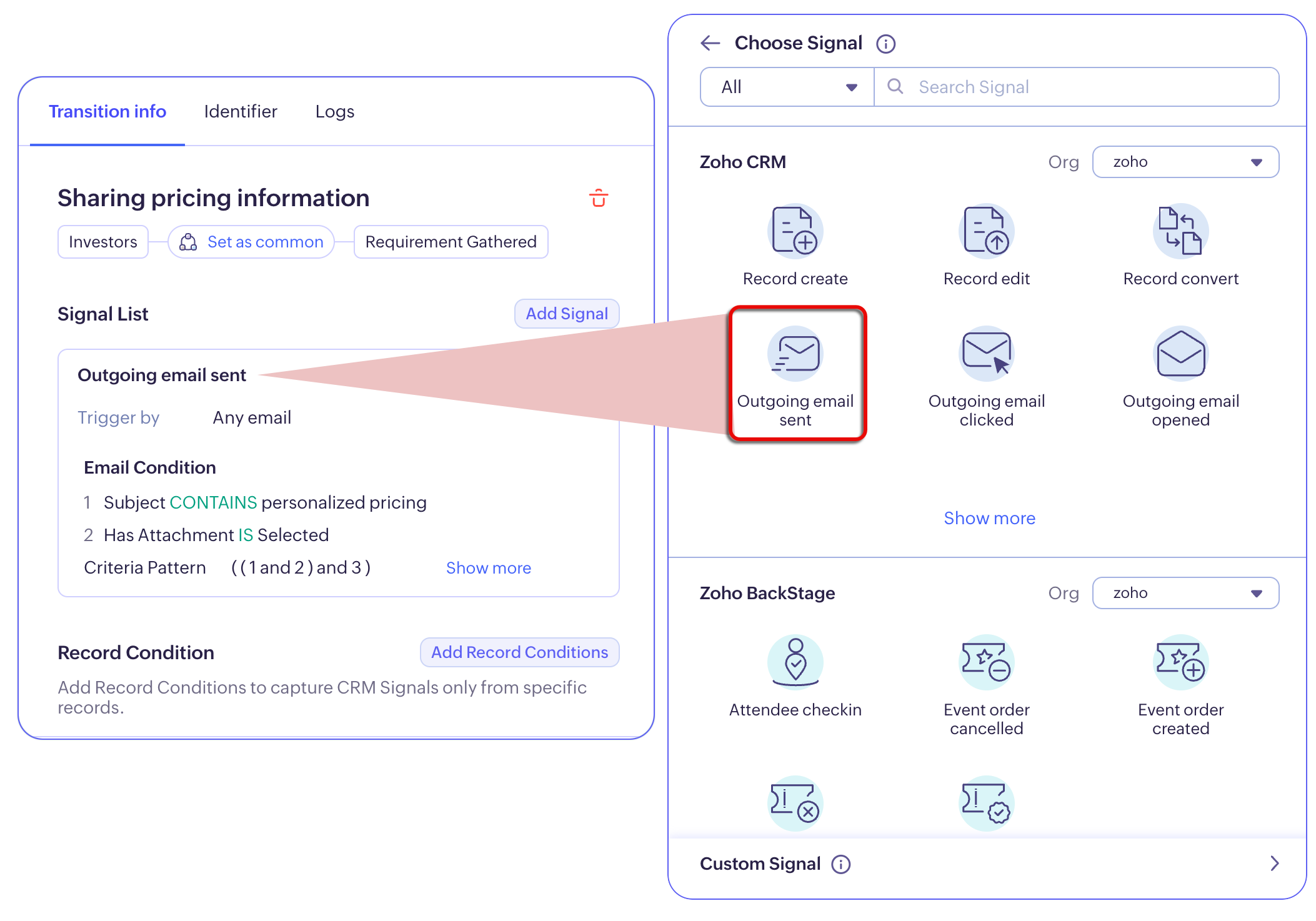
Configuring Signals in Zoho CommandCenter
Zoho CommandCenter is a standalone product that enables cross-channel orchestration. It can help onboard data from various tools, applications, and platforms and by means of Signals, the events can be captured based on your business use case.
The list of Signals in Zoho CommandCenter appear common for both Path Finder and Journey Builder.
You have
- System-standard Signals coming as a result of authenticating Zoho applications.
- Custom Signals to capture events in third-party applications and channels.
Notes:
- If you have multiple organizations in one Zoho service, you can select the desired organization from which you’d want to process the Signal in the path/ journey configuration page.
- If you have used CommandCenter in Zoho CRM, then Zoho CRM will be integrated to Zoho CommandCenter by default.
- Signals of all those applications that are integrated with Zoho CRM, will also be listed as part of Signals. It will be indicated like the below:
- If after authorization, you disconnect an application, the Signals will be muted.
Authenticating system-standard Signals
System-standard Signals are those standard/native signals that are available when you integrate various applications from Zoho's ecosystem.
Currently, you can authenticate Signals from the following applications with your CommandCenter:
- Zoho CRM
- Zoho Desk
- Zoho Invoice
- Zoho SalesIQ
- Zoho Survey
- Zoho BackStage
- Zoho Commerce
- Zoho Books
- Zoho Webinar
- Zoho Inventory
- Zoho Billing
Imagine you are conducting a tradeshow, for which your contact purchase tickets in Zoho BackStage.
- For each ticket order, you send out the agenda, seating order, venue details, and in return, you solicit responses like RSVP, food allergies, the need for chaperones, and more using Signals from BackStage.
- You associate these orders to your customer records in CRM, nurture and move them through the funnel using CRM-based Signals.
- Further based on their interactions and interest, the deal gets signed, the order gets placed, and the invoice gets created.
- Using the Invoice-based Signals, their payment course can be optimized.
So on and so forth: you complete optimizing the entire customer purchase cycle through various application using actionable Signals created and/ or authenticated in Zoho CRM.
To authorize and authenticate Signals of these apps for Zoho CommandCenter
- Login to the CommandCenter application with your administrator privilege.
- Go to Settings
from the top-right of the application > Configuration Blocks > Signals.
- In the Signals Configuration page, you can view all the Zoho services available for authentication.
- All those apps that are authorized, will be listed under Authenticated apps.
- Those apps for which you have subscription, but are not connected to CommandCenter yet, will be listed under To Be Authenticated section.
- Rest of the apps that are generally available for CommandCenter are listed under the Other Supported Apps section.
- To authorize an available application,
- Click Authorize on the desired application under the To Be Authenticated section.
- In the ensuing Authorization popup, choose the organization or portal you’d like to capture signals for.
- Click Authorize.
- This will move the application under the Authenticated Apps section and the default signals of that service will be displayed in the Signals of Path Finder and Journey Builder.

Note:
- User should be an admin in both CommandCenter and the respective organization in the app that they are authenticating.
- If your subscription is expired, you will not be able to authorize the application.
- Also, if the subscription expire after authorizng, the Signals used in journeys will become invalid or non-functional.
Connecting Custom Signals
Custom Signals are links you create to capture desired events occurring in various third-party tools and applications into CommandCenter.
It is achieved by connecting applications via APIs and collecting necessary values or data when an event occurs in the endpoint. These values, also known as, properties are then captured for discovery and orchestration of customer journeys.
For example, you can build your own custom signals to perform an action involving another mobile app or website and have it associated with CommandCenter.
To create a Custom Signal
Click the Custom Signals tab in the Signals configuration page.
Click on the +Create Signal button and provide a name for the Custom Signal.
Add a description if you’d like.
Under the Add additional signal detail, add the desired property to be appended in your Custom Signal link.
- Provide a name and the data type.
The data types available are: Text, Integer, Double, Date, Datetime, Boolean, Email. - Keep adding as many properties to fulfill your Signal requirements.
- Click Save.
- These properties will be appended to the Signal link created as slug.
- This will add this Signal into the list of Signals created in your CommandCenter organization.
- At any point in time, you can add or delete properties to/ from the link, regenerate to a new link.
- If you have associated this link as part of any Path configuration or journeys, you can also view them under the Associated section for a consolidated view.
Note:
- The values after digest in the Custom Signal link help trigger the Signals in the application. Any instance of exposure may result in wrong transitioning of records affecting the execution (if the identifying values happen to match as well). To avoid this we recommend you to invoke the Custom Signal from the Server side and not the client side. If you suspect of exposure, a new Custom Signal link can be regenerated.
- Addition, deletion, and regeneration of Signal properties will alter the structure of the Signal link and kindly remember to change or replace the link in signal source you have configured.
- Once you have created a Custom Signal and properties, you can connect the API with the desired application and start receiving Signal triggers.
- When you use Custom Signal to capture custom events, specific attributes and the respective identifiers can be passed in two places: In the query parameters, within the braces { } or in the Body. While both ways, help convenient encoding of values, Identifiers, by its virtue, converts and saves all the special characters in a URL as spaces. If the parameters to identify the records are used as part of query parameters, the braces are converted into spaces resulting in inaccurate identifier processing. Therefore, we recommend you to pass the identifying attributes as part of the Body.

Interesting fact:
A Custom Signal is not limited for one time use. Once created can be reused in multiple journeys and Path Finder configurations.
Click here to learn how to create custom Signals.