Affiliate Signup Form Customization

Affiliate Signup Form Customization


The affiliate signup form is where you can create a welcoming and tailored registration experience for affiliates who want to join your program. With plenty of customization options, you can make sure it captures just the right information while keeping the process simple.

Form elements and customization   

You can tweak both the Form Elements and the Theme to make the affiliate signup form fit your needs perfectly.

Form elements  

Predefined fields

  • These ready-made fields can be easily added to your form with a simple drag-and-drop. You can customize their labels and descriptions to align with your program's tone and requirements.

  • You can specify whether the field is mandatory and view its field ID—a unique, automatically configured identifier used to track the field’s input. Note that the field ID is fixed and cannot be edited.


Custom fields
Custom fields let you design input areas that suit your unique needs.


Here’s what you can configure:

  • Label: The name that will appear on the form. (This field is mandatory by default.)

  • Description: A short explanation to help affiliates understand the field.

  • Field ID: A unique identifier to track the field’s input. (This field is mandatory by default.)

  • Mandatory: Decide if filling out this field is a must for submission.


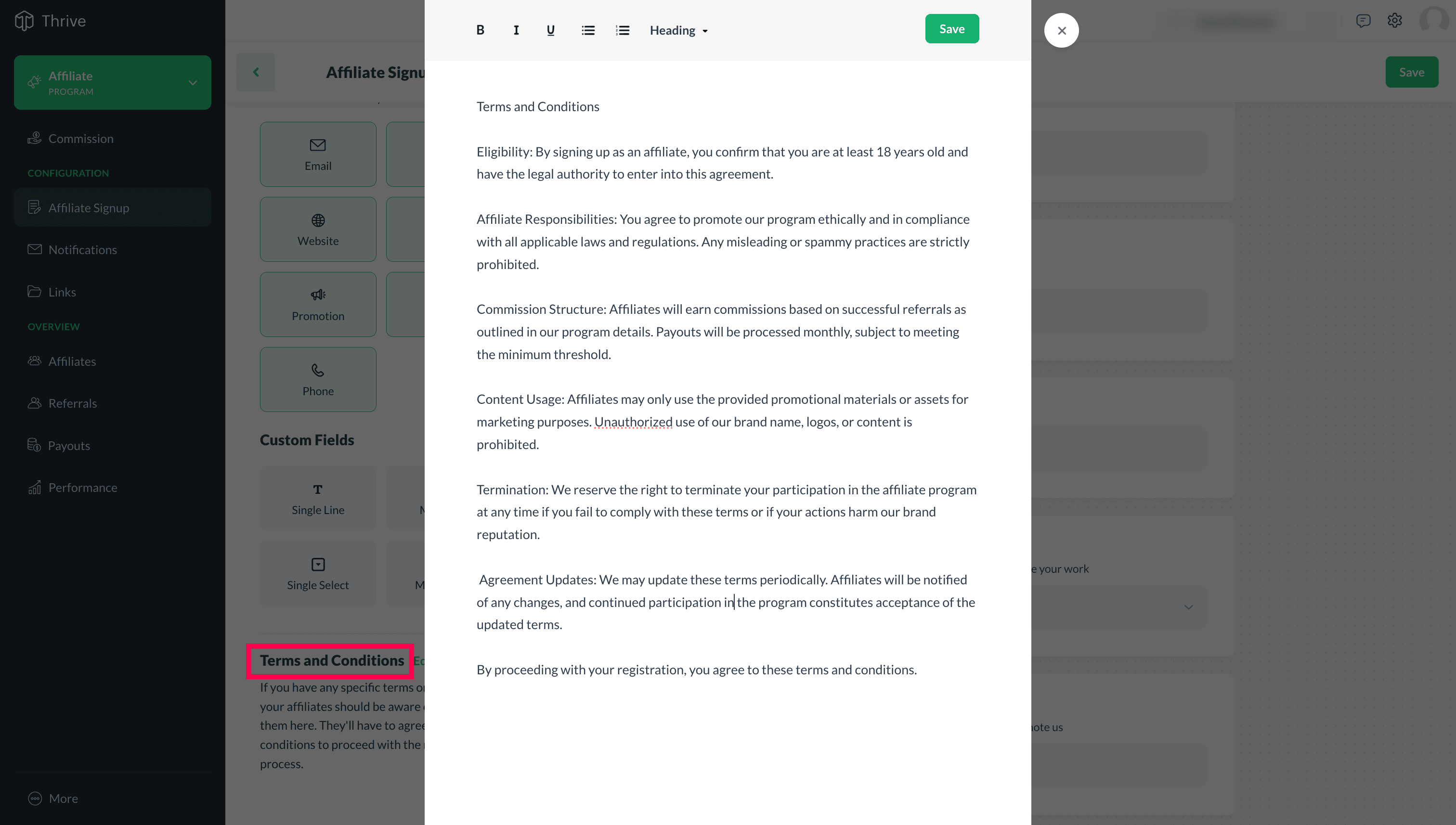
Terms and conditions
Add all the important information about your program, policies, permissions, and guidelines. Affiliates must agree to these terms before completing their registration, making it an extra step to ensure you’re onboarding the right people.


Theme customization
  

Customize your signup form to align with your brand's style by tailoring its appearance. Here's how:

  • Color theme: Choose colors for the background, text, and buttons to match your brand’s look.

  • Font family: Select a font style that aligns with your brand and enhances the readability of your form.

  • Form heading: Customize the main heading of your form to reflect your program's identity and purpose.

  • Content placement: Choose where the program overview appears—left, right, or hide it entirely, based on your preference.

  • Program Overview: Highlight the unique advantages of your program with a persuasive message that attracts and inspires affiliates to join.


Finalizing your form  

Once your form looks and feels just right, save it, bring your program live, then grab the link. You can share this link wherever you want to invite affiliates to sign up for your program. It’s as simple as that!


Notes
Note: Make sure your affiliate program is live, as the form link can only be accessed and used once the program is active.


      Create. Review. Publish.

      Write, edit, collaborate on, and publish documents to different content management platforms.

      Get Started Now


        Access your files securely from anywhere

          Zoho CRM Training Programs

          Learn how to use the best tools for sales force automation and better customer engagement from Zoho's implementation specialists.

          Zoho CRM Training
            Redefine the way you work
            with Zoho Workplace

              Zoho DataPrep Personalized Demo

              If you'd like a personalized walk-through of our data preparation tool, please request a demo and we'll be happy to show you how to get the best out of Zoho DataPrep.

              Zoho CRM Training

                Create, share, and deliver

                beautiful slides from anywhere.

                Get Started Now


                  Zoho Sign now offers specialized one-on-one training for both administrators and developers.

                  BOOK A SESSION


                              Quick LinksWorkflow AutomationData Collection
                              Web FormsEnterpriseOnline Data Collection Tool
                              Embeddable FormsBankingBegin Data Collection
                              Interactive FormsWorkplaceData Collection App
                              CRM FormsCustomer ServiceAccessible Forms
                              Digital FormsMarketingForms for Small Business
                              HTML FormsEducationForms for Enterprise
                              Contact FormsE-commerceForms for any business
                              Lead Generation FormsHealthcareForms for Startups
                              Wordpress FormsCustomer onboardingForms for Small Business
                              No Code FormsConstructionRSVP tool for holidays
                              Free FormsTravelFeatures for Order Forms
                              Prefill FormsNon-Profit

                              Intake FormsLegal
                              Mobile App
                              Form DesignerHR
                              Mobile Forms
                              Card FormsFoodOffline Forms
                              Assign FormsPhotographyMobile Forms Features
                              Translate FormsReal EstateKiosk in Mobile Forms
                              Electronic Forms
                              Drag & drop form builder

                              Notification Emails for FormsAlternativesSecurity & Compliance
                              Holiday FormsGoogle Forms alternative GDPR
                              Form to PDFJotform alternativeHIPAA Forms
                              Email FormsFormstack alternativeEncrypted Forms

                              Wufoo alternativeSecure Forms

                              TypeformWCAG


                                          Create. Review. Publish.

                                          Write, edit, collaborate on, and publish documents to different content management platforms.

                                          Get Started Now


                                                            You are currently viewing the help pages of Qntrl’s earlier version. Click here to view our latest version—Qntrl 3.0's help articles.


                                                                Manage your brands on social media


                                                                  • Desk Community Learning Series


                                                                  • Digest


                                                                  • Functions


                                                                  • Meetups


                                                                  • Kbase


                                                                  • Resources


                                                                  • Glossary


                                                                  • Desk Marketplace


                                                                  • MVP Corner


                                                                  • Word of the Day


                                                                  • Ask the Experts


                                                                    Zoho Sheet Resources


                                                                        Zoho Forms Resources


                                                                          Secure your business
                                                                          communication with Zoho Mail


                                                                          Mail on the move with
                                                                          Zoho Mail mobile application

                                                                            Stay on top of your schedule
                                                                            at all times


                                                                            Carry your calendar with you
                                                                            Anytime, anywhere


                                                                                  Zoho Sign Resources

                                                                                    Sign, Paperless!

                                                                                    Sign and send business documents on the go!

                                                                                    Get Started Now


                                                                                            Zoho TeamInbox Resources


                                                                                                      Zoho DataPrep Demo

                                                                                                      Get a personalized demo or POC

                                                                                                      REGISTER NOW


                                                                                                        Design. Discuss. Deliver.

                                                                                                        Create visually engaging stories with Zoho Show.

                                                                                                        Get Started Now


                                                                                                                            • Related Articles

                                                                                                                            • Widget Customization

                                                                                                                              A widget is a small graphical element that will be displayed on your online store/website after enabling the loyalty programs and successfully integrating with Thrive. Your customers use this to view and interact with your loyalty program. You can ...
                                                                                                                            • Participants

                                                                                                                              The participants section serves as a comprehensive database where you can access detailed information about all your participants. This data helps you monitor individual performance, adjust points, and even restrict participants from further ...
                                                                                                                            • Can I remove the text from the loyalty program launcher (widget), keeping only the icon?

                                                                                                                              Yes, you can. Follow the steps below to remove the post-icon text completely. In Thrive’s system, go to Widget > Text. Scroll down to the Widget Button Text field. Delete the default text and click Save. To learn about the other widget customization ...
                                                                                                                            • Is it possible to track referrals who sign up using incognito mode?

                                                                                                                              Zoho Thrive will not be able to track any referral signup that happens via: Incognito mode. A browser that has extensions that are designed to block third-party cookies. A browser that has any other configurations set up to avoid third-party cookie ...
                                                                                                                            • Can I add multiple users to Thrive?

                                                                                                                              Yes, we can add multiple users to your organization. Only the Owner and users with Admin roles will be able to add users to the program. To add a new user: Go to the navigation toolbar and click on the Settings icon. Under Settings, click Users. ...
                                                                                                                              Wherever you are is as good as
                                                                                                                              your workplace

                                                                                                                                Resources

                                                                                                                                Videos

                                                                                                                                Watch comprehensive videos on features and other important topics that will help you master Zoho CRM.


                                                                                                                                eBooks

                                                                                                                                Download free eBooks and access a range of topics to get deeper insight on successfully using Zoho CRM.


                                                                                                                                Webinars

                                                                                                                                Sign up for our webinars and learn the Zoho CRM basics, from customization to sales force automation and more.


                                                                                                                                CRM Tips

                                                                                                                                Make the most of Zoho CRM with these useful tips.


                                                                                                                                  Zoho Show Resources
