Aperçu des modules de Zoho Projects
Dans cet article nous découvrirons les différents modules dans Zoho Projects qui vont vous permettre de gérer vos projets en stimulant la productivité, en améliorant la transparence du projet et en fournissant une vision claire à l'équipe.
ACCUEIL
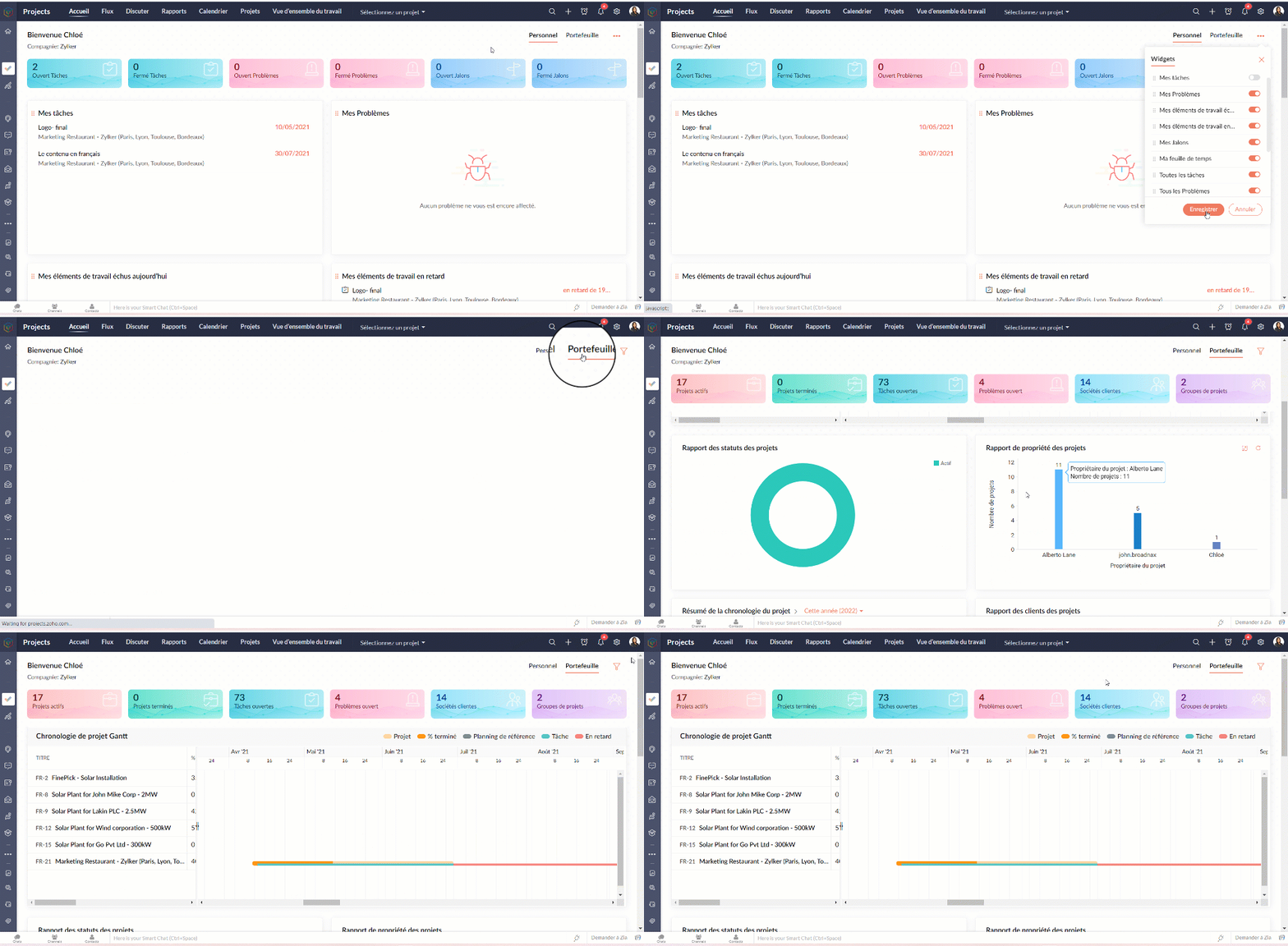
L'accueil ou le tableau de bord de Zoho Projects vous donne deux vues;
- La vue personnelle où vous allez trouver les détails sur l'ensemble des projets dont vous faites partie. Cette vue peut être personnalisée.
- La vue portefeuille où vous avez un aperçu des détails de l'ensemble des projets du portail de votre organisation. Un compteur affiche les statistiques relatives à vos projets, tâches, problèmes, clients et groupes de projets. Le time line du projet Gantt donne un indicateur visuel du calendrier du projet et de son état d'avancement.
FLUX
Par défaut, les flux sont affichés pour tous les projets. Sous le module "Flux", il y a trois onglets :
- Flux - Flux est un système automatisé qui enregistre les activités dans vos projets. Chaque fois que des utilisateurs effectuent des activités dans les projets auxquels vous êtes associé, vous recevrez des mises à jour. Vous pouvez également partager vos avis sur ces flux en les commenter et même ajouter des pièces si nécessaire.
- Statut - Sous l'onglet "Statut", vous trouverez les mises à jour du statut d'activité de tous les utilisateurs de tous les projets desquels vous faites partie. Il vous permet de connaître les statuts récemment publiés par vos collaborateurs.
- Flux d'activités - Les activités de tous les utilisateurs dans les projets sont affichées dans une vue chronologique, ce qui vous permet d'être informé sur les activités des membres de votre projet au quotidien et de savoir qui fait quoi. Vous pouvez également accéder à une chronologie spécifique pour vérifier l'activité particulière exécutée par votre membre du projet.
Vérifier les flux pour un projet spécifique
- Depuis la liste déroulante de "Sélectionner un projet", choisissez un projet. Le flux s'affiche pour ce projet spécifique.
DISCUTER
Il s'agit d'une fonction de collaboration interne qui vous permet de mener des discussions par chat ou par les réunions audio-vidéo avec les personnes associées à vos projets.
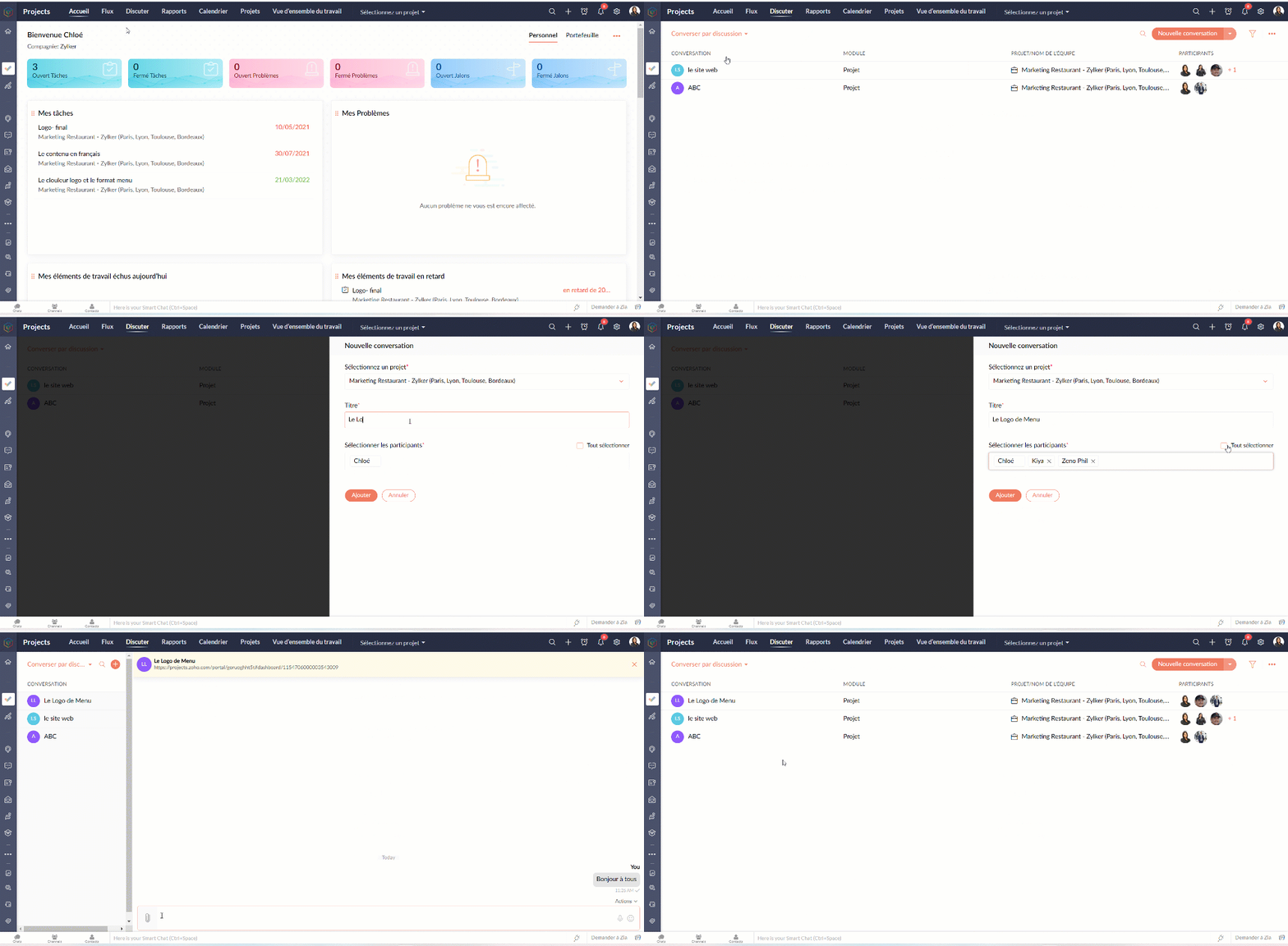
Entamer une conversation
- Sélectionnez "Converser par discussion" depuis la liste déroulante.
- Cliquez sur "La nouvelle conversation".
- Sélectionnez le nom du projet, ajoutez le titre de la discussion.
- Ajoutez les participants parmi les collaborateurs du projet sélectionné.
- Cliquez sur "Ajouter".
- Une nouvelle fenêtre de chat s'affiche et est prête à entamer la discussion.
- Les participants peuvent toujours revenir à "Discuter" et cliquer sur le chat pour communiquer.
- Les participants peuvent accéder aux anciens chats à partir de l'onglet " Anciens salons de discussion"
Entamer une réunion
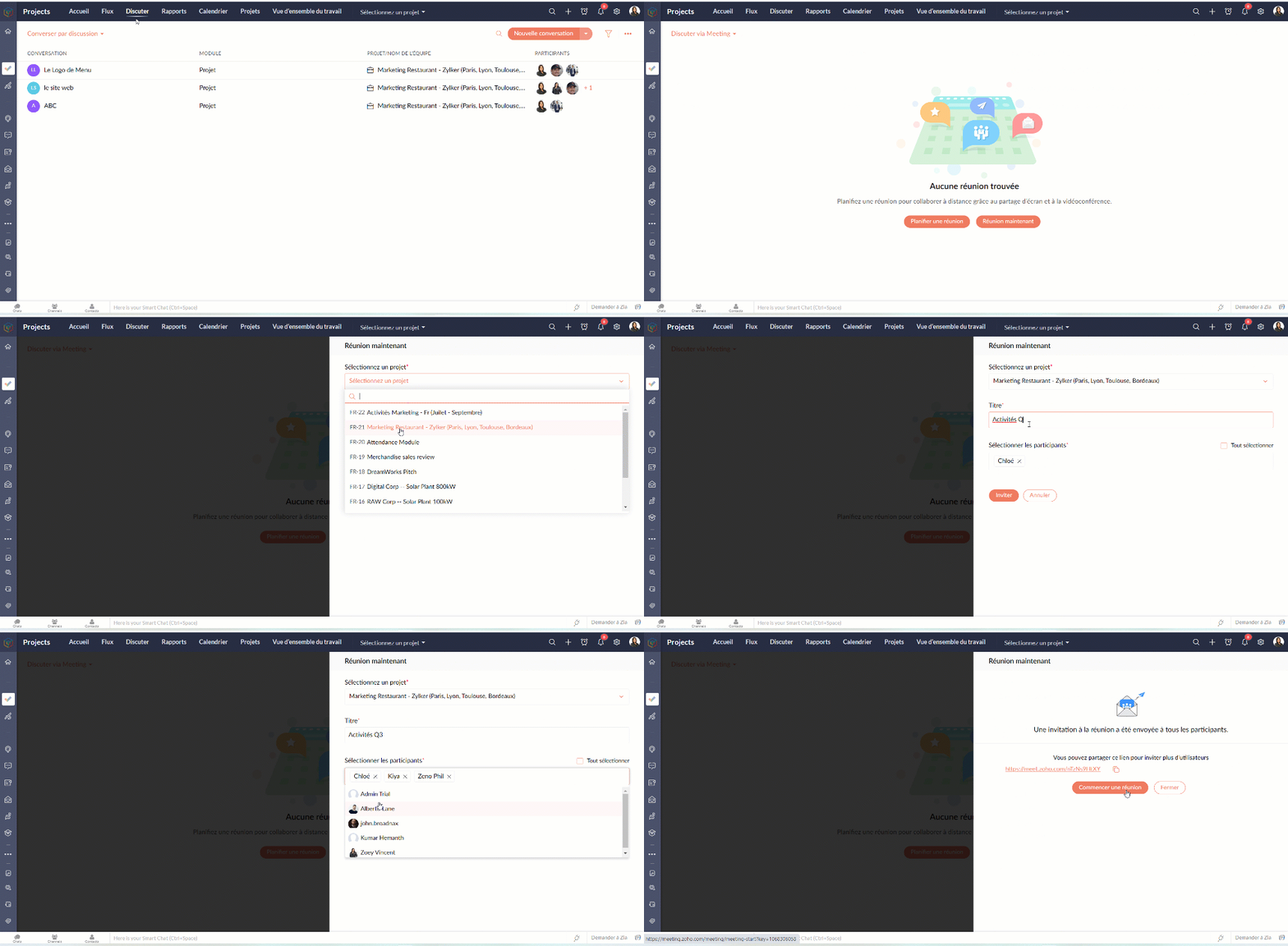
- Sélectionnez "Discuter via Meeting" depuis la liste déroulante.
- Vous pouvez suivre les indications à l'écran pour programmer la réunion.
CALENDRIER
Suivez toutes les activités de votre projet à l'aide du module Calendrier. Le calendrier vous permet d'organiser rapidement des réunions, des événements, de planifier des rendez-vous et de gérer des tâches et des problèmes. Il aide l'équipe à rester au top du planning. Il aide également l'équipe à identifier facilement les dates auxquelles elle est engagée afin qu'elle puisse planifier à l'avance et terminer son travail à temps.
Ajouter les activités dans le calendrier
Gérez les échéances de vos projets et les principaux éléments livrables avec vos modules de calendrier. Vous pouvez créer des jalons, des tâches, des événements, des étapes et des problèmes dans le calendrier. Vous pouvez également afficher toutes les activités de projet prévues pour des dates particulières dans votre calendrier.
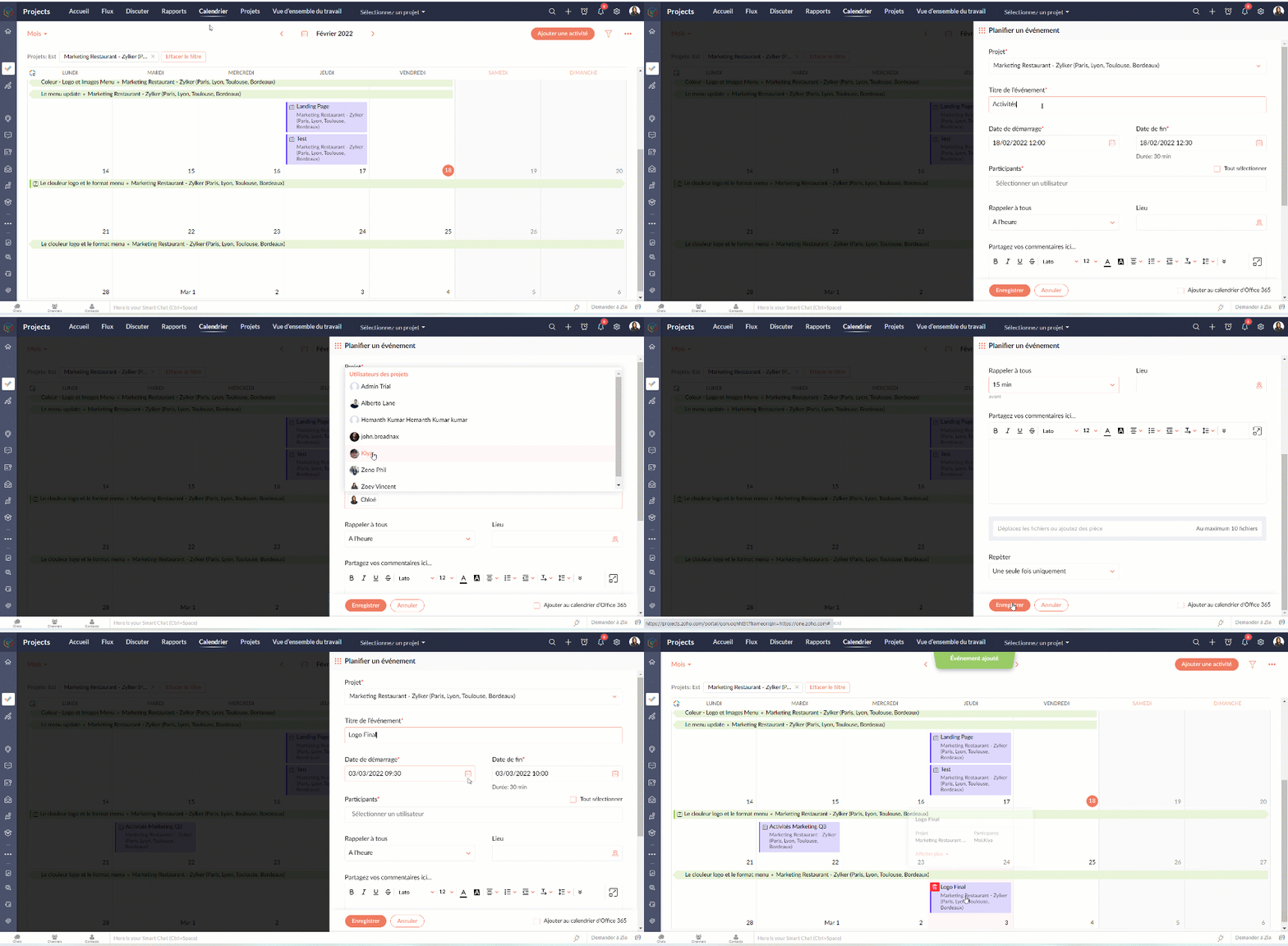
Programmer un événement dans votre calendrier
- Cliquez sur "Ajouter une activité"
- Sélectionnez le projet, ajoutez le nom de l'événement
- Remplissez les autres détails demandés et enregistrez
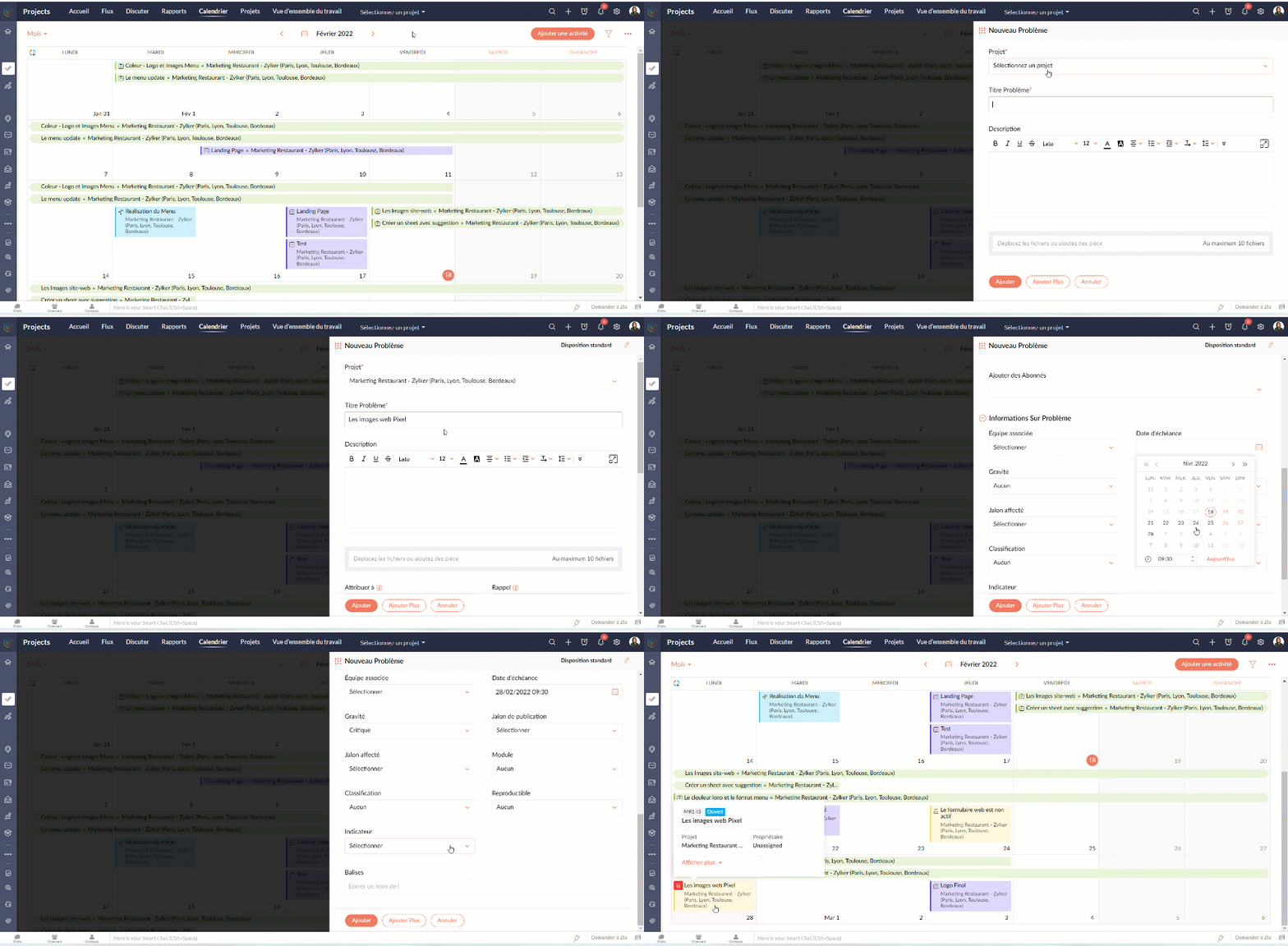
Programmer une tâche/ un problème / un jalon
- Cliquez sur "Ajouter une activité"
- Survolez sur l'icône des options complémentaires
- Choisissez parmi les options disponibles
- Suivez les indications s'affichant sur l'écran.
- Voilà : la tâche, le problème ou le jalon sont créés dans votre calendrier.
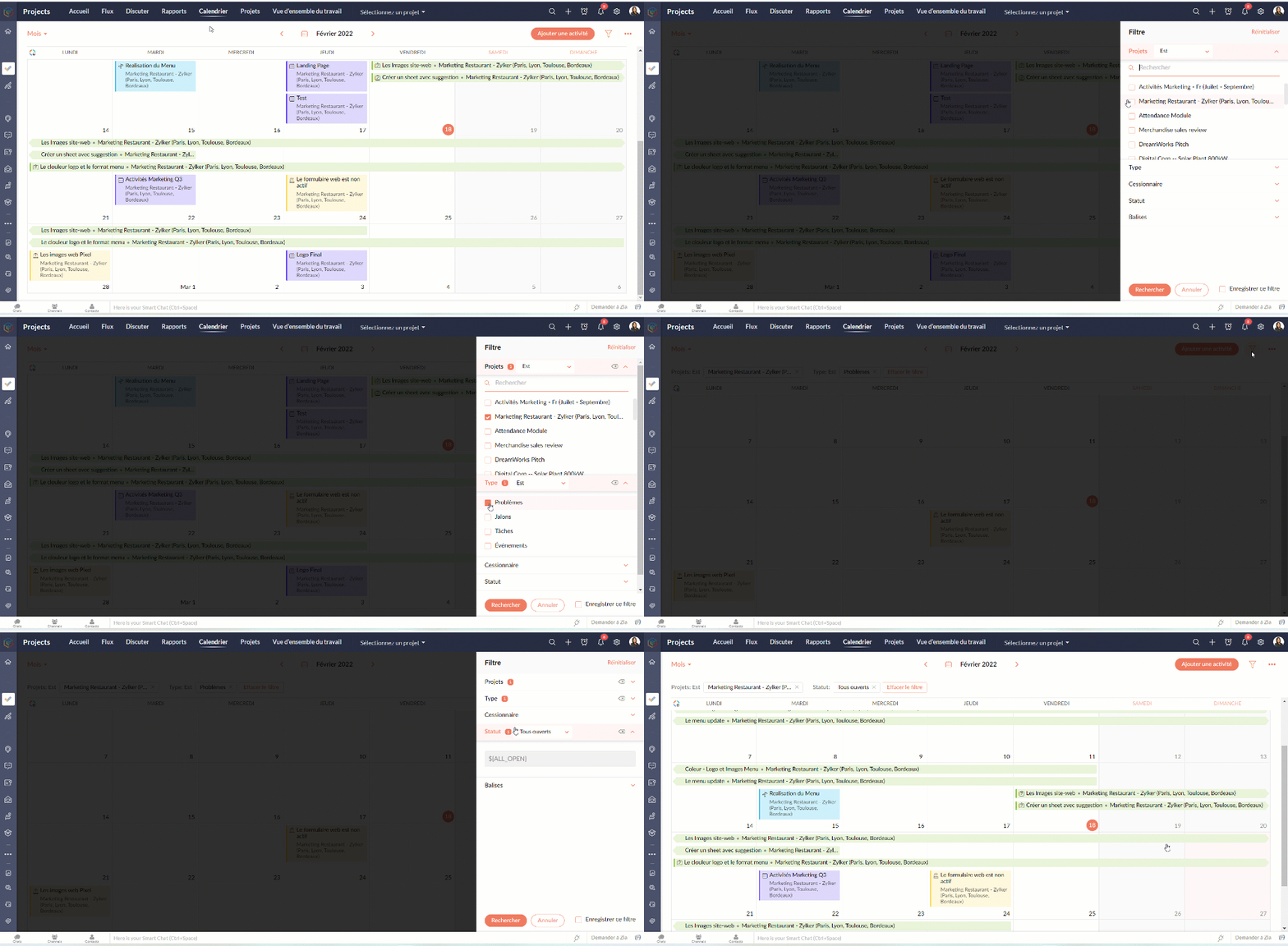
Avec l'option filtre, vous pouvez paramétrer les vues selon les projets, le statut, le type, les balises, etc.
PROJETS
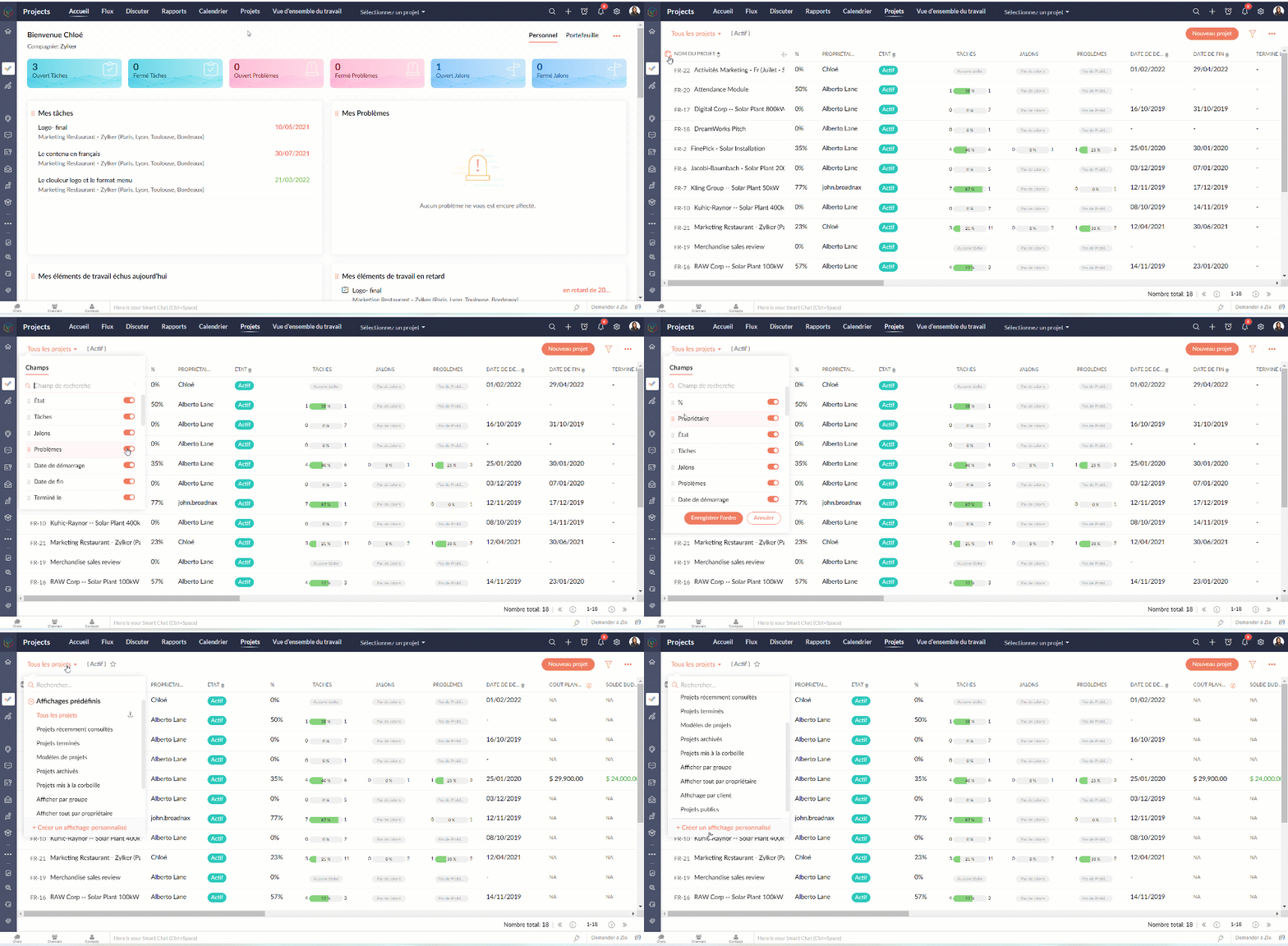
L'onglet projets donne un aperçu rapide de tous les projets auxquels vous participez. Les utilisateurs peuvent voir le statut du projet, le nombre de tâches accomplies, la date de début et de fin, les coûts prévus et réels, les détails du budget et bien plus encore. Les champs affichés peuvent être personnalisés pour afficher vos propres champs ou même désactiver des champs.
Personnaliser l'aperçu
- Allez sur l'onglet "Projets"
- Sélectionnez l'onglet " Personnaliser colonne".
- Choisissez les colonnes que vous voulez activer ou désactiver.
- Réorganisez les colonnes en glisser-déposer.
- Depuis les affichages prédéfinis vous pouvez choisir les projets que voulez afficher ou même créer une vue personnalisée.
Modifier / supprimer un projet
- Survolez sur le projet que vous voulez modifier/ supprimer
- Depuis l'onglet paramètres à coté, vous pouvez soit modifier, supprimer ou archiver un projet
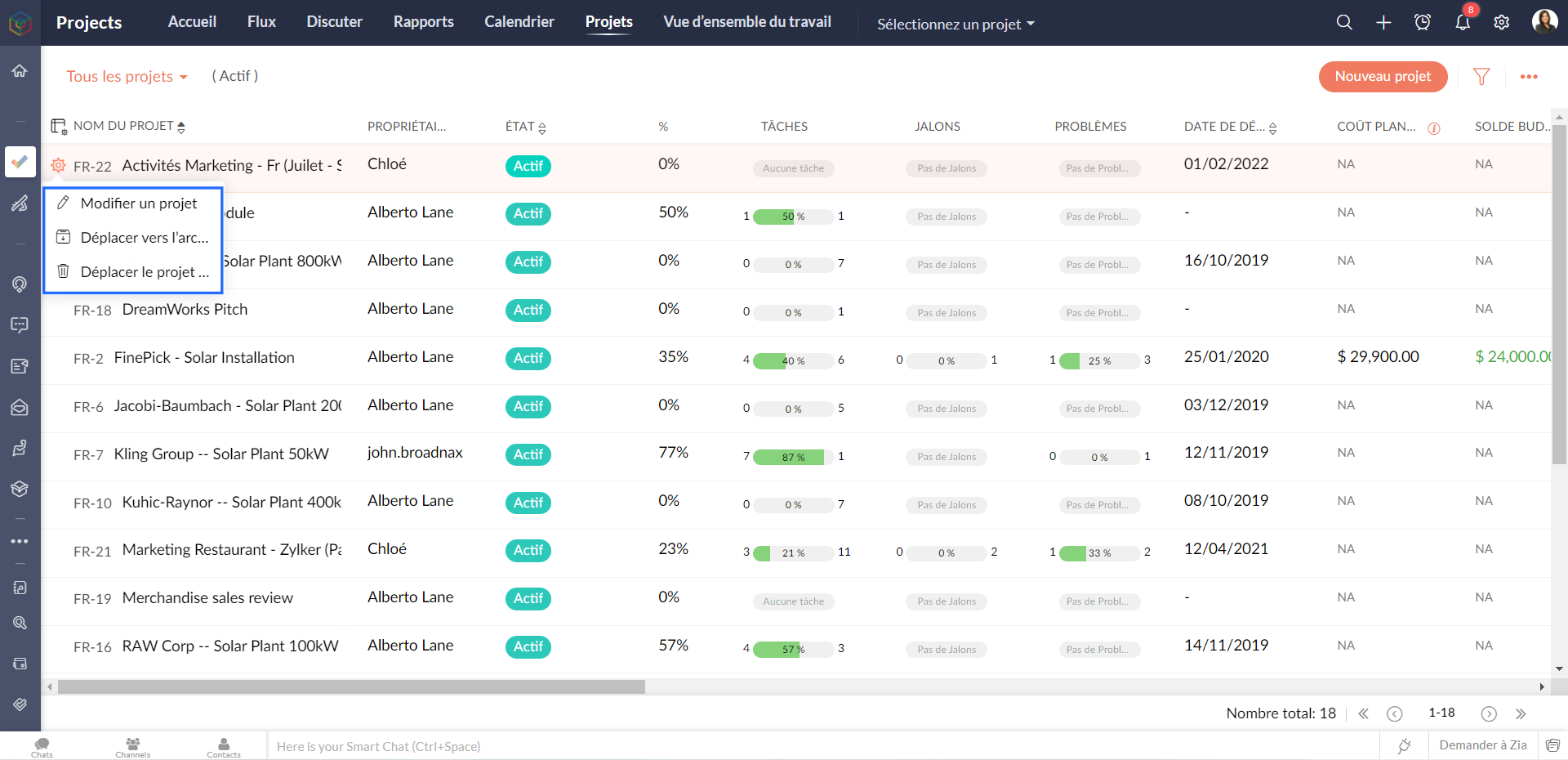
Les modèles de projet
Les modèles de projet peuvent vous aider à gérer votre travail plus efficacement. Vous n'avez pas à saisir les mêmes tâches à plusieurs reprises, ce qui vous permet de gagner du temps et d'être plus productif. Les modèles de projet sont accessibles à partir de la vue de la liste des projets.
Créer un modèle de projet
- Allez sur l'onglet "Projets"
- Depuis la liste déroulante à gauche, sélectionnez " Modèles de projets"
- Cliquez sur "Nouveau modèle"Sélectionnez la mise en page du projet que vous souhaitez appliquer au modèle. Si vous n'avez pas créé de mise en page de projet, la mise en page standard sera affichée dans la liste déroulante.
- Remplissez les détails demandés.
- Cliquez sur "Ajouter le modèle" et voilà : un modèle projet est créé.
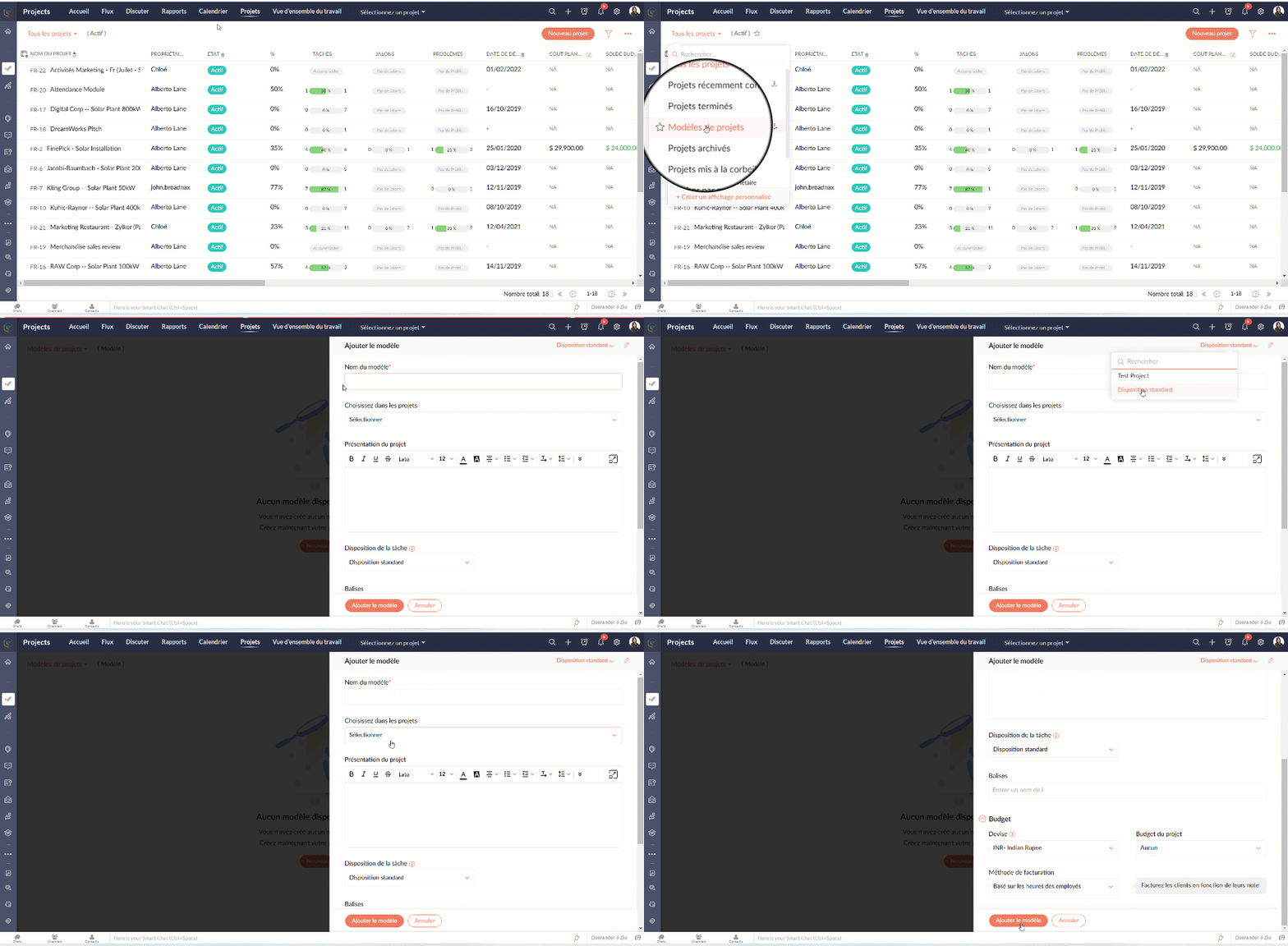
Dans l'article suivant nous verrons le module "Rapports" de Zoho Projects.
N'hésitez pas à poser vos questions en commentaire.
L'équipe Zoho France
Access your files securely from anywhere
Centralize Knowledge. Transform Learning.
All-in-one knowledge management and training platform for your employees and customers.
New to Zoho Recruit?

Zoho Developer Community
New to Zoho LandingPage?
Zoho LandingPage Resources
New to Zoho Survey?
New to Zoho CRM Plus?
Deliver unforgettable customer experiences
New to Zoho CRM Plus?
Deliver unforgettable customer experiences
New to Zoho Marketing Plus?
Everything you need to run your marketing
New to Zoho Marketing Plus?
Everything you need to run your marketing
New to Bigin?





Topic Participants
Kinjal Lodaya
Sticky Posts
Collaboration sans faille avec Zoho One
Bonjour à tous, Dans cet article nous allons voir comment Zoho One permet une collaboration à différents niveaux . La façon dont nous travaillons évolue. À mesure que les entreprises se mondialisent, la plupart des activités sont menées en équipe.
New to Zoho TeamInbox?
Zoho TeamInbox Resources
Zoho CRM Plus Resources
Zoho Books Resources
Zoho Subscriptions Resources
Zoho Projects Resources
Zoho Sprints Resources
Qntrl Resources
Zoho Creator Resources
Zoho CRM Resources
Design. Discuss. Deliver.
Zoho Show Resources

Get Started. Write Away!
Writer is a powerful online word processor, designed for collaborative work.
Zoho CRM コンテンツ
-
オンラインヘルプ
-
Webセミナー
-
機能活用動画
-
よくある質問
-
Ebook
-
-
Zoho Campaigns
- Zoho サービスのWebセミナー
その他のサービス コンテンツ
Nederlandse Hulpbronnen

ご検討中の方
Recent Topics
Bring your own credentials (BYOC) for connections in Zoho Creator
Hello everyone, We're excited to announce an important step forward in how integrations and authentications work in Zoho Creator. Zoho Creator is a versatile platform for integrations, enabling you to connect with thousands of third-party services usingProject Management Bulletin: March, 2026
We are passionate about equipping our users with efficient solutions that help them run their businesses successfully. Our collective efforts over the past 2 years have culminated in the launch of Sprints 3.0— built with reliable features, impactful integrations,Composite items inside of composite items; bill of materials needed
Hi Zoho and Everyone, I am evaluating whether Zoho Inventory will work for my small business. I grow and harvest herbs and spices but also get from wholesalers. I use all these items to make herbal teas, but also sell them as individual items on my Shopify store and Etsy. I discovered the composite item bundling and am wondering if I could get some assistance since there is no bill of materials: Our herbal company's best selling tea is a sleepytime tea. Sleepytime Tea can be purchased in three weightsAutomation Series: Sync Task Status with Zoho Desk Tickets
In Zoho Projects, you can automatically close and reopen an associated Zoho Desk ticket when the status of a task is changed. This syncs the current state of the task with the support ticket without manual updates. For instance, a support team handlingAuto-Generate Line Numbers in Item Table Using HTML & CSS Counters (Zoho Books & Zoho Inventory Custom Templates)
<div> <style> /* Start counter from 0 inside tbody */ tbody#lineitem { counter-reset: rowNumber; } /* Increment counter for each row */ tbody#lineitem tr { counter-increment: rowNumber; } /* Show counter value in first column */ tbody#lineitem tr td:first-child::beforeDoes zoho inventory need Enterprise or Premium subsrciption to make Widgets.
We have Zoho One Enterprise and yet we can't create widgets on inventory.Zoho CAMPAIGNS working hours
Hi I use Campaigns Automation workflows to automate follow-ups to my Leads. I discovered this weekend that emails are being sent out on Sundays. How do I limit my Campaigns outgoing emails to business working hours? This is very important! Thanks, DDepositing funds to account
Hello, I have been using Quickbooks for many years but am considering moving to Zoho Books so I am currently running through various workflows and am working on the Invoicing aspect. In QB, the process is to create an invoice, receive payment and thenCreate Receipt of a Donation (not a sale)
We are a non-profit organization that receives general donations. How do I create a receipt of payment for the donor and categorize the payment as a Gift? I tried the method of creating an invoice; however that automatically created a "Sales" transactionFunction #2: Create a Deal in Zoho CRM when an Estimate is created in Zoho Books
For those who use Zoho CRM integrated with Zoho Books, here's a nifty function that helps you optimize your sales process by adding a Deal in Zoho CRM whenever an estimate is created in Zoho Books. Custom Function: To create the custom function, go toNew Custom View -Sorting the Custom fields
While creating a New Custom View in invoice , Customers, Bills ,expense etc , the sorting of custom fields are not available , a query function "order by / sort by " may also be included in Define new criteria module which will be more beneficial toGrouping Undeposited Funds to Move to other accounts
In the bank option it would be nice to check what transactions in undeposited funds I want to move to other accounts. Then while checking this it can accumulate totals and created whats essentially a deposit slip. Once the transaction is moved it shouldSync your CRM Tasks with Zoho Projects
Zoho Projects integration with Zoho CRM helps you manage your tasks more efficiently. You can create all project related activities right inside your CRM using this integration. Create new portal or associate an existing portal, add projects to the portal,Zoho CRM strips whitespace in text fields
When editing field text with multiple spaces: CRM - both UI and API trim / compress the whitespace to a single space when saving: Is this known / expected / documented behaviour?Custom Button makes scroll bar go down in report
I have a report with a Custom button called Completed. A colleague mentionned to me that when he pressed this custom button it scrolled down the page which is annoying since he want to stay at the same space on the repoort. There is no reload linked toQuickbooks Integrations Stopped Working
All of our Quickbooks integrations have stopped working. I am checking in to see if: a) this is a known issue b) if anyone else is having this issue. As usual, Zoho support is unavailable.Incorrect Functioning of Time Logs API (Version 3)
We need to fetch the list of time logs for each task for our company internal usage. We are trying to achieve it by using the next endpoint: https://projects.zoho.com/api-docs#bulk-time-logs#get-all-project-time-logs Firstly, in the documentation theDynamic image in form works in the app but not on the customer portal.
img = frm_Fichas[ID == input.Nombre].Foto; imgno = Nophoto[ID2 = 1].Image; if(len(img) > 1) { img = img.replaceAll("/sharedBy/appLinkName/",zoho.appuri); img = img.replaceAll("viewLinkName","Fichas_de_personal_public"); img = img.replaceAll("fieldName","Foto");Uplifted homepage experience
Editions: All editions. Availability update: 17th February 2026: All editions in the CA and SA DC | JP DC (Free, Standard and Professional editions) 23 February 2026: JP (All Editions) | AU, CN (Free, Standard, Professional editions) 27 February 2026:Approval Workflow for Purchase Orders Abrir
The requirement is , that all purchase orders greater than or equal to 5000 go through an approval process from certain people, but within books I only see that the approvers can be by levels or any approver but we cannot enter a rule like these. CanWeTravel + Zoho CRM Integration - Has Anyone Built a Connector or Extension?
Hi all, I'm exploring options for integrating Zoho CRM with WeTravel (booking & payment platform for tour operators). Zapier seems to be the common method but seems limited. I'm wondering if anyone in the community has developed a more comprehensive solution,Option in pipeline deal to select which hotel or branch or store if client has more than one local store
Hi, I would like to know if there is an option in the deal pipeline to select which hotel, branch, or store a deal is related to—if the company has more than one location. For example, I have a client that owns several hotels under the same company, andUndo article like/dislike
It seems to be not possible to undo your like/dislike for an article. Would be great if you can. Kind regards, HelenNested notebooks
Dear Sir/Madam, I would like to know if it is possible to nest notebooks. It would be very helpful when there are too many, as it would improve organization. Thank you for your response. Best regards.Tax in Quote
Each row item in a quote has a tax value. At the total numbers at the bottom, there is also a Tax entry. If you select tax in both of the (line item, and the total), the tax doubles. My assumption is that the Tax total should be totalling the tax fromDynamically Fetching Lookup Field Display Value
I have an audit trail form, Audit_Changes, that tracks old vs new values across different forms. For lookup fields, the old/new value is the ID, but I also need the display value. What's a best practice for dynamically fetching the display value of theStop Scrolling, Start Asking: Meet Zia for Your Files
Hey everyone 👋 The era of 'scrolling and searching' is officially over. Whether it's a dense legal contract or a long meeting recording, searching for specific details is a massive time-sink. We think you should be able to interact with your files, notHow do I open MSG files in Microsoft Word?
If you want to open MSG files in Microsoft Word is not natively supported, as MSG is an email file format created by Microsoft Outlook. However, there are professional approaches to access MSG content in Word. First, open the MSG file in Outlook and copyUnable to charge GST on shipping/packing & Forwarding charges in INDIA
Currently, tax rates only apply to items. It does not apply tax to any shipping or packing & forwarding charges that may be on the order as well. However, these charges are taxable under GST in India. Please add the ability to apply tax to these charges.How to add packing & forwarding charge in purchase order & quotation???
Hello Zoho Team I have just started using Zoho for my company and I wanted to make purchase order. My supplier charges fix 2% as packing & forwarding on Total amount of material and then they charge me tax. For example, Material 1 = 100 Rs Material 2How to create a boxplot chart in Zoho Analytics?
Hi, I'm looking forward to making a boxplot in Zoho Analytics, either with all my data or with a time segmentation. No documentation or YouTube video explaining that was found. I guess this is a feature gap. How feasible would it be to add this to Analytics?What are the create bill API line item requiered fields
While the following documentation says that the line items array is requiered it doesn't say what if any files are requiered in the array. Does anyone know? API documentation: https://www.zoho.com/inventory/api/v1/bills/#create-a-bill I'm trying to addBudget function?
Has there been any progress on the development of a budget function in Zoho Books / Invoice? It's impossible to grow/run a business without some kind of budgeting. If I've missed something, apologies, but there seems little point in using Zoho Books without a budgeting function. Otherwise, I'm very impressed with the Zoho apps and the support. Keep up the great work.Connecting Zoho Inventory to ShipStation
we are looking for someone to help connect via API shipStation with Zoho inventory. Any ideas? Thanks. UriZoho Booking - TIN vs ATIN & ITIN
Zoho Booking Vendors allows for TAX ID values of SSN, EIN, ATIN an ITIN. There is no option for TIN. What is the method to properly add TIN to the list of taxable values for companies? For reference: Social Security Numbers (SSN) Individual Taxpayer IdentificationWhere is the settings option in zoho writer?
hi, my zoho writer on windows has menu fonts too large. where do i find the settings to change this option? my screen resolution is correct and other apps/softwares in windows have no issues. regardsUsing IMAP configuration for shared email inboxes
Our customer service team utilizes shared email boxes to allow multiple people to view and handle incoming customer requests. For example, the customer sends an email to info@xxxx.com and multiple people can view it and handle the request. How can I configureWhen Does WorkDrive integrate with Books?
When Does WorkDrive integrate with Books?POP mailbox limits
If I am accessing a remote POP mail server using Zoho Mail is there a mailbox quota for the account or is it all related to my mail account storage limits?Warranty Service and Repair in Zoho FSM
Hi There, We are a retail store that sells products and also performs installations and repairs. Our field technicians handle this work. Some repairs are covered by manufacturers, who reimburse us for both parts and labour. In these cases, we performNext Page