Featurecast Story 12 - Auto response
IM'ing (Instant Messaging) Feature Story Series
Featurecast Story 12 - Auto response
Provide prompt, clear communication
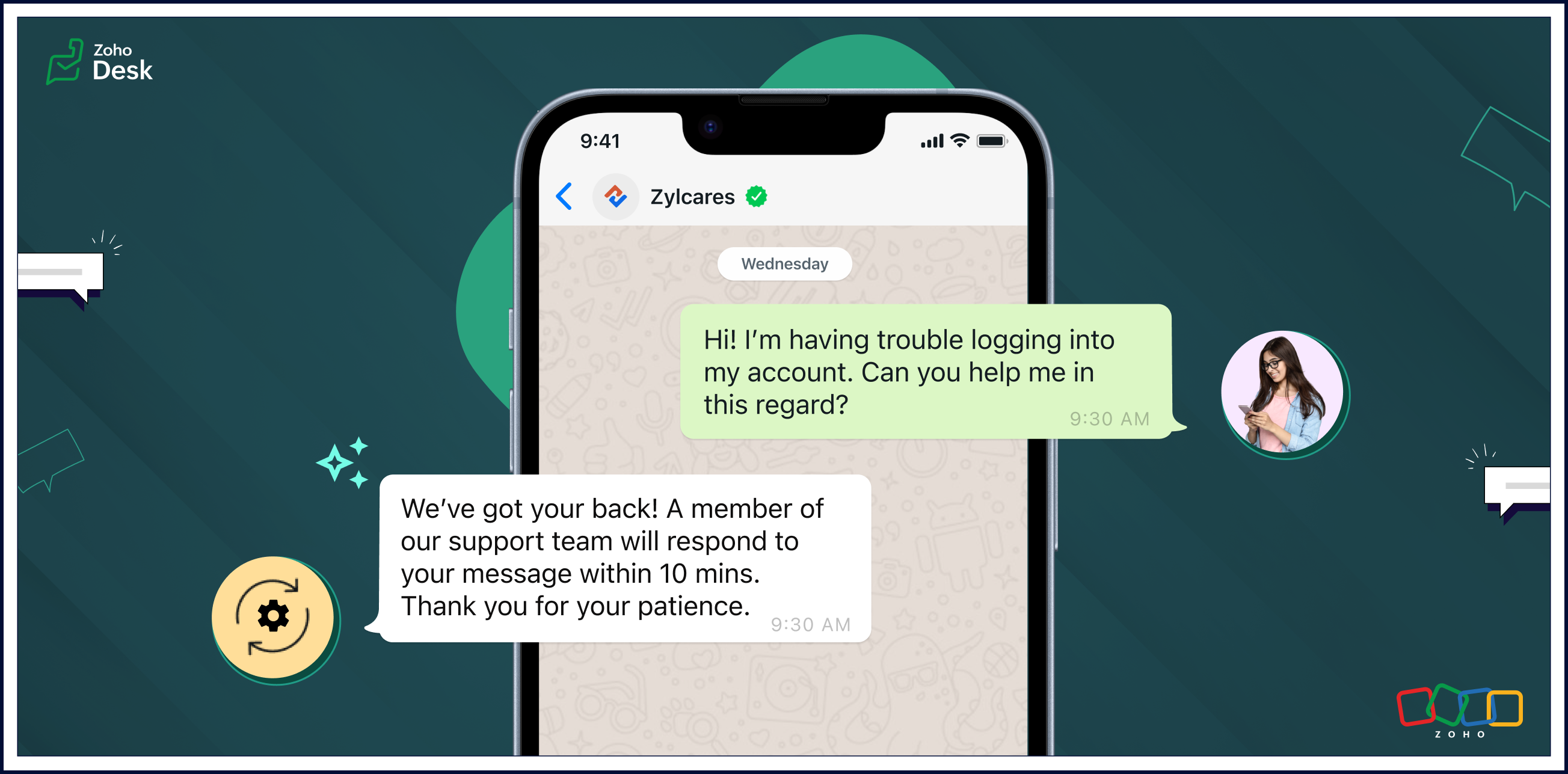
Auto response ensures that users receive an immediate confirmation of their message, setting a positive tone for their interactions with your organization.
Automatic replies enable businesses to streamline routine interactions, freeing up agents to focus on more complex issues and requests. The strategic use of auto-response messages enhances customer satisfaction, optimizes workflow efficiency, and contributes to cost savings.
Pros of auto-response messages
Prompt, clear communication
Automatic responses help maintain clear and uniform communication. These messages can include essential information, such as expected response times, alternative contact details, or links to relevant resources.
Fast response times
Auto-response messages excel in expediting response times. Customers appreciate swift acknowledgements of their questions or concerns and will be more willing to wait patiently if they know help is coming soon.
Reduced burdens on support reps
One of the primary advantages of auto-response messages is the time-saving benefit for agents. Routine inquiries or frequently asked questions can be addressed automatically, allowing agents to focus on more complex issues. This efficiency contributes to improved overall customer service.
Cons of auto-response messages
Limited capabilities compared to a human agent
Given a choice, customers often prefer to interact with human agents despite the convenience of automated replies. Even though auto replies are efficient, they lack the personal touch and empathy that human communication can provide. Also, auto responses may struggle to meet customer expectations in situations requiring emotional understanding.
Potential customer frustration
Auto replies can lead to customers becoming frustrated in some scenarios. They may need help with urgent or sensitive issues and be upset about not being able to reach an agent immediately. Standardized messages might not be able to address unique concerns adequately, leaving customers feeling unheard. Striking the right balance between automation and personalization is essential to mitigate frustration and provide a positive experience.
Uses of auto-response messages
• Sending out-of-office notifications
• Managing high volumes of incoming messages
• Providing information outside of business hours
• Handling customer interactions during events
• Saving time and making support teams more cost-efficient
• Managing high volumes of incoming messages
• Providing information outside of business hours
• Handling customer interactions during events
• Saving time and making support teams more cost-efficient
Auto-reply messages are quickly becoming an essential tool for providing effective customer support. Here are a few examples of auto-reply messages that you can use in different situations.

• Hi there! Thank you for contacting us. A support agent has already received your request and will reply soon.
• Hi there! You've reached [company name], and one of our support reps will get back to you shortly.
• Thank you for your message. We are currently unavailable, but a service agent will contact you as soon as possible.
• Welcome aboard! We can't wait to start working with you. Our team is always here for you if you have any questions or need support. Thank you for joining us!
• Thank you for reaching out to us. We're aware of the issue, and we're working on it. We'll update you as soon as we have more information.
• We're closed, but our support team will be available at [time] to get back to you and address your concerns. Thanks for your patience.
• Hi there! Thank you for opting into our newsletter. You'll start receiving exclusive content and updates from us soon.
• Sorry for the late delivery. We're on it and doing our best to get your order to you as quickly as possible. We appreciate your patience.
• Thank you for your message. We are currently unavailable, but a service agent will contact you as soon as possible.
• Welcome aboard! We can't wait to start working with you. Our team is always here for you if you have any questions or need support. Thank you for joining us!
• Thank you for reaching out to us. We're aware of the issue, and we're working on it. We'll update you as soon as we have more information.
• We're closed, but our support team will be available at [time] to get back to you and address your concerns. Thanks for your patience.
• Hi there! Thank you for opting into our newsletter. You'll start receiving exclusive content and updates from us soon.
• Sorry for the late delivery. We're on it and doing our best to get your order to you as quickly as possible. We appreciate your patience.
Closing thoughts
Automated replies save time, ensure prompt acknowledgement of customer requests, and help manage expectations when agents are unavailable or busy due to high communication volumes.
They enhance the transparency of business communication by providing immediate responses, even outside regular business hours. This helps foster a positive support experience and nurture long-term relationships with customers.
Clarity in communication improves customer satisfaction by setting appropriate expectations and reducing uncertainty in the support process. It's a win-win for customers and businesses.
I hope you found this article helpful and start using auto responses to help deliver great service to your customers. There's more to come, so please watch this space for more IM feature stories.
Until next time,
Kavya Rao
The Zoho Desk Team
Access your files securely from anywhere
Centralize Knowledge. Transform Learning.
All-in-one knowledge management and training platform for your employees and customers.
New to Zoho Recruit?

Zoho Developer Community
New to Zoho LandingPage?
Zoho LandingPage Resources
New to Zoho Survey?
New to Zoho CRM Plus?
Deliver unforgettable customer experiences
New to Zoho CRM Plus?
Deliver unforgettable customer experiences
New to Zoho Marketing Plus?
Everything you need to run your marketing
New to Zoho Marketing Plus?
Everything you need to run your marketing
New to Bigin?





Topic Participants
Kavya Rao Addepalli
Antonio
Shivani | Zoho Desk
Sticky Posts
Register for Zoho Desk Beta Community
With the start of the year, we have decided to take a small step in making the life of our customers a little easier. We now have easy access to all our upcoming features and a faster way to request for beta access. We open betas for some of our featuresShare your Zoho Desk story with us!
Tell us how you use Zoho Desk for your business and inspire others with your story. Be it a simple workflow rule that helps you navigate complex processes or a macro that saves your team a lot of time; share it here and help the community learn and grow with shared knowledge.Tip #1: Learn to pick the right channels
Mail, live chat, telephony, social media, web forms—there are so many support channels out there. Trying to pick the right channels to offer your customers can get pretty confusing. Emails are most useful when the customer wants to put things on record. However, escalated or complicated issues should not be resolved over email because it's slow and impersonal. When you need immediate responses, live chat is more suitable. It's also quick and convenient, so it's the go-to channel for small issues.Welcome to Zoho Desk Community - Say hello here!
Hello everyone! Though we have been here for a while, it’s time to formally establish the Zoho Desk Community; we’re really happy to have you all here! This can be the place where you take a moment to introduce yourself to the rest of the community. We’d love to hear all about you, what you do, what company or industry you work for, how you use Zoho Desk and anything else that you will like to share! Here’s a little about me. I am Chinmayee. I have been associated with Zoho since 2014. I joined hereWebinar 1: Blueprint for Customer Service
With the launch of a host of new features in Zoho Desk, we thought it’ll be great to have a few webinars to help our customers make the most of them. We’re starting off with our most talked about feature, Blueprint in Zoho Desk. You can register for the Blueprint webinar here: The webinar will be delivered by our in-house product experts. This is a good opportunity to ask questions to our experts and understand how Blueprint can help you automate your service processes. We look forward to seeing
New to Zoho TeamInbox?
Zoho TeamInbox Resources
Zoho CRM Plus Resources
Zoho Books Resources
Zoho Subscriptions Resources
Zoho Projects Resources
Zoho Sprints Resources
Qntrl Resources
Zoho Creator Resources
Zoho CRM Resources
Design. Discuss. Deliver.
Zoho Show Resources

Get Started. Write Away!
Writer is a powerful online word processor, designed for collaborative work.
Zoho CRM コンテンツ
-
オンラインヘルプ
-
Webセミナー
-
機能活用動画
-
よくある質問
-
Ebook
-
-
Zoho Campaigns
- Zoho サービスのWebセミナー
その他のサービス コンテンツ
Nederlandse Hulpbronnen

ご検討中の方
Recent Topics
Is Zoho Sites still actively being developed?
Hello, Is Zoho Sites still actively being developed as part of the Zoho ecosystem? I noticed that the What's New page (https://www.zoho.com/sites/whats-new.html) does not show any updates since Q1 2025. We were considering migrating our website from SquarespaceAdding new data to the sheet with most recent data being added to top row.
I am using a form that I built from within sheets. When the form is submitted, is it possible to have the data entered in (for example) row 2 (since row 1 is the heading) instead of being added into the next available row which should be hundreds ofneed a packing list feature
In our business, goods listed on an invoice are packed in separate boxes and shipped off. for e.g. an invoice may have 10 items. each item could then be packed in different boxes depending on qty of each item. this packing list is as important as the invoice for purposes of shipping documents. Request you to add this feature asap.Editing Item Group to add Image
I did not have the image of the product when the Item Group was created. Now I have the product image, and would like to associate/add to the Item Group. However the Item Group Edit functionality does not show/allow adding/changing image. Please helZoho CRM Queries Now Support Databases and Cloud Data Sources
Hello everyone! We're thrilled to announce a major enhancement to the Queries feature in Zoho CRM! Queries now support a broader range of external data sources, allowing you to fetch live data and combine it with CRM records, all using a unified queryRe: Application Architecture in Zoho Creator — A Platform-Specific Deep Dive
A recent community post on application architecture made some excellent points about planning architecture early in Zoho Creator projects. The core message is right — Creator applications have a habit of growing organically into maintenance nightmares,Introducing a smarter, faster, and more flexible charting experience
Hello Zoho Sheet users, We're delighted to share the latest news about a major update to charts in Zoho Sheet! The new version supports dynamic data ranges, granular styling options, faster loading, and other interesting enhancements that allow you toZoho Bookings - Feature Request - Services Which Include A Resource and Consultant
Hi Bookings Team, My feature request is to have the ability to add Consultants and Resources to Services. Use case: Your business provides first aid training and there are certain equpment you require to provide the half day training. There are only specificAssign Meeting in records
It would be nice to be able to "call and assing" meetings from a record, for example from a Deal. Right now - calendar is synced with CRM - meetings show in calendar - you can go in each meeting and assign it to a record It would be nice to be able toSincronizar eventos de Bigin en Zoho Calendar (Zoho Mail)
Hola Me gustaría poder sincronizar mi Calendario de Zoho (Mail) con los eventos de Bigin. No veo la opción disponible.Sales Receipts in UK Free tier
Is Sales Receipts available in UK Books, specifically at the Free tier? None of the options from the help pages are available to me.My client requires me to have custom pdf file names to except payment for invoices, how can I customize this before emailing.
Hello! I love the program so far but there are a few things that are standing in the way. I hope you guys can code them in so I can keep the program for years to come. My client requires I customize the pdf file names I send in for billing. Can you pleaseWhen I schedule calendar appointments in zoho and invite external emails, they do not receive invites
Hello, We have recently transitioned to zoho and are having a problem with the calendar feature. When we schedule new calendar appointments in zoho the invite emails aren't being sent to the external users that we list in participants. However, this worksMigrate different zoho subscription to zoho one
Dear We have different zoho subscription we need to migrate it to zoho one. Currently we are paying for zoho email, zoho expense, zoho payroll etc under different admin We need to move it too zoho one flexlible plan for all my employeesBigin use in hospital- Human Med or Veterinary
I am looking for users who are in either human or veterinary medicine and use the CRM specifically for referral management tasks. Are you using the basic version? How many users update the CRM and is it effective? Did you pay for additional customizations?Standardize email communication with Signature Template
Maintaining a consistent and professional signature across all outgoing emails is essential for any organization. However, when users manage their signatures individually, it often leads to inconsistencies like varying formats, missing designations, orZoho Books: tax is not automatically pulled from product-data anymore - why?
Hi, until a short time ago, you could set a default taxrate for each product/item. This taxrate automatically appeared each time the item was chosen in an invoice or quote. Why does this not work anymore? The field is still there at the product record,Setting up property management in Zoho Books
Hi, I run a property management business that manages property complexes. There are multiple owners, some owning more than one property on the same complex. My role is to manage the fees they pay for maintenance of common areas, such as the swimming poolZoho Creator to GMAIL API Setup - Where Do I Begin?
Does anyone know how to connect Zoho Creator to Google Workspace (Specifically GMAIL?) We have FLOW setup and working fine to send emails via GMAIL, but Flow doesn't accept file attachments which is a major problem. So, we need to be able to send an emailKiosk Page Refresh
We have a Kiosk running from a button in contacts to update values and also add related lists, which works great, but when the kiosk is finished the page does not refresh to show the changes. Is there a way to force the contact to refresh/update whenSetting GC session variable programatically in a website
Hi! Is there a way now to programatically set session variables from a website for a Guided Conversations? The current available methods are dependent on react-native.Ticket Merge Error
Refresh frequency
Dear Zoho Team, I really, truly appreciate that Zoho Books gets frequent updates. As a matter of fact this is how a good SaaS company should stay on top. However, I feel that I have to hit refresh almost every day. This was exciting at the beginning butUpdate application by uploading an updated DS file
Is it possible? I have been working with AI on my desktop improving my application, and I have to keep copy pasting stuff... Would it be possible to import the DS file on top of an existing application to update the app accordingly?Two-factor authentication (2FA) Log-in Problems
The Two-factor authentication (2FA) Login on my passwords doesn't match , so it wont accept login I'm down to my last backup code.Remove my video
Hi, How can I remove my video so that I don't have to see myself. It's weird so I always remove my own video from what I see but cannot find this feature here. Thanks!Client Script: Any plans to add support for multi-select field with onChange
Client Script is fantastic and the documentation lists multiselect form fields as unsupported. Just wondering if there are any plans to make this a supported field. https://www.zoho.com/crm/developer/docs/client-script/client-script-events.html 2. FieldFeature Reqeust - Include MPN In Selectable FIelds
I have noticed that the MPN is not available to show in the list view of Items. Please consider adding it as EAN, UPC and ISBN are all available, so it doesn't make much sense to exclude this similar option. Thanks for considering my feedback.Experience effortless record management in CRM For Everyone with the all-new Grid View!
Hello Everyone, Hope you are well! As part of our ongoing series of feature announcements for Zoho CRM For Everyone, we’re excited to bring you another type of module view : Grid View. In addition to Kanban view, List view, Canvas view, Chart view andWindows Desktop Application for Bigin
I'm finding the need for a standalone Bigin desktop app for Windows users. Most of my daily work is done through a browser, so I often have several open tabs while working with customers and checking product information, etc. With Bigin currently onlySet another Layout as Standard
We created a few layouts and we want to set another one to standard:Salesforceに添付ファイルを格納したい
お世話になっております。 Salesforceに添付ファイルを格納したく、カスタムオブジェクトに連携し、 「ファイルのアップロード」項目を設けました。 実際、エラーもなく送信出来たのですが、実際生成されたカスタムオブジェクトのレコードを見ると、どこにも添付ファイルがありません。仕様として、この添付ファイルはSalesforceのどこに格納されるのでしょうか? 今回作りたいフォームは、複数の書類を添付するため、Zohoformのファイルアップロード項目「本人確認書類」「源泉徴収票」などの項目を、Salesforce側にも設けた「本人確認書類」「源泉徴収票」という各項目にURLリンクとして紐づけたいと思っておりました。Knowledge Base article lists
Is it possible to adjust the number of articles that are visible under a category of the Knowledge Base portal? Currently it looks like by default it populates about 5 articles before it puts the "more" option at the bottom. Looking to see if I can extendDiscrepancy in Contracts with Fields list/Layout
The Support Plan field on the layout isn't in the fields list. What am I missing?Migrating all workflows to another Zoho account
We are going to transfer into another company, and we are going to get new emails and new Zoho accounts. Is there a way to migrate (or save in some sort of external file) all presets and settings that we have on this account? That includes primarily workflows,Edit The Newsletter
There doesn't seem to be the ability add a title and a caption below the button. Can this be done?Unable to Delete Items – No Visible Transactions but Error “Items which are a part of other transactions cannot be deleted…”
Hello Community, We are using Zoho Inventory for our business and encountered a persistent issue that is preventing us from deleting certain items. The message shown is: “Items which are a part of other transactions cannot be deleted. Instead, mark themKeyboard UX for Assemblies
The new Assembly module has a counter-intuitive behavior that ought to be corrected. When an Assembly is ready to be entered, there are two options given, the blue-highlighted "Assemble" and the gray "Save as Draft". This correctly implies that the normallanded cost-need help with different currency under the same bill
I’m having trouble recording landed costs in Zoho Inventory/Books. My purchase order is in CNY, but the landed cost (freight) I pay is in USD. Zoho forces everything under the same bill to use one currency, so I can’t enter the landed cost in its actualImproved Functionality PO Bill SO Invoice
Hello, I need to enter over 100 items, it's frustrating to scroll a few item rows and wait for more to load, then scroll again. It would be nice to have buttons that scroll to the top or bottom with one click. Furthermore, these items I'm adding are VATNext Page