Introducing the Submissions sub-module
The Submissions sub-module stores candidate submissions made to client-contacts as records, along with other key details. Designed to provide you with an eagle-eye view of all your candidate submissions, this sub-module makes it easier for you to stay organized and streamline your hiring process.
What is the Submissions sub-module?
The Submissions sub-module is a built-in tool in Zoho Recruit that tracks and stores every candidate submission you make. Each submission is stored as a unique record, and you can customize views and perform mass actions on them. This means you can easily keep track of the status of each submission and quickly access all relevant information associated with it.
Key Features
Centralized Tracking of Submissions
The Submissions Sub-module provides a centralized repository to track all candidate submissions made to clients. You can now easily monitor and manage the status of each candidate submission in one place. No more sifting through emails or spreadsheets to find submission details.
With a centralized tracking system, recruiters can efficiently manage their talent pipeline, stay organized, and prioritize follow-ups, leading to faster and more effective hiring decisions.
Review Status and Client Feedback
The Submissions Sub-module allows you to record client reviews and feedback for each submission. You can now easily assess candidate performance and suitability based on client ratings and comments. This valuable feedback enables you to fine-tune their candidate selection process.
Accessing client feedback directly within the submission record streamlines the review process and enhances collaboration between recruitment teams and clients, leading to better candidate matches and improved client satisfaction.
Workflow Automation for Efficiency
Zoho Recruit's Workflow automation can be applied to the Submissions Sub-module, allowing you to automate actions based on predefined criteria. You can set up automated reminders for follow-ups with clients, notifications for candidate reviews, or even color-coded tags for prioritizing submissions based on specific conditions.
Workflow automation saves time and ensures that critical tasks are not overlooked. It helps recruiters stay on top of their submission pipeline, leading to improved responsiveness and a smoother hiring process.
Easy Access from Related Records
To help you track candidate submissions better, Zoho Recruit offers multiple ways of accessing submission records, such as the Submissions List View page and the Related List section of associated records (Candidates, Job Openings, Applications, Clients ). You can quickly access submission details from the associated records, making it effortless to review the entire submission history of a candidate or a specific job opening.
This easy access to submission details from multiple views enhances visibility and makes it convenient for recruiters to navigate the submission history across different modules, promoting seamless collaboration between teams.
How Does it Work?
When you forward a candidate profile to a client, a submission record is automatically created in the Submissions Sub-module.
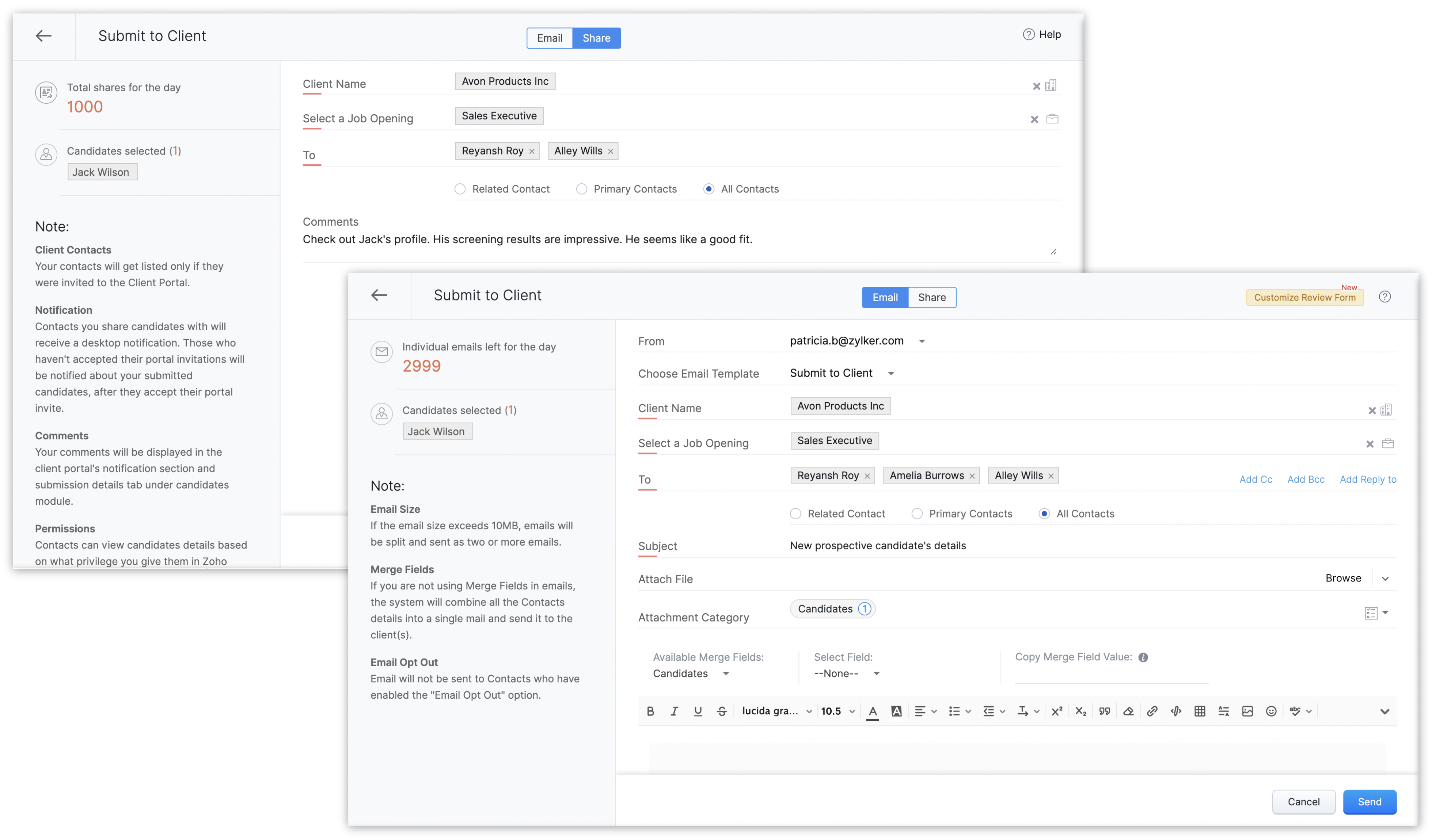
You can view and manage these records from the List View page or the Details Page. Plus, with customizable views, you can organize submissions based on your preferences.
How to Get Started?
Navigate to Submissions
In your Zoho Recruit account, hover over the Candidates module and click Submissions.
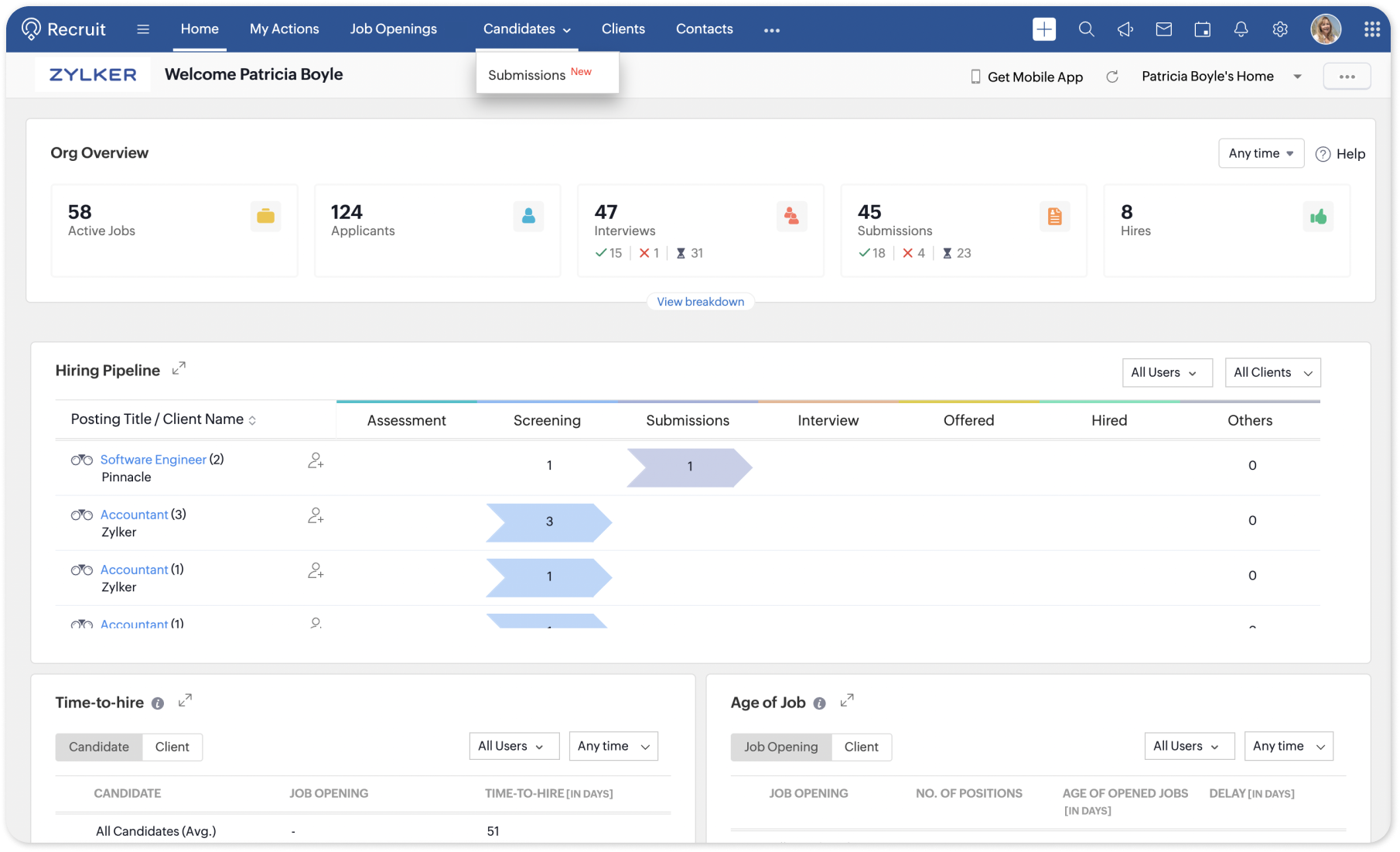
Explore List View
The List View page is where all your submissions will be listed as records. Take a moment to familiarize yourself with various default views and the options available, such as Quick View, Change Owner, Mass Transfer, Bulk Delete, etc.
Customizable Views
If you have a requirement to be able to view a certain field from the List View page in order to be on top of your work, then click the Edit icon near the Views drop-down. Add or remove fields as columns in your List View page, apply criteria based filters, and save custom views for quick access later.
Submission Details
In the Details Page of a submission record, you'll find comprehensive information about the submission, including the candidate's name, associated job opening, submission status, submission date, and more. When a client-contact submits their review for a submission, it is automatically added to the Review Status sub-tab of the submission's details page in real-time.
Enable Workflow Automation
To make the most of the new Submissions sub-module, consider setting up workflow alerts and actions such as configuring automatic follow-ups and replies to scheduling tasks and meetings. Navigate to Setup > Automation > Workflow Rules and create a new rule for the Submissions module. Define the criteria and actions you want to trigger for each submission that the rule is triggered for.
For more information, refer our help article or reach out to our customer support team at support@zohorecruit.com.
Regards,

Access your files securely from anywhere
New to Zoho Recruit?

Zoho Developer Community
New to Zoho LandingPage?
Zoho LandingPage Resources
New to Zoho Survey?
New to Zoho CRM Plus?
Deliver unforgettable customer experiences
New to Zoho CRM Plus?
Deliver unforgettable customer experiences
New to Zoho Marketing Plus?
Everything you need to run your marketing
New to Zoho Marketing Plus?
Everything you need to run your marketing
New to Bigin?





Topic Participants
Pradyumn K
arthur
Tony
Mark Z R
AG Recruitment
Sticky Posts
An update to improve email delivery | Email Authentication & Relay
Update Rollout Latest Update: Enterprise users (8th July, 2025) This update is now live for Enterprise plan users in all regions. This includes People Plus, but not Zoho One, which will be covered in an upcoming update. Professional users (31st May 2025)Zoho Recruit User Group Meet-up | INDIA 2025 (Venue Finalised)
Hello Zoho Recruit users from India, We’re pleased and excited to announce our 2025 edition of Zoho user group meet-up in India in five cities! In this meet-up, our team of experts will help you understand the intricate nuances to use Zoho Recruit better,Zoho Recruit is coming to the UK | Zoho Community Learning Series
Customers from the United Kingdom, Exciting news: We will be in London for the Zoho Recruit user meet up. Our team will help you better understand the intricate nuances of Zoho Recruit to help you hire faster, inform about new and upcoming features, andAsk the experts - A live Q & A discussion on Zoho Recruit
We are delighted to come back with another edition of Ask the Experts community series. This edition, we'll be focusing on everything about Zoho Recruit. The topics will focus on the features that are used/asked by the majority of users and also basedRestriction on 'From' addresses with a public domain
Dear Zoho Recruit Community, We hope this message finds you well. This post is to inform you about some important updates regarding email restrictions within Zoho Recruit. Effective post 31st March 2025, we will be implementing changes to the use of email
New to Zoho TeamInbox?
Zoho TeamInbox Resources
Zoho CRM Plus Resources
Zoho Books Resources
Zoho Subscriptions Resources
Zoho Projects Resources
Zoho Sprints Resources
Qntrl Resources
Zoho Creator Resources
Zoho CRM Resources
Design. Discuss. Deliver.
Zoho Show Resources

Get Started. Write Away!
Writer is a powerful online word processor, designed for collaborative work.
Zoho CRM コンテンツ
-
オンラインヘルプ
-
Webセミナー
-
機能活用動画
-
よくある質問
-
Ebook
-
-
Zoho Campaigns
- Zoho サービスのWebセミナー
その他のサービス コンテンツ
Nederlandse Hulpbronnen

ご検討中の方
Recent Topics
Setting up primary mobile number.
Hi Sir Earlier I joined IIFL team and got an organizational email of zoho services. Later i quit and now my account is deactivated with IIFL but i am unable to link my mobile number to my own email id with zoho.Tables for Europe Datacenter customers?
It's been over a year now for the launch of Zoho Tables - and still not available für EU DC customers. When will it be available?Guided Conversations - Ticket Creation
Hi there, Using Guided Conversations to Take Customer Data and apply it into a Support Ticket for internal use, Is there a way to take multiple Textual Variables Inputs (A series of questions), and have the answers all appear in the Description of theHow to send certain invoices for Approval based on condition?
To streamline operations, I need the invoices to go for approval when certain conditions are met. For example, if my staff gives a discount of x amount, it must go for approval. If there is no discount, then the invoice will be approved automatically.Unable to continue payment
Hi, I want to make a payment for my email subscription, but I cannot proceed with the payment because my NITKU is invalid. In Indonesia, the NITKU consists of 22 digits, but Zoho only provides 20 digits, causing my NITKU to be invalid. Please help meIs there a way to show contact emails in the Account?
I know I can see the emails I have sent and received on a Contact detail view, but I want to be able to see all the emails that have been sent and received between all an Accounts Contacts on the Account Detail view. That way when I see the Account detailMassive spam pretending to come from our address – is this a Zoho security issue?
Hi, We’ve been receiving more and more suspicious emails lately — many of them clearly look like scams. But yesterday, we got an email that appeared to be sent from our own address, which was very concerning. We're starting to wonder if this might beCant recieve mails
I’m having an issue with my external IMAP account not fetching any emails into Zoho Mail, even though the connection test says “Success”. I can send, if someone sends an email to me. my original directory (home.pl host) recieves it in their portal butZoho Sheet Autofit Data
While using Autofit Data function in Zoho Sheets with Devnagri Maratji or Hindi Fonts, a word or a number, it keeps couple of characters outside the right side border.Enhancements to finance suite integrations
Update on the migration (October 28, 2025): Starting this week (October 29 tentatively), we’ll begin migrating Zoho CRM users to Zoho Books as integration users. This means actions will now run under each user’s own Zoho Books access, instead of the admin’s.Edit 'my' Notes only
The permissions around Notes should be more granular, and allow to user to be able to edit the notes he created only. The edit Notes permission is useful as it allows the user to correct any mistakes or add information as needed. However, with this sameJob Alerts for Candidates
hi All, I have 2 questions relating to sharing job details with candidates. 1. is there a way to notify candidates that meet certain criteria of current jobs available? eg. I run a candidate search, and identify 50 candidates that might be suitable. CanEnhancing Task Accuracy: Automatically notify the owners upon Task duplication.
Hello Everyone, A Custom function is a user-written set of code to achieve a specific requirement. Set the required conditions needed as when to trigger using the Workflow rules (be it Tasks / Project) and associate the custom function to it. The requirementNodemailer not working with Zoho
Hi All, I'm having issues with Zoho working with Nodemailer. It works as expected when using gmail as the service. Below is the code I get when using zoho. Error sending email: Error: connect ECONNREFUSED 127.0.0.1:587 at TCPConnectWrap.afterConnect [asdesktop app for TODO
Is there a desktop app for Zoho TODO?Show/ hide specific field based on user
Can someone please help me with a client script to achieve the following? I've already tried a couple of different scripts I've found on here (updating to match my details etc...) but none of them seem to work. No errors flagged in the codes, it justWhere are Kanban swimlanes
So i've been playing with Zoho Projects Kanban view a bit more. It appears that task lists are being used as the Kanban columns, which makes sense from the implementation point of view but not the logical one. Kanban columns are statuses that a task can flow through, while a task list has been a logical way to organize related tasks and relate them to a mislestone. In other words a task in a particular task can go through several stages while remaining in the same task list. After doing some researchTip 19: How to display images in Pages using ZML snippets
Hi folks, We're back with another tip on how to use Zoho Markup Language (ZML) to create interactive pages in Zoho Creator. You can use ZML snippets to add various kinds of components to your pages and structure them in meaningful ways. That's not all, though—using ZML you can ensure your application is automatically compatible with all kinds of devices without any inconsistencies. We often get questions from users about how to invoke Deluge scripts within ZML code. Here's a simple use case for addingCan zoho swign format block text spacing automatically when prefilled from zoho crm?
I'm sending zoho sign template from zoho crm, so that zoho crm pre-populates most fields. I have existing pdf documents that i am having signed. I have no ability to change the pdf documents, they are standardized government forms. The problem I am facingReference lookup field values in Client script
hello all, I'm using a "ZDK.Apps.CRM.Products.searchByCriteria" function call, which is returning the matching records correctly; however, one of the fields is a lookup field which I need the associated data. I believe there is a way to get this dataEvery time an event is updated, all participants receive an update email. How can I deactivate this?
Every time an event is updated in Zoho CRM (e.g. change description, link to Lead) every participant of this meeting gets an update email. Another customer noticed this problem years ago in the Japanese community: https://help.zoho.com/portal/ja/community/topic/any-time-an-event-is-updated-on-zohocrm-calendar-it-sends-multiple-invites-to-the-participants-how-do-i-stop-that-from-happeningHow can I filter a field integration?
Hi, I have a field integration from CRM "Products" in a form, and I have three product Categories in CRM. I only need to see Products of a category. Thanks for you answers.How to implement new online payment gateway?
Hello, Can you tell me how to proceed to implement my local payment gateway? DIBS has an open avaiable API that should be easy to implement into ZOHO BOOKS. http://tech.dibspayment.com/dibs_payment_windowZoho CRM - Portal Users Edit Their Own Account Information
Hi Community, I'm working on a client portal and it seems like the only I can make the Account record editable to the Contact, is if I add another lookup on the Account to the Contact record. Am I missing something as the account already has a list ofConnecting Zoho Mail with Apollo.io
Hi, I am trying to connect my Zoho Mail account with my Apollo.io account to start sending cold email for prospecting purposes. I have activated the IMAP setting but I am still unable to connect to the Apollo account. I am using my email credentials butWhere does this report come from in the Zoho One ecosystems?
Is this directly from MA, Analytics or ??? ???Contact's title in "Contact Role Mapping"
When I'm creating a deal, I'd like to see the contacts title in the listing. Right now, I only see this: How can I get the contact's title in there?Zoho CRM - Client Portal - Hide Notes Related List
Hi Community, I'm building a customer portal and I can't find a way to hide the notes related list. I don't want the client to see the notes I have about them. Is there a way to do this as it is no bin/trash icon when I hover over."Pivot Table" Conditional Formatting
Team, I there a way to use conditional formatting a "Pivot Table" report? Thanks, Arron Blue Pumpkin Hosting | Solutions Made SimpleHow many clients can be added to Zoho Practice?
How many clients can be added to Zoho Practice without having their zoho app?Stage History
when viewing a ticket , and you look at stage history tab (kanban view) and look at the stage duration column in days, it shows the current stage of the ticket as " current stage ". Should it not rather show the amount of days it has been in that currentAutomating Ticket Responses Using Zoho Desk's AI Features
We’re looking to set up an automation within Zoho Desk that can analyze incoming emails or tickets and automatically respond with relevant knowledge base articles based on the content of the request. Could you please guide us on how to configure thisOptimising CRM-Projects workflows to manage requests, using Forms as an intermediary
Is it possible to create a workflow between three apps with traceability between them all? We send information from Zoho CRM Deals over to Zoho Projects for project management and execution. We have used a lookup of sorts to create tasks in the past,Service locations are tied to contacts?
Trying the system out. And what I discovered is that it seems that the whole logic of the app is, I'd say, backwards. There is a Customer - a company. The company has contact persons and service locations can be associated with different contact persons.Enhancements to Zoho Map integration tasks
Hello everyone, We're excited to announce enhancements to the Zoho Map integration tasks in Deluge, which will boost its performance. This post will walk you through the upcoming changes, explain why we're making them, and detail the steps you need toBug in Total Hour Calculation in Regularization for past dates
There is a bug in Zoho People Regularization For example today is the date is 10 if I choose a previous Date like 9 and add the Check in and Check out time The total hours aren't calculated properly, in the example the check in time is 10:40 AM checkNarrative 12: Sandbox - Testing without the risk
Behind the scenes of a successful ticketing system: BTS Series Narrative 12: Sandbox - Testing without the risk What is a sandbox environment? A sandbox environment is a virtual playground that allows you to test freely and experiment with various elementsAnnouncing new features in Trident for Mac (1.27.0)
Hello everyone! Trident for macOS (v1.27.0) is here with new features and enhancements to improve scheduling and managing your calendar events. Let's take a quick look at them. Stay aligned across time zones. Both the scheduled and original time zonesSlow uploads of large files
I'm wanting to use Workdrive for transferring large images and video (we're talking things from 100MB-5GB). I'm running solo on a 500MBit/sec fiber connection. I'm getting upload speeds to Workdrive of no more than about 1-3Mbytes/sec when going throughMigrate Your Notes from OneNote to Zoho Notebook Today
Greetings Notebook Users, We’re excited to introduce a powerful new feature that lets you migrate your notes from Microsoft OneNote to Zoho Notebook—making your transition faster and more seamless than ever. ✨ What’s New One-click migration: Easily importNext Page