Introduction of Canvas for Zoho CRM
All industries function in a way that is very different in many aspects. There is no one size fits all approach. The companies should be able to modify the CRM design to suit their needs after a purchase has been made. This is where customers can control their experience completely. Zoho CRM is a giant that has created a new benchmark for customization.
With Canvas, Zoho plans to offer the best possible consumer experience that there is. The customers can create their own experience using Canvas. Zoho introduces Canvas as a design so that the customers can redesign the visual interface of Zoho CRM services to suit their requirements.
Using Canvas, users can remodel the look and feel of their CRM without writing even a single line of code since a simple drag and drop interface is used. Canvas creations can immensely improve the end user’s experience that helps in increasing productivity and morale. It sets the precedent for users to experience autonomy where the user can control the experience with the product.
In this blog, we will get to know all about Canvas and everything it can do for CRM.
What is Canvas?
Canvas is a design studio that is built into the Zoho CRM. The customers can redesign the user interface from an entirely blank canvas using Canvas. It offers a better CRM user interface and supports a wide range of formatting options that help companies to re-imagine the look and feel of any module down to small details. This is how the data meets design.
The use of Canvas is similar to photoshop for databases but it is much more nuanced. Canvas completely understands how the modules, fields, buttons, and related lists in the interface get created. Hence, it offers a much more thoughtful and contextual designing experience for the customers.
You can think of Canvas as a unique tool by Zoho CRM, something that no other CRM vendor has ever considered creating. Zoho has actually pioneered the design autonomy movement allowing the customers to curate the user experience that they are looking for. With the use of Canvas, Zoho CRM has become the most customizable CRM in the market.
Canvas as a no-code design platform is one of the most powerful things to change your Zoho CRM user experience from a visual and a functional perspective. It is a simple user interface management platform that is created into the native CRM system and is applicable in various ways of the CRM. The UI can be customized with the following CRM pages using Canvas.
A unified user experience can be created at various engagement points across platforms with internal CRM, partner portals, and self-service customers. Finally, regardless of the fact if they are your customers, partners or employees, all of the groups that work with a consistent UI when it comes to page design, look and feel, yet the data organized in all layouts can be customized based on various functions and requirements.
Working of Canvas
Canvas helps companies create a custom view that is readily available as an option along with the default views. The customers can click to create a new Canvas view from a listing page or the record page so that a blank canvas is opened as the powerful editor. Some of the things that are responsible for making Canvas stand out are:
1. Right Information in the Right Place
Customers can look for all the related lists, fields, and buttons available on the left side of the menu in editor mode. This actually means that no information is lost and all associations will remain intact just the way they are.
Canvas plays the role of helping users change the appearance of Zoho CRM with multiple design variants.
2. Drag-and-drop Interface
There is no need to become a programmer or even a designer for using Canvas. You just need to have good design taste. Canvas is the first CRM design studio that also comes with a drag and drop interface to offer a much-simplified design experience for everyone.
With the editor, users can easily choose some components from the left menu, drag them on the interface, drop them at the desired location, and then finally click to see available formatting options. It only takes a couple of clicks to create a new design.
3. Formatting Options
Canvas provides many formatting options for playing around with so that the companies can find the exact style that fits their team the best.
Right from changing the shape of the contact image or the color of a button to changing the padding, the shadow, and the width, Canvas enables the users to make sure that all details are suitable for a personal view.
4. Templates
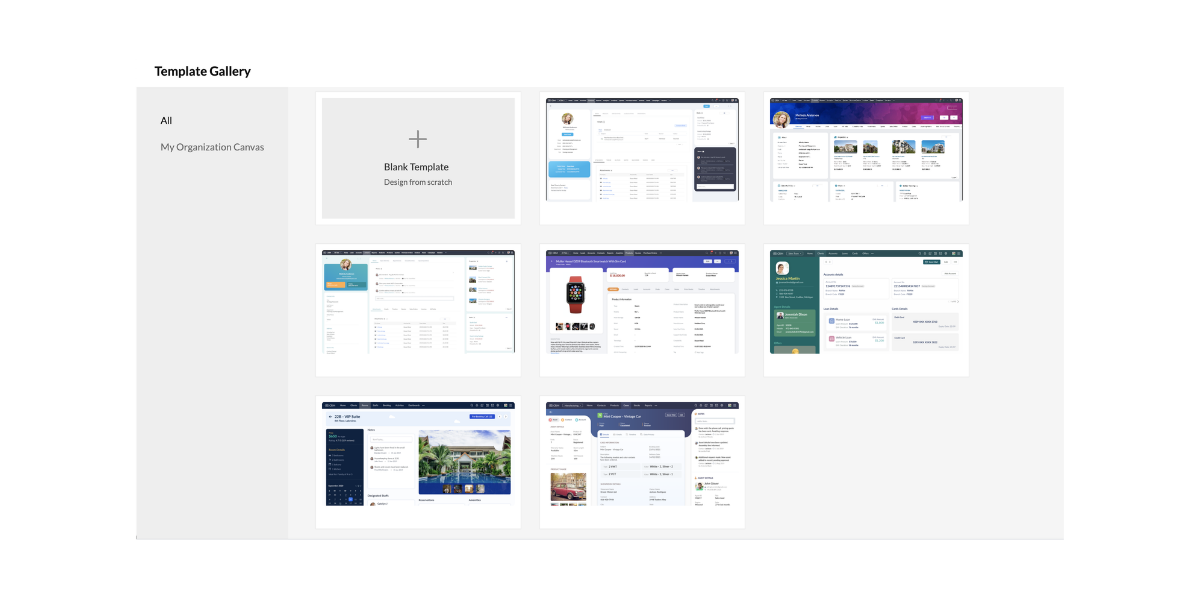
Canvas also comes with a set of templates that the customers can choose in case they want a good start with their design or in case they are looking for inspiration.
The templates can be easily customized to a wide range of industries and they can also be changed to suit the customers in an improved way.
5. Uniform Design All Over Modules
Canvas is a no-code design platform that can be easily copied to other modules for maintaining a uniform design and color style.
Almost any detail that is not associated with the new module can be easily reconfigured at any time. This leads to a uniform design across all possible modules.
How Does Canvas Help Users?
Canvas plays an excellent role in helping companies experiment seamlessly with multiple designs taking input from the salespeople and other end users. These are the people who end up spending a large amount of time using the Zoho CRM.
The admins can easily remodel the list page and detail page of all modules so that everyone’s needs are solved on the basis of suggestions. Canvas can effectively solve important challenges that businesses face in the present day including lack of personalization, employee experience, and complex implementations.
Canvas is the first CRM design studio that helps the users in the following ways:
1. Creating Personalized Instances:
Canvas is responsible for helping companies design a version of CRM that suits the industry and the working culture. Administrators can easily design views with fields, buttons, lists, and labels that are relevant to business so that the end-users can get the maximum results out of Zoho CRM. The customers can also enjoy tailored experiences of a vertical CRM that comes with all possible capabilities of a general-purpose CRM.
2. Enhanced Employee Experience
Using Canvas as a no-code design platform, companies can easily build a CRM that is easy to work with. The users can create views with a minimal design and great colors that are soothing for the eye and the mind. The customers can also highlight, record, hide, and reposition fields, lists, and buttons for helping salespeople work much better.
3. Removes Complexity
Canvas makes it very simple for businesses to get started with the Zoho CRM. The implementation phases including extensive training, data prep, and onboarding experiences need less time and effort all thanks to a simple and customized design. Successful implementation is necessary for reducing any complexity of the system while ensuring that there is high usage and streamlined ROI.
Canvas Serves the Purpose of Everyone
Canvas is literally for everyone. It helps in the following things.
1. Collaborative Selling
 The companies can effectively share their Canvas views with the vendors, consultants, and partners with the use of various portals. The sales process can also become increasingly collaborative where different parties need to get involved at various stages of a sale. Canvas helps in facilitating this collaboration.
2. Superior Self-Service
It is a well known fact that millennial customers are highly protective of their data and the option of self-service is appreciated much more. The customers can fill in important information and review it directly in the company’s very own custom Canvas creation which improves the overall experience considerably.
3. Thriving Community
 Canvas is a one of a kind first CRM design studio where the customers can create new Canvas views and share them with the community. In this way, other businesses can use them as well. With Canvas, Zoho CRM works to create a community of designers who can submit, edit, and implement templates very similar to the community WordPress created for websites.
Canvas sets the precedence of UX Rich Autonomy
Zoho plans to introduce Canvas to the entire Zoho CX suite and finally to complete the product range. In this way, the companies can enjoy the Zoho environment with a design all across the board. When the companies have greater control over the user experience, the results are incredibly beneficial for the end-user, organization, and even the vendor.
Conclusion
Zoho CRM is on a mission to make sure that the specific needs of all industries, companies, and teams are met with the use of Canvas. As Zoho CRM continues its journey to pioneer the new era of personalized CRM, continuous work is being done on user experience enhancements focused on making it simple for end-users to keep using Zoho CRM. Canvas – the first CRM design studio is an example of that.
Zoho claims that this is a journey that never ends and it is in it for a long time. This is one of the major milestones of Zoho for creating a high standard of CRM experience and the company continues making changes.
I hope that you learned something new today :)
Stay Tuned for more!
Cheers!
Abhi
(Seasoned Zoho Authorized and Certified Partner)
Feel free to contact me if you have any queries
Email: abhishek(@)encaptechno(dot)com
Call: +1-416-405-8185
Access your files securely from anywhere
New to Zoho Recruit?

Zoho Developer Community
New to Zoho LandingPage?
Zoho LandingPage Resources
New to Zoho Survey?
New to Zoho CRM Plus?
Deliver unforgettable customer experiences
New to Zoho CRM Plus?
Deliver unforgettable customer experiences
New to Zoho Marketing Plus?
Everything you need to run your marketing
New to Zoho Marketing Plus?
Everything you need to run your marketing
New to Bigin?





Topic Participants
Abhishek - Zoho Partner
Sticky Posts
Presenting ABM for Zoho CRM: Expand and retain your customers with precision
Picture this scenario: You're a growing SaaS company ready to launch a powerful business suite, and are looking to gain traction and momentum. But as a business with a tight budget, you know acquiring new customers is slow, expensive, and often deliversGood news! Calendar in Zoho CRM gets a face lift
Dear Customers, We are delighted to unveil the revamped calendar UI in Zoho CRM. With a complete visual overhaul aligned with CRM for Everyone, the calendar now offers a more intuitive and flexible scheduling experience. What’s new? Distinguish activitiesCreate and populate a record in an instant: Introducing zero-shot field prompting to Zia's ICR
A couple of months ago, we upgraded our in-house AI image detection and validation tool, Zia Vision, with intelligent character recognition (ICR). By training Zia with sample images, you could create and enrich CRM records with data extracted from standardIn-person ZUG Meetups for Real Estate Professionals - US Q1 2026
The Real Estate Zoho User Group is going on a multi-city, in-person meetup tour across the US, and we’d love to see you there! These meetups are a great opportunity to: Connect with fellow real estate professionals using Zoho Share challenges and discoverNimble enhancements to WhatsApp for Business integration in Zoho CRM: Enjoy context and clarity in business messaging
Dear Customers, We hope you're well! WhatsApp for business is a renowned business messaging platform that takes your business closer to your customers; it gives your business the power of personalized outreach. Using the WhatsApp for Business integration
New to Zoho TeamInbox?
Zoho TeamInbox Resources
Zoho CRM Plus Resources
Zoho Books Resources
Zoho Subscriptions Resources
Zoho Projects Resources
Zoho Sprints Resources
Qntrl Resources
Zoho Creator Resources
Zoho CRM Resources
Design. Discuss. Deliver.
Zoho Show Resources

Get Started. Write Away!
Writer is a powerful online word processor, designed for collaborative work.
Zoho CRM コンテンツ
-
オンラインヘルプ
-
Webセミナー
-
機能活用動画
-
よくある質問
-
Ebook
-
-
Zoho Campaigns
- Zoho サービスのWebセミナー
その他のサービス コンテンツ
Nederlandse Hulpbronnen

ご検討中の方
Recent Topics
Show both Vendor and Customers in contact statement
Dear Sir, some companies like us working with companies as Vendor and Customers too !!! it mean we send invoice and also receive bill from them , so we need our all amount in one place , but in contact statement , is separate it as Vendor and Customer,STOCK history in zohosheets
is it possible to get historical stock value using stock function in zoho sheets? i could not see from and to period in the helper document.Auto sync Photo storage
Hello I am new to Zoho Workdrive and was wondering if the is a way of automatically syncing photos on my Android phone to my workdrive as want to move away from Google? ThanksAgent password reset
Hi Zoho support, I would like to ask if there is a way the admin can reset a password of an agent? RegardsCan receive but not send messages in Zoho Mail
Hello! I was able to configure my email client successfully in that I can receive messages just fine. However, when I send messages out, they seem to go out fine (I don't receive any errors or anything), but the recipient does NOT receive those messages.Mail is sent twice!
Been using Zoho for a while now. Installed Zoho for someone else and some weird things are happening. Mails are being sent twice. He is using Thunderbird as an email client. I already read about email being duplicated in the sent folder. But in my caseCan't login IMAP suddenly
Since this evening I'm getting the error: You are yet to enable IMAP for your account. Please contact your administrator... IMAP always been enabled in my account and was workign fine for the past 7 years. Already tried turning IMAP off and on again.Sending of username did not succeed: Mail server pop.zoho.com responded: User already specified
I am having issues receiving emails from Zoho in Thunderbird. I am getting the above error. The first error tells me Authentication failed, and prompts me to enter in my password. Then I get the above error. I can receive emails when I log in online toBug tracking
Hi, does anyone know how to track errors during picking or packing? This way I can keep track and see how to improve and prevent errors in this area.Migration of corporate mail environment from Yandex 360 to Zoho mail
I have to migrate a corporate mail environment with an existing domain from Yandex 360 to Zoho mail. It is vital to migrate all users with all the data. I have read the article on this topic using MacMister Email Backup Software just now and have someI'm unable to send mail pthrough Zoho SMTP programmatically
This has been working for years, but today it's been offline all day long. I see nothing anywhere on your site about this. I'm not the only one experiencing this. Downdetector has a spike of reports todayCan no longer send email via Django site
This was working fine as of 11/7/25. Now I am unable to send user verification emails from a Django site on a AWS lightsail sever. When a user attempts to register the following error occurs. I have also attempted to send a test email via the shell andunable to send email but able to receive email
my email address is info@securityforceservices.caLogin to server failing
When trying to retrieve my mail, I am getting this error message -- Login to server pop.zoho.com with username (my email address) failed. It gives me the option to retry, enter password, or cancel. Then I get this message -- Sending of username did notConfiguration failed: 200 response not received for POST request.
Hello, I am trying to set up a webhook to connect with an Salesforce but I receive the following error from Zoho: Configuration failed: 200 response not received for POST request I have tried testing it on webhook.site as well and receive the same errorZoho Migration Assistant not working
Hello, I am trying to use you Migration assistant to migrate emails from Rediff to Zoho. I am stuck in the first step. After downloading the migration tool, I copied the link to verify user credentials, however, after pasting the link in the browser,Paid Support Plans with Automated Billing
We (like many others, I'm sure) are designing or have paid support plans. Our design involves a given number of support hours in each plan. Here are my questions: 1) Are there any plans to add time-based plans in the Zoho Desk Support Plans feature? TheScheduled Reports - Do not send empty report
Hello, We are intensively using reports in the CRM, especially for sales managers. When data is empty, they still receive an email. Can you add an option to avoid sending the report when data is empty?Contacts Missing — PeopleSync/Zoho Mail
English: In our company we use ManageEngine Mobile Device Manager (MDM), Free edition, to manage corporate mobile devices. Our usage policy does not allow personal Google accounts on these devices; therefore, Google account sync is blocked through MDM.Best way to integrate Zoho with mobile app for managing customer requests with real-time notifications?
Hello, I'm building a solution for a travel company where customers submit requests through a website, and the sales team manages these requests through a mobile app. The Requirement: Customers fill a form on the website (name, email, number of children,Kaizen #57 - Mass Update API in Zoho CRM
Hello everyone! Welcome back to yet another post in the Kaizen series. This week, we will discuss the Mass Update API in Zoho CRM. In this post, we will cover the following: 1. Introduction 2. Mass Update Records API 3. Schedule Update and Get StatusGetting Attachments in Zoho Desk via API
Is there a way to get attachments into Zoho Desk via an API? We have a process by which a zoho survey gets sent to the user as a link in a notification. The survey has several upload fields where they can upload pdf documents. I've createdMultiple currencies - doesn’t seem to work for site visitors / customers
I am trying to understand how the multiple currency feature works from the perspective of the website visitor who is shopping on my Zoho Commerce site. My site’s base currency is US Dollars (USD) but my store is for customers in Costa Rica and I wouldPincode based Product Restriction
we have different types of products. 1) Very bulky items like plywood. 2) Too delicate items like glass These type of products we want to sell to local customers. Other products we want to supply all over India. There should be an option to restrict productsCan multiple agents be assigned to one ticket on purpose?
Is it possible to assign one ticket to two or more agents at a time? I would like the option to have multiple people working on one ticket so that the same ticket is viewable for those agents on their list of pending tickets. Is something like this currentlyRelated Lists filter
I have Contacts showing in our Accounts module. I customized the Contacts module with an Employment Status field, with the following picklist options: "Primary Contact", "Secondary Contact", "Active Staff(not a main contact)", and "No longer employed".Standalone custom function not generating logs
Why dont't standalone custom functions generate logs when the're called from another function? I have some functions (workflow, buttons and blueprint) that have common parts, so I put that part in a standalone function which is called from the others.Add "Reset MFA" Option for Zoho Creator Client Portal Users
Hello Zoho Creator Team, We hope you are doing well. We would like to request an important enhancement related to Multi-Factor Authentication (MFA) for client portal users in Zoho Creator. Currently, Creator allows us to enforce MFA for portal users,Support Bots and Automations in External Channels
Hello Zoho Cliq Team, How are you? We actively use Zoho Cliq for collaboration, including with our external developers. For this purpose, external channels are a key tool since they work seamlessly within the same interface as all of our other channelsUrgent Security Feature Request – Add MFA to Zoho Projects Client Portal Hello Zoho Projects Team,
Hello Zoho Projects Team, We hope you are doing well. We would like to submit an urgent security enhancement request regarding the Zoho Projects Client Portal. At this time, as far as we are aware, there is no Multi-Factor Authentication (MFA) availableCreator HTML page refresh
Hi, I have added around 5 different html snippets in single creator page. I understand, I can refresh the entire page from page script using Navigational URLs https://help.zoho.com/portal/en/kb/creator/developer-guide/others/url-patterns/articles/navigational-urlsZoho Desk - Custom Module Related List Columns on Tickets
I have a custom module in Zoho Desk called Asana Tasks, each task has a lookup to a Ticket. On the Ticket I want to see the columns of the Asana Tasks in the related list . Is there a way to do this? Right now it just has the name of the record and IWhat is your opinion of the new UI?
Hi Everyone, I would like to see what everyone thinks of the new Zoho One Dashboard. I don't get it, but perhaps I'm missing something. What are your thoughts?What are the OAuth scopes needed to access the Zoho MCP server?
I think I'm authenticating with the MCP server endpoint successfully using a bearer token but I can't successfully initialize an MCP session. I'm using the official MCP Python sdk (https://github.com/modelcontextprotocol/python-sdk). I get as far as herecant upload images in signature- urgent help needed. ta!
HI, I have been trying to insert the company logo in the signature. i have tried it several times since yesterday, the longest I waited was 1 hour and 12 minutes for the pop up window to upload a 180 KB .jpg file. what am i doing wrong.. an urgent reply will be appreciated, TaAccount blocked for IMAP use
Hello, My email client (Evolution) can't sync mail anymore. It gives the error: "Your account is temporarily blocked for IMAP use. This may happen if you exceed the maximum number of simultaneous IMAP connections allowed. Kindly try again after some time."Is SMTP included in the free plan?
My client has a Zoho Mail Free 14 day trial that ends tomorrow. She has set up a domain email address with SMTP on a third party app and is wondering if it will continue working once her plan downgrades to the free forever plan. ThanksZoho mail issue.
I have verified my domain ohhoexpress.online by adding necessary TXT and MX records. But when I am sending email to any external email id, it is showing as zohomail.com. Also while I am sending mail to internal mail id, it is saying user not found whereasMy email is blocked from sending
I get this message when I try to send any message .. > Unable to send message, Reason 554 5.1.8 Email Outgoing Blocked We have urgent emails to send and the issue continues to persist from yesterday. Please help us with this issue as soon as possibl[WEBINAR] Smooth year-end closure with Zoho Books (KENYA)
Hello there, This webinar is for all Kenyan businesses looking to wrap up their financial year smoothly! Join our free session to learn how Zoho Books can simplify your year-end process. What to expect from this webinar: - All the latest updates in ZohoNext Page