Kaizen #103 - Bulk Write API using PHP SDK (v5) - Part I
Hi everyone and welcome to another amazing Kaizen week!
This week, we will discuss and explore Bulk Write API in detail, and how to implement the same using Zoho CRM PHP SDK. Please note that the information in the article holds true for Zoho CRM PHP SDK supporting version 5 of Zoho CRM APIs.
What is Bulk Write API?
The Bulk Write API enables you to efficiently insert, update, or upsert a large dataset into your CRM account. As this is an asynchronous API, the records will not be added immediately, instead a job will be scheduled to do so. You will receive a notification at the specified callback URL or you can periodically check the job status.
The Bulk Write API allows you to insert, update, or upsert up to 25,000 records in a single API call. This is much more than the maximum of 100 records that you can insert, update, or upsert using the Insert, Update, and Upsert Records API.
When to use Bulk Write API?
- When you want to schedule a job to import a huge volume of data in your CRM account.
- When you want to insert, update, or upsert more than 100 records in a single API call.
- When you want to perform background processes like migration and initial data sync between Zoho CRM and external services.
However, the Bulk Write API consumes 500 credits per job, while the Insert, Update, and Upsert records API consumes 1 credit per 10 records. So, if you only need to insert, update, or upsert a small number of records (5,000 or less), it is economical to use the Records API as it will consume fewer credits.
Here are the major differences between Record APIs and Bulk Write API.
Insert, Update, Upsert Records API | Bulk Write API |
You can insert, update, or upsert only up to 100 records per API call. | You can insert, update, or upsert 25000 records per API call. |
The response is available instantly. | The response to the Bulk Write API request will not be available immediately. You can check the status of the job by polling for it, or you can wait for the status to be available in the callback URL after the job has completed. |
The API consumes 1 credit per 10 records. | Bulk Write API consumes 500 credits per API call. |
Bulk Write API
To insert, update, or upsert records in bulk, follow the below steps:
- Prepare your CSV file
- Upload your file in zip format
- Create a bulk write job
- Check the job status
- Download the result
1. Prepare the CSV file
To use the Bulk Write API, you must first create a CSV file containing the data you want to import to Zoho CRM. The first row of the CSV file must contain the field API names, and each subsequent row must contain the data. You can insert, update, or upsert records in a single module using one Bulk Write API call.
Input format for each data type:
Datatype | Description |
Single Line | Accepts up to 255 characters. Accepts alphanumeric and special characters. Ex: Mike O'Leary |
Multi-Line | Small - accepts up to 2000 characters. Large - accepts up to 32000 characters. Ex: This is a sample description. |
Email | Accepts valid email IDs. |
Phone | Accepts up to 30 characters. This limit may vary based on the value configured in 'Number of characters allowed' in the properties pop-up of the field, in UI. Accepts only numeric characters and '+' (to add extensions). Ex: 9800000099 |
Picklist | You can pass an existing pick list value. If you give a new one, it is automatically added to the pick list set. The pick list value accepts all alphanumeric and special characters. Ex: auto mobile |
Multiselect Picklist | You can either pass the existing pick list values separated by a semicolon(;) or add a new one. The pick list value accepts all alphanumeric and special characters. Ex: Analytics;Bigdata |
Date | Accepts date in different formats as mentioned here. Ex: 2023-05-03 |
DateTime | Accepts date in different formats as mentioned here. Ex: 2023-05-03T20:39:19+05:30 |
Number | Accepts numbers up to 9 digits. This limit may vary based on the value configured in 'Maximum digits allowed' in the properties pop-up of the field, in UI. The accepted formats are mentioned here. Accepts numeric values. Ex1: 350 Ex2: 123,344 |
Currency | Before decimal point - accepts numbers up to 16 digits. This limit may vary based on the value configured in 'Maximum digits allowed' in the properties pop-up of the field, in UI. After decimal point - accepts precision up to 9 digits. This limit may vary based on the value configured in 'Number of decimal paces' in the properties pop-up of the field, in UI. Please note that comma separated digits are accepted. Ex1: 250000.90 Ex2: 123,456.657483 |
Decimal | Before the decimal point - accepts numbers up to 16 digits. This limit may vary based on the value configured in 'Maximum digits allowed' in the properties pop-up of the field, in UI. After the decimal point - accepts precision up to 9 digits. This limit may vary based on the value configured in 'Number of decimal places' in the properties pop-up of the field, in UI. Accepts comma separated numeric values. Ex1: 250000.50 Ex2: 123,235.345 |
Percent | Accepts numbers up to 5 digits. Accepts only numeric values. Ex: 25 |
Long Integer | Accepts numbers up to 18 digits. This limit may vary based on the value configured in 'Maximum digits allowed' in the properties pop-up of the field, in UI. Accepts only numeric values. Ex: 0012345600012 |
Checkbox | Accepts only Boolean values(true,false). Ex: true |
URL | Accepts valid URLs. |
Lookup | Use the dot(.) operator to link the record. For instance, if there is an account lookup in the Contacts module, you can give the column name as - Account.id Ex: Account.id : 4150868000001136302 |
User | This is a default look-up field for users in Zoho CRM. Accepts the unique ID of the user, which you can get through the get users API. Ex: User.id |

Note:
- To give multiple values for a multi-select pick list field, enclose them in double quotes("") and separate each value with the semicolon(;).
- If your multi-line field has more than one line, input them directly by enclosing them in double quotes("").
- You can only zip one CSV file to upload for bulk write. Adding more than one CSV file into the zip file will result in an error.
- You can specify a specific format for your number, currency, decimal, date and datetime fields using format key.
Subform Data in Bulk Write API:
The Bulk Write API allows you to import and update records with subforms. To insert or update records with subforms, you must import the parent records first with Bulk Write API, and then the subform records with another Bulk Write API.
For example, consider an instance where you have a subform named "Contact Details" in the Account module. The subform has the following fields - Contact_Name, Contact_Email and Contact_Phone. You must first create a csv file with the parent records, compress it as a zip file, upload it, and create a bulk write job.
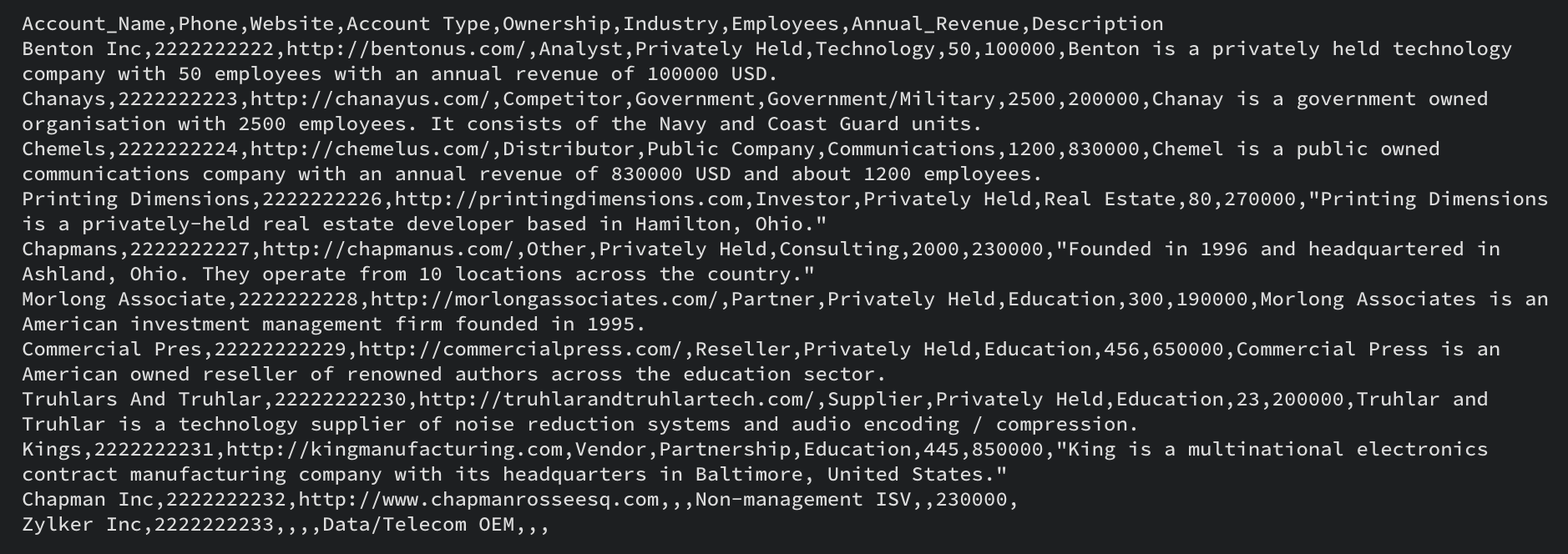
This is an example csv file. Note the Field API names are in the first row, and the record data is in the subsequent rows.
Once you have imported the parent records, you can upload the subform data CSV. When you prepare the subform data CSV file, it is mandatory to have the parent record ID in the subform data file, along with the subform data.

This is a sample CSV file for the subform data. The subform data in each row will be added to the corresponding parent record.
Multiselect Lookup Fields in Bulk Write API
To upload records with multiselect lookup fields, you can follow the same steps as for subforms. First, import the parent records. Then, import the multiselect lookup field data. The CSV file should contain both the parent record ID and the multiselect lookup field data. Please note that this method does not work for line items.
User Lookup in Bulk Write API
To import records with user lookup fields, you can include them in the same CSV file as the parent records. Use the field API name of the user lookup field in the CSV header, and add the unique IDs of the lookup records in the data column for each record.
Once you have prepared the CSV file, compress it as a zip file to upload in the next step. We will add examples of how to add subform data, user lookup and multiselect lookup field data in subsequent sections.
2. Upload your zip file
Once you have your csv file ready and compressed into a zip file, you should upload the same using a POST request. Use the following code snippet to upload the file.
<?php namespace bulkwrite; use com\zoho\crm\api\bulkwrite\FileBodyWrapper; use com\zoho\crm\api\bulkwrite\BulkWriteOperations; use com\zoho\crm\api\util\StreamWrapper; use com\zoho\crm\api\bulkwrite\UploadFileHeader; use com\zoho\crm\api\HeaderMap; require_once "vendor/autoload.php"; class UploadFile { public static function initialize() { // Add init code here. // Refer to this post for more details } public static function uploadFile1(string $orgID, string $absoluteFilePath) { $bulkWriteOperations = new BulkWriteOperations(); $fileBodyWrapper = new FileBodyWrapper(); $streamWrapper = new StreamWrapper(null, null, $absoluteFilePath); $fileBodyWrapper->setFile($streamWrapper); $headerInstance = new HeaderMap(); //To indicate that this a bulk write operation $headerInstance->add(UploadFileHeader::feature(), "bulk-write"); $headerInstance->add(UploadFileHeader::XCRMORG(), $orgID); //Call uploadFile method that takes FileBodyWrapper instance and headerInstance as parameter $response = $bulkWriteOperations->uploadFile($fileBodyWrapper, $headerInstance); // Add your code to handle the response received in the $response. } } UploadFile::initialize(); $orgID = "add_your_org_id_here"; // add your zgid which you can obtain using Get Organization API. $absoluteFilePath = "/Users/test/bulk-write.zip"; //add the absolute file path of your zip file here. UploadFile::uploadFile1($orgID, $absoluteFilePath); |
The uploadFile() method takes two parameters: the organization ID ($orgID) and the absolute file path ($absoluteFilePath) of the file to be uploaded. Within the uploadFile() method, an instance of BulkWriteOperations is created to call the Bulk Write API. This API is used to upload files to the Zoho File System. The HeaderMap instance is created to hold the necessary headers for the API request. The UploadFileHeader::feature() and UploadFileHeader::XCRMORG() methods are used to set the feature and organization ID headers, respectively. These headers are required to identify the type of operation being performed and the organization that the file is being uploaded.
The uploadFile() method is called on the BulkWriteOperations instance, passing the FileBodyWrapper and HeaderMap as parameters. The response from the API call will be stored in the $response variable, which contains the file ID as well. We will use this file ID in the next step, creating a bulk write job.
We hope you found this post on the Bulk Write API useful. In next week's post, we will cover how to create a bulk write job, including lookup and user lookup fields and subform data. We will also show you how to check the job status and download the job result.
If you have any specific questions about the Bulk Write API, please leave a comment below, or reach out to us at support@zohocrm.com. We are happy to help!
Thank you for reading! Stay tuned for more useful posts in the series. See you all next week!
Access your files securely from anywhere
Centralize Knowledge. Transform Learning.
All-in-one knowledge management and training platform for your employees and customers.
New to Zoho Recruit?

Zoho Developer Community
New to Zoho LandingPage?
Zoho LandingPage Resources
New to Zoho Survey?
New to Zoho CRM Plus?
Deliver unforgettable customer experiences
New to Zoho CRM Plus?
Deliver unforgettable customer experiences
New to Zoho Marketing Plus?
Everything you need to run your marketing
New to Zoho Marketing Plus?
Everything you need to run your marketing
New to Bigin?





Topic Participants
Anu Abraham
Sticky Posts
Kaizen #198: Using Client Script for Custom Validation in Blueprint
Nearing 200th Kaizen Post – 1 More to the Big Two-Oh-Oh! Do you have any questions, suggestions, or topics you would like us to cover in future posts? Your insights and suggestions help us shape future content and make this series better for everyone.Kaizen #226: Using ZRC in Client Script
Hello everyone! Welcome to another week of Kaizen. In today's post, lets see what is ZRC (Zoho Request Client) and how we can use ZRC methods in Client Script to get inputs from a Salesperson and update the Lead status with a single button click. In thisKaizen #222 - Client Script Support for Notes Related List
Hello everyone! Welcome to another week of Kaizen. The final Kaizen post of the year 2025 is here! With the new Client Script support for the Notes Related List, you can validate, enrich, and manage notes across modules. In this post, we’ll explore howKaizen #217 - Actions APIs : Tasks
Welcome to another week of Kaizen! In last week's post we discussed Email Notifications APIs which act as the link between your Workflow automations and you. We have discussed how Zylker Cloud Services uses Email Notifications API in their custom dashboard.Kaizen #216 - Actions APIs : Email Notifications
Welcome to another week of Kaizen! For the last three weeks, we have been discussing Zylker's workflows. We successfully updated a dormant workflow, built a new one from the ground up and more. But our work is not finished—these automated processes are
New to Zoho TeamInbox?
Zoho TeamInbox Resources
Zoho CRM Plus Resources
Zoho Books Resources
Zoho Subscriptions Resources
Zoho Projects Resources
Zoho Sprints Resources
Qntrl Resources
Zoho Creator Resources
Zoho CRM Resources
Design. Discuss. Deliver.
Zoho Show Resources

Get Started. Write Away!
Writer is a powerful online word processor, designed for collaborative work.
Zoho CRM コンテンツ
-
オンラインヘルプ
-
Webセミナー
-
機能活用動画
-
よくある質問
-
Ebook
-
-
Zoho Campaigns
- Zoho サービスのWebセミナー
その他のサービス コンテンツ
Nederlandse Hulpbronnen

ご検討中の方
Recent Topics
Optimum CRM setup for new B2B business
Can some advise the most common way to setup Zoho CRM to handle sales for a B2B company? Specifically in how to handle inbound/outbound emails. I have spent hours researching online and can't seem to find an accepted approach, or even a tutorial. I havefilter on sheets mobile (iOS, iPadOS) does not work
I have this issue on every spreadsheet, whether imported or created natively in Zoho Sheets. I can use on desktop without issue: desktop screenshot on iOS the filter dropdowns are not there and there is no way to add them mobile iPadOS looks the sameIs there a way to customize default settings?
I want to customize default settings within my Zoho Business account. For instance, the current default setting for Texts inserted into a Notebook has the font much bigger than I like. Thus every time I create a new text item on a page, I have to go through the annoyance of selecting all the text and changing the size. Granted this is a minor irritation in the scheme of things, but it would be nice to have the ability to set default fonts, sizes, colors, background colors, etc. Is there currentlyCan't edit Segments
Happening with 2 different Zoho One environments, in different browsers. Please fix.Error 554 Email Outgoing Error
Our email address (info@tvbhouston) was recently migrated to a new domain host on WordPress, and our SSL certificate is still pending. We would like to continue using your service, but we are currently unable to send emails. Could you please re-enableTransfer ownership of files and folders in My Folders
People work together as a team to achieve organizational goals and objectives. In an organization, there may be situations when someone leaves unexpectedly or is no longer available. This can put their team in a difficult position, especially if thereConsumer Financing
Does Zoho currently have a payment gateway (such as Stripe, Square, etc) which offers financing for customers? So, let's say the estimate we give the customer is greater than what they can afford at the time, but we can sell the service now, letting themSubform edits don't appear in parent record timeline?
Is it possible to have subform edits (like add row/delete row) appear in the Timeline for parent records? A user can edit a record, only edit the subform, and it doesn't appear in the timeline. Is there a workaround or way that we can show when a userZoho CRM - Option to create Follow-Up Task
When completing a Zoho CRM Task, it would be very helpful if there was an option to "Complete and Create Follow-Up Task" in the pop-up which appears. It could clone the task you are closing and then show it on the screen in edit mode, all the user wouldDeluge function to copy parent record file upload field to child record file upload field
I'm stuck trying to write a deluge function that is triggered via automation in child record "Appointments," confirms if a file is in file upload "Report" field of parent "Contacts" record via Contacts lookup field "Contact_Name". If no file is in parentMake panel configuration interface wider
Hi there, The same way you changed the custom function editor's interface wider, it would be nice to be able to edit panels in pages using the full width of the screen rather than the currently max-width: 1368px. Is there a reason for having the configuration panel not taking the full width? Its impossible at this width to edit panels that have a lot of elements. Please change it to 100% so we can better edit the layouts. Thanks! B.Image Compression Options
Much better if we have level of options to compress the image [20%, 40%...] We are dealing with service reports daily that has before and after photos (image field)- the file size too large and one thing, the current limit is 10mb or 15mb for reportHow to hide or archive a blog post temporarily in Zoho commerce website builder?
I would like to temporarily hide or archive a blog post in zoho commerce website builder so that it doesnt appear on my website till I enable it again. I tried to look for this option but could not find it. It only allows me to permanently delete a blogHow to mix different types of inputs (such as dropdown list and textbox)
Hi, I'm creating a form called "Room Reservations" for a company. I created a "table" using "Matrix Choice". I created "Room 1", "Room 2" and "Room 3" with the "Questions". I would then like to create two columns with the "Answers", one called "Department"Zoho Commerce - Poor Features Set for Blogging
Hi Zoho Commerce team, I'm sure you will have noticed that I have been asking many questions about the Blogs feature in Commerce. I thought that it would be useful if I share my feedback in a constructive way, to highlight the areas which I feel needPass shipping info to payment gateway Zoho Books to Authorize.net
For some reason the integration from Zoho books to Authorize.net does not pass the shipping address. Authorize.net is ready to receive it, but zoho books does not send itMassive Zoho Books failure
We have not received any communication or notification from Zoho, but we have detected that Zoho Books is not working for all our users. We cannot access or use Zoho Books. This is critical. We are trying to contact Zoho on the Spain telephone number,Does the Customer “Company Name” field appear anywhere in the Zoho Books UI outside of PDFs?
Hi everyone, I’m trying to understand how the Company Name field is actually used in Zoho Books. There is a Company Name field on the customer record, but when viewing transactions like a Sales Order in the normal UI (non-PDF view), that field doesn’tEmail outbox is now available in the sandbox
Hello all! Testing emails without visibility has always been a blind spot in the sandbox. With the new Outbox, that gap is closed. You can now view and verify every email triggered from your sandbox, whether it’s through workflows, approvals, or massLooking For Recruit Developer
Hi everyone, I am looking for a Zoho Certified Developer to assist with a development project for MetalXpert. We are building a software system designed to bridge the gap between a candidate mobile app and an employer web portal using Zoho Recruit assales IQ issue on website
i integrated the zoho sales IQ code on the website but it is comming in distroted form i am sharing the screenshot below the website is bulit in wix platformI need to know the IP address of ZOHO CRM.
The link below is the IP address for Analytics, do you have CRM's? IP address for Analytics I would like to know the IP address of ZOHO CRM to allow communication as the API server I am developing is also run from CRM. Moderation Update: The post belowImportant Update: Google Ads & YouTube Ads API Migration
To maintain platform performance and align with Google's newest requirements, we are updating the Google Ads and YouTube Ads integrations by migrating from API v19 to the newer v22, before the official deprecation of v19 on February 11, 2026. Reference:Blocklist candidates in Zoho Recruit
We’re introducing Block Candidate, which helps recruiters to permanently restrict a candidate from applying to current/future job openings. Once the candidate is blocked, they will no longer be able to participate in the recruitment process. This willZoho Desk - Upsert Ticket
Hi Desk Team, It is common to request more information from end-users. Using forms is a great way to ensure all the required information is collected. It would be great if there were an "upsert" option on the Zoho Form -> Zoho Desk integration which wouldClient Side Scripts for Meetings Module
Will zoho please add client side scripting support to the meetings module? Our workflow requires most meeting details have a specific format to work with other software we have. So we rely on a custom function to auto fill certain things. We currentlyIntroducing Multiple Sandbox Types and Support for Module's Data Population
Register here for the upcoming Focus Group webinar on Multiple Sandbox | Help documentation to learn more about the new enhancements Hello everyone, Sandbox in CRM is a testing environment for users to create and test new configurations like workflowCreator Offline
We had online access setup and working on our iphones. We have just set it up on an 'Android Tablet' and it is not downloading all the images? We use it to show customers our catalogue. Any ideas. Offline components all setup on both devicesEnable or disable any Field Rule!
Hello Zoho Forms Community, We are excited to announce a powerful new enhancement to Field Rules that gives you greater control and flexibility in managing your form logic! Previously, if you wanted to temporarily deactivate a field rule, you had twoMarketing Tip #20: Increase traffic with strong meta titles and descriptions
Meta titles and descriptions are what people see first on search results before they ever click through to your website. If your pages use generic titles or basic descriptions, you miss the chance to stand out, and search engines may not know which pageKanban view on Zoho CRM mobile app!
What is Kanban? The name doesn't sound English, right? Yes, Kanban is a Japanese word which means 'Card you can see'. As per the meaning, Kanban in CRM is a type of list view in which the records will be displayed in cards and categorized under the givenNot able to delete a QC nor able to revert or create a cycle of manufacturing for QC failed Jobs
Not able to delete a QC nor able to revert or create a cycle of manufacturing for QC failed JobsDheeraj Sudan and Meenu Hinduja-How do I customize Zoho apps to suit my needs?
Hi Everyone, I'm Meenu Hinduja and my husband Dheeraj Sudan, run a business. I’m looking to tweak a few things to fit my needs, and I’d love to hear what customizations others have done. Any tips or examples would be super helpful! Regards Dheeraj Sudanis there any way to change the "chat with us now" to custom message?
is there any way to change the "chat with us now" to custom message? I want to change this textSubscriptions for service call
So we install products and we want to offer a service contract for the customers yearly service calls to be billed monthly. So ideally at some point we want to email them a quote for their needs. WE will choice it our end based on the equipment. It wouldConnection to other user
Zoho Cliq handles sharing of Custom OAuth Connections that require individual user logins.How to invite friends on other social media platforms to one of my group chats in arattai?
Hello, I have formed chat groups in arattai. I want to invite my friends on other social media platforms like WhatsApp/ FB to one of my groups. Different friends would be invited to different groups. How to share an invite link of one of my groups toZoho Books (UK) needs to be able to submit a CT600 CTSA return
As well as a VAT Return, most (if not all) small businesses have to submit a CT600 Corporation Tax Self-Assessment. There are many providers who do this (like Xero) bujt not Zoho. Can you add this to the request list please? Many thanks SteveCliq does not sync messages after Sleep on Mac
I'm using the mac app of Cliq. When I open my mac after it was in sleep mode, Cliq does not sync the messages that I received. I always have to reload using cmd + R, which is not what I want when using a chat application.Function #2: Create a Deal in Zoho CRM when an Estimate is created in Zoho Books
For those who use Zoho CRM integrated with Zoho Books, here's a nifty function that helps you optimize your sales process by adding a Deal in Zoho CRM whenever an estimate is created in Zoho Books. Custom Function: To create the custom function, go toNext Page