
Maximize Your Potential as a Sales Representative With Zoho CRM

Maximize Your Potential as a Sales Representative With Zoho CRM

Maximize Your Potential As a Sales Representative With Zoho CRM _ Encaptechno

Most of the sales representatives are not so fond of using a CRM solution. The reason behind this is that the sales representatives enter the data manually and spend multiple hours making reports. They also claim that CRM is not so user-friendly.

The use of CRM can offer multiple features to the teams that can also be quite beneficial to the sales cycle process. The main question is how can you implement and manage the CRM system so that your sales representatives can love it and adopt it seamlessly. However, the question is how is that possible?

In this blog, we will look at the ways in which you can maximize your potential as a sales representative with the Zoho CRM.

1. Use Related Lists


Zoho CRM includes multiple modules that include important information about a customer’s journey. This information can be consolidated in Activities, Quotes, Invoices, Deals, etc. Now, most of the sales representatives go back and forth between these modules regularly while simultaneously working with the prospects.

This process can be made easier by introducing Related Lists. With the use of these lists, the sales representatives can view all the records associated with a parent record. This means that all the tasks, deals, products, events, invoices, etc. get displayed in the contact information of Zoho CRM.

This way, there will be no need to navigate to different modules for viewing the related data. What’s more, all the lists will have an option to form a new record within the module and link it with the parent record. For example, if you are viewing a record in a module and you wish to strike a deal with them then you can click on the + New Deal button in the related lists section for deals to create a record in the Deals module while automatically associating it with the record in Accounts module.

There are also many places where information about a customer can be easily found. For example, text files, mobile notes, etc. The use of Zoho CRM can provide you an option to integrate social media, emails, and notes as well. As a result, all the important information about a lead or a customer will be in one place.

2. Streamline and Clean 


Make sure that you do not show the modules that are not being used. It is important to understand that Zoho CRM has many features that are focused on helping various businesses. There are times when some modules may not be useful for the sales representatives or in the 
sales cycle process.

When you set up Profiles and Roles for your users, you do not just define a structure for a company but you also remove all the unwanted modules while making sure that all the sales representatives have information that is needed without having to search for it. By using the Roles, you can form the hierarchy of an organization and the Profile will help you determine the level of access a user can potentially have.

If you set up a Profile then you can reduce the amount of unnecessary information seen by a sales representative. Make sure that you stick to gathering relevant information only because most of the CRM applications will have many fields for storing data. However, often many fields are left completely untouched.

Seeing empty fields can make things look like the sales representative does not have the right information but this is not always the case. You can use layouts to remove any unwanted fields and make the Zoho CRM look way more concise and complete. Also, remember that the conditional layout rules are a feature in Zoho CRM where the fields show up after the criteria are fulfilled successfully.

3. Leverage CRM Mobile App 
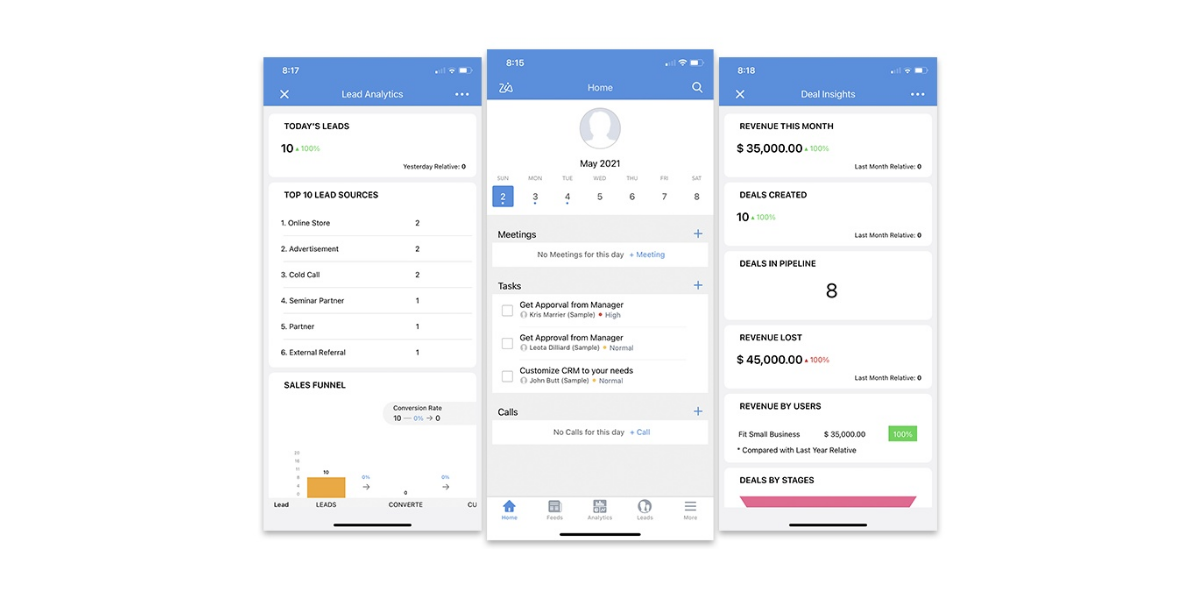

Leverage CRM Mobile AppA CRM mobile application can be used to get an edge in the process of customer acquisition. For example, let’s say a sales representative goes for a corporate business conclave to network more. Now this person may return with a bunch of leads.

Rather than manually creating all these leads, the sales representative can quickly add all of them using a mobile CRM app. This is an excellent step in the sales pipeline that can help in adding important information to the CRM app.

Zoho has many applications of its own that can help you instantly record the attendee’s information in the CRM database. This can save the time of your sales representatives and they can also follow up right from the CRM mobile application only. Using the application also helps in setting up a workflow for sending an automated email to the lead.

4. Social Media Integration 


A sales representative has the potential to make a stronger pitch to a prospect and advance a lead to the next stage in case they have clarity about the personality and inclinations of the potential customer. To get this information, social media is one of the best ways in the present time.

The sales representatives can pursue the profiles of all the leads and also get a sense of the requirements of these leads. With the Zoho CRM social media integration, a sales representative has no problem in finding a customer’s social media profile.

There is no need to open up new tabs and search for things manually. Moreover, the responses that are received from a company’s sales representative can make customers feel that the company always takes care and addresses the requirements of the customers.

5. Automate Work 


The sales representatives can also configure the workflow rules for making the Zoho CRM function in the way that is needed. A sales workflow includes acquiring new leads, sending emails, converting leads into deals, negotiating, and closing the deal.

This process can be used to reduce any mundane or repetitive work for the sales representatives. For example, in case the deal advances to the next step in the sales process, a follow-up task can be created for the deal owner stating that they must add a note in this record and summarize the main takeaways of the conversation with the sales prospect.

The workflows can be easily set up for sending an email, creating tasks, updating the fields, etc. In addition, you can also easily schedule an action to take place at a later time. For example, for creating a task, you can remind the sales representative to send a follow-up email after the field in the deal record.

6. Using Zoho CRM Template and Macros 


Using the CRM is a lot about making the system work for you. You can send many emails in different time zones, update the inventory, and do much more by using the 
Zoho CRM template and macros.

These are some of the repetitive tasks most businesses have to endure anyway and this is where a Zoho CRM template and macros come in. You will also find that your workloads get greatly reduced. The process of creating a template can save a lot of effort that would otherwise go in manually constructing an email.

You can set up a Macro that lets you send emails at specific periods without having to send them yourself. For instance, you can set up a Macro for sending an email when the deal is closed or when an activity is completed successfully.

7. Use Zoho’s Gamification Features 
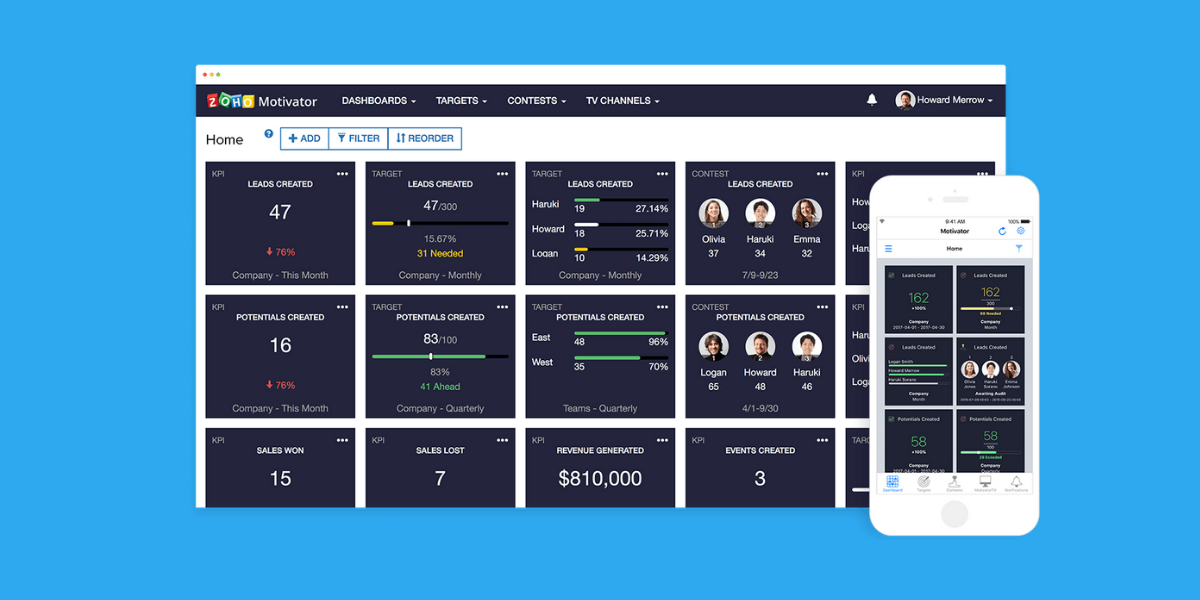


The Zoho CRM’s gamification features can be helpful in bringing out the competitive spirit of your sales representatives. These features are a fun way of adding a motivating spirit to the 
sales pipeline and meet the sales quota.

Zoho CRM offers Gamescope for setting up challenges and also rewards your team with trophies and badges. You can choose your team to convert the most leads they can win in a single day. The sales representative who manages to convert a fixed number can win a trophy.

Other than completing the everyday sales tasks, the gamification features of Zoho CRM also have a long-term value. They can be used to calculate the bonuses for the sales representatives based on their performance in all the games they participated in last year. This also boosts their morale so that they never get tired from their work.

8. Use Zoho Feeds 


If a business has to realize its complete potential then it has to be run forward by a cohesive team that can coordinate its work with a final aim to increase the revenue. This also involves the ones who are high up on the ladder too.

A serious problem that comes in most companies is a lack of constant communication between different levels or even among peers in the organization. There must be a culture of open communication in the company so that anyone from the company finds it easy to get in touch with anyone in the team. This improves coordination and ease of work as well.

There can be an increased collaboration and easy communication with the implementation of an effective policy. This can empower the collective effort made by the team members and also affect the sales process constructively. The use of Zoho Feeds is an excellent way to increase collaboration.

All the sales representatives have access to the Feeds section and any post made by a user can be visible to almost everyone in the organization. The users can post, comment, and add attachments as well. In case you do not want all the employees to see your post then you can make the post visible to the selected users only.

In addition, another effective method is to create Groups with specific users. In case you wish to make a post in the group, only the users in the group will be able to view it. These are some of the functions that can make the open communication policy in the company much more effective.

9. Customize the Homepage 


The Zoho CRM Homepage has the ability to give you a comprehensive overview of the sales aspect of your work. The Zoho CRM also lets you customize your homepage effectively.

It is possible to have dashboards such as Pipeline By Stage, Events, Tasks, Calls, Leads By Source, etc. Any normal homepage will not contain these dashboards but using the Zoho CRM, you can customize the homepage as per your requirements so that the sales cycle process becomes easy.

Conclusion


Zoho CRM has been made in a way that can help to maximize the potential of a sales cycle process. It has so many features that can be used to make the process of sales extremely productive and fruitful. Implement Zoho CRM today and see it for yourself.

In case you need any further support with the implementation and use of Zoho CRM for the sales cycle process then please feel free to get in touch with us.


    Access your files securely from anywhere


                            Zoho Developer Community


                                                  • Desk Community Learning Series


                                                  • Digest


                                                  • Functions


                                                  • Meetups


                                                  • Kbase


                                                  • Resources


                                                  • Glossary


                                                  • Desk Marketplace


                                                  • MVP Corner


                                                  • Word of the Day


                                                  • Ask the Experts


                                                            • Sticky Posts

                                                            • How to reach the official Zoho Support channels and avoid fake ones.

                                                              Dear Customers, Thanks a lot for choosing Zoho! Our applications are built to help achieve your day-to-day business goals. We are committed to engaging with you, to understand and develop solutions that enhance your productivity.  We are happy and ready to help you use our services effectively. Understanding and avoiding fake support Just like using popular bank names and financial applications for phishing purposes, using Zoho and claiming to be providing Zoho Support or services with false numbers
                                                            • Function #35: Close all tasks associated with a lead and create a new task.

                                                              Welcome back everyone! Last week, we learnt how to close all tasks of a deal depending upon the deal stage. This week, let's look at a custom function that lets you close all of the tasks associated with a lead while simultaneously creating a new task, like when you need to halt all progress towards a lead while the lead is not available at the moment but create a reminder task. Business scenario: The success of a company, in one way or another, is determined by the leads it gets. Each lead is just
                                                            • Zoho CRM Webinar - Redesigning Daily User Experiences with Canvas

                                                              <br> Your users across roles use the CRM for day-to-day tasks that are necessary. Whether they perform their tasks on time, the right way, or at all depends on a lot of factors, including User Experience. Many businesses struggle with rigid layouts,
                                                            • Join us at the Canada ZUG Meetup: What’s New in Zoho CRM

                                                              Hello Zoho Community! Start your year with fresh insights into Zoho CRM’s latest updates and tools. Whether you're a CRM beginner or a experienced user, this meetup is crafted to help you optimise your processes and leverage new features. Explore practical
                                                            • CRM Hack #2: Automate sending of birthday greetings to your customers.

                                                                Hello everyone! What sets you apart as a sales person is your ability to add that personal touch to your business relationship with your customers. Sending a gift on a special day, or leaving a note wishing them on their birthdays, are small, yet significant actions that show your customers that you care. And these are actions done without any expectations :) You must be engaging with a lot of customers and it is highly unlikely that they all are your friends on Facebook or some social channel,


                                                            Manage your brands on social media


                                                                  Zoho TeamInbox Resources


                                                                      Zoho CRM Plus Resources

                                                                        Zoho Books Resources


                                                                          Zoho Subscriptions Resources

                                                                            Zoho Projects Resources


                                                                              Zoho Sprints Resources


                                                                                Qntrl Resources


                                                                                  Zoho Creator Resources


                                                                                      Zoho CRM Resources

                                                                                      • CRM Community Learning Series

                                                                                        CRM Community Learning Series


                                                                                      • Kaizen

                                                                                        Kaizen

                                                                                      • Functions

                                                                                        Functions

                                                                                      • Meetups

                                                                                        Meetups

                                                                                      • Kbase

                                                                                        Kbase

                                                                                      • Resources

                                                                                        Resources

                                                                                      • Digest

                                                                                        Digest

                                                                                      • CRM Marketplace

                                                                                        CRM Marketplace

                                                                                      • MVP Corner

                                                                                        MVP Corner


                                                                                          Design. Discuss. Deliver.

                                                                                          Create visually engaging stories with Zoho Show.

                                                                                          Get Started Now


                                                                                            Zoho Show Resources

                                                                                              Zoho Writer

                                                                                              Get Started. Write Away!

                                                                                              Writer is a powerful online word processor, designed for collaborative work.

                                                                                                Zoho CRM コンテンツ


                                                                                                  Nederlandse Hulpbronnen


                                                                                                      ご検討中の方


                                                                                                              • Recent Topics

                                                                                                              • PDF Attachment Option for Service Reports

                                                                                                                Hello Team, I would like to check with you all if there is an option to attach PDF documents to the service reports. When I try to attach a file, the system only allows the following formats: JPEG, JPG, and PNG. Could you please confirm whether PDF attachments
                                                                                                              • Zoho Browser??

                                                                                                                hai guys, this sounds awkward but can v get a ZOHO BROWSER same as zoho writer, etc. where i can browse websites @ home and continue browsing the same websites @ my office, as v have the option in Firefox, once i save and close the browser and again when i open it i will be getting the same sites. If u people r not clear with my explanation, plz let me know. Thanks, Sandeep  
                                                                                                              • SMS to customers from within Bigin

                                                                                                                Hi All, Is there anyone else crying out for Bigin SMS capability to send an SMS to customers directly from the Bigin interface? We have inbuilt telephony already with call recordings which works well. What's lacking is the ability to send and receive
                                                                                                              • No OR Filter for Views with a Related Modules Criteria

                                                                                                                We would like to create a Deal View where the User can see all their deals. For that, we would need an OR to connect the criteria. One of the Fields is a "multiselect User", these (Related Modules Criteria) can only be Filter with an AND. Even between
                                                                                                              • Admins cannot see each others' Scheduled Reports?!

                                                                                                                Very frustrating that as an admin I cannot see what my reports my fellow admins have created and scheduled.  After asking about this on the help chat, I was told the issue is trust and security.  By giving someone Admin status, it means we trust them with those responsibilities. Please change this, it is not a good process to have to bother other users to change a report or change users within a report.
                                                                                                              • Automatically CC an address using Zoho CRM Email Templates

                                                                                                                Hi all - have searched but can't see a definitive answer. We have built multiple email templates in CRM. Every time we send this we want it to CC a particular address (the same address for every email sent) so that it populates the reply back into our
                                                                                                              • Writer update results in BitDefender blocking it as malware

                                                                                                                After updating Writer to latest update, Bitdefender blocked the app and writer no longer runs.
                                                                                                              • Is there a way to invoke deluge function from within a widget?

                                                                                                                Hi! I have custom functions in deluge and I was wondering whether there is any way to call this function through a widget? Something like on click of a button inside a widget, run the deluge custom function. Would this be possible?
                                                                                                              • Missing Import Options

                                                                                                                Hello, do I miss something or is there no space import option inside of this application? In ClickUp, you can import from every common application. We don't want to go through every page and export them one by one. That wastes time. We want to centralize
                                                                                                              • Zoho CRM Portal Field Level Permission Issue

                                                                                                                Hi Support Team, I am using the Zoho CRM Portal and configuring field-level editing permissions. However, we are unable to restrict portal users from editing certain fields. We have created a portal and provided View and Edit (Shared Only) access for
                                                                                                              • Why am I seeing deleted records in Zoho Analytics syncing with Zoho CRM?

                                                                                                                I have done a data sync between Zoho CRM and Zoho Analytics, and the recycle bin is empty. Why do I see deleted leads/deals/contacts in Zoho Analytics if it doesn't exist in Zoho CRM? How can I solve this problem? Thanks
                                                                                                              • Zoho Tables is now live in Australia & New Zealand!

                                                                                                                Hey everyone! We’ve got some great news to share — Zoho Tables is now officially available in the Australian Data Center serving users across Australia and New Zealand regions! Yes, it took us a bit longer to get here, but this version of Zoho Tables
                                                                                                              • Custom Fonts in Zoho CRM Template Builder

                                                                                                                Hi, I am currently creating a new template for our quotes using the Zoho CRM template builder. However, I noticed that there is no option to add custom fonts to the template builder. It would greatly enhance the flexibility and branding capabilities if
                                                                                                              • Introducing the Zoho Projects Learning Space

                                                                                                                Every product has its learning curve, and sometimes having a guided path makes the learning experience smoother. With that goal, we introduce a dedicated learning space for Zoho Projects, a platform where you can explore lessons, learn at your own pace,
                                                                                                              • All new Address Field in Zoho CRM: maintain structured and accurate address inputs

                                                                                                                The address field will be available exclusively for IN DC users. We'll keep you updated on the DC-specific rollout soon. It's currently available for all new sign-ups and for existing Zoho CRM orgs which are in the Professional edition. Latest update
                                                                                                              • Import Function: ONLY update empty fields

                                                                                                                When setting up an import from a spreadsheet to CRM, there is a checkbox "Don't update empty values for existing contacts" (see screenshot below). While I see some limited benefit from this functionality, I think there should also be an "ONLY update empty
                                                                                                              • Collaboration with customers made easy with Zoom Meeting and Zoho Desk integration

                                                                                                                Hello everyone! We are happy to announce that you can now integrate your Zoho Desk account with Zoom Meeting. The integration bridges the gap between digital communication and human connection, empowering teams to deliver timely support when it matters
                                                                                                              • CRM Canvas - Upload Attachments

                                                                                                                I am in the process of changing my screens to Canvas.  On one screen, I have tabs with related lists, one of which is attachments.  There doesn't appear to be a way to upload documents though.  Am I missing something really obvious?  Does anyone have
                                                                                                              • TrueSync regularly filling up my local disk

                                                                                                                Seems that WorkDrive's TrueSync randomly starts filling up my local hard drive space. None of the folders have been set as "Make Offline" but still it seems to randomly start making file offline. The settings of the app is so minimal and is of no real
                                                                                                              • Kaizen #194 : Trigger Client Script via Custom buttons

                                                                                                                Hello everyone! Welcome back to another interesting and useful Kaizen post. We know that Client Scripts can be triggered with Canvas buttons and we discussed this with a use case in Kaizen#180. Today, let us discuss how to trigger Client Script when a
                                                                                                              • [Webinar] A recap of Zoho Writer in 2025

                                                                                                                Hi Zoho Writer users, We're excited to announce Zoho Writer's webinar for January 2026: A recap of Zoho Writer in 2025. This webinar will provide a recap of the features and enhancements we added in 2025 to enhance your productivity. Choose your preferred
                                                                                                              • Picklist field shows "none" as default

                                                                                                                Hello, Is there an option to avoid showing "none" as the default value in a picklist field? I also don't want to see any option displayed. My expectation is to have a blank bar, and then when I display the drop-down list, I can choose whichever I wa
                                                                                                              • Stage-probability mapping feature in custom module

                                                                                                                Hi, I'm building a custom module for manage projects. I would like to implement the stage-probability feature that Potentials has. Is this possible?
                                                                                                              • Create static subforms in Zoho CRM: streamline data entry with pre-defined values

                                                                                                                Last modified on (9 July, 2025): This feature was available in early access and is currently being rolled out to customers in phases. Currently available for users in the the AU, CA, and SA DCs. It will be enabled for the remaining DCs in the next couple
                                                                                                              • Field Description is very small

                                                                                                                Hello, The field Description in the activity is very small. Why don't try open a new window, or a bigger popup, or increase the width of the "popup". Example:
                                                                                                              • StatusIQ

                                                                                                                Please add StatusIQ to data sources. We using site24x7 and StatusIQ together and site24x7 integration is already there. Thanks and regards, Torsten
                                                                                                              • In Zoho People, the Operations buttons are frequently not visible or do not appear consistently.

                                                                                                                In Zoho People, the Operations buttons are frequently not visible or do not appear consistently. We request you to please investigate and address this issue, as it is affecting daily HR operations and user access.
                                                                                                              • Marketing Tip #14: Increase cart value with product bundles

                                                                                                                Bundling products is a great way to increase average order value while giving customers more convenience. Think “camera + tripod + memory card” or “soap + lotion + bath salts.” Bundles make shopping easier and feel like a better deal. It’s a win-win for
                                                                                                              • Problem with Workdrive folders

                                                                                                                I'm having a problem a problem accessing files in a Zoho work drive folder when using the Zoho writer app. The problem folder appears grayed out in the Zoho work drive window in both the online and writer application. However I can open the folder in
                                                                                                              • Sortie de Zoho TABLE ??

                                                                                                                Bonjour, Depuis bientôt 2 ans l'application zoho table est sortie en dehors de l'UE ? Depuis un an elle est annoncée en Europe Mais en vrai, c'est pour quand exactement ??
                                                                                                              • Add RTL and Hebrew Support for Candidate Portal (and Other Zoho Recruit Portals)

                                                                                                                Dear Zoho Recruit Team, I hope you're doing well. We would like to request the ability to set the Candidate Portal to be Right-to-Left (RTL) and in Hebrew, similar to the existing functionality for the Career Site. Currently, when we set the Career Site
                                                                                                              • Auto tracking URL generation based on Carrier

                                                                                                                Hi, While creating a shipment order for a package in Zoho Books, I have a requirement that for example, if the carrier is Delhivery and tracking number is 1234, then can automatically the tracking link/URL be generated as www.delhivery.com/1234. Similary,
                                                                                                              • Zoho Bookings form pre-filled with Zoho Forms in

                                                                                                                Hi, I've got a contact page on my website and I'd like to have the option to book an appointment (redirected to zoho bookings page) after an option is submitted on the contact form. how would I go about doing this? thanks
                                                                                                              • Pre-orders at Zoho Commerce

                                                                                                                We plan to have regular producs that are avaliable for purchase now and we plan to have products that will be avaliable in 2-4 weeks. How we can take the pre-orders for these products? We need to take the money for the product now, but the delivery will
                                                                                                              • Customer ticket creation via Microsoft Teams

                                                                                                                Hi all, I'm looking to see if someone could point me in the right direction. I'd love to make it so my customers/ end users can make tickets, see responses and respond within microsoft teams. As Admin and an Agent i've installed the zoho assist app within
                                                                                                              • Zoho Books' 2025 Wrapped

                                                                                                                Before we turn the page to a new year, it’s time to revisit the updates that made financial management simpler and more intuitive. This annual roundup brings together the most impactful features and enhancements we delivered in 2025, offering a clear
                                                                                                              • Can multiple agents be assigned to one ticket on purpose?

                                                                                                                Is it possible to assign one ticket to two or more agents at a time? I would like the option to have multiple people working on one ticket so that the same ticket is viewable for those agents on their list of pending tickets. Is something like this currently
                                                                                                              • This user is not allowed to add in Zoho. Please contact support-as@zohocorp.com for further details

                                                                                                                Hi Team, when I,m trying to create a email account (imagixmidia.com.br) it's showing this error >>  This user is not allowed to add in Zoho. Please contact support-as@zohocorp.com for further details plz help me  thanks
                                                                                                              • Edit default "We are here to help you" text in chat SalesIQ widget

                                                                                                                Does anyone know how this text can be edited? I can't find it anywhere in settings. Thanks!
                                                                                                              • Can't change form's original name in URL

                                                                                                                Hi all, I have been duplicating + editing forms for jobs regarding the same department to maintain formatting + styling. The issue I've not run into is because I've duplicated it from an existing form, the URL doesn't seem to want to update with the new
                                                                                                              • Next Page


