Nouvelle fonctionnalité Zoho Bigin : découvrez Team Pipelines
Bonjour à tous !
Il y a quelques jours, nous vous avions annoncé l'arrivée de la nouvelle version de Bigin.
Dans cet article nous avions fait le tour des nouvelles fonctionnalités développées pour booster la croissance de votre petite entreprise.
Aujourd'hui, nous abordons plus en détail la fonctionnalité la plus attendue de cette update : Team Pipelines.
Quel est l'intérêt de cette nouvelle mise à jour ?
Toute entreprise, petite ou grande, est caractérisée par de multiples opérations en contact avec la clientèle, telles que les ventes, le marketing ou le succès client.
En tant que propriétaire d'une petite entreprise, vous avez soit une équipe où chacun s'occupe de plusieurs opérations, soit des membres individuels qui s'occupent d'opérations spécifiques.
Idéalement, chaque élément d'information recueilli auprès de vos clients doit être ajouté à votre CRM afin que vous et votre équipe puissiez y accéder chaque fois que nécessaire.
En fin de compte, l'unification des informations sur les clients et la rationalisation de chaque élément de vos opérations quotidiennes deviennent la clé pour obtenir une vue panoramique sur vos clients et atteindre l'objectif difficile qui consiste à obtenir une source unique de vérité pour les données clients.
Actuellement, la plupart d'entre vous utilisent Bigin pour gérer leurs opérations de vente. Vous pouvez également renommer les modules, personnaliser les champs et les étapes de vos pipelines pour gérer des opérations autres que les ventes, comme l'accueil des clients, les études de cas marketing, la livraison des produits, etc.
Mais que se passe-t-il lorsque vous voulez gérer simultanément vos affaires, l'accueil des clients et la mise en œuvre, le tout dans le même compte Bigin ?
Ce que nous avons remarqué avec le système de pipeline actuel, c'est que la plupart des clients créent plusieurs comptes Bigin ou ont recours à d'autres outils tels que des feuilles de calcul, des logiciels d'assistance, etc. pour gérer les opérations de contact avec les clients autres que les ventes.
Mais dans de telles situations, les données de vos clients sont dispersées entre plusieurs outils, ce qui entraîne un manque de coordination entre les membres de votre équipe, avec pour conséquence un retard global dans les opérations et une expérience client amoindrie.
C'est pour remédier à ce manque d'unification que nous avons conçu Team Pipelines.
Présentation de Team Pipelines
Au cours du processus d'achat, vos clients s'adressent au service commercial, ce qui est généralement suivi dans le pipeline Deals. Si un contrat légal est impliqué dans la vente, il peut être géré par l'équipe juridique dans le pipeline juridique. Une fois l'affaire conclue, la livraison du produit peut être saisie dans le pipeline Delivery, et à chaque étape de ce pipeline, les clients peuvent être informés automatiquement de l'état de la livraison.
De même, une fois le produit livré, il peut y avoir d'autres étapes comme l'installation et l'activation qui peuvent être suivies dans les pipelines respectifs par les équipes.
Dans le parcours que nous venons de voir, au moins cinq personnes différentes travaillent ensemble pour offrir une excellente expérience aux clients.
Comment la nouvelle mise à jour va-t-elle vous aider ?
Avant Team Pipelines, aucun des membres de votre équipe n'aurait eu la visibilité des tâches et des opérations effectuées par les autres équipes. Ils auraient été obligés de s'appeler, de discuter ou de s'envoyer des e-mails, ce qui aurait rendu le parcours chaotique et inefficace pour vos clients.
À présent, avec Team Pipelines, les opérations de chaque équipe sont désormais visibles et accessibles à partir d'un seul compte Bigin. Il vous suffit de cliquer sur un contact pour connaître l'état de chaque activité associée à ce contact.
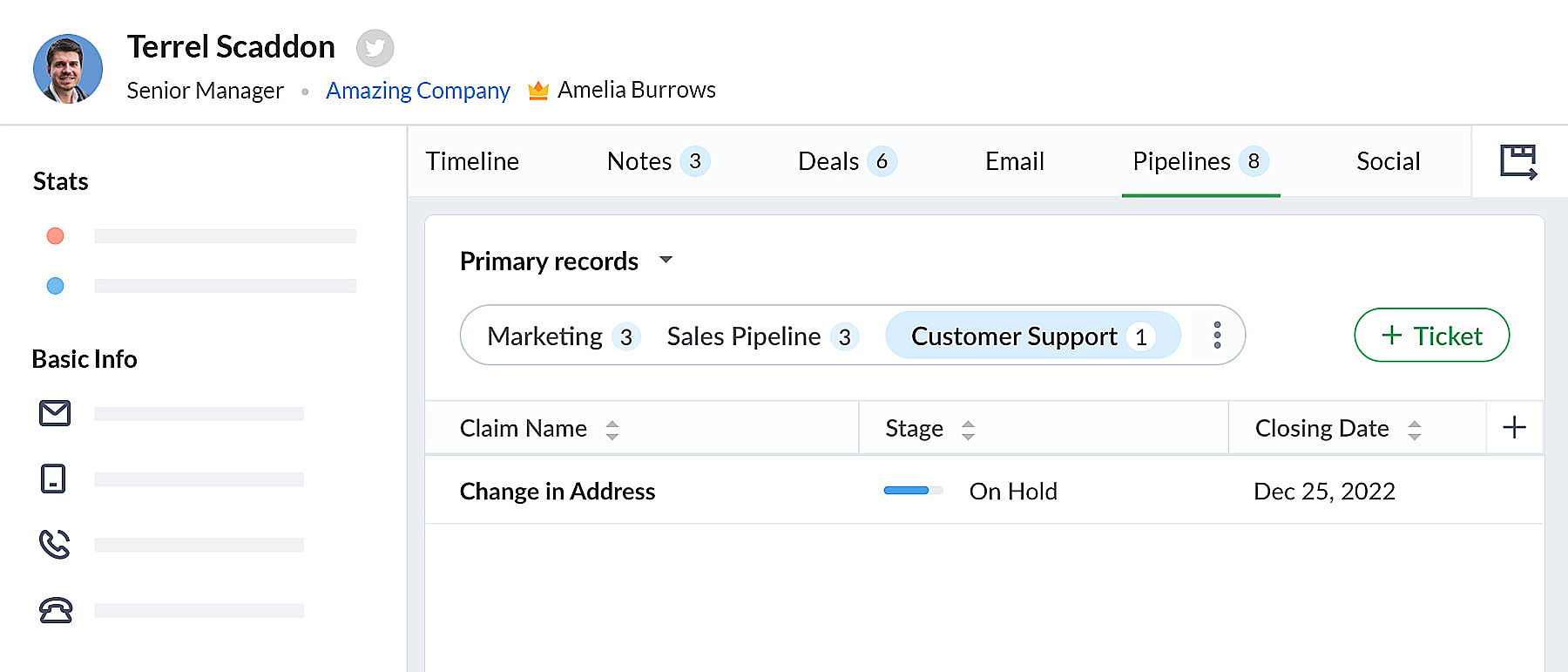 bigin pipeline
Team Pipelines et sous-pipelines : L'équipe idéale pour gérer les opérations uniques de vos clients
Au sein de chaque Team Pipelines, vous pouvez également créer différents sous-pipelines. Les sous-pipelines au sein d'un Team Pipelines ne diffèrent que par les étapes. Ainsi, au sein d'un Team Pipelines, si vous avez besoin de différents ensembles d'étapes pour différentes opérations, vous pouvez créer des sous-pipelines.
En d'autres termes, les sous-pipelines dans Bigin ne sont rien d'autre que la fonctionnalité multi-pipeline actuelle dont vous disposiez déjà.
Votre compte Bigin devient maintenant la source unique d'informations fiables sur vos clients. Il donne à tous les membres de votre équipe une vue à 360 degrés des informations sur les clients, leur permettant de gérer les relations et les interactions avec succès.
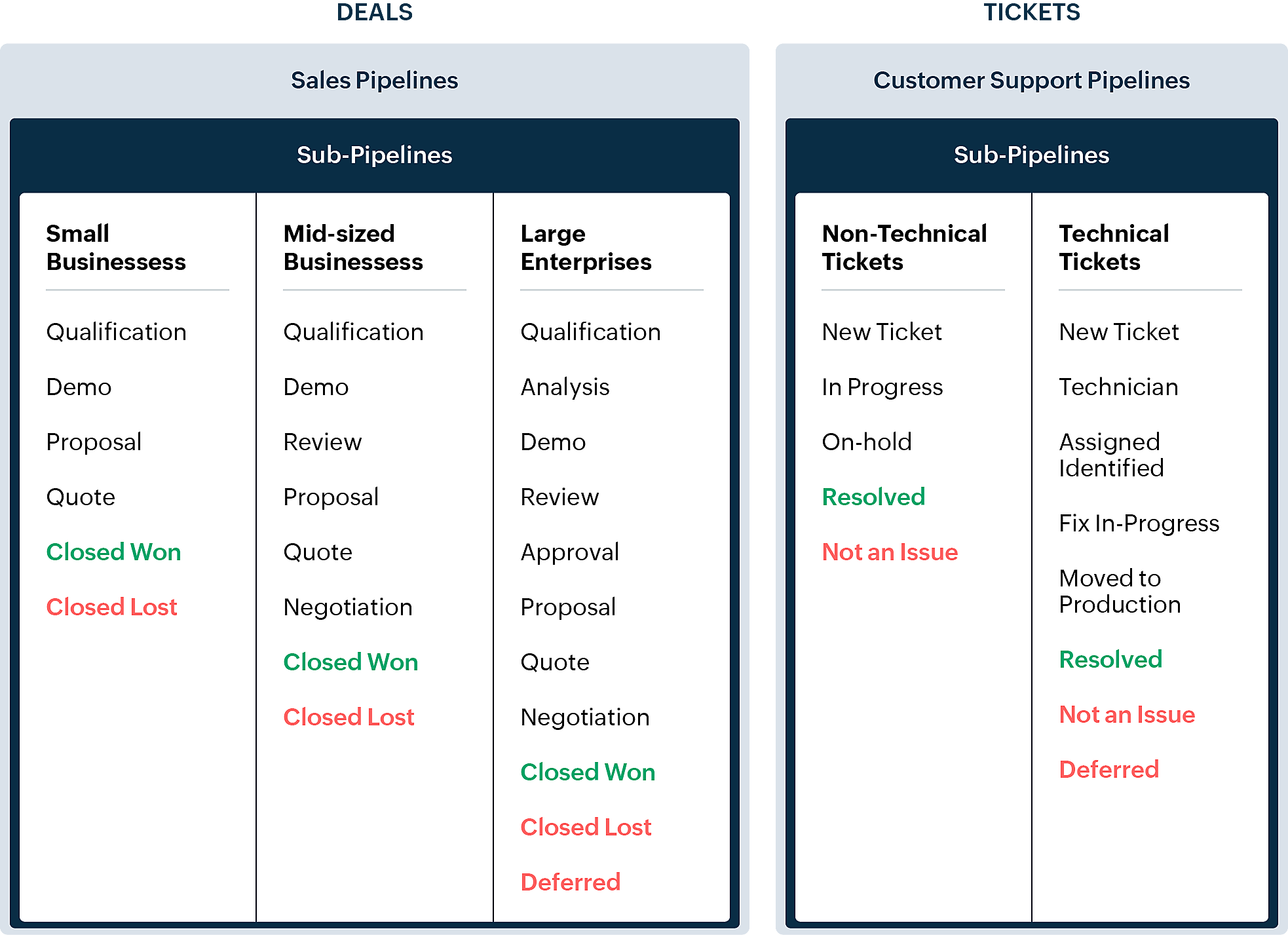
En quoi la nouvelle version est-elle différente de l'interface utilisateur Bigin existante ?
Pipelines est maintenant un module séparé dans Bigin. Là où il y avait auparavant les affaires/opportunités, vous avez maintenant les pipelines. Dans ce module, vous pouvez gérer plusieurs types d'enregistrements tels que les transactions, les tickets, les demandes, etc.
- Les anciennes versions des pipelines que vous avez créés précédemment seront disponibles en tant que sous-pipelines en bas à l'intérieur de chaque pipeline d'équipe.
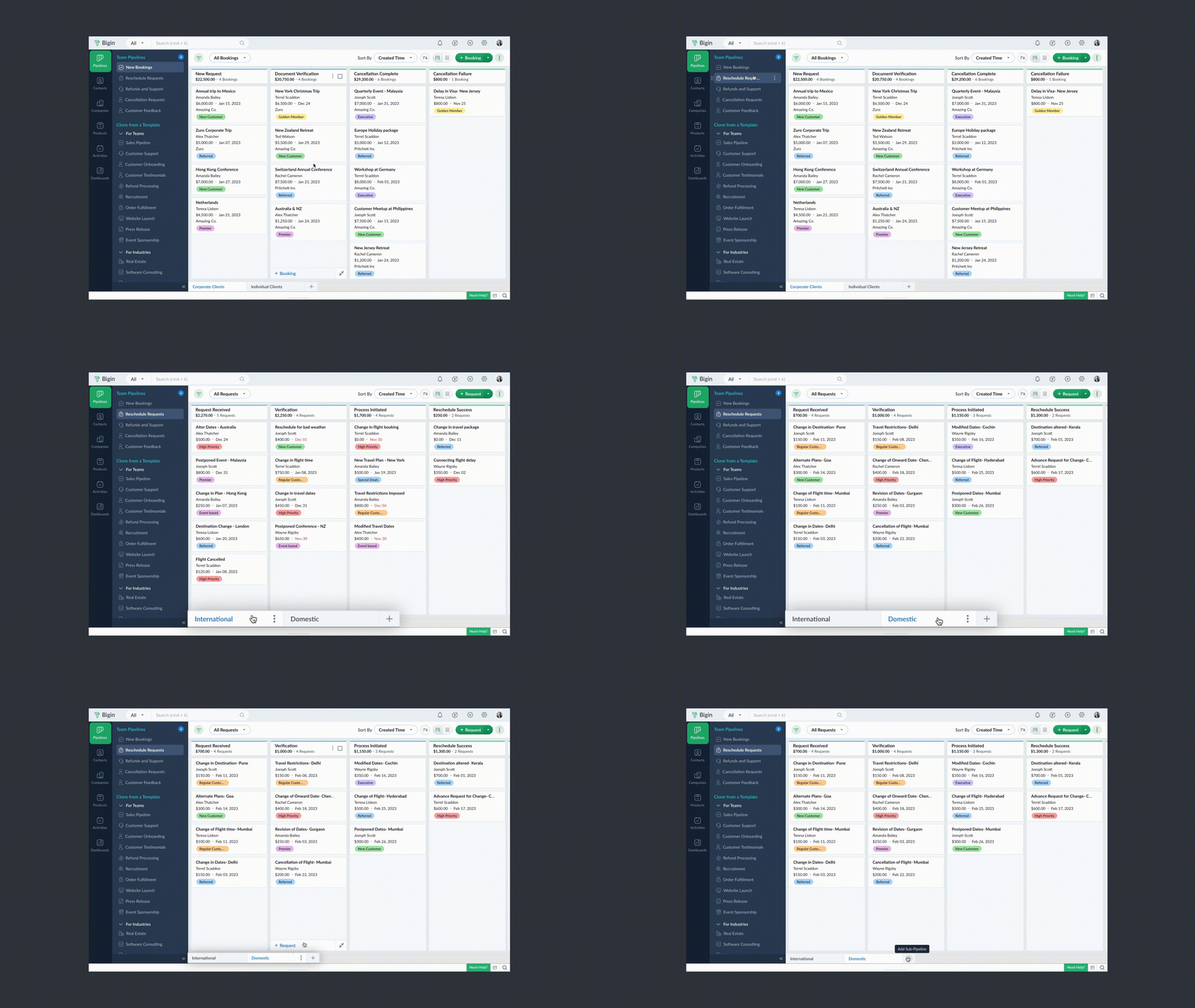
- Chaque pipeline d'équipe peut gérer un type d'enregistrement différent. Par exemple, vous pouvez gérer des transactions dans un pipeline de vente, des tickets dans un pipeline de support client, et ainsi de suite.
- Vous pouvez créer des pipelines à partir de zéro ou utiliser l'un des modèles proposés par Bigin.
- Vous pouvez rendre vos pipelines d'équipe extrêmement spécifiques aux opérations en leur donnant des noms pertinents, en choisissant les champs nécessaires, en ajoutant des étapes appropriées et en attribuant les bons profils d'utilisateurs pour accéder aux pipelines.
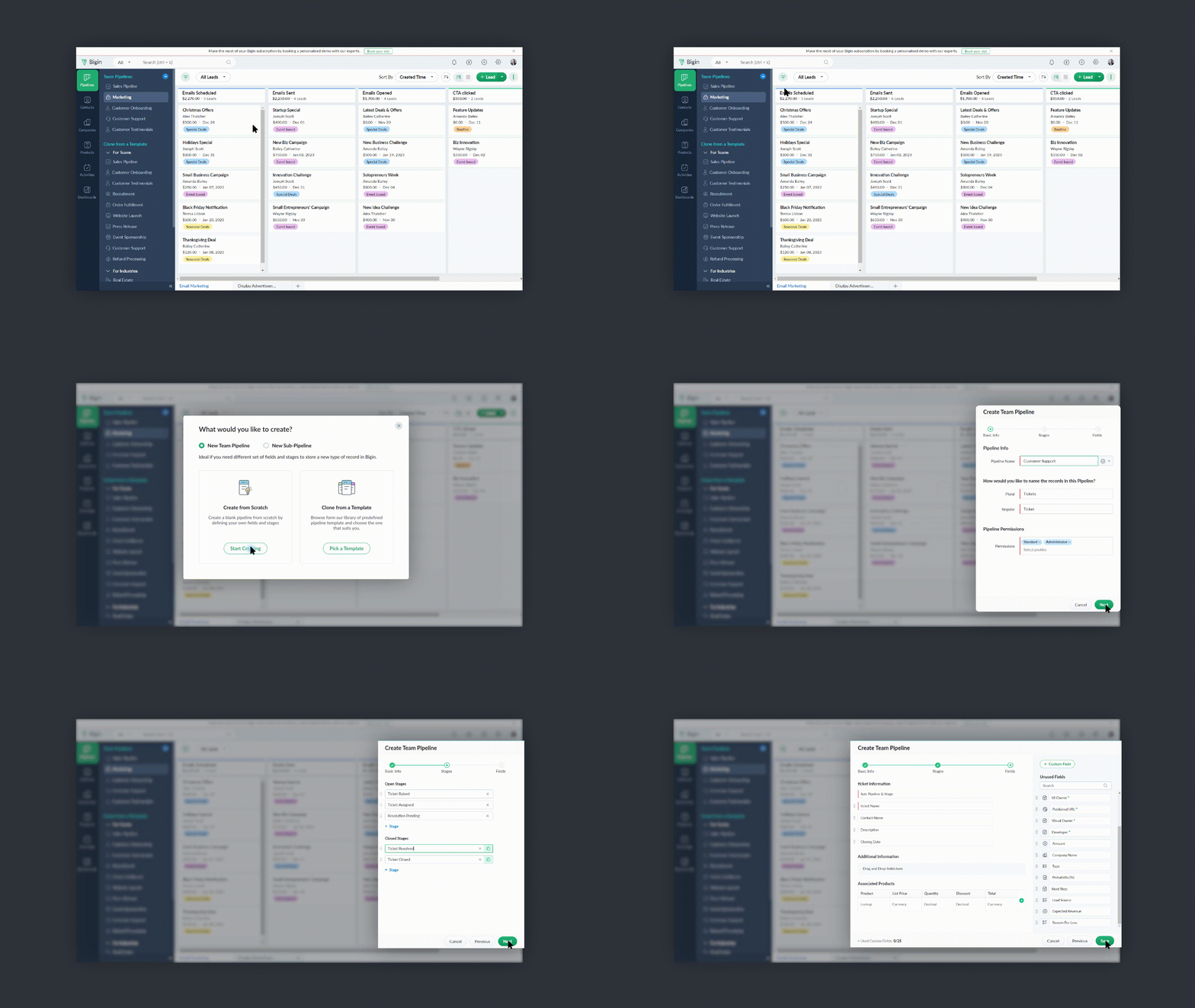
- Vous pouvez réduire le panneau Pipelines d'équipe lorsque vous n'en avez pas besoin en cliquant sur l'icône de la flèche de réduction en bas à gauche.
Comment accéder à cette nouvelle fonctionnalité ?
La fonctionnalité Team Pipelines est désormais accessible à tous nos clients directement depuis l'application Bigin. Il suffit de cliquer sur l'interface comme visible sur la photo ci-dessous :

Vous pouvez nous écrire à l'adresse support@eu.bigin.com à tout moment pour nous faire part de vos commentaires et de vos réactions.
PS : Je serai là si vous avez besoin d'aide pour la nouvelle mise à jour. Il vous suffit de laisser un commentaire dans cet article pour obtenir une réponse à vos questions.
Passez une bonne journée et à très bientôt pour découvrir les nouvelles fonctionnalités Bigin !
Access your files securely from anywhere

Zoho Developer Community





Topic Participants
Antoine Perrault
Sticky Posts
Bigin - Astuce #5 : Comment transférer le statut Super Admin ?
Bonjour Community France, Découvrons comment transférer le statut de Super Administrateur. Sachez que le statut de super administrateur ne peut être transféré à un autre utilisateur administrateur que par le super administrateur lui même. Pour transférerNouveau forfait Bigin Premier : Multi-devises, flux de travail avancés et plus encore !
Bonjour à tous, Nous sommes ravis d'annoncer une toute nouvelle édition de Bigin qui contient plusieurs nouvelles fonctionnalités comme la multidevise, des flux de travail avancés, des champs de recherche personnalisés et plus encore : l'édition Premier.Nouveauté Bigin : associez plusieurs contacts à une même affaire!
Bonjour à tous, Une transaction implique souvent plusieurs décideurs. Prenons l'exemple de l'entreprise Zylker qui utilise Bigin pour gérer ses pipelines de vente. Ils souhaitent acheter des meubles. Pour valider la vente, différents employés, de différentsPack débutant : vos premiers pas sur Zoho Bigin
Dans cet article nous verrons comment paramétrer votre CRM Bigin en 4 étapes : renseigner vos informations, gérer vos utilisateurs ainsi que leurs rôles et profils. Renseigner les informations de votre organisation Vous venez de vous inscrire à Zoho Bigin,Anniversaire Bigin : le CRM pour les petites entreprises évolue
Bonjour à tous ! Nous sommes de retour avec quelques annonces passionnantes. Mais d'abord, joyeux anniversaire à nous ! Bigin a eu un an récemment et nous avons un nouvel ensemble de fonctionnalités que nous sommes impatients de partager avec vous. Nous
Zoho TeamInbox Resources
Zoho CRM Plus Resources
Zoho Books Resources
Zoho Subscriptions Resources
Zoho Projects Resources
Zoho Sprints Resources
Qntrl Resources
Zoho Creator Resources
Zoho CRM Resources
Design. Discuss. Deliver.
Zoho Show Resources

Get Started. Write Away!
Writer is a powerful online word processor, designed for collaborative work.
-
オンラインヘルプ
-
Webセミナー
-
機能活用動画
-
よくある質問
-
Ebook
-
-
Zoho Campaigns
- Zoho サービスのWebセミナー
その他のサービス コンテンツ
Nederlandse Hulpbronnen

ご検討中の方
Recent Topics
Creating Custom PDF Template from Form
I am trying to create a custom PDF from form submissions. I have the standard subscription and it indicates that PDF forms are included. I cannot find anywhere to create PDF forms. I try to follow the instructions from here: https://help.zoho.com/portal/en/kb/forms/form-settings/pdf-settings/pdf-editor/articles/creating-your-own-pdf-template#Creating_your_template_from_the_scratchImportant Update: Facebook Metrics Deprecation & Impact on Zoho Analytics
Dear Zoho Analytics users, Facebook has deprecated a set of metrics from the Facebook Pages Insights API, effective November 15, 2025. As a result, these changes will affect any reports and dashboards in Zoho Analytics that rely on Facebook Pages data.Introducing Zoho MCP for Bigin
Hello Biginners! We're excited to introduce Zoho MCP for Bigin, a completely new way of interacting with Bigin data using AI. With Zoho MCP, you can securely connect your Bigin account with popular AI agents like Claude, Cursor, Windsurf, and VS Code,MCP > Creator connection failing with Claude
I'm trying to get claude to access any of my Zoho Creator apps and it keeps failing. I have enabled all tools for creator and ensured in claude settings that everything is authorised. Here is what claude says : Unfortunately, the error messages I'm receivingIs it possible to sync data every 5–10 minutes in Zoho Analytics (CRM or Excel imports)?
Hello Team, I want to know if Zoho Analytics supports near real-time syncing of data from different sources. My requirements: I am importing data from Zoho CRM → Zoho Analytics I also have some datasets maintained in Excel/CSV I want both data sourcesFeature Request: Dynamic Dimension Control for zc_LoadIn Popups
As detailed in this community discussion, Zoho Creator's zc_LoadIn parameter is a vital tool for opening components (forms, reports, or pages) in modal dialogs via HTML snippets, Notes, or Rich Text Fields. While powerful, this feature suffers from aSubforms in stateless forms
I think the title says it all. We need to be able to add subforms to stateless forms. Currently the only workaround is to create a Form and delete each record upon submission of the form. I need to build an interface to update our inventory. BasicallyText wrap column headers in reports?
Is it possible to auto wrap column headers so that a longer multi-word header displays as two lines when the column is narrower than the width of the header title?What’s New in Zoho Inventory — Latest Features, Integrations & Updates | December 2025
Zoho Inventory has evolved significantly over the past months, bringing you smarter, faster, and more connected tools to streamline your operations. Whether you’re managing multichannel sales, complex fulfillment workflows, or fast-moving stock, our newestMarketer’s Space - Multi-Channel Campaigns for the Biggest Shopping Week with Zoho Marketing Automation
Hello marketers, Welcome back to another post in Marketers Space! The biggest shopping week of the year is almost here, and it’s your moment to shine without the stress. With Black Friday and Cyber Monday just around the corner, being present across email,Pricing Strategies: #5 Stay local, Price & Sell Global
Arun had always dreamed of taking his handmade craft business beyond his hometown. For years, he sold locally. Most of his customers are familiar faces, in our usual currency and with the exact expectations. But one day, a traveller visited his workshopWhat is the easiest way to move Hotmail emails to an IMAP server?
The easiest way to move Hotmail (Outlook.com) emails to an IMAP server is to add your Hotmail account directly to any email client that supports IMAP, then copy the messages across. This avoids paid tools and keeps the process simple. Fastest free method:No feedback from Zoho Books regarding Yodlee feeds for Investec
I reported on 6 Feb 2025 that the Bank Feeds for Investec bank via Yodlee are not working. To date there has been no resolution. You are charging us for a suite of products where the functionality does not work. Please advise how you will refund me forTurn off Knowlege Base Follow options and Follower lists
Is there a way to hide or turn off the option in the Knowledge Base for users to follow specific departments/categories/sections/articles? If not, is there a way to turn off the public list of followers for each of those things? Otherwise, customer namesService One. Bill Another. Zero Hassle.
In field service operations, one challenge often comes up: the person who needs the service isn’t always the one who pays for it. Think about tenants vs. property managers, corporate offices vs. their finance departments, or school buildings vs. centralPresenting ABM for Zoho CRM: Expand and retain your customers with precision
Picture this scenario: You're a growing SaaS company ready to launch a powerful business suite, and are looking to gain traction and momentum. But as a business with a tight budget, you know acquiring new customers is slow, expensive, and often deliversCan Zoho Flows repeat Actions more than once?
I'm attempting to make an intentional Zoho Flow loop using the below layout. However, when "WithinLimit" condition is met, the program fails to execute the action "Get & Add Request Co..." again. Is this by design? Is Zoho Flows unable to repeat actionsVideo interviews not compatible on mobile
Hi Zoho, The 2-way video interview feature you have added to Recruit would be great if the candidate was able to use the link to the video on a mobile phone, it doesn't work on Samsung browser, it doesn't work on chrome/firefox mobile version of browser,Zoho Desk View Open Tickets and Open Shared Tickets
Hi, I would like to create a custom view so that an agent can view all the open tickets he has access to, including the shared tickets created by a different department. Currently my team has to swich between two views (Open Tickets and Shared Open Tickets).Enviro Recycling EHF Fee's
I'm in Canada and each province has it's own recycling program with it's own fee's. There are numerous categories that electronics fall into and each category has a taxable rate applied to it. I need a way to be able to apply the correct rate dependingZoho Desk API - Influence which layout is used
Hello, how can the ticket layout be changed using the API? I would like to choose the layout directly when creating the ticket. If this is not possible, my question would be how can I change it afterwards? Best regards, SvenHas CSS Changed for Common Elements?
I noticed today that the standard title headings on my Forms and Reports display smaller in size than before. Google Dev Tools (attached), seems to confirm my suspicion. Something appears to be overriding the 1.375rem to 1.125rem. The font size on theText field alignment
Is it possible to align text in the text field? Or even better, is there a possibility to have a field which accepts only numbers?email moderation issue when email is sent in the name of a mail group
Symptom: an email that is sent by a mail group moderator in the name of a moderated mail group is held back for approval. Reproduction: Create a moderated mail group with members and moderators. Allow that mails can be sent in the name of the group (extendedPipeline in Custom Modules
I love the way the Sales Pipeline looks and functions with reports. I would like to add the save pipeline features and visualization to a custom module, however, I only see that these pipelines are only available for the Deals module. Is there a way to add pipelines to custom modules?Tip #53- Remote Billing: Your End-to-End Billing Solution in Zoho Assist- 'Insider Insights'
Manual invoicing, after every remote support session, can be time-consuming and often error-prone. As an MSP, IT admin, or even a freelance support technician, it may become overwhelming to keep track of session time, service rates, and client invoices.Record history and ticket interaction tab in contacts and accounts
Hello everyone! We have improved the History tab to help users trace updates in the interaction activity logs of the Contacts and Accounts detail pages in the Customer Module. This enhancement make it easier to get clear details about who made each update,Is there an API to "File a Ticket" in Desk
Hi, Is there an API to "File a Ticket" in Desk to zoho projects?Keyboard UX for Assemblies
The new Assembly module has a counter-intuitive behavior that ought to be corrected. When an Assembly is ready to be entered, there are two options given, the blue-highlighted "Assemble" and the gray "Save as Draft". This correctly implies that the normalWhy can't I see images uploaded by other users in the Library for Campaigns
We are several users of zoho Campaign. I have uploaded visuals of our company, but my team members can't see them.zoho sheet stuck
I Need help. ZOHO sheets stuck on the loading screen. I've already deleted the system cache and cookies of my browser (google chrome) but it's still not opening.Tip of the Week #78 – Cut response time with multichannel shared inboxes
If you’ve ever felt your team juggling between multiple email accounts, social pages, and chat apps just to reply to customers, you’re not alone. Managing conversations in multiple channels can quickly turn messy. Important messages across inboxes, repliesNeed a way to run a client script longet than 10 seconds
By The Grace of G-D. Hi, Currently, Client Scripts are Timing out at 10 seconds. We have complex logics that needs more time. Can you add a feature request to increase the timeout?FSM Improvement Idea - Show an Import button when there is no data
I am setting up FSM for a client and I noticed that there is no option to import data, see screenshot below. Even when you click Create Contact there is only an option to Import from Zoho Invoice. It is only after you add at lease 1 record that the ImportUI Improvement - Ability to Collapse Flow
The UI for Flow is generally pretty good. However, when multiple decision trees are used, the layout can get pretty convoluted and hard-to-follow (see one of my Flows below): In these cases, even the auto-arrange fails to make this something that a normalTasks Statuses
Hi, The task status "Completed" is a final status which closes the task. We need to have a status "Cancelled". However, when the status is set to "Cancelled", the task prompt still has a blue button to Close Task. When the customer clicks that and closesAdd Lookup Field in Tasks Module
Hello, I have a need to add a Lookup field in addition to the ones that are already there in the Tasks module. I've seen this thread and so understand that the reason lookup fields may not be part of it is that there are already links to the tables (Create New Tasks Layout in CRM
I am able to do this in Leads, Contacts, Meetings, Calls - every other module, but cannot create a new layout in tasks. I have the appropriate access but it's simply not appearing as an option. Only "Standard" option shows. Please help!Using IMAP configuration for shared email inboxes
Our customer service team utilizes shared email boxes to allow multiple people to view and handle incoming customer requests. For example, the customer sends an email to info@xxxx.com and multiple people can view it and handle the request. How can I configureAuto-sync field of lookup value
This feature has been requested many times in the discussion Field of Lookup Announcement and this post aims to track it separately. At the moment the value of a 'field of lookup' is a snapshot but once the parent lookup field is updated the values diverge.Next Page