Revamped forecasting in Zoho CRM
Forecasting is an important part of a business's strategy to help set meaningful targets, optimize their sales strategies to help users achieve said target and drive revenue for the business.
With this in mind, we've brought a number of different enhancements to Zoho CRM's forecasting capabilities to help businesses understand their pipeline better, make accurate forecasts, set realistic targets, and help sales teams achieve them. Earlier in December, we briefed about these enhancements in forecasts in our Winter '21 announcement. We are thrilled to talk about these changes in detail here.
Create multiple and condition based forecasts across different periods
Businesses were limited to just a single forecast that encompasses all deals, but now you can create multiple forecasts, which can include all your deals or deals that match specified conditions, with a greater control of the forecast periods.
Forecasts can be created for all the available hierarchy:
- Role/Reporting to
- Territory
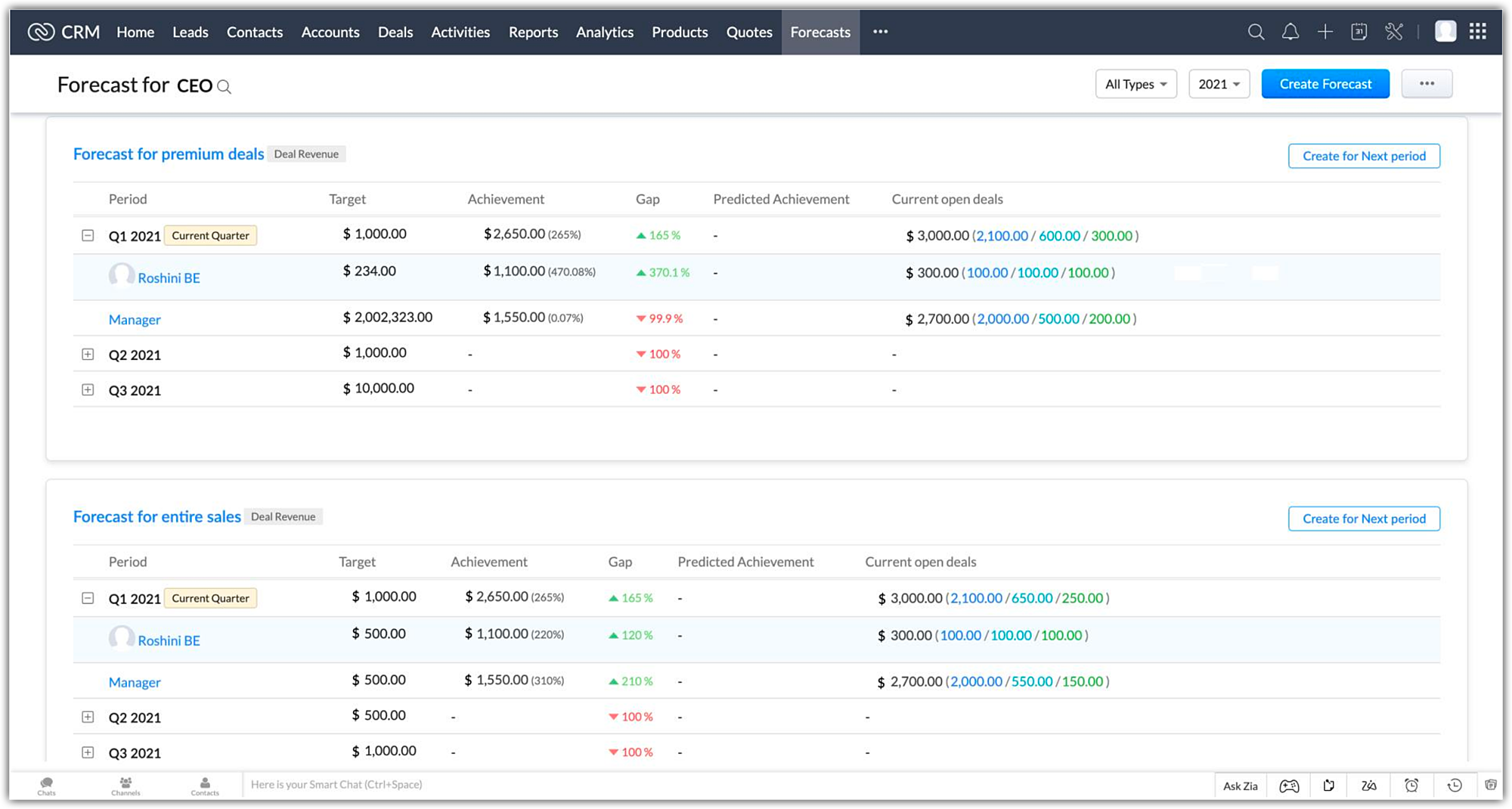
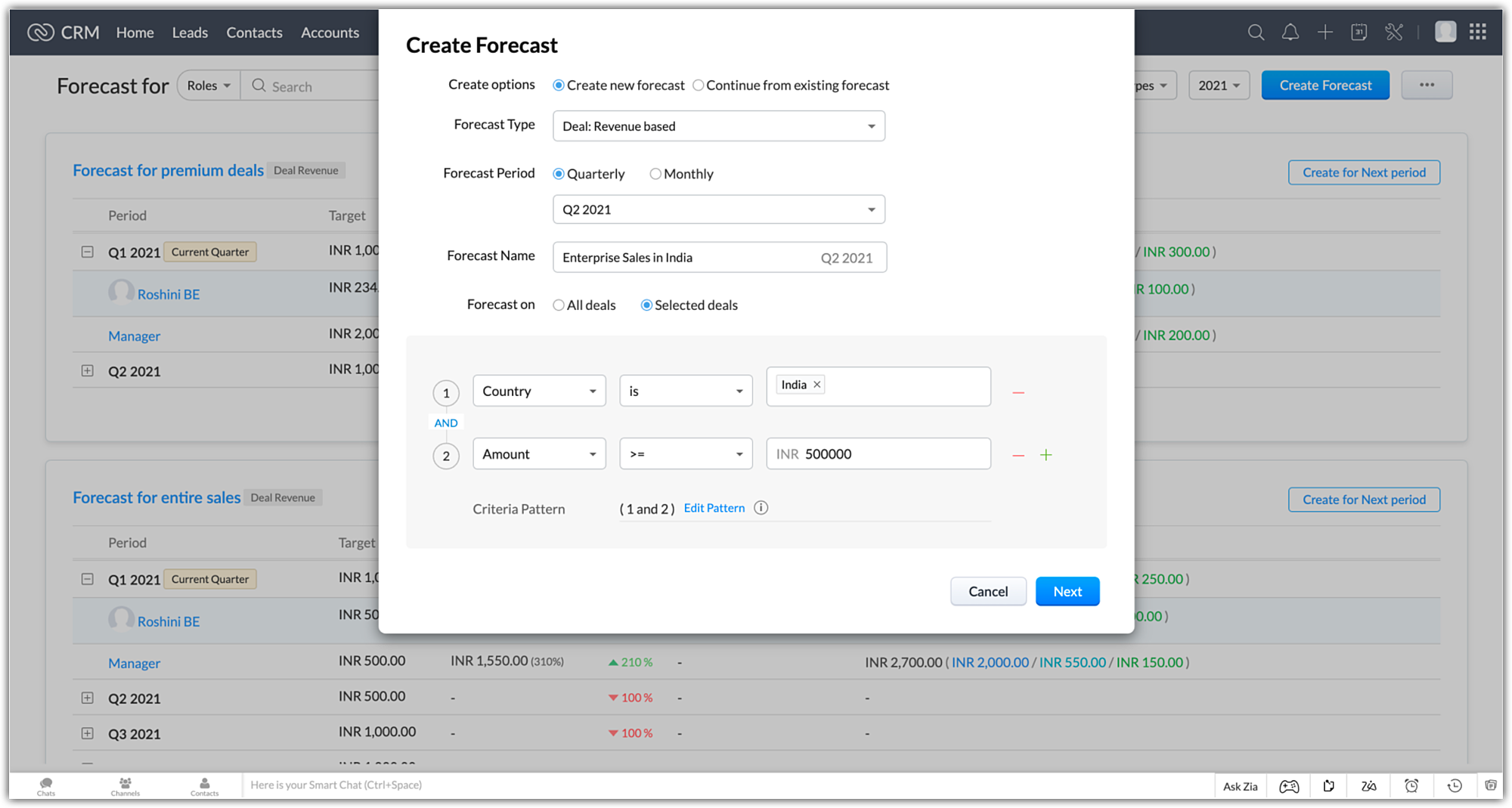
Forecasts can be created monthly or quarterly for the following forecast periods.
- Current - 4 Quarters / 12 months of current fiscal year
- Future - 4 Quarters / 12 months of the next fiscal year
- Completed - The previous 2 fiscal years
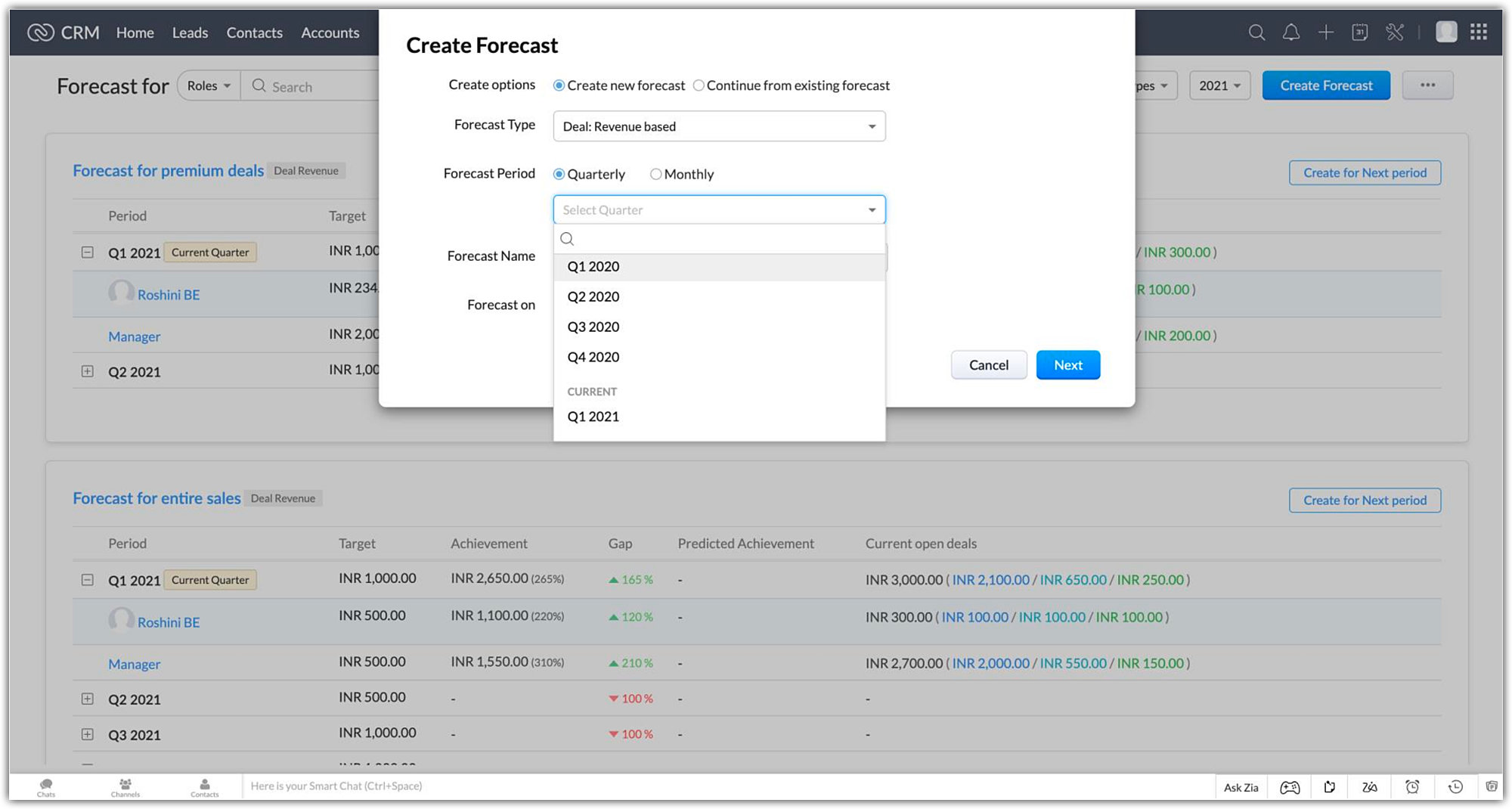
Forecast types
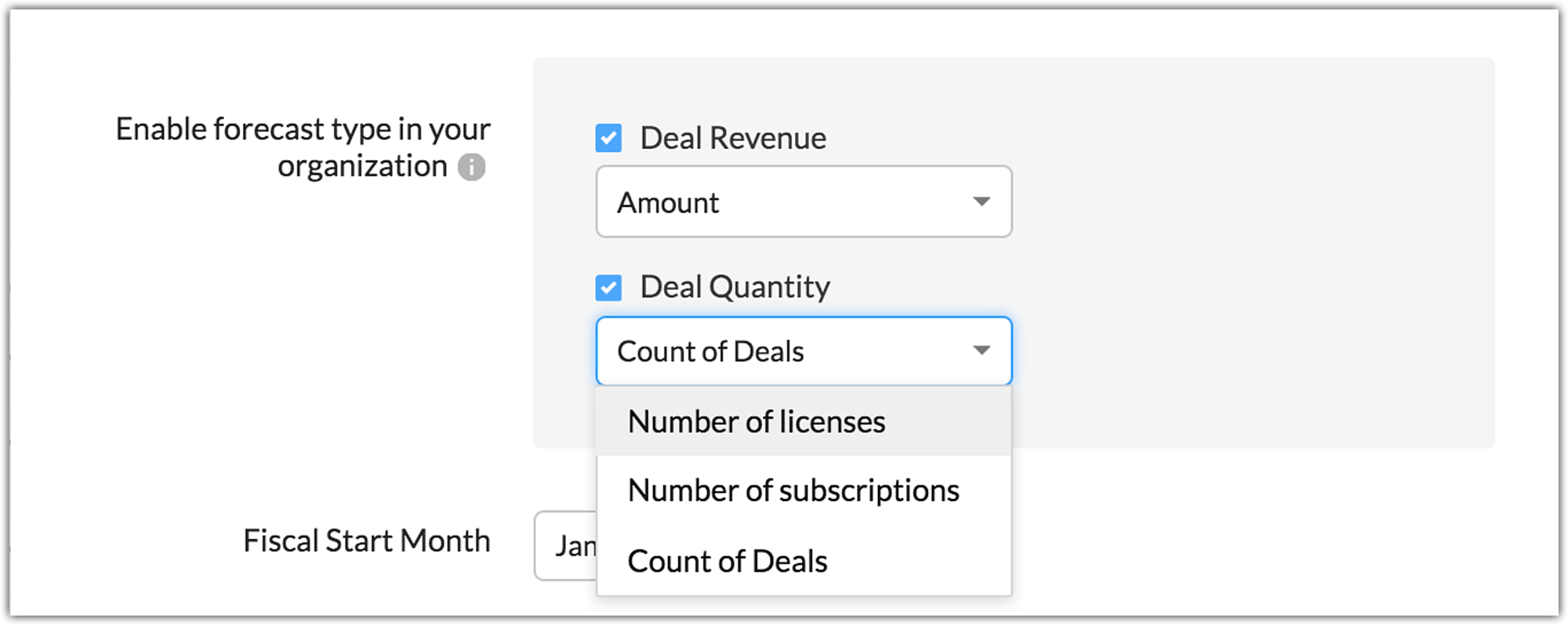
Two forecasts types can be created which are based around the attribute that is used to set targets for your users:
- Deal Revenue based forecasts - These are forecasts where the targets are based on currency fields like deal amount, expected revenue or other custom currency fields defined the deals module
- Deal Quantity based forecasts - These are forecasts where the targets are based on system defined fields like "count of deals" and other custom number fields
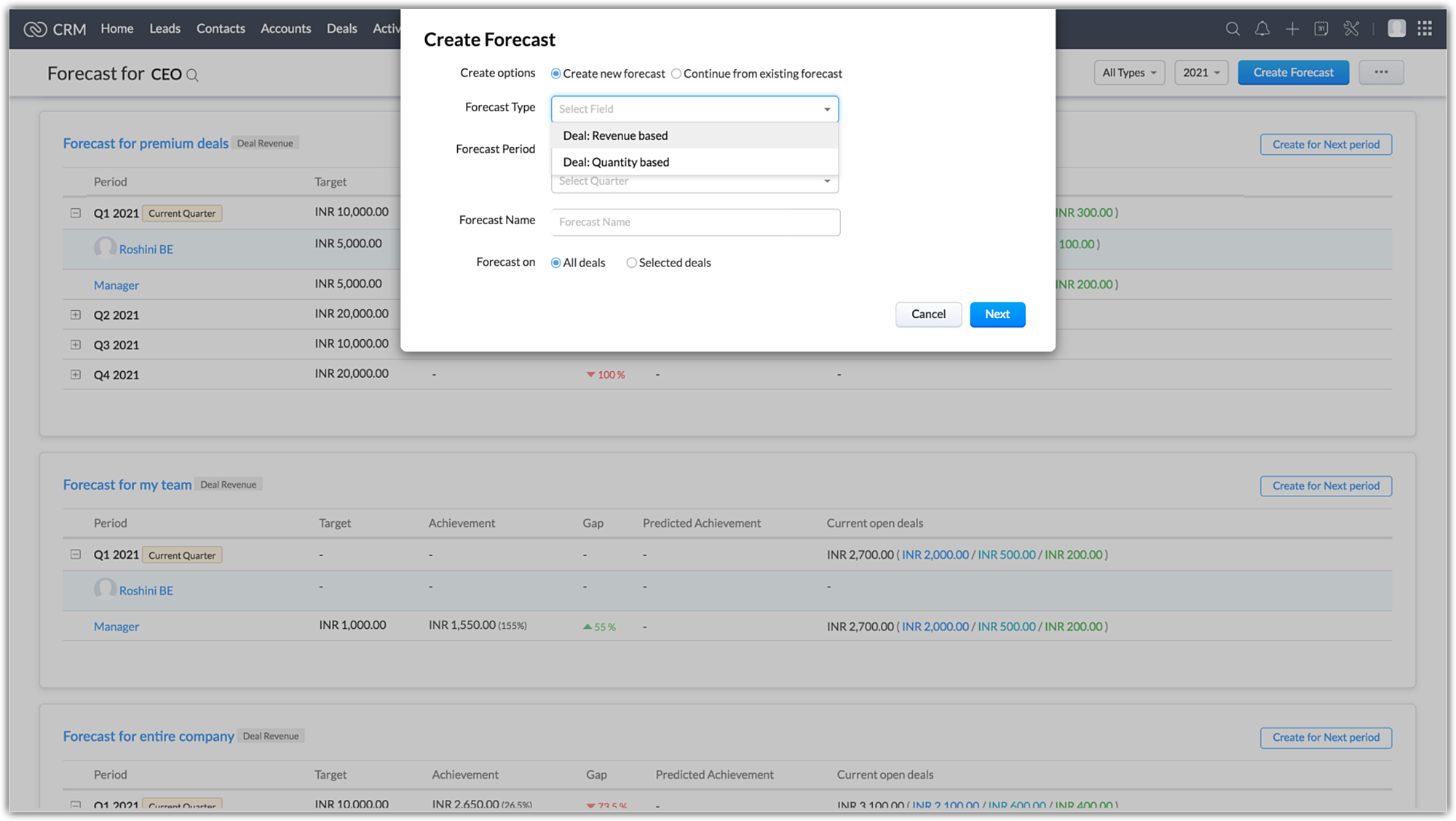
Introducing Best Case and Committed deals under "Forecast Category"
In the current forecasting, deals only had three forecast categories that were associated with them.
- Closed won - Deal was marked "Won"
- Closed lost - Deal was marked "omitted"
- Open - Deal was marked "Pipeline"
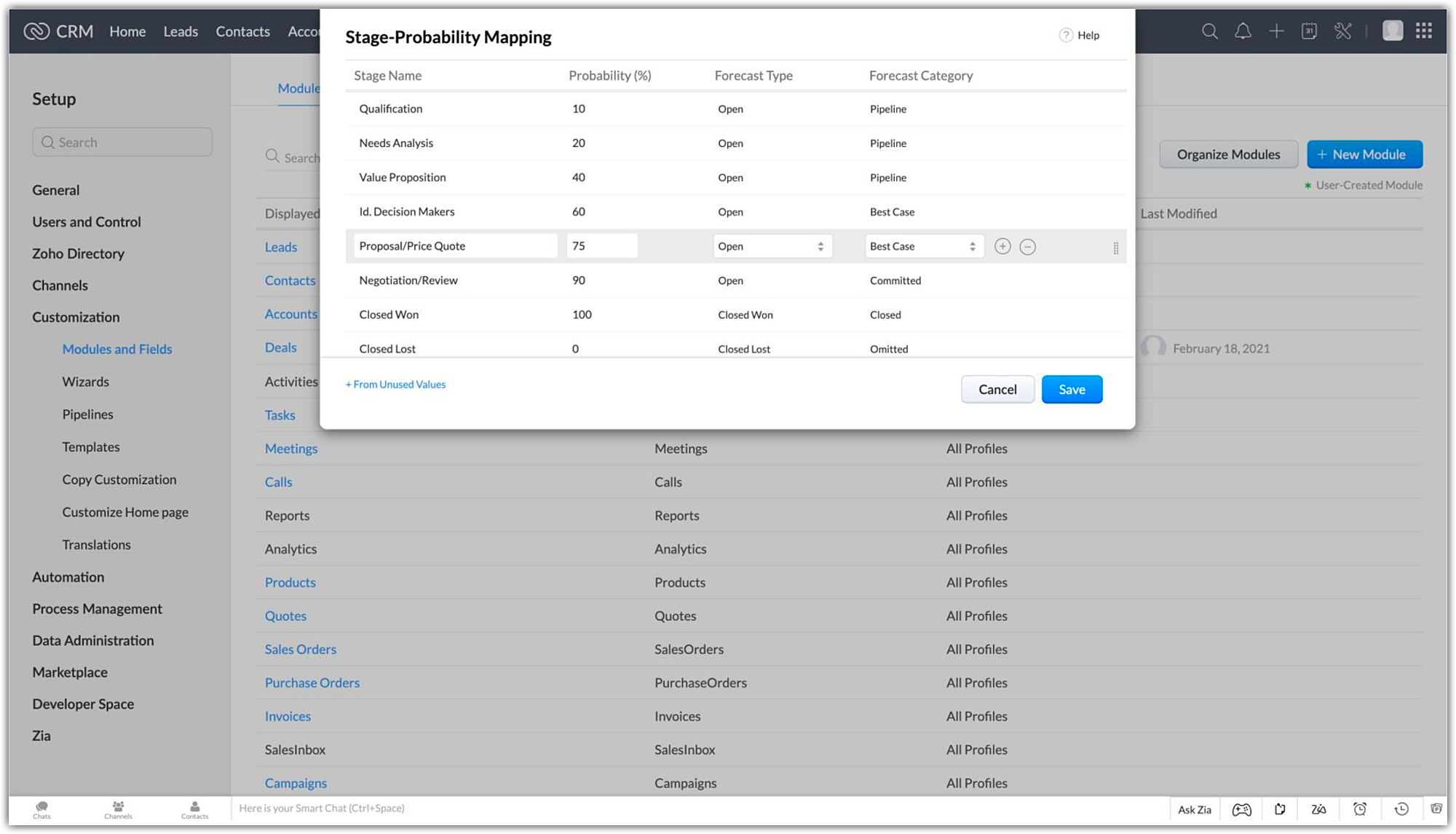
Now open deals can be tagged with new options under the forecast category:
- Best case - Open deals that have a high chance of being won
- Committed - Open deals that sales reps commit to winning
Instead of generalising all open deals as pipeline deals, this split gives a better picture as to where a particular sales rep stands in terms of the deals in their pipeline. This allows the administrator to make a more informed decision when setting targets for a particular user.
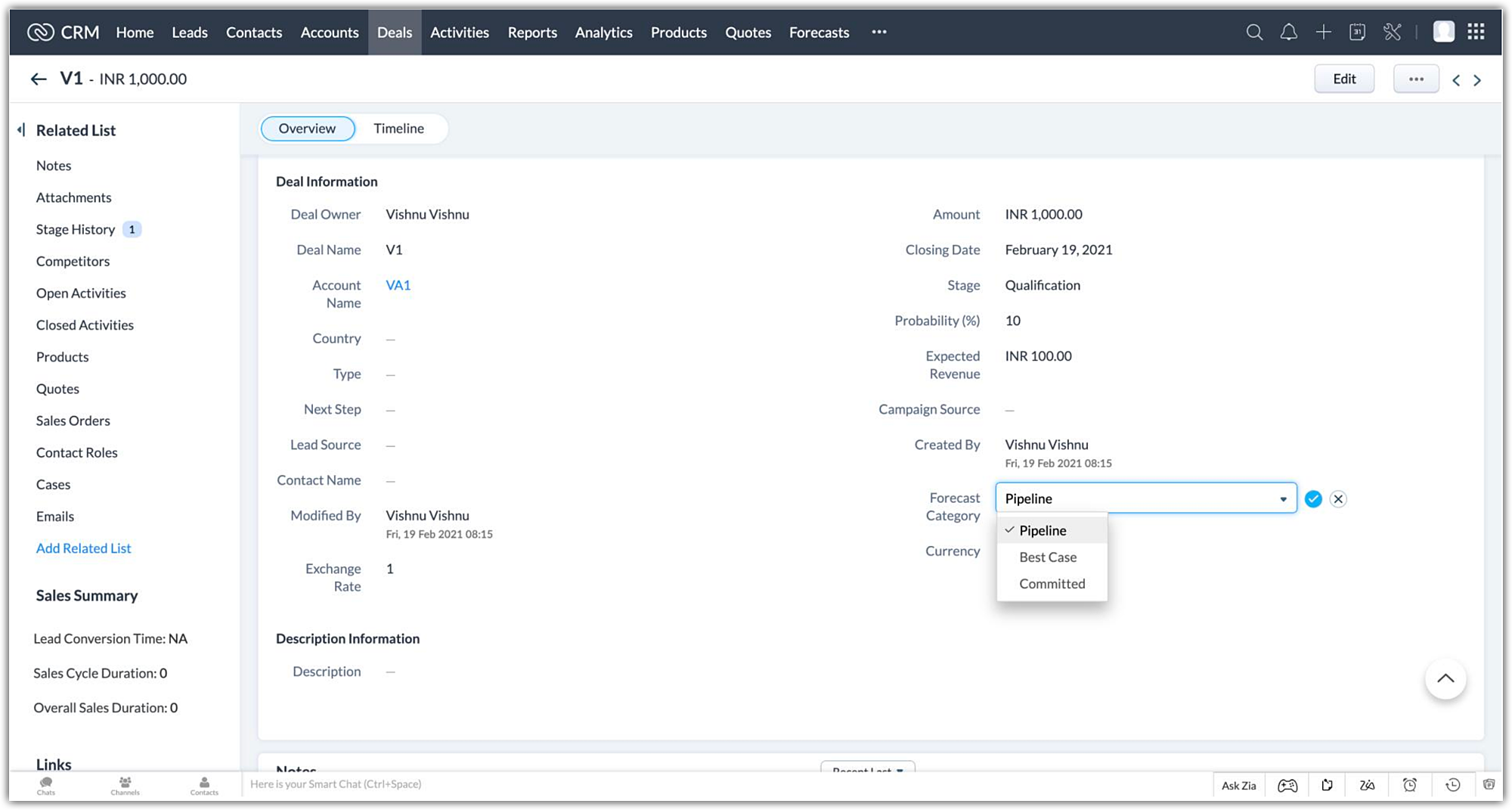
Sales reps also have the option to update the forecast category in a specific deal manually, to the appropriate option when the situation calls for it. The deal amount will then be updated in your forecast during its next sync
Transparent split of deals in your pipeline for optimal targets
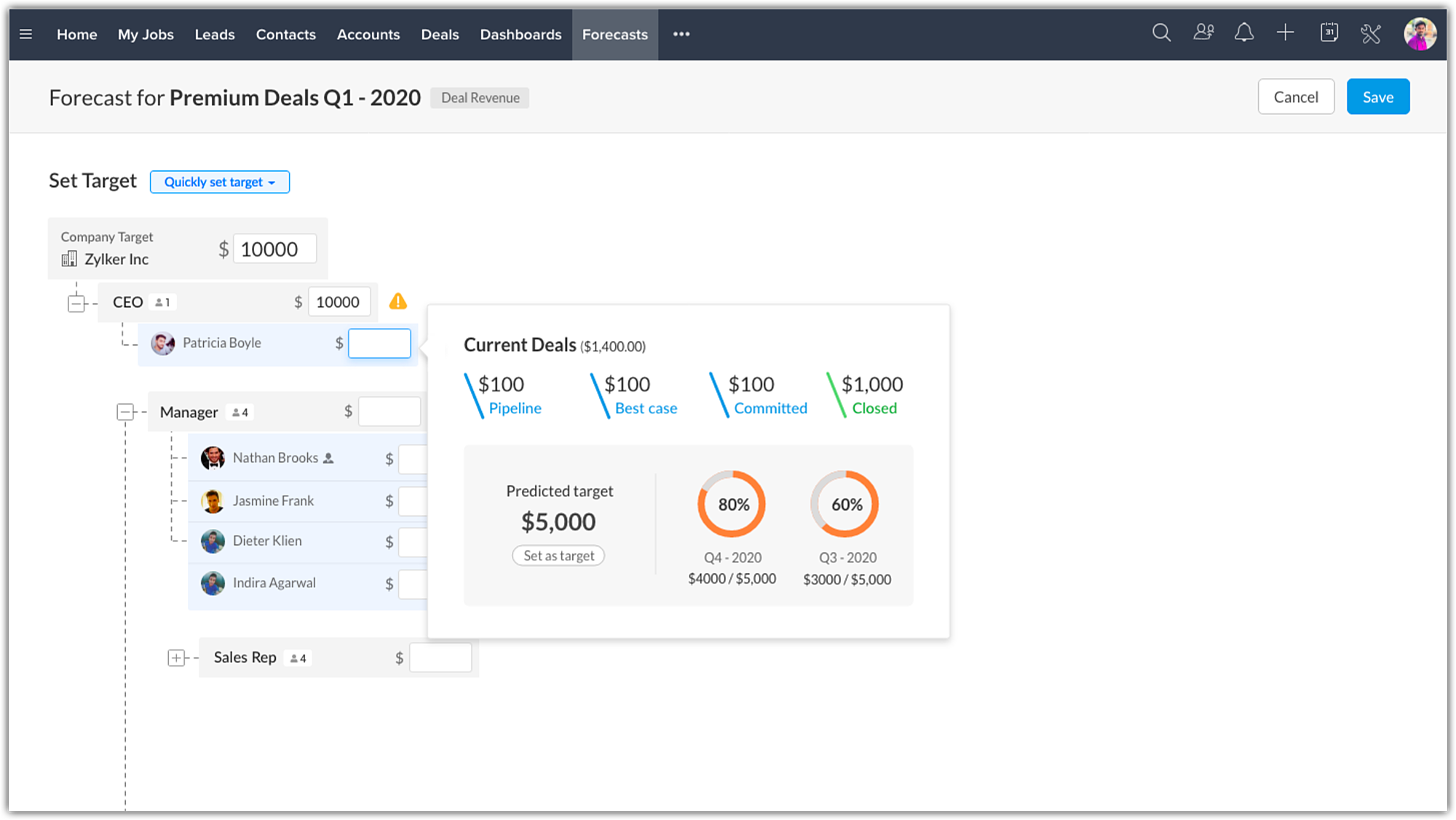
When setting targets for your users, a popup with your pipeline data shows the split of deals to give you a better picture of where each user stands in-terms of sales numbers.
The deals are split into open and closed won deals, with the open deals being further split into best cases, committed and pipeline deals.
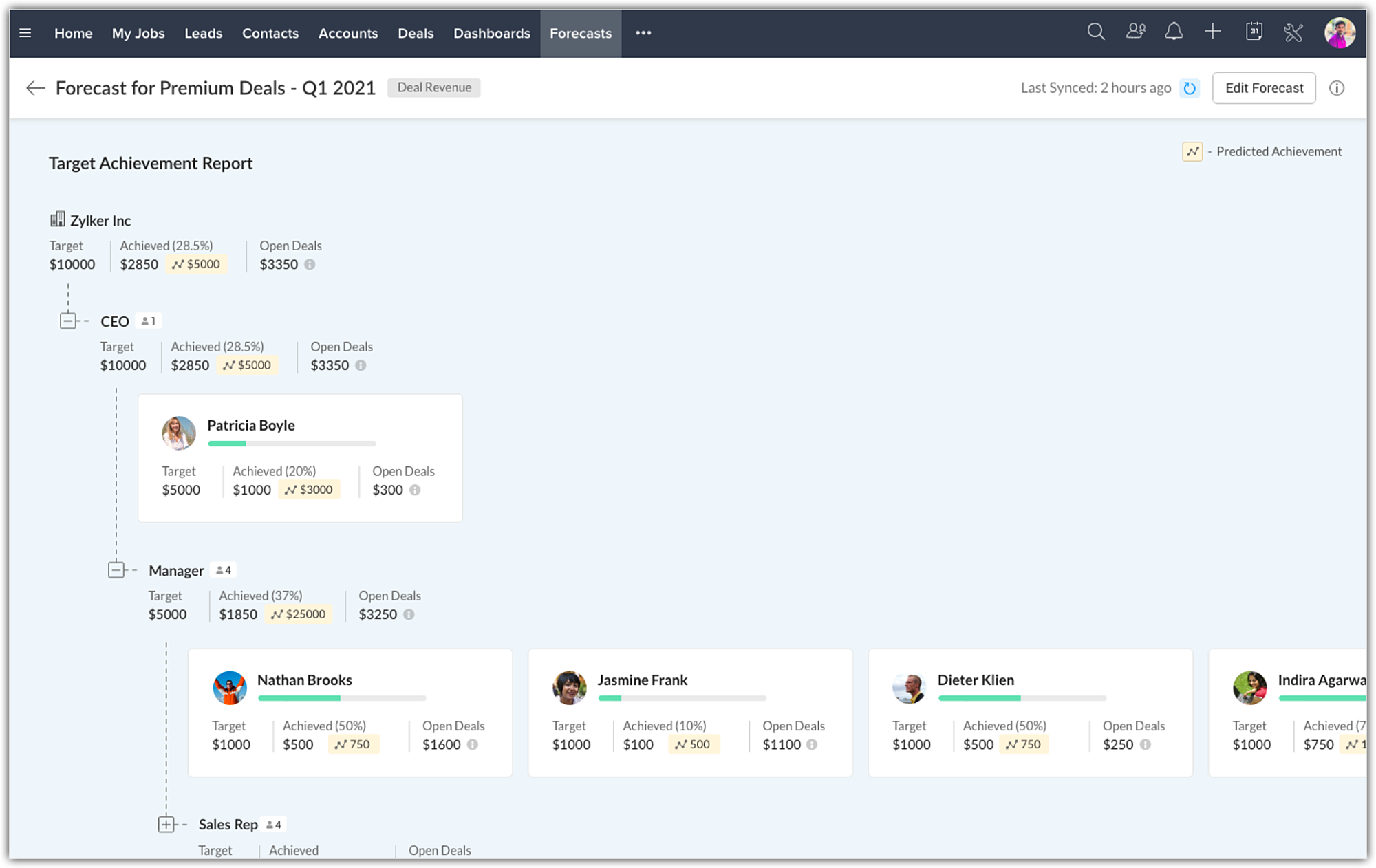
Zia offers target suggestions and predicts target achievement
When creating forecasts, there are two choices. They can be built from the ground up as a completely new forecast, or they can be linked and created from an existing forecast.
When creating a continuous forecast, Zia will calculate and suggest targets based on the historical data of your selected forecasts. This will be available in the forecast create page when setting targets.
The historical and current deal closure pattern of users will be analysed as well to give you the predicted target achievement for the users. Achievement predictions will be available in the target achievement report.
Compare your performance across different forecast periods
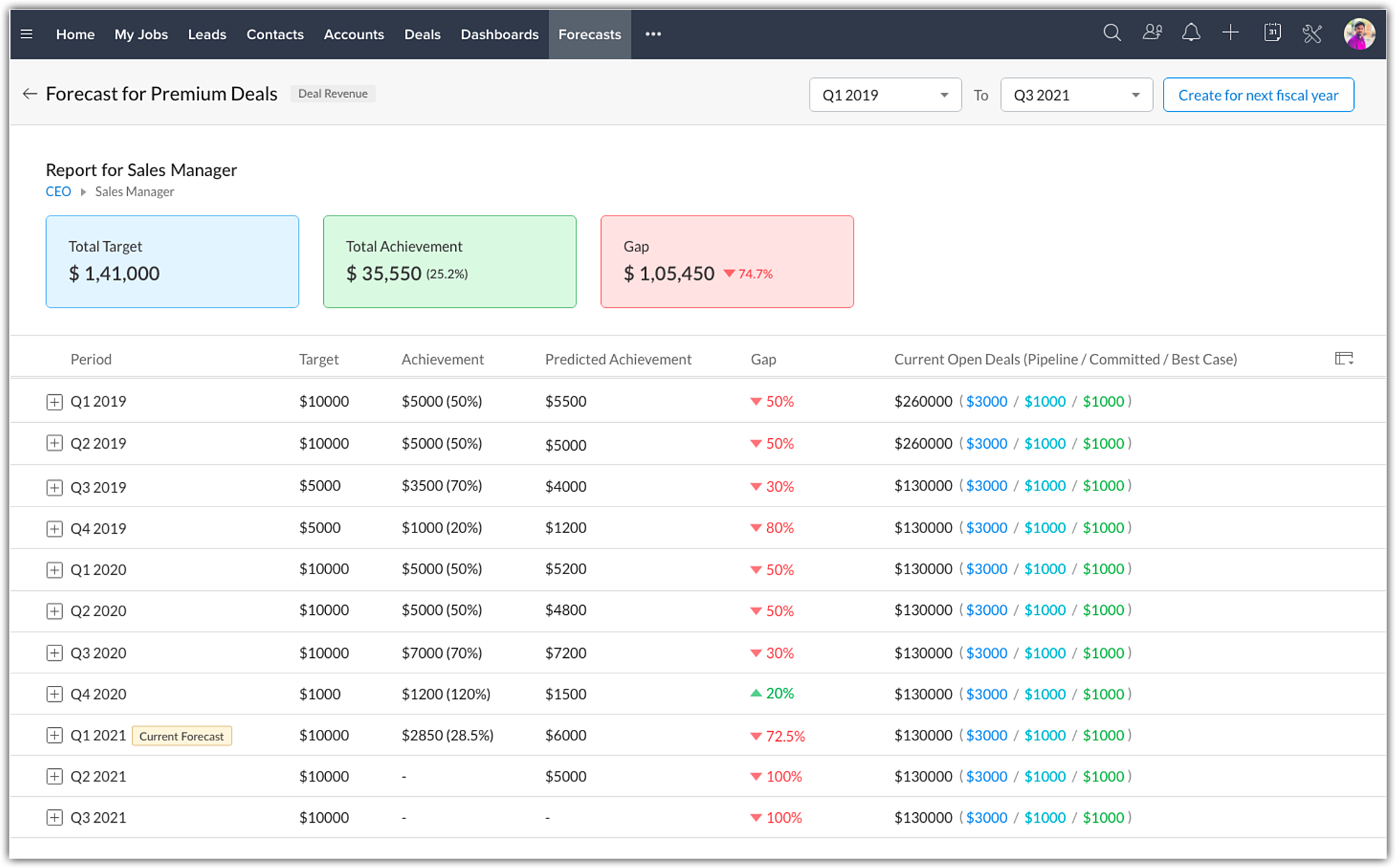
All your created forecasts will be available in a list view under the forecast module. You can now drill down into a particular forecast and compare how your business performance fared across the years.
Depending on the duration selected in the filter, the following data will be consolidated and shown at the top :
- Total target
- Achievement
- Gap
Under the consolidated data, the forecast data for each quarter/month for the selected duration will be listed for a bird's eye view analysis. You can then drill down further to analyse the performance of individual users or roles if required.
Archived Forecast
The purpose of having forecasts is to keep track of the company's performance on various levels of the organization. Thus far, the forecast list view page shows data only for the completed two years, the current year, and one future year. So, as your business continues, you would be losing forecast records beyond two previous years. This clearly beats the purpose of having forecasts as the past data might still be significantly important. Hence, we have introduced archived forecasts as our latest enhancement.
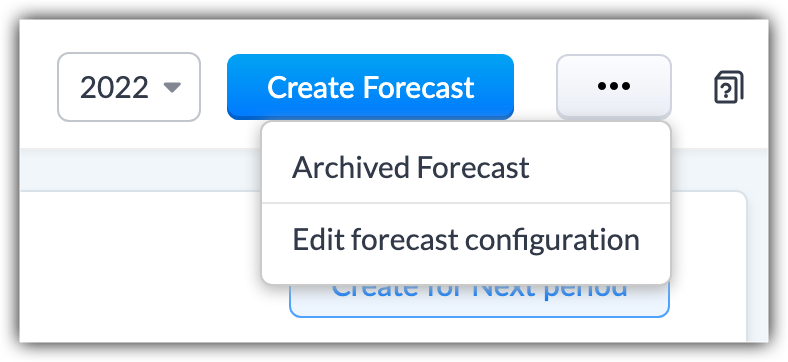
- The forecast list view displays up to 2 completed years' data. Now, the forecasts created beyond these two years will be archived automatically.
For example, suppose the current forecast is for Q3 2021. The list view has records for completed forecasts since Q1 2019. The forecasts before Q1 2019 would be archived. - If a forecast configuration is edited, the current and future forecasts based on old configuration will be deleted while the completed forecasts will be archived.
For the above example of point 1, if you edit the hierarchy or any other configuration, the completed forecasts will be archived, and the current forecast for Q3 2021 will be deleted along with any future forecasts created.
When will forecasts be archived?
- Completed forecasts over two years from the current year will be archived. For example, if the current year is 2022, forecasts of 2021, and 2019 will be available on the forecast list view page. Forecasts older than 2019 will be archived.
- Forecasts will be archived automatically upon editing forecast configuration- changing either the hierarchy or forecast type.
For example if the Hierarchy is Reporting To, and its changed to Territory, or edit the forecast type, the existing forecasts would be archived. - Forecast will be archived if the hierarchy preferences are modified in Company Details.
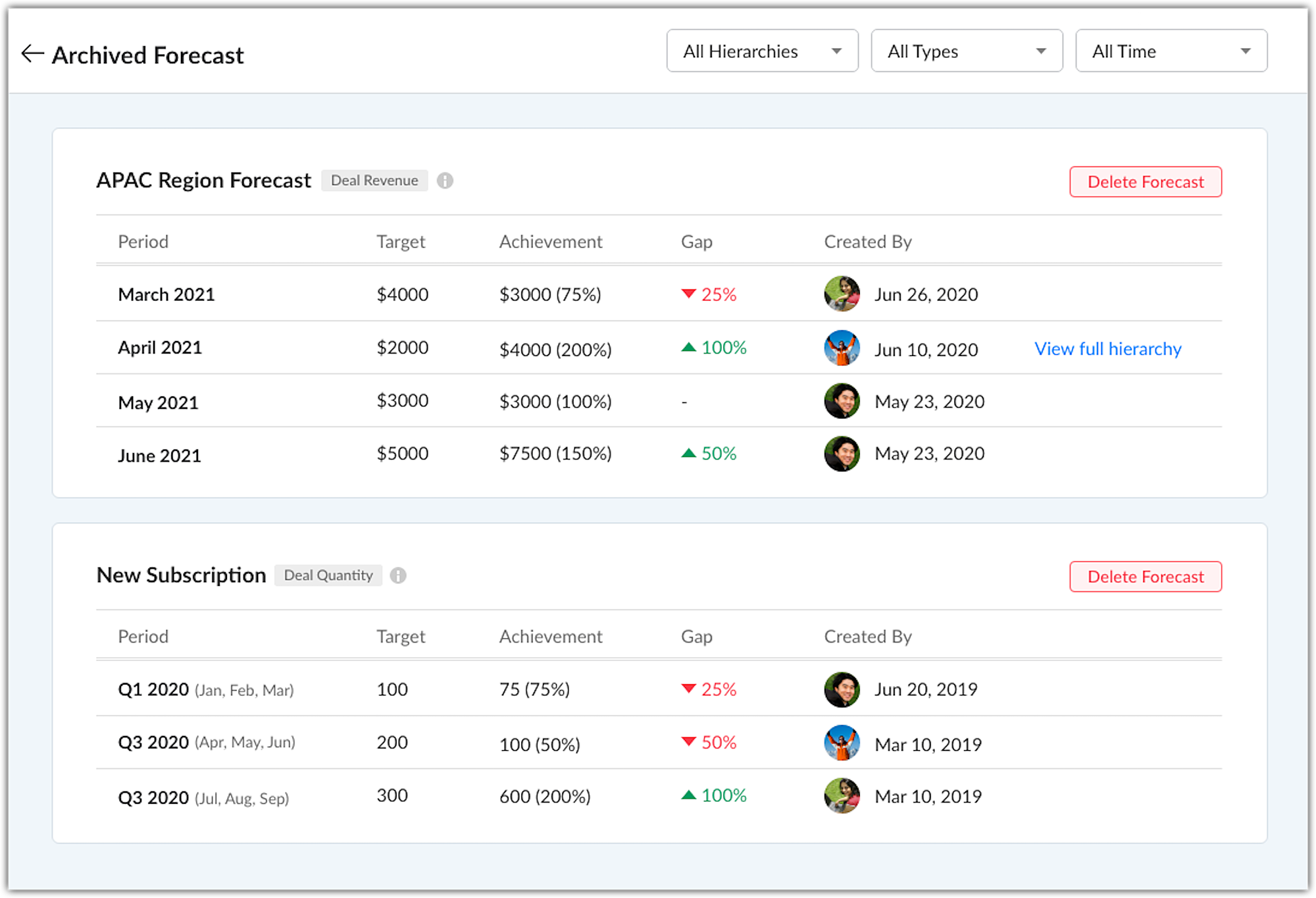
In the archived forecast page, the forecasts are listed in chronological order. You can also filter them based on Hierarchy, Forecast Type, and Time.
Notes
- The archived forecasts cannot be edited, they are just for viewing purposes. Users can delete a forecast.
- Up to 5 years of forecasts records would be available as archive.
- Changing when the Fiscal Year of your org begins, say changing it from January to April, will delete all the existing forecasts as well as the archived forecasts.
Empowering forecast managers
Forecast managers can now build their own forecasts and assign targets to their role, their own target, their peers and sub roles & users. Individual teams can have their own distinct forecasts and targets which can be focused on. These forecasts will be visible for the Admin, CEO and the forecast manager of a higher role who can monitor these forecasts and update them when needed.
If a forecast manager's target has been modified by the CEO, admin or a forecast manager from a higher role, the modified target is locked and cannot be changed by the forecast manager.
That's all about the enhancements. For more details check out our help page Creating and Working with Forecasts.
We have opened this new forecast for all users subscribed to the paid editions of Zoho CRM, in all DCs. For users who are currently using the old forecasts, they will have the option to switch to new forecast till June end. Post which, it will be mandatory to switch to the new forecasts to access the forecast module.
Looking forward to hearing from you.
Access your files securely from anywhere
New to Zoho Recruit?

Zoho Developer Community
New to Zoho LandingPage?
Zoho LandingPage Resources
New to Zoho Survey?
New to Zoho CRM Plus?
Deliver unforgettable customer experiences
New to Zoho CRM Plus?
Deliver unforgettable customer experiences
New to Zoho Marketing Plus?
Everything you need to run your marketing
New to Zoho Marketing Plus?
Everything you need to run your marketing
New to Bigin?





Topic Participants
Nizamuddin Sohel SK
gavinpereira
Ishwarya SG
Jackie Koehler
Sunderjan Siddharth
Sticky Posts
Good news! Calendar in Zoho CRM gets a face lift
Dear Customers, We are delighted to unveil the revamped calendar UI in Zoho CRM. With a complete visual overhaul aligned with CRM for Everyone, the calendar now offers a more intuitive and flexible scheduling experience. What’s new? Distinguish activitiesVoC in Zoho CRM is now data savvy: Explore response drilldown, summary components and participation in CRM criteria
VoC has all the goods when it comes to customer intelligence—which is why we're constantly enhancing it. We recently added the following: A customer drilldown component that shows you the list of prospects and customers behind a chart's attribute ExpandedWrapping up 2025 on a high note: CRM Release Highlights of the year
Dear Customers, 2025 was an eventful year for us at Zoho CRM. We’ve had releases of all sizes and impact, and we are excited to look back, break it down, and rediscover them with you! Before we rewind—we’d like to take a minute and sincerely thank youPresenting ABM for Zoho CRM: Expand and retain your customers with precision
Picture this scenario: You're a growing SaaS company ready to launch a powerful business suite, and are looking to gain traction and momentum. But as a business with a tight budget, you know acquiring new customers is slow, expensive, and often deliversCreate and populate a record in an instant: Introducing zero-shot field prompting to Zia's ICR
A couple of months ago, we upgraded our in-house AI image detection and validation tool, Zia Vision, with intelligent character recognition (ICR). By training Zia with sample images, you could create and enrich CRM records with data extracted from standard
New to Zoho TeamInbox?
Zoho TeamInbox Resources
Zoho CRM Plus Resources
Zoho Books Resources
Zoho Subscriptions Resources
Zoho Projects Resources
Zoho Sprints Resources
Qntrl Resources
Zoho Creator Resources
Zoho CRM Resources
Design. Discuss. Deliver.
Zoho Show Resources

Get Started. Write Away!
Writer is a powerful online word processor, designed for collaborative work.
Zoho CRM コンテンツ
-
オンラインヘルプ
-
Webセミナー
-
機能活用動画
-
よくある質問
-
Ebook
-
-
Zoho Campaigns
- Zoho サービスのWebセミナー
その他のサービス コンテンツ
Nederlandse Hulpbronnen

ご検討中の方
Recent Topics
Templates
Trying to sort out / get rid of unwanted invoice templates, the error msgs are not at all helpful. Surely it's easy to amend the error msg by including a list of the names of the customers / vendors that use it, denying deletion or making it inactiveContacts limit in basic vs standard - what counts? Are customers contacts?
I’ve been using books for a number years for my small business. I only ever work with 20 clients at any given time. I do purchase services from a number of vendors to run my business, so there are some comtacts there too. I used to use the basic package,Finding missing records
I have a challenge and I am not really sure where to start with it. I can't find any similar threads on here, can anyone help: I have two forms, FormA and FormB. Both forms have records that contain a field called Job_Number. What I am trying to achieveUpdates for Zoho Campaigns: Merge tag, footer, and autoresponder migration
Hello everyone, We'd like to inform you of some upcoming changes with regard to Zoho Campaigns. We understand that change can be difficult, but we're dedicated to ensuring a smooth transition while keeping you all informed and engaged throughout the process.What's New in Zoho Inventory | August – October 2025
Hello customers, The last quarter has been incredibly productive! We've released a powerful slate of new features and enhancements in Zoho Inventory designed to give you better control, greater efficiency, and expanded functionality across your inventoryLet's Talk Recruit: Meet Zia, your all-in-one AI assistant (Part-2)
Welcome back to Let’s Talk Recruit series. In Part 1, we introduced Zia and how AI is reshaping the way recruiters work. This time, we’re taking a closer look at how far Zia has come and how each update continues to simplify your everyday tasks. WhenZoho Developer - Feature Request Platform
Zoho Developer is one of the most underatted platform in zoho ecosystem, however, it may just be what zoho needs to welcome more people to use Zoho Services. The more developers you have creating zoho creator applications and zoho extensions the moreLast/Previous month in relative date filter
In the relative date filter, what is the difference between "Last 2 months" and "Previous 2 months"? So, if we are on 25-July, then is my understanding correct of the following: Last 2 months :=: 25-May~24 July Previous 2 months :=: 01-May~30-June Thanks.Tags get removed from notes on mobile
I don't know why this keeps happening even after all these app updates but if you log out and log back into the app or you reinstall it, all the tags you assigned to your notes get taken off, but if you go on the desktop version the tags are still there.Introducing Lead Capture: Empower exhibitors to capture leads effortlessly
Events provide a great opportunity for exhibitors to generate awareness and engage with potential customers. Efficiently distributing attendee information to exhibitors through a seamless and secure way is of paramount importance. Introducing Lead CaptureWork Order Creation Issue
Dear Team, I would like to inquire about the daily limit for Work Order creation in Zoho FSM. Yesterday (02/05/2025) at around 6:30 PM GST, I attempted to create a Work Order, but I have been unable to do so since then. Please find the attached imageURGENT: ChatGPT Extension Failing With “gpt-3 Access Error” (Priority Support)
Appreciate support reviewing this urgently. I am a Priority Support member and need immediate clarification on a recurring issue involving the ChatGPT extensions inside Zoho Desk. Both extensions — including the version created and published by Zoho —Zoho Desk iOS update: Custom buttons, follow/ unfollow option on tickets
Hello everyone! In the most recent Zoho Desk iOS app update, we have brought in support to access the custom buttons configured on web app(desk.zoho.com). Using custom buttons you can seamlessly execute predefined actions directly from their mobile devices,Zoho pdf suit
Pl. design products with following feature: 1. Please add all features given in Ilovepdf website to work on pdf files. It is mandatory to use pdf in court work. 2. Courts have prescribed New Times Roman, pl. add this font as well 3. Indexing, signatureZoho Not Working
Today Zoho not wokringDynamically autofill fields with URL parameters
I have a zoho form embedded in my organization's WP website. Our users find their account with a search tool, and then can select to open this page with the embedded form. The URL of the page holds the parameter that I need, but I cannot figure out howIntegrate Projects for Desk KB article release tasks
Could you please look into the possibility of integrating project tasks for Zoho Desk article release processes? We are looking for an internal integration between Zoho Projects and Zoho Desk's KB article drafting, reviewing and releasing tasks. We couldIssue in Annual Leave
We created a policy to credit 21 days at the Start of the Year An employee has taken 16 days of leaves thought the year, so we expect to see 5 Leaves remaining right? But Zoho People is Showing 12 Days of Leave Balance Available If we check the LeaveUse the searchBy parameter to find user by email address
I'm trying to find a user is Zoho Desk via the Api. In the documentation I see that there is the possibility to add a searchBy parameter in the request. But I can't find how the search values should be formatted. I've tried multiple things and get eitherZoho CRM Community Digest - September 2025 | Part 2
Hello Everyone! Mid-September vibes: fresh tips, smart hacks, and practical Zoho CRM updates all in one place. Let’s dive in. Product Updates: The All-New Address Field! The new Address field type makes it easier to capture complete addresses in one structuredZoho Vault API: Create new Secrets
Hello, I attempt to Post Secrets to the vault, since the encrypted entries are almost impossible to decrypt, since there is no documentation on how to decrypt them. Like with the lack of documentation on how to descrypt, there are missing information regarding on how to create new secrets/post secrets. Source: https://www.zoho.com/vault/api/#create-a-new-secret When I try to send JSON Informationen as a POST-Request I only receive the error message: { "operation": { "result": { "error_code": "",CRM and Finance Tab - Add Invoice "Subject " Column
When On a contact in CRM, and you click the Zoho Finace tab, how can I put in the invoice subject line? Or even a custom field for this. We need to see what that invoice is for, without opening it. If we have tons of invoices we need a way to quickCollections Management: #4 Before, During & After Payment Processing
"Mark, I think the payment link isn't working. Can you send it again?" Staring at a message, Mark got on his phone. This was the third time the same customer had asked him that week. A few minutes later, another message came, "Hey, the invoice total seemsAccount name not populating when importing contacts
When importing a csv file to add contacts the account name is blank? Every other filed gets mapped and imported correctly, i.e contact name, phone number. However not the account name which I have mapped to "company" field in my csv fileSuggestion to improve zoho writer
I am using your product, I believe it is very useful, however, i was writing a note and I needed to draw an arrow in different angles to explain a point and I couldn't. it would be helpful, to add draw functions to the zoho writer. thankswebhook basic authentication
II want to use a webhook to send out a SMS. Unfortunately Twilio does not use an authToken but basic authentication. I created the webhook as POST and get this url: https://{username}:{password}@api.twilio.com/2010-04-01/Accounts/{account}/Messages?body=<BODY>&to=+155555555&from=+1555555555Custom function return type
Hi, How do I create a custom deluge function in Zoho CRM that returns a string? e.g. Setup->Workflow->Custom Functions->Configure->Write own During create or edit of the function I don't see a way to change the default 'void' to anything else. AddingIssue with Hour Calculation in Zoho People Attendance Module
I have noticed an issue in the attendance regularization feature of Zoho People. When trying to regularize past dates, the total working hours are not calculated correctly. For example, if I enter a check-in and check-out time for a previous day, thePush Notification for New Bookings in Zoho Bookings App
when a someone schedules an appointment through the booking page, is there any option to receive a push notification in the mobile app?Automation in Zoho Sprints
Hi. I have a Sprints board with the following statuses: ToDo, InProgress, CodeReview, Testing, Preprod, Live When a ticket is moved from e.g. Testing to Preprod, the following tags should be modified: remove 'tested OK' remove 'ready for Preprod' addExport Purchase orders as Excel
Is it possible to export purchase orders as excel rather than PDF? Our suppliers don't want orders made in PDF, they need it to be excelDraft & Schedule Emails Directly in Bigin
Greetings, I hope all of you are doing well. We're happy to announce a few recent enhancements we've made to email in Bigin. We'll go over each one in detail, but here's a quick overview: Previously, you couldn't draft or schedule emails in Bigin, butTDS Filing
Is there any option for automatic 26Q and 24Q filing in Zoho books. Even Tally has this option. Why don't Zoho has this ? Is there any customisation available for this ?Zia’s AI Assist now helps you write clearer notes — in seconds
After helping recruiters craft job descriptions, emails, and assessments, Zia’s AI Assist is now stepping in to make note-taking effortless too. Whether you’re recording feedback after an interview or sharing quick updates with your team, you can nowShortcut to fill a range of cells
Good evening: I'm writing because I haven't been able to find a feature that allows you to select a range of cells, type in one of them, and then use a key combination to type in all of them. In Excel, the keyboard shortcut is Ctrl+Enter. I haven't foundObject required error
Hi, I am getting an 'Object required' error on the line Call HideColumnsOutsideRange(ws, startOfWeek, endOfWeek) when I run the ShowCurrentWeek macro but not when I run the ShowCurrentMonth macro. Any ideas? Regards, GW Option Explicit Sub HideColumnsOutsideRange(wsZoho CRM - Rename "Estimates" in CRM Finance Suite Integration to "Quotes"
I'm not sure if it's been 2 or 3 years now since Zoho Books renamed Estimates to Quotes. I still see "Estimates" in the Zoho CRM integration. Could this be added to Translation settings so that some customisation could be made on an account by accountIts 2022, can our customers log into CRM on their mobiles? Zoho Response: Maybe Later
I am a long time Zoho CRM user. I have just started using the client portal feature. On the plus side I have found it very fast and very easy (for someone used to the CRM config) to set up a subset of module views that make a potentially extremely usefulNew Series Announcement - Ecommerce Marketing Tips
Running an online business is more than just having a website. It’s about getting the right customers to discover you, trust you, and keep coming back. To support your growth journey, we’re launching a weekly Marketing Tips series right here on Zoho CommerceMarketing Tip #7: Add a blog to your online store
A blog is more than content. It’s a magnet for new customers. Sharing product guides, styling tips, or industry insights through blog posts builds trust and helps you rank higher on search engines. Try this today: Write one blog post answering a commonNext Page