Upcoming Updates - August 2022

Upcoming Updates - August 2022

Hi all,

Greetings from the Zoho Creator team! Today we've got news for you on some exciting updates. And rest assured— there’s more to come!

In this post, we'll be going over the upcoming features and improvements for this month as mentioned below. A few of these will be available immediately and the rest are planned for release in the coming weeks.

  • Enabling dark mode for Android apps
  • Introducing presets
  • Customizing display titles for forms
  • Launching a revamped UI for customer portals
  • Announcing strict validation for the max length field property

In addition to the above, Creator 4 will be deprecated, and all the accounts still using it will be automatically upgraded to Creator 5 by August 31, 2022. Scroll down to know more!

Dark mode for Android

One of our most requested features is finally here: Dark mode!

Dark mode, which is currently supported in our iOS apps, has now been extended to Android apps as well. We have carefully designed every component and screen to have an overall balanced color scheme for your mobile apps. Dark mode will be automatically enabled based on your default system settings and has the following benefits:

  • Reduces power usage by a significant amount (depending on your device's screen technology)
  • Improves visibility for users with low vision and those who are sensitive to bright light
  • Makes it easier for anyone to use their devices in low-light environments

Presets - panel configuration reusability

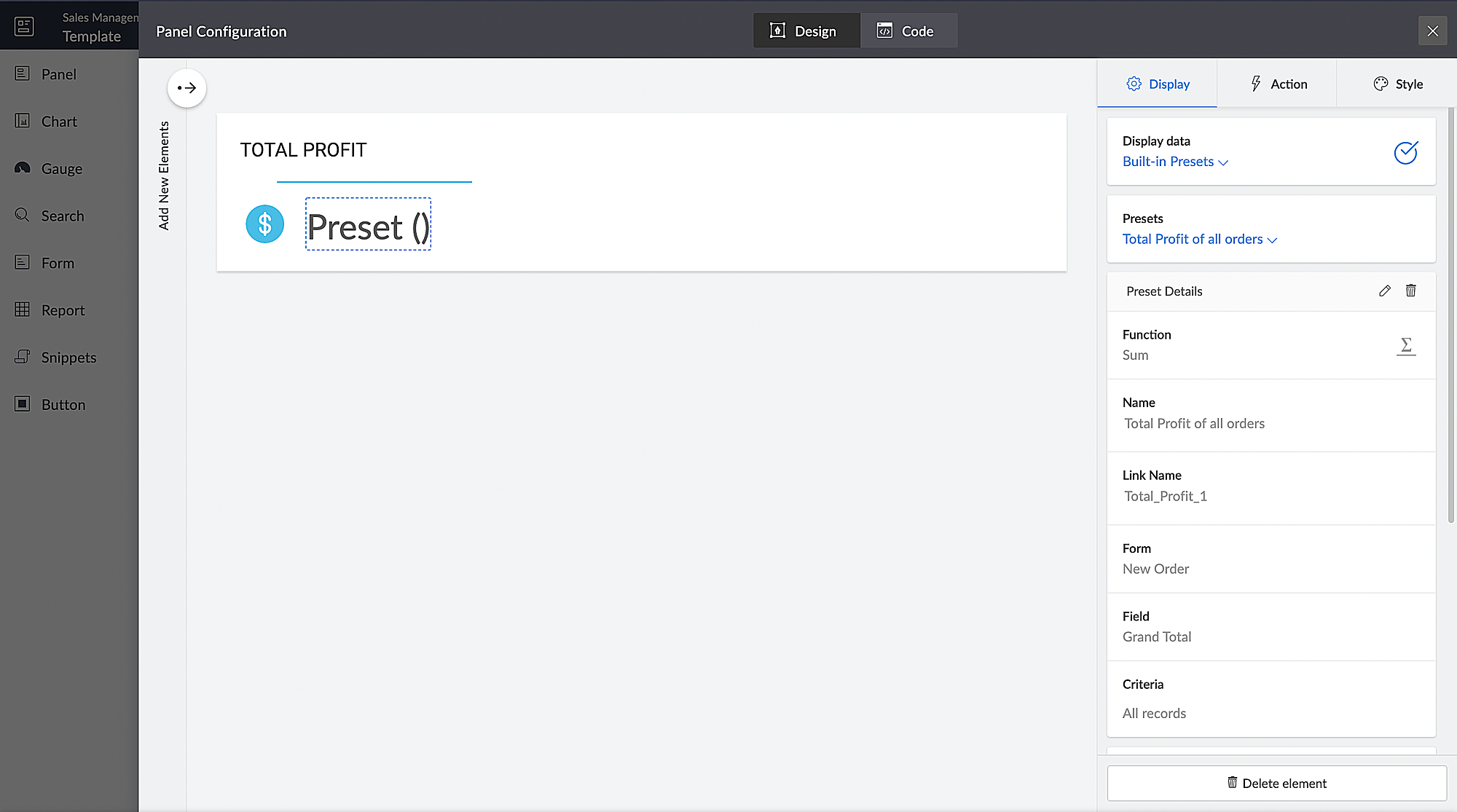
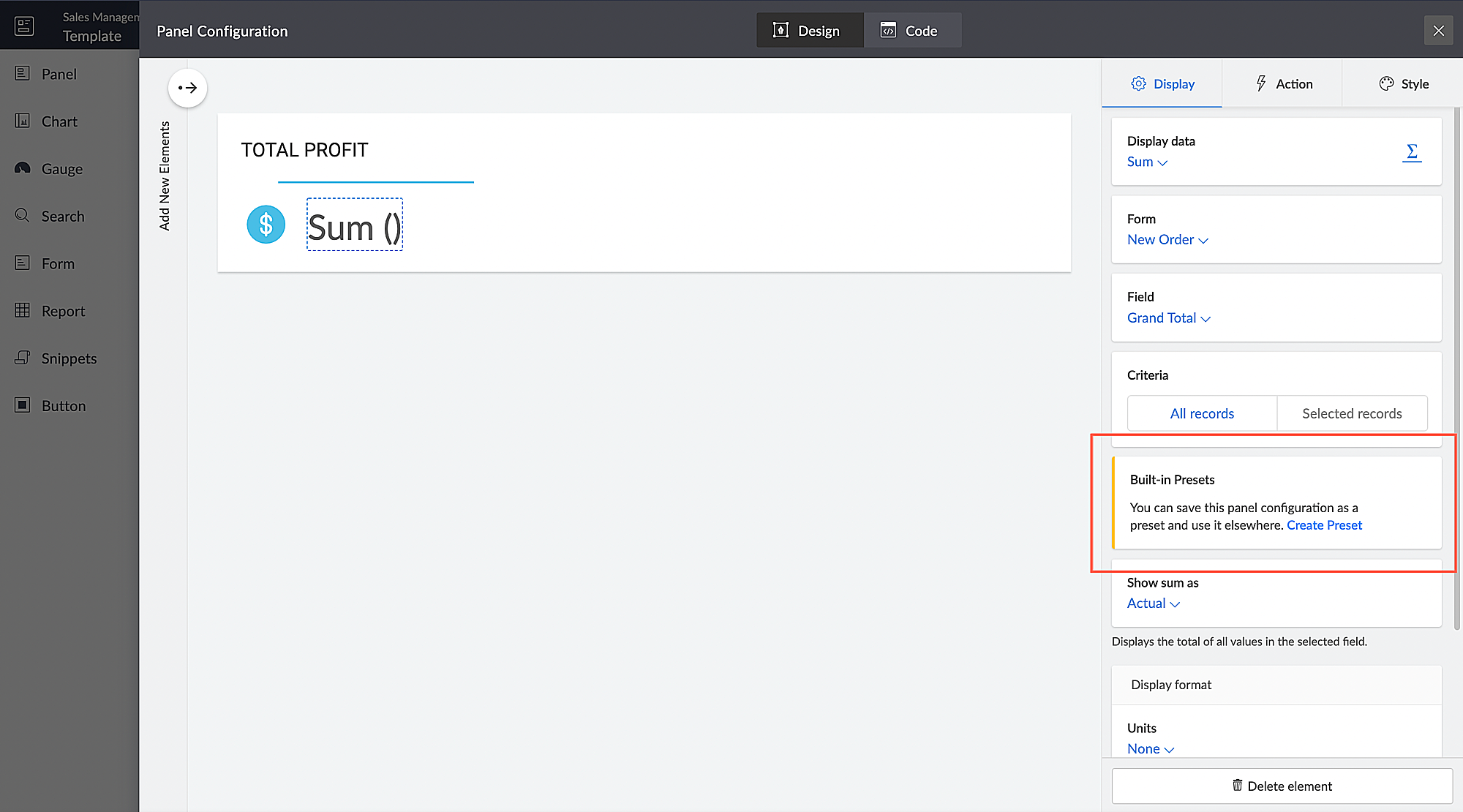
You can configure aggregates to be displayed on page panels. Currently, if such a configuration needs to be reused on a different panel on the same page or on a different page, it has to be manually reconfigured. With presets, the aggregate configuration can now be saved and used across apps in your Creator account, thereby preventing repeated manual configurations. The created presets will be available as a dropdown inside the panel element.

Presets are required in cases, where a configured aggregate value needs to be displayed in more than one panel, like if a user needs to display the Total Profit value in their dashboard, both as an actual value and as a percentage value. In this particular case, the user will have to manually configure the Total Profit value in two panels and choose a different Show As value (Actual in one panel and Percentage of a number in the other panel) in each panel. Using the preset capability, users can save the configuration and reuse it in different panels with only the Show As value being different.


Introducing different display titles for forms

Interacting with forms can become more meaningful when we have contextual information about the actions performed by users. We've introduced form titles that'll enable you to assign different customized titles to the forms displayed when a user is performing the following tasks:

  • While adding record - The title that will be displayed when a user accesses the form to add a record.
  • While editing record - The title that will be displayed when a user is editing an existing record.


By default, the form title for while adding to the form and while editing the form actions will be the same as the form name. Learn more


Revamped UI for customer portals

We're happy to announce the rolling out of a major refinement to the customer portal UI (​sign in​, ​signup​, and ​reset password​ pages).

Portal users will now be able to use a one-time password (OTP) for signing in to your customer portal. Along with Google and Facebook, ​federated login​ can now be set up to allow users to sign in to the portal using their Apple IDs.

These refinements have been designed to ensure compatibility with upcoming features that we are working on. Although the feel and appearance of the new UI will be different from the existing one, we have ensured that it doesn't affect any of your existing portal functionalities. We'll have a separate detailed post on the changes for existing users once the feature is ready to go live.

Announcing strict validation for the max character length field property

In reference to ​this post​, starting from August 31, 2022, maximum character length validation will be implemented strictly across Creator. If a record is added via Deluge, API, or email input, the maximum length property will be validated for all your form fields. This validation ensures that all the records added via various inputs undergo a thorough check for their field characters to ensure they're on par with the predefined character limits that you set, thereby minimizing error handling. After this update, errors might be shown in the following cases:

(i) Existing forms:

While editing/updating a record in an existing form, the maximum length property will be validated for all fields in that form.

(ii) Workflows
  • On validate: Following this update, during the execution of the on validate script for a particular record, the maximum length validation will be strictly performed for all the fields that are associated with the script, and an appropriate error will be thrown.
  • On success: Following this update, during the execution of the on success script, an exception will be thrown for varchar fields (email, single line) when a new record is successfully submitted to the database or when an existing record is updated or deleted from the database. In the case of number fields, the values will be truncated upon successful submission.

(iii) APIs

While adding/updating record values via API requests, the maximum length property will be validated for all fields.

Additionally, if a record is added via ​email input​, the maximum length property for all the fields will be validated. As an admin, you can minimize errors by suitably adjusting your character limits. We also assure you that we've taken all necessary measures to ensure that the transition is seamless, with minimal impact on your end.


Upgradation to Creator 5

The majority of our users have already ​migrated to Creator 5​ from the previous version (Creator 4). As the final step of this process, we'll be automatically migrating the remaining accounts using the older version to Creator 5 by August 31, 2022.

As you all know, ​Creator 5​ empowers developers to customize traditional web-based apps for smartphones and tablets, opening up new possibilities and ensuring an all-around smoother experience. You will be notified via email prior to the migration and this will not affect the data in your existing Creator apps.

We hope this announcement serves to be helpful in planning your upcoming projects and apps. We'd also like to thank you once again for your loyalty and continued support. Please don't hesitate to reach out to us at ​support@zohocreator.com​ if you have any questions or concerns, or need assistance.

That's all for now!

Thanks,
The Zoho Creator Team.


    Access your files securely from anywhere

        All-in-one knowledge management and training platform for your employees and customers.


                              Zoho Developer Community


                                                    • Desk Community Learning Series


                                                    • Digest


                                                    • Functions


                                                    • Meetups


                                                    • Kbase


                                                    • Resources


                                                    • Glossary


                                                    • Desk Marketplace


                                                    • MVP Corner


                                                    • Word of the Day


                                                    • Ask the Experts


                                                              • Sticky Posts

                                                              • Introducing Zoho Creator's 2025 Release Projection 2

                                                                Hello Creators! I'm Prakash, from the Creator product management team, and today I'm delighted to unveil our next set of features as part of Release Projection 2 for 2025. With thoughtful analysis and planning, we've curated powerful new capabilities
                                                              • Zoho Creator - 2023 Release Projection 1

                                                                Hello everyone! A very Happy New Year to you and your family. Hope you're all good and having a great time using Zoho Creator to make your lives easier and your businesses prosper. 2022 was an action-packed year for us at Creator, and we hope to continue
                                                              • Zoho Creator User Group meetups in a city near you! - Oct - Nov, 2023

                                                                Greetings from the Zoho Creator team! We're hosting a series of Zoho Creator meetups in various cities across the globe, and we'd love to meet you there! Our meetups are a great opportunity to network with industry peers, exchange ideas and best practices,
                                                              • Zoho Creator - 2023 Release Projection 2

                                                                Hello everyone! Time truly flies when you're having an incredible journey, and today we mark the completion of an eventful and action-packed six months. It feels like just yesterday when we embarked on this adventure together with the launch of our new
                                                              • Upcoming Updates - August 2022

                                                                Hi all, Greetings from the Zoho Creator team! Today we've got news for you on some exciting updates. And rest assured— there’s more to come! In this post, we'll be going over the upcoming features and improvements for this month as mentioned below. A


                                                              Manage your brands on social media


                                                                    Zoho TeamInbox Resources


                                                                        Zoho CRM Plus Resources

                                                                          Zoho Books Resources


                                                                            Zoho Subscriptions Resources

                                                                              Zoho Projects Resources


                                                                                Zoho Sprints Resources


                                                                                  Qntrl Resources


                                                                                    Zoho Creator Resources


                                                                                        Zoho CRM Resources

                                                                                        • CRM Community Learning Series

                                                                                          CRM Community Learning Series


                                                                                        • Kaizen

                                                                                          Kaizen

                                                                                        • Functions

                                                                                          Functions

                                                                                        • Meetups

                                                                                          Meetups

                                                                                        • Kbase

                                                                                          Kbase

                                                                                        • Resources

                                                                                          Resources

                                                                                        • Digest

                                                                                          Digest

                                                                                        • CRM Marketplace

                                                                                          CRM Marketplace

                                                                                        • MVP Corner

                                                                                          MVP Corner


                                                                                            Design. Discuss. Deliver.

                                                                                            Create visually engaging stories with Zoho Show.

                                                                                            Get Started Now


                                                                                              Zoho Show Resources

                                                                                                Zoho Writer

                                                                                                Get Started. Write Away!

                                                                                                Writer is a powerful online word processor, designed for collaborative work.

                                                                                                  Zoho CRM コンテンツ


                                                                                                    Nederlandse Hulpbronnen


                                                                                                        ご検討中の方


                                                                                                                • Recent Topics

                                                                                                                • filter on sheets mobile (iOS, iPadOS) does not work

                                                                                                                  re-posting this as a question because reporting as a problem netted zero responses... I have this issue on every spreadsheet, whether imported or created natively in Zoho Sheets. I can use on desktop without issue: but on iOS the filter dropdowns are
                                                                                                                • Inactive License for free account.

                                                                                                                  I recently upgraded my Cliq subscription not my team (on the free version), are unable to login to their accounts. The error message received is Inactive License Looks like you have not been covered under the current free plan of users. Please contact
                                                                                                                • Zoho Books recurring invoicing link to a Zoho CRM Deal?

                                                                                                                  With the Zoho CRM Finance Integration setup, normally when creating an invoice via Zoho CRM Finance Integration on a Deal, it creates the invoice in Zoho Books with the CRM Deal *Potential link for that invoice. Alternatively, if you create the invoice
                                                                                                                • Data Import

                                                                                                                  Hello Latha, Is there any option to enable data import option in Equipment module? Best regards, Chethiya.
                                                                                                                • No background for video recordings, no playback speed, can't even playback longer recordings - have to download…

                                                                                                                  Hi. We utilize heavily video messages on Slack, but wanted to migrate to Cliq with Zoho One, however very basic yet very frequently used feature is missing: backgrounds for video recordings and playback speed. We were not happy with Slack's 5 minute limits
                                                                                                                • Introducing PDF conversion in Deluge

                                                                                                                  Hello everyone, We're pleased to introduce built-in PDF conversion capabilities in Deluge with the launch of the convertToPDF task. As PDF is one of the most widely used formats in professional environments, this task helps streamline document generation
                                                                                                                • Changing naming convention for Estimates

                                                                                                                  Hi there, How do I customise the naming of the filenames for estimates when sending them? Currently they are named literally just ES11.PDF or whatever the number of the estimate is. There is no Company name, description of the work, customer name, date
                                                                                                                • Email templates for estimates

                                                                                                                  Hi there, When I send an estimate the option to choose a template appears. However it is common to need to make some minor personalizations and modifications to the email before sending ie. adding a second person to the greeting, or adding a small note
                                                                                                                • How to transfer uploaded files from Zoho Survey to external systems?

                                                                                                                  Hi everyone, I'm currently integrating Zoho Survey with an external system and have run into a limitation I haven't been able to solve yet. I'm using webhooks to send submitted survey data (JSON) to my external API, which works perfectly for all standard
                                                                                                                • On Duty Requests - Zoho People Data

                                                                                                                  Hello Team, We are currently using the On Duty Form to record Work From Home (WFH) requests in our organization. However, we are facing an issue where pending On Duty requests are not appearing in the Attendance Module. For example, if I submit On Duty
                                                                                                                • Editing Estimates

                                                                                                                  Hi team, How do I delete line items in an estimate when editing it? I can't see any option to do this - no X, no trashcan, no drop down... And how do I revert to the original estimate after cloning? I cloned to see if the option to edit were disabled
                                                                                                                • Reading emails sent from Zoho

                                                                                                                  Hi there, How do I view an email sent from Zoho, for example an email which contains an estimate? I can see there is a tab in the screen for that estimate which is labelled 'Emails' and I can see a summary of the email sent listed there, but I cannot
                                                                                                                • Feature Request: Mass update selected Contacts to Accounts

                                                                                                                  I can't believe this isn't an ability already. It's a quick fix that would save hours of manual entry time. This looks like it had been requested 3-4 years ago with no answers from staff! Please add all contact fields into the "mass update" menu. You
                                                                                                                • Support Bots and Automations in External Channels

                                                                                                                  Hello Zoho Cliq Team, How are you? We actively use Zoho Cliq for collaboration, including with our external developers. For this purpose, external channels are a key tool since they work seamlessly within the same interface as all of our other channels
                                                                                                                • How To Implement an Auto-Check-out Feature for Attendance?

                                                                                                                  If an employee forgets to check out, the system should automatically check out the employee at 6:30 PM
                                                                                                                • Automate the file import step

                                                                                                                  Hello everyone, I have a Sales - 'Account' category, and currently import the file to update it as follows: Import Accounts - From File - Update existing Accounts only - select and match the field the CRM. Since we have been using Microsoft 365 SharePoint.
                                                                                                                • Set Default Status of Assembly to "Assembled" When Entered in UI

                                                                                                                  I've just discovered the new "confirmed" status of Assemblies within Inventory. While I understand the intent of this (allowing for manufacturing planning and raw material stock allocation), it was initially confusing to me when manually entering some
                                                                                                                • Sender Email Configuration Error.

                                                                                                                  Hello Team, Hope you are all doing well. We are in the process of creating the Zoho FSM environment in the UAE. When we try to add the sender email address “techsupportuae@stryker.com”, we receive the error message: “Error occurred while sending mail
                                                                                                                • Share saved filters between others

                                                                                                                  Hi, I am in charge to setup all zoho system in our company. I am preparing saved filters for everybody, but the only one can see its me. How can others see it? Thanks
                                                                                                                • Webinar Alert: Learn how to decode your landing page performance with analytics

                                                                                                                  Every click, scroll, and drop-off tells a story. Are you listening? Join our Landing Page Analytics webinar to understand how data can reveal what’s working and what’s costing you conversions. In this session, you'll discover The most important metrics
                                                                                                                • Campaign Status Field in CRM

                                                                                                                  I'm wanting to create a custom view in CRM that shows all those who have recently hard bounced in past campaigns so we can clean up the database. An old Zoho article said it was possible, but I don't see the option to push campaign status field to CRM,
                                                                                                                • Zoho Forms for Vertical Studio Subscriber Organizations

                                                                                                                  We’re excited to introduce the Zoho Forms integration with Vertical Studio. This allows you to capture data using forms and send it directly to your Vertical Studio modules. With this integration, form submissions can be used to create or update records,
                                                                                                                • Zoho Flow not handling Boolean properly

                                                                                                                  Hi, I have a checkbox in one system that I'm trying to sync with a checkbox in Zoho CRM. The value from the source system comes in as blank (unticked) or 1 (ticked). I've written the following custom function to convert the output to either boolean false
                                                                                                                • Printing invoice from creator using writer

                                                                                                                  Hello. I have created my invoices using Zoho Writer and i'm sending data to them from Zoho Creator by selecting a row in a report and then clicking a button which has workflow connected to it to send the date to the invoice in writer. This is working
                                                                                                                • How to Initiate WhatsApp Message on SalesIQ?

                                                                                                                  I've just activated a Business WhatsApp phone number through SalesIQ because of its touted omnichannel chat approach. Sounds exciting. I understand that when a customer sends me a WA message, I can reply to it on SalesIQ and keep the chat going, perfect.
                                                                                                                • i want to delete organization or tranfer ownership

                                                                                                                  I accidentally created a Zoho organisation and now I cannot accept an invite from another organisation. I am the Super Admin and cannot leave. Please either delete my organisation or transfer ownership so I can leave.
                                                                                                                • Bulk upload images and specifications to products

                                                                                                                  Hi, Many users have asked this over the years and I am also asking the same. Is there any way in which we can bulk upload product (variant) images and product specifications. The current way to upload/select image for every variant is too cumbersome.
                                                                                                                • Zoho FSM API Delete Record

                                                                                                                  Hi FSM Team, It would be great if you could delete a record via API. Thank you,
                                                                                                                • Marketing Tip #26: Optimize product images for SEO

                                                                                                                  Product images can do more than make your store look good. They can also help customers discover your products through search. Since search engines can’t "see" images, they rely on text signals to understand what an image is about. Two small actions make
                                                                                                                • Allow rejected records (Approval process) to re-enter Blueprints

                                                                                                                  Cannot seem to get my head around the key differences between the Blueprints and the Approval Process. For me it seems like different flavours of more or less the same thing - especially now that we have the option of Record Locking. Have a quote to sales
                                                                                                                • Every time an event is updated, all participants receive an update email. How can I deactivate this?

                                                                                                                  Every time an event is updated in Zoho CRM (e.g. change description, link to Lead) every participant of this meeting gets an update email. Another customer noticed this problem years ago in the Japanese community: https://help.zoho.com/portal/ja/community/topic/any-time-an-event-is-updated-on-zohocrm-calendar-it-sends-multiple-invites-to-the-participants-how-do-i-stop-that-from-happening
                                                                                                                • Streamlining E-commerce Photography with AI Background Tools

                                                                                                                  Hey Zoho Community, I’ve been messing around with ways to make product images less of a headache for fashion brands on Zoho Commerce. You know how boring generic backdrops can get, and how much time traditional photoshoots eat up, right? I tried out this
                                                                                                                • Add @Mention Notifications in Zoho Cliq for Zoho Project Mentions

                                                                                                                  Hello Zoho Projects Team, We hope you are doing well. We would like to submit a feature request regarding "Projects Bot" Cliq bot notifications for @mentions inside Zoho Projects comments (Tasks and Issues). Current Behavior: At the moment, when someone
                                                                                                                • WO Completion Status Not Updating Automatically

                                                                                                                  Hello Latha, Hope you are doing well. Over the past few days, we have been facing an issue with WO completion. When an AP is marked as complete, the work order status is not automatically updating to “Completed,” and we have to mark it manually. Could
                                                                                                                • Is it possible to create a meeting in Zoho Crm which automatically creates a Google Meet link?

                                                                                                                  We are using Google's own "Zoho CRM for Google" integration and also Zoho's "Google Apps Sync" tools, but none of them provide us with the ability to create a meeting in Zoho CRM that then adds a Google Meet link into the meeting. Is this something that
                                                                                                                • Customer Message Edit/Delete Function & Backend Visibility Inquiry

                                                                                                                  目前客服已发送的对话支持编辑和删除功能,请问在 Zoho 系统后台,是否可以查看客服具体发送了什么内容,以及删除或修改了哪些信息?如果无法查看,这个功能是否可以通过设置关闭客服的编辑和删除权限?如可以,请告知具体设置路径。 Currently, customer service agents are able to edit and delete messages after sending them. In the Zoho system backend, is it possible to view
                                                                                                                • In App Auto Refresh/Update Features

                                                                                                                  Hi,    I am trying to use Zoho Creator for Restaurant management. While using the android apps, I reliased the apps would not auto refresh if there is new entries i.e new kitchen order ticket (KOT) from other users.   The apps does received notification but would not auto refresh, users required to refresh the apps manually in order to see the new KOT in the apps.    I am wondering why this features is not implemented? Or is this feature being considered to be implemented in the future? With the
                                                                                                                • Sync Task Status from Zoho Projects to Zoho Desk

                                                                                                                  Hi Zoho Desk Team, Hope you’re doing well. We’re actively using the Zoho Desk–Zoho Projects integration, which helps our support and project teams stay aligned. However, we noticed that when we change a task’s status in Zoho Projects, the change is not
                                                                                                                • Lost the ability to sort by ticket owner

                                                                                                                  Hi all, in the last week or so, we have lost the ability to sort tickets by Ticket Owner. Unlike the other columns which we can hover over and click on to sort, Ticket Owner is no longer clickable. Is it just us, or are other customers seeing this too?
                                                                                                                • Placeholder doesnt work in email tempalate

                                                                                                                  Hi Team,  I have put in the customer happiness rating place holder in my email template but when I pick the template in my ticket and send it to client, the place holder doesnt get generated. What am I missing here? screenshot attached. 
                                                                                                                • Next Page