We’re transitioning from Zoho ShowTime to TrainerCentral
Hello everyone,
Zoho ShowTime was originally built as a training platform to serve training agencies, HR teams, and individual trainers. As the platform grew, we realized that more creators and businesses could benefit from its capabilities. That’s why we launched a new brand, TrainerCentral, a full-featured training platform that handles everything from course creation to live sessions. With a host of new features and added capabilities in TrainerCentral, we’re saying goodbye to Zoho ShowTime and transitioning to a more advanced, comprehensive platform.
With TrainerCentral, you can design multimedia-rich courses that combine videos, documents, quizzes, and assignments to offer self-paced training. Built-in live session tools allow you to host interactive sessions including polls, chats, and surveys, to keep learners engaged. The platform simplifies learner management with detailed progress tracking, analytics, and automated certificates, helping trainers measure performance and learning outcomes with ease.
It also offers a no-code website builder that enables users to create a professional, fully branded academy website to strategize and market their online courses effectively to learners. With its robust, integrated payment gateway system, it facilitates secure, frictionless transactions across global markets.
This migration from Zoho Showtime to TrainerCentral will provide you with access to enhanced features, improved performance, and a unified training experience.
How to migrate from Zoho ShowTime to TrainerCentral.
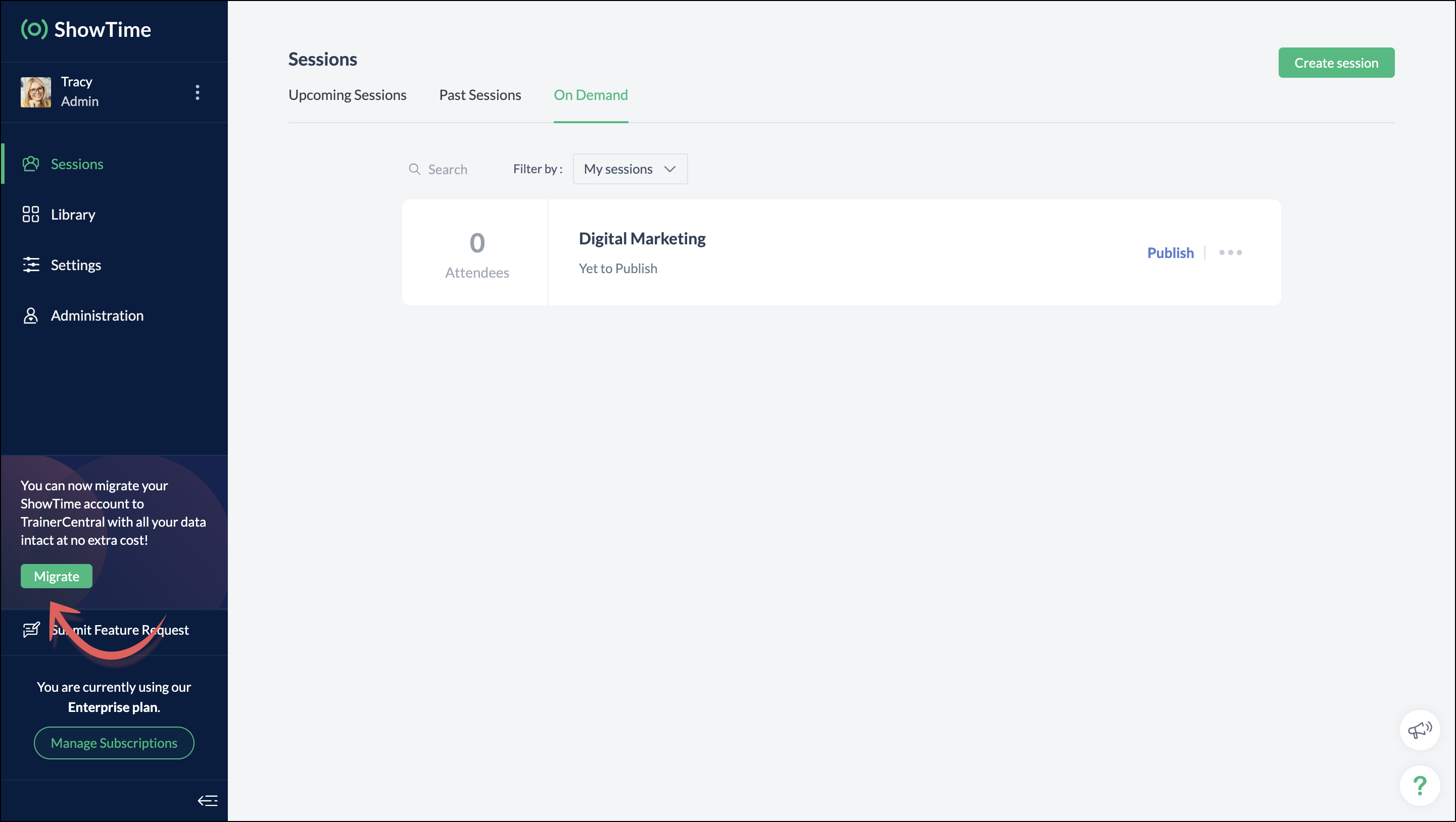
You can migrate your account from Zoho ShowTime to TrainerCentral anytime by clicking the Migrate button in the left pane and following the on-screen instructions. Once migrated, you’ll receive a notification, through which you can access your TrainerCentral account.
- Only the super admin of a Zoho ShowTime portal can migrate their portal's data to TrainerCentral.
- We’ll be disabling remote session scheduling and learner registration for on-demand sessions starting December 1, 2025. With this transition, Zoho ShowTime will reach its End of Life (EOL) on December 31, 2025.
To avoid any disruptions to your live classes, please move to TrainerCentral before December 31, 2025.
We hope this will elevate your experience to the next level.
If you have any questions, take a look at the FAQ section below, reach out to us at support@zohoshowtime.com, or just leave a comment here.
FAQ
FAQ
1. How long will the migration take?
The migration of your Zoho ShowTime data and account portal is expected to take approximately one to two hours. In the event of any technical issues or glitches during the migration, the product team will address them immediately. In such rare cases, the migration will be completed within 24–48 hours.
2. What will happen to my Zoho ShowTime account if it is not migrated before the sunset?
If you fail to migrate before the sunset, i.e., December 31, 2025, active Zoho ShowTime accounts will be automatically migrated to TrainerCentral.
3. What will happen after migration?
You will be able to access TrainerCentral with your Zoho ShowTime credentials and continue your teaching journey seamlessly, with the added benefit of new features.
4. Will there be any changes to my payment after migration?
No, there will be no changes to your payment. The amount you currently pay for your Zoho ShowTime subscription will remain the same after migration.
5. I am a Zoho ShowTime customer or Zoho One user. How will I be mapped to the TrainerCentral plan?
If you are a Zoho ShowTime customer or a Zoho One user, you will be mapped to the equivalent TrainerCentral plan automatically to ensure a seamless transition.
6. What happens if I choose not to migrate?
You can back up your data, including materials, recordings, and analytics associated with your account, and then contact our support team to delete your account.
7. I am a Zoho One user and purchased paid attendee add-ons. How do I enable them in TrainerCentral?
8. Will my configured payment gateway and ticket settings in Zoho ShowTime be migrated to my TrainerCentral account automatically?
All of the sessions and tickets created in Zoho ShowTime will be migrated without any changes to your TrainerCentral account. However, for any new sessions you create in TrainerCentral, you will need to set up your payment gateway and ticketing options again.
9. Where can I find my past sessions and library content from Zoho ShowTime in TrainerCentral after migration?

➤ Remote session: You can find previously created/conducted Zoho ShowTime remote sessions in Live Workshops → Past Sessions.
➤ On-demand session: You can find previously created/conducted Zoho ShowTime on-demand sessions in Live Workshops → On demand.
➤ All materials hosted in your ShowTime library will be moved to TrainerCentral's library.
10. Will my current integrations like Zoho CRM, Zapier, and Zoho Flow function seamlessly?
All of your Zoho CRM, Zapier, and Zoho Flow integrations and their functionalities will be migrated seamlessly to TrainerCentral. In Zapier and Zoho Flow, several additional triggers and actions are available for all courses and live workshops.
11. If I cancel my TrainerCentral subscription after migration, will I get the same plan when I resubscribe to a new TrainerCentral account?
No. The equivalent plan is provided only if you migrate from Zoho ShowTime. If you resubscribe for a new TrainerCentral account, you’ll be mapped to a new plan.
12. What if I can't see the Migrate button on my Zoho ShowTime portal?
If the Migrate button isn’t visible, please contact our support team to help you migrate from Zoho ShowTime to TrainerCentral.
Access your files securely from anywhere
New to Zoho Recruit?

Zoho Developer Community
New to Zoho LandingPage?
Zoho LandingPage Resources
New to Zoho Survey?
New to Zoho CRM Plus?
Deliver unforgettable customer experiences
New to Zoho CRM Plus?
Deliver unforgettable customer experiences
New to Zoho Marketing Plus?
Everything you need to run your marketing
New to Zoho Marketing Plus?
Everything you need to run your marketing
New to Bigin?





Topic Participants
Neeraja Raghavendran
Sticky Posts
Video tip 02: Customize your feedback and evaluation forms in Zoho ShowTime
Hello everyone, Here's a new video tip for all our ShowTime users. Today we will learn few quick, effective ways to evaluate your participants and assess your trainings conducted on Showtime, like MCQs (multiple choice questions), text-boxes, and ratings scale. Watch the below video to learn how these assessment systems help you effectively evaluate course-related knowledge and skills of your trainees on a regular basis. Follow this page to learn more such tips and stay updated on all theVideo tip 05: Host training courses under your own personalized domain and white-label your email communications.
Hello everyone, As a trainer, having your own domain name increases your brand's positioning and reach through search results on top search engines like Google, Yahoo, and Bing. Prospective customers will more readily pay for courses from an organization with a professional, established online presence. A custom domain establishes you as a leader in your area of subject expertise, helping you promote your courses and build brand recognition with your global audience. In today's video tip, we atVideo tip 04: Do you want to set up repeated training sessions at regular intervals? Learn how.
Hello everyone, Sometimes it is difficult to organize and manage your everyday work and training sessions. Scheduling recurring or repeated sessions can be even more time-consuming as you need to create and maintain the training content, schedule multiple time slots for the training, manage registrants across each session, and more. Zoho ShowTime offers a smarter option for these cases that only takes a few clicks. Play the video below to learn how to use the same presentation content and setSpotlight 03: Connect and deliver more effective trainings with ShowTimes' Viewer app
With the growing need for virtual classroom learning, the use of mobile and tablet software is quickly becoming the most convenient way to share knowledge between educators and students. According to a 2018 study, nearly 67% of digital learners now use mobile devices to complete their online coursework. Additionally, smartphone learners complete course material 45% faster than those using a computer. Considering these facts, we now introduce our next community spotlight series that will focus on ZohoVideo tip 1: Record and share trainings on Zoho ShowTime.
Hello everyone, We are excited to launch our video tip of the month series within our ShowTime's community, aimed to help our trainers and educators with brief and practical tips on delivering more effective and comprehensive training. In this month's video tip, we will show you how to record your training sessions quickly and share them with your attendees and other prospective learners externally. We hope this tip was useful. ShowTime also allows you to automatically record your live trainings
New to Zoho TeamInbox?
Zoho TeamInbox Resources
Zoho CRM Plus Resources
Zoho Books Resources
Zoho Subscriptions Resources
Zoho Projects Resources
Zoho Sprints Resources
Qntrl Resources
Zoho Creator Resources
Zoho CRM Resources
Design. Discuss. Deliver.
Zoho Show Resources

Get Started. Write Away!
Writer is a powerful online word processor, designed for collaborative work.
Zoho CRM コンテンツ
-
オンラインヘルプ
-
Webセミナー
-
機能活用動画
-
よくある質問
-
Ebook
-
-
Zoho Campaigns
- Zoho サービスのWebセミナー
その他のサービス コンテンツ
Nederlandse Hulpbronnen

ご検討中の方
Recent Topics
[Integration Edition] Deluge Learning Series – Custom API with Deluge | November 2025
We’re excited to conclude this four-month Integration Edition of the Deluge Learning Series: Session 1 – Integrating Zoho Apps with Deluge Using Built-In Integration Tasks Session 2 – Integrating Zoho Apps with Deluge Using invokeURL and invokeAPI SessionAutomate Backups
This is a feature request. Consider adding an auto backup feature. Where when you turn it on, it will auto backup on the 15-day schedule. For additional consideration, allow for the export of module data via API calls. Thank you for your consideration.Tips for Organizing Workflows and Improving Team Coordination in Zoho
Hi everyone, I’m looking for some general advice on how different teams are organizing their daily work within Zoho’s apps. Our team recently expanded, and we’re trying to streamline how tasks, discussions, and documents are shared so everything staysPre-fill webforms in Recruit
I don't want to use the career site portal (as I have my own already), but I would like to direct users to the application forms for each role, from my website job pages. Is there a way to pre-fill fields in Recruit application forms, so that I only havePrevent user from viewing all records?
I have a report that is meant to be used by vendors to view only the records that are assigned to them. All the vendor information is stored in a separate application, so I need to call a function to get the current user's ID (not the zoho user ID). The report settings criteria doesn't support using function calls, so instead I'm embedding the report in an html page like this: if (thisapp.Global.CurrentUserIs("Vendor")) { personID = common.getLoggedInPersonID(); query = "Assigned_Vendor.ID="How do I copy an email message to one or more other folders?
I can move a message to another folder using the "move to" option but I can't figure out how to copy a message.Zoho Site pages not displaying in iframes
I simply want to show a Zoho Site page inside an iframe on another non Zoho website. When testing this across many browsers, the iframe content simply does not appear. IE reports that the host does not allow their content to be displayed in iframes. Very disappointing. Is there a way around this please? Here is the URL of the page I would like to appear in an iframe. http://ips-properties-to-rent.zohosites.comZoho Inventory as connector in Zoho Creator
Hello, It doesn't appear that Zoho Inventory is one of the many built in connectors in Zoho Creator? I see that there are non-Zoho inventory applications that have built in connectors such as Cin7, which leads me to believe that I'm missing somethingSend Zoho Forms Link using Zoho CRM Email Templates
I have set up Zoho Forms and CRM integration to pre-populate data from Zoho CRM to Zoho Forms. The setup is working fine. I have also created an email template in the Zoho CRM deals module to send Zoho forms links. So when I send an email using that templateMy go to On Load Client Script - Fast, efficient, and works for ALL profiles; Hides everything except initial fields
This is my on Load client script that I use for Create pages. I use a modified version for Edit and Display pages which you can create yourself using the same basic structure that I will give you below. First up, the script. Below that will be an explanationCustom Search using HTM+CSS Snippet
Suppose I wanted to create my own list view using HTML and CSS snippets inside a Page with a custom search input at the top of the list (not the Search snippet). Without Javascript, is there a way to retrieve a user's entry from that search input andMass Update of Lookup Fields not possible
Hello List I've created a custom field for Leads and Contacts 'Current Campaign'. This is very Handy as I can filter leads and then related them to a campaign. Everything ready, but then I realized that mass update doesn't work for lookup fields... aZoho CRM Kiosk Upload Files
Hello all, We are trying out Kiosks at the moment to see where it can fit best in our business. We are still a bit off in the application but lets say we will sort this out. My question is the following - when I create a Kiosk I can add "File Upload"Double opt-in notifications and customizable confirmation messages for your webforms
Dear CRM Community, We are excited to announce a major upgrade to our Webforms feature. You can now customize the confirmation message shown to your users who double opt-in from your webform and also customize your confirmation emails when they submitHas Anyone successfully integrated Zoho and Sage Intact?
Hey all, We’re evaluating Zoho One + Sage Intacct and I’m trying to connect with anyone who has actually implemented the two together.Specifically, I’d love to know: -- Which functions you kept in Zoho vs. Intacct (e.g., Product Catalog, AR/AP, invoicing,Introducing Image Upload Field
Hello everyone, In this post we will discuss about the benefits and usage of the Image upload field. The field is available for standard and custom modules. Usage: This field can be used to upload a gallery of images to a record and share the record with peers or customers. The record can be made accessible to users outside of Zoho CRM via Portals, where they can upload the necessary images. Preview, editing, and deleting images: The uploaded images can be directly edited and saved from the recordTrigger a Workflow Function if an Attachment (Related List) has been added
Hello, I have a Case Module with a related list which is Attachment. I want to trigger a workflow if I added an attachment. I've seen some topics about this in zoho community that was posted few months ago and based on the answers, there is no triggerFree webinar alert on November 19 - Email driven strategies - Master personality based styles
Hello Zoho Community! Want to make email management easier, smarter, and more you? We’ve got just the session for you! Join our interactive, game-based webinar to discover how Zoho Mail adapts to your personality and work style. Learn practical hacks,AI generated meeting notes associated to Account or Deal
As our organization works to improve efficiency we are looking for a solution to leverage AI to generate meeting notes and then add those notes to a CRM record such as an Account or Deal. I see Zoho has a Notebook AI offering that talks about the abilitydue date on cheue
how to handle cheque in zoho books for customers and vendors including due dateZoho CRM Portal Field Level Permission Issue
Hi Support Team, I am using the Zoho CRM Portal and configuring field-level editing permissions. However, we are unable to restrict portal users from editing certain fields. We have created a portal and provided View and Edit (Shared Only) access for'Statement of Accounts does not exist' error received, when creating PO using api in Zoho Inventory
Here is request json -- JSONString = { "date": "2019-09-24", "purchaseorder_number": "PO-6-1", "delivery_date": null, "delivery_org_address_id": 36221200000056XXX, "vendor_id": 362212000000564XXX, "attention": "Testing", "line_items": [{ "unit": "Pieces", "account_id": 36221200000003XXX, "quantity": 1, "item_id": 362212000000049XXX, "tax_type": "", "tax_name": "", "name": "One HD", "purchase_rate": 85, "tax_percentage": 0, "item_total": 85.00, "tax_id": "", "warehouse_id": 362212000000564XXX }] }Zoho Projects API 100 requests/2 min. Limit
Hi Requesting clarification on the API documentation. "You can invoke or call an API for 100 times in a span of two minutes. If you invoke more than 100 times, the particular API request will be locked for the next 30 minutes. " Does this limit applyIntegrate your Outlook/ Office 365 inbox with Zoho CRM via Graph API
Hello folks, In addition to the existing IMAP and POP options, you can now integrate your Outlook/Office 365 inbox with Zoho CRM via Graph API. Why did we add this option? Microsoft Graph API offers a single endpoint to access data from across Microsoft’sZoho Projects - Attachments added to Task and Bug emails are not saved
Hi Projects team, I have been experimenting with emails into projects to create tasks and bugs. I have noticed that attachments added to the emails are not saved to the task or bug. Is this normal behaviour? Thanks, AshleyZoho Inventory's latest shipping integration updates at a glance.
Hello Users, We would like to share some important news about our latest improvements in the Shipping integration capabilities of Zoho Inventory that we achieved in 2024 with some of our major integration partners in key editions across APAC, North America,Sorting a list of record acquired from the zoho.crm.searchRecords function.
This is something for which I'm trying to figure out a straightforward way to do. The searchRecords does a great job fetching me the records that I want. However, in some cases, where it returns multiple records, I want it to sort the returned list by date of creation of that record, so that when I do records.get(0), I get the most recent record. As an example, here's my sample pseudo code: records = zoho.crm.searchRecords("Clients", "Office_Number:equals:123456"); Now the "records" list above containsZoho Inventory Custom Field Update
Hello All, In this post I am describing how can we Update the Custom Field Value in Zoho Inventory. // Get Org ID orgid = organization.get("organization_id"); // Field Value resvp = ifnull(item.get("purchase_rate"),null); // Record ID iid = item.get("item_id");Deprecation of the Zoho OAuth connector
Hello everyone, At Zoho, we continuously evaluate our integrations to ensure they meet the highest standards of security, reliability, and compliance. As part of these ongoing efforts, we've made the decision to deprecate the Zoho OAuth default connectorAlphabetically
How can i arrange alphabetically - (Manage Manufacturer) Field in Item MasterSpotlight series #6: The Show app for Android TV has a new look!
Hello everyone! We are delighted to introduce our revamped and redesigned Show app for Android TV. Smart TVs are exploding in popularity. Android TV alone has over 110 million active monthly devices. Zoho Show, as part of a constant effort to improveCan i set a default value for country and state in address field in zoho creator?
Can i set a default value for country and state in address field in zoho creator?Convert HTML to PDF & Send as Email Attachments in Zoho Creator (Deluge)
This approach is useful for sending welcome letters, instructions, or promotional offers after order creation. // 1. Define the variables using the submitted input customerName = input.Customer_Name1; orderID = input.ID; customerEmail = input.Email_Address; //Redirect after submission is not working after a few submission
I have setup redirect url correctly and everything works as expected. However, it seems that there's a limit to the number of submissions before the redirect stops working. After the "limit" is reached, the page redirects to a seemingly zoho hosted page,Enhancement Request for Multi-Asset Work Order Feature
Hello Latha, Thank you for your continued support. The multi-asset Work Order feature is extremely helpful. I did some testing based on our requirements, and during the process, I noticed a few areas where we need your team’s support to improve the featureMarketing Tip #8: Run limited-time offers
Exclusive offers that don't last long make shoppers purchase right away instead of waiting. Run a flash sale or limited-time discount to convert interest into sales. Try this today: Set up a "Buy X Get Y" coupon in Zoho Commerce valid for a limited timeAdd Option to Mass Dispatch by User
Hello! We are using the dispatch console to dispatch service appointments to our service ressources. Right now, the process is our dispatcher verifies each ressource's route for the day and dispatches it after validation. Sadly, there doesn't seem toFree webinar: Zoho Sign unwrapped – 2025 in review
Hey there! 2025 is coming to an end, and this year has been all about AI. Join our exclusive year-end webinar, where we'll walk you through the features that went live in 2025, provide answers to your questions, and give you a sneak peek on what to expectZoho Projects - Email notification relabelling of modules not present on default templates
Hi Projects Team, I noticed that in the default email template notification, the word "bug" was not renamed to the lable I am using in my system. As many users may used the Bugs modules for various purposes including Changes, Revisions, Issues, etc...Publish to LinkedIn via API
Hi, Is it possible to publish a job opening to LinkedIn (paid job slots) if creating a job opening via api / deluge function? Or is the user required to manually publish via the job boards process? Many Thanks AdrianNext Page