Zoho Projects - Rapports

Suite à l'article précédent, nous continuons la découverte des différents modules dans Zoho Projects. Dans cet article, découvrons les variétés de données en termes de diagrammes de Gantt et de rapports pour les tâches, les bugs et les feuilles de temps afin de vous aider à mesurer efficacement la productivité et la progression du travail.
Intérêt
- Garder la trace de toutes les tâches d'un projet.
- Gérer les activités qui se chevauchent et la surcharge des ressources.
- Gérer les dépendances des tâches.
Les différents types de rapports disponibles dans Zoho Projects comprennent :
- Les diagrammes de Gantt
- L'utilisation des ressources
- Planifié contre réel
- Les rapports de projet
- Les rapports de tâche
- Les rapports de feuilles de temps
Les diagrammes de Gantt
Un diagramme de Gantt est une représentation visuelle du déroulement du projet. Il affiche des informations sur la progression, le propriétaire, le statut de la tâche et d'autres données liées à cette tâche. Dans Zoho Projects, vous pouvez visualiser le diagramme de Gantt par deux moyens :
Gantt des jalons : Les jalons, les listes de tâches et les tâches sont affichés en fonction de leur hiérarchie dans le projet. Les jalons sont représentés par un panneau, les listes de tâches par des barres horizontales noires et les tâches de différentes couleurs par des barres de Gantt horizontales.
Que pouvez-vous faire avec le Gantt des jalons ?
- Modifiez n'importe quelle tâche dans le jalon de Gantt lui-même.
- Faites défiler l'écran vers la droite pour afficher d'autres détails sur les tâches, comme le pourcentage d'achèvement, la durée, la date de début, la date de fin, le propriétaire et la priorité. Vous pouvez également voir le pourcentage d'achèvement des jalons et des listes de tâches.
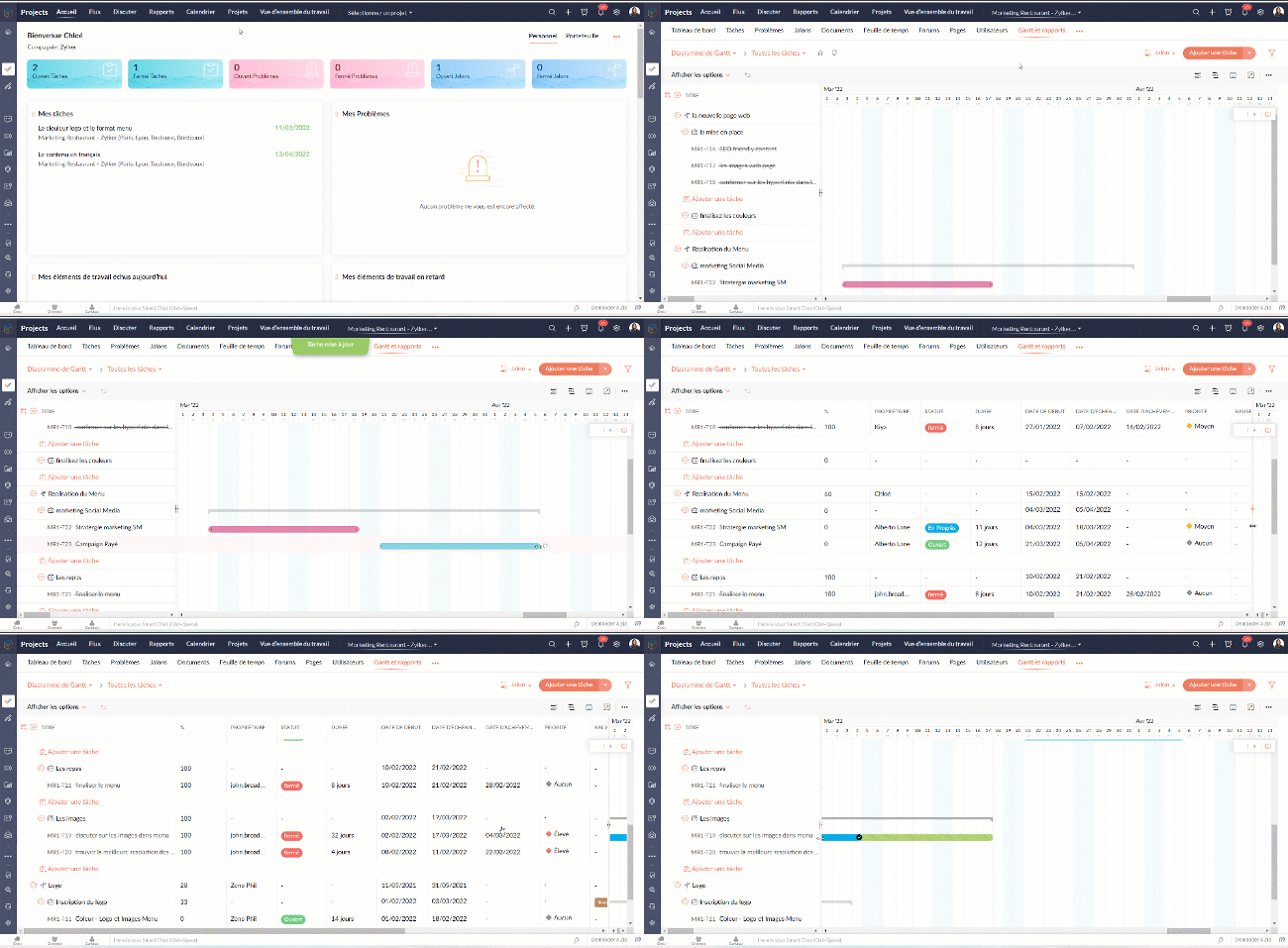
- Définissez la dépendance entre les tâches.

- Sur l'axe vertical, les jours fériés sont affichés en rouge et les week-ends en bleu.
- Pour accéder au jalon de Gantt à travers les projets, naviguez vers Accueil >> Rapports >> Jalon de Gantt. Dans cette section, vous pouvez consulter les jalons de Gantts pour tous les projets de votre entreprise. Si vous souhaitez afficher les résultats d'un projet spécifique ou d'un ensemble spécifique de projets, cliquez dans le coin en haut à droite pour filtrer les données en fonction du projet.
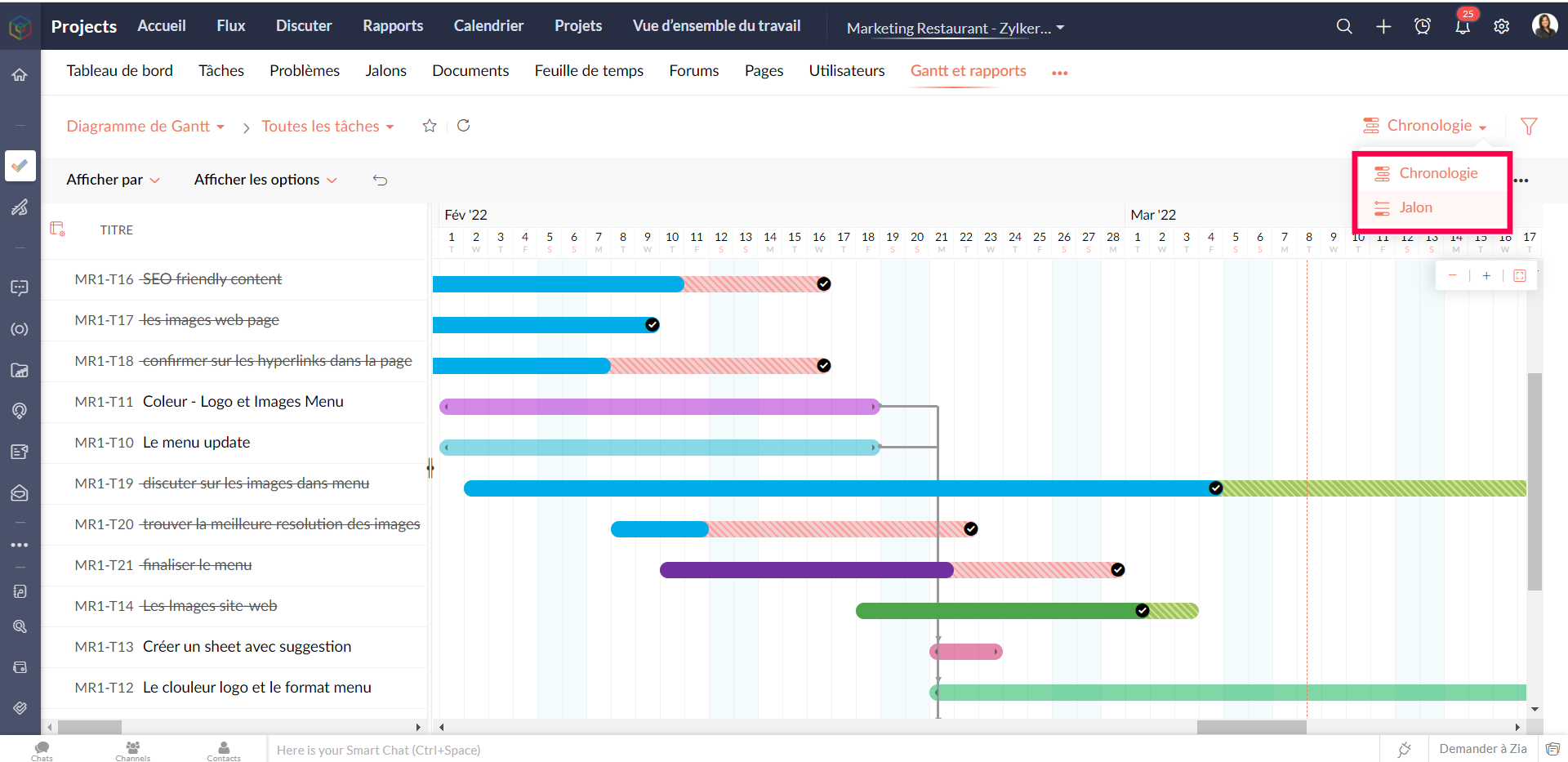
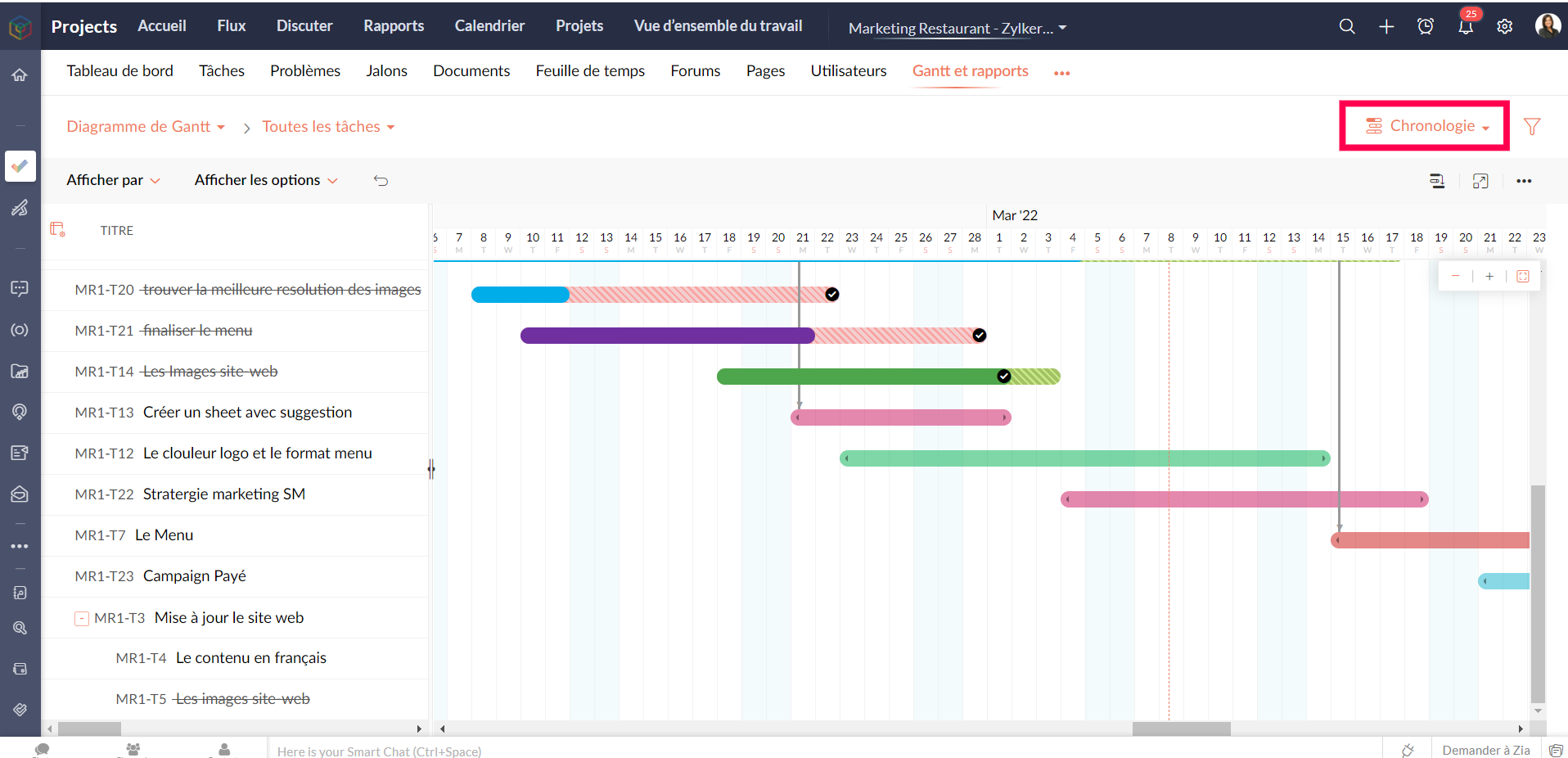
Gantt chronologique : Les barres de Gantt sont affichées en fonction de l'ordre de la date de début dans le projet. Les tâches et sous-tâches sont représentées par des barres de Gantt horizontales dans des couleurs différentes.
Personnaliser le diagramme de Gantt
Vous pouvez personnaliser les colonnes de Gantt depuis le bouton "Personnaliser colonne". Vous pouvez réorganiser l'ordre des colonnes ou même activer ou désactiver les champs à partir de ce bouton.

Pour personnaliser la couleur de la barre des tâches, survolez une barre de tâches, cliquez sur l'icône de personnalisation des couleurs et sélectionnez la couleur. La couleur de la barre est modifiée.
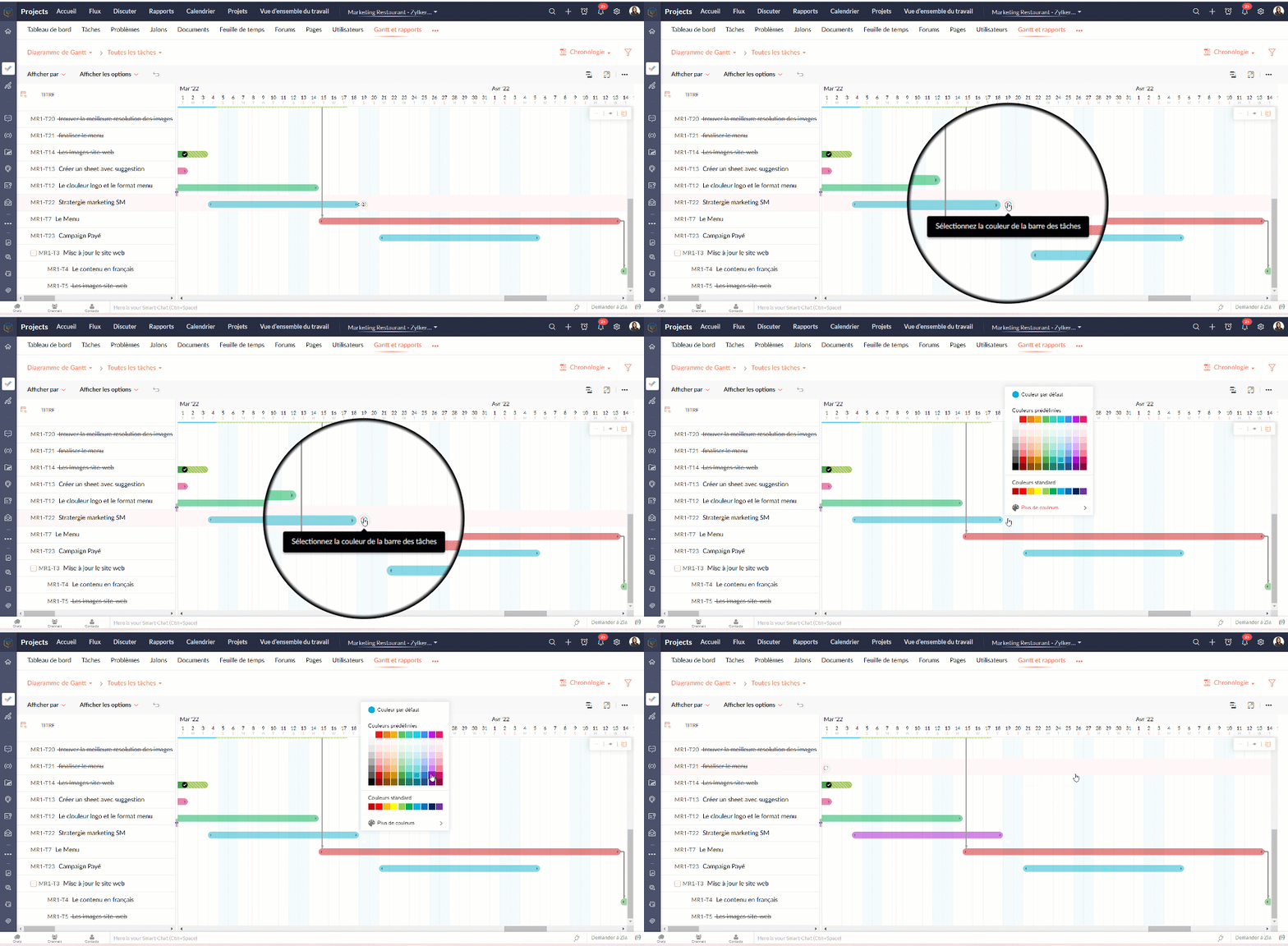
Tableau d'utilisation des ressources
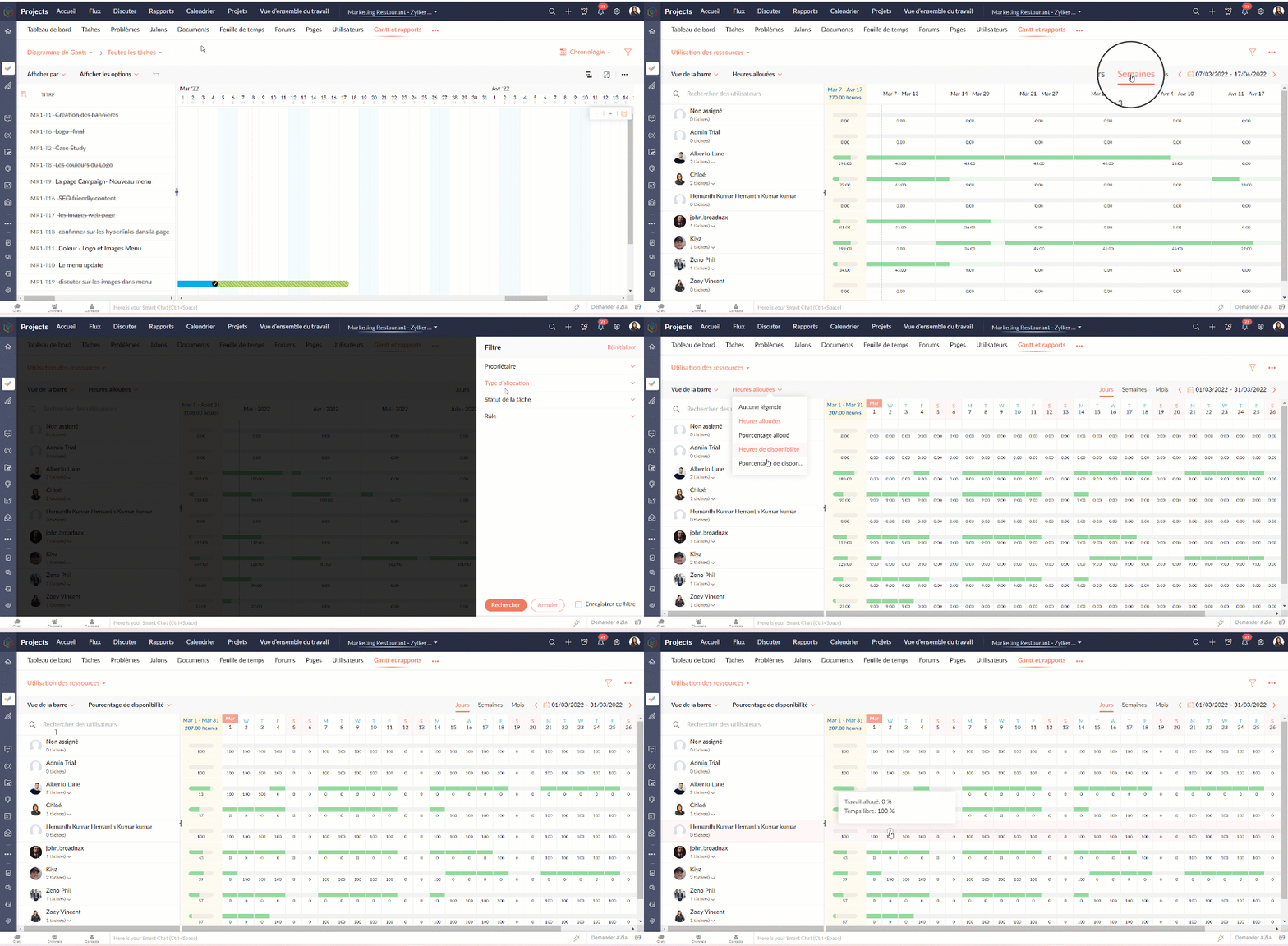
Le graphique d'utilisation des ressources montre visuellement le travail réparti en heures et en pourcentage. Le temps d'inactivité est reflété. Lorsqu'une ressource est surchargée, vous pouvez la reprogrammer soit vers une autre ressource, soit vers un autre jour avec des heures de travail disponibles. Vous pouvez ajouter directement des tâches sur le graphique pour tout usager sélectionné.
Attribuer les tâches à partir du tableau d’utilisation des ressources
- Allez dans "Rapports"
- Sélectionnez "Utilisation des ressources" dans la liste déroulante du graphique.
- Cliquez sur la barre de planification des tâches dans le graphique pour ouvrir la fenêtre pop-up "Attribuer un utilisateur".
- Sélectionnez les heures de travail standards ou flexibles dans la fenêtre pop-up "Attribuer un utilisateur".
- Remplissez les détails demandés.
- Cliquez sur "Soumettre" pour mettre à jour le propriétaire de la tâche.
Heures planifiées vs. réelles pour les tâches
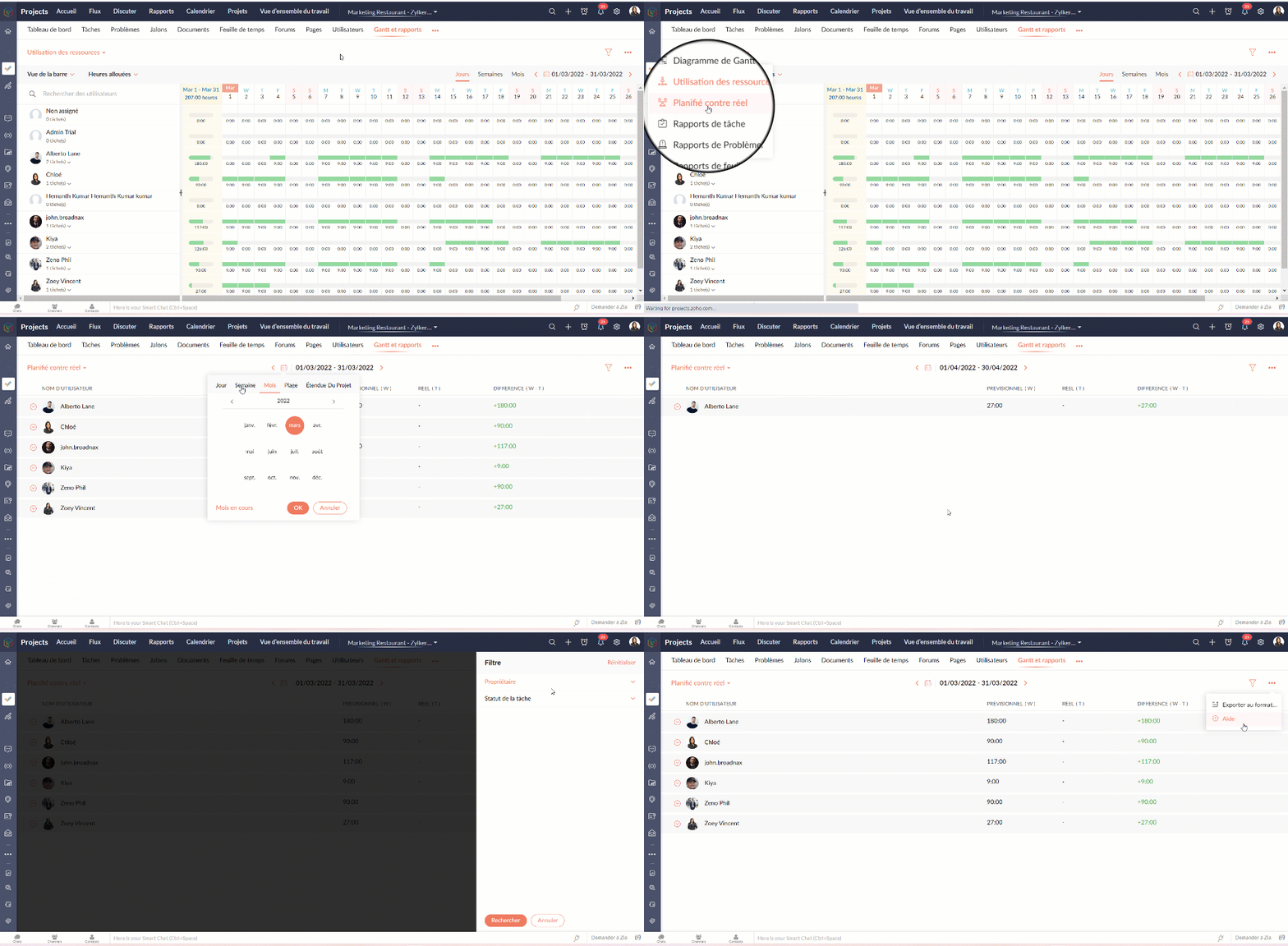
Planifié vs Réel est une fonctionnalité qui indique la progression du travail de l'utilisateur en fonction de la différence entre ses heures planifiées et ses heures réelles. Vous pouvez visionner à la fois le total des heures planifiées d'un utilisateur et les heures réelles passées par l'utilisateur dans un projet. La différence entre les heures planifiées et les heures réelles indique la progression de l'utilisateur du projet.
Rapports de tâche
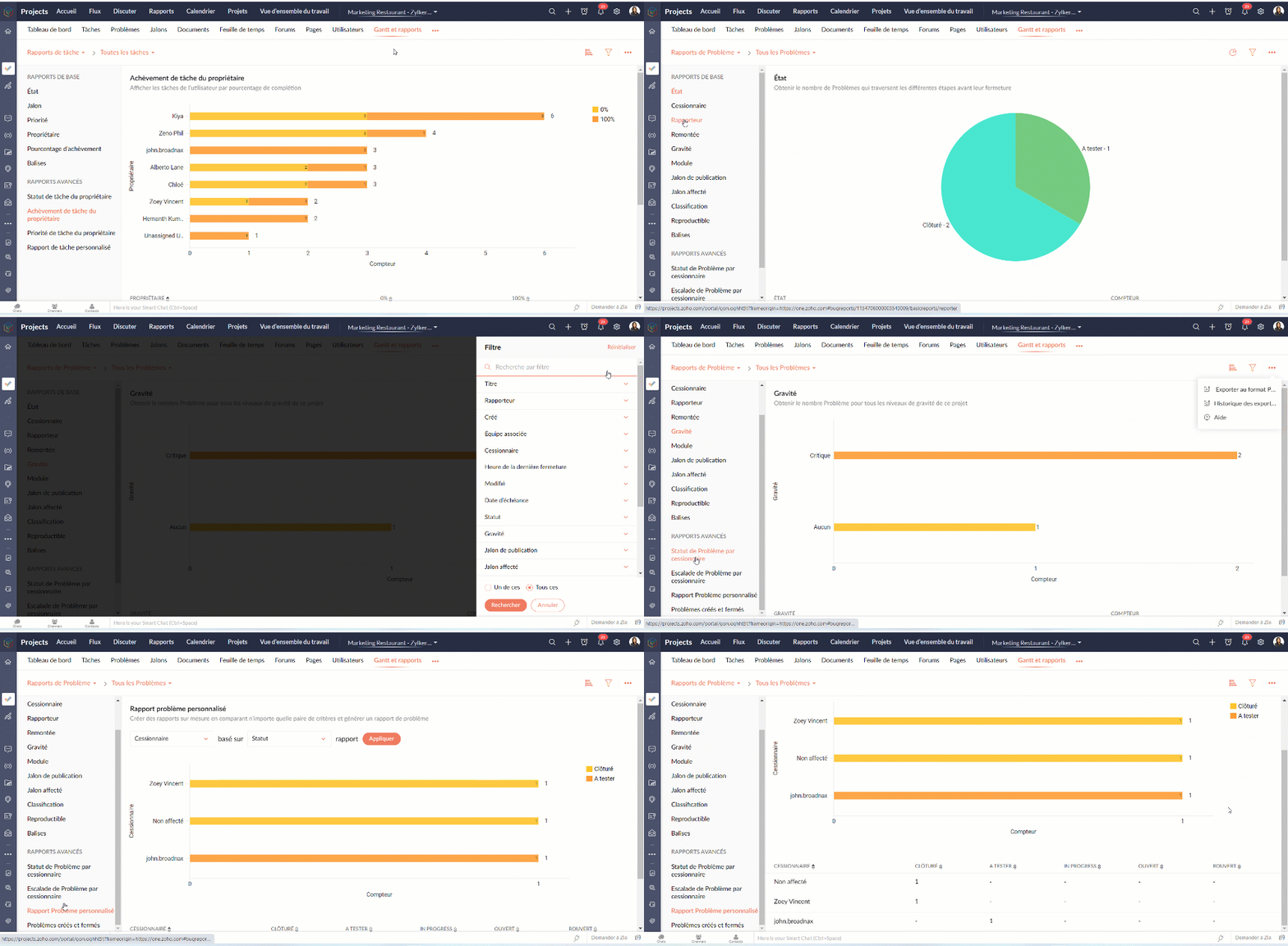
La vue des rapports de tâches fournit une vue consolidée de toutes les tâches d'un projet en fonction de leur statut, de leur jalon, de leur priorité, de leur propriétaire et de leur pourcentage d'achèvement.
Avantages
- Obtenir le nombre de tâches en fonction du pourcentage d'achèvement.
- Visualiser les tâches de chaque utilisateur en fonction du pourcentage d'achèvement.
- Créer des rapports sur mesure en comparant deux critères et en générant un rapport sur les tâches.
Types de rapports de tâches
Les rapports de base
Les rapports de base vous donnent le nombre de tâches par rapport à cinq critères différents : statut, priorité, balises, propriétaire, ou pourcentage de réalisation.
- Statut - Rapport généré pour afficher le nombre de tâches basé sur le statut des tâches.
- Propriétaire - Rapport généré pour afficher le nombre de tâches en fonction du propriétaire.
- Priorité - Rapport généré pour afficher le nombre de tâches en fonction de la priorité des tâches.
- Pourcentage de réalisation - Rapport généré pour afficher le nombre de tâches en fonction du pourcentage d'achèvement des tâches.
- Balises - Rapport généré pour afficher le nombre de tâches en fonction des balises.
- Projet - Rapport généré pour afficher le nombre de tâches dans chaque projet.
Les rapports avancés
Les rapports avancés vous donnent le nombre de tâches par propriétaire selon le statut, la priorité ou la réalisation. Vous pouvez également créer des rapports de tâches personnalisés basés sur différents critères.
- Owner-wise Task Status - Rapport généré pour afficher le nombre de tâches en fonction du statut défini par le propriétaire.
- Achèvement des tâches par le propriétaire - Rapport généré pour afficher le nombre de tâches en fonction du pourcentage d'achèvement défini par le propriétaire.
- Priorité de la tâche par le propriétaire - Rapport généré pour afficher le nombre de tâches en fonction de la priorité définie par le propriétaire.
- Rapport de tâche personnalisé - Rapport généré pour visualiser le nombre de tâches en comparant deux critères quelconques.
Vous pouvez changer le type de graphique à partir de la liste déroulante dans le coin supérieur droit. Cliquez pour personnaliser vos critères de filtrage et obtenir les résultats en conséquence.

Rapports sur les problèmes
Les rapports sur les problèmes donnent un aperçu détaillé de l'état des problèmes. Les problèmes peuvent être analysés en fonction de nombreux paramètres.
Rapports de base
Les rapports de base montrent l'état des problèmes en utilisant les paramètres les plus courants tels que le statut, la gravité, la balise, le rapporteur, renvoi à l'échelon supérieur, etc
Rapports avancés
Les rapports avancés répondent à des questions telles que "Combien de problèmes un propriétaire a-t-il à chaque étape ?" ou "Combien de problèmes ont été remontés et à quel niveau ?".
Rapports sur les feuilles de temps
Les rapports sur les feuilles de temps vous aident à suivre les heures enregistrées pour les tâches et les problèmes. Les rapports avancés montrent les heures approuvées, rejetées et en attente pour chaque utilisateur. Le rapport sur les feuilles de temps facturables et non facturables montre, bien entendu, combien d'heures sont facturables et non facturables par utilisateur.
Nous continuerons d'en découvrir dans nos prochains articles. En attendant, n'hésitez pas à poser vos questions en commentaire.
L'équipe Zoho France
Access your files securely from anywhere
Centralize Knowledge. Transform Learning.
All-in-one knowledge management and training platform for your employees and customers.
New to Zoho Recruit?

Zoho Developer Community
New to Zoho LandingPage?
Zoho LandingPage Resources
New to Zoho Survey?
New to Zoho CRM Plus?
Deliver unforgettable customer experiences
New to Zoho CRM Plus?
Deliver unforgettable customer experiences
New to Zoho Marketing Plus?
Everything you need to run your marketing
New to Zoho Marketing Plus?
Everything you need to run your marketing
New to Bigin?





Topic Participants
Kinjal Lodaya
Sticky Posts
Collaboration sans faille avec Zoho One
Bonjour à tous, Dans cet article nous allons voir comment Zoho One permet une collaboration à différents niveaux . La façon dont nous travaillons évolue. À mesure que les entreprises se mondialisent, la plupart des activités sont menées en équipe.
New to Zoho TeamInbox?
Zoho TeamInbox Resources
Zoho CRM Plus Resources
Zoho Books Resources
Zoho Subscriptions Resources
Zoho Projects Resources
Zoho Sprints Resources
Qntrl Resources
Zoho Creator Resources
Zoho CRM Resources
Design. Discuss. Deliver.
Zoho Show Resources

Get Started. Write Away!
Writer is a powerful online word processor, designed for collaborative work.
Zoho CRM コンテンツ
-
オンラインヘルプ
-
Webセミナー
-
機能活用動画
-
よくある質問
-
Ebook
-
-
Zoho Campaigns
- Zoho サービスのWebセミナー
その他のサービス コンテンツ
Nederlandse Hulpbronnen

ご検討中の方
Recent Topics
Zoho Delayed Posting & Loss of Article Thumbnails on BlueSky
Hello! I am wondering if anyone else has had the either of the following issues when posting to socials via Zoho and if there is a fix? 1. Post says it is scheduled or it is live when sent off via Zoho but it doesn't show up on socials till some timeConnection Not Secure (Certificate Mismatch) Error
Hi, Just a fyi, when you go to https://bigin.zohocloud.ca/bigin/Home you get a "Your Connection Is Not private" error. (Certificate mismatch to domain.) I get to that page after I have signed up and signed in as a customer and select the Access BiginUnable to create new finance account in Zoho Books Android app due to missing account number field.
Free plan I have enabled a setting via the website requiring unique account codes to be specified for all accounts. When using the android app, go to expenses, new expense, select account, new account. Promoted to enter the Account name and description.Recording the Investment
Hello, - One Investor Invested to our company, So how do we record investment which we received in our bank in the Zoho books ? - How do we record if we provide shares to the investor in the Zoho books? ThanksClient and Vendor portal at the same time
We have companies that serve both as clients and vendors and they are linked. However, we have a problem giving them access to the vendor/client portal. If they accept the invitation from the client portal, when we try to invite them to the vendor portalIntegrate Multiple ZohoBooks organization with zoho projects
We have successfully connected our Zoho Books with Zoho Projects for synronizing timesheet data. Our Business specialty is, that the staff of the Main company (A) is working on several projects, but the Clients are sometimes contracted and paying to aWays to calculate the difference form two years or months
Hi to everyone I have this request: I need to show the difference or variation from two periods (years or months) whether using a Pivot View or a graph, in this is case is better in a Pivot view. In the pivot view I will have the amount or results fromCareer site URL - Suggestion to modify URL of non-english job posting
Hi, I would like to suggest making a few modification to career sites that are not in english. Currently, the URL are a mix of different languages and are very long. It makes for very unprofessional looking URLs... Here is an example of one of our URLIntroducing Contract Settings & Backdated Contracts in Zoho Contracts
We are rolling out updates that give you more control over how contracts are created and managed in Zoho Contracts. From defining default workflows with Contract Settings to aligning agreements with real timelines using Backdated Contracts, these enhancementsCelebrating our customers on International Client's Day
Hi everyone, Every customer is part of our Zoho Desk family, and we wouldn’t want to miss celebrating you on this special day. This International Client's Day, we’d like to take a moment to appreciate every customer who has helped us grow and build meaningfulFaster Ticket Response with use of Snippets in comments
Hello everyone, Responding to tickets often involves repeating the same messages, whether it is sharing updates with customers or leaving notes for internal collaboration. To make this easier and more consistent, we are allowing agents to use snippetsImproving Zoho Creator's email deliverability
Hi all, We're pleased to announce updates to email handling in Zoho Creator to improve the deliverability of the emails sent from the Creator platform. These updates have been designed keeping in mind the fact that emails from domains with strong senderWhat's New in Zoho Billing | February 2026
February brings a powerful set of updates to Zoho Billing, from smarter subscription management and flexible payment options to better reporting and more control over your hosted pages. Here's everything that's new this February. Create SubscriptionsReassign Partially Saved Entries
Hi, I would like to be able to go to Partially Saved Entries and like the option to delete them I would like the option to multi-select and be able to reassign them to another user to complete (Such as when a user has left the company). Thanks DanCan we rely on order of returned ids when inserting multiple records?
Hello! API https://www.zoho.com/crm/developer/docs/api/v8/insert-records.html does not mention that the response array will match the input array*, keeping this important information implicit and someone might have doubts to rely on it. (*the responseDisplaying only unread tickets in ticket view
Hello, I was wondering if someone might be able to help me with this one. We use filters to display our ticket list, typically using a saved filter which displays the tickets which are overdue or due today. What I'd really like is another filter thatWhat is a realistic turnaround time for account review for ZeptoMail?
On signing up it said 2-3 business days. I am on business-day 6 and have had zero contact of any kind. No follow-up questions, no approval or decline. Attempts to "leave a message" or use the "Contact Us" form have just vanished without a trace. It stillZoho Books: tax is not automatically pulled from product-data anymore - why?
Hi, until a short time ago, you could set a default taxrate for each product/item. This taxrate automatically appeared each time the item was chosen in an invoice or quote. Why does this not work anymore? The field is still there at the product record,Issue creating a YTD report with last years numbers
I am looking to create a widget to compare the YTD leads we have in 2023 to the YTD leads we had in 2022. I'm having issues with the aggregate formula creation to gain access to the 2022 Leads YTD data point. Feeling like this is a common view of dataBrand Studio Projects in Analytics
Hi All, Currently pulling my hair out over trying to link together some social media posts for a reporting dashboard in Analytics, so I thought I'd see if anyone on here had a solution. Our Marketing Team created a LinkedIn campaign in Zoho Brand Studio,Manage Testing Process in Zoho Sprints
Agile framework supports a robust quality assurance system that incorporates continuous testing throughout the development lifecycle of the product. The agile testing team focuses on planning the testing around the development, identifying defects earlyAnnouncing the Zohotshots of the ZDC Hackathon 2025
Hey everyone, The wait is finally over! After weeks of building, experimenting, and pushing creative boundaries, we’re excited to announce the winners of the second edition of the ZDC Hackathon. This edition brought together an incredible community ofZOHO CRM Button Integration
Hi Team, I’m currently working with Zoho CRM along with a custom application where I fetch deal details from the CRM and use them based on my requirements for each deal. Now, I want to enhance this setup. I plan to create a button on the Deal Detail pageMajor journey crash and not loading. Zoho Marketing Automation
Hi all. Last night (19MAR, 2026) Marketing Automation for a specific journey completely crashed, and since the crash the specific journey has failed to load at all (blank journey canvas, no journey appears, no menu accessible) but other separate journey'sSubtotals per Header
Hey, we would like to display subtotals per header in our invoices:Candidate Assessments, no workflows.
I have an issue where I would like to trigger a workflow based on a candidate assessment being completed. Sometimes a returning candidate will complete a second assessment, on completion the status of the candidate will be updated to "Unqualified" ifMail Merge in Zoho Desk
Hello Team, Do we have an option of mail merge within Zoho Desk like we have in Zoho CRM? We have a requirement to generate some pdf file in the form of mail merge doc from the ticket.Workdrive backup and default storage selection
Hi community, I have been informed by Zoho that workdrive will be the default storage mechanism for crm and projects. These 2 Apps seem to have different design on how they interact with workdrive for storage. 1. Crm: seems to have files saves at theZoho vault filling in a form it's not supposed to fill in
Hey there, I have a problem with ZOHO Vault autofill. In a software package, we have these options: For some reason zoho vault always replaces what's in the top option and fills a 2fa password in there, and then saves that value.. Meaning whatever wasZoho Booking Integration with Desk
Just wanting to share something in case it helps someone else who may run into a similar use case as we did. Issue: Currently, the Zoho Booking integration with desk will drop a comment into the ticket when a customer books a time, however it won't changeLet us view and export the full price books data from CRM
I quote out of CRM, some of my clients have specialised pricing for specific products - therefore we use Price Books to manage these special prices. I can only see the breakdown of the products listed in the price book and the specialised pricing forSyncing calendar with Google Calendar doesn't work when events are sent to auto repeat
Hi... The ZOHO CRM -- GOOGLE CALENDAR sync is broken. If I create a single event on either side, sync works, but if I create an event with auto repeat on either side it doesn't work. Furthermore, events created before the sync don't show up in the calendar.Organization wide Account and Contacts Visibility/Sharing Capabilities?
Has anyone figured out a way to make visibility or sharing of Accounts and Contacts to be available across the entire organization without having to have every individual user edit their Sharing permissions? For our sales folks they need to be able toNotification of Interaction Assignment
If a user is assigned an interaction, they should be notified via email. These are almost useless because if I assign an interaction for someone to respond to, they dont know that I assigned it to them without me telling them or them logging in and discoveringCountries List Global Set- Complete with Phone Country Code and Continent.
Dear Zoho Team I saw your recent addition to the Global Sets regarding the Countries list and states. While working on it, why didn't you also add things like Continent and Phone Country Code? Also, some ISO codes from some Countries/regions are misCustom Display Field for Lookup Dropdowns in Zoho CRM
Could Zoho CRM support changing the display field in lookup dropdowns, like Zoho Creator does? This would make it much easier to select the right record by showing a more useful field instead of only the default one. It would improve speed, clarity, andMessage as bot
I would like to be able to send a Cliq message truly as a bot. the current implementation of this function, while it sends the message as a bot it sends that message inside a chat from the user how authenticated the flow cliq connection instead of directlyA2P 10DLC Opt-in Rejection Issue with Zoho Creator Public Form
Hi everyone, I’m working on an A2P 10DLC SMS campaign and running into repeated rejections due to opt-in issues. I’m using Zoho Creator for the registration flow. The form is public (no login required). Users enter their phone number and there is an uncheckedTrouble with using Apostrophe in Name of Customers and Vendors
We have had an ongoing issue with how the system recognizes an apostrophe in the name of customers and vendors. The search will not return any results for a name that includes the mark; ie one of our vendors names is "L'Heritage" and when entering theBooks <-> CRM synchronisation with custom Fields
Hello, We are synchronising Books Customers with CRM Accounts. In CRM Accounts I set up last year a "segments" multiselect field shown below In Books, I set up a custom multi-select field with the same value as in the CRM And set up the synchronisation inside Books. Want to synchronise the Books Segments with the CRM Segments, but the later doesn't exist, and another non-existing is there ?! First, I don't understand where the field Segmentation is coming from. Second, I set CRM Segmentation to syncNext Page