Announcing DataPrep 2.0 Beta!

Being data-driven is an important end goal for all organizations, because when businesses can manage, analyze, and make actionable decisions based on data, they have a competitive advantage.
With that said, how confident are you in making business decisions based on your business data? How clean is your CRM data? Or how much time is spent on manual data cleansing and preparation?
To help you solve these problems, we're pleased to announce the release of the DataPrep 2.0 public beta! With this new version, it's now even easier to build an end-to-end pipeline and have complete control over the quality and movement of your data.
What's new in 2.0?

Visual pipeline builder
The all-new pipeline canvas lets you design a seamless end-to-end data flow. Earlier, you were limited to working with a single dataset at a time—but now data can be fetched from multiple sources, more than one dataset can be prepared and used simultaneously, and the data can be exported to multiple destinations. This helps businesses visualize data flows better, simplify complex workflows, and work with data with more confidence.
Unified scheduling of end-to-end pipelines
A massive upgrade has been made to our scheduling feature. In DataPrep 1.0, the sources and destinations had separate schedules which had to be manually managed by staggering the schedule timing, which was hard. But with 2.0, the scheduling can now be set up at the pipeline level. A single unified schedule can be used to manage imports, processing, and exports for all sources and destinations within the pipeline.
Monitor jobs with ease
With automated pipelines, data transfer happens around the clock. Sometimes, there can be issues with fetching data, and the data transfer can fail. But with jobs, you can easily monitor failed jobs with granular details and identify the points of failure. This ensures your organization doesn't miss out on any valuable data.
Comprehensive version history
Maintain a complete audit trail with version history. Working with data can be challenging; but with the help of this feature, you can easily track changes and run experiments to get more out of your data. Not happy with your experimental changes to data? Easily switch back to the previously published version with the click of a button.
Backfill your data effortlessly
There can be outages in the data pipeline, this can be due to source or destination failure, changes in the data or model requiring changes in the preparation steps, and can take a while to be restored. However there is no easy way to catch up on processing the data during the outage, to solve this we are now introducing the Backfill feature. The backfill feature can be used to fetch data and simulate a scheduled process for a selected period of time. For example, if there was an outage of 2 days on a pipeline that was setup to run every hour. With backfill, you can now create a configuration to process all that data by simulating the schedule process for the missed two days, this will create 48 new jobs that will run in sequence and process the missed data for two days.
Efficient row processing with incremental fetch
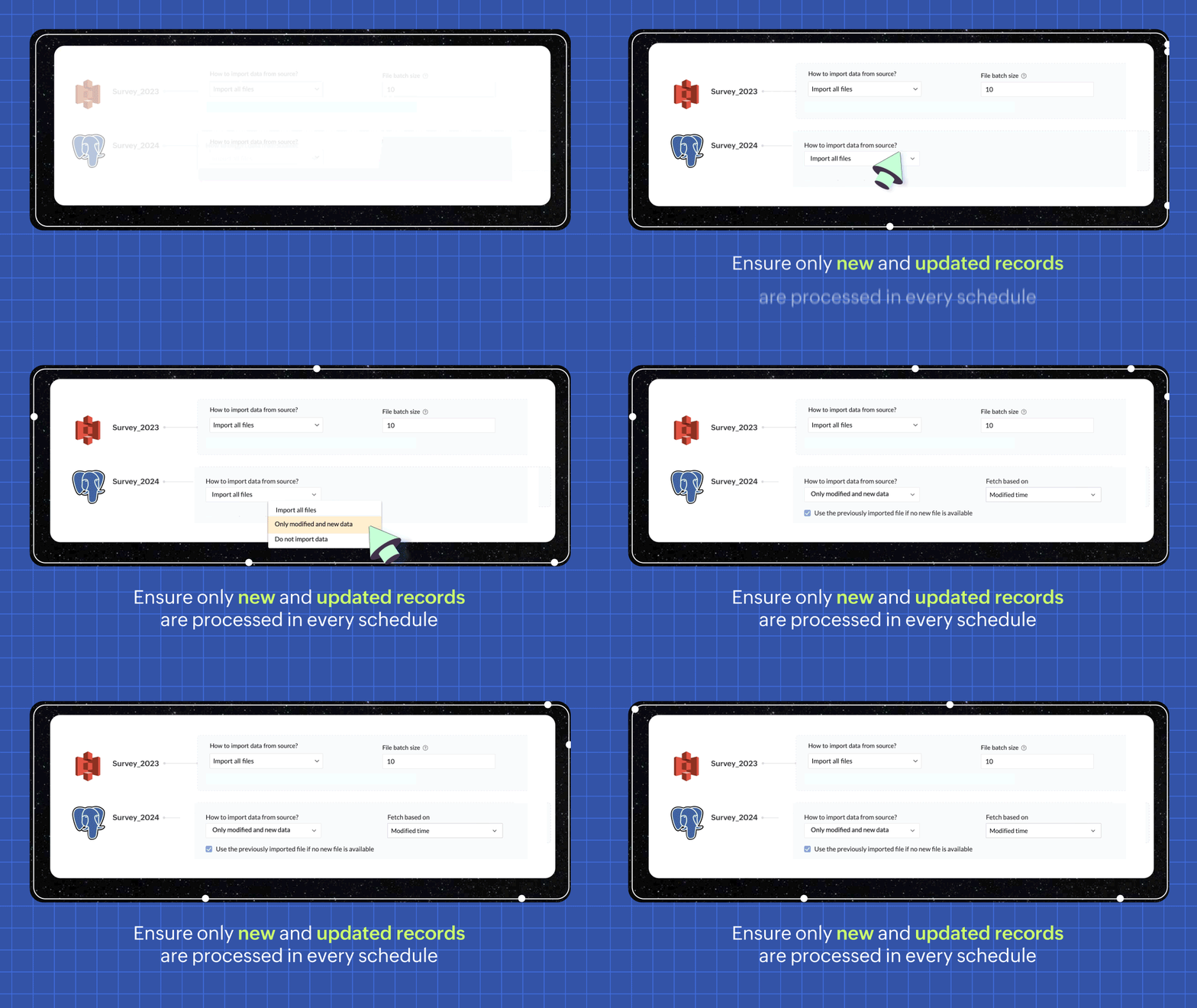
In every scheduled run, choosing the incremental fetch option fetches only the new and updated data from the source for processing. This was available for few sources in 1.0, but we're expanding the support to all data sources in 2.0. Incremental fetch job runs faster, compared to full fetch as only the newly added rows are processed, also making it more cost effective.
Transforms made simple with OpenAI
Our new transforms, powered by OpenAI, help generate complex formulas based on logic written in simple English or transform data based on the sample output given. This simplifies the data preparation process and makes Zoho DataPrep more accessible, even for organizations that don't have a dedicated data analyst team.

Create instant pipelines with templates
We built DataPrep with a vision of helping businesses, big or small, have better access to all their business data—but we understand that the data game can be tricky when you're starting out.
To keep our vision alive and to help everyone start using their business data better, we've built a template gallery based on various business use cases that can easily be used to create a pipeline architecture. Just click on the template to add the formula instantly and transforms needed for the data workflow.
You can also save your own data pipelines as templates to make recreating pipelines easier or to apply the data pipeline over a different set of data. You can also share the data pipelines with your organisation or export them as files to share across different organisations.

New dashboard showcasing your pipeline status
Our new and improved dashboard shows the status of all your pipelines instantly. Easily monitor your scheduled runs, identify failed jobs, and ensure your data is up-to-date in your system.

Make data movement easier with other business applications
We are expanding the list of data connectors supported in Zoho DataPrep and as a start we have released the Zoho Creator integration.

Migrating data into Zoho Creator, as well as seamlessly moving data between various modules within your custom Creator app, has been made easy with DataPrep.
As more organizations are adopting SaaS products in their tech stack, in order to make data more available, we're opening up integrations with HubSpot, Salesforce, and SurveyMonkey, as well as many more Zoho products, in the next couple of months. Stay tuned for more data connectors in Zoho DataPrep!
Can't wait to try DataPrep 2.0?
All our existing customers can access the Beta version right from within their DataPrep home page. The Beta is not available for Zoho One users yet, but if you want to try out the Beta on a standalone account, contact us at customersuccess@zohodataprep.com
Zoho DataPrep is designed to make data preparation and movement easy. With DataPrep 2.0, we have completely revamped our product with the new pipeline builder, unified schedules, pipeline templates and universal incremental fetch that lets you easily manage complex data preparation jobs and data movement. We've also included 50+ other updates to help you clean, prepare, and monitor your business data effortlessly.
Check out all updates in 2.0
Check out all updates in 2.0
Access your files securely from anywhere
Centralize Knowledge. Transform Learning.
All-in-one knowledge management and training platform for your employees and customers.
New to Zoho Recruit?

Zoho Developer Community
New to Zoho LandingPage?
Zoho LandingPage Resources
New to Zoho Survey?
New to Zoho CRM Plus?
Deliver unforgettable customer experiences
New to Zoho CRM Plus?
Deliver unforgettable customer experiences
New to Zoho Marketing Plus?
Everything you need to run your marketing
New to Zoho Marketing Plus?
Everything you need to run your marketing
New to Bigin?





Topic Participants
Viswanath Subramani SS
Ben Norman
SaaSguru
Sticky Posts
Announcement: Zoho DataPrep to Deprecate Password-Only Authentication for Snowflake Connections on July 31, 2025
As part of our ongoing commitment to security and in alignment with Snowflake's pledge to the Cybersecurity and Infrastructure Security Agency (CISA) Secure by Design initiative, Zoho DataPrep will no longer support single-factor password authentication.Announcement: Zoho DataPrep 1.0 will be deprecated on April 15, 2026
We'd like to inform you that the Zoho DataPrep 1.0 version will be officially deprecated as of April 15, 2026. This aligns with our efforts to streamline and improve your overall experience with Zoho DataPrep 2.0 which was released in Sep 2024 . To ensureAnnouncement: Migrate your workspaces to Zoho DataPrep 2.0
Zoho DataPrep 2.0 was recently launched with exciting new updates to the platform. You can read more about the new updates in the previous announcement. To take full advantage of the new data pipeline features, migrate your existing workspaces from theAnnouncing Zoho DataPrep 2.0: An AI-Powered Data Management Platform
Originally launched in 2021, Zoho DataPrep started as an efficient self-service data preparation solution. We are excited to launch our new version 2.0, with significant enhancements to our platform to help you manage your end-to-end data needs with theAnnouncing DataPrep 2.0 Beta!
Being data-driven is an important end goal for all organizations, because when businesses can manage, analyze, and make actionable decisions based on data, they have a competitive advantage. With that said, how confident are you in making business decisions
New to Zoho TeamInbox?
Zoho TeamInbox Resources
Zoho CRM Plus Resources
Zoho Books Resources
Zoho Subscriptions Resources
Zoho Projects Resources
Zoho Sprints Resources
Qntrl Resources
Zoho Creator Resources
Zoho CRM Resources
Design. Discuss. Deliver.
Zoho Show Resources

Get Started. Write Away!
Writer is a powerful online word processor, designed for collaborative work.
Zoho CRM コンテンツ
-
オンラインヘルプ
-
Webセミナー
-
機能活用動画
-
よくある質問
-
Ebook
-
-
Zoho Campaigns
- Zoho サービスのWebセミナー
その他のサービス コンテンツ
Nederlandse Hulpbronnen

ご検討中の方
Recent Topics
Does Zoho Learn integrate with Zoho Connect,People,Workdrive,Project,Desk?
Can we propose Zoho LEarn as a centralised Knowledge Portal tool that can get synched with the other Zoho products and serve as a central Knowledge repository?Marketer's Space - Going beyond basics: Smarter ecommerce marketing with Zoho Campaigns
Hello Marketers, Welcome back to this week's Marketer's Space. In the last post, we discussed the basics of email marketing and how to get started with email marketing in ecommerce. In this part, we'll dive much deeper into some other advanced featuresConnecting two modules - phone number
Hi, I’d like some guidance on setting up an automation in Zoho CRM that links records between the Leads module and a custom module called Customer_Records whenever the phone numbers match. Here’s what I’m trying to achieve: When a new Lead is createdZoho Marketing Automation 2.0 - Landing Page function not working
Dear Zoho Team, I am working on implementing Zoho Marketing Automation 2.0, and am now looking into the section "Lead Generation". If I open the "Landing Pages" section, I immediately get an Error code: Error: internal error occurred. Can you help meUnable to use Sign "You have entereed some invalid characters"
Unable to use Sign "You have entered some invalid characters" I do not see any invalid characters. The text in "Leave a Note" is plain text which I entered directly into the field. See attached screenshotcannot login from outlook on mobile
Hi there, I tried to set up my email accounts on my iphone using outlook, but it always return email address and password error. Please find the attachment for the screenshot. I am pretty sure that I typed in the correct email address and password and the imap has been enabled from zoho admin account. I can configure the email address on iphone default mail service as well as outlook on pc, the problem only occurs on the outlook app on mobile. I do need to use this app instead of the iphone defaultElevate your CX delivery using CommandCenter 2.0: Simplified builder; seamless orchestration
Most businesses want to create memorable customer experiences—but they often find it hard to keep them smooth, especially as they grow. To achieve a state of flow across their processes, teams often stitch together a series of automations using WorkflowMessages not displayed from personal LinkedIn profile
Hello. I connected both our company profile and my personal profile to Zoho social. I do see all messages from our company page but none from my private page. not even the profile is being added on top to to switch between company or private profile,"Performed changes in the query is not allowed due to following reason" when adding columns or reordering data
I'm trying to make changes to a query but every time i try to save it i get this error message. I'm not touching the data it's flagging. All I've tried to do is reorder a couple of fields and add a new one. Why won't it let me do this? It's a core queryOnboard new users easily with native screen recording in Zoho Projects Plus
Communication involving both visual and audio elements tends to capture more interest among the audience. Whenever we onboard new employees to the organization, the task of engaging them in the induction sessions, and keeping the spark going in theirRequest to Add Support for PDF Templates and More Flexibility in Email Editor
Hi Zoho Campaigns Team, I hope you're doing well. I wanted to share some feedback and request a few improvements in the Email Template feature of Zoho Campaigns. Right now, we can create email templates using the HTML editor, which is helpful. But we’reCan you stop Custom View Cadences from un-enrolling leads?
I'm testing Cadences for lead nurture. I have set un-enroll properties to trigger on email bounce/unsubscribe, and do NOT have a view criteria un-enroll trigger. However, help documents say that emails are automatically un-enrolled from a Cadence whenZoho Desk Android and iOS app update: Agent detail overview
Hello everyone! We’ve introduced agent detail overview on the Zoho Desk Android and iOS app update. With this feature, you can get a complete view of agent’s tickets, response times, logged hours (for both tickets and activities), customer happiness ratingsBlog Widget: Show recent blog posts on my homepage
Hey there I am using the Zoho Sites Blog feature. On my homepage, on the bottom I'd like to have a featured content section where I show some of my blog posts (selected, most recent, filtered by category and so on...). It would be nice to have a blogHow to iterate through excel data using zoho rpa
I wanted to iterate or loop through excel data ( datatable). How can i do thatZoho Commerce
Hi, I have zoho one and use Zoho Books. I am very interested in Zoho Commerce , especially with how all is integrated but have a question. I do not want my store to show prices for customers that are not log in. Is there a way to hide the prices if notMass (Pull back) (Close WOs) (Close APs)
Hi develop team. Just idea because Zoho FSM is great but its too manual. we have a lot of task to do every day and the system needs to have more features to automatic our tasks. I need to close several WOs, APs and Pull Back per day. Please we need massCustomising Zohidesk portal default widgets
Hello, I'm wondering how could I customise the default widgets such as "popular topics", "popular articles" using CSS or to make the tiles at the bottom match the ones that I made in the picture attached. I have made some custom widgets and edited themIf there’s a batch at the end, the ‘mark as inactive’ function doesn’t work.
when my batch has a date to batch end and I "mark as inactive" he batch does not obey the status and reactivates the batch.Seamless multilingual messaging and tone control in Zia IM Composer
Hello everyone! Managing customer conversations across multiple languages can be time-consuming. Using Zia in the Instant Messaging (IM) Composer helps you overcome this by providing tools to translate content, adjust your tone, and refine your messagesAdvanced Deluge help needed with custom function and COQL limits
I have a scheduled function that takes a snapshot of specific metrics and saves them to a custom module. However I'm struggling with the limits of COQL. I attach my full code, but an example of the issues I'm having is that it's erroring with a 'LimitTip of the Week - Conditional Formatting Chart
Conditional formatting allows you to highlight your data series based on a pattern or a trend in your data. This makes it easy for you to identify when your data reaches certain values or when it deviates from the trend. Zoho Analytics allows you toZoho Campaign says "null"
Here is what I did: 1. Created a list in CRM, made a form to fill information in the list. - This is working fine. 2. Created a flow to connect CRM (chose a the list) and want to add an event in Google Calendar. (Calendar is connected). Problem 1 - WhenZoho Learn - AI Translate
Hi Learn team, I had a situation today where I was providing training to a client team and I had written articles into their Zoho Learn to support their learning. I realised that one of the team members was a non-native English speaker and they were strugglingPower of Automation :: Auto-Sync Custom Date Field Between Related Tasks via Blueprint Transition
Hello Everyone, A custom function is a software code that can be used to automate a process and this allows you to automate a notification, call a webhook, or perform logic immediately after a workflow rule is triggered. This feature helps to automateIntroducing auto-upgrade in Zoho LandingPage
Hi everyone, We’re excited to share an upcoming update to help you get the most out of your landing pages — the auto-upgrade option, launching on October 22, 2025. Your landing pages are designed to bring in leads, and we want to make sure you never missWebhook Authentication Key
As Google Ads' lead form extension does not integrate with Zoho CRM at the moment other than Zapier. I want to use the Zoho Flow webhook feature to send leads to Zoho CRM. Meaning creating a flow in Zoho Flow that triggers based on Webhook and then webhookWorkdrive comment links stopped working.
I have marked a PDF file with 95 comments, they have worked for a while. When i clicked on them they brought me to the correct page and showed me the outline that i had drew on the plans. The comments included the page number of the outline, but now itHow to Bulk-Update Sales Orders in CRM
Hi - I need to bulk update existing sales orders with dates from our ERP of when the sales orders were created. I made a date field on the Sales Order module where I want to insert that data. I can't Mass Update because I am not updating the fields toZoho ToDo in Cliq
Our organization utilizes Zoho ToDo in the Zoho Mail Desktop app. Is there a way for these to show up in Cliq Desktop app as well?【Zoho CRM】サンドボックス機能のアップデート:カスタムビューが利用可能になりました。
ユーザーの皆さま、こんにちは。コミュニティチームの中野です。 今回は「Zoho CRM アップデート情報」の中から、サンドボックス機能のアップデートをご紹介します。 目次 1. カスタムビューとは 2. 今回の機能アップデートについて 1. カスタムビューとは カスタムビューは、ユーザーが設定した条件に基づいてデータをフィルタリング・整理し、 重要な情報へ効率的にアクセスできるようにする機能です。 「過去15日間の見込み客」や「受注間近の商談」、「特定の優先度レベルが設定された案件」など 条件を指定してわずか数クリックで設定できます。Changing an agents email address
How do you change an agent's email address? I keep getting a red circle even though I am an admin. And on one of my agents he has two email addresses? How is that possible?Zoho CRM - Potentials Tab
Hi! When I create a Deal (Potentials tab) the header looks like this: After a refresh on the page it looks like this: What should I do so that it is displayed like in the second pic without refresh? Also I have a user that as of recently, cannot see thisUnable to create embed code for resource of workdrive using API
Hello Team, I am trying to create embed code for a resource using workdrive api in powershell, however facing some issues with injecting data in body. Followed Doc: https://workdrive.zoho.com/apidocs/v1/filefoldersharing/shareeveryone Please help, belowFeature Request - Insert URL Links in Folders
I would love to see the ability to create simple URL links with titles in WorkDrive. or perhaps a WorkDrive extension to allow it. Example use case: A team is working on a project and there is project folder in WordDrive. The team uses LucidChart to createnot able to convert pdf to jpg and other forms and vice versa.
i want to change my pdf to jpg, word, etc and some times jpg to pdf. i don't know how to do in this.Enable / show scroll bar when Mega Menu is opened
Hey there I am using the mega menu add-on and experience a "flicker" whenever the mega menu opens. The reason is, that the scrollbar, which has a width of a few pixels, stops showing when the mega menu opens. As the scrollbar disappears the whole pageReports: Custom Search Function Fields
Hi Zoho, Hope you'll add this into your roadmap. Issue: For the past 2yrs our global team been complaining and was brought to our attention recently that it's a time consuming process looking/scrolling down. Use-case: This form is a service report withHow can I transfer data from Production to Development environment?
Hi, I am using Creator V6 and would like to bring all the data in production to the Development and Testing environments? Is there an easy way of doing that or I have to export and import each table?New portal SAML authentication error: User not found
Dears, Has anyone else been experiencing this lately? I am creating a new portal authenticated by SAML (Entra ID). I followed the same process as I did with other portals, but any new portal created after this always encounters this error. I’ve been reportingNext Page