Augmenting subform capabilities
Greetings, everyone!
Finally, the day has come for us to announce some of the most anticipated, requested, and exciting updates to
subforms in Zoho Creator.
As you're aware, subforms are an integral part of Creator forms, as they help in establishing proper modelling of the app, collecting rows of data, and setting up users to enter data that has a parent-child relationship. With this new set of updates, we've bought in a paradigm shift to subforms, as they'll be getting an all-new look for an improved user experience, along with new capabilities for solving challenges. This post will give you a sneak peek into these new subform enhancements.
Do you find it difficult to scroll subforms horizontally? Do you wish you could drag and drop subform rows? Do you want to manipulate subform fields via Deluge script? Then your wait has come to an end—continue reading to learn more on how you can now do all of this in subforms.
Subform list and pop-up view
As announced in the
March 2023 post, the List
view type of subforms will display the subform as a pop-up, and the current method of displaying subforms has been christened
Grid.
To further understand how this can be helpful, let's put ourselves in the shoes of a supply chain manager. Their job requires them to regularly keep track of inventory lists in their warehouses.
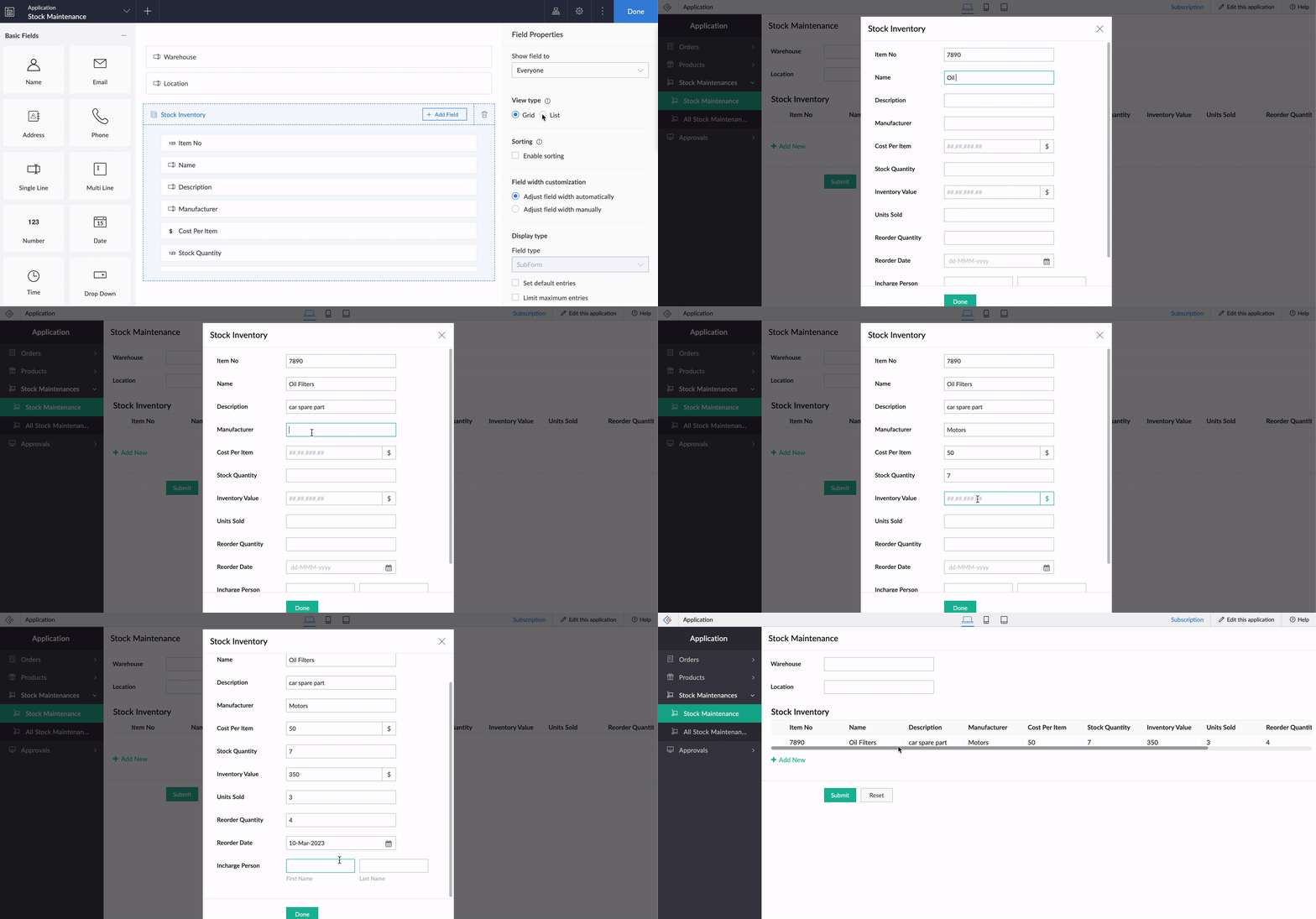
Let's assume there's a form collecting warehouse details, like name, location, and stock inventory. For collecting the stock inventory details, a subform is present with these fields—Item No, Name, Manufacturer, Description, Cost Per Item, Stock Quantity, Inventory Value, Units Sold, Reorder Quantity, Reorder Date,
and
Person In Charge.
Now, the default view type will tire you out from scrolling back and forth horizontally, and results in a frustrating time-consuming process. We all long for a new way to avoid this and make data entry swifter.
To achieve this, make use of the new List option under
Subform->Field Properties->View Type.
List view, which looks similar to our list report, is a table-like subform without inline inputs. When you try adding or updating data in each row, a pop-up will be displayed listing out the fields with vertical scrolling, thereby ensuring a vastly superior user experience and more effective space management.
Crucially, it also helps to load subform rows quickly while editing records, by reducing the loading time.
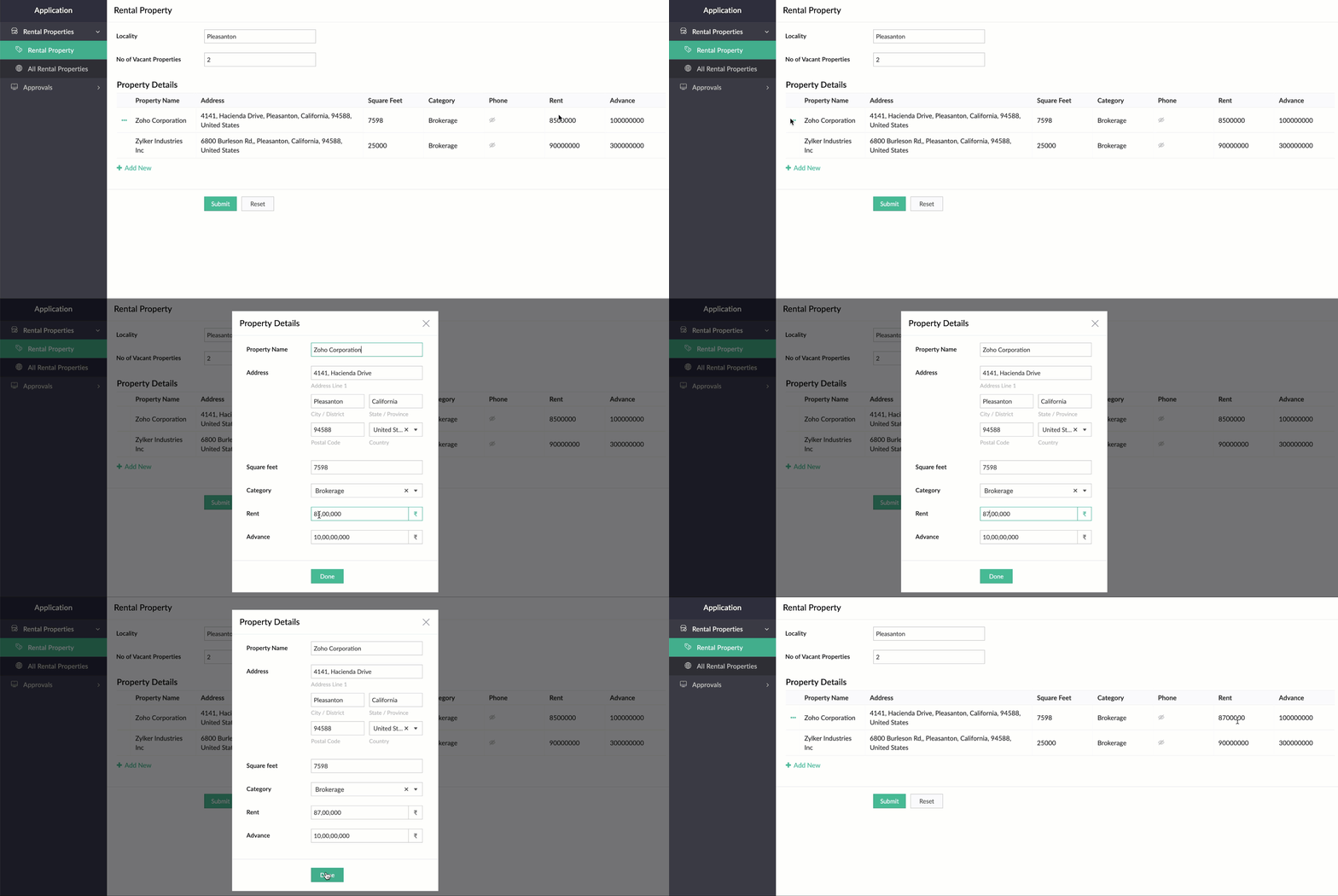
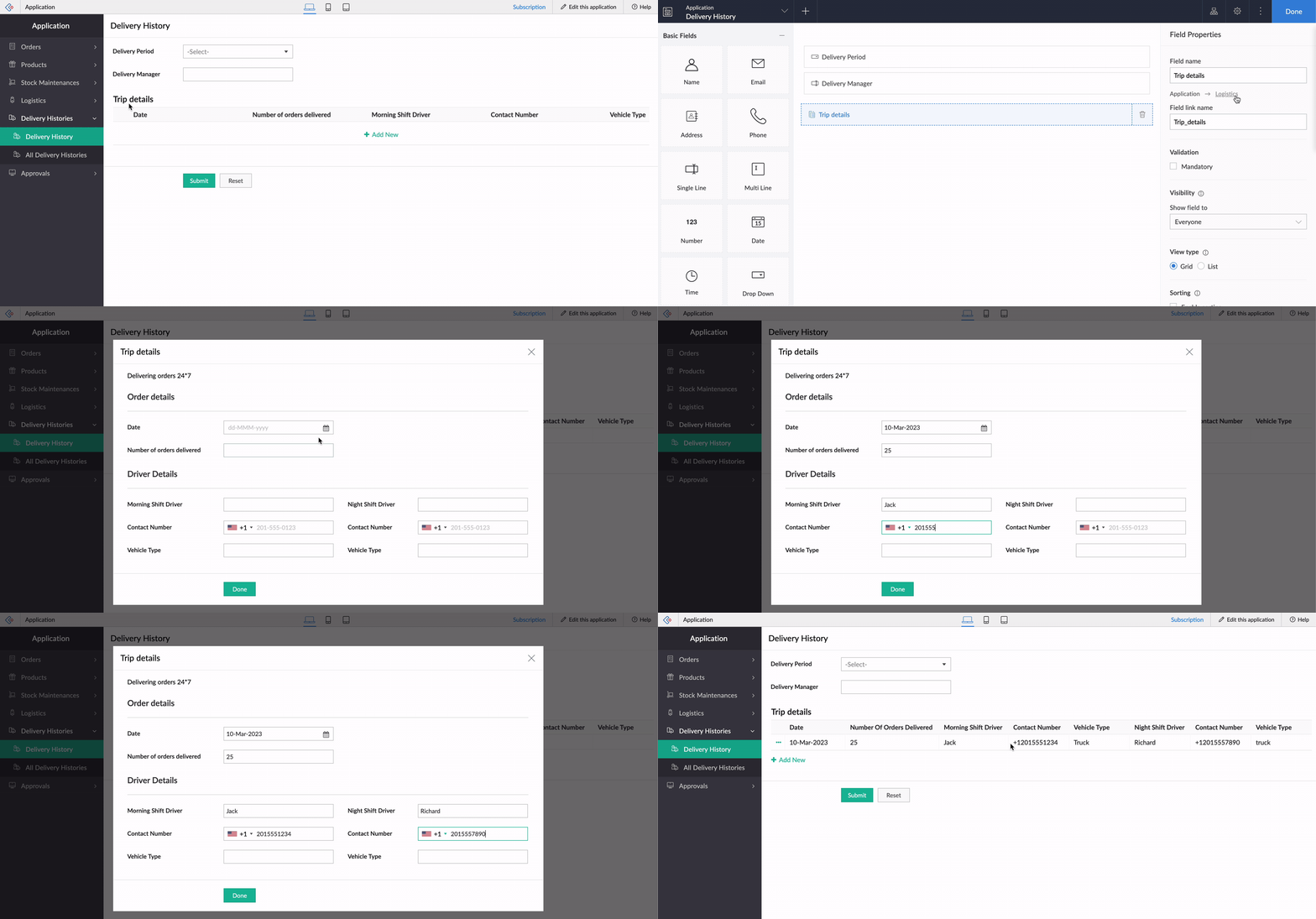
While using an existing form as a subform, the form's exact structure will be replicated in the pop-up, to ensure consistency in the look and feel of the form. To understand this better, let's assume our form has a two-column layout, with
Section
and Note
fields. Now the same customizations will be displayed in the pop-up, too!
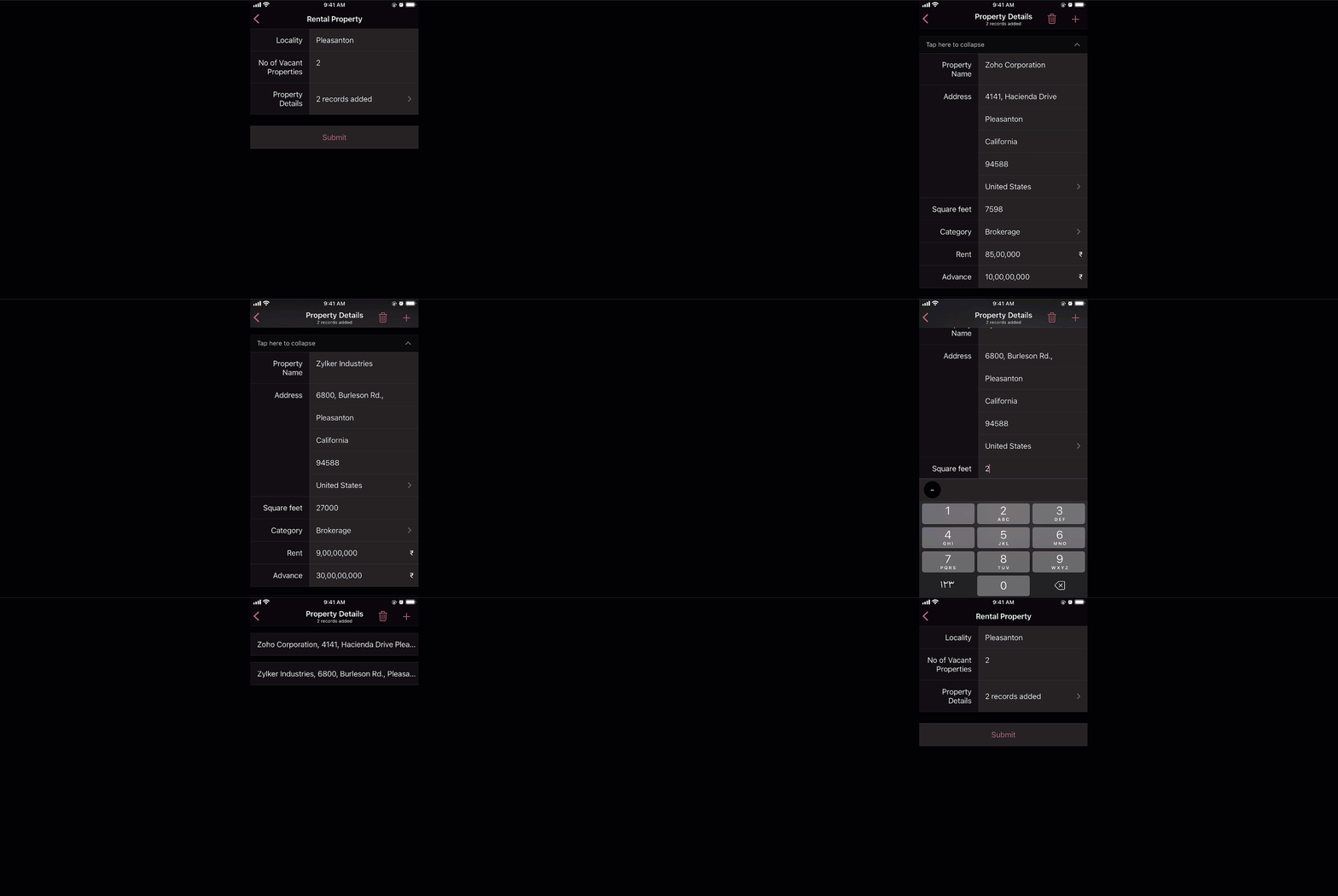
And that's not all—the new List view type is being extended to mobile apps, too. When it's enabled, the subform will be opened in the next screen, where users can add their data. This data will then be added as a subform row.
Custom sorting
Currently, the only sorting option in subforms is
field-based sorting, where you can choose a field based on which rows are sorted, either in ascending or descending order. Though this works well for basic cases, the need may arise in some cases to sort the subform in random order. With the new custom sorting support, you can effortlessly drag and drop subform rows to rearrange them.
To understand how it works, let's consider a task manager working on a To-Do List
form, to plan activities for a current project. For this, they have a main form collecting
project details, date-time,
and
milestones,
and a subform for maintaining the to-do list with the following fields:
Task Name, Description, Category, Status, Deliverables, Priority, and
Deadline. Here, before submitting the list, they want to rearrange some tasks based on their daily routine.
To achieve this, they use the Custom sorting option under
Subform->Field Properties->Sort type.
Now, with custom sorting, all they need to do to reorder the row sequence—both while adding and editing records—is simply drag and drop them in the required position.
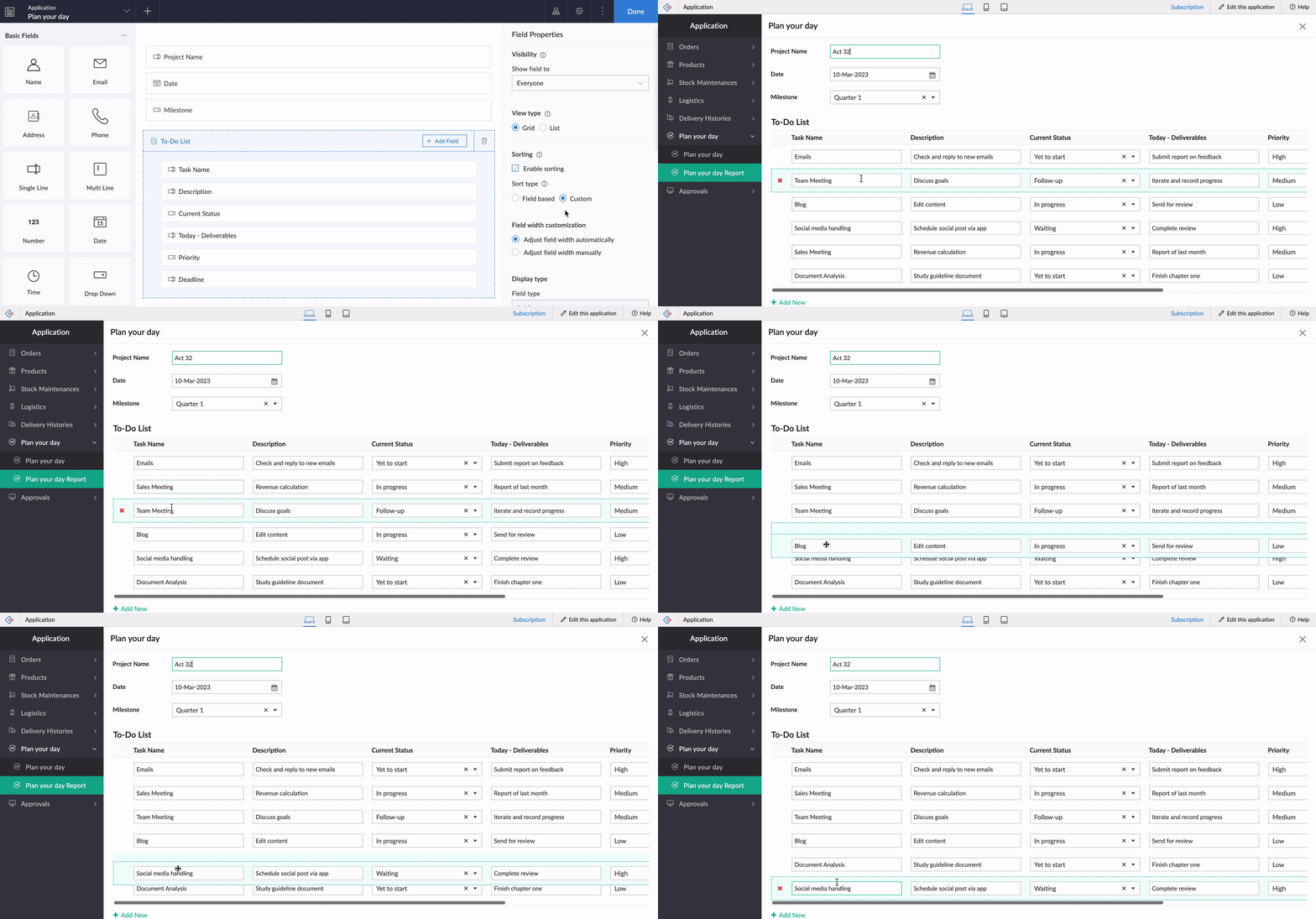
The same order will be retained in reports or while opening the form for updating the list.
Note:
Custom sorting can be used both in List and Grid-type subforms.
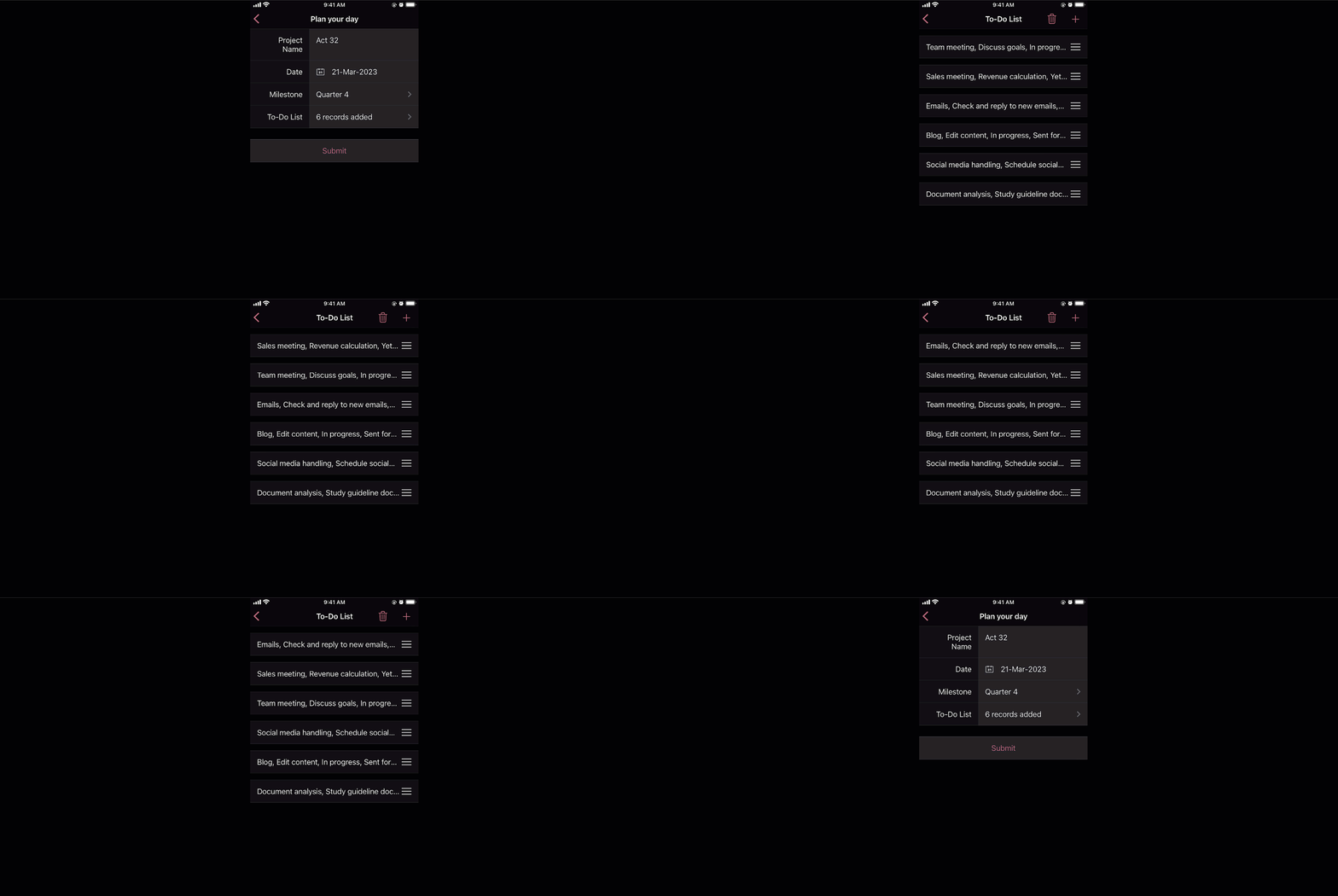
Custom sorting will also be available on the mobile apps and you can effortlessly rearrange fields in subforms.
Deluge tasks for row-level actions
You can use a combination of workflows and Deluge scripts to help your subforms handle complex business logic. With that in mind, we formulated the idea of bringing in actions that help you take control at the row level of subforms.
In the past, you may have come across business scenarios which required you to hide/show or enable/disable a particular field in a specific subform row. Now, with new dedicated Deluge tasks, you can bid adieu to shortcuts and workarounds.
Note:
Deluge tasks can be used both in List and Grid-type subforms.
Enable/disable
The new enable and disable subform Deluge tasks can be used to enable and disable specific fields.
Syntax:
enable row.subform_field
disable row.subform_field
disable row.subform_field
Events:
On add row, On delete row, On user input of subform field
Let's assume a Vehicle form has fields like
Customer Name, Vehicle Model, and Date of Booking,
and a subform to collect payment details with the following fields:
Payment Date, Payment Method, Credit Card Number, Bank Account Number,
and
Transaction Ref Number.
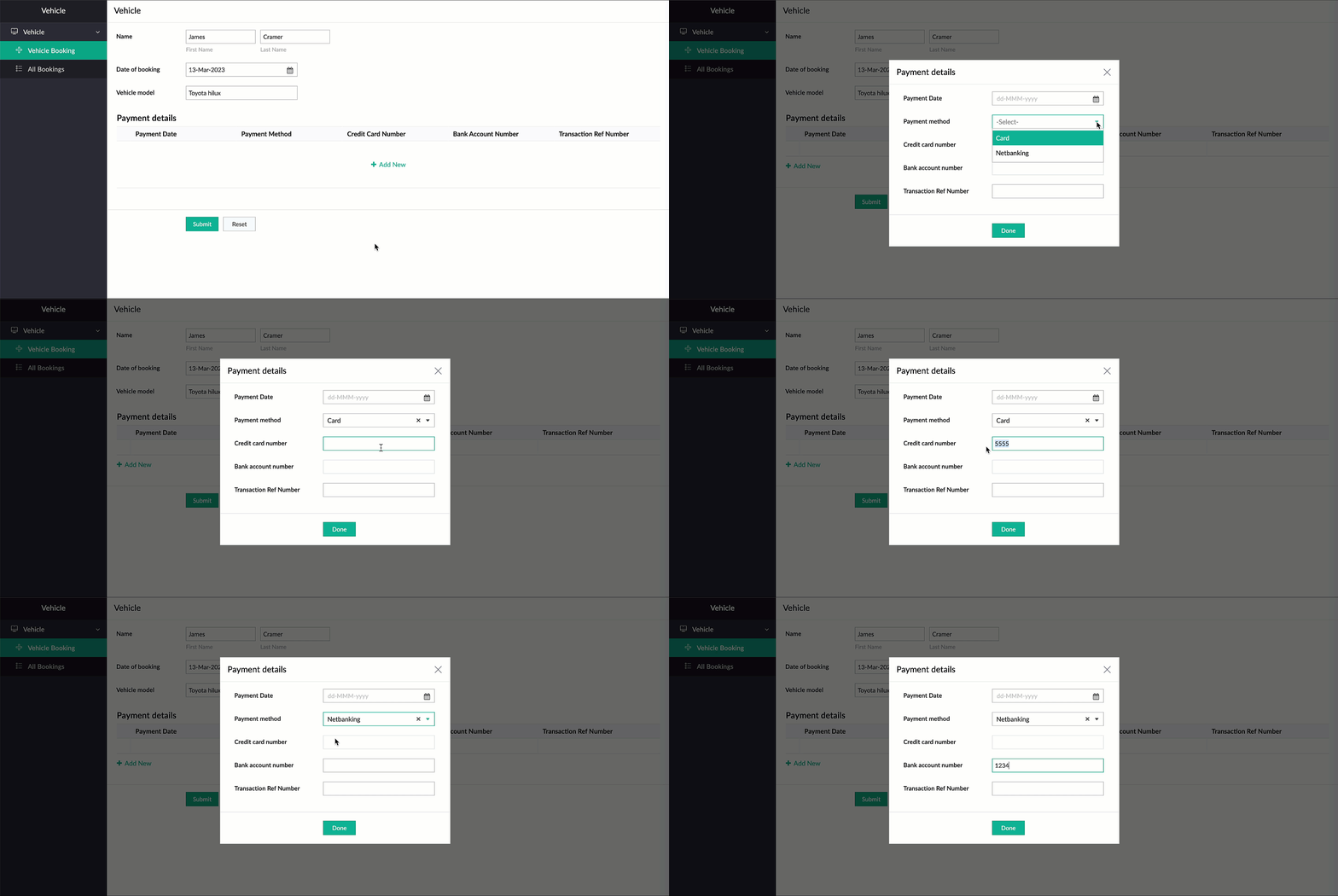
Now, there are two payment options—Card and Netbanking. If Card is chosen, then the Credit Card Number field should be enabled and the Bank Account Number field should be disabled. Similarly, when Netbanking is chosen, then the Bank Account Number field should be enabled and the Credit Card Number field disabled.
Code snippet:
if(Payment_details.Payment_method == "Card")
{
enable row.Credit_card_number;
disable row.Bank_account_number;
}
if(Payment_details.Payment_method == "Netbanking")
{
enable row.Bank_account_number;
disable row.Credit_card_number;
}
{
enable row.Credit_card_number;
disable row.Bank_account_number;
}
if(Payment_details.Payment_method == "Netbanking")
{
enable row.Bank_account_number;
disable row.Credit_card_number;
}
Hide/show
The new show
and
hide subform
Deluge tasks can be used to show and hide specific fields.
Syntax: hide row.subform_field
show row.subform_field
show row.subform_field
Events: On add row, On delete row, On user input of subform field
Let's use the example of a rental property manager who needs to keep track of a list of properties that are available in every locality. For this, a form is used for collecting information like Locality and No of Vacant Properties, and a subform will be used to list property details with the following fields: Property Name, Address, Square Feet, Rent, Advance, Category, and Contact Number.
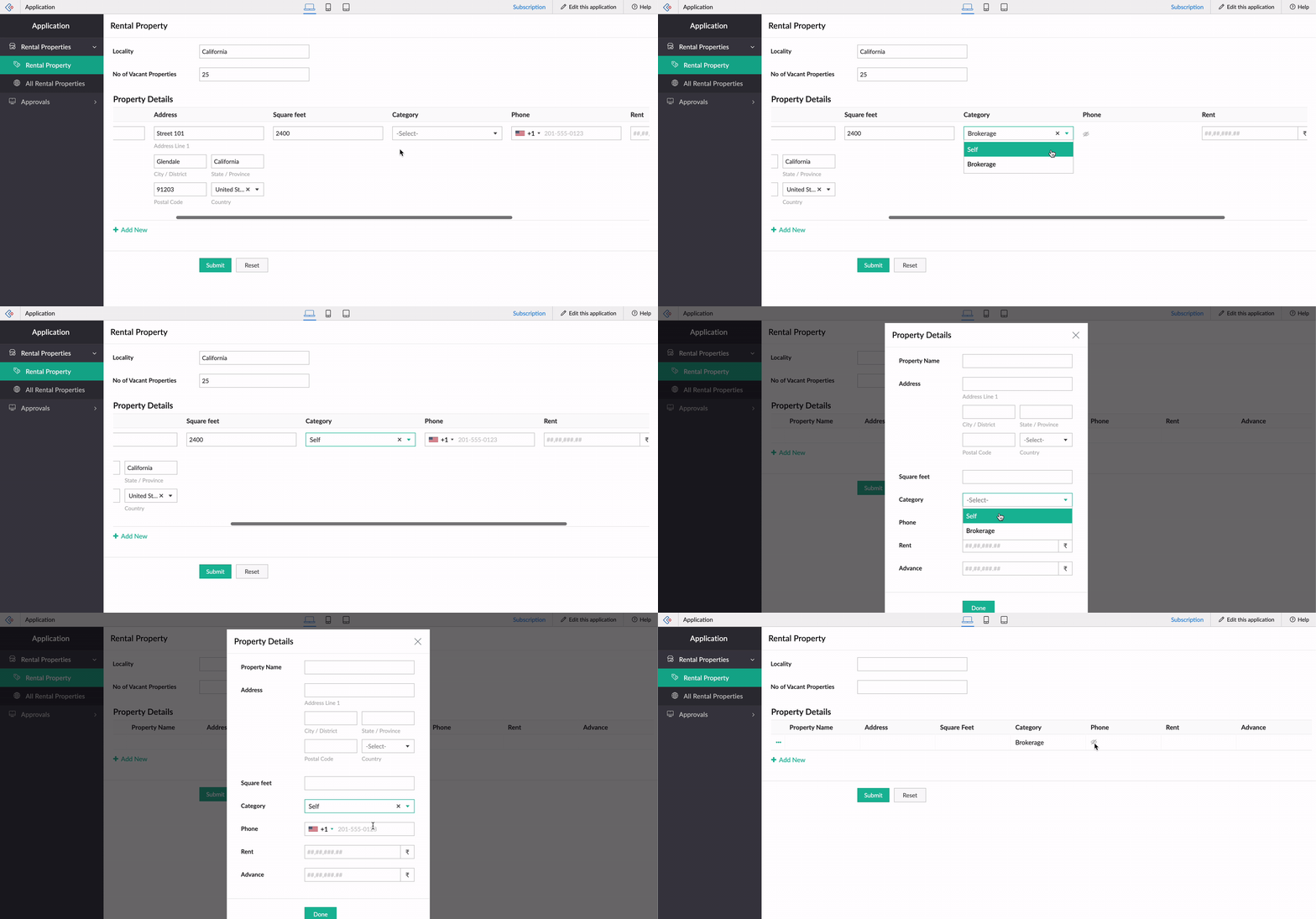
When the category is Brokerage, we need to hide the contact number of the landlord. We can use the new Deluge tasks to achieve this.
Code snippet
:
if(row.Category == "Brokerage")
{
hide row.Phone_Number;
}
else
{
show row.Phone_Number;
}
-----
That's it from us on our subform enhancements! We expect these updates to be rolled out in the upcoming weeks. Once done, we'll pop in a comment below and also update our Release Notes page.
Don't forget—your feedback helps us make Creator better and stronger. We'd love to hear what you think about these updates. Please use the space below or send your feedback to
support@zohocreator.com.
Regards,
Zoho Creator Team
Access your files securely from anywhere
New to Zoho Recruit?

Zoho Developer Community
New to Zoho LandingPage?
Zoho LandingPage Resources
New to Zoho Survey?
New to Zoho CRM Plus?
Deliver unforgettable customer experiences
New to Zoho CRM Plus?
Deliver unforgettable customer experiences
New to Zoho Marketing Plus?
Everything you need to run your marketing
New to Zoho Marketing Plus?
Everything you need to run your marketing
New to Bigin?





Topic Participants
Ashwin Vishal R
Jean Le Gal
stevesmith41
Darren Burn
Anurag Jaiswal
Sticky Posts
Introducing Zoho Creator's 2025 Release Projection 2
Hello Creators! I'm Prakash, from the Creator product management team, and today I'm delighted to unveil our next set of features as part of Release Projection 2 for 2025. With thoughtful analysis and planning, we've curated powerful new capabilitiesZoho Creator - 2023 Release Projection 1
Hello everyone! A very Happy New Year to you and your family. Hope you're all good and having a great time using Zoho Creator to make your lives easier and your businesses prosper. 2022 was an action-packed year for us at Creator, and we hope to continueZoho Creator User Group meetups in a city near you! - Oct - Nov, 2023
Greetings from the Zoho Creator team! We're hosting a series of Zoho Creator meetups in various cities across the globe, and we'd love to meet you there! Our meetups are a great opportunity to network with industry peers, exchange ideas and best practices,Zoho Creator - 2023 Release Projection 2
Hello everyone! Time truly flies when you're having an incredible journey, and today we mark the completion of an eventful and action-packed six months. It feels like just yesterday when we embarked on this adventure together with the launch of our newUpcoming Updates - August 2022
Hi all, Greetings from the Zoho Creator team! Today we've got news for you on some exciting updates. And rest assured— there’s more to come! In this post, we'll be going over the upcoming features and improvements for this month as mentioned below. A
New to Zoho TeamInbox?
Zoho TeamInbox Resources
Zoho CRM Plus Resources
Zoho Books Resources
Zoho Subscriptions Resources
Zoho Projects Resources
Zoho Sprints Resources
Qntrl Resources
Zoho Creator Resources
Zoho CRM Resources
Design. Discuss. Deliver.
Zoho Show Resources

Get Started. Write Away!
Writer is a powerful online word processor, designed for collaborative work.
Zoho CRM コンテンツ
-
オンラインヘルプ
-
Webセミナー
-
機能活用動画
-
よくある質問
-
Ebook
-
-
Zoho Campaigns
- Zoho サービスのWebセミナー
その他のサービス コンテンツ
Nederlandse Hulpbronnen

ご検討中の方
Recent Topics
Alphabetically
How can i arrange alphabetically - (Manage Manufacturer) Field in Item MasterCan i set a default value for country and state in address field in zoho creator?
Can i set a default value for country and state in address field in zoho creator?Convert HTML to PDF & Send as Email Attachments in Zoho Creator (Deluge)
This approach is useful for sending welcome letters, instructions, or promotional offers after order creation. // 1. Define the variables using the submitted input customerName = input.Customer_Name1; orderID = input.ID; customerEmail = input.Email_Address; //Redirect after submission is not working after a few submission
I have setup redirect url correctly and everything works as expected. However, it seems that there's a limit to the number of submissions before the redirect stops working. After the "limit" is reached, the page redirects to a seemingly zoho hosted page,Enhancement Request for Multi-Asset Work Order Feature
Hello Latha, Thank you for your continued support. The multi-asset Work Order feature is extremely helpful. I did some testing based on our requirements, and during the process, I noticed a few areas where we need your team’s support to improve the featureMarketing Tip #8: Run limited-time offers
Exclusive offers that don't last long make shoppers purchase right away instead of waiting. Run a flash sale or limited-time discount to convert interest into sales. Try this today: Set up a "Buy X Get Y" coupon in Zoho Commerce valid for a limited timeAdd Option to Mass Dispatch by User
Hello! We are using the dispatch console to dispatch service appointments to our service ressources. Right now, the process is our dispatcher verifies each ressource's route for the day and dispatches it after validation. Sadly, there doesn't seem toZoho Projects - Email notification relabelling of modules not present on default templates
Hi Projects Team, I noticed that in the default email template notification, the word "bug" was not renamed to the lable I am using in my system. As many users may used the Bugs modules for various purposes including Changes, Revisions, Issues, etc...Include the "Added Email ID" to the Filters of a Report
Hi, With a Report and lots of entries, a normal thing is to filter entries by the submitter, but that is not included in the Auto Filter of Reports and you can't add a custom filter to a Report without specifying the actual value. I would like to be ableLoops in Deluge
Hi, Can someone tell me how I do a simple loop in deluge? For example, if i have a variable "X" containing a number of loops to perform, i would like to perform an action X amount of times. X = 10; do while (Y < X){ // ... do something } to further explain, the equivalent in PHP of what i am trying to acheive would be: $X = 20; for($Y = 1; $Y < $X; $Y++ ){ // ... do something } ThanksI am facing a problem with an if-else condition
If I use if, else if, and else conditions in Deluge with the same variable name, sometimes the variable causes an error because the same variable name is present in every blockZoho Projects - Reply by email to @ mentions posted on the Feed.
When mentioning someone on the Feed (Status), it would be great if that mentioned person could reply to the email notification to update the Feed thread.Record Overseas Transactions Along with CC charges
Hi All, We receive payments via stripe in multiple currencies and stripe takes around 2.5% fees. The amount is settled in INR into our local bank. What should be the currency of the income account used for Stripe payments? Here is a sample flow that weProduct Updates in Zoho Workplace applications | October 2025
Hello Workplace Community, Let’s take a look at the new features and enhancements that went live across all Workplace applications this October. Zoho Mail Create Signature from Compose window You can now effortlessly create a Signature using the CreateSubform data to Sheets
I have been trying to setup a Zoho Flow automation to bring any Subform input to a Zoho Sheets but it seems impossible to post the subform entries to a Zoho Sheet. Is there any way to do it via Zoho Sheet API? https://www.zoho.com/sheet/help/api/v2/#CONTENT-Insert-row-with-JSON-dataEdit Contact Roles in the Potentials Mod
New to ZOHO so I need some help. I work the same people on different projects concurrency. Their contact info remains the same but their role changes from project to project. In the Potential Mod you can pick contacts and assign a Role to them. I knowIs there a way to disable the Activity Reminders Pop-Up Window every time I log in?
Just wondering if there is a setting to disable the window from opening every time I open my CRM? Thanks ChrisHide fields only for creation
Hello, I'd like to hide some fields only during the creation of a contact in Zoho CRM. In fact I have some fields that are automatically calculated thanks to an automation, so when my users create a contact I don't want them to fill those fields. I knowRich-text fields in Zoho CRM
Hello everyone, We're thrilled to announce an important enhancement that will significantly enhance the readability and formatting capabilities of your information: rich text options for multi-line fields. With this update, you can now enjoy a more versatileFont Size 11 - Zoho CRM Email Templates
Our company communicates with our vendors exclusively using Calibri Font Size 11, as this is the standard formatting for professional emails. Since the CRM only allows for the selection of font sizes 10 & 12, we have been unable to utilize the CRM emailError 400 Booking
Added a custom domain to Booking. Am Getting a SSL Error that has some other domain on the SSL and giving a 400 error. Followed instructions and it stated it verified our domain.. However it is not working. Please Help!Zoho Projects - Email Notifications for Feed Updates
Hi Projects Team, I'm working with a client who wants a simple way to communicate with their customers on projects. Getting the customer to add comments to Tasks or Bug records is not ideal, as we need a way which is easy with minimal training, and hasZoho Analytics Export API
Hi Team, I’m working on some integration tasks and wanted to confirm if it’s possible to retrieve a Zoho Analytics table as JSON data using a Deluge script. I’ve already stored my custom data from multiple sources and combined it into a single source.Request to Remove LinkedIn Verification from My Emai
I would like to submit a complaint regarding my Zoho Mail account. I previously used this email address to verify a LinkedIn account, but that LinkedIn account has now been closed. I need to remove or cancel the verification associated with the closedIntroducing the all-new email parser!
Greetings, We are pleased to introduce to you, a brand-new, upgraded version of the Zoho CRM Email Parser, which is packed with fresh features and has been completely redesigned to meet latest customers needs and their business requirements. On that note,Zoho Projects - Refine Access to Collaboration Menu
Hi Projects Team, I noticed that Calendar, Chat and Meeting menu options in the Collaboration section are visible to client users, even when they don't have access to the features. This could be confusing and frustrating, because if it's there you expectExtracting Images from a Zoho Creator Report into a Pages
If you’ve uploaded images in a form and can see them in your report, you might also want to display those same images inside a Page (custom HTML page). This is useful for dashboards, profile pages, or any place where images should be visible dynamicallyZoho is blocking emails I subscribe to from one sender
About 4 months ago I stopped receiving newsletters that I subscribe to from @thedispatch.com. They tell me that zoho's server is blocking them. I've added them to my contacts list, but they're not even reaching my inbox. I don't know how to troubleshootInactive Items - Make Less Prominent by Default
Currently, when one marks an Item as "Inactive", it really doesn't do much of anything to hide it or get it out of the way. Search and reporting within Finance should, by default, hide inactive Items from standard reports, searches, etc. If one specificallyHow to calculate GST based on "Ship To Address"
We into the interior designing work, providing "Works Contract Services" to our clients across India. We are registered under GST in Maharashtra state. For works contract services as per the GST rule, we need to decide place of supply based on "Ship toI NEED TO NUMBER TO TEXT NO HERE
=NUMBERTEXT NEEEDAuto-fill New Row with Previous Row Values
rowsize = input.Order_Items.count(); for each row1 in input.Order_Items { rowsize = rowsize - 1; if(rowsize == 1) { row.Door_Model = row1.Door_Model; row.Door_Color = row1.Door_Color; row.Materials = row1.Materials;Python - code studio
Hi, I see the code studio is "coming soon". We have some files that will require some more complex transformation, is this feature far off? It appears to have been released in Zoho Analytics alreadyAPI question - adding a thread to an existing ticket
Hi Is there an API function for the customer to add to an existing ticket thread? example, customer puts in new support ticket. support replies and ask for more details. customer replies with more details -what api function is used for this (will add record append to same ticket number?) ThanksCalendar week view: Today + 6
Is there anyway to have the calendar change dynamically based on the date? Due to the amount of events, we only display a week at a time, but towards the end of the week, we can no longer see ahead to next week (without changing it manually every time).How to restrict user/portal user change canvas view
Hi , I would like to restrict user / portal user change their canvas view because I hide some sensitive field for them. I dont want my user switch the canvas view that do not belong to them But seems Zoho do not provide this setting?How to add to Subforms via Zapier with Zoho Writer?
I have the following layout for a Zoho Writer Document. As you can see there is a repeating subform taking in "Items". I am trying to make a Zapier integration with it, and I can see there is 1 field saying: "Items", but it does not specify how I'm supposedContrôles administratifs granulaires : un atout pour la sécurité des e-mails
La moindre erreur dans votre système de messagerie peut coûter très cher à votre entreprise, tant en argent qu’en conformité et en image de marque. Pour beaucoup d’organisations, ce risque est bien réel. Les e-mails véhiculent quotidiennement des informationsCollections Management: #6 Realign Customers who gets back In-Term
Arun stared at the subscription list on his dashboard. Another account had just been moved to Cancelled status after completing the whole dunning process. Nothing unusual, just that payment failures happen, retries fail, and cancellation is the expectedZoho Mail IP Blacklist
I need problems with send mails: Error: junk mail rejected - sender4-op-o10.zoho.com 136.143.188.10, is in RBL. Spamcop. Please remove FQDN for blacklist. Regards.Next Page